LG E2250S Manuale utente

Make sure to read the Important Precautions before using the
product. Keep the User's Guide(CD) in an accessible place for future
reference.
See the label attached on the product and give the information to
your dealer when you ask for service.
User’s Guide
E2050S
E2250S
E2350S

1
This unit has been engineered and manufactured to ensure your personal safety,
however improper use may result in potential electrical shock or fire hazards. In
order to allow the proper operation of all safeguards incorporated in this display,
observe the following basic rules for its installation, use, and servicing.
On Safety
Use only the power cord supplied with the unit. In case you use another power
cord, make sure that it is certified by the applicable national standards if not being
provided by the supplier. If the power cable is faulty in any way, please contact the
manufacturer or the nearest authorized repair service provider for a replacement.
The power supply cord is used as the main disconnection device. Ensure that the
socket-outlet is easily accessible after installation.
Operate the display only from a power source indicated in the specifications of
this manual or listed on the display. If you are not sure what type of power supply
you have in your home, consult with your dealer.
Overloaded AC outlets and extension cords are dangerous. So are frayed power
cords and broken plugs. They may result in a shock or fire hazard. Call your service
technician for replacement.
As long as this unit is connected to the AC wall outlet, it is not disconnected from
the AC power source even if the unit is turned off.
Do not Open the Display:
There are no user serviceable components inside.
There are Dangerous High Voltages inside, even when the power is OFF.
Contact your dealer if the display is not operating properly.
To Avoid Personal Injury :
Do not place the display on a sloping shelf unless properly secured.
Use only a stand recommended by the manufacturer.
Do not drop an object on or apply impact to the product. Do not throw any toys
or objects on the product screen.
It can cause injury to human, problem to product and damage the display.
To Prevent Fire or Hazards:
Always turn the display OFF if you leave the room for more than a short period
of time. Never leave the display ON when leaving the house.
Keep children from dropping or pushing objects into the display's cabinet
openings. Some internal parts carry hazardous voltages.
Do not add accessories that have not been designed for this display.
When the display is to be left unattended for an extended period of time, unplug
it from the wall outlet.
In the presence of thunder and lightning, never touch the power cord and signal
cable because it can be very dangerous. It can cause electric shock.
Important Precautions

Important Precautions
NOTE
THE MANUFACTURER IS NOT RESPONSIBLE FOR ANY RADIO OR TV
INTRERFERENCE CAUSED BY UNAUTHORIZED MODIFICATIONS TO THIS
EQUIPMENT.SUCH MODIFICATIONS COULD VOID THE USER'S AUTHORITY
NOTE
This epuipment has been tested and found to comply with the limits for a class
B digital device,pursuant to part 15 of the FCC Rules.These limits are designed
to provide reasonable protection against harmful interference in a residential
installation.This equipment generates,uses and can radiate radio frequency
cause harmful interference to radio communications.However,there is no
guarantee that interference will not occur in a particular installation.If this
which can be determined by turning the equipment off and on,the user is
encouraged to try to correct the interference by one or more of the following
measures:
-Reorient or relocate the receiving antenna.
-Increase the separation between the equipment and the receiver.
-Connect the equipment into an outlet on a circuit different from that to which
the receiver is connected.
energy and,if not installed and used in accordance with the instructions,may
equipment does cause harmful interference to radio or television reception,
TO OPERATE THE EQUIPMENT.
-Consult the dealer or an experienced radio/TV technician for help.
A3

2
Important Precautions
On Installation
Do not allow anything to rest upon or roll over the power cord, and do not place
the display where the power cord is subject to damage.
Do not use this display near water such as near a bathtub, washbowl, kitchen
sink, laundry tub, in a wet basement, or near a swimming pool.
Displays are provided with ventilation openings in the cabinet to allow the release
of heat generated during operation. If these openings are blocked, built-up heat
can cause failures which may result in a fire hazard. Therefore, NEVER:
Block the bottom ventilation slots by placing the display on a bed, sofa, rug, etc.
Place the display in a built-in enclosure unless proper ventilation is provided.
Cover the openings with cloth or other material.
Place the display near or over a radiator or heat source.
Do not rub or strike the Active Matrix LCD with anything hard as this may scratch,
mar, or damage the Active Matrix LCD permanently.
Do not press the LCD screen with your finger for a long time as this may cause
some afterimages.
Some dot defects may appear as Red, Green or Blue spots on the screen.
However, this will have no impact or effect on the display performance.
If possible, use the recommended resolution to obtain the best image quality for
your LCD display. If used under any mode except the recommended resolution,
some scaled or processed images may appear on the screen. However, this is
characteristic of the fixed-resolution LCD panel.
Leaving a fixed image on the screen for a long time may cause damage to the
screen and cause image burn-in. Make sure to use a screen saver on the product.
Burn-in and related problems are not covered by the warranty on this product.
Do not shock or scratch the front and sides of the screen with metallic objects.
Otherwise, it may cause damage to the screen.
Make sure the panel faces forward and hold it with both hands to move. If you
drop the product, the damaged product can cause electric shock or fire. Contact
an authorized the service center for repair.
Avoid high temperatures and humidity.

Important Precautions
3
On Cleaning
Unplug the display before cleaning the face of the display screen.
Use a slightly damp (not wet) cloth. Do not use an aerosol directly on the display
screen because over-spraying may cause electrical shock.
When cleaning the product, unplug the power cord and scrub gently with a soft
cloth to prevent scratching. Do not clean with a wet cloth or spray water or
other liquids directly onto the product. An electric shock may occur. (Do not use
chemicals such as benzene, paint thinners or alcohol)
Spray water onto a soft cloth 2 to 4 times, and use it to clean the front frame;
wipe in one direction only. Too much moisture may cause staining.
On Repacking
Do not throw away the carton and packing materials. They make an ideal
container in which to transport the unit. When shipping the unit to another
location, repack it in its original material.

4
Accessories
!!! Thank for selecting LGE products !!!
Please make sure the following items are included with your
monitor. If any items are missing, contact your dealer.
User's Guide/Cards
15-pin D-Sub Signal Cable
(To set it up, this signal cable may
be attached to this product before
shipping out.)
NOTE
This accessories may look different from those shown here.
User must use shielded signal interface cables (D-sub 15 pin cable, DVI-D cable) with ferrite
cores to maintain standard compliance for the product.
AC-DC adapter
(Depending on the country)
or
AC-DC adapter
Power Cord
(Depending on the country)

Connecting the Display
5
Before setting up the monitor, ensure that the power to the monitor, the computer
system, and other attached devices is turned off.
1 way stand
1. Place the monitor with its front facing downward on a cushion or soft cloth.
Important
This illustration depicts the general model of connection. Your monitor may differ from
the items shown in the picture.
Once you connect the stand base, try not to disconnect it.
Do not carry the product upside down holding only the stand base. The product may
fall and get damaged or injure your foot.
2. Use a coin on the back of the stand base and turn the screw clockwise to tighten.
4. When you desire to disintegrate the monitor from the stand base, use a coin to turn the
screw counterclockwise.
.Once assembled take the monitor up carefully and face the front side.
3

Press
6
Connecting the Display
2. Press the button as shown, and pull the stand body up.
3. After pull the stand body up,take the monitor up carefully and face the front side.
(Once you pull the stand body up, please keep pressing the button.If you don’t
press the button, it will damage the product.)
When limited tilt degree, the button
is not working, pull stand body up or
down a little.
Before setting up the monitor, ensure that the power to the monitor, the computer
system, and other attached devices is turned off.
2 way stand
1. Place the monitor with its front facing downward on a soft cloth.

Connecting the Display
6
4. If you want to use the stand base,pull the stand body down.
Important
This illustration depicts the general model of connection. Your monitor may differ from
the items shown in the picture.
Once you connect the stand base, try not to disconnect it.
Do not carry the product upside down holding only the stand base. The product may
fall and get damaged or injure your foot.
5.Use a coin on the back of the stand base and turn the screw clockwise to tighten.
6
.Once assembled take the monitor up carefully and face the front side.
(Once you pull the stand body down, please keep pressing the button.If you don’t
press the button, it will damage the product.)

Connecting the Display
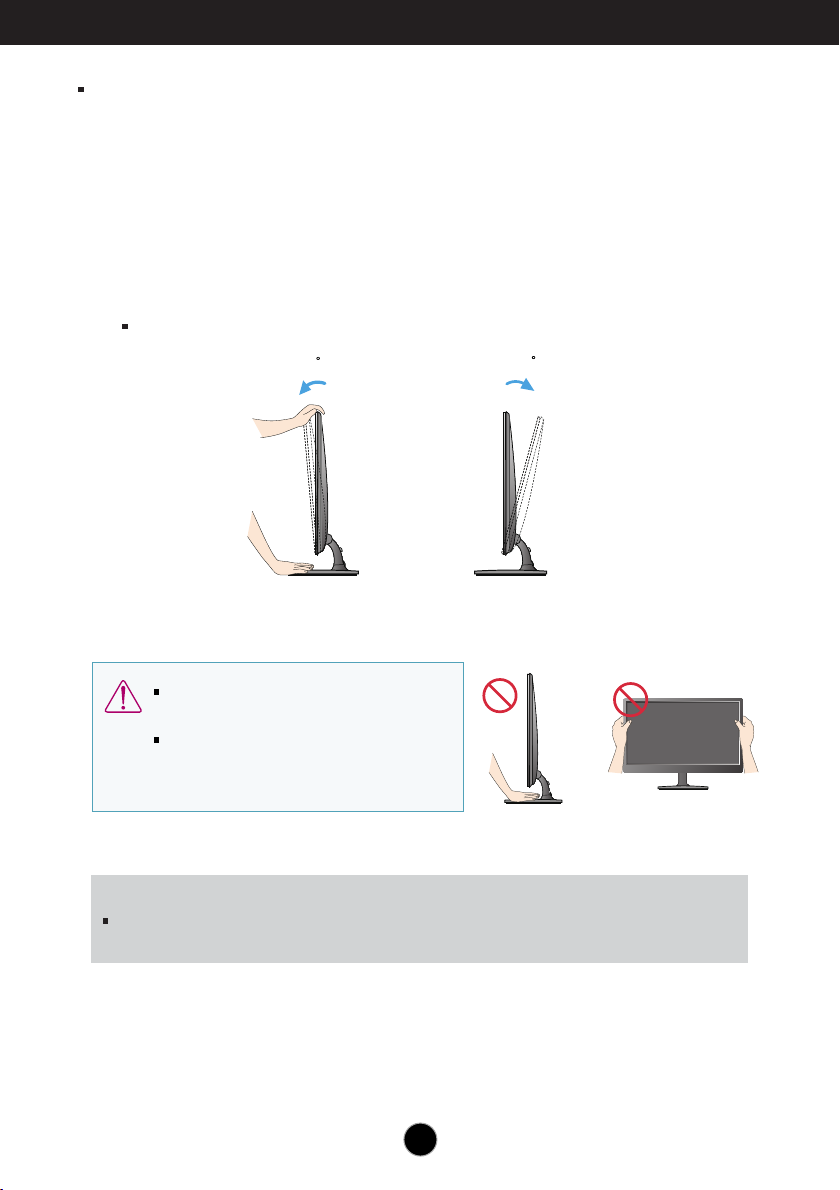
After installation, adjust the angle as shown below.
Adjust the position of the panel in various ways for maximum comfort.
Tilt Range : -5˚~15˚
ERGONOMIC
It is recommended that in order to maintain an ergonomic and comfortable viewing position,
the forward tilt angle of the monitor should not exceed 5 degrees.
15
-5
Do not touch or press the screen when
adjusting the angle of the monitor.
When adjusting the angle of the screen, do
not put your finger(s) in between the head of
the monitor and the stand body. You can
hurt your finger(s).
7
* With sandbase
Before setting up the monitor, ensure that the power to the monitor,
the computer system, and other attached devices is turned off.
Positioning your display
Questo manuale è adatto per i seguenti modelli
3
Indice
Altri manuali LG Monitor

LG
LG 34CB88-PF Manuale utente

LG
LG 35WN75C Manuale utente

LG
LG 27ML600M Manuale utente

LG
LG 49UH5C Manuale utente

LG
LG W2241T - - 21.6" LCD Monitor Manuale utente

LG
LG E2370V Manuale utente

LG
LG FLATRON 24MB35PB Manuale utente

LG
LG 35BN75CP Manuale utente

LG
LG FLATRON L1730S; FLATRON L1930S Manuale utente

LG
LG One:Quick Flex 43HT3WJ Manuale utente

LG
LG Flatron T717BKM-K Series Manuale utente

LG
LG EB2242T Manuale utente

LG
LG Flatron W2386V Manuale utente

LG
LG 19MB35P Manuale utente

LG
LG 27BP88QD-BS.AUB Manuale utente

LG
LG W1943SB-BF Manuale utente

LG
LG UltraFine 38GL950G Manuale utente

LG
LG D2770P-PN Manuale utente

LG
LG M3201T-BA Manuale utente

LG
LG 24MP500 Manuale utente