LG LSP710 Manuale utente

LSP-710 USER GUIDE
Please read this manual carefully before operating your set.
Retain it for future reference.
LSP-710 EN_090416 2009.4.16 2:3 PM 페이지1

Congratulations on your subscription to the LSP-710
Fixed Wireless phone. This phone has been designed
to operate on the IS-2000 Air Protocol over the
800MHz band. And the phone has the advanced user
interface similar to mobile phone. It has greatly
enhanced voice clarity and provides various advanced
features.
Key phone features:
ᶀ
Wide view, Graphic, Backlit Display
ᶀ
Polyphonic Ring tones: A choice of 15 melodies
and 5 bell sounds available
ᶀ
Large Phonebook with 500 entries
ᶀ
Speed Dialling for upto 99 numbers
ᶀ
3 Way call conferencing
ᶀ
Enhanced SMS features - Group SMS.
ᶀ
Hands free Speaker Phone
ᶀ
Receiver Off-Hook tone
ᶀ
Adjustable Ringer Volume, Earpiece Volume, Key
Volume, Speaker Volume
ᶀ
A Menu driven interface with prompts for easy
operations
ᶀ
Serial port for Diagnostic.
ᶀ
Organiser: Scheduler, Alarm, Memo, Calculator,
World Clock with DST, Stopwatch
ᶀ
Fast charging battery
ᶀ
Voice Service
Highlights
Highlights
2
LSP-710 EN_090416 2009.4.16 2:3 PM 페이지2

1. Important Information 4
1.1 Safety Instruction 4
1.2 Optimal Phone Performance 4
1.3 Care and Service 5
1.4 Safety Information 6
2. Introduction 9
2.1 Front View of the Phone 9
2.2 LCD Display 10
2.3 Installation 11
2.4 Installation Steps 14
3. Basic Operations 15
3.1 Making a Call 15
3.2 Redialing Last Number 15
3.3 3 way call conferencing 15
3.4 Volume Control 16
3.5 Receiving a Call 16
3.6 Lock Mode 16
3.7 Entering and Editing Information 17
4. Menu Tree 19
4.1 Names 23
4.2 Messages 25
4.3 Call History 30
4.4 Sound 32
4.5 Display 35
4.6 Settings 36
4.7 Organiser 42
5. Speaker Phone 45
6. Troubleshooting 46
7. General Information 47
7.1 Main Unit 47
7.2 AC/DC Adapter 47
7.3 Battery 48
CONTENTS
3
CONTENTS
LSP-710 EN_090416 2009.4.16 2:3 PM 페이지3

1. Important Information
Important Information
4
1.1 Safety Instruction
WARNING / CAUTION
To reduce the risk of fire or electric shock, do not
expose this phone to rain or moisture. Do not use this
phone in swimming pools or other water bodies.
1.2 Optimal Phone Performance
ᶀ
Do not hold the antenna when operating the
phone, or operate the phone when someone is
within four inches (ten centimeters) of the antenna.
Both cases affect the call quality and may cause the
phone to operate at a higher power level than
required.
ᶀ
For the best call quality, keep the antenna free from
obstructions and position the antenna upright.
ᶀ
Do not use the phone if the antenna is damaged.
Replace the damaged antenna immediately by a
qualified technician. Use only a manufacturer-
approved antenna. Non-approved antennas,
modifications or attachments may impair call
quality and damage the phone.
ᶀ
RF energy may affect improperly installed or
inadequately shielded personal medical devices
such as pace-makers or hospital monitors. Consult
the manufacturer of any personal medical devices
to determine whether they are adequately shielded
from external RF energy. Turn your phone OFF in
health care centers if any regulations posted in the
area instruct you to do so. Hospitals or health care
centers may be using equipment that may be
sensitive to external RF energy.
ᶀ
If this phone causes harmful interference to radio
or television reception, which can be determined by
turning the equipment off and on, the user is
encouraged to try to correct the interference by
one or more of the following measures:
- Reorient or relocate the receiving antenna
- Place the radio or television farther away from the
phone.
- Connect the equipment to an outlet on a circuit
different from that to which the phone is
presently connected.
4
LSP-710 EN_090416 2009.4.16 2:3 PM 페이지4

- Consult the Authorized LG-Nortel Dealer for
assistance of an experienced radio/TV technician.
ᶀ
Use battery, antenna and AC/DC power adapter
provided by LG-Nortel . Using parts made by any
other manufacturer may invalidate the warranty.
ᶀ
Only authorized personnel should service the
phone and its accessories. Faulty installation or
service can be dangerous and may invalidate the
warranty.
ᶀ
Do not use the phone in any designated “cellular
phone use” area.
ᶀ
Avoid using the phone in high temperature or
humidity.
ᶀ
Avoid spilling any liquid on the phone. If the phone
gets wet, turn the power off immediately. If the
phone doesn’t work, please contact the service
provider immediately.
ᶀ
Avoid shock or impact.
ᶀ
We recommend you to charge the backup battery
before initial use. The backup battery may be
discharged during delivery.
1.3 Care and Service
Before cleaning, always unplug the phone from the
wall outlet and remove the antenna (or disconnect the
antenna cable). Do not use liquid or aerosol cleaners;
use a damp cloth for cleaning.
If the phone doesn’t work, do not attempt to
disassemble it; contact the phone service agent for
assistance.
If any of the following conditions exist, unplug the
phone from the wall plug, remove the battery and call
the qualified engineer.
- The power supply cord is damaged or frayed.
- Liquid has spilled into the phone.
- The phone has been exposed to rain or water.
- The phone has been dropped or damaged.
- The phone does not function normally even after
following the operating instructions.
Important Information
1. Important Information
5
LSP-710 EN_090416 2009.4.16 2:3 PM 페이지5

WWAARRNNIINNGG
ᶀ
For safety, use only an adapter
approved by LG-Nortel .
LG-Nortel does not bear
responsibility for any faults that
may arise due to non-conformation
to this guide. Example: LSP-710
(LG-Nortel Power Adapter
Source: DC 5V / 1A)
ᶀ
Do not, in any way, cause a
short-circuit. It may start a fire
or the phone may explode
causing injury.
ᶀ
Do not create a sudden impact
on the battery by throwing it. Do
not dispose off batteries by
putting them in a fire. They may
explode or catch fire due to the
electrolyte within.
1.4 Safety Information
CCAAUUTTIIOONN
ᶀ
Do not use the phone with a car
battery. It may cause electric
shock, fire, breakdown or
transformation.
ᶀ
Avoid using the phone in high
temperature or humidity. Avoid
spilling any liquid on this phone.
If the phone gets wet, Switch off
phone and turn off AC power
supply.
ᶀ
Keep the phone dry.
Submersion, humidity, and
liquids contain minerals that
may corrode internal electronic
circuits.
ᶀ
Do not store or use the phone
in dusty or dirty areas as this
can damage the moving parts.
ᶀ
Do not store the phone in hot
areas. High temperatures can
shorten the life of electronic
devices, damage batteries, and
warp or melt certain plastics.
1. Important Information
Important Information
6
LSP-710 EN_090416 2009.4.16 2:3 PM 페이지6

Important Information
7
ᶀ
Do not store the phone in cold
areas. When the phone warms
upto its normal operating
temperature, moisture can form
inside the phone, which can
damage the internal electronic
circuit boards.
ᶀ
Do not attempt to open it. Non-
expert handling of the device
could damage it. It may cause
fire, electric shock and
breakdown. Consult your
authorized LG-Nortel dealer for
assistance.
ᶀ
Do not drop, knock or shake the
phone. Rough handling may
break the internal circuit boards.
ᶀ
Do not use harsh chemicals,
cleaning solvents or strong
detergents to clean the phone.
Wipe it with a soft cloth that has
been slightly dampened in a mild
soap and water solution.
ᶀ
Do not paint the phone. Paint
can clog the device’s moving
parts and prevent proper
functioning.
ᶀ
During lightning, do not touch
the power plug or the phone
line. It may result in an electric
shock or death.
ᶀ
Do not install the phone under
direct sunlight or on an uneven
surface.
ᶀ
Before using the plug, check the
available power voltage.
Inaccurate power voltage may
cause fire and damage.
Example: LSP-710 Input
Voltage: 100 ~ 240V.
1. Important Information
LSP-710 EN_090416 2009.4.16 2:3 PM 페이지7

Important Information
8
ᶀ
Do not plug many power cords
into one outlet.
It may cause fire or electric
shock.
ᶀ
Do not remodel the power cord
or disassemble it.
If the power cord or plug is
impaired, do not use it.
It may cause fire or electric shock
ᶀ
Do not install the phone in an ill-
ventilated place.
It may cause fire or a breakdown.
ᶀ
Do not touch the plug with wet
hands. When disconnecting the
power cord of any accessory,
grasp and pull out the plug itself
and not the cord. It may cause
fire or electric shock.
ᶀ
Do not put heavy objects on the
power cord. Do not bend the
power cord too much. It may
cause fire or electric shock.
ᶀ
Use only an LG-Nortel approved
battery and adapter. If not, it
may cause an explosion or result
in a short-circuit. LG-Nortel
does not bear any responsibility
for the damage.
ᶀ
When you disconnect the power
cord of any accessory, grasp and
pull the plug itself and not the
cord. It may cause the adapter to
breakdown.
1. Important Information
LSP-710 EN_090416 2009.4.16 2:3 PM 페이지8

Introduction
2. Introduction
9
2.1 Front View of the Phone
ῡSoft key 1 : Activates Menu state
②Dial/Flash : Activates Dial or Flash state, make it possible to
redial from call history
③Soft key 2 : Searches phone number list
④(▲) : Moves to SMS Menu, Moves up in the Menu
⑤(▼) : Selects Melody/Bell setting Menu, Moves down
in the Menu
⑥END : Deactivates a state - End or Power ON/OFF
⑦Clear : Deletes the last digit, Moves previous Menu, My Menu
⑧(): Activates hands free speaker phone function
⑨‘
*
’ : Input dial ‘
*
’, Makes a phone switch between the ‘Light
mode’ & the ‘Previous set mode’ after long-press
⑩‘#’ : Input dial ‘#’, Makes a phone lock after long-press
⑪MIC
⑫Attached Antenna
ڹںڻ
ڼ
ڽ
ھ
ڿ
ۀ
ہۂ
ۃ
LSP-710 EN_090416 2009.4.16 2:3 PM 페이지9

2. Introduction
Introduction
10
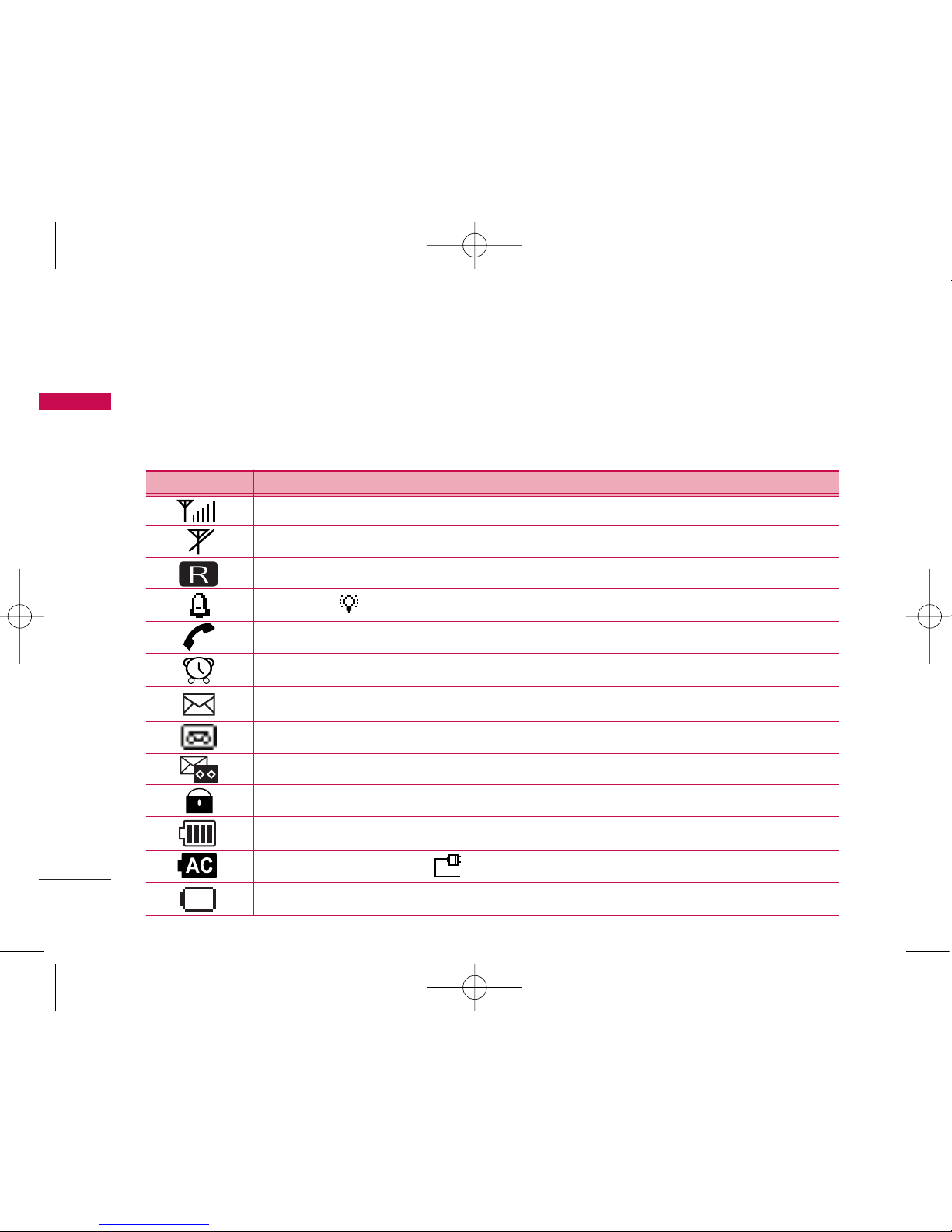
2.2 LCD Display
The LCD shows icons on the top of the LCD screen.
Different indicators appear based on the phone's operating mode.
Lock mode
IIccoonnOOppeerraattiinnggCCoonnddiittiioonn
RSSI indicator: Indicates the signal strength in the service area.
No service: The phone is not receiving any system signal.
Bell (Light : ).
In use: Displayed when a call is in progress or the phone is in off-hook state
Alarm: Displayed when alarm time is set
Text message: Displayed when a text message is received
Voice message: Displayed when voice message are received
Text and Voice message: Displayed when text and voice messages are received.
Battery charge level: Indicates charged battery level
Charge complete (Others : , Only outlet (No battery) )
No AC power & Battery ON. But in low battery state
Roaming Service
LSP-710 EN_090416 2009.4.16 2:3 PM 페이지10
Indice
Altri manuali LG Telefono