
Linkbox Linkbox 8000HD PLUS Manuale utente
©Copyright2012,LinkTVMedia
User’s Guide
Linkbox 8000HD PLUS
HD Satellite Receiver
LinkTV Media
Sun Valley, California, U.S.A.

©Copyright2012,LinkTVMedia Page1

©Copyright2012,LinkTVMedia Page2

©Copyright2012,LinkTVMedia Page3
CONTENTS
1.GETTING STARTED ............................................................................................. 5
1.1Introduction ........................................................................................................ 5
1.2Caution............................................................................................................... 5
1.3What’s inside the box ......................................................................................... 6
2.Control and Displays ............................................................................................. 7
3.Operation............................................................................................................... 9
3.1Initial Setup ........................................................................................................ 9
3.2Installation .......................................................................................................... 9
3.2.1Antenna Connection ....................................................................................... 9
3.2.2Satellite List and Antenna Setup ..................................................................... 9
3.2.3Single Satellite Search.................................................................................. 11
3.2.4Multi Satellite Search .................................................................................... 11
3.2.5TP List and Search ....................................................................................... 11
3.3Edit Channel..................................................................................................... 12
3.3.1TV Channel List ............................................................................................ 12
3.3.2Radio Channel List........................................................................................ 14
3.3.3Delete Channel ............................................................................................. 14
3.4System Setup................................................................................................... 14
3.4.1Language...................................................................................................... 14
3.4.2TV System .................................................................................................... 14
3.4.3Display Settings ............................................................................................ 15
3.4.4Local Time Setting ........................................................................................ 15
3.4.5Timer Setting................................................................................................. 15
3.4.6Parental Lock................................................................................................ 16
3.4.7OSD Setting.................................................................................................. 17
3.4.8Favorite......................................................................................................... 17
3.4.9Others ........................................................................................................... 17
3.5Tools................................................................................................................. 17
3.5.1Information.................................................................................................... 17
3.5.2Factory Setting.............................................................................................. 17
3.5.3Upgrade via RS232 (Receiver to Receiver) .................................................. 17
3.5.4Upgrade via USB .......................................................................................... 18
3.6Game ............................................................................................................... 18
3.7HDD(PVR)........................................................................................................ 18
3.7.1Record Manager ........................................................................................... 19
3.7.2Storage Information....................................................................................... 19

©Copyright2012,LinkTVMedia Page4
3.7.3PVR Setting .................................................................................................. 19
3.7.4Media Player................................................................................................. 19
3.8PVR.................................................................................................................. 21
3.8.1Recording ..................................................................................................... 21
3.8.3Timeshift ....................................................................................................... 21
3.8.4Jump ............................................................................................................. 22
3.9Channel List ..................................................................................................... 22
3.10Program Guide (EPG)...................................................................................... 22
3.11Audio Change .................................................................................................. 22
3.12Favorite Channels ............................................................................................ 23
3.13Video Mod ........................................................................................................ 23
3.14WiFi Function ................................................................................................... 23
3.14.1 WiFi Manager ............................................................................................... 23
3.14.2 AP Connect .................................................................................................. 24
3.14.3 Ugrade by Network....................................................................................... 24
4.SPECIFICATIONS.......................................................................................... 25,26
5.TROUBLESHOOTING ........................................................................................ 27

©Copyright2012,LinkTVMedia Page5
1. GETTING STARTED
1.1 Introduction
The Linkbox 8000HD allows you to record HD digital satellite programming
and enjoy it whenever you choose. You can enjoy the vivid picture and lifelike
sound of any of the digital broadcasting channels.
This manual will show you how to setup and operate the Linkbox 8000HD.
You will find the operation of the Linkbox 8000HD to be simple and easy to
handle. Any problems not addressed in this manual should be handles by
qualified personnel.
1.2 Caution
Do not attempt to open the cover. There is risk of malfunction or electric
shock.
When you are not using the product for extended periods of time, please
unplug the unit from the outlet.
Do not use damaged power cords. There is danger of fire or electric shock
if damaged power cords are used.
Do not install the unit on the following places:
oin direct sunlight
oin damp or wet areas
oin extremely cold or hot areas
oin very dusty areas
oin places that have hot fumes or oils
oin areas of high vibration or movement
onear open liquids
Do not cover the product or place heavy items on top of the product
Keep area around the unit clear for proper ventilation
Do not connect/disconnect any cables while the power cable is plugged in
Avoid using sprays or liquid materials around the unit. Caution should be
used to ensure foreign objects/materials do not enter the unit.
A means to disconnect the power cable should be easily accessible.

©Copyright2012,LinkTVMedia Page6
1.3 What’s inside the box
Please confirm that the following items are enclosed in the box when you
open it:
1- Remote Control
2- AAA Batteries
HDMI Cable
NOTE: If any of the items are missing, please contact the vendor where this
product was purchased.
©Copyright2012,LinkTVMedia Page7
2. Control and Displays
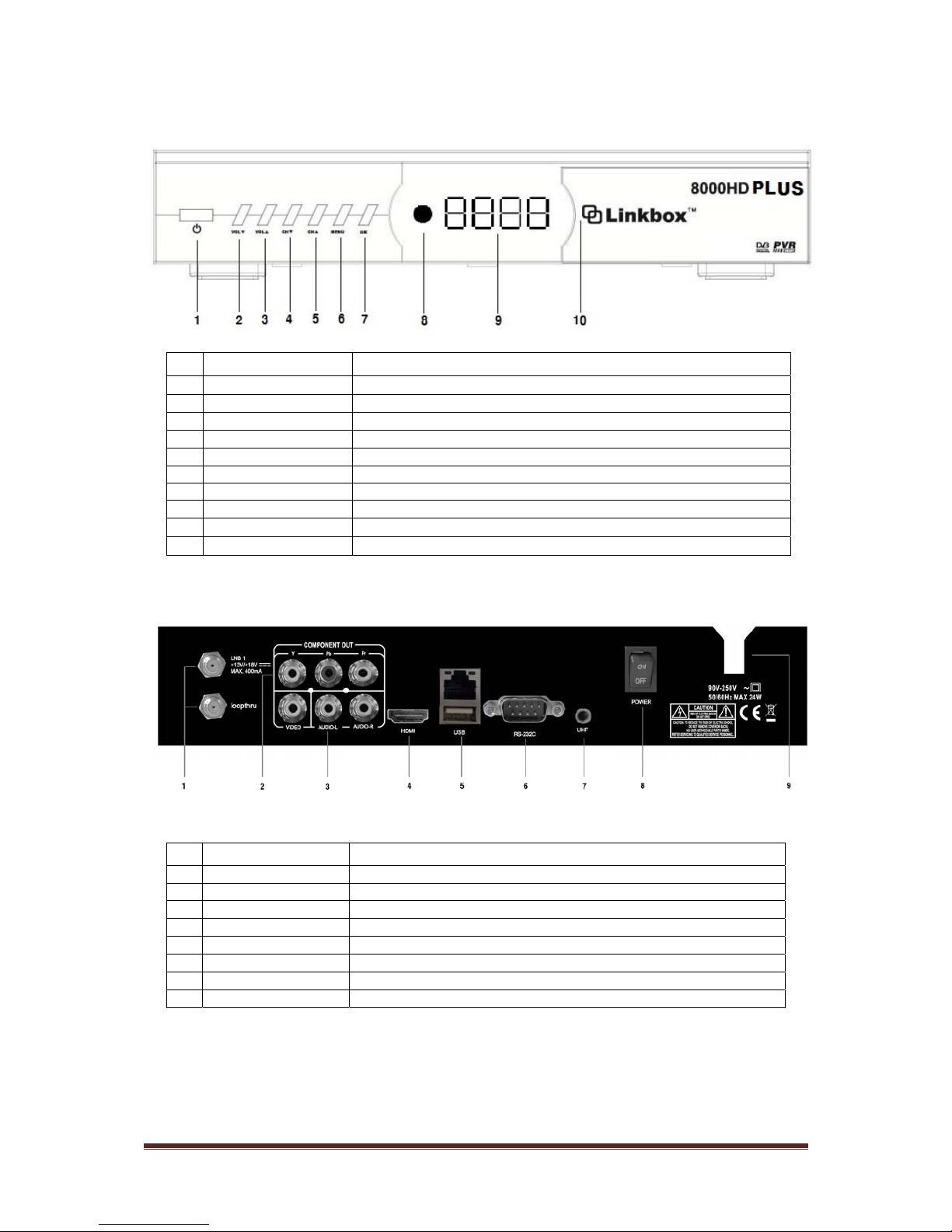
Remote Control
Key Function
Power on/off
Mute
PAUSE Holds the picture or releases the pause
i Shows channel information
AUDIO Selects audio mode, Selects audio language
LAST Returns to previous channel
MENU Enter/Exit main menu screen
EXIT Move to previous menu
PAGE - Page down
PAGE + Page up
FIND Find Channel
EPG Shows program information
FAV Enter/Exit favorites menu
SAT Enter programmed satellite list
SIG Check signal quality
TIME Shows current Time , Set time
Fast rewind playback
Fast forward playback
Plays recorded program
Stop recording or playing
Slow rewind
Slow forward
Pause the playback
Starts recording
HDD Enter Hard Disk Recording menu
PVRi PVR Information
ZOOM Zoom Screen
SLEEP Sleep timer
CH +/- Channel Up /Down
SUBT Subtitle Function
V.MODE Show/Modify video out resolution
OK Shows Channel list. Confirm selection
TV/RADIO Toggles between TV and Radio operation
F1 Function Key
F2 Function Key
Change the value of a selected line,
Volume up/down
©Copyright2012,LinkTVMedia Page8
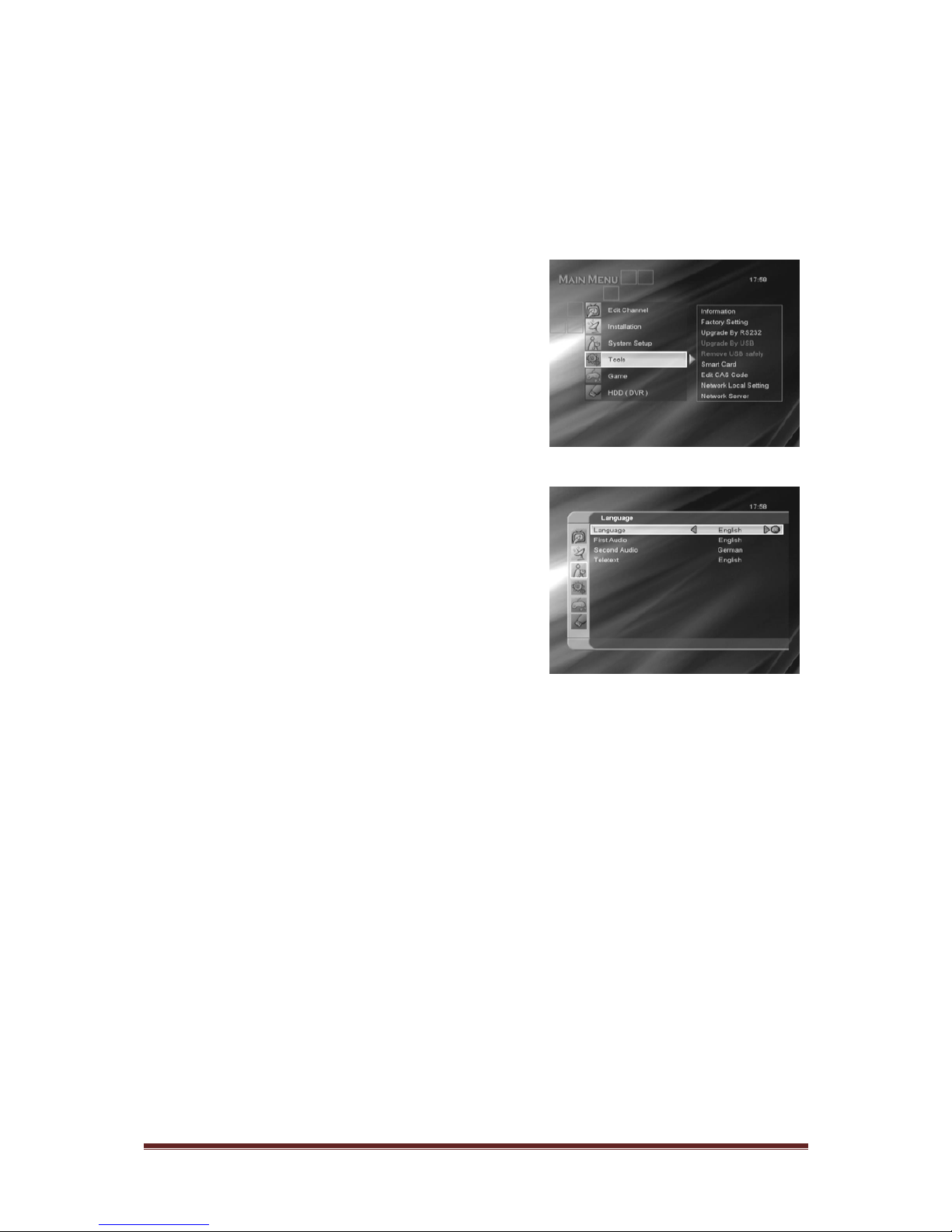
Front Panel
No Name Fuction
1 POWER Switches the unit between standy and on
2 VOL ▼Change volume up
3 VOL ▲Change volume down
4 CH ▼Change CH down
5 CH ▲Change CH up
6 MENU Moves to MENU
7 OK Select in menus
8 DISPLAY Segment LED Display
9 IR IR Receiver
10 USB USB Port (+5V 500mA)
Rear Panel
No Name Function
1 IF Input / Output IF INPUT From LNB to receiver / IF Loop-through output to 2nd receiver
2 Component Output Component Video Output(Y, Pb, Pr)
3 Composite Output Composite Video Output/ Audio Left/Right Output.
4 HDMI Digital Video/ Audio Output
5 USB+RJ45 USB2.0/Ethernet
6 RS232 Serial Port used for software upgrade
7 UHF Option for UHF Remote Controller kit
8 Rocker Switch AC Power Switch
©Copyright2012,LinkTVMedia Page9
3. Operation
3.1 Initial Setup
When the receiver is powered on for the first time, the main menu will appear.
When first powering on the unit, please do
the following:
1) Select the System Setup
2) Switch the language using the ◀▶
buttons. Confirm the language by
pressing [OK].
3) Select installation on the main
menu and configure antenna
setting (See section 3.2)
4) Adjust the LNB configuration for
each satellite
5) Start scan to find programs
6) Exit the installation after all
programs are scanned and found
Use the ◀▶▲▼buttons to navigate the menu and press [OK] on the
remote to make the selections.
3.2 Installation
The Installation menu is located on the main menu.
3.2.1Antenna Connection
Use the ◀▶buttons to set the “Antenna Connection Type”.
3.2.2Satellite List and Antenna Setup
Indice
Altri manuali Linkbox Ricevitore


