
LinkPoint 3000 Manuale utente

LinkPoint® 3000
Installation Manual V 2.0
0526 1199
LinkPoint®3000
INSTALLATION MANUAL

LinkPoint® 3000 Installation Manual
Manual Revision Number 2.0
Published November 1999
LinkPoint International®, Inc.
5310 Derry Avenue, Suite W
Agoura Hills, CA 91301
www.linkpt.com
Printed in the United States of America.
© Copyright 1999 LinkPoint International, Inc. All rights reserved.
No part of this publication may be copied, distributed, stored in a retrieval system,
translated into any human or computer language, transmitted, in any form or by any
means, without the prior written consent of LinkPoint International, Inc. LinkPoint
International reserves the right to make changes to this document and the products it
describes without notice. LinkPoint International shall not be liable for technical
errors or omissions made herein, nor for incidental or consequential damages
resulting from the performance or use of this product.
LinkPoint 3000 is a registered trademark of LinkPoint International, Inc.
Note: This equipment has been tested and found to comply with the limits for a Class A digital
device, pursuant to part 15 of the FCC Rules. These limits are designed to provide a reasonable
protection against harmful interference when the equipment is operated in a commercial
environment. This equipment generates, uses and can radiate radio frequency energy and, if
not installed and used in accordance with the instruction manual, may cause harmful
interference to radio communications. Operation of this equipment in a residential area is
likely to cause harmful interference, in which case the user will be required to correct the
interference at his own expense. Caution: Danger of explosion if lithium battery is incorrectly
replaced. Replace battery only with the same or equivalent type recommended by the
manufacturer. Dispose of used batteries according to the manufacturer’s instructions.

TABLE OF CONTENTS
© 1999 LinkPoint International, Inc. i LinkPoint 3000
GENERAL SAFETY INFORMATION................................................................1
GETTING STARTED.............................................................................................2
Introduction.......................................................................................................2
Unpacking .........................................................................................................3
Installation.........................................................................................................4
Maintenance......................................................................................................5
Returning the Terminal for Service................................................................5
Printers...............................................................................................................5
PIN Entry Devices............................................................................................6
TERMINAL FEATURES........................................................................................7
The Display Panel.............................................................................................7
The Cardreader.................................................................................................7
The Keypad .......................................................................................................8
BASIC OPERATION..............................................................................................9
Download..........................................................................................................9
Transaction Keys...............................................................................................9
Using the Cardreader.......................................................................................9
Entering Alphanumeric Data From the Keypad........................................10
LINKPOINT 3000 SPECIFICATIONS..............................................................11

GENERAL SAFETY INFORMATION
© 1999 LinkPoint International, Inc. 1 LinkPoint 3000
GENERAL SAFETY INFORMATION
♦For safety, the LinkPoint 3000 terminal must be serviced by only
LinkPoint International or its representatives.
♦Do not operate the LinkPoint 3000 terminal until you have been trained
by your sales representative.
♦Operate the terminal according to the instructions in this manual.
♦Protect the terminal from liquid spills, dust and sharp objects.
♦Do not submerge the terminal.
♦Avoid operating the terminal in locations where it may be splashed with
acid or other chemicals.
♦Do not place any foreign objects into the cardreader or into the jacks of
the terminal.
♦Make sure all cables are connected securely.
♦Do not attempt to disassemble the unit. Doing so will void your
warranty.

GETTING STARTED
© 1999 LinkPoint International, Inc 2 LinkPoint 3000
GETTING STARTED
Introduction
Congratulations on your choice of the LinkPoint 3000 point-of-sale (POS)
terminal (see Figure 1). Scientifically engineered to exceed the quality found
in current terminal technology, the LinkPoint 3000 combines user-friendly
operation with “soft,” programmable functions. The screen-addressable keys
and the innovative backlit display panel make terminal operation quick and
easy. The terminal’s expanded serial port capabilities are compatible with
all major printers, and there are additional serial ports for PINpads, check
readers and other peripherals.
This manual explains how to unpack and install your terminal and how to
make sure that it is operating properly.
Figure 1
LinkPoint 3000 Terminal

GETTING STARTED
© 1999 LinkPoint International, Inc. 3 LinkPoint 3000
Unpacking
Carefully inspect the shipping carton and its contents for any damage that
may have occurred during shipping. If the terminal is damaged, file a claim
immediately with the shipping company or carrier and notify your service
provider. Do not try to use a damaged terminal!
To unpack the LinkPoint 3000:
1. With the shipping carton right side up, open the carton’s lid.
2. Lift the terminal, its AC adapter and line cord with modular plugs up
and out of the box.
3. Remove the terminal from its protective bubble wrap and place the
bubble wrap back in the shipping carton. Remove the AC adapter from
its protective box and return the box to the shipping carton. Close the
shipping carton and save the shipping materials so that the unit can be
repackaged for shipping or moving.
4. Place the terminal on a desk or tabletop. When choosing a place for the
LinkPoint 3000, avoid areas with:
♦Direct sunlight or objects that radiate heat
♦Excessive dust
♦Electrical devices that cause excessive voltage variations, such as air
conditioners, space heaters, fans or high-frequency security devices
Figure 2
LinkPoint 3000 and Accessories
GETTING STARTED
© 1999 LinkPoint International, Inc 4 LinkPoint 3000
Installation
Installing the LinkPoint 3000 terminal is simple and requires no tools.
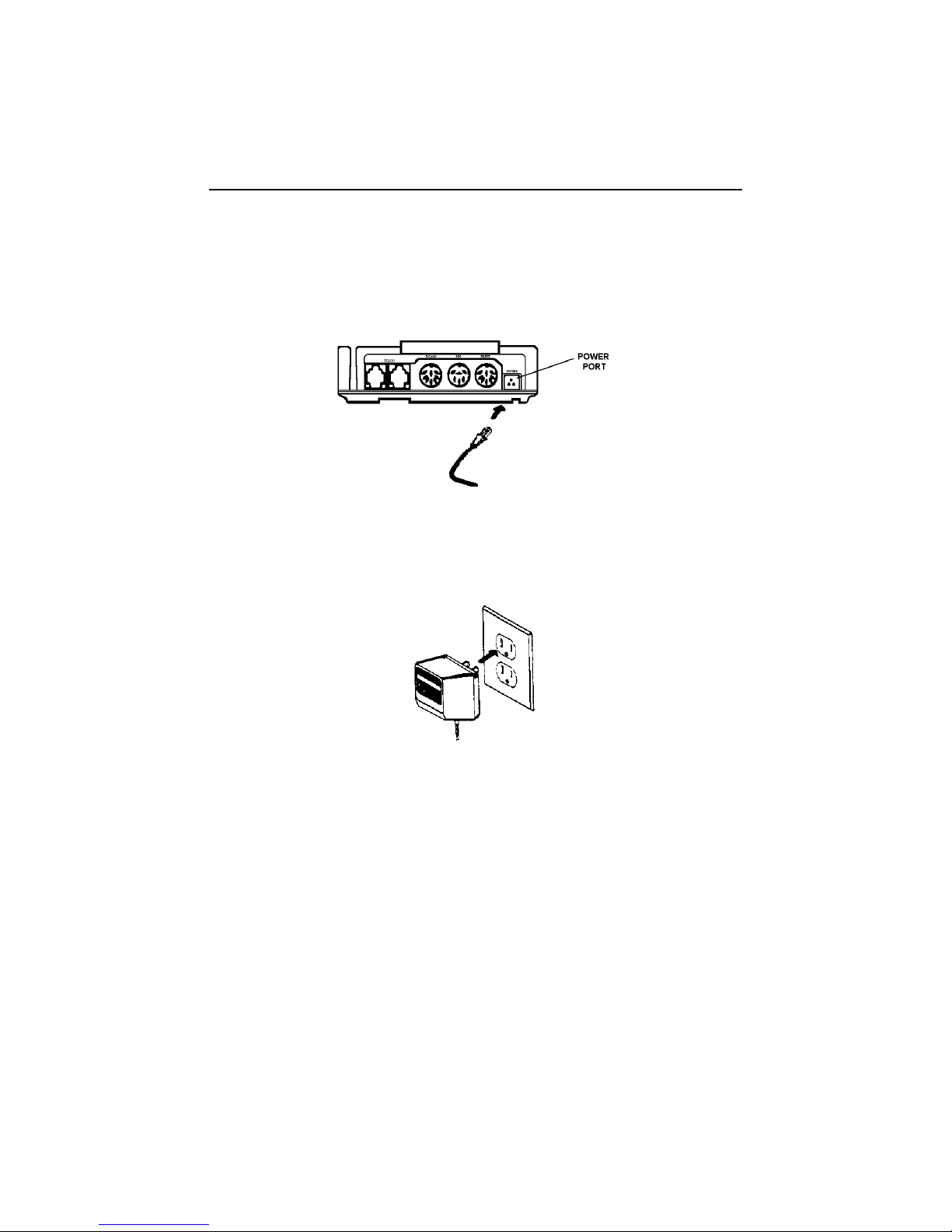
1. Connect the AC adapter to the power input at the rear of the
LinkPoint 3000 terminal (see Figure 3).
Figure 3
2. Plug the adapter into a 120V electrical outlet or into a surge suppressor
(see Figure 4).
Figure 4
3. Connect one end of the telephone line cord to one of the modular jacks at
the rear of the terminal. Connect the other end of the line cord to a
modular telephone wall jack, just as you would connect a telephone (see
Figure 5). Insert the modular plug directly into the wall jack, or use a
four-prong adapter (not included) for older four-prong jacks.
Note: You may connect a standard telephone or handset to the other
modular jack at the rear of the terminal.

GETTING STARTED
© 1999 LinkPoint International, Inc. 5 LinkPoint 3000
Figure 5
4. If you are using a printer with your LinkPoint 3000 terminal, see the
manual packaged with your printer for installation and operating
instructions.
5. When the terminal is plugged in, it will display an idle message (i.e.,
App. Not Available).
Maintenance
Your LinkPoint 3000 system does not need preventive maintenance.
However, LinkPoint International does recommend periodically cleaning the
keypad with a soft paintbrush to remove dust. To avoid costly downtime,
LinkPoint International also recommends protecting your terminal with a
surge suppressor. Because your terminal can be damaged by liquids, do not
spray liquid cleaners directly on the device. Always apply the cleaner to a
cloth towel first, and then use the towel to clean the terminal.
Returning the Terminal for Service
To repair or replace your LinkPoint 3000 terminal, contact your service
provider or sales representative for instructions. Be sure to mention the
serial number on the bottom of your terminal.
CAUTION: Do not try to service, adjust or repair the LinkPoint 3000
terminal yourself; doing so will void your warranty.
Printers
The LinkPoint 3000 terminal supports all major terminal printers. Printers
attach easily to the LinkPoint 3000 terminal with a connecting cable and can
be plugged into any standard 120V electrical outlet.

GETTING STARTED
© 1999 LinkPoint International, Inc 6 LinkPoint 3000
PIN Entry Devices
The LinkPoint 3000 terminal supports personal identification number (PIN)
entry devices. Please refer to the PIN entry device manual for installation
and operating instructions.

TERMINAL FEATURES
© 1999 LinkPoint International, Inc. 7 LinkPoint 3000
TERMINAL FEATURES
The Display Panel
Each LinkPoint 3000 terminal has a built-in display panel capable of
showing up to 20 letters or numbers (see Figure 6). The two-line, 20-
character display panel is backlit to enhance readability, and it easily
accommodates most messages. The LinkPoint 3000 terminal also includes a
scrolling feature that allows you to read messages longer than 20 characters.
Figure 6
Sample LinkPoint 3000 Display Message
The Cardreader
The LinkPoint 3000 comes with a dual-track magnetic cardreader, allowing
the terminal to perform functions on both tracks. The cardreader collects the
cardholder’s account number, expiration date, name, and security data from
the magnetic stripe on the back of all major credit cards and bankcards.
Figure 7
Note: When sliding the card (bidirectional motion), face the magnetic stripe
down and away from the keypad.
Altri manuali per 3000
5
Indice
Altri manuali LinkPoint Terminale di pagamento

LinkPoint
LinkPoint 3000 Guida di riferimento

LinkPoint
LinkPoint 3000 Guida di riferimento

LinkPoint
LinkPoint 3000/AIO Manuale utente

LinkPoint
LinkPoint AIO Manuale utente

LinkPoint
LinkPoint 3000 Manuale utente

LinkPoint
LinkPoint AIO Manuale utente

LinkPoint
LinkPoint L3FRR30 Guida di riferimento

LinkPoint
LinkPoint AIO Manuale utente

LinkPoint
LinkPoint 9100 Istruzioni operative e di manutenzione

LinkPoint
LinkPoint AIO Manuale utente


