
LinQTab LQ8 Manuale utente
1
LinQTab
LQ8
User Manual
Please read this manual before operating your device, and keep it for future reference.

2
Copyright
© LinQTab is a registered trademark of eXiom Technologies and its related entities.
The Bluetooth® word mark, figure mark (stylized “B Design”), and combination mark (Bluetooth
word mark and “B Design”) are registered trademarks and are wholly owned by the Bluetooth
SIG.
microSD™ and the microSD logo are Trademarks of the SD Card Association.
Wi-Fi, the Wi-Fi CERTIFIED logo, and the Wi-Fi logo are registered trademarks of the Wireless
Fidelity Alliance, Inc.

3
Table of Contents
General notices for use.................................................................................................................................5
Disclaimer......................................................................................................................................................5
Getting Started..............................................................................................................................................5
Box Contents.............................................................................................................................................5
Battery Charging .......................................................................................................................................6
Power on...................................................................................................................................................6
Hibernate ..................................................................................................................................................6
Shutdown and forced shutdown ..............................................................................................................7
Apps vs Widgets........................................................................................................................................ 7
Understanding your tablet LQ8 ....................................................................................................................8
Front Views of tablet.................................................................................................................................8
Back View of tablet ...................................................................................................................................9
Home Screen...........................................................................................................................................10
Navigation Buttons .................................................................................................................................10
Status / Notification Information Area ...................................................................................................11
Touch screen operations.............................................................................................................................11
Screen unlock..........................................................................................................................................13
Start application......................................................................................................................................14
Tablet Settings ............................................................................................................................................15
Connect to Wi–Fi network (Settings > WiFi)...........................................................................................17
Connect tablet to Bluetooth devices (Settings > Bluetooth)..................................................................18
Reset the tablet to original factory state (Settings > Backup & reset) ...................................................18
Check Tablet Specifications (Settings > About tablet)............................................................................19
Connect to the computer............................................................................................................................19
Customizing the Home screen ....................................................................................................................19
Insert/Remove microSD™ card...................................................................................................................20
Keeping your device secure ........................................................................................................................21
Frequently Asked Questions .......................................................................................................................21
How to create a folder ............................................................................................................................21
How to secure your tablet ......................................................................................................................21
How to uninstall an app..........................................................................................................................22

4
How to extend the life of our battery.....................................................................................................22
How do I install software on the tablet, like my favourite game ...........................................................22
Can I use my tablet without internet connection...................................................................................22
How to watch YouTube videos ...............................................................................................................23
Option 1: Live Streaming....................................................................................................................23
Option 2: Watch offline - Download with YouTube app.....................................................................23
Option 3: Watch offline - Download with TubeMate app ..................................................................23
How to watch movies on your tablet......................................................................................................24
Option 1: Live Streaming.....................................................................................................................24
Option 2: Stream and Download .......................................................................................................25
Option 3: Have your own library of movies........................................................................................25
Troubleshoot...............................................................................................................................................25
Tablet stops responding..........................................................................................................................25
An app stops responding ........................................................................................................................25
Tablet does not turn on ..........................................................................................................................28
Customer service ........................................................................................................................................28

5
General notices for use
This product is a highly advanced electronics device. Disassembly, customization or
repairs without the appropriate knowledge and precautions can lead to dangerous
situations with chance of damaging the product and causing serious personal injuries.
Avoid use in extreme conditions such as high or low temperatures, high humidity or
moist environments and around magnetic fields. Also avoid long-time exposure to
sunlight.
Only use the manufacturer permitted accessories to avoid damages to the product and
possibly warranty loss.
Please follow the relevant local environmental regulations to deal with obsolete
machines and accessories.
Use a protective folder to avoid extreme physical shocks to the device (i.e. of dropping).
Disclaimer
The screenshots in this manual are for reference only. They may be made on a device
with a different resolution or hardware configuration than yours and therefore can be
slightly different that the final product.
The manufacturer takes no responsibility for loss of information or data caused by
hardware or software failure. The user is responsible for performing timely backups of
important data.
All information and images used in this user manual are provided ‘as is’ and are subject
to change without notice.
The manufacturer accepts no liability for the information offered in this document.
Getting Started
Box Contents
LinQTab LQ8 Tablet
Device charger
USB cables
Leather case (optional)
Metal Stand (optional)
6
Battery Charging
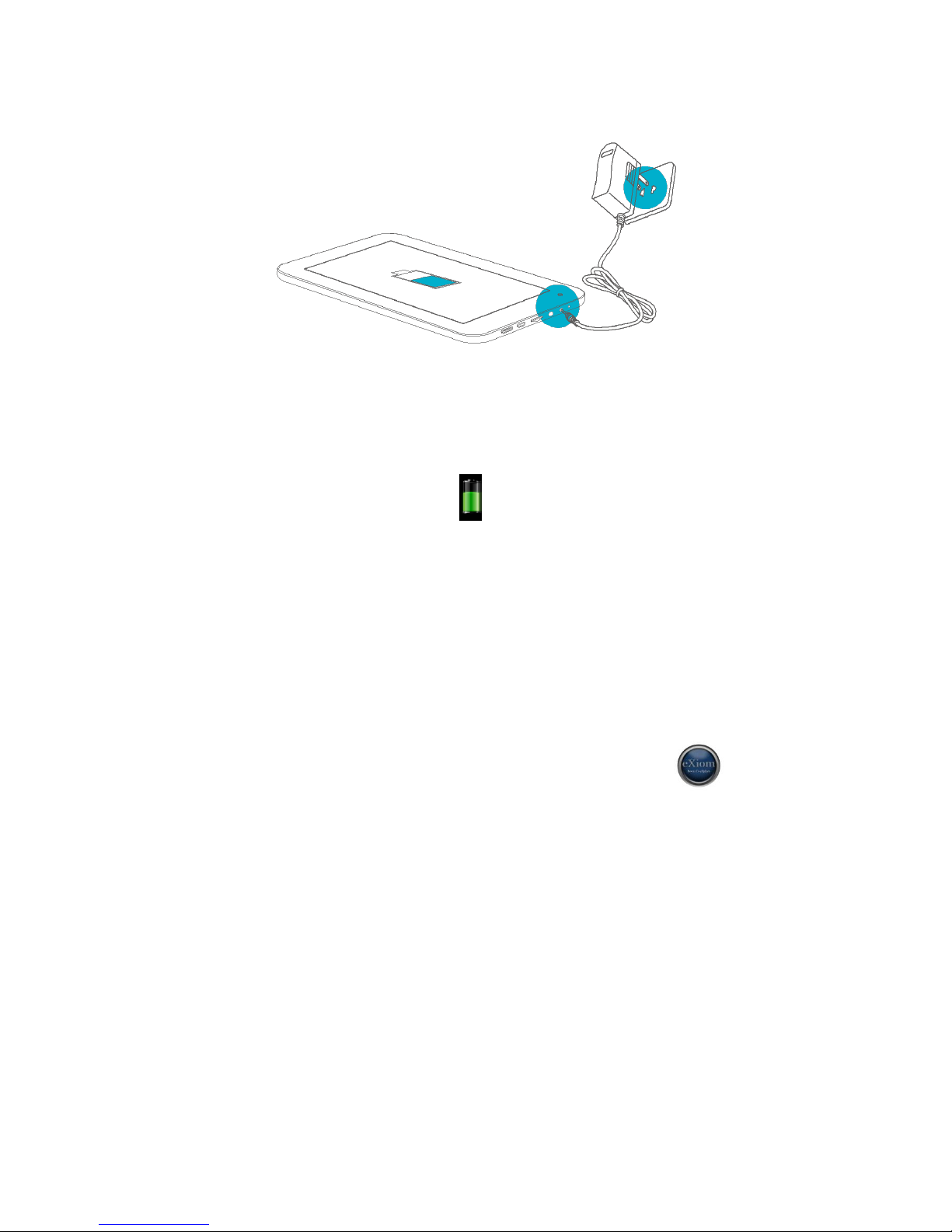
Battery Charging Diagram
Please make sure that the battery is fully charged before your first use. To charge the battery,
please connect the matching charger to a power outlet and insert the DC jack end into the
charge interface of LQ8. After a few seconds, the eXiom logo appears on the screen follow by a
picture of a battery being charged. After a few seconds the screen will go blank. While
the battery is charging, you can view the charging progress by pressing the power
button.
Once the charging is completed, please unplug the charger from LQ8 and the power supply
connection.
Power on
Hold down the power button until the eXiom logo appears on the screen.
Wait for a few seconds for the system start up to complete. Unlock the tablet to enter the
home screen.
Hibernate
Once booted up, a short press of the power button will put the LQ8 to hibernate state. During
hibernation, LQ8 will turn off the screen and enter into the standby condition, where it will
consume very little power. Another short press of power button will bring the LQ8 out of
hibernation and you can continue with your operation.

7
Shutdown and forced shutdown
If you are not using the LQ8 for several days, we recommend you to shutdown the tablet. Hold
down the power button for two seconds, and select “Power off” from the pop-up window
“Tablet options” to completely shut down the LQ8.
In case of a system crash and the LQ8 stops responding to your commands, please hold down
the power button for more than 10 seconds to forced shutdown. You need to reboot the LQ8
after a forced shutdown.
Apps vs Widgets
Apps are shortcuts placed on the Home screen and used to open applications installed
on your tablet.
Widgets are apps with special functionality that displays content that is updated
frequently. You can view the updated content without opening the widget.
To view all apps and widgets, touch the All apps icon. There is a tab for the Apps and
another tab for the Widgets
8
Understanding your tablet LQ8
Front Views of tablet
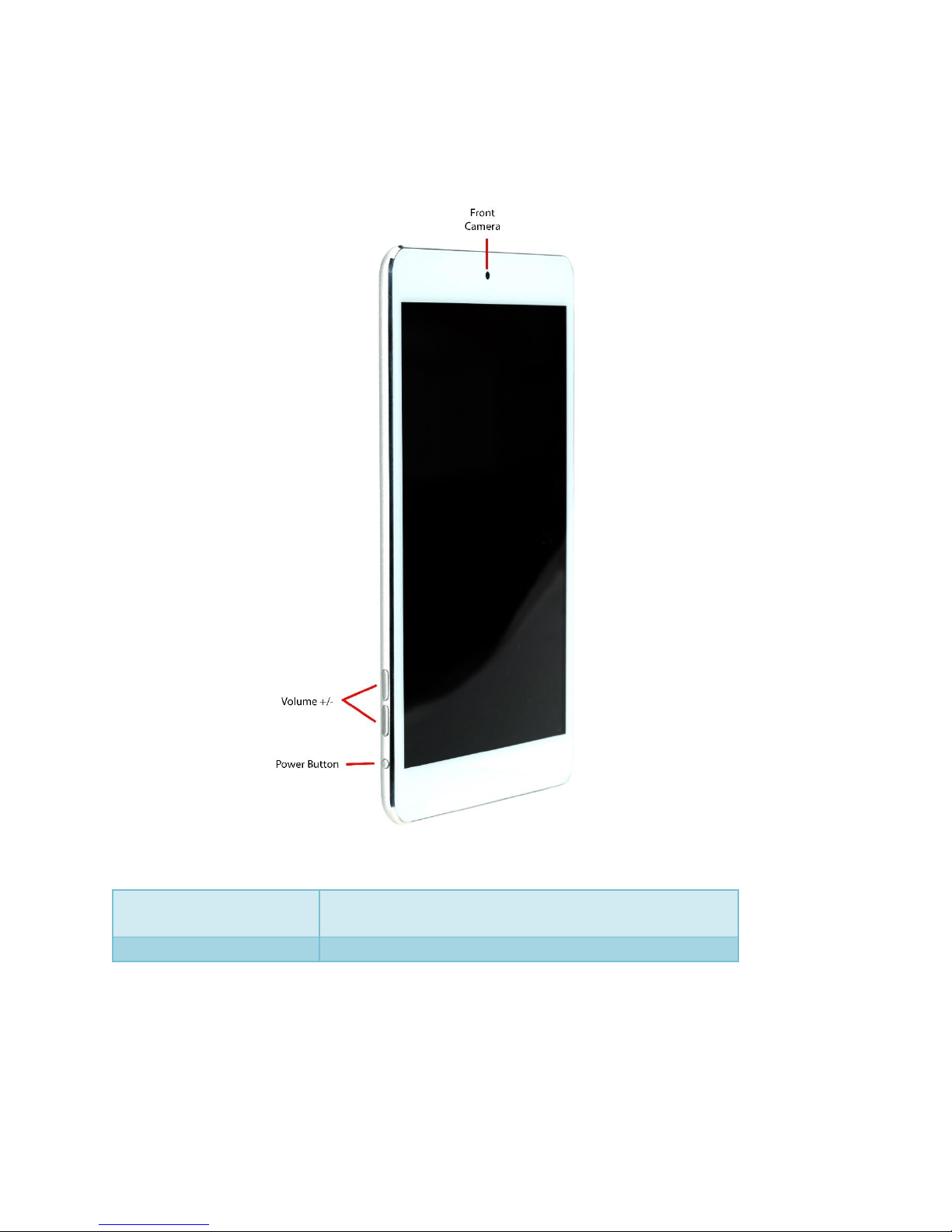
Power Button
Long press to turn on/off LQ8
Short press for hibernating/awakening LQ8
Volume +/-
Increase/Decrease the volume
9
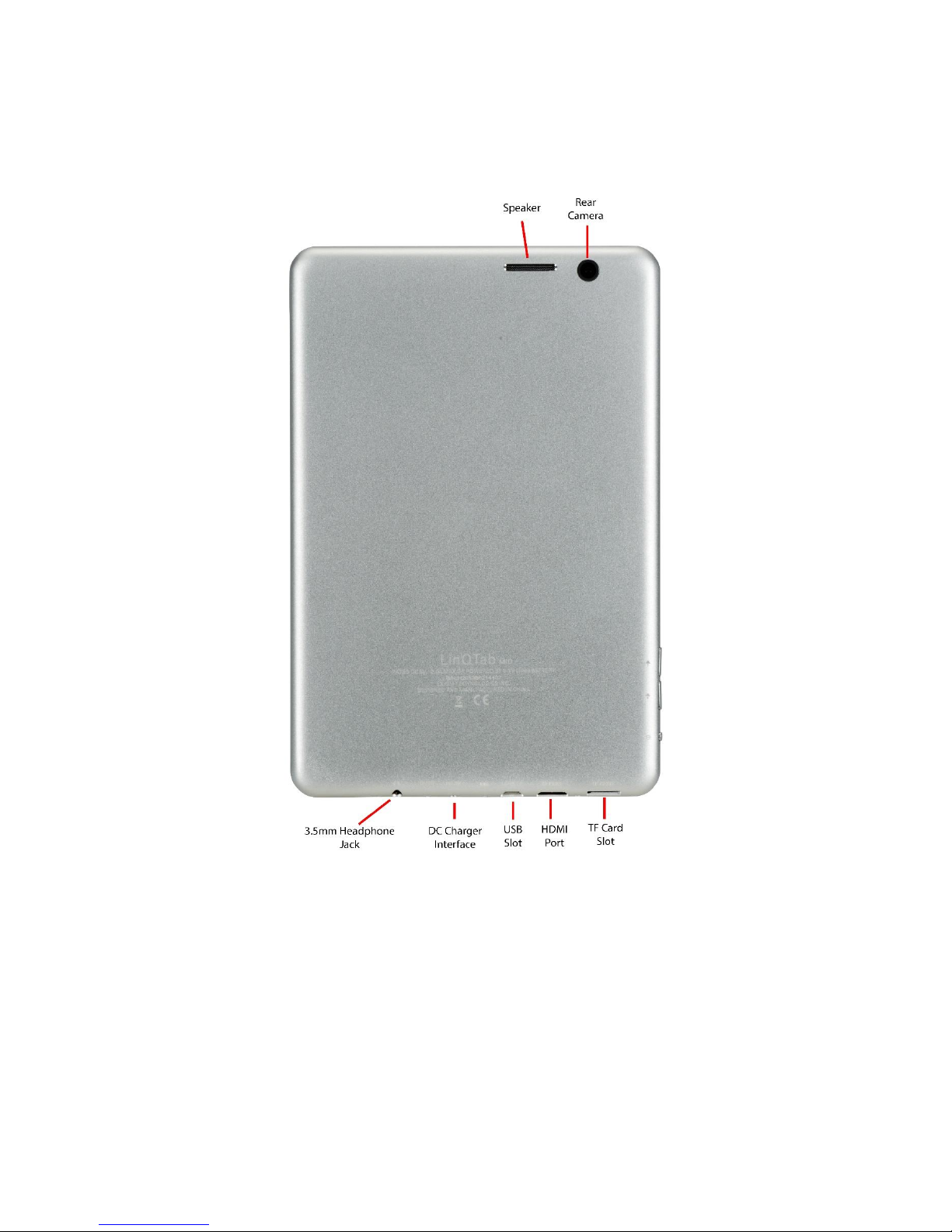
Back View of tablet
10
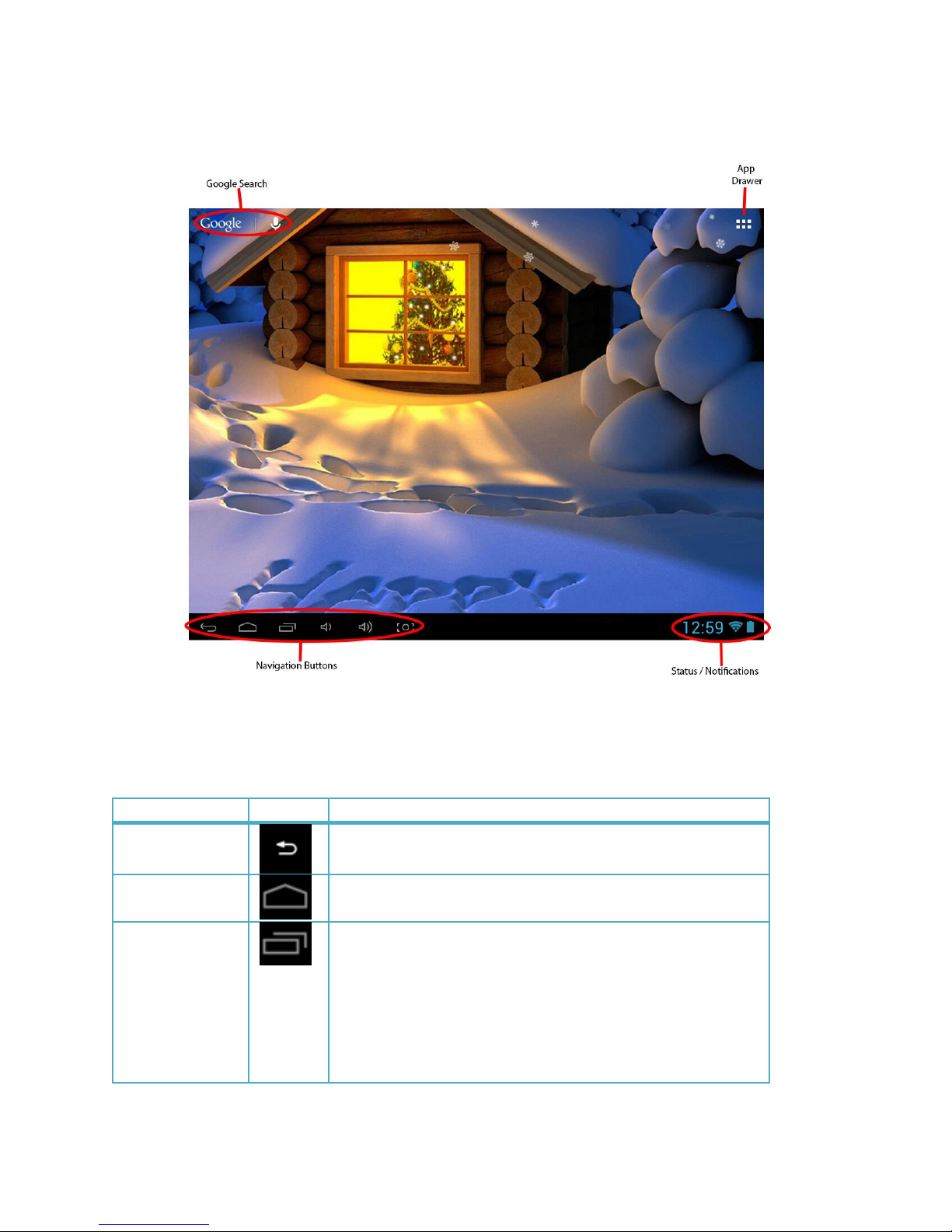
Home Screen
Navigation Buttons
These buttons are located at the bottom left of the tablet screen.
Function
Icon
Description
Go Back
Tap the Go Back button, at bottom of screen, to go
back one to the previous screen.
Home
Tap the home button, at bottom of screen, to return to
your home screen.
Multitask
(Recent Apps)
Tap the Multitask button, at bottom of screen, to
display thumbnail list of apps that are running in the
background.
To remove an app from the list, select the app by
pressing down on it with your finger and swipe it left or
right. This is useful to clear RAM and to speed up the
device.
Altri manuali per LQ8
1
Indice
Altri manuali LinQTab Tavoletta


