
Linsn MC100 Manuale utente
LINSN LED TECHNOLOGY CO., LTD.
Tel:+86-755-36513042,Fax:+86-755-36984024 Website: www.linsnled.com
Address:Building 3,Sanlian Industrial Park,Shiyan Town,Bao'an District,Shenzhen,China.
MC100 LED Player Instructions
Initial Startup
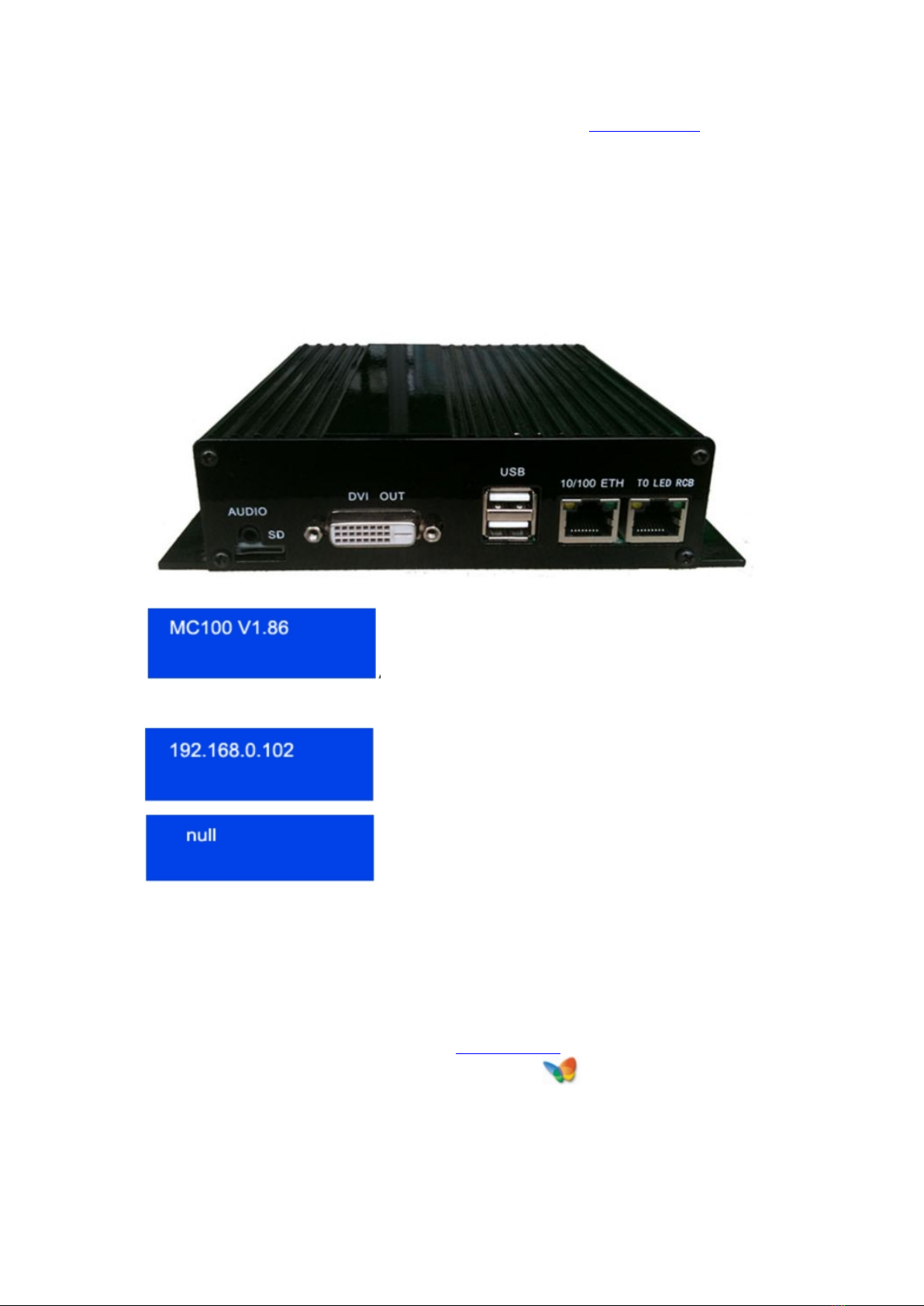
output:as below You can use the HDMI / DVI adapter cable attached to the sending card. or you can also connect
the Gigabit output port to the receiver card directly(Note: if the big screen is not displayed,pls select the
appropriate receiver card in the display settings of the software, see below, "how to choose to receive the
card?" ).
Then starting to see a picture
After completion of the moment just started, you'll see a short blue
screen.
if connect the internet right,you will see the IP address
if not connect the internet ,it looks like this :NULL
If the player can work with the network, you can use the computer directly to control large screen,it is very
convenient. Youcan put network cable into the player's Ethernet port directly the, then connect with the
exchanger on the other side.
How to set the screen size?
Installation MC100 Setup.exe ,or download MC100at: www.linsnled.com Download Center
Run MC100 Program edit management software on the computer . Click "Main Menu -> View-> LED
screen settings."
initial password:168 ,named LED here and specify its size, as well as other settings
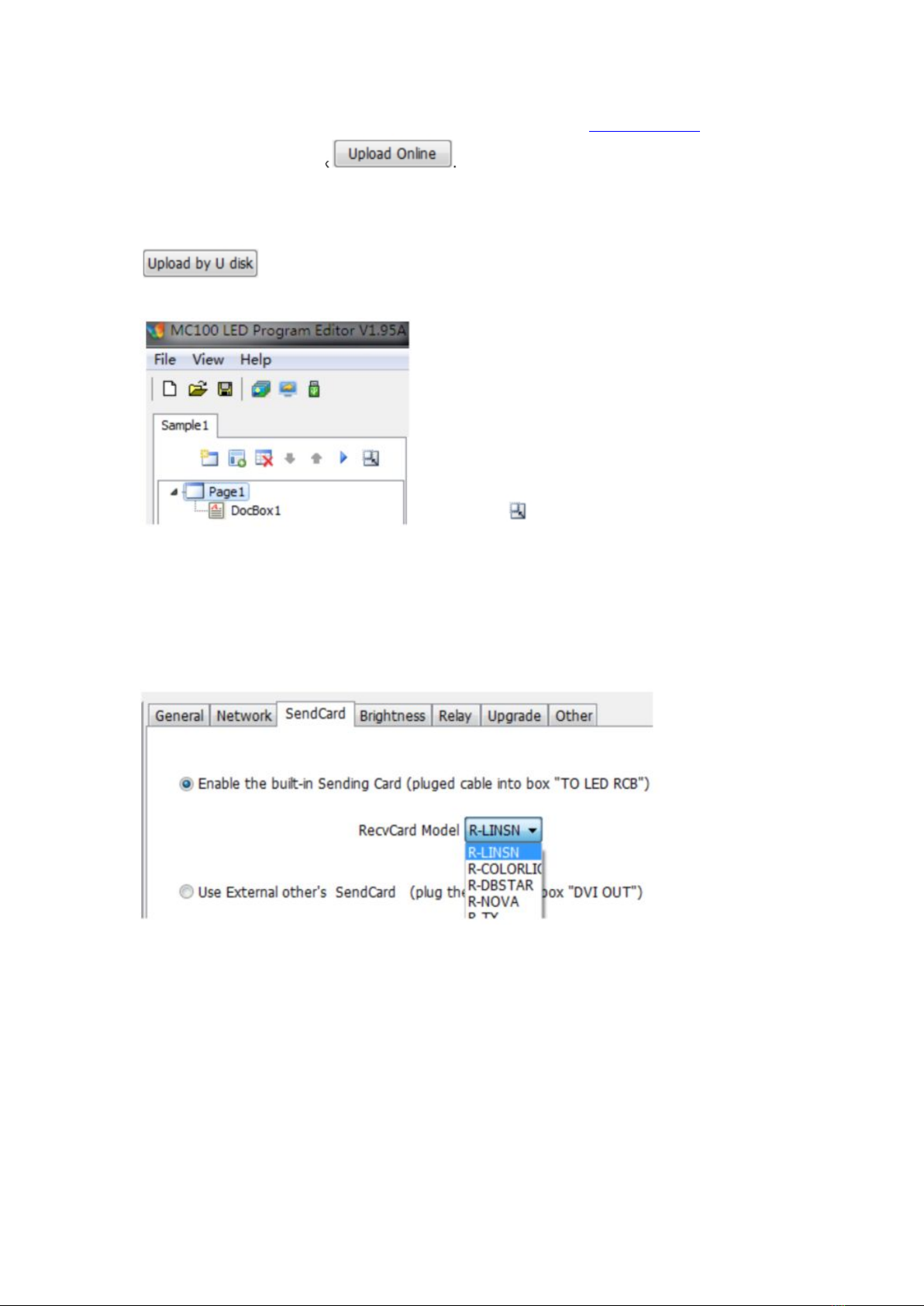
type of receiving card, you can enter SendCard page, set " Recv Card Model ".
After setting, it must be uploaded to the LED. One is through the Internet (prior to the player network cable
connected), one is through U disk.
LINSN LED TECHNOLOGY CO., LTD.
Tel:+86-755-36513042,Fax:+86-755-36984024 Website: www.linsnled.com
Address:Building 3,Sanlian Industrial Park,Shiyan Town,Bao'an District,Shenzhen,China.
(1)Internet upload or LAN , click .
There is a small problem, how can i know the big screen 's IP address? This need you to watch when the big
screen IP network is starting up,or, You can scan the entire network, view IP: Click Menu -> View -> Monitoring
LED screen -> Find a large screen.
(2)upload settings for U disk: plugged U disk , click on the bottom right of the screen to set the screen
.Then plug U disk into the player on the big screen. U disk upload process is very fast, the
screen will have promptions.
Remarks:If you just want to changethe size of the program player window , it is simple
click the icon (Or menu / View / Set display window size)
How to set the type of receiving card? How to switch gigabit transmission and
DVI send?
Player default working in Gigabit port transmit mode. If the large screen is not displayed, you need to select the
screen settings for receiving card.
Menu -> Administration -> Display settings -> Send card -> select the "Enable built-in Gigabit transmission": as the
following figure.
If the receveing card is another type , you can only use the DVI output.
USD DVI output, need select "enable external sending card" and then use HDMI / DVI adapter cable attached to
the sending card. (If you do not use enable external sending card, you will find no text in DVI mode, or the screen
is black.
How to upload the program? How to switch the current program?
First big screen need connect network cable (or wireless usb wifi), and then run the mc100, you can upload the
new program. Menu -> Administration -> Monitoring LED screen -> Find, select the screen -> Upload program. If
you want to switch the current program, you can click on the "play the selected program" in the "Program
Management Page". If there is no network, or the network is slow, itcan only use to upload a new program by U
disk.
How to use U disk to upload program?
Please click the green U disk icon on the main interface toolbar. as below picture :

LINSN LED TECHNOLOGY CO., LTD.
Tel:+86-755-36513042,Fax:+86-755-36984024 Website: www.linsnled.com
Address:Building 3,Sanlian Industrial Park,Shiyan Town,Bao'an District,Shenzhen,China.
Then, plug the U disk into the big screen, you will see the "reading U disk ...." Word. Some of the large programs,
will take some time to upload. Some smaller, flash on the message will ok
How to connect the player with a network cable box? How to set a fixed IP?
Sometimes, you need t a laptopconnect to the network cabledirectly to adjust the player box . Player Cable
network default is dynamic IP, so you need to set a fixed IP player on the list. For example, you can set to
192.168.0.16 then, you put your notebook also set to 192.168.0.5 (same network segment). Then you can directly
connect.
Setting method is: the screen settings -> Wired Network -> Using fixed IP. After setting, you can use U disk upload.
Then you can direct the.
Moreover, after the big screen starts again, it will be the fixed IP.
Indice


