
Lippert Components Touch Audio VD300WR Manuale utente

Rev: 04.10.2014 Page 1 Touch Audio VD300WR Owners Manual

Rev: 04.10.2014 Page 2 Touch Audio VD300WR Owners Manual
TABLE OF CONTENTS
System 3
Safety Information 3
System Specications 3
System Controls 4
System Wiring Ports 5
System LCD Display 5
Wireless Remote Controls 6
Installation 7
Speaker Wiring Harness 8
Operation 9
Remote 9
Touch Audio 11
Radio Mode 11
Weather Band 12
Programming 12
TV System 12
Power Resume 12
Auto Play 12
TV Type 12
Rating 13
Default 13
Language Setup 13
Audio Setup 13
Video Setup 14
Speaker Setup 14
Troubleshooting 15
Rev: 04.10.2014 Page 3 Touch Audio VD300WR Owners Manual
System
Safety Information
The “WARNING” symbol above is a sign that a service or maintenance procedure has a safety risk involved and may
cause death or serious injury if not performed safely and within the parameters set forth in this manual.
Always wear eye protection when performing service or maintenance to the vehicle. Other safety equipment to
consider would be hearing protection, gloves and possibly a full face shield, depending on the nature of the service.
This manual provides general service and maintenance procedures. Many variables can change the circumstances
of the service procedure, i.e., the degree of difficulty involved in the service operation and the ability level of the
individual performing the operation. This manual cannot begin to plot out procedures for every possibility, but
will provide the general instructions for effectively servicing the vehicle. In the event the skill level required or the
procedure too difficult, a certified technician should be consulted before performing the necessary service. Failure
to correctly service the vehicle may result in death, injury or voiding the warranty.
System Specifications
Feature Specification
Laser 650um Wave Length
Video Auto/NTSC
Frequency Response 20 Hz - 20 KHz
Signal/Noise Ratio >95 dB
Dynamic Range >80 dB (1 KHz)
Video Out
Output Level - 1vp-p
Load Impedance - 75 Imbalance
Negative Polarity
Power Supply DC 12-14.4 V
Power Consumption <50 W
Dimensions (WxHxD) 218mm x 185mm x 169mm
Weight Approx. 2kg
AM Frequency AM 520 ~ 1710 KHz
FM Frequency FM 87.5 ~ 108 MHz
WB CH1 - CH7 MHz
Frequency Range
CH1 - 162.400 MHz
CH2 - 162.425 MHz
CH3 - 162.450 MHz
CH4 - 162.475 MHz
CH5 - 162.500 MHz
CH6 - 162.525 MHz
CH7 - 162.550 MHz
Output Power 200 W PMPO
Rev: 04.10.2014 Page 4 Touch Audio VD300WR Owners Manual
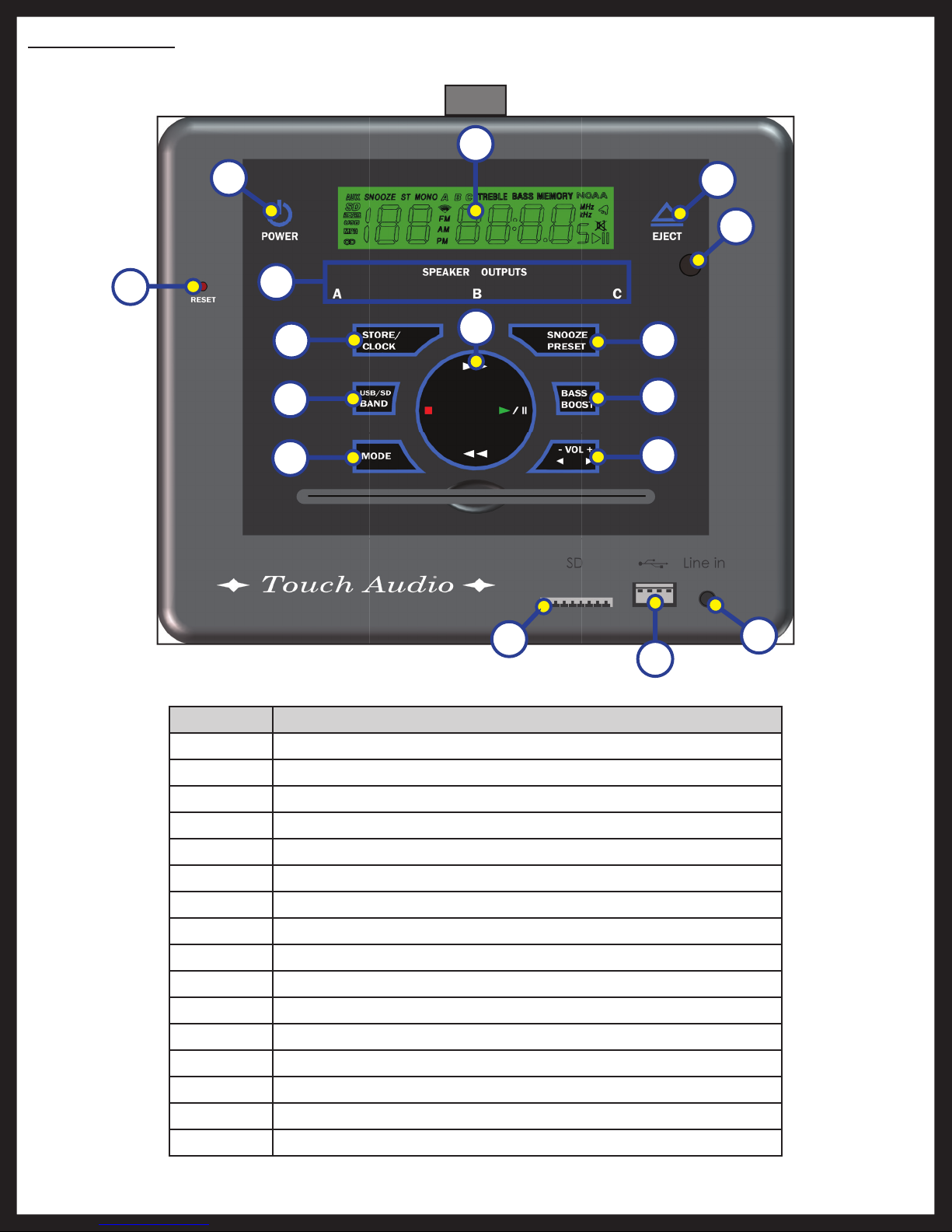
Fig. 1
Callout Description
A Power
B Reset (Must remove screw cover first)
C A/B/C Speaker Outputs
D Store/ Clock
E USB/ SD/ Band
F Mode
G LCD Display
H Stop/ Play/ Pause/ Fast Forward/ Rewind
I Eject
J Remote Sensor
K Snooze/ Preset
L Bass Boost
M Volume Up/ Volume Down
N SD/ MMC Card Port
O USB Port
P Auxiliary In
System Controls
A
D
C
E
F
B
G
I
J
K
L
M
N
O
P
H
Rev: 04.10.2014 Page 5 Touch Audio VD300WR Owners Manual
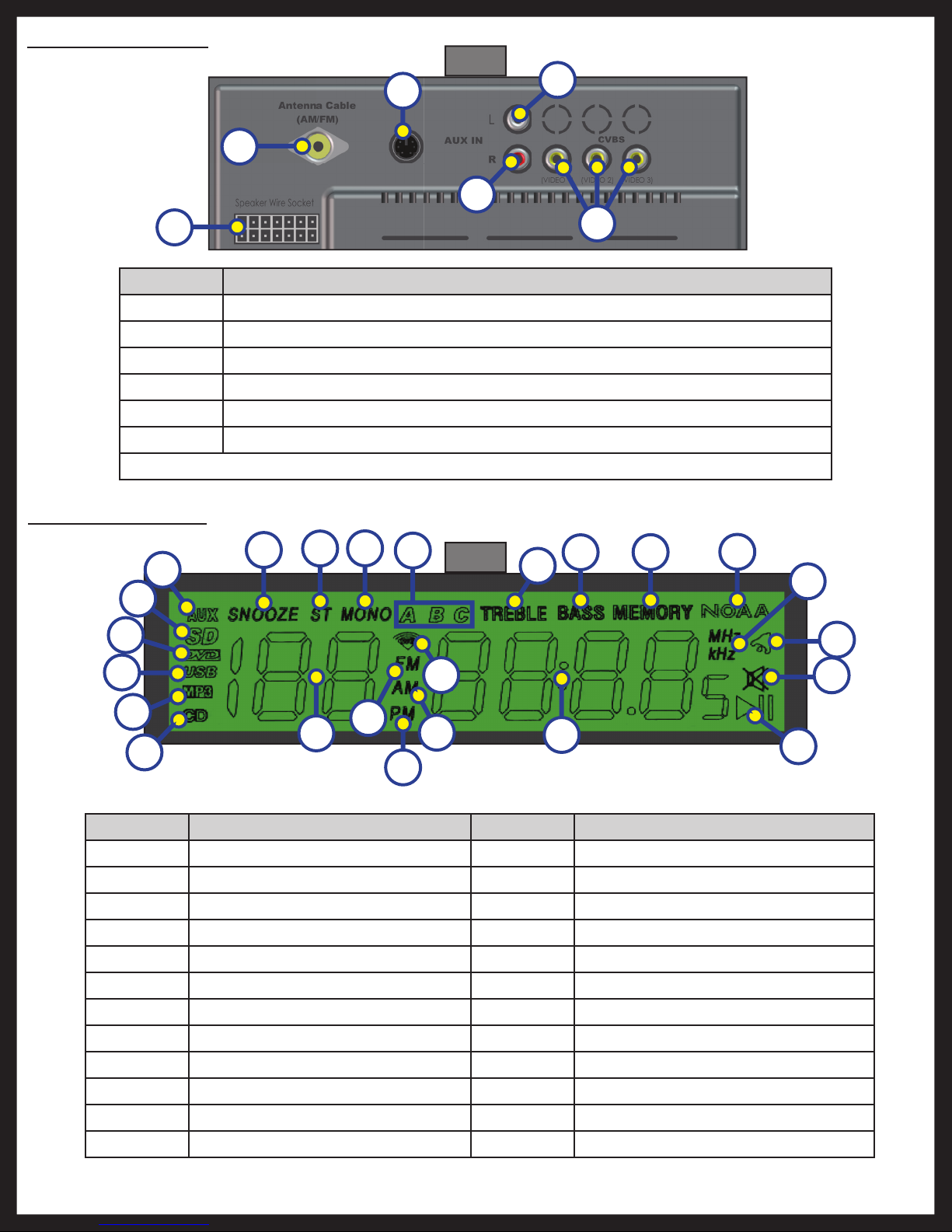
Fig. 2
Fig. 3
Callout Description
A Auxiliary In Mode
B SD/MMC Card Play
C DVD Disc Play
D USB Port Play
E MP3/WMA Play
F CD Play
G Snooze Mode
H FM Stereo Audio Mode
I FM Mono Audio Mode
J A/B/C Speaker Outputs
K Track/Preset Number
L FM Mode
Callout Description
M PM Mode
N AM Mode
O WB Mode
P Treble
Q Bass
R Disc/Radio/Clock Time
S Memory
T NOAA
U MHz/kHz Mode
V Alarm
W Mute
X Play/Pause
Callout Description
A Wiring Harness Port
B Automotive Antenna Port (AM/FM/WB)
C Wired Remote Port
D Auxiliary IN (R) TV Audio Input
E Auxiliary IN (L) TV Audio Input
F CVBS (3 Video Output)
NOTE: The wired remote with a 20ft cable is optional and plugs into Fig. 2C.
System Wiring Ports
System LCD Display
B
A
C
D
E
F
A
C
D
B
F
E
GHIQST
JP
V
W
X
U
M
R
N
O
L
K
Rev: 04.10.2014 Page 6 Touch Audio VD300WR Owners Manual
Wireless Remote Controls
E
A
I
M
Q
U
Y
CC
H
D
F
J
N
R
V
Z
DD
L
P
T
BB
FF
G
K
O
S
W
AA
EE
X
BC
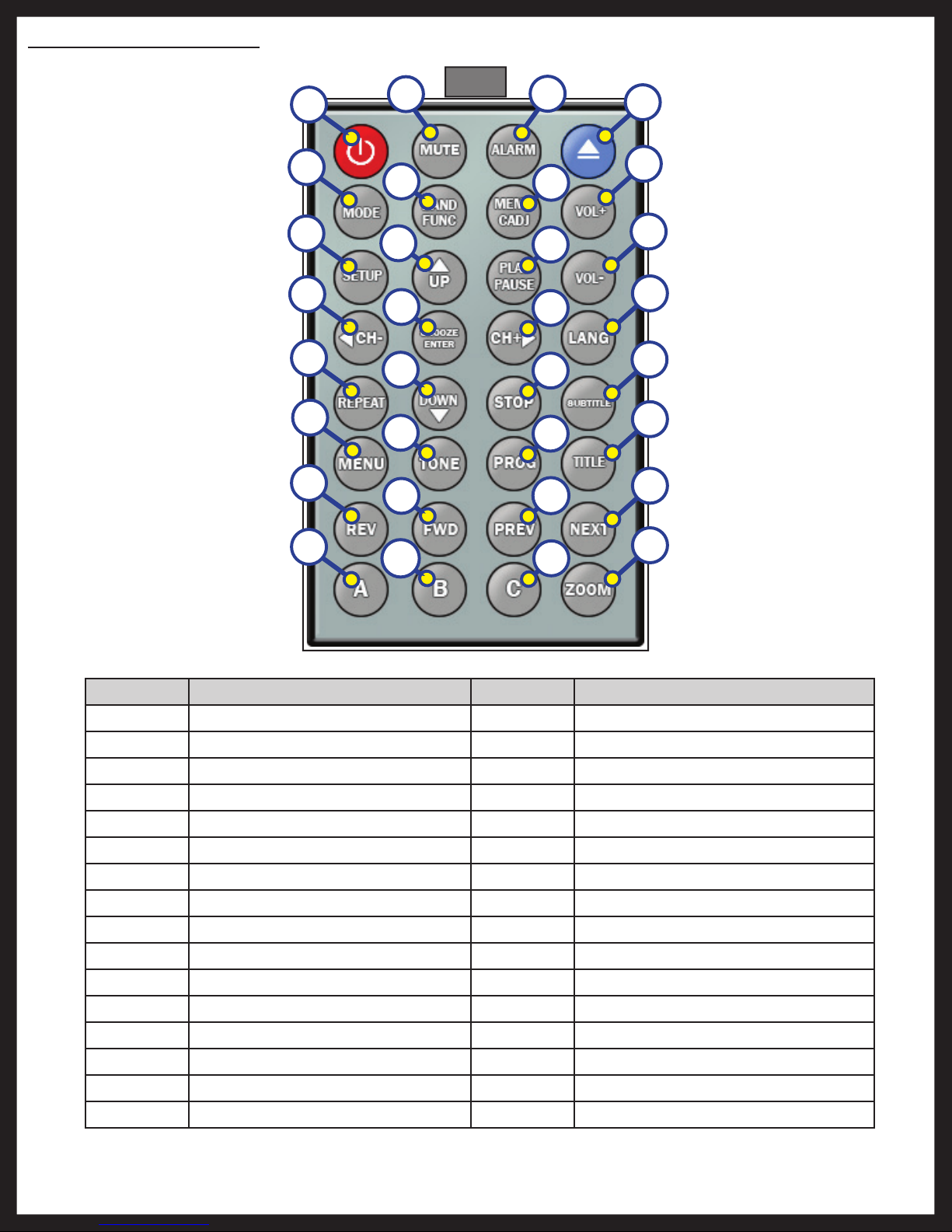
Fig. 4
Callout Description
A Power
B Mute
C Alarm
D Eject
E Mode
F Band/ Function
G Memory/ Clock Adjust
H Volume Increase
I Setup
J Up Arrow
K Play/ Pause
L Volume Decrease
M Channel Decrease/ Left Arrow
N Enter/ Snooze
O Channel Increase/ Right Arrow
P Language
Callout Description
Q Repeat
R Down Arrow
S Stop
T Subtitle
U Menu
V Tone
W Program
X Title
Y Rewind
Z Fast Forward
AA Previous
BB Next
CC A
DD B
EE C
FF Zoom
Rev: 04.10.2014 Page 7 Touch Audio VD300WR Owners Manual
Installation
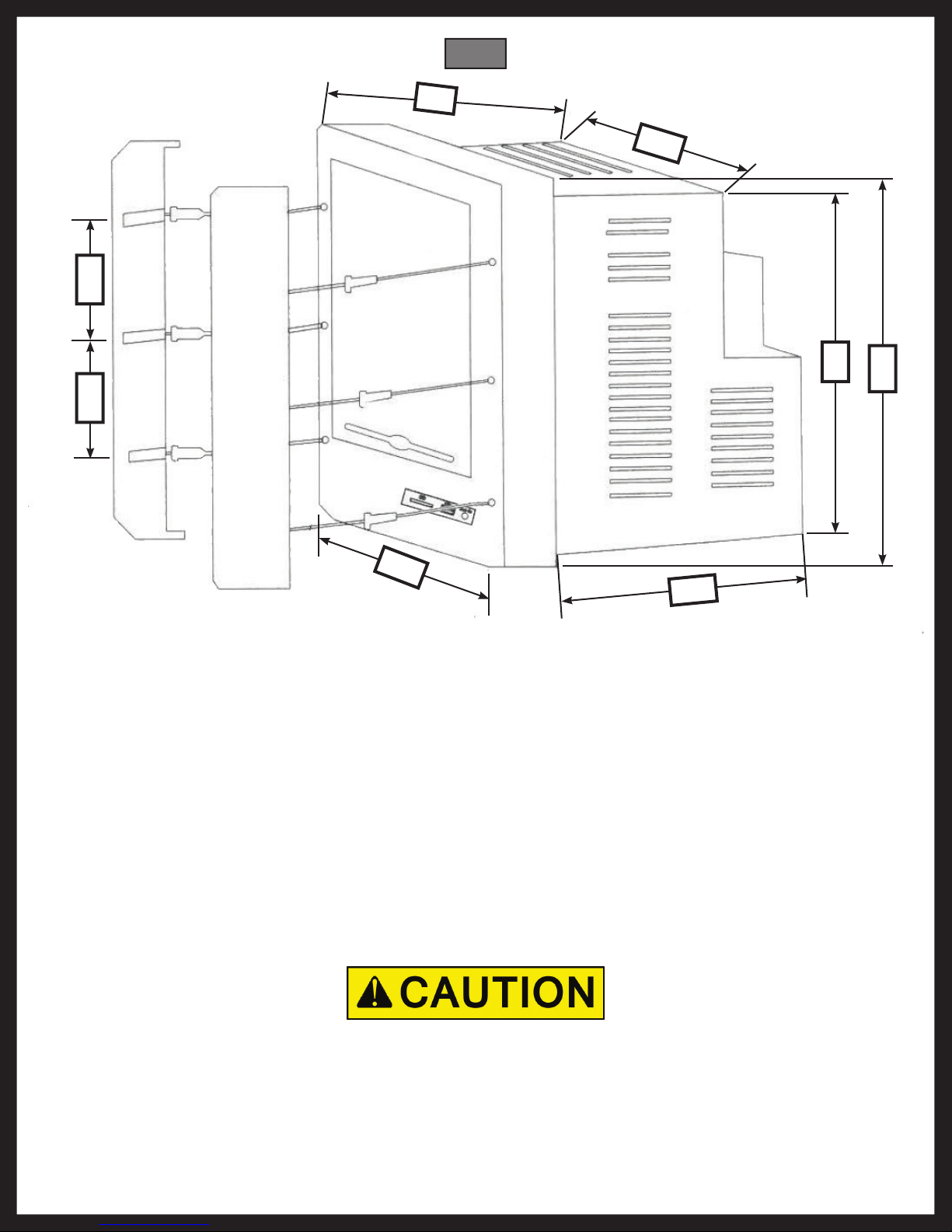
7.2"
7.67"
5.9"
7.08"
5.86"
8.86"
2.16 " 2.16 "
Accessories included:
• Wireless Remote
• FM Antenna (Pig Tail)
• RCA Cable (Video)
• Batteries (x2)
• Mounting Screws (x6)
• Wiring Harness (DC Power and Speakers)
• DC Power Extension (Red and Black Wires)
Mounting the Touch Audio:
1. Remove the screw covers.
2. Connect all wires and test the radio.
Connecting the speakers wrong will cause distortion and damage the power amplifier.
3. Mount the radio in the wall or cabinet.
4. Screw the unit in place, replace screw covers.
Fig. 5
Rev: 04.10.2014 Page 8 Touch Audio VD300WR Owners Manual
Speaker Wiring Harness
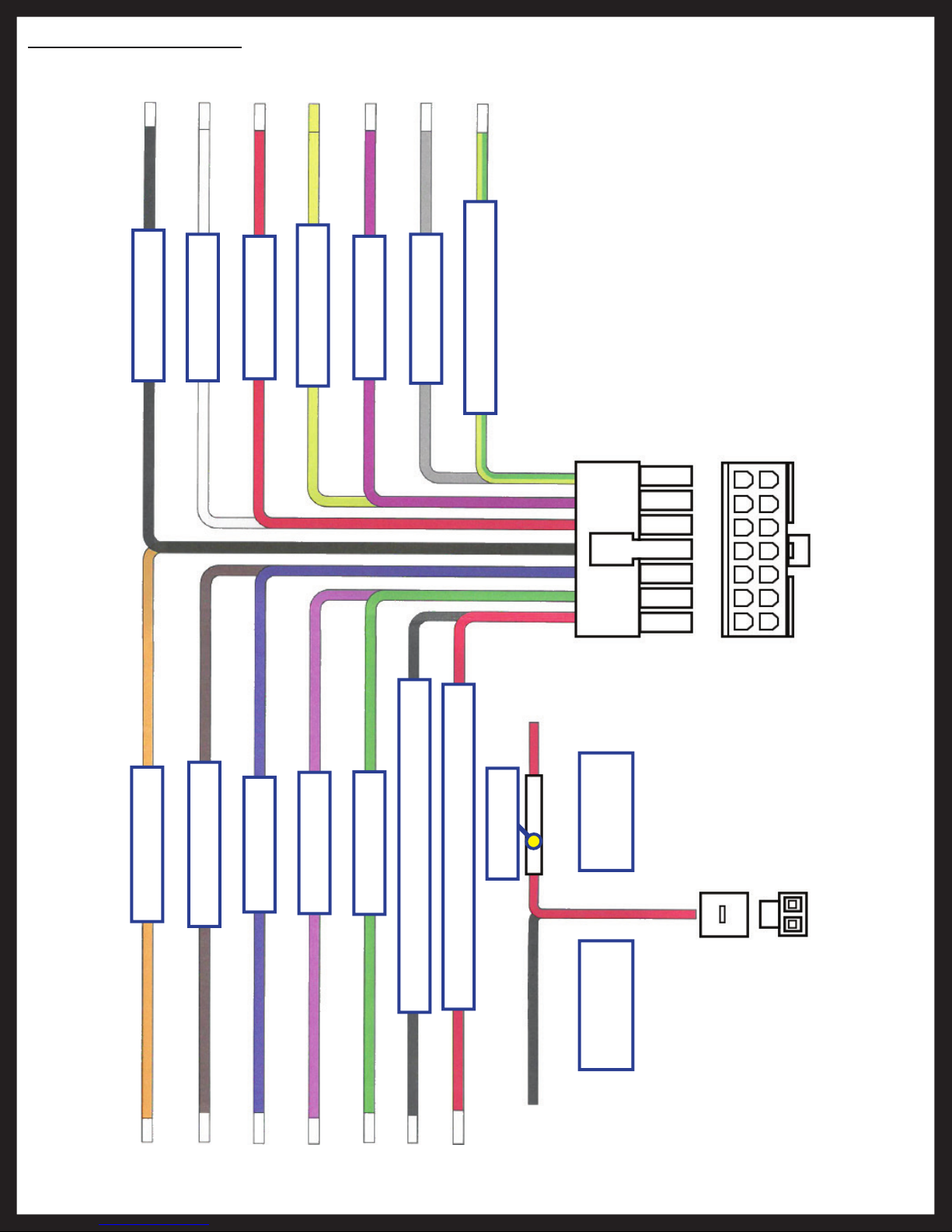
NOTE: Wrong connection or reversed polarity (+/-) can cause distortion and damage the power amplifier.
Black A-Right (-)
Orange C-Left (-)
Brown C-Right (+)
Blue B-Left (+)
Pink C-Right (-)
Green B-Left (-)
Power In Black #16 AWG Power 12V (-)
Power In Red #16 AWG Power 12V (+)
Power 12V+
Red +12V
Power 12V-
Black Ground
White C-Left (+)
Red A-Right (+)
Yellow B-Right (-)
Violet A-Left (-)
Grey B-Right (+)
Yellow/Green A-Left (+)
15A Fuse

Rev: 04.10.2014 Page 9 Touch Audio VD300WR Owners Manual
Operation
Remote
1. Power
A. Select power on or standby.
2. Setup
A. The setup screen will appear for Touch Audio settings.
NOTE: If pressed during DVD playback it will take you to the setup menu and auto pause the DVD.
3. Program
A. Saves the desired program.
4. Mode
A. Cycles through WB, auxiliary, radio and disc playback.
5. Band/Function
A. Cycle through radio modes including; FM, AM, Tuner and auxiliary.
6. Language Select
A. Press to select a language for instructions and press again to select disc language.
7. Alarm
A. Set an alarm.
8. Bass/Tone
A. Turn on bass boost.
9. Memory/Clock Adjust
A. Press to save current radio stations and set the clock time.
10. A
A. Select speaker channel A.
11. B
A. Select speaker channel B.
12. C
A. Select speaker channel C.
13. Subtitle
A. Turns on subtitles and cycles subtitle languages.
14. Up
A. Selects and changes modes and features setup.
15. Down
A. Selects and changes modes and features setup.
16. Channel Down /Left
A. Changes channel down and selects options in menu.
17. Channel Up /Right
A. Changes channel up and selects options in menu.
18. Snooze/Enter
A. Confirms selection and snoozes for 9 minutes.

Rev: 04.10.2014 Page 10 Touch Audio VD300WR Owners Manual
19. Volume Up
A. Increases the volume output.
20. Volume Down
A. Decreases the volume output.
21. Eject
A. Removes disc.
22. Menu
A. Switches to menu mode.
NOTE: DVD playback must be stopped before entering menu mode.
23. Title
A. Returns to the selection menu of DVD playback.
24. Mute
A. Reduces audio output to 0.
25. Stop
A. Stops playback , press play/pause to resume.
26. Play/Pause
A. Enters/returns normal playback. When in playback mode press to pause playback.
27. Repeat
A. Repeats current chapter or track. Press it twice to repeat the current disc or title.
28. Rewind
A. Reverses playback with no audio. Press multiple times to increase reversal speed.
29. Fast Forward
A. Increases playback speed with no audio. Press multiple times to increase playback speed.
30. Previous
A. Skips back to previous chapter or track.
31. Next
A. Skips forward to next chapter or track.
32. Zoom
A. Magnifies image during VCD/SVD/DVD playback.
Indice


