
LORGAR LRG-CMT521 Manuale utente

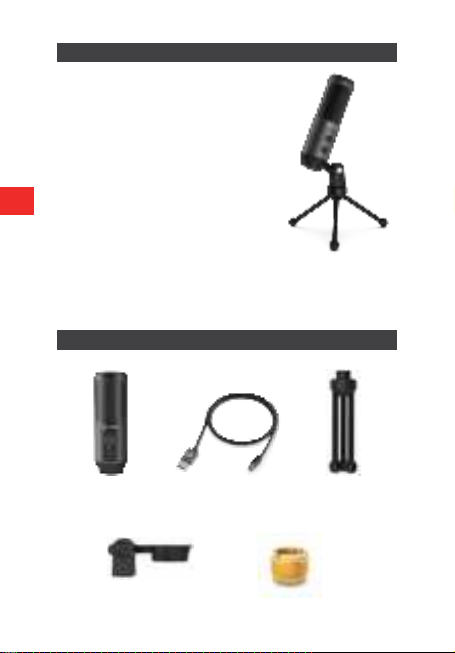
● Frequency Response: 50Hz—18kHz
● Sensitivity: -40dB±3dB
● S/N Ratio: 70dB (A-weighted)
● Recording format: 16bit
● Electrical Current: 75±5mA
● Nickel-plated diaphragm
● Plug and Play system
● Cardioid polar pattern
● Volume knob
● Mute button with LED indicator
● 360° Rotation & 180° Tilt
● 3,5 mm headphone jack
● Dimensions: 49 х154.6 х 56.1 mm.
● Compatible with Mac, Windows, Android and Sony PlayStation
● Supports Discord, OBS, FL Studio, Skype etc
FEATURES:
PACKAGE CONTENT
Pivot Mount
Microphone USB type C cable, 2 m Tripod
EN
3/8" to 5/8" universal
pantograph adapter

EN
INTRODUCTION
This device is operating on the principle "Plug and Play". Please connect or
insert necessary device with correct port.
Please turn the volume down when plugging the
microphone into the USB port, and gradually increase
the volume to an ideal level.
Press the mute button to turn the mute
option on. The indicator will turn red.
Screw the mount to adjust the shock mount
angle 180° vertically and screw the metal
ring to adjust the microphone angle 360°
horizontally.
Make sure the front of the microphone
points towards your mouth.
Volume up:
Clockwise (Turn right)
Volume down:
Counter-clockwise (Turn left)
The indicator will be green
after plugging to the computer.

EN
Lorgar Voicer-521 includes a standard 1/8″
(3.5mm) headphone jack for monitoring
and playback
Problem Solution
A computer couldn`t
identify the USB devices
Please restart a computer and connect
the microphone to another USB port.
The microphone is
detected but no output of
the sound
Make sure that System Sound isn`t
mute and you haven`t set a microphone
volume to minimum.
The microphone is
detected but no output of
the sound after updating
Windows 10
To let apps access the
microphone, please select
Settings>Privacy>Microphone, then
turn on Allow apps to access your
microphone.
PLUG & PLAY
Plug the USB cable into the USB port of your computer. Your computer will
automatically recognize the USB device and install a driver. The driver will
be installed automatically. If the microphone is not picking up sound, please
follow the instuctions below:
Read carefully and follow all instructions before using this
product.
1. Do not expose the device to excessive moisture, water or
dust. Do not install in rooms with high humidity and dust level.
2. Do not expose the device to heat: do not place it close to heating
appliances, and do not expose it to direct sun rays.
3. Clean the device with dry cloth only.
SAFETY INSTRUCTIONS

EN
The warranty period starts from the day of the product purchase from Lorgar
authorized Seller. The date of purchase is the date specied on your sales
receipt or on the waybill. During the warranty period, repair, replacement
or refund for the purchase shall be performed at the discretion of Lorgar. In
order to obtain warranty service, the goods must be returned to the Seller
at the place of purchase together with proof of purchase (receipt or bill of
lading). 2 years warranty from the date of purchase by the consumer. The
service life is 2 years. Additional information about the use and warranty is
available at https://lorgar.eu/warranty-terms/
Manufacturer: Asbisc Enterprises PLC, 43, Kolonakiou Street, Diamond
Court 4103 Ayios Athanasios
WARNING
It is forbidden to dismantle the device. Attempt to repair this device is not
recommended and leads to warranty waste.
WARRANTY

● Frekvencija: 50Hz—18kHz
● Osjetljivost: -40dB±3dB
● Omjer S/N: 70dB (A-weighted)
● Format snimanja: 16bit
● Struja: 75±5mA
● Niklovana membrana
● Plug and Play sistem
● Kardiodni Polarni uzorak
● Dugme za jačinu zvuka
● Isključivanje zvuka sa LED indicatorom
● Rotacija 360° & Nagib 180°
● Priključak za slušalice 3,5 mm
● Dimenzije: 49 х154.6 х 56.1 mm
● Kompaktibilan sa Mac, Windows, Android i Sony PlayStation
● Podržava Discord, OBS, FL Studio, Skype itd
KARAKTERISTIKE:
SADRŽAJ PAKOVANJA
Okretni nosač
Mikrofon USB kabal tip C, 2 m Tripod
BA
3/8" to 5/8" univerzalni
adapter za pantograf

BA
UVOD
Ovaj uređaj radi na principu “Plug and Play”. Povežite ili uključite uređaj u
ispravan priključak.
Smanjite jačinu zvuka prilikom uključivanja mikrofona
u USB priključak i postepeno povećavajte jačinu zvuka
do idealnog nivoa.
Pritisnite tipku za Isključivanje zvuka kako
biste uključili opciju Isključivanje zvuka.
Indikator će postati crven.
Zavrnite nosač da biste podesili ugao
nosača udarca za 180° vertikalno a metalni
prsten zavrnite, kako bi prilagodili ugao
mikrofona, za 360° vodoravno.
Pazite da prednji dio mikrofona bude
usmjeren prema ustima.
Pojačavanje zvuka:
U smjeru kazaljke na satu
(Okrenuti desno)
Smanjivanje zvuka:
U suprotnom smjeru od kazaljke
na satu (Okrenuti lijevo)
Nakon priključenja na računar
indikator će biti zelen.

BA
Lorgar Voicer-521, priključak za slušalice
uključuje standard 1/8″ (3.5mm) za nadzor
i reprodukciju.
Problem Rješenje
Računar ne prepoznaje
USB priključak
Molimo ponovo pokrenite računar i
uključite mikrofon u drugi USB priključak.
Mikrofon je identikovan,
ali nema zvuka.
Provjerite da System Sound nije isključen
i da niste podesili jačinu zvuka na
mikrofonu na minimum.
Mikrofon je detektovan,
ali nema zvuka nakon
ažuriranja Windows 10
sistema.
Da biste dopustili pristup aplikacijama,
molimo odaberite sljedeće
Settings>Privacy>Microphone, zatim
uključite Allow apps kako bi odobrili
pristup mikrofonu.
PLUG & PLAY
Uključite USB kabal u USB priključak na računaru. Računar će automatski
prepoznati novi USB uređaj i obaviti automatski instalaciju. Ako mikrofon ne
registruje zvuk molimo da pratite sljedeće instrukcije:
Pažljivo pročitajte i pratite sve upute prije korištenja proizvoda.
1. Ne izlažite uređaj prekomjerenoj vlazi, vodi ili prašini. Nemojte
postavljati uređaj u prostorijama sa visokim stepenom vlage i
prašine.
2. Ne izlažite uređaj vrućini! Uređaj nemojte postavljati u blizini uređaja za
grijanje i direktnim sunčevim zrakama.
3. Uređaj možete čistiti samo sa suhom krpom.
SIGURNOSNE INSTRUKCIJE

BA
Garancija na proizvod je dvije godine. Garantni period počinje od dana
kupovine proizvoda od ovlaštenog Lorgar prodavca. Datum kupovine je
datum naveden na računu. Tokom garancijskog perioda, popravka, zamjena
ili povrat novca izvršit će se prema uputama od strane Lorgar-a. Da bi se
pokrenuo postupak garancije, proizvod mora biti vraćen Prodavcu, zajedno
sa računom i garantnim listom. Dodatne infomacije o upotrebi i garanciji su
dostupne na https://lorgar.eu/warranty-terms/
Proizvođač: Asbisc Enterprises PLC, 43, Kolonakiou Street, Diamond Court
4103 Ayios Athanasios
UPOZORENJE
Zabranje je demontirati uređaj. Pokušaj popravke ovog uređaja se ne
preporučuje i dovodi do gubitka garancije
GARANCIJA
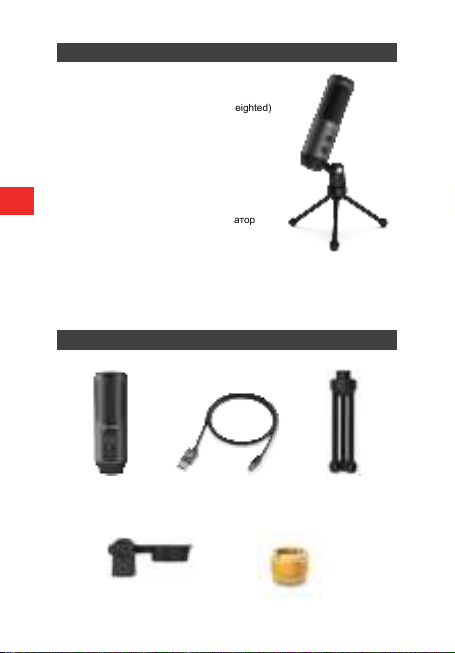
● Честотен диапазон: 50Hz—18kHz
● Чувствителност: -40dB±3dB
● Отношение сигнал/шум: 70dB (A-weighted)
● Формат на запис: 16bit
● Електрически ток: 75±5mA
● Никелирана диафрагма
● Plug and Play система
● Кардиоиден полярен модел
● Бутон за силата на звука
● Бутон за заглушаване с LED индикатор
● 360° Завъртане & 180° Наклон
● 3,5 mm жак за слушалките
● Размери: 49 х154.6 х 56.1 mm.
● Съвместима с Mac, Windows, Android и Sony PlayStation
● Поддържа Discord, OBS, FL Studio, Skype и др.
ХАРАКТЕРИСТИКИ
СЪДЪРЖАНИЕ НА ПАКЕТА
Стойка за монтаж
Микрофон USB кабел type C, 2 м Триножник
BG
3/8" до 5/8" универсален
адаптер за пантограф
Indice
Lingue:
Altri manuali LORGAR Microfono


