
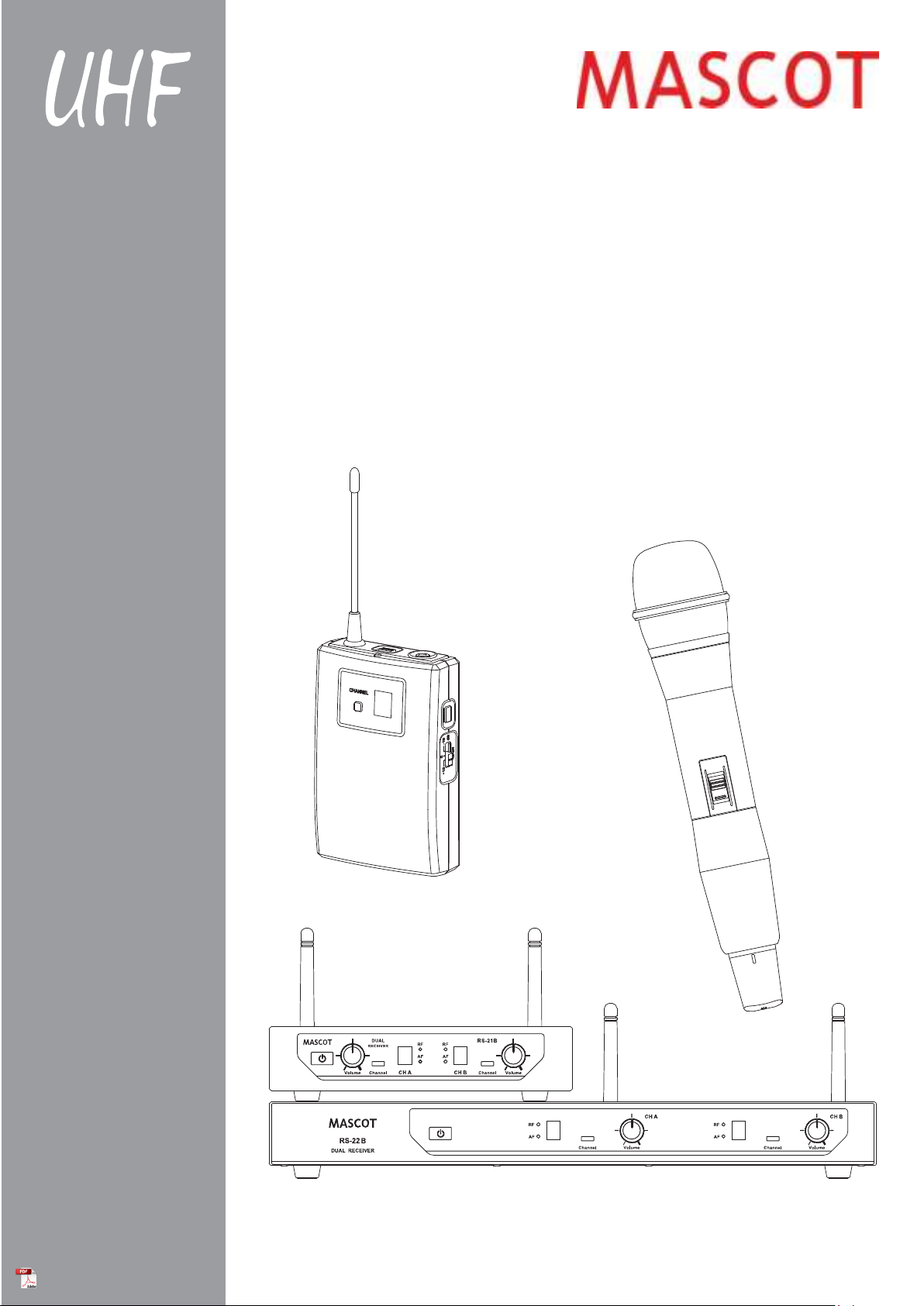
MASCOT RS-21B Manuale utente
Contents:
Introduction
Quick Start Guide
Product Description
System Operation
Color Label Identification
Basic Connections
Trouble Shooting
Specification
-------------------------------------------------------------------------- 1
------------------------------------------------------------------ 2
---------------------------------------------------------------- 4
------------------------------------------------------------------ 8
--------------------------------------------------------- 10
----------------------------------------------------------------- 11
------------------------------------------------------------------- 12
------------------------------------------------------------------------- 13
This device complies with Part 15.236 of the FCC Rules. Operation is subject to the following
two conditions:(1)This device may not cause harmful interference and (2) This device must
accept any
The changes or modifications not expressly approved by the party responsible for
compliance could void the user’s authority to operate the equipment.
IMPORTANT NOTE: To comply with the FCC RF exposure compliance requirements, no
change to the antenna or the device is permitted.
could result in the device exceeding the
to operate the device.
Thank you for purchasing our product. This PLL synthesized wireless microphone system
operates in UHF band frequency with 8 selectable channels. Please read this instruction
manual carefully before operating the system. This manual covers the function and operation
of the wireless microphone system.
Safety
Do not spill liquid on the appliance and do not drop it on a hard concrete floor.
Do not place the equipment near heat sources such as radiators, heating ducts, amplifier, etc.
Do not expose the equipment to direct sunlight, extremely dust, excessive moisture, rain,
mechanical vibrations, or shock.
Take out the battery from transmitter, if the appliance has been not used for a longer period.
This will avoid the damage resulting from a defective leaking battery.
WARNING: To reduce the risk of fire or electric shock, do not use the products near water
and do not expose them to rain or moisture.
Environment
When disposing the equipment, remove the batteries, separate the case, circuit boards,
and cables, and dispose of all components in accordance with local waste disposal rules.
Do not throw used batteries into a fire or garbage bin with domestic rubbish. Be sure to
dispose of used batteries in accordance with local waste disposal rules.
If the equipment is not going to be used for a long time, disconnect the AC adapter from
the power outlet. Please note that if you turn the equipment off while leaving the AC
adapter plugged in, it is not fully isolated from the power supply.
No guarantee claims for the equipment and no liability for any resulting personal damage
or material damage will be accepted if the equipment is used for other purpose than
originally intended, if the equipment is not correctly connected or operated, or if the
equipment is not repaired in an expert way.
Notice :
FCC Statement
interference received, including interference that may cause undesired operation.
Introduction
Any change to the antenna or the device
RF exposure requirements and void user’s authority
1
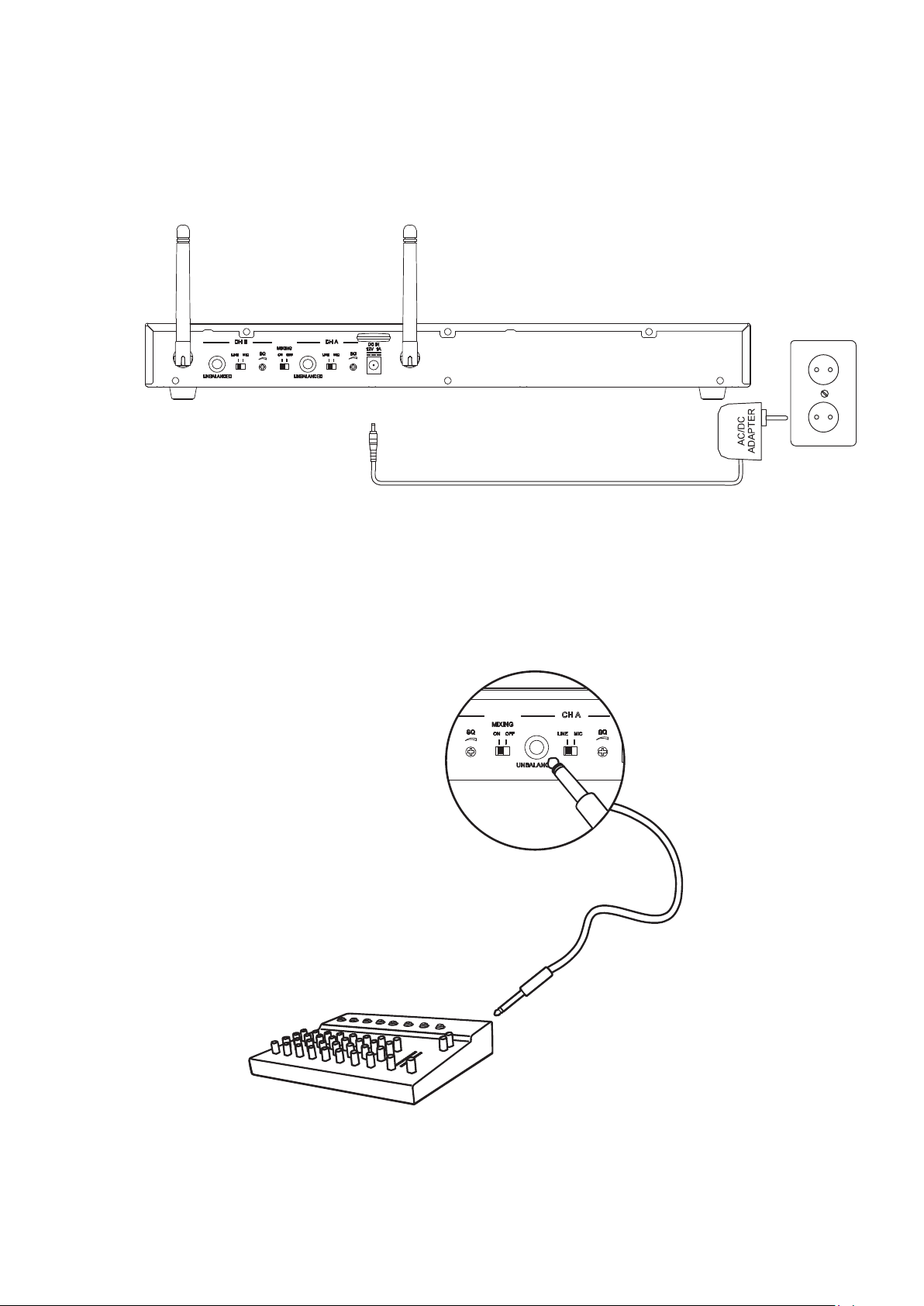
1. Connected Receiver Power Cable
2. Connect Mixer or Amplifier
2
Quick Start Guide
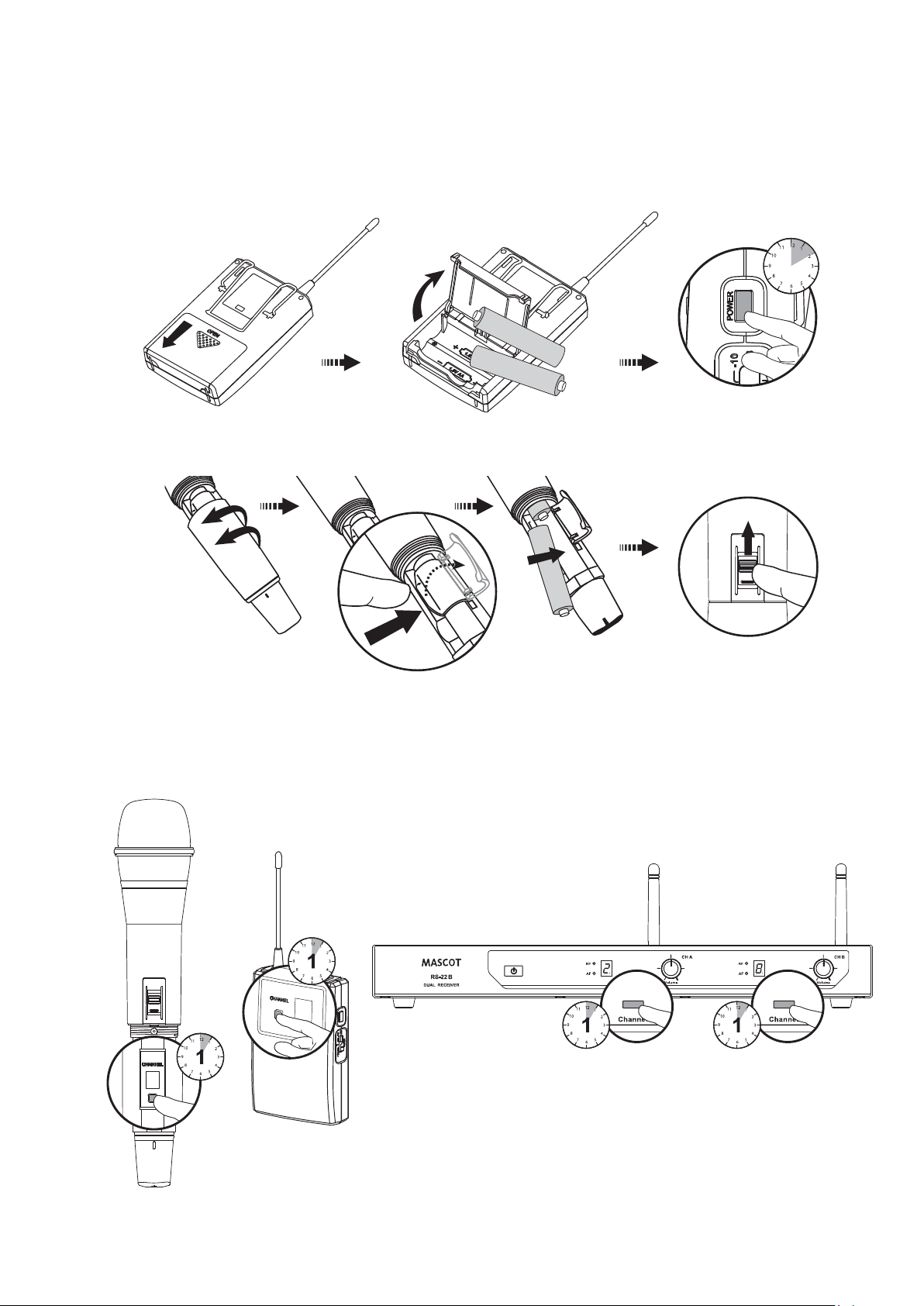
3. Insert Batteries
4. Select channel
3
Quick Start Guide
2
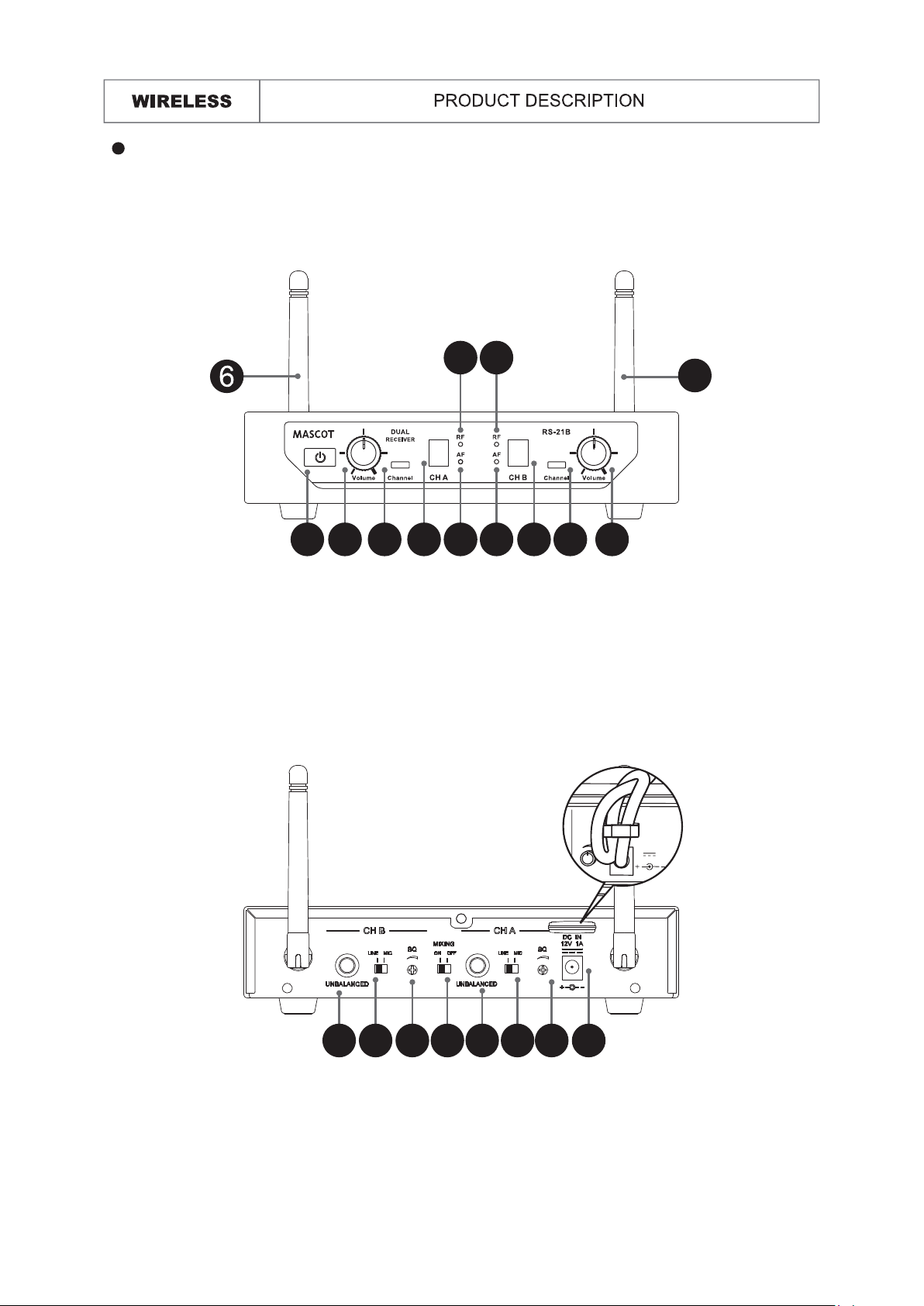
Front :
Rear :
RS-21B: Dual Channel Receiver
4
Receiver
1. Unbalanced 6.35mm Audio Output
2. Mixing Output Switch: Audio to both Mix A Channel and B Channel Outputs
3. MIC/LINE Switch: Use this switch to adjust audio output level for MIC level (-20dB) or
LINE level (0dB)
4. Squelch: Turn the knob to adjust or decrease the noise floor level
5. Power Adapter Connector
1. Power Button
2. AF Indicator: Display the reception status of AF signal.
3. RF Indicator: Display the reception status of RF signal.
4. LED Display: Display selected channel.
5. Channel Selector: Tap the channel backward.
6. Fixed UHF Antenna
7. Volume Control: Adjust the receiver output level.
1 2
3
2
3
4 45 5
6
7 7
DC 12V 500mA
MIC
SQ
51 3 24 1 3 4
5
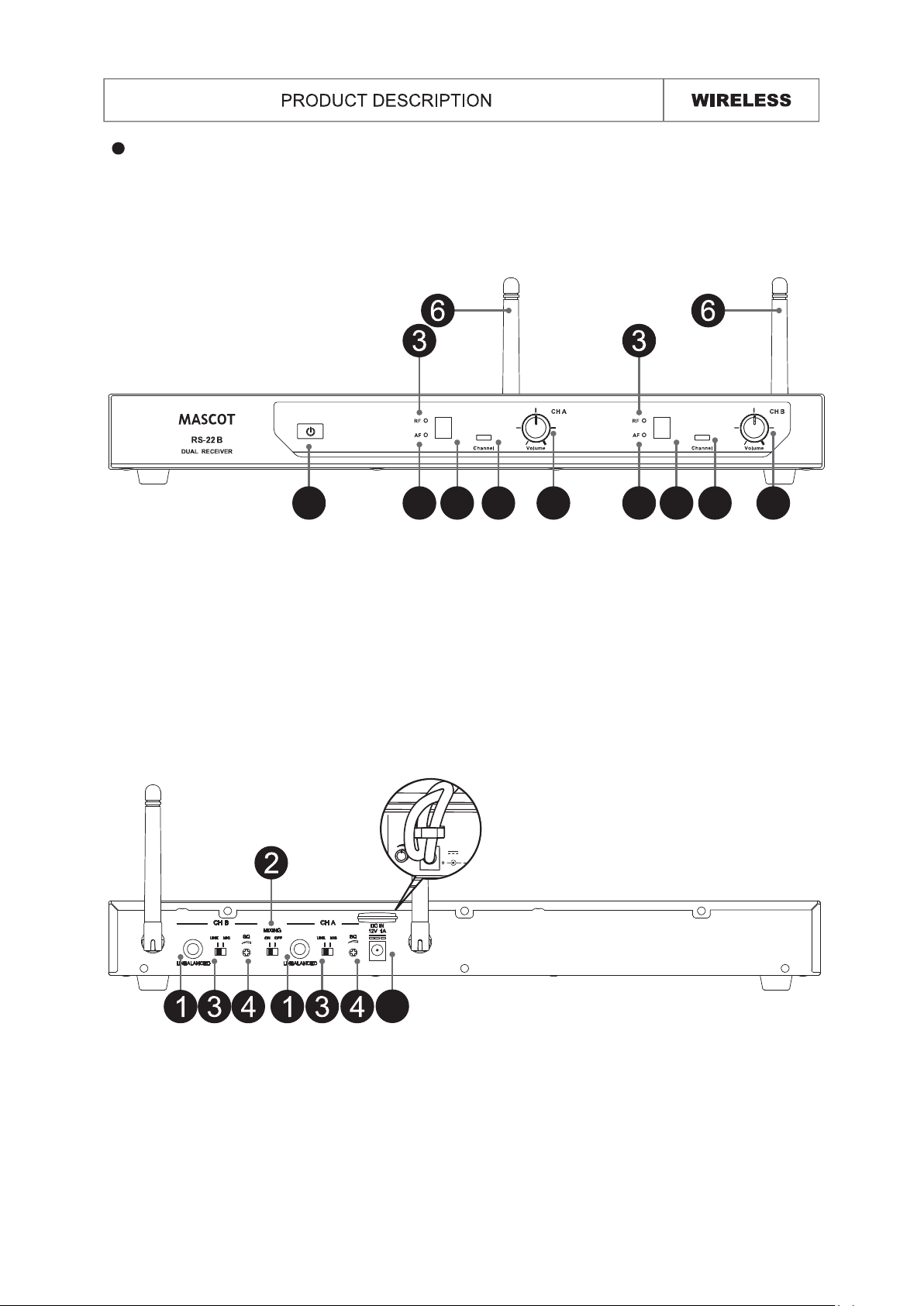
Front :
Rear :
RS-22B: Dual Channel Receiver
Receiver
1. Unbalanced 6.35mm Audio Output
2. Mixing Output Switch: Audio to both Mix A Channel and B Channel Outputs
3. MIC/LINE Switch: Use this switch to adjust audio output level for MIC level (-20dB) or
LINE level (0dB)
4. Squelch: Turn the knob to adjust or decrease the noise floor level
5. Power Adapter Connector
1. Power Button
2. AF Indicator: Display the reception status of AF signal.
3. RF Indicator: Display the reception status of RF signal.
4. LED Display: Display selected channel.
5. Channel Selector: Tap the channel backward.
6. Fixed UHF Antenna
7. Volume Control: Adjust the receiver output level.
1 2 4 5 7 2 4 5 7
5
DC 12V 500mA
MIC
SQ
6
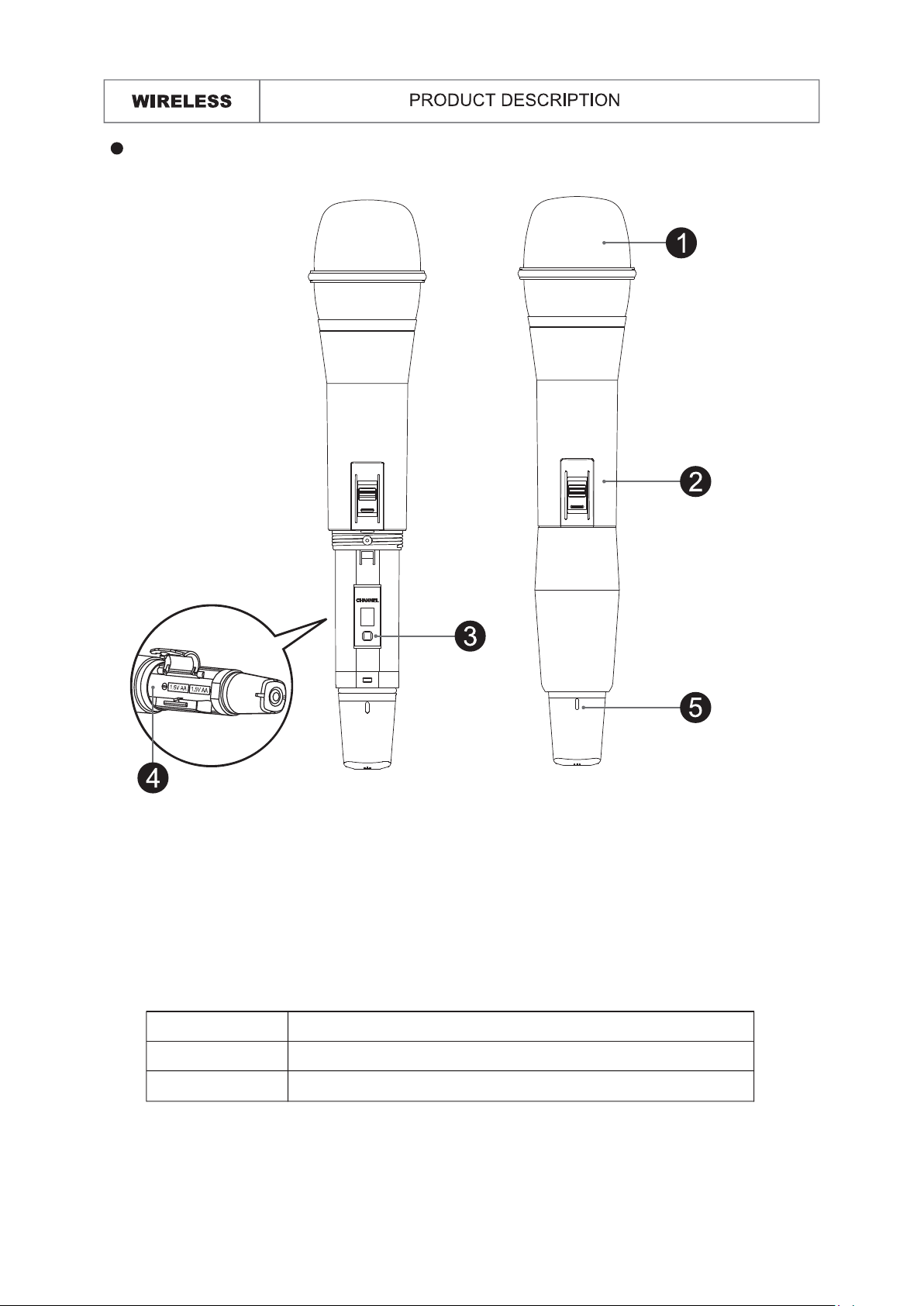
UF-21B Handheld Microphone
1. Grille: Protects the microphone capsule and helps reduce breath sounds and wind
noise.
2. Talk Switch: Push the switch up to talk. Push the switch down for mute.
3. Channel Selector: 8 different selectable channels.
4. Battery Compartment: Insert two AA size batteries into the compartment and make
sure that the polarity of batteries is correct.
5. Power LED: Indicate the power / low battery level status.
LED Indicator Status
Green Ready
Flashing Red Low battery power when less than 10 minutes operation
7
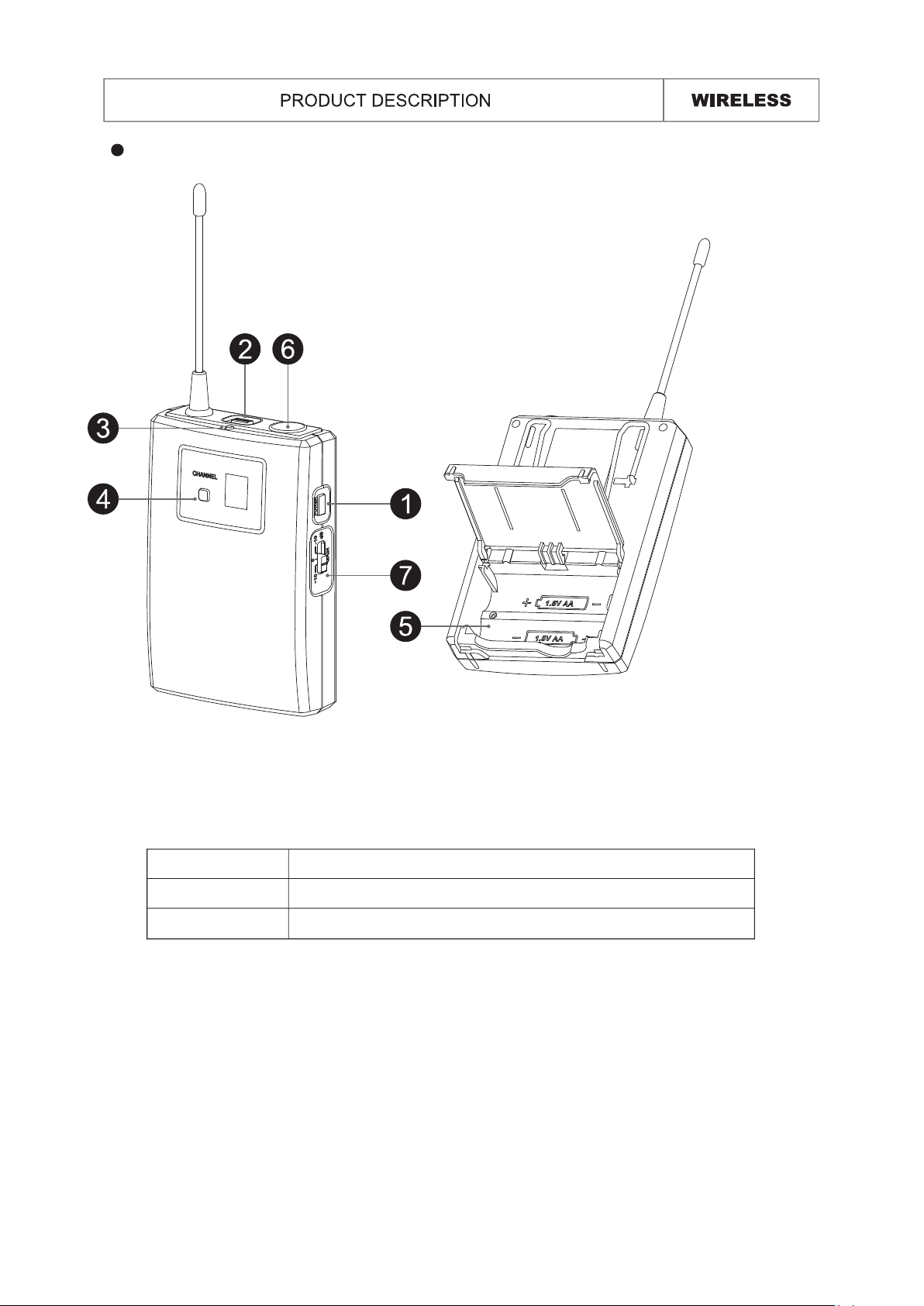
UT-16B Bodypack Transmitter
1. Power Button: Press for 2 seconds to power the microphone on or off.
2. Mute Button: With the transmitter on, a slight press for button will toggle between mute
and unmute function.
3. Power LED: Indicate the power / low battery level status.
4. Channel Selector: 8 different selectable channels.
5. Battery Compartment: Insert two AA size batteries into the compartment and make
sure that the polarity of batteries is correct.
6. 3.5ø screw plug: Connect to the lavalier microphone or headset microphone.
7. Gain Switch: The switch sets the audio input to -10dB, 0dB, 10dB
LED Indicator Status
Green Ready
Flashing Red Low battery power when less than 10 minutes operation
LINEMIC
NBALANCED
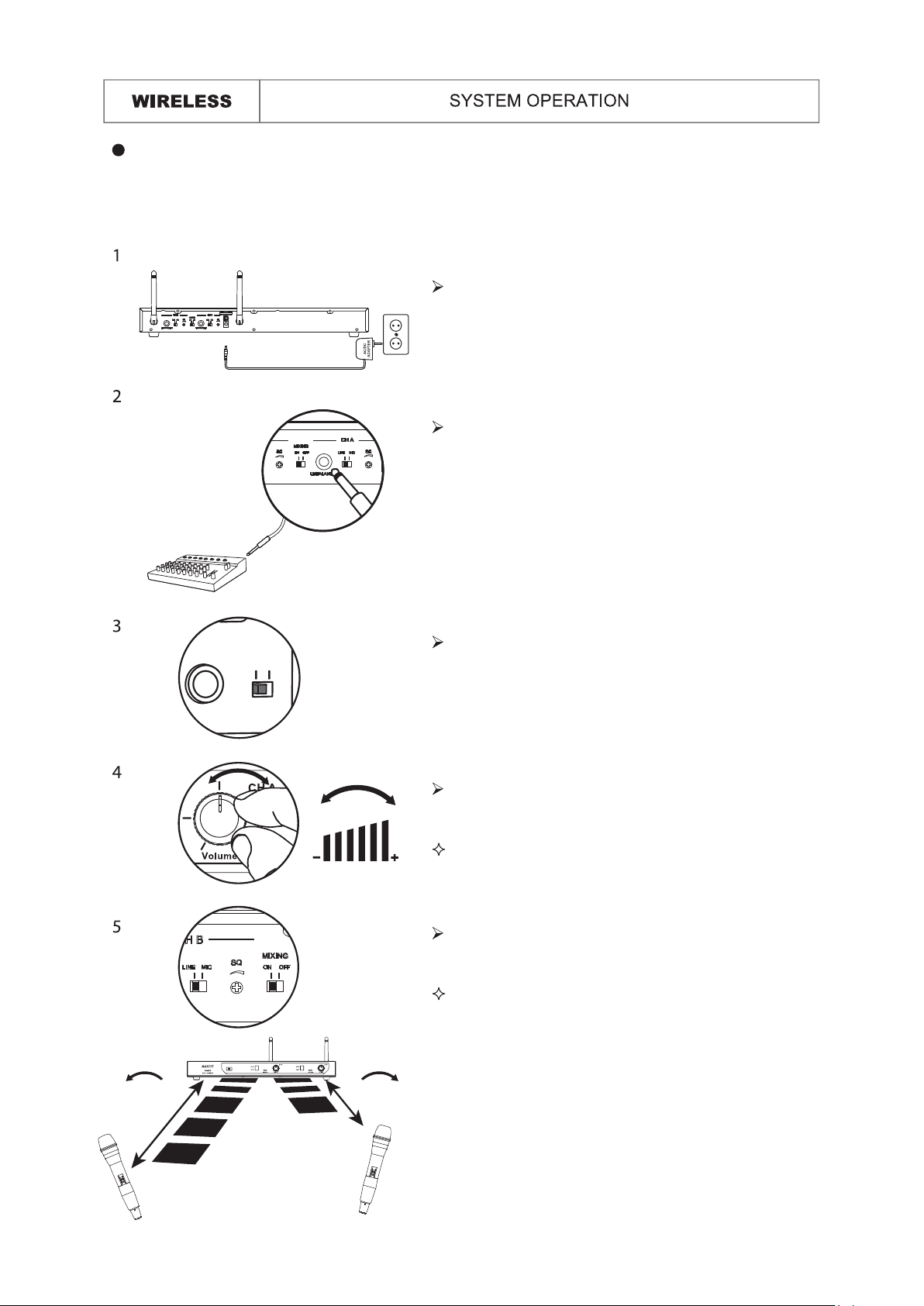
Prior to setting up, please check that the transmitter and receiver are tuned to the same
frequency or channel. Two or more transmitters operating in the same frequency can not
be used at the same time and area.
VOLUME
min.
SQ
max.
SQ
Connected the provided DC power supply to
the receiver power input with an appropriate
AC power source. The LED display will light
and the receiver is on.
Set the audio output level for
MIC: -20dB
LINE: 0dB (Default Setting)
Using the Volume Controller to adjust the AF
audio level to the input of the amplifier or mixer.
Use squelch to eliminate or suppress the
ambient RF noise.
Using a standard audio cable with 6.3mm phone
plugs to connect the mixer or amplifier.
Default Setting: In minimum VOLUME position.
Defaulting Setting: In properly position.
8
Connecting the receiver
Questo manuale è adatto per i seguenti modelli
1
Indice
Altri manuali MASCOT Sistema microfonico


Manuali Sistema microfonico popolari di altre marche


Sennheiser
Sennheiser Evolution Wireless Digital EW-DX EM 2 Manuale utente

Alpha Technologies
Alpha Technologies RBMS Manuale utente

SWIT Electronics Co.,LTD.
SWIT Electronics Co.,LTD. CW-S150 Manuale utente

Shure
Shure UA844 Manuale utente

Panasonic
Panasonic SHFX70 - DVD HOME THEATER WIRELESS SYSTEM Manuale utente

Pyle
Pyle PDWM5000 Manuale utente