
mbeat DAB02K Manuale utente

1
Quick Start Guide
Caution: DAB02 is a portable DAB+/DAB/FM player, without
built-in antenna, an external earphone plug or audio cable must
be plugged to the device to get reception to scan radio channels.
Press and hold the Power Button for more than 3 seconds
to turn on the radio.
DAB Radio
When the DAB mode is selected for the rst time, press the M
Button to enter into <Region> to select a region,Australian user
please select [AU&EURO] region for DAB+ radio. then radio will
automatically search for local DAB and DAB+ radio stations.
Selecting <Station List>, it will display all the radio stations found
and play the rst radio station automatically.
FM Radio
Press the DAB+/FM Button then switch to FM mode. Press the
M Button to access to the FM Main Menu.
Use the“ ”Button to select <Auto Program> and then press
the Enter Button, some new stations will replace the pre-stored
radio stations.
MP3
MP3 les stored into a TF card, it can be played back through
the radio by inserting card into the card slot on the bottom of the
radio.
Recording Function
It is possible to record FM or DAB broadcast to TF card. (Please
ensure the TF card was inserted before recording.)
System Setup
Set Power off Time can save the battery power.
Time Setup: You can set the time and date manually and also
can use the DAB broadcast as time synchronize.
You can set the Brightness; Backlight Time out and can check
the version information.

2
User Manual
1. Introduction.........................................................................4
2. Packaging and Specication .....................................4
2.1 Packaging................................................................4
2.2 Specications ..........................................................5
2.2.1 DAB Function .................................................5
2.2.2 FM Function.....................................................5
2.2.3 MP3 .................................................................6
2.2.4 Time.................................................................6
2.2.5 Battery .............................................................6
2.2.6 General............................................................6
3. Button Instruction................................................................7
4. Display Screen ...................................................................9
4.1 Playing Screen .......................................................9
4.2 Menu Screen .........................................................10
4.3 Information Screen ................................................ 11
4.4 Query Screen ........................................................12
5. Main Menu........................................................................13
6.DAB Menu.......................................................................15
6.1 Preset List .............................................................16
6.2 Station List ............................................................16
6.3 Local Scan.............................................................16
6.4 Manual Tune ........................................................17
6.5 Region ...................................................................17
6.6 DRC.......................................................................18
6.7 Record ...................................................................18
6.8 Sort ........................................................................18
6.9 System Setup .......................................................18
6.10 Main Menu ...................................................18
7. DAB Mode Operation .......................................................19
7.1 Basic Operation .....................................................19
7.1.1 Power on DAB for the First Time...................19
7.1.2 Power on DAB after the First Time................19
7.1.3 Select Stations...............................................19
7.1.4 Playing Stations.............................................19
7.1.5 Storing Stations .............................................19

3
7.1.6 Recalling Preset Stations ..............................20
7.1.7 Display Station Information ...........................20
8. FM Radio Menu Introduction and Operation ....................20
8.1 Preset List..............................................................20
8.2 Channel List...........................................................20
8.3 Seek Mode ............................................................21
8.4 Tune Mode.............................................................21
8.5 Auto Program.........................................................21
8.6 Clear All List...........................................................22
8.7 Region ...................................................................22
8.8 Scan Setting ..........................................................23
8.9 Audio Setting .........................................................23
8.10 Record............................................................24
8.11 System Setup .................................................24
8.12 Main Menu......................................................24
9. MP3 .................................................................................25
9.1 TF Card .................................................................25
9.2 Audio Setting Menu ..............................................26
9.2.1 Play Mode......................................................26
9.2.2 Play Range....................................................27
9.2.3 EQ .................................................................27
9.3 System Setup ........................................................28
9.4 Main Menu............................................................28
9.5 MP3 User Interface for Display..............................28
10. System Setup Menu Introduction and Operation............28
10.1 Set Power Off Time .............................................29
10.2 Time Setup ..........................................................29
10.2.1 Display Time & Date....................................29
10.2.2 Set Time & Date ..........................................29
10.3 Brightness............................................................30
10.4 Backlight TimeOut ...............................................30
10.5 Reset All ..............................................................30
10.6 Info.......................................................................31
11. Safety Warning ...............................................................31

4
1. Introduction
DAB02 is a digital radio with DAB, DAB+, FM and MP3
functions.
DAB stands for Digital Audio Broadcasting and it is the third-
generation broadcasting system after AM and FM analogue
broadcasting. This new transmission system has great anti-
interference performance qualities and can eliminate noise
and distortion during the transmission process, automatically
correcting errors, can also be amended which leads it to
provide near CD-quality sound.
DAB+ is the updated version of the DAB standard and is used
in many European countries as well as Australia, Canada,
China and South Korea. The DAB+ standard is based on
HE-AACv2 and can deliver the same high quality sound at a
much lower bit rate.
As DAB Radio isn’t available everywhere in the world,
DAB02 has FM radio function for choosing.
In MP3 mode, it can play MP3 music les which stored into
TF card.
2. Packaging and Specication
2.1 Packaging
Thank you for choosing the DAB radio, please check the
accessories in the box according to the list as below. If there
is anything missing, please contact your retailer.
1. DAB+ radio device 1pc
2. USB 2.0 charging cable 1pc
3. Earphone 1pc
4. User Manual 1pc
5. Adapter 1pc (optional)

5
2.2 Specications
2.2.1 DAB Function
The DAB radio can receive and play all the
Band III radio stations, the frequency range
of DAB band III is 174.928MHZ-239.2MHZ
Supports Region setting, so the device
will search the appropriate band for the
radio stations when the user has set up the
default Region.
Supports local searching.
Supports searching by preferred frequency
channel.
Supports DRC function.
Supports recording function, and the default
recording format is MP2 when it is in DAB
status. The default recording format is AAC
when it is in DAB+ status. The capacity is
up to the capacity of TF card.
Supports preset, and the maximum number
of preset station is 30.
2.2.2 FM Function
Also you can use the device to receive
and play FM radio stations, and the FM
frequency range is 87.5MHZ-108MHZ, the
interval is 0.1MHZ.
Supports searching and playing strong
signal radio stations only.
Supports playing the radio stations only in
Mono mode.
Supports searching and storing the radio
stations automatically. The maximum is 30
radio stations in the Channel list.
Supports preset function, and the maximum
number of preset station is 30.

6
Supports Tune and Seek mode.
Supports recording function. The default
recording format is MP3, and the capacity is
up to the capacity of TF card.
Supports clearing all the pre-stored radio
station list, including the preset list and the
channel list.
Supports RDS function.
2.2.3 MP3
The device supports playing music les
from TF card.
Playing mode supports <One Time>,
<Repeat> and <Shufe> mode.
Playing range can be <Single>, <Directory>
and <All> les.
Supports equalizer function.
Supports play, pause, next, previous
function.
2.2.4 Time
The time can be set up manually or can use
the DAB broadcast as time synchronize.
User can set 30 minutes, 45 minutes or 60
minutes to turn off the device automatically.
2.2.5 Battery
1. Build in 700mAh Li-polymer battery, playing time is over 10
hours
2. Charging time: 3 hours.
3. The charging current: 300mAh
4. Circle times: over 300 times.
2.2.6 General
1. 3.5-mm stereo earphone jack.
2. Dimension: 54*93.5*15.5mm (H*W*D)
3. Weight: 64 grams

7
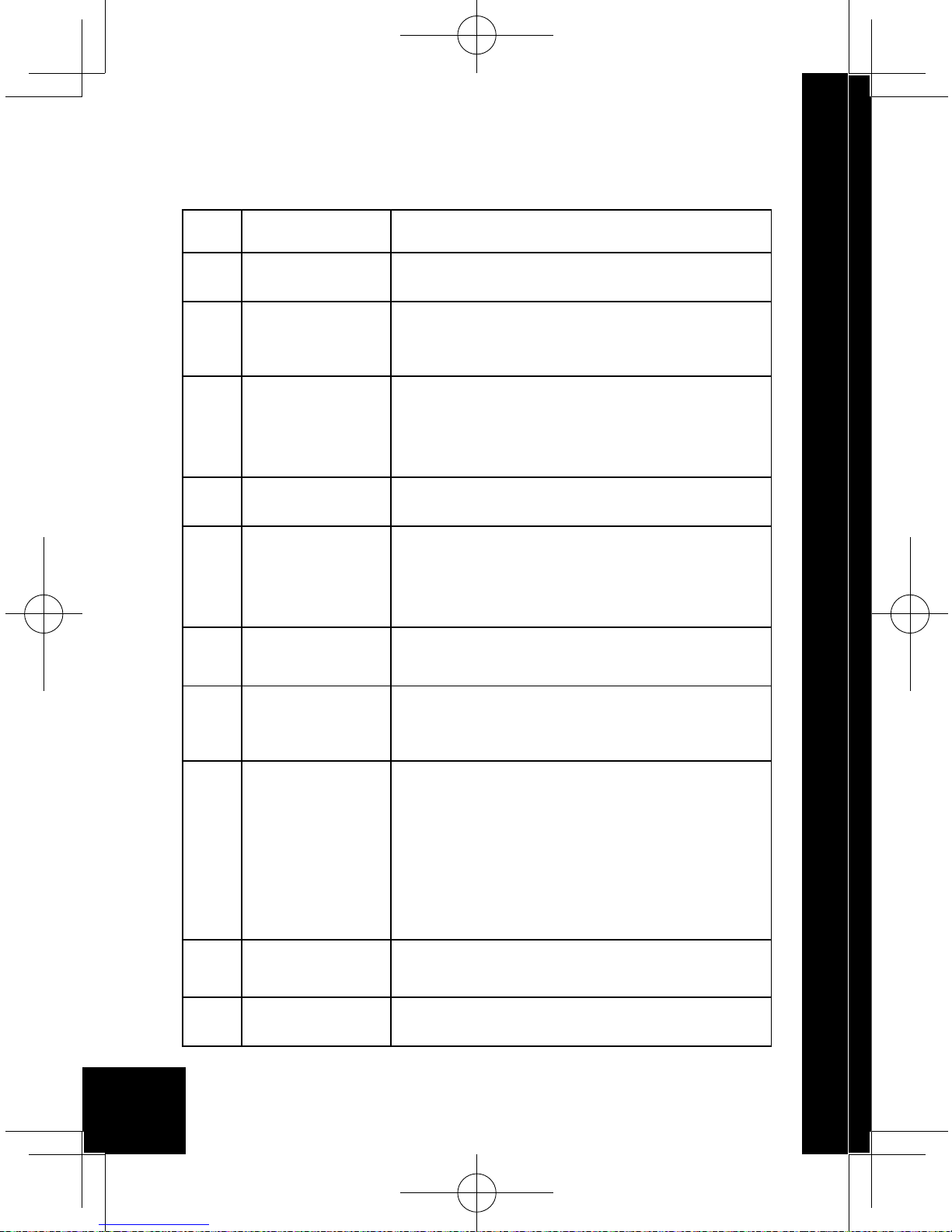
3. Button Instruction
RESET
M Button
DAB+/FM Button
LCD display
Next/function plus
(Right Button)
Enter Button/Power Button
TF slot
RESET
Volume+ (Up Button)
Previous/function
reduce (Left Button)
Volume- (Down Button)
Earphone Jack
USB Charging Connection
8
1Items Descriptions
2M Button Press it to go back to the previous
menu.
3
DAB+/FM
Button
Short press is for DAB/FM/MP3
mode converting. Long press is for
storing radio stations.
4
Left / Right
Button
Select previous or next music in
MP3 mode.
Searching FM or DAB radio stations
in FM or DAB mode.
5Volume+/- “+” means increasing the volume, “-”
means decreasing the volume.
6
Enter
Button/
Power
Button
Short press is for conrm selections;
long press is for power on or power
off the device.
7Reset
Button
If the device operation is failed,
press the button to reset the radio.
8
Earphone
Jack
Connect earphone and listen the
radio stations or connect to an
external speaker system.
9
USB
Charging
Connection
Charge the internal battery via the
USB charging connection, either
directly via a computer, or using
power adapter (optional).
Use USB cable to read the
information of the TF card in the
device.
10 TF slot Plug the TF card into this slot.
11 LCD Display Display all the pictures or characters
info.
Questo manuale è adatto per i seguenti modelli
2
Indice
Altri manuali mbeat Radio


