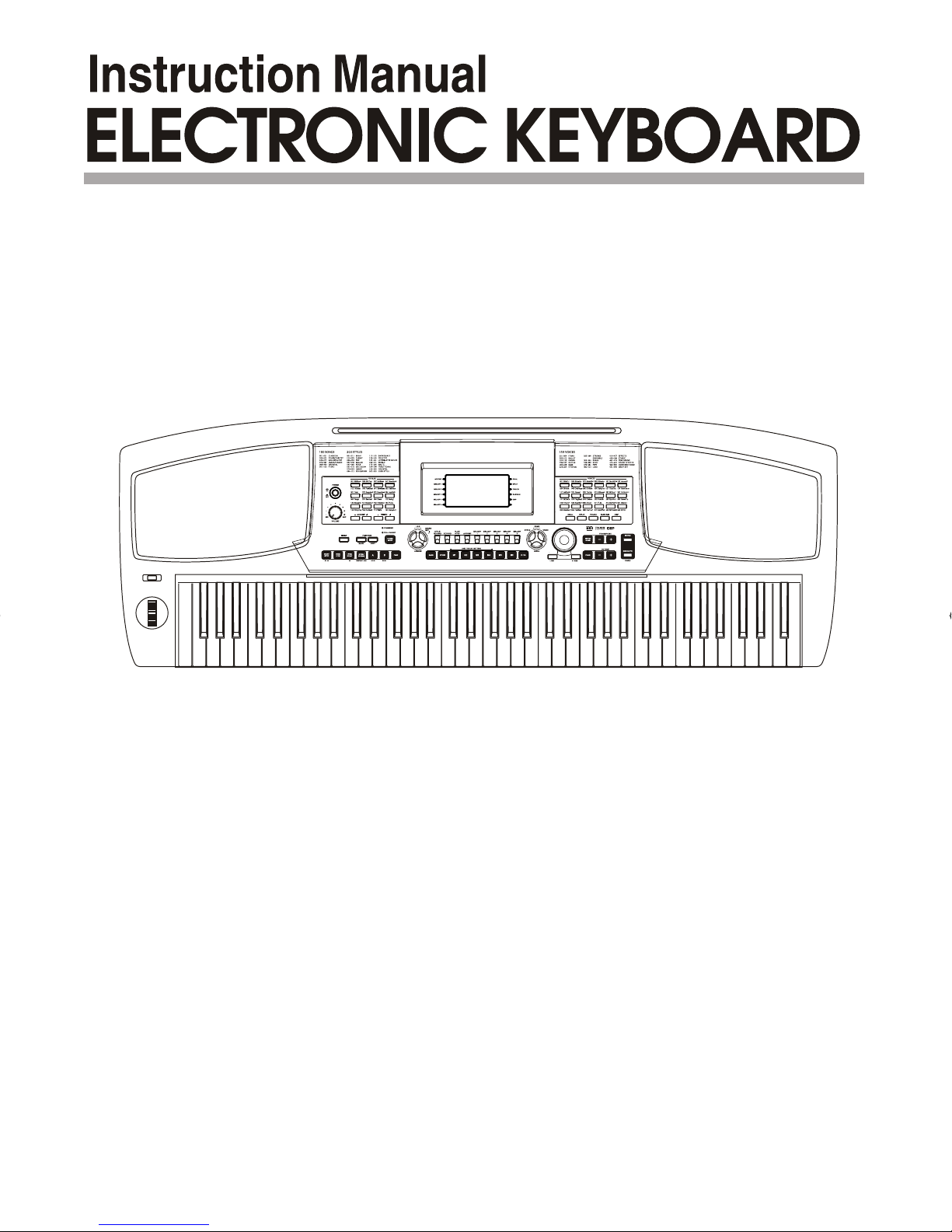
Medeli MC780 Manuale utente

DZBPFB0DQXDOB*BSGIDZBPFB0DQXDOB*BSGI

Congratulations on your purchase of this Electronic keyboard!
The keyboard is an user friendly keyboard with fabulous sound quality and advance
feature such as style record and self-learning. No matter you are adult or children,
you will enjoy playing the keyboard as it provides amazing styles for accompaniment,
expressive tones, and real time record. Other features such as numbered musical notation
display chord dictionary, variety of songs will help you better master the playing skill.
You are recommended to study this manual carefully before using the unit.
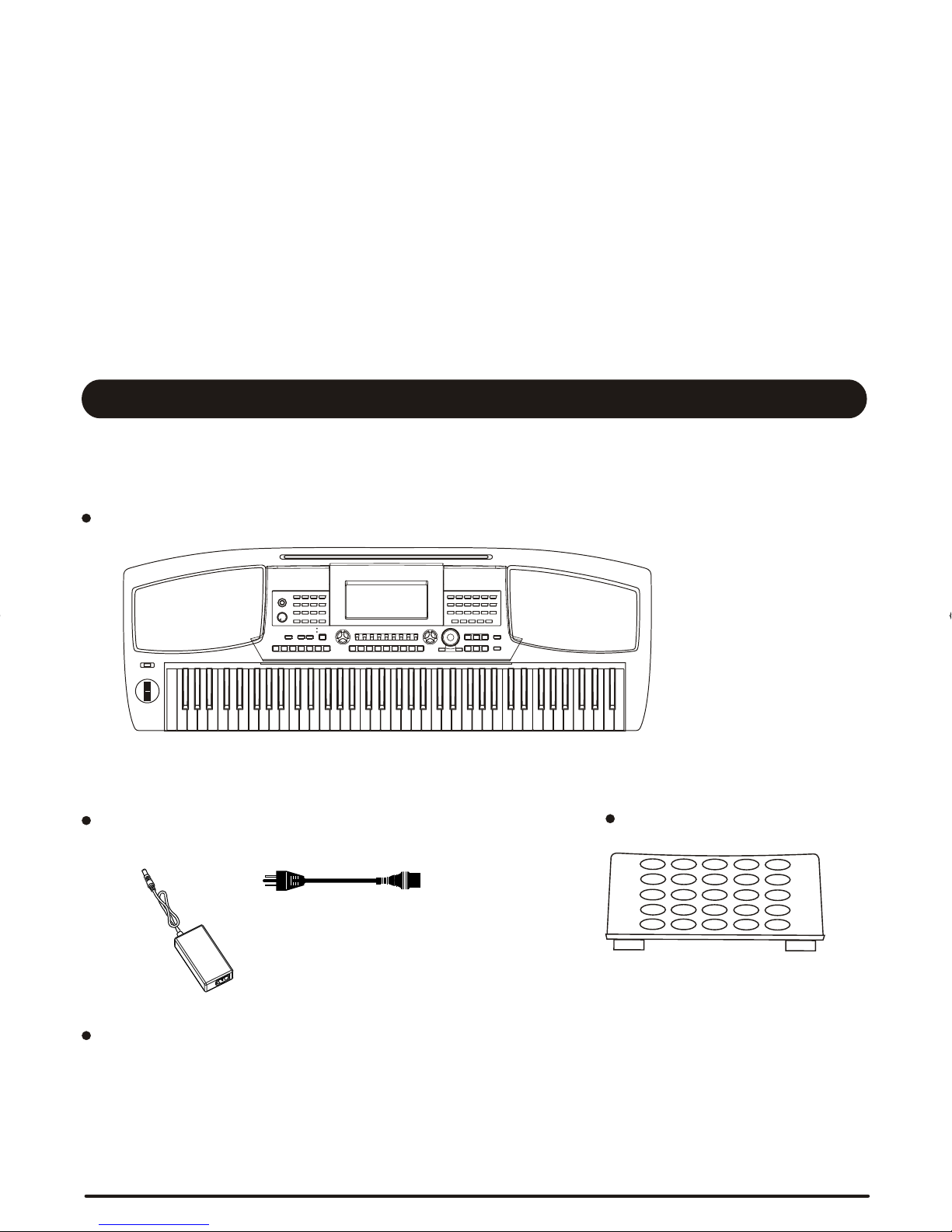
Please make sure the package completely contains the following:
The Instrument
Instruction Manual
Congratulations!
PLEASE KEEP THIS MANUAL
Inside This Package
DC 12V Adaptor Music Rest
2
DZBPFB0DQXDOB*BSGIDZBPFB0DQXDOB*BSGI

3
THIS DEVICE COMPLIES WITH PART 15 OF THE FCC RULES. OPERATION IS SUBJECT TO THE
FOLLOWING TWO CONDITIONS:
(1) THIS DEVICE MAY NOT CAUSE HARMFUL INTERFERENCE, AND
(2) THIS DEVICE MUST ACCEPT ANY INTERFERENCE RECEIVED,
INCLUDING INTERFERENCE THAT MAY CAUSE UNDESIRED OPERATION.
Precautions
WARNING
Do not expose the unit to the following
conditions to avoid deformation,
discoloration, or more serious damage
Direct sunlight
High temperature (near a heat source,
or in a car during the day time)
Excessive humidity
Excessive dust
Strong vibration
Location
Always follow the basic precautions listed below to avoid the possibility of serious injury or even death from electrical
shock, short-circuiting, damages, fire or other hazards. These precautions include, but are not limited to, the following:
Electrical Interference
This instrument contains digital circuitry
and may cause interference if it is placed
too close to radio or television receivers.
If this occurs, move the instrument further
away from the receivers.
Turn Off Power When Making Connections
To avoid damaging the instrument and
other devices to which it is connected,
turn off the power switches of all related
devices prior to connecting or disconnecting
cables.
Power Supply
Make sure to use the suitable AC adaptor,
and also make sure the AC outlet voltage
at your country matches the input voltage
specified on the AC adaptor s label.'
Turn the power switch OFF when the
instrument is not in use.
An AC adaptor should be unplugged from
the AC outlet if the instrument will not be
used for an extended period of time.
Unplug the AC adaptor during electric
storms.
Avoid plugging the AC adaptor into the
same AC outlets as appliances with high
power consumption, such as electric
heaters or ovens. Also avoid using multi-
plug adaptors since this could reduce
sound quality, causes operation errors
and damages.
's
Cleaning
Clean the unit with a soft dry cloth.
Slightly dampen a cloth helps to remove
stubborn grime and dirt.
Never use cleaners such as alcohol or
thinner.
Avoid placing vinyl object on top of the
unit (vinyl might discolor and stick to
the surface) .
Handling and Transporting
Never apply excessive force to the
controls, connectors or other parts of
the instrument.
Always unplug cables by gripping the
plug firmly, but not pulling the cables.
Disconnect all cables before moving
the instrument.
Physical shocks caused by dropping,
bumping, or placing heavy objects on
the instrument could result in scratches
or even severe damages.
Radiated Immunity
The normal function of the product may be
disturbed by Strong Electro Magnetic
Interference. If so, simply reset the product
to resume normal operation by following
the instruction manual. In case the function
could not resume, please use the product
in other location.
ESD, Fast Transient and Surge may cause
the unit to temporary malfunction. Switch off
and on again to resume normal operation.
The normal function of the product may be disturbed by Strong Electro Magnetic Interference. If so,
simply reset the product to resume normal operation by following the instruction manual. In case the function
could not resume, please use the product in other location.
Caution!
DZBPFB0DQXDOB*BSGIDZBPFB0DQXDOB*BSGI

Main Feature
KEYBOARD
76-key touch response keyboard
LCD DISPLAY
The keyboard indicates the note you playing on
the staff
VOICE
559 voices in total, 36 voices can be selected
conveniently from the panel
STYLE
203 styles in total, including 3 user styles,
24 styles can be selected conveniently from
the panel
SONG
100 songs in total. Each song has its learning
mode
DEMO
2 demos in total
CHORD MODE
Single finger chords, multi finger chords, full range
chords
CHORD DICTIONARY
A function for you to learn the chords, including
Dict 1 mode (dictionary mode) and Dict 2 mode
(test mode)
SONG LEARNING
Three learning mode of lesson 1/2/3, left and
right hand to choose, and offers the grade function.
RECORD
3 recording songs. Each recording song has 6
tracks--1 ACCOMP track and 5 melody tracks.
The information contained in this manual are considered correct at the moment of printing.
All specification and appearances are subject to change without prior notice .
STYLE RECORD
3 recording styles
MEMORY FEATURE
48 memories, 8 banks with 6 memories each.
PEDAL
Foot Switch (Sustain Pedal Soft Pedal
Memory Change Pedal Start/stop Pedal)
Volume Pedal
INTERFACE
MIDI IN / OUT, USB, Headphones,
Line IN / OUT
SD CARD
Portable storage device to save and load the
user songs, user styles and memory datas.
STYLE CONTROL
Sync start, Sync stop, Start/Stop, Fill In A/Normal,
Fill In B/Variation, Intro/Ending, Fade In/Out,
Chord mode.
FUNCTION MENU
Tuning, Beat, Split point, Pedal select, Portamento
time, Reverb level, Chorus level, MIDI Receive,
MIDI Transmit.
MIXER MENU
Rhythm S, Rhythm M, Bass, Chord1,Chord2,
Chord3, Phrase, Phrase2, Voice R1, Voice R2,
Voice L, SD Play .
OTHER FEATURES
Dual voice, Split voice, Touch, Sustain, DSP,
Grand piano, Metronome, O.T.S., Transpose,
Octave, Pitch bend and etc.
By pressing and holding [YES/+] and [NO/-]
together and turning the power on simultan-
eously; default setting will be loaded into the
keyboard, then the memory and the record
song will be lost.
Technical specifications are subject to change
4
DZBPFB0DQXDOB*BSGIDZBPFB0DQXDOB*BSGI

Store and Load...........................................................
Contents
General Guide..................................
Front Panel..........................................................
LCD Display.....................................................
Rear Panel................................................................
Top Panel...............................................................
Power Jack...................................................................
Setting Music Rest.............................................
Sustain Jack........................................................
Headphones Jack...............................................
Volume Jack....................................................
AUX OUT Jack................................................
USB Jack...............................................................
MIDI IN/OUT Jack...................................................
Connections...................................
Demo....................................................................
Preparation........................................
Power Switch & Volume....................................
Portamento......................................................
Piano.................................................................
DSP Effect..............................................................
Transpose..............................................................
Voices and Effects.........................
Select a Voice...................................................
Dual Voice...............................................................
Lower Voice/Split Point..........................................
Sustain.....................................................................
Pith bend/Moudulation joystick...........................
Octave.............................................................
Touch Respones..............................................
Fill A/B...............................................................
Recognizing Chords..............................................
Tempo........................................................................
Fade..........................................................................
Style Control.....................................
Select a Style........................................................
The Accompaniment Section..................................
Start a Style..............................................................
Stop a Style.......................................................
Accomp Volume........................................................
Metronome.................................................................
Split Point........................................................
Pedal Assign.....................................................
Portamento Time.....................................................
Beat.................................................................
Function Menu...............................
Tune.................................................................
Reverb Level...................................................
Chorus Level........................................................
MIDI Setting..................................................
Memory..................................................
Bank..............................................................................
Memory Data...........................................................................
One Touch Setting.............................................
Record..................................................
Delete Song.....................................................
Playback Song.........................................................
Record Song................................................
SD Function..................................................
Save........................................................................
Load........................................................................
Play..............................................................................
Delete........................................................................
Format........................................................................
Style Record...........................................
Quantify a Style...................................................
Copy a Style............................................................
Edit a Style...........................................................
Start Style Record.................................................
Record a new Style.................................................
Delete a Style....................................................
Lesson 1....................................................................
Lesson 3.................................................................
Lesson 2..................................................................
Song....................................................
Lesson Mode.......................................................
Chord Dictionary...............................
Pedal........................................................
MIDI Function......................................
USB Connection.....................................................
What is MIDI............................................................
MIDI Application..............................................
MIDI Connection.....................................................
Specifications...........................................
Trouble Shooting.........................................
Appendix 6-MIDI Implementation Chart.............................
Appendix 3-Song List.........................................................
Appendix 1-Voice List...........................................
Appendix 5-Chord List.......................................................
Appendix..............................................
Appendix 4-Demo List.....................................................
Appendix 2-Style List.................................................
5
Mixer Menu..................................................
6-7
6
7
7
7
9
8
8
8-10
9
8
9
10
10
11
11
11
12
12-15
13
13
14
12
14
15
14
15
14
15
16
16-22
16
17
18
18
19
20
20
20
21-22
23
23-25
23
24
24
24
24
25
25
27
27
27
27
28
28-30
30
28-29
30
41-46
43
42
45
45-46
44-45
31-36
31-32
32-33
34-35
35-36
36
34
37-39
37-38
38
38
39
39-40
41
47-48
47
47
48
48
49
49
50-59
50-54
57
55-56
58
58
59
26
DZBPFB0DQXDOB*BSGIDZBPFB0DQXDOB*BSGI

General Guide
Front Panel
3
2
1
433 35 36
1
34
1
5
6
9
7
8
10 13
11 12
1
14 17
18
15
16
25
23 26
21
22
24
19
29
27
1
20
1
32
28
1
30
31
37
3
5
6
1
2
1
4
13
15
16
11
12
1
14
9
7
17
8
18
1
10
25
23
26
21
22
1
24
19
29
31
27
28
1
20
1
30
1
32
33
35
36
1
34
37
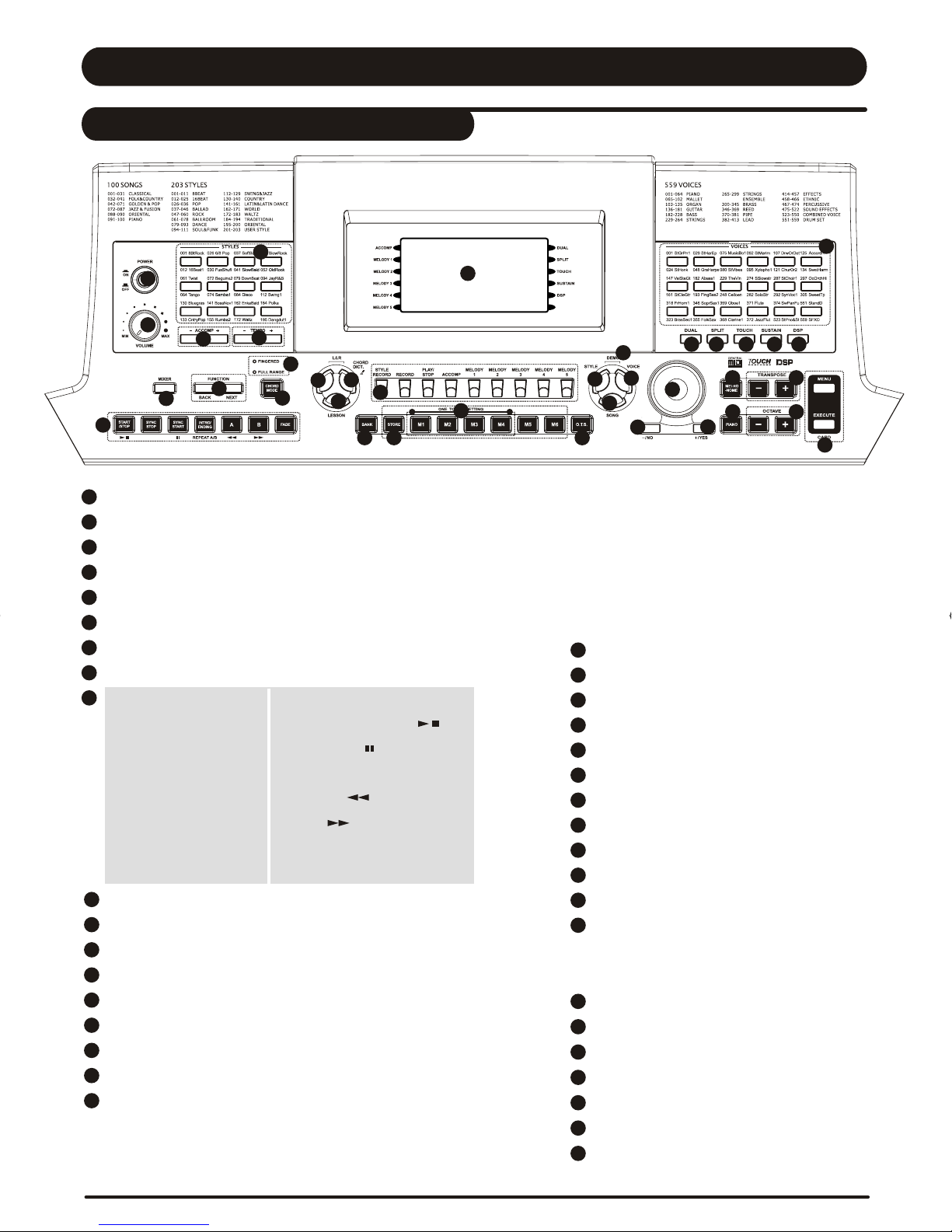
POWER ON/OFF button
VOLUME knob
ACCOMP + / ACCOMP - button
TEMPO + / TEMPO - button
STYLE direct select button
MIXER button
FUNCTION BACK / FUNCTION NEXT button
FINGERD / FULL RANGE LED indicator light
In Style mode
-START/STOP
-SYNC STOP
-SYNC START
-INTRO/ENDING
-FILL A
-FILL B
-FADE
CHORD MODE
LEFT HAND button
RIGHT HAND button / CHORD DICTIONARY button
LESSON button
BANK button
STORE M1-M6 button
ONE TOUCH SETTING (M1-M4) button
O.T.S. Button
Sequencer
-STYLE RECORD button
-RECORD button
-PLAY / STOP button
In Song mode
-START/STOP
-PAUSE
-REPEAT A/B
-REW
-FF
-ACCOMP button
-MELODY 1 button
-MELODY 2 button
-MELODY 3 button
-MELODY 4 button
-MELODY 5 button
STYLE button
VOICE button
DEMO button
SONG button
DATA DIAL
-/NO button
+/YES button
METRONOME button
PIANO button
TRANSPOSE + / TRANSPOSE -
OCTAVE + / OCTAVE -
SD Card Control
-SD MENU button
-SD EXECUTE button
VOICE DIRECT SELECT button
DUAL button
SPLIT button
TOUCH button
SUSTAIN button
DSP button
LCD display
6
DZBPFB0DQXDOB*BSGIDZBPFB0DQXDOB*BSGI

35 6
121
478
3
5
6
1
1
2
2
1
4
7
8
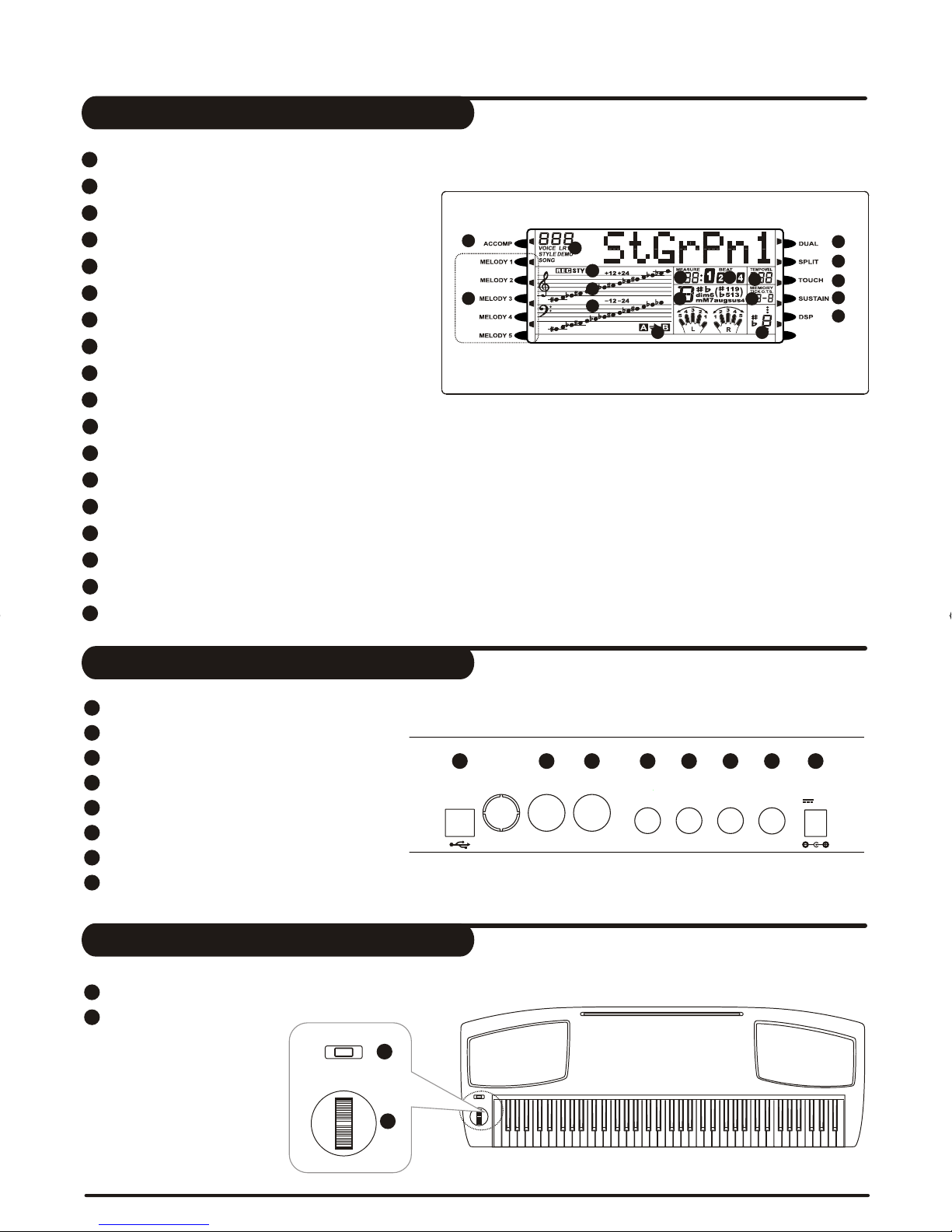
USB jack
MIDI IN jack
MIDI OUT jack
SUSTAIN jack
VOLUME jack
AUX.OUT jack
PHONES jack
POWER jack
PORTAMENTO button
MODULATION/PITCH
BEND joystick
13
15
16
17
18
11
12
1
14
3
5
6
1
2
1
4
9
7
8
1
10
ACCOMP
MELODY 1 - MELODY 5
DUAL
SPLIT
TOUCH
SUSTAIN
DSP
VOICE/STYLE/DEMO/SONG
RECORD / STYLE RECORD
MEASURE
BEAT
TEMPO
CHORD
MEMORY / ONE TOUCH SETTING
LEFT / RIGHT HAND LESSON MODE
NOTE Indication
TREBLE CLEF
BASS CLEF
FILL A / B
9
8
7
1
2
1
1518
3
1
4
1
5
1
6
1
13 14
16
1110
17
12
LCD Display
Rear Panel
Top Panel
MIDI IN
MIDI IN
USB
USB
MIDI OUT
MIDI OUT
SUSTAIN
SUSTAIN
VOLUME
VOLUME
AUX.OUT
AUX.OUT
PHONES
PHONES 12V
7
1
2
DZBPFB0DQXDOB*BSGIDZBPFB0DQXDOB*BSGI

Headphones Jack
Never use the headphone with high volume, as it may
hurt your ear.
To prevent the damage of the speakers, ensure that
the volume is set to the minimum level before conne-
cting the power and other devices.
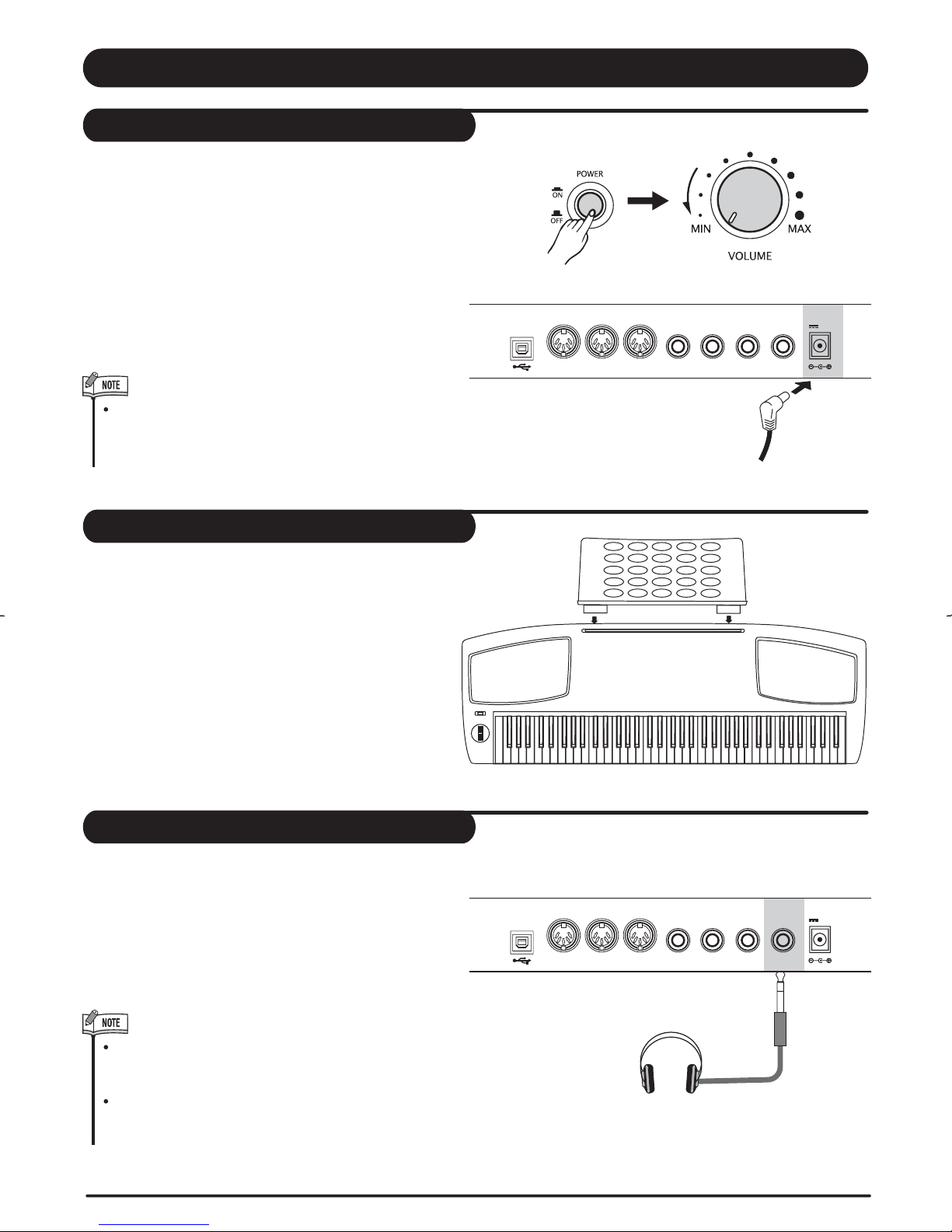
If you prefer to play with headphones for high quality
personal monitoring, plug a set of stereo headphone
into the PHONES jack.
Plug a set of headphones into [ jack and
the speakers will be shut automatically.
PHONES]
Connections
Power Jack
Setting Music Rest
First, please ensure the keyboard is turned off, then
turn the volume switch to reach the minimum volume
level.
Connect the adaptor into the AC wall outlet and the
cord into the unit. The power jack is located on the
rear panel of the keyboard body. Make sure that only
the AC adaptor specified for this keyboard is used.
The adaptor shall be 12V DC output, and center
positive type.
When the keyboard is not in use or in the time of
thunderstorm, please disconnect the power for
safety purpose.
USB 12V
MIDI INMIDI IN MIDI OUTMIDI OUT
SUSTAIN VOLUME AUX.OUT PHONES
USB 12V
MIDI INMIDI IN MIDI OUTMIDI OUT
SUSTAIN VOLUME AUX.OUT PHONES
A music stand is supplied with the keyboard.
You can easily attach it to the instrument by
inserting it into the slots at the rear of the
panel.
Please set up the music rest as shown:
8

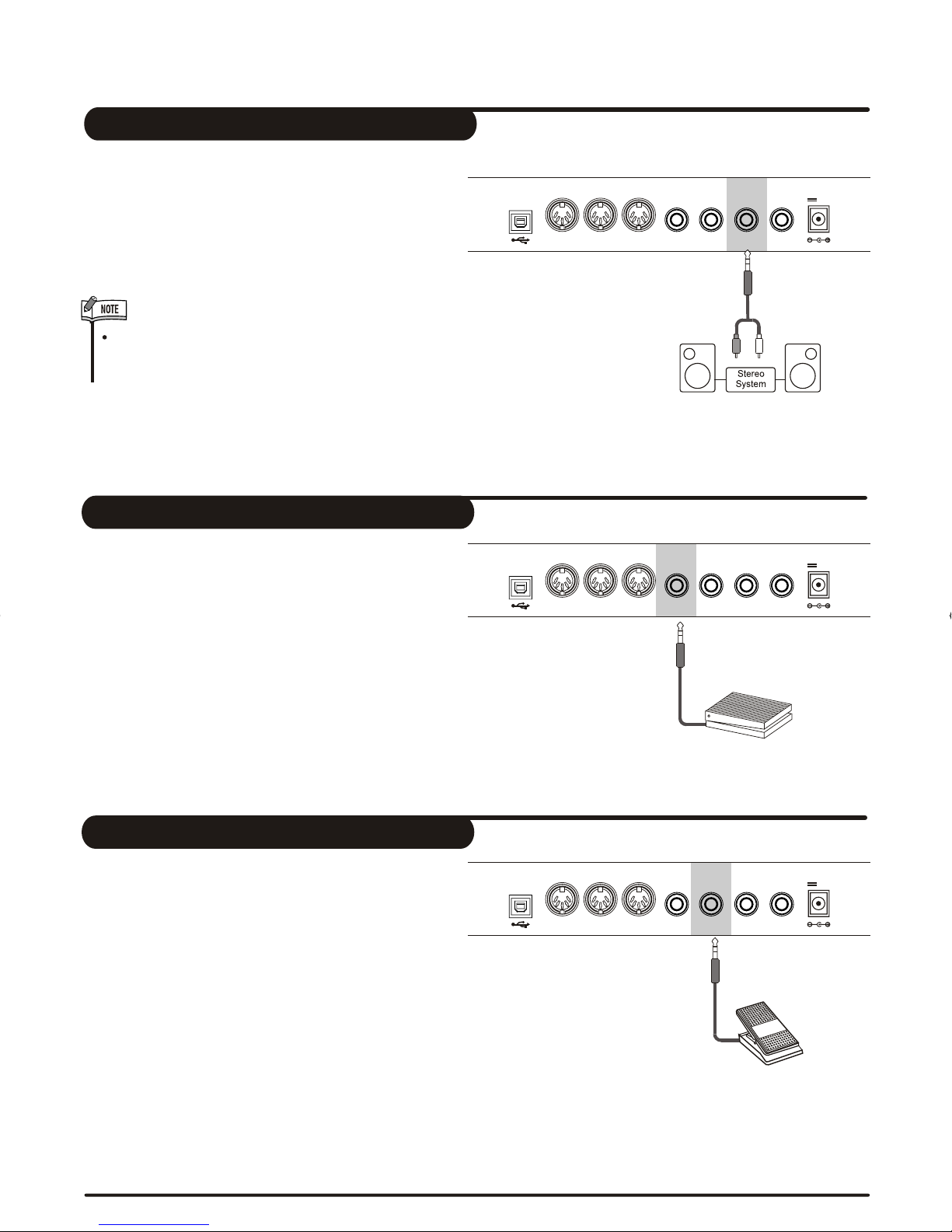
An optional volume control can be plugged into the
[VOLUME] jack for adjusting the volume of sound.
Sustain Jack
Volume Jack
An optional footswitch can be plugged into the
[SUSTAIN] jack for sustain control.
The footswitch functions like the damper pedal on a
piano-press for sustain, release for normal sound.
USB 12V
MIDI IN
MIDI IN
MIDI OUT
MIDI OUT
SUSTAIN
SUSTAIN
VOLUME
VOLUME
AUX.OUT
AUX.OUT
PHONES
PHONES
USB
USB
12V
12V
MIDI IN
MIDI IN
MIDI IN
MIDI IN
MIDI OUT
MIDI OUT
MIDI OUT
MIDI OUT
SUSTAIN
SUSTAIN
SUSTAIN
SUSTAIN
VOLUME
VOLUME
VOLUME
VOLUME
AUX.OUT
AUX.OUT
AUX.OUT
AUX.OUT
PHONES
PHONES
PHONES
PHONES
AUX OUT Jack
To avoid damaging the speakers, please ensure that
volume has set to the minimum level before connect-
ing the power and other devices.
The AUX.OUT jack delivers the output signal of the
keyboard to an external amplifier.
Use an audio cord to plug into the [AUX.OUT] jack
located on the rear panel; then plug the other end
of the cord into LINE IN or AUX.IN of the amplifier.
9
DZBPFB0DQXDOB*BSGIDZBPFB0DQXDOB*BSGI

To avoid damages, please be sure to turn
off the power switches before you discon-
nect the related devices from the keyboard.
WARNING
MIDI stand for Musical Instrument Digital Interface.
MIDI is a world wide standard that makes it possible
for various electronic musical instruments and other
devices.
MIDI IN:
MIDI OUT:
Data transmitted from other MIDI instrument via MIDI
is received by this terminal.
Data produced by the Digital Piano is transmitted to
other MIDI instruments via MIDI from this terminal.
MIDI IN/OUT Jack
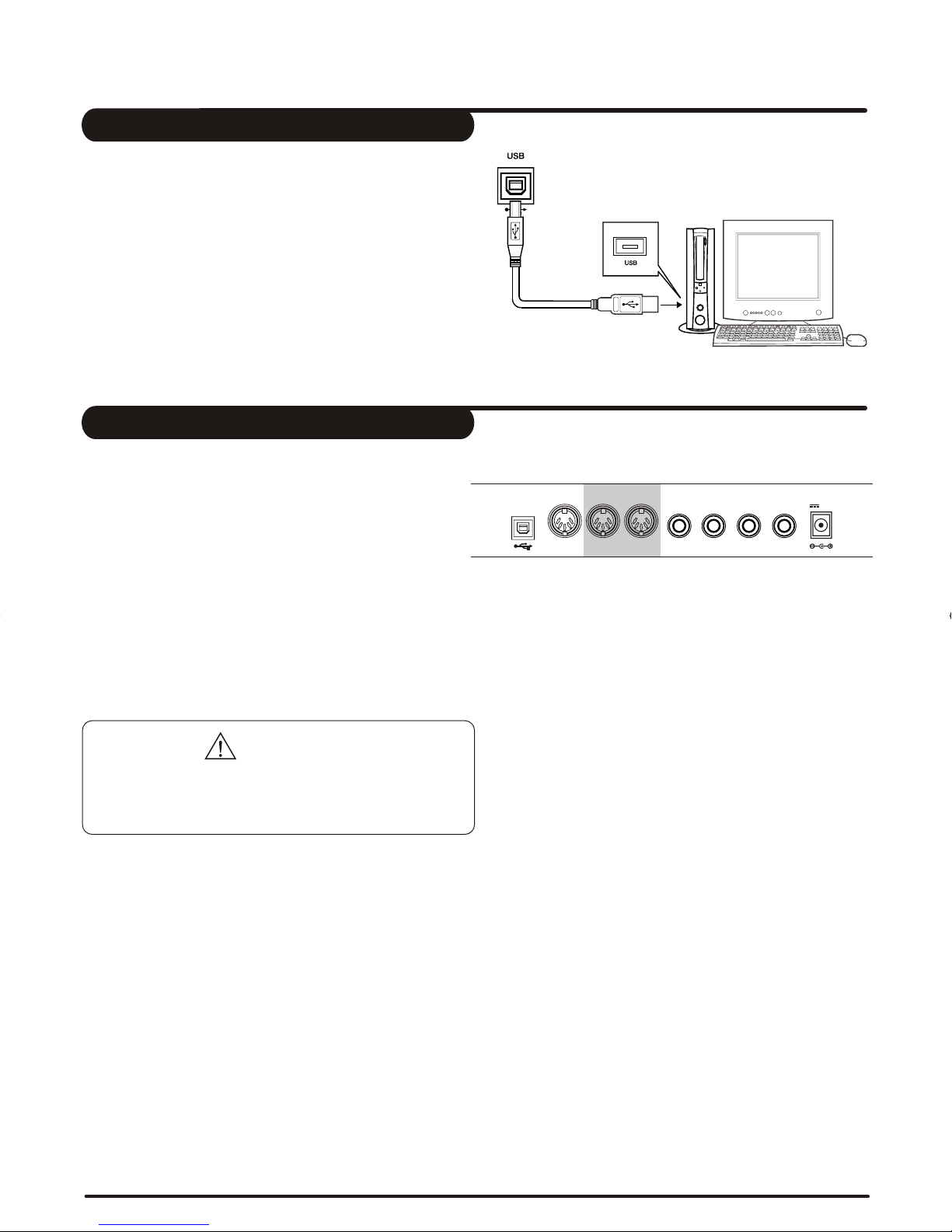
USB Jack
Connect PC or other USB host devices that support
USB Audio.
You can simply connect the MIDI/USB converter to
your USB play on your computer and plug the MIDI
in and out cables into the piano, after the driver is
installed and initialization is finished, you can choose
USB Audio Device in the device menu of the software
to transfer midi data.
USB
12V
12V
MIDI IN
MIDI IN
MIDI OUT
MIDI OUT
SUSTAIN
SUSTAIN
VOLUME
VOLUME
AUX.OUT
AUX.OUT
PHONES
PHONES
10
DZBPFB0DQXDOB*BSGIDZBPFB0DQXDOB*BSGI
Indice
Altri manuali Medeli Tastiera elettronica

Medeli
Medeli MC-49 Manuale utente

Medeli
Medeli ELECTRONIC KEYBOARD Manuale utente

Medeli
Medeli M221L Manuale utente

Medeli
Medeli M-30 Manuale utente

Medeli
Medeli M311 Manuale utente

Medeli
Medeli MC-110 Manuale utente

Medeli
Medeli mc710 Manuale utente

Medeli
Medeli MC760 Manuale utente

Medeli
Medeli A1000 Manuale utente

Medeli
Medeli M10 Manuale utente

Medeli
Medeli M20 Manuale utente

Medeli
Medeli AK603 Manuale utente

Medeli
Medeli MK200 Manuale utente

Medeli
Medeli MC37A Manuale utente

Medeli
Medeli MD700 Manuale utente

Medeli
Medeli MC560 Manuale utente

Medeli
Medeli AW830 Manuale utente

Medeli
Medeli MC49A Manuale utente

Medeli
Medeli M5 Manuale utente

Medeli
Medeli mc37 Manuale utente