character to preamp sound style and further enhance DI silent performance while attaining perfect stage volumes, all in the same box.
When Recording, use the Attenuator to achieve more power clip character for certain parts when multi-tracking or clamp down the
volume for your monitor Cabinet in the Cutting Room while your power section is unleashed and soaring out the balanced DI OUTPUT
without bleed from other instruments in an ensemble session.
For late night “considerate” practicing, the Attenuator allows you to crank into stadium-worthy power ranges as you Rock through
STUDIO or LIVE versions of our Big Cabs in Headphones. All while your significant other dreams away comfortably to the sound of
your Electric “unplugged” right there in the same bedroom. Any of these ways you dial it up, the PLUS’s on-board Attenuator adds
next-level performance both to your DI and Live Monitored sounds.
The features of the Attenuator include:
• A SPKR/LOAD two position mini toggle that allows you to select between the CabClone on-board Internal Load (of the impedance
you’ve chosen at time of purchase) or your Speaker Enclosure of choice.
• A WARNING LED that indicates when you have selected SPKR but you have no load (cabinet) connected to the “TO SPKR” OUT-
PUT jack and your amplifier is not protected.
• A five-position ATTENUATOR rotary which provides five levels of attenuation ranging from 0dB (Bypassed), to -4, -8, -12, and
-16dB.
• A LEVEL control for the -16dB position that allows control over the most attenuated position from -16dB when full up, to “INFINITE”
attenuation (no sound) when the pot is rolled all the way off.
Helpful Hints
We have provided within the CabClone IR+’s 16 IR Presets, the very best, most accurate captures of our most popular MESA Cabinetry
recorded in a world class studio environment using the most iconic combinations of microphones.
Sound, like color, is subjective. No two artists hear or see things alike. With the vast number of listening environments, including
headphones, monitors — be they recording or Live PA — we feel we’ve provided something for almost any need and every style in the
Factory loaded Presets. From cabinetry that excels at open sounding, transparent cleans, to vintage-voiced open-back cabs that sing
and howl for semi-saturated Blues overdrive, to closed-back 2x12s and Quad Boxes that chunk and grind for gained-up, Heavy Rock,
there’s a cabinet and a voice for everyone here in the CabClone IR+s 16 Presets. Spend the time matching up your different sounds to
the included Presets and you will quickly realize what a powerful tool you’ve chosen for trouble free DI recording and Live applications.
Use caution when setting the Master Volume on your amp. While the CCIR can handle up to 150 Watts, setting the amp extremely
loud is usually not the best approach to obtaining great Tone. Setting the Master Volume all the way up will generally sound less
desirable and mean that you sacrifice most of the control over the character and response you’ve dialed in with the preamp. It will
also wear out your power tubes faster, the same as if the amp were connected to a speaker. In most cases, you’ll find the sweet spot
is somewhere between 11:00-2:00 on the amp’s Master Volume. In that region you’ll be introducing plenty of power section color and
fullness, but you will still retain much of the preamp’s control over the sound and the response. When the power section is driven to
full clip, the sound you’ve dialed up on the preamp’s controls will be overshadowed by the power section’s behavior, good or bad.
The firmware inside the device includes many error detection mechanisms. When an error is detected, the red clip LED will blink an
error code. To reset the error, unplug and reconnect the power supply, or push the Boot switch located through a small hole on the
bottom of the unit.
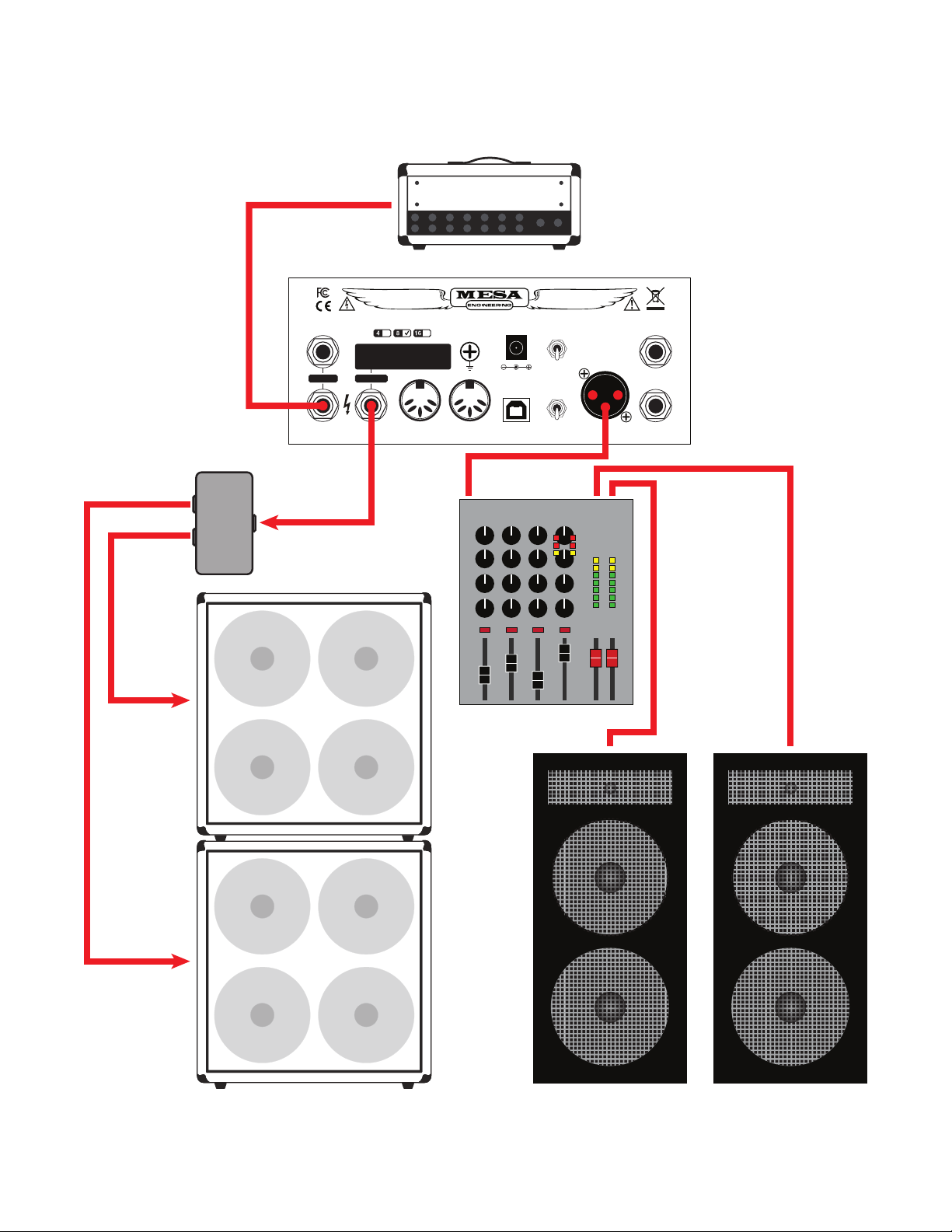
Since so many of the interfacing connections are located on the Rear Panel, unlike other MESA Operating Guides/Manuals, we will
start on the Rear Panel to help you get your CabClone IR+ connected properly for your chosen application. The Top Panel where the
Controls are located is very simple to look at and even simpler to operate, so we’ll jump up there in just a moment, but first, let’s get
the CCIR connected so you can begin to enjoy its inspirational and convenient MESA cabinet captures.
PAGE 3