Mi XMJGTYDS01FM Manuale utente

Mi 4K Laser Projector 150” User Manual

Table of Contents
User Notice..................................................................................................4
Legal Notice.................................................................................................4
Laser Safety Information.........................................................................5
Safety Instructions....................................................................................5
Package Contents .....................................................................................8
Product Overview......................................................................................9
Exterior .....................................................................................................9
Connection Ports..................................................................................10
Power Indicator .....................................................................................11
Remote Control .....................................................................................12
Projection Distance & Screen Size..................................................13
Suspended Ceiling Installation ........................................................14
Quick Start Guide ......................................................................................15
Pairing the Remote
Control
...............................................................................
15
Image Focus............................................................................................16
Keystone Correction............................................................................16
Network & Internet...............................................................................17
Smart Temperature Control ..............................................................17
Safety & Protection ..............................................................................18
Bluetooth Speakers..............................................................................19
Care & Maintenance.................................................................................20
Heat Dissipation Maintenance ........................................................20
Cleaning & Maintenance....................................................................20
SpeciÞcations .............................................................................................21
Troubleshooting .........................................................................................23
Product CertiÞcations .............................................................................24


User Notice
Thank you for choosing the Mi 4K Laser Projector 150".
Read this manual carefully before use, and retain it for future reference.
Illustrations of product, accessories, and user interface in the user manual are for reference purposes only. Actual product and
functions may vary due to product enhancements.
Legal Notice
All products bearing this symbol are waste electrical and electronic equipment (WEEE as in directive 2012/19/EU) which should
not be mixed with unsorted household waste. Instead, you should protect human health and the environment by handing over
your waste equipment to a designated collection point for the recycling of waste electrical and electronic equipment, appointed
by the government or local authorities. Correct disposal and recycling will help prevent potential negative consequences to the
environment and human health. Please contact the installer or local authorities for more information about the location as well as
terms and conditions of such collection points.
Hereby, Fengmi (Beijing) Technology Co., Ltd declares that the radio equipment type Mi 4K Laser Projector 150" is in compliance
with Directive 2014/53/EU. The full text of the EU declaration of conformity is available at the following internet address:
h w.mi.com/global/service/support/declaration.html
This device is restricted to indoor use when operating in the 5150 to 5350 MHz frequency range.
Operating Frequency: 2.4 GHz–2.4835 GHz (for Bluetooth)
Maximum RF Power Output: 20 mW (for Bluetooth)
Operating Frequency: 2.4 GHz–2.4835 GHz (for Wi-Fi 2.4 GHz)
Maximum RF Power Output: 100 mW (for Wi-Fi 2.4 GHz)
Operating Frequency: 5.15 GHz–5.35 GHz and 5.47 GHz–5.725 GHz (for Wi-Fi 5 GHz)
Maximum RF Power Output: 200 mW (for Wi-Fi 5 GHz)
Note: Under normal use of condition, this equipment should be kept a separation distance of at least 20 cm between the
antenna and the body of the user.

Laser Information Label
The product complies with IEC 60825-1:2014 Class 1 and RG2 IEC 62471-5:2015.
As with any bright light source, do not stare into the beam, RG2 IEC 62471-5:2015
Laser Safety Information
Caution
Do not stare into the beam
RG2
Safety Instructions
Before using the product, please carefully read the following safety instructions.
Safety Label Description
This warning symbol informs the user that this product contains non-insul ated voltage sources that can cause an electric
shock. Coming into contact with any internal component may result in an electric shock.
This symbol informs the user about important handling and maintenance related information. Please read this information
carefully to ensure proper use.
This symbol informs the user to be aware of high temperatures.
This symbol informs the user to avoid touching this part.

Preventing Electric Shocks and Fire Hazards:
Safety Precautions:
- Using an incorrect power cord may result in decreased product performance and even electric shock or fire. To ensure the
projector's performance and safety, only use its original power cord or an identical replacement.
- If you use an extension cord, it must not have a current rating lower than the projector's original power cord. Failure to heed this
warning may result in the extension cord overheating and could pose hazards such as electric shock and fire.
- To avoid damage caused by a power surge or lightning strike, unplug the projector from the power outlet during thunderstorms or
when it is not in use for a long time.
- Do not place any flammable objects near this projector so as to avoid fire.
- Do not block the lens with any object when the projector is turned on. Any object placed close to the lens may get very hot and/or
deformed, and may even cause a fire.
- Do not block any of the vents of the projector, as this may cause a buildup of heat within the product and result in a fire.
- Do not place this projector on an unstable platform, stand or table so as to prevent it from falling and causing serious damage or
personal injury.
- Do not look directly into the lens when the projector is turned on to avoid eye damage.
- Do not attempt to disassemble this projector as it may contain dangerous high voltage components. This projector must only be
maintained and repaired by a qualified or authorized technician.
Transportation Instructions: It is recommended to transport this projector in its original or similar packaging.
Grounding Warning: This product must be grounded when in use.

- Do not place this projector in an upright position, as it may fall over and cause injury or damage.
- Do not expose this projector to rain or moisture (operating humidity is 20%–80%).
- Do not immerse this projector in, nor expose it to water or other liquids. Immediately unplug the projector if any liquid or object got
into its housing, and have it checked by a qualified technician before using it again.
- Do not place this projector in any of the following environments:

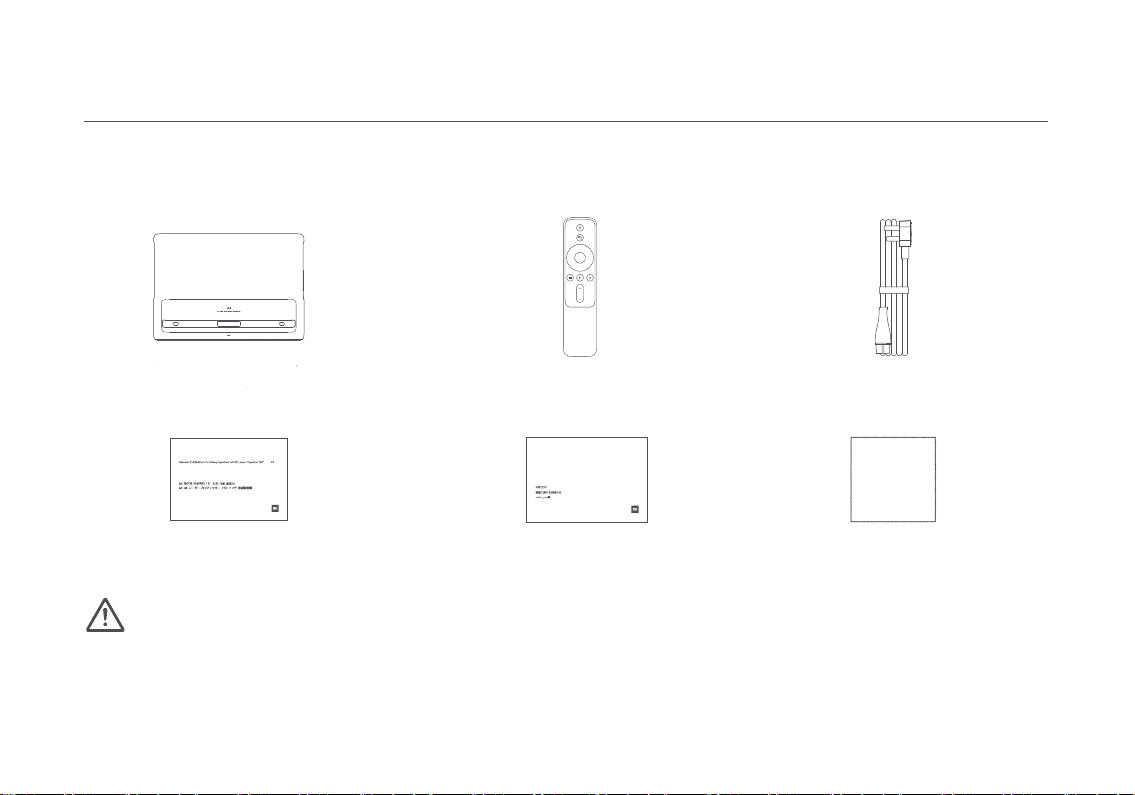
When opening the packaging, check the contents of the box against the list below. If there is anything missing, please contact the
seller in time.
Package Contents
Note:
Laser Projector Remote Control Power Cord
User Manual Warranty Notice
- The actual contents may vary depending on the country (or region) of sale, please refer to the actual product.
- Retain the original packaging for future storage or transportation.
WARRANTY NOTICE 3
12
10
AVISODE GARANTÍA 6
AVVISOSULLAGARANZIA 7
GWARANCJA 9
11
GARANTIE 5
GARANTIEERKLÄRUNG 4
ГАРАНТИЙНОЕУВЕДОМЛЕНИЕ8
Mi 4K Laser Projector 150” User Manual 3
Mi 4K Laserprojektor 150’’ Benutzerhandbuch 25
Manual de usuario de Mi 4K Laser Projector 150” 69
Manuale utente Mi 4K Laser Projector 150” 91
Руководство пользователя Лазерногопроектора Mi 4K (150 дюймов) 113
Projektor laserowy Mi 4K 150” Instrukcja obsługi 135
0157
177
Mi 150 4K
197
Cleaning Cloth

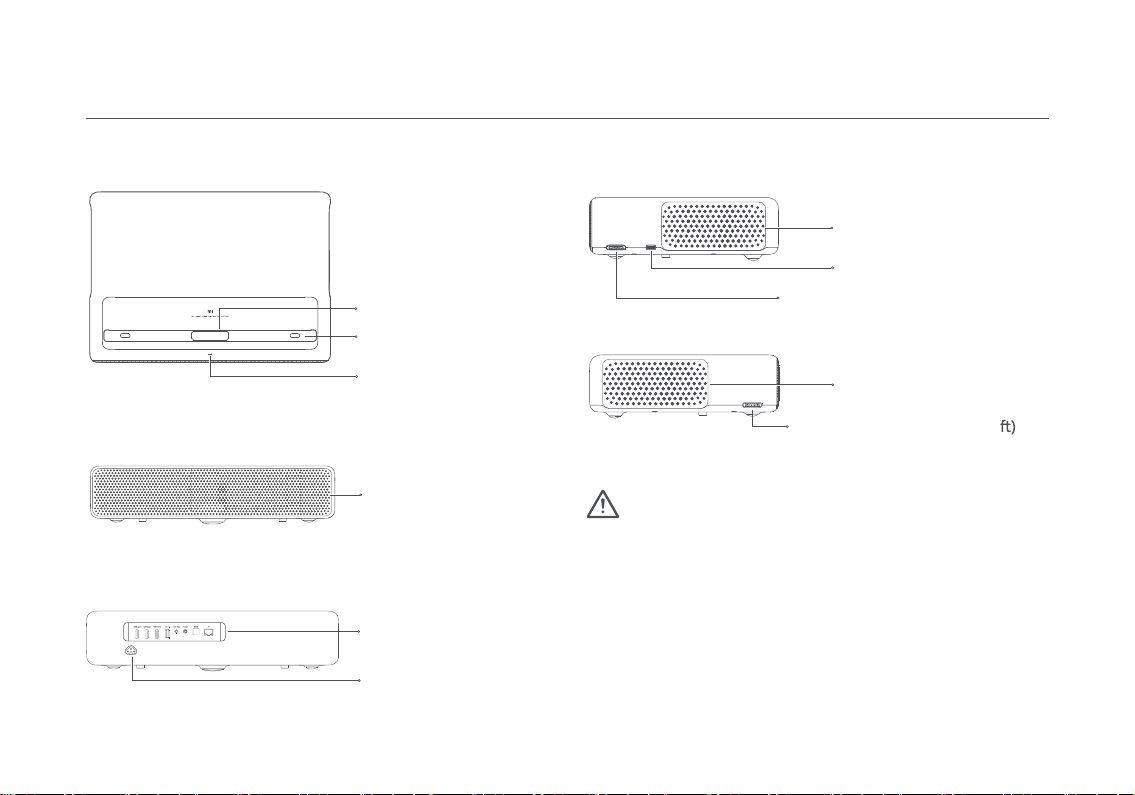
Projection Lens
Power Indicator
Height Adjustable Wheel (Le
Power Port
Metal Speaker Grille
Heat Dissipation Vents
Vents
USB 2.0 Port
Height Adjustable Wheel (Right)
Caution
Connection Ports
Human Body Detection
-
Do not place any ßammable objects nearthe heat dissipation vent.
- Do not place any objects near the vents, as this may cause heat
to build up inside the projector.
- Do not look directly into the lens so as to avoid eye damage as
this projector emits strong light during use.
Product Overview
Exterior

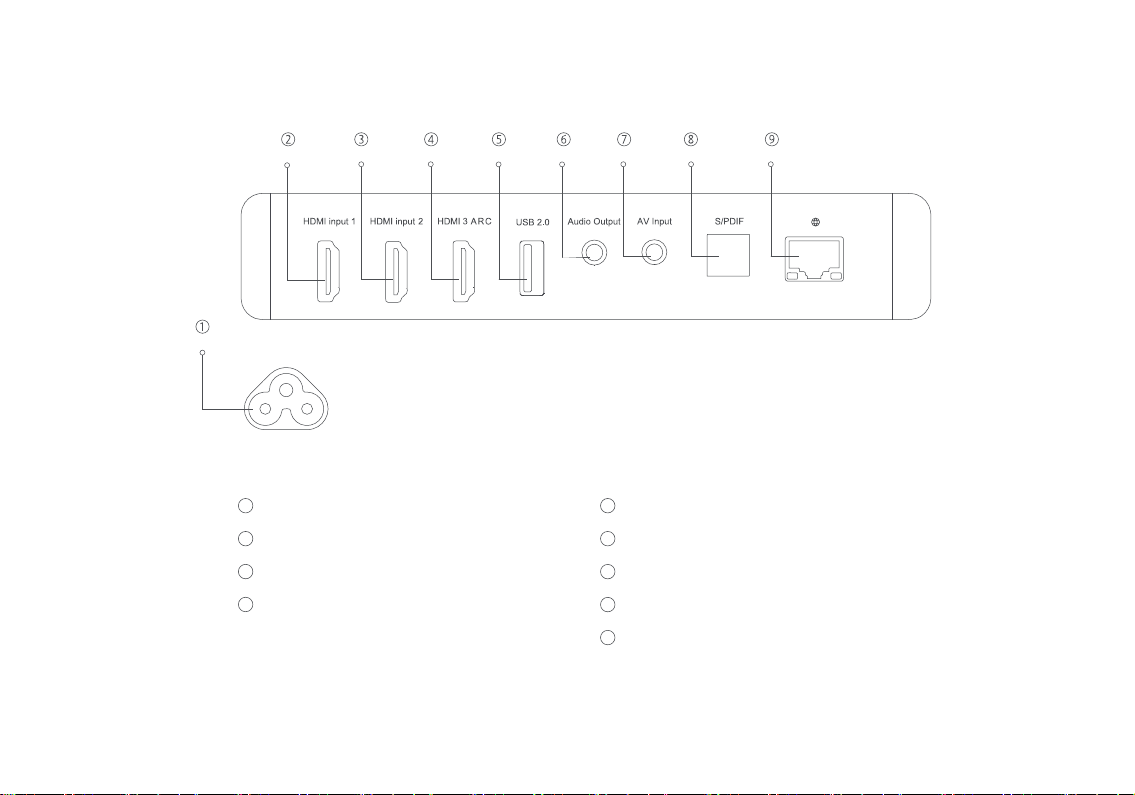
Connection Ports
Power Port
HDMI input port 1
HDMI input port 2
HDMI input port 3
1
3
4
5
6
7
8
9
Audio return channel port
Supports USB 2.0 communication protocol
Audio output port (supports subwoofers)
AV input port (3.5 mm composite AV port)
Optical digital audio signal output port
Ethernet port
2

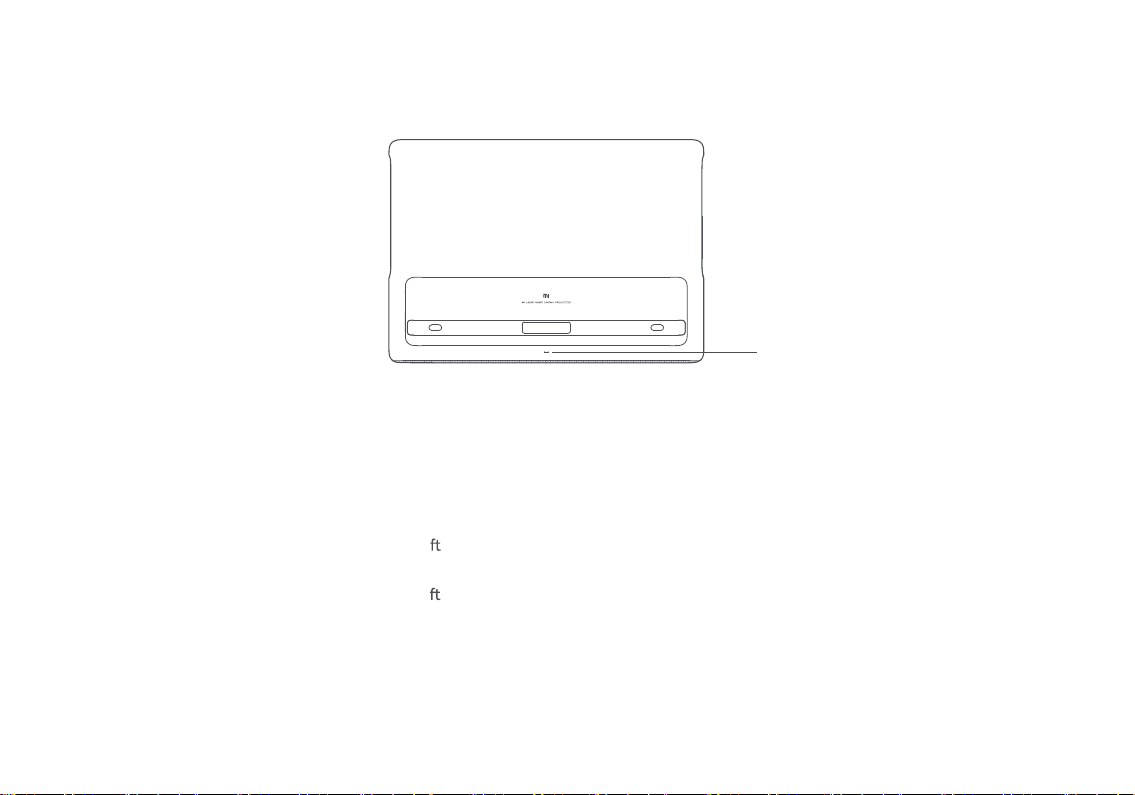
Power Indicator
Power Indicator
The power indicator (a white light) to the corresponding projector's status is as follows:
- Connect to the power outlet, the projector automatically turns on.
- The indicator blinks when the projector is turning on.
- The indicator turns oa er the project is turned on.
- The indicator blinks when the projector is turning o.
- The indicator turns oa er the projector is turned o.
Indice
Altri manuali Mi Proiettore