Microzone MC6C Manuale utente

D/R
CH.5CH.6
Please read carefully before use
MC6C Manual
D/R
CH.5CH.6
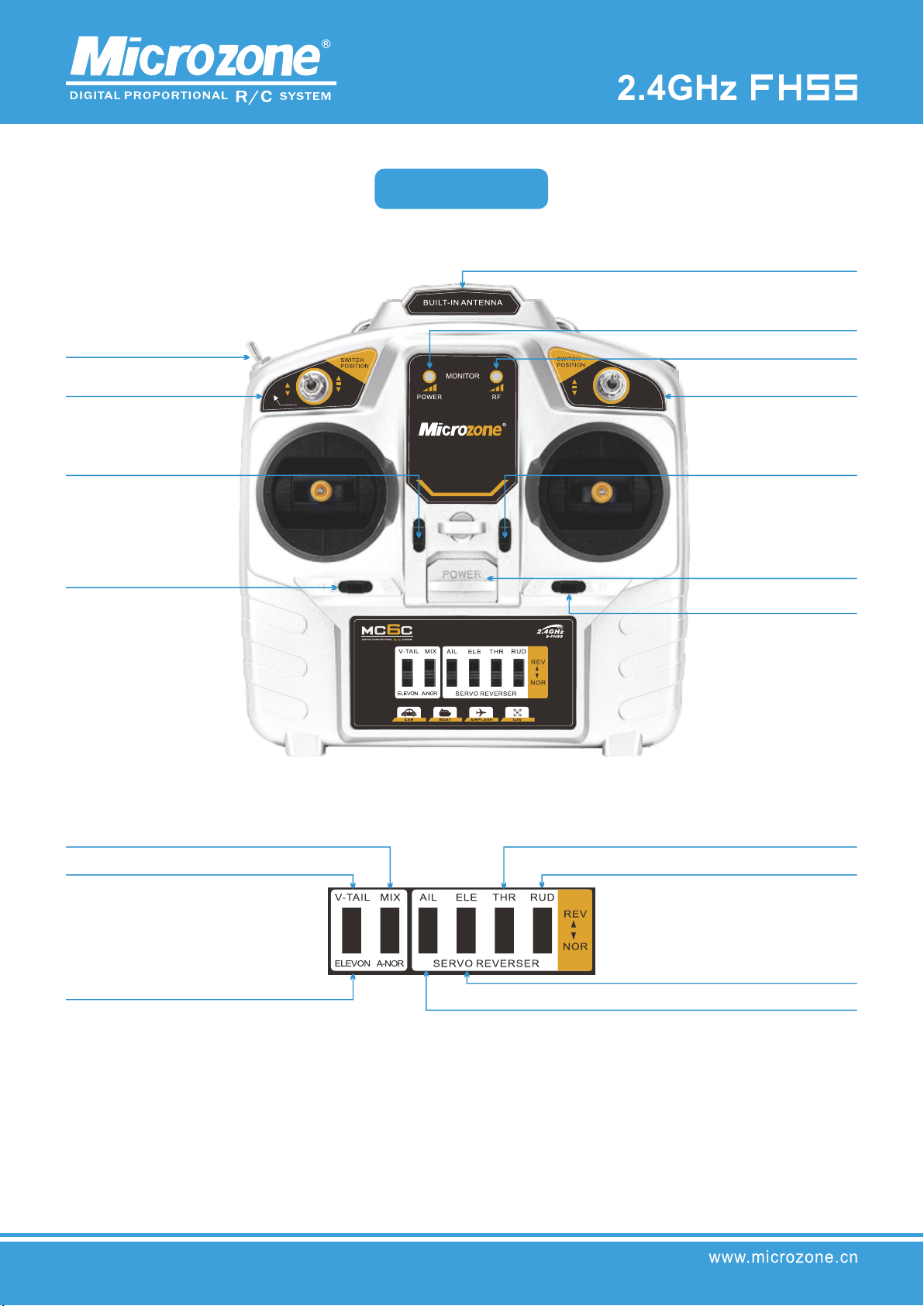
Transmitter Analysis
MC6C
D/R switchD/R switch
channel 5
Throttle fine-tuning
(left-hand throttle)
Elevator Trim
(Right Hand Throttle)
rudder trim
antenna
Power Indicator
signal light
channel 6
Elevator Trim
(Left Hand Throttle)
Throttle fine-tuning
(left-hand throttle)
switch
aileron trim
Mixing function switch
V-tail mixing
Delta wing mixing
Throttle channel positive and negative settings (CH.3)
Direction channel positive and negative settings (CH.4)
Front and back setting of lifting channel (CH.2)
Aileron channel forward and reverse setting (CH.1)

MCC
Silver
Fixed wing, multi-axis, vehicle, boat
Aisle
MHz-MHz
Electronic trimming
%-%
Adopt the latest FHSS mode in the world
and comply with European standards
>m
≤MW
DC.~V
4 AAA batteries or 2S lithium batteries
g
**(mm)
Color
Application
Number of channels
Frequency band
Fine-tuning method
Joystick dynamic range
Air control range
Modulation mode
Transmit power
Weight
Transmitter Power
Requirements
Receiver Power
Requirements
Dimensions (length,
width and height)
Model
Transmitter parameters

First time use:
When you use the remote controller for the first time, you need to bind with the receiver. Please refer to the description of the
receiver below for the method of frequency binding. The same remote controller and the same receiver only need to be bound
once. The transmitter can control multiple receivers at the same time, and the receiver is only controlled by the remote controller
that is bound to the frequency.
Start up:
Push up the power switch to turn it on, the orange light and blue light are on at the same time, the horn beeps twice, and the
remote control turns on normally.
Powered by:
DC4-9V, You can use 4 AAA batteries to install in the
battery compartment, as shown in the figure below,
You can also use an external power supply to connect to the DC power socket on the right side of the remote control. When
using an external power supply, please remove the battery in the battery compartment first, as shown in the figure below.
Detailed description

Then pull the joystick to the middle position, as shown in the figure below, and finally unplug the short-circuit wire, and the
calibration is completed.
Turn on the power of the remote control, at this time the orange and blue lights flash alternately, the horn beeps, and the
remote control enters the joystick calibration state. First, pull the two joysticks of the remote control left and right, up and
down, as shown in the figure below.
Shutdown:
In order to ensure the safety of the model airplane and yourself, do not follow the steps below to turn off the power of the
receiver first, and then turn off the power of the remote control after the motor of the model airplane stops running.
Indicator light description:
The orange light is the power indicator light, and the blue light is the signal light;
Alternate orange and blue: the remote control is in the calibration state;
Blinking orange light, blue light off: insufficient battery power;
Blinking blue light: only appears in models with trainer function, when the blue light is flashing, it is the student machine
control state.
Joystick Calibration:
Versions before 2023: Remove the back cover of the remote control, and use wires to short-circuit the 2P pins on the circuit
board.

Then pull the joystick to the middle position, as shown in the figure below, and finally pull the D/R switch to complete the
calibration.
At the same time, turn on the power of the remote control, enter the joystick calibration state, first move the two joysticks of the
remote control to the maximum, left and right, as shown in the figure below,
Versions after 2023: Pull the left joystick to the upper right corner, and pull the right joystick to the upper left corner, as shown below,
To switch between left and right:
Note: Recalibration is required for switching the left and right hand sticks;
Versions before 2023: Remove the back cover of the remote controller, and replace the retaining springs and
neutral levers of the left and right joysticks, as shown in the figure below.

Solder the two square solder joints closest to the main IC with tin wire to complete the switch between left and right hands, as shown
in the figure below.
Versions after 2023: Remove the back cover of the remote control, and replace the retaining
springs and neutral levers of the left and right sticks, as shown in the figure below.

3
4 4
3
2
1 1
2
Channel description:
6 channels, the signal range is 1000-2000us (the value will increase or decrease 0-120 in the
case of adding a fine-tuning value).
Left handed mode:
The left and right joysticks are channel 1, and the up and down are channel 2; the left and right
joysticks are channel 4, and the up and down are channel 3; as shown in the figure below.
3
4 4
3
2
1 1
2
Right-handed mode:
The left and right of the right joystick are channel 1; the up and down are channel 3; the left
and right joystick are channel 4; the up and down are channel 2; as shown in the figure
below.
Pull the left joystick to the lower left corner, and pull the right joystick to the lower
right corner, as shown in the figure below, and at the same time turn on the power of
the remote control to complete the switch between left and right hands.

Take channel 1 as an example, when the reverse switch is pulled down, pull the joystick from left to right, the servo will swing
from left to right, and when the reverse switch is pulled up, pull it from left to right When the joystick is pressed, the servo
will swing from right to left, as shown in the figure below.
Forward and reverse switch:
The 4 channel reverse switches correspond to channels 1, 2, 3, and
4 from left to right, as shown in the figure below.
DR switch:
Large and small rudder switches, the signal output of the large rudder is 100%, that is, 1000-2000, and the output of the small
rudder is 50%, that is, 1250-1750.
Trimmer switch:
The lower left trim switch corresponds to channel 4, and the right trim switch corresponds to channel 1; the upper left trim
switch corresponds to channel 3 in left-hand mode, and channel 2 in right-hand mode; the upper right trim switch corresponds
to channel 2 in left-hand mode, and corresponds to channel 2 in right-hand mode. Channel 3; as shown below.
41
left handed mode 3
right hand mode 2
2 left handed mode
3 right hand mode
Forward
Feverse

PPM simulator signal:
PPM signal has a frame of data every 20ms, starting with low power frequency, the duration from the first rising edge to the
second rising edge is channel 1 data, and the duration from the second rising edge to the third rising edge is channel 2 data,
and so on.
Triplane 1/2 channel mixing control Close
mixed control mode
V tail 2/4 channel mixing control
Mixing switch
Open
Mixing switch:
The mixing control switch is pulled down to close, as shown in the figure below.
Mix Mode:
Pulling it to the bottom is the 1/2 channel mixing control of the three-wing wing, which is suitable for models
such as the Su-27 trigger, and pulling it to the top is the 2/4 channel mixing control of the V tail, as shown in the
figure below.
Indice
Altri manuali Microzone Telecomando