Miscea "Classic" Manuale utente

NL
EN
DE
... 04-10
Instruction Manual
Remote control «Classic»
... 11-18
... 19-26

42
A
1
2
2x
+

42
A
1
2
2x
+
11
3 V 1.0
B01-B04
2x
3
2x
2
4
1
8
1
3
2
4
1x
1x
A-B

3
5 V 1.0 EN
1. General 6
1.1 About this manual 6
2. Description. 6
2.1 Components 6
3.
Use. 7
3.1 Use of remote control 7
3.2 Change dosage soap 7
3.3 Change dosage lotion or disinfectant 7
3.4 Change initial water temperature 7
3.5 Change response time of water flow 8
4. Technical data 9
5.
Warranty and information
10
5.1
Warranty
10
5.2
Warranty conditions 10
5.3
Contact information
10
5.4
Updates of the manual 10
3.6 Turn on/off the Automatic cleaning cycle 8
3.7 Turn on/off the Light pulse 8
3.8 Turn on/off the Beep 8
3.9 Resetting to default settings 8
4.0 Information of default settings 9
3.10 Replacing the batteries 8
Table of contents
24
© 2011 miscea GmbH
No part of this publication may be reproduced, transmitted, transcribed, stored in any retrieval
system or translated into any human or computer language by any means or in any form, without
the prior written permission of miscea. Contravention of the owner’s copyright may also reduce
the ability of miscea to provide effective support for its equipment.
All technical information, data and instructions contained in this manual for operations that can
and are to be performed, are up to date at the time of editing.
This manual contains our current knowledge and experience to the best of our understanding.
We reserve the right to make technical modifications arising from further development of the
miscea product presented in these operating instructions. For this reason, no claims may be
derived from technical data, descriptions and illustrations.
miscea reserves the right to make changes without notice to both this manual and to its products
described within this manual. Nothing in this manual represents any contractual or other
commitment on the part of miscea and should not be taken as such. All possible care has been
taken in the preparation of this publication. Contact miscea for suggestions of improvement. This
manual is originally written in English. A copy is available on request.
FR
NL
EN DE
FR
NL
EN DE
FR
NL
EN DE
FR
EN DE
NL
FR
NL
EN DE
FR
NL
EN DE
FR
NL
EN DE
FR
EN DE
NL

3
5 V 1.0 EN
1. General 6
1.1 About this manual 6
2. Description. 6
2.1 Components 6
3.
Use. 7
3.1 Use of remote control 7
3.2 Change dosage soap 7
3.3 Change dosage lotion or disinfectant 7
3.4 Change initial water temperature 7
3.5 Change response time of water flow 8
4. Technical data 9
5.
Warranty and information
10
5.1
Warranty
10
5.2
Warranty conditions 10
5.3
Contact information
10
5.4
Updates of the manual 10
3.6 Turn on/off the Automatic cleaning cycle 8
3.7 Turn on/off the Light pulse 8
3.8 Turn on/off the Beep 8
3.9 Resetting to default settings 8
4.0 Information of default settings 9
3.10 Replacing the batteries 8
Table of contents
English

12 6
General1.
About this manual1.1
This manual includes technical specifications, instructions and explanations that help to use this
product safely. Read and understand these instructions before you operate the product.
The illustrations, drawings and graphics in this manual may be different from the actual
components. Contact your local supplier for questions that are not answered in this manual.
Keep this manual for future reference.
Description2.
With the remote control, you can change the default settings of the hand hygiene system
miscea ‘Classic’. The settings that can be changed include: language, temperature, dosage,
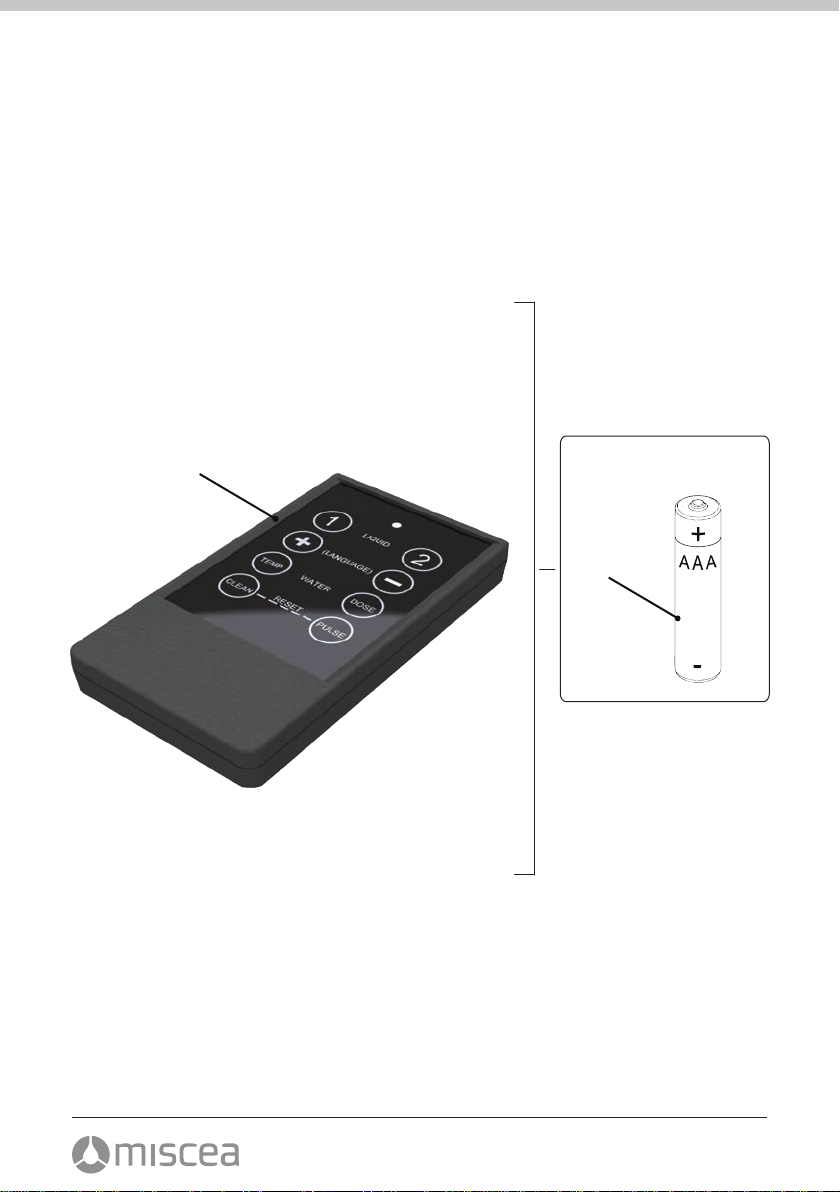
Components2.1
●
Refer to fig. A for the identification of the components.
1.
Remote control
2. Batteries
cleaning, light pulse, beep tone and resetting to default settings.
For further information, please visit our website for the miscea representative in your country.

14 7
Use3.
3.1 Use of the remote control
Change dosage soap3.2
3.3
Change dosage lotion or disinfectant
3.4 Change initial water temperature
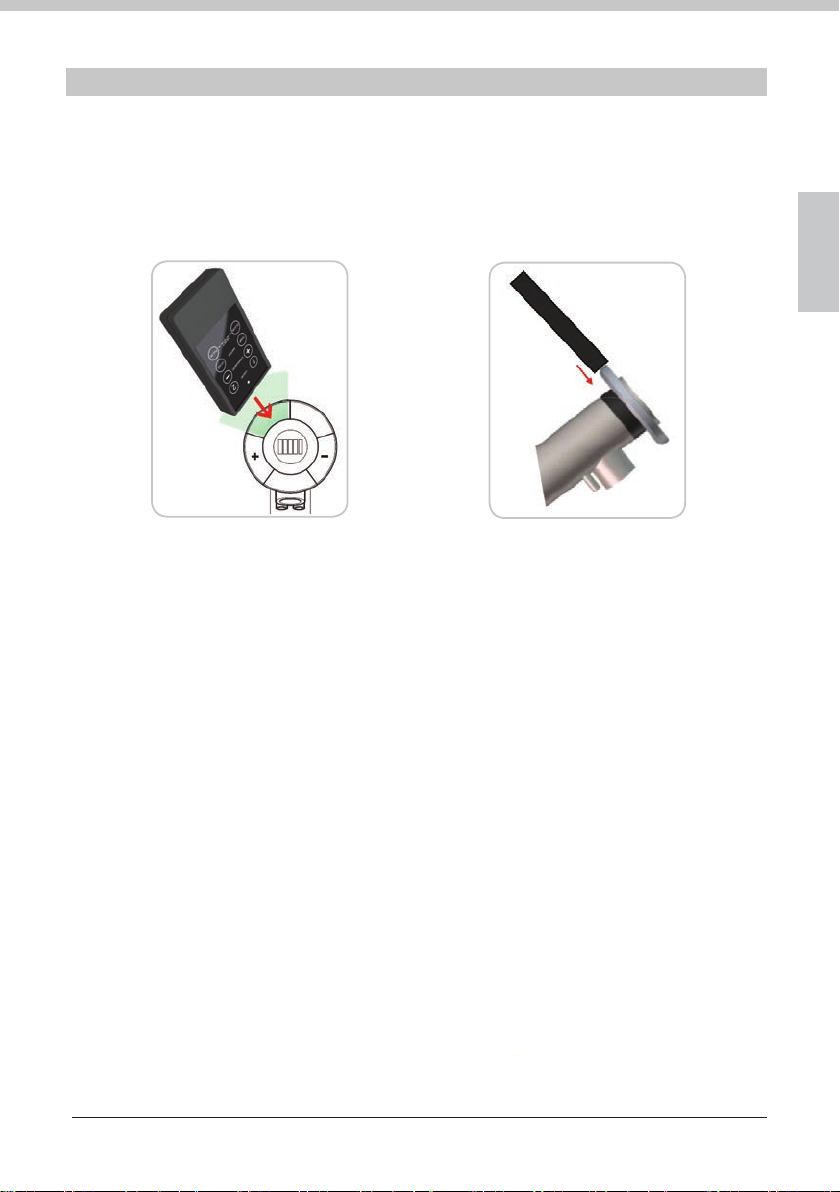
The remote control works through the IR sensors of the green soap segment.
Position the remote control over the IR ring, like Fig. C and D, then the desired settings
can be changed.
Fig. C Fig. D
Press the «1» button. The faucet shows a green light onto the «Soap» segment.
With the «+» and «-» buttons the amount of soap can be changed. The amount of soap can be
checked by the LED bars onto the display of the faucet. The selected setting is automatically
stored after 10 seconds or when the «2» button is pressed.
Press the «2» button. The faucet shows a green light onto the «Disinfect» segment.
With the «+» and «-» buttons the amount of lotion or disinfectant can be changed.
The amount of lotion or disinfectant can be checked by the LED bars onto the display of the
faucet. The selected setting is automatically stored after 10 seconds or when the «2» button is
pressed.
Press the «TEMP» button. The faucet shows a red light at the «+» segment and a green light at
the «-» segment. With the «+» and «-» buttons the initial water temperature can be changed.
The selected setting is automatically stored after 10 seconds or when the «2» button is pressed.
V 1.0 EN
English

15
8
Change response time of water flow3.5
Turning on/off the automatic cleaning cycle3.6
Turning on/off the light pulse3.7
Turning on/off the beep tone3.8
Resetting to default settings3.9
Replacing the batteries3.10
Press the «DOSE» button. The faucet shows a white light onto the «Water» segment.
With the «+» and «-» buttons the response time of the water flow can be changed.
The selected setting is automatically stored after 10 seconds or when the «2» button
is pressed.
Press the «CLEAN» button for 3 seconds. The IR sensors and the LED‘s are now in
standby mode. To get out of standby mode, the «CLEAN» button needs to be
pressed again for 3 seconds. The standby mode will not work if the faucet gets no
power from the mains power supply.
Press the «PULSE» button. The light pulses are being turned on or off.
The selected setting is automatically stored after 10 seconds or when the «2» button
is pressed.
With the «+» button the beep tone can be switched on, with the «-» button the beep
tone can be switched off.
To restore the default settings, press the «CLEAN» and the «PULSE» button simultaneously.
All segments show their own light colour for 2 seconds.
To replace the batteries, when they have run out of power, see Fig. B.

18 9
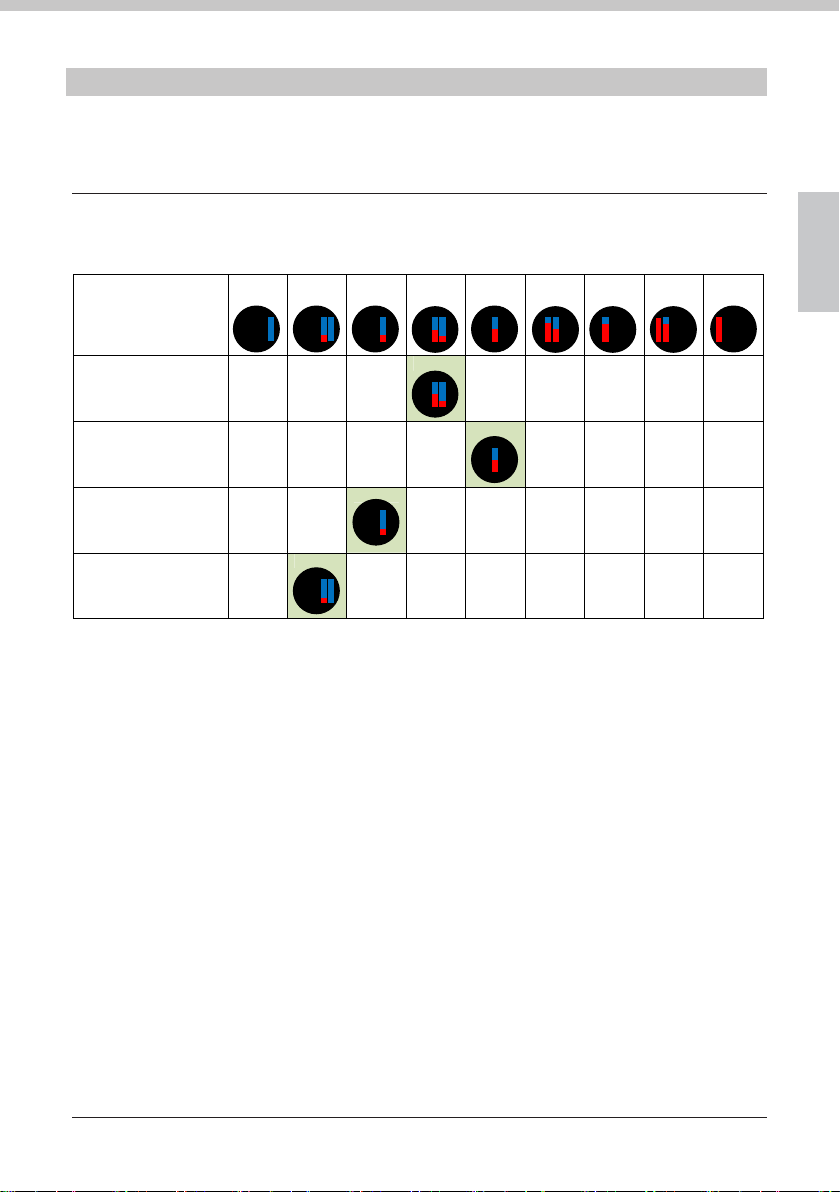
Technical data4.
Information of default settings
1
Minimum
23456789
Maximum
V 1.0 EN
Position
Bar position
Soap
ca. dosage in ml
Disinfect
ca. dosage in ml
Initial water temperature
Response time of water flow
in seconds
Other default settings
Light pulse ONE
Beep tone ONE
Automatic cleaning cycle OFF
0.3 0.5 0.7 1.0 1.5 2.0 3.0 4.0 5.0
0.5 1.0 1.5 2.0 3.0 4.0 6.0 8.0 10.0
Cold range Warm range Hot range
0.5 1.0 1.5 2.0 3.0 5.0 10 30 60
English

19
10
Warranty and information5.
Warranty5.1
The warranty period is 2 years.
If the remote control needs repairing, contact your miscea dealer.
Warranty conditions5.2
In addition, miscea refers to the miscea Sales and Delivery conditions regarding the applicable
warranty conditions.
Contact information5.3
For questions about where to buy our products or questions concerning the use:
please visit our website for the miscea representative in your country.
Updates of the manual5.4
We update this manual regularly. If you want to have the latest version of this manual, you can
Notes
Altri manuali per "Classic"
3
Indice
Lingue:
Altri manuali Miscea Telecomando