
Mpio FL 400 Manuale utente
User’s Manual
FL400_Eng_060216.indd 2-3 2006-02-16 ソタネト 2:57:30
3
█
Copyright
- MPIO holds patent, trademark, and other intellectual property right about this User’s Manual. Imitating
all or part of software of this product, and duplication, reproduction, or interpretation without a prior
consent with MPIO is prohibited. Making the electronic media version and the mechanical abridgement
of the contents are also prohibited.
█
Trademark
- Microsoft, Windows, Windows Explorer, and Windows logo are the trademark or registered trademark
of Microsoft Corporation.
- Intel and Pentium are the registered trademark of Intel Corporation.
- Macintosh and Macintosh are the registered trademark of Apple Computer, Inc.
- Products and products described in this manual are the trademark or registered trademark of the
corresponding company or organization, and ™ or ® mark not always displayed explicitly.
█
Disclaimer
- Manufacturer and sales office do not bear any responsibility over the accidental damage that
accompanies the injury to the user, which is caused by improper usage of this product.
The contents of this manual are based on the product status at the time of sales and can be changed
without a prior notice for continuous performance improvement and additional function supplementation
in the future.
■
Introduction of
Thank you for purchasing MPIO FL400. FL400 is a digital audio player that
enables users to play back music conveniently and utilize it for various purposes.
To use this product properly, make sure to read through this manually before
using it.
http://www.mpio.com
For more information on the MPIO products, visit our web site on the Internet. You
can find many answers to the customer’s various enquiries, or upgrade the product
performance through firmware upgrade (system software) that operates this product.
2
Getting Started
FL400_Eng_060216.indd 2-3 2006-02-16 ソタネト 2:57:30

The following information is for protecting the user’s safety and any property damages.
Please read the following information and use the product accordingly.
Do not use in high
temperature(near heating device
or heat generators).
Do not use in minus zero
temperatures or outdoors during
winter (operating temperature 0˚
C~40˚C).
Do not leave in humid areas or
frequently flooding areas.
Do not leave in dusty areas. Do not leave inside vehicles or
under direct sunlight. Avoid shaky areas.
Avoid magnetic objects. Avoid strong impact to prevent
disassemble or data loss. Never disassemble, repair or
reorganize.
54
■
Safety Precautions
Be careful of foreign substances
entering the product interior.
E.g.) Paper clips, paper, water,
drinks, etc.
When removing foreign sub-
stances from the product surface,
always use a soft cloth or a towel.
Do not use chemical solvents.
█
User Safety
1. Traffic safety
- Do not listen to music using headphones or earphones when riding a bicycle, motorcycle, or driving a vehicle. It is
dangerous and it may be against the law in some regions.
- Reduce the headset or earphone volume when listening to music or FM while you’re walking. There is a risk of an
accident.
2. Hearing Protection
- Do not use headphones or earphones for a long period of time. Professionals suggest that long use of all portable
audio devices may have a possibility of causing hearing loss.
█
Data Storage
1. MPIO Co., Ltd. will not be responsible for data loss or damages occurred while transferring data between the product
and a PC.
2. When storing important data, please make a back-up copy. The data may be damaged due to malfunction or
other elements such as outer impact or lack of battery. Please note that in case of data loss, MPIO Co., Ltd. will
not be responsible for the lost data.
3. When inserting/removing the USB plug into a computer, please do so by holding the plug.
4. When the product is connected to a computer, please do not cause impact or shake the connector.
5. You should back up the data saved in the product before requesting the after service. MPIO will consider that the
customers have backed up their data before sending it to MPIO for after service. MPIO will not back up your data upon
receiving the after service request. Additionally, MPIO will bear no responsibility over data loss during the service.
Getting Started
FL400_Eng_060216.indd 4-5 2006-02-16 ソタネト 2:57:32
76
■
Table of Contents
Getting Started
■
Safety Precautions ................................... 4
■
Product Features ...................................... 8
■
Components ............................................. 9
■
Name of the Parts .................................... 10
■
Using the Necklace Earphones ................ 12
■
Recharging ............................................... 14
Connection
■
Connecting to a PC .................................. 16
System Requirement ................................ 16
Installing the Software .............................. 17
Connect with a USB Connector ................ 20
■
Installing USB Driver Manually ................. 21
■
Using a Removable Disk .......................... 23
File Download / Upload / Delete ............... 23
Disconnecting the USB Connection ......... 25
Basic Usage
■
Basic Operation ........................................ 26
■
Changing Modes ...................................... 28
■
Voice Recording ....................................... 29
■
Using the Navigation ................................ 30
■
Listening to the Radio ............................... 31
Manually Searching the Frequency
(Scan mode) ............................................. 31
Automatically Searching the Frequency
(Scan mode) ............................................. 31
Saving Channels ...................................... 31
Changing a saved frequency .................... 32
Listening to a Saved Frequency
(Channel mode) ........................................ 32
■
Radio Recording ....................................... 33
Additional Usage
■
Menu Structure ......................................... 34
■
Menu Operation ........................................ 35
■
Setting the Menu [Volume Settings] ......... 37
Setting EQ ................................................ 37
Setting Sound Effects ............................... 38
Setting Repeat .......................................... 38
■
Setting the Menu [Recording Settings] ..... 39
Setting the Voice Quality / FM Quality ...... 39
Radio reservation Recording .................... 39
■
Setting the Menu [Radio Settings] ............ 40
Saving Auto Preset ................................... 40
Setting Seek Step ..................................... 40
Setting Bandwidth .................................... 41
■
Setting the Menu [System Settings] ......... 42
Setting Auto Play ...................................... 42
Setting A↔B Repeat ................................ 42
Setting File Information ............................ 43
Setting Resume ........................................ 43
Setting Fade In ......................................... 44
Setting Sleep ............................................ 44
Setting Auto Power Off ............................. 45
Setting the Backlight ................................. 45
Setting Contrast ........................................ 46
Setting the Language ............................... 46
Setting the Time & Date ........................... 47
Setting Alarm ............................................ 47
Checking Device Information ................... 48
Customer Support
■
Formatting ................................................ 49
■
Storing Default Settings ............................ 52
■
Upgrading Firmware ................................. 53
Upgrading Firmware in Macintosh ............ 55
■
Troubleshooting ........................................ 56
■
Product Specifications .............................. 58
Getting Started
FL400_Eng_060216.indd 6-7 2006-02-16 ソタネト 2:57:38
차 차 차
차 차 차
9
■
Components
■
Product Features
8
Digital audio player with a simple design that everybody can use with ease.
■
A compact, super-slim, high-capacity digital audio player.
It’s a product that is newly designed with a compact necklace concept and put on the way you
would jewels or accessories.
■ Supports USB 2.0 high-speed data transmission.
Data can be transferred and used faster and more conveniently using USB 2.0 interface.
■ Supports USB mass storage
MP3 player can be used as a removable disc. You can save and use the data conveniently at
any time and place.
■ Supports playback of multiple formats and DRM-applied file
Not only does it play MP3, WMA, ASF, and OGG files, but it also plays DRM files that you buy
online.
■ FM radio function
Besides simple listening to the FM radio, channel saving and automatic preset functions are also
provided.
■ Supports voice recording and FM recording
Voice and FM can be recorded.
■ Supports a 7-setting EQ and a Spatializer UltraMobile HD.
Offers Normal, Pop, Rock, Jazz, Classic, and Vocal modes and an EQ menu that the users can
set the way they want. It also supports a Spatializer UltraMobile HD to offer 3D sound effects and
rich sound.
■ Provides Real Player
License Real Player program is bundled with this product, which enables to author MP3 file and
use the music library.
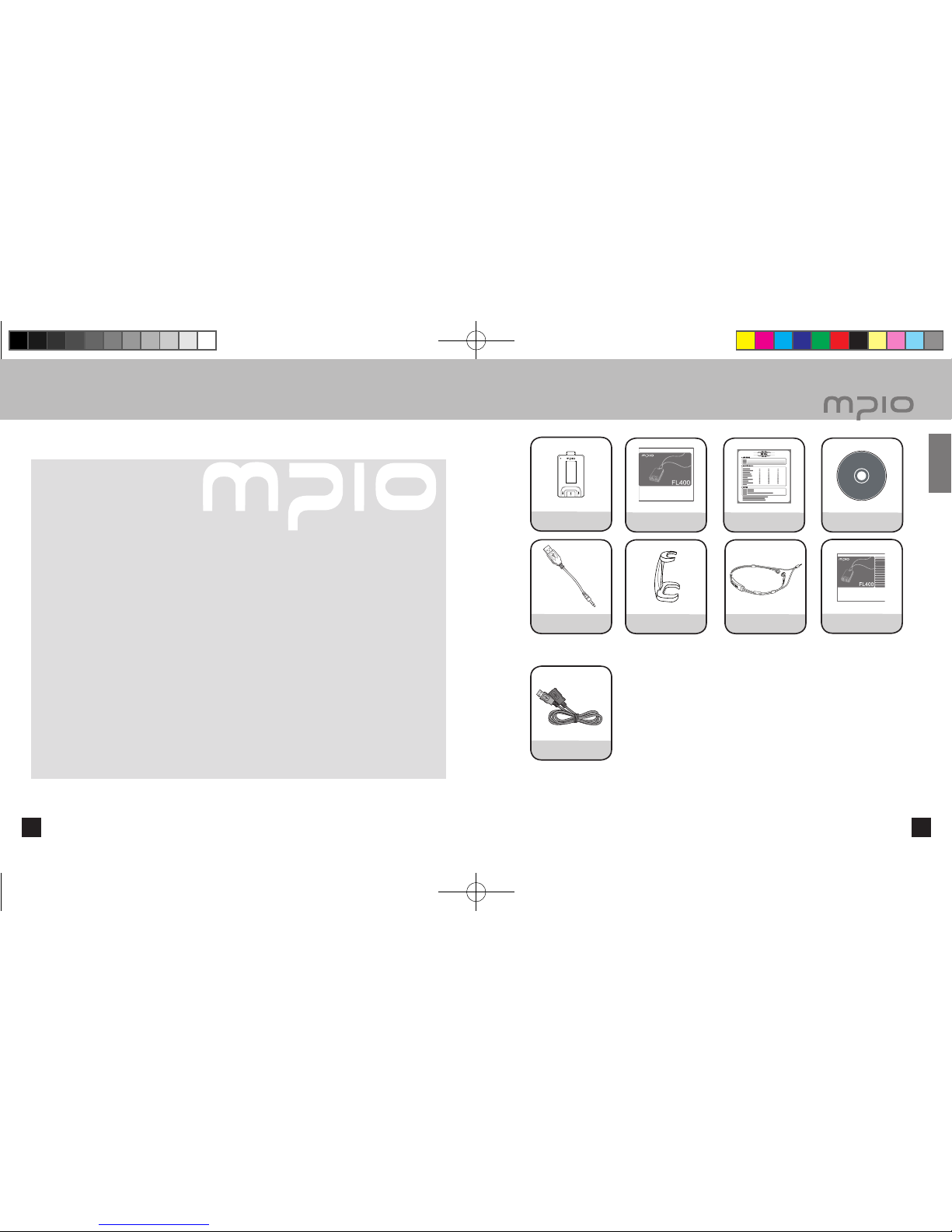
Additional components
Player User’s manual Product Warranty Installation
Driver CD
USB Connector Connection clip
Necklace Earphones
Quick guide
Additional components (Additional components
can differ depending on the sales area.)
USB extension cable
Note
● Actual player may vary slightly from images shown, and subject to change without notice.
● Broken accessories may be purchased separately at MPIO Service Center.
Getting Started
FL400_Eng_060216.indd 8-9 2006-02-16 ソタネト 2:57:40
►
08:22:10
MO 0:00:10
VOICE001.MP3
MO CH 3
89.9MHz
MO CH 1
FM002.MP3 01:20
107.7MHz
Pop
Displays Stereo/Mono
Displays Channel number
Battery Indicator
Displays Selected
frequency
Displays Stereo/Mono
Displays Voice Recording Progress time
Displays
Play/Pause
Displays Voice
Recording
Progress
Displays
available
Recording
Time
Displays Voice Recording Filename
Displays Stereo/Mono
Displays Channel No.
Displays Selected
frequency
Displays Radio
Recording Time
Displays Radio-recording file name
Total Tracks Repeat Indicator
Current Track EQ Indicator
Battery
Indicator
Display
of music
information
Playback timer
Displays File
Progress
Displays Total
Playtime
Displays
Play/
Pause
Radio Screen
Voice Recording Screen Radio Recording Screen
Music Screen
11
█
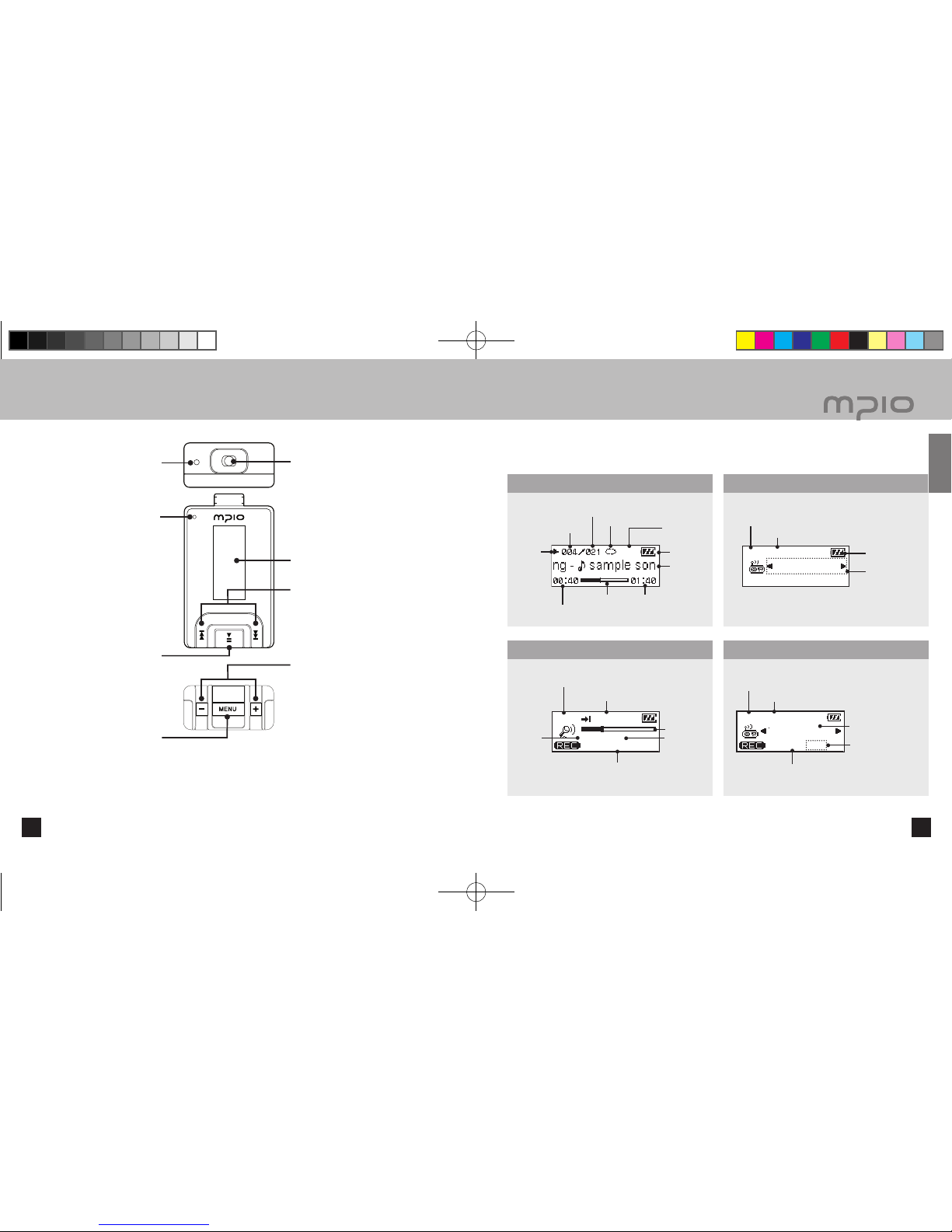
LCD Screen
■
Name of the Parts
10
Note
●
You can initialize it by pressing the reset hole with a fine pin.
●
When you reset, all settings revert to the default settings.
Microphone
LCD Screen
Power/Play/Pause Button
Menu, Navigation/Changing Track/
Rewind & Fast Forward
Earphone/USB Jack
RESET Hole
Menu, Navigation Setting
Volume Control Button
Getting Started
FL400_Eng_060216.indd 10-11 2006-02-16 ソタネト 2:57:41
13
■
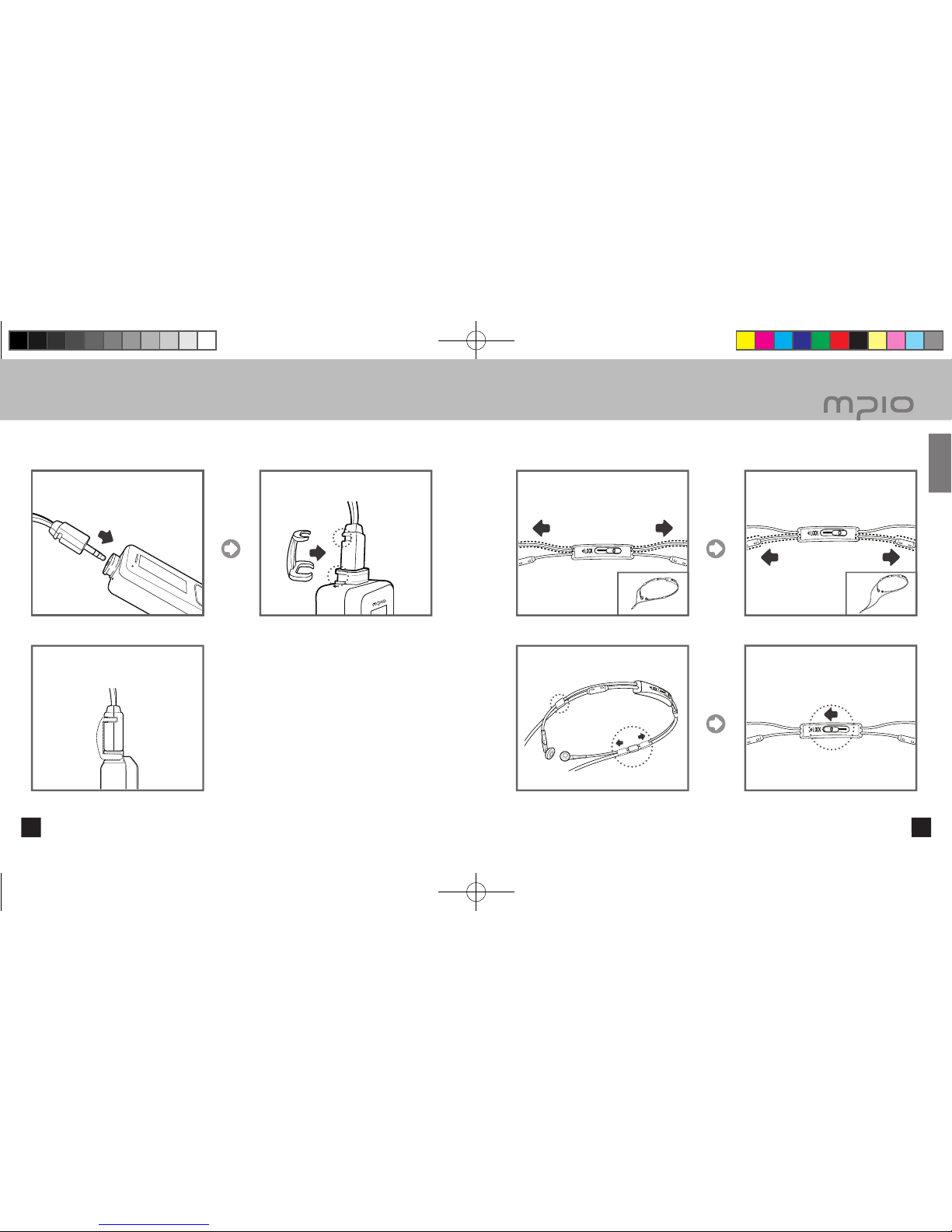
Using the Necklace Earphones
12
When you want to make the strap
shorter, hold the necklace strap in the
direction of the arrow as in the figure.
When you want to make the strap
longer, hold the necklace strap in the
direction of the arrow as in the figure.
Adjust the loops on both sides correctly.
As in the figure, please press the
switch in the direction of the arrows
without moving the adjusted strap.
█
Using the Necklace Earphones Strap
Insert the earphones in the direction of
the arrow.
Connect the connection clip so that it
goes into the indention.
Inserting the connection clip safely holds
the earphones so that they don’t fall out
when you wear the necklace earphones.
█
Connecting the Necklace Earphones
Getting Started
FL400_Eng_060216.indd 12-13 2006-02-16 ソタネト 2:57:42
15
█
About the Internal Rechargeable Battery
● Battery can be charged at any time but we recommend the battery to be fully charged before use.
● If the battery usage time is shorter compared to the charging time, this means the battery must be
changed.
● Please fully charge the battery at initial use or after it has not been used for a long period of time.
● The built-in battery is expendable, therefore the battery usage time will gradually reduce after
purchase.
● Always charge and store the produce at room temperature.
● The battery is not fully charged when the product is purchased. Please fully charge the product
before use.
● The battery usage time will differ depending on how the product is used and how long, usage
temperature, and other environmental matters.
Note
● Contact MPIO Service Center for replacing the internal battery.
14
■
Recharging
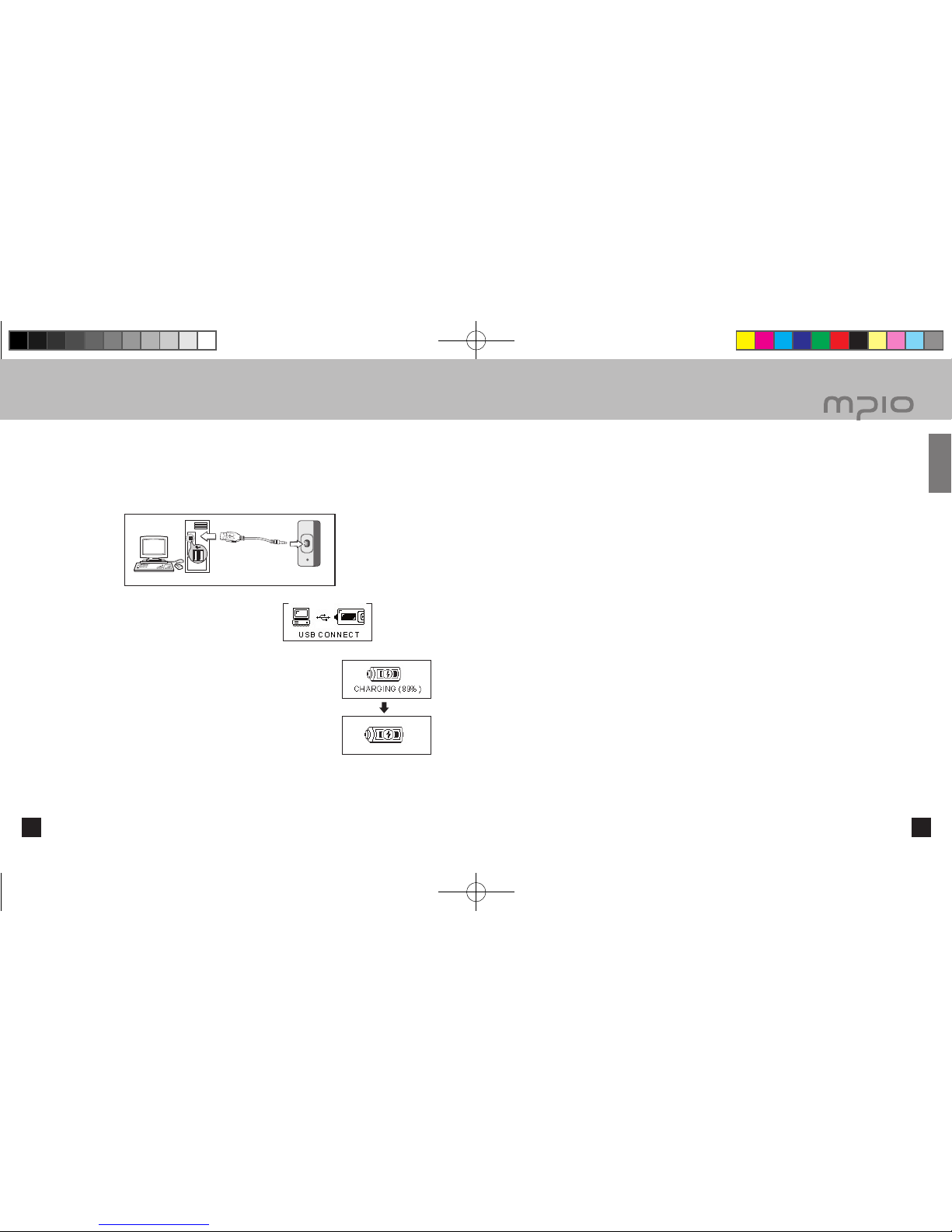
USB connection
screen when the
power is ON/OFF
Connect with a USB Connector
█
Charging the battery while the power is on/off
If the charge is insufficient, the low battery message appears on the LCD window, and you must charge the battery.
When you turn on and off, connect the product to the USB port on the computer with the USB
connector as in the figure.
The USB connector connection screen is displayed on
the LCD window.
When the USB connector is connected and no data is transferred
from the portable disk, a CHARGING message appears on the LCD
and the battery starts to charge. After the battery is fully charged
the following figure will be displayed.
- Before using for the first time charge for more than 2 hours.
- Charging time: 1 hour.
Note
●
Playtime capacity is a maximum of 9 hours.
●
Playtime and charging time may differ depending on the user’s computer environment.
●
Please remove the USB connector when it is not in use for charging or for a removable disc.
Getting Started
FL400_Eng_060216.indd 14-15 2006-02-16 ソタネト 2:57:44
1717
■
Connecting to a PC
1616
█
System Requirement
●
IBM PC
System: USB Interface 2.0, Standard device and a CD-ROM Drive equipped
CPU: Pentium 133MHz or faster
Memory: 64MB or more
Hard disk space: 20MB or more
Supported Operating Systems: Windows 98 / 98SE / ME / 2000 / XP
●
Macintosh
System: USB Interface 2.0, Standard device and a CD-ROM Drive equipped
Ex.) Power Mac G3 (Blue & White) / G4 / G4 Cube, iMac / iBook, PowerBook, PowerBook G4
Memory: 64MB or more
Hard disk space: 20MB or more
Supported Operating Systems: Mac OS version 9.2 or later
Caution
●
Connection using USB Hubs or extension cables is not guaranteed.
Note
●
In Windows 98 / 98SE, the program must be installed to use FL400 as a removable disk. Please install the USB
drivers before use.
●
In Windows ME, 2000, XP, FL400 may be used as a Removable Disk without any separate programs. FL400 is
accessible though the Windows Explorer.
●
To format, or upgrade the firmware of FL400 in Windows 98, 98SE, ME, 2000 or XP, please install the MPIO
Utility.
█
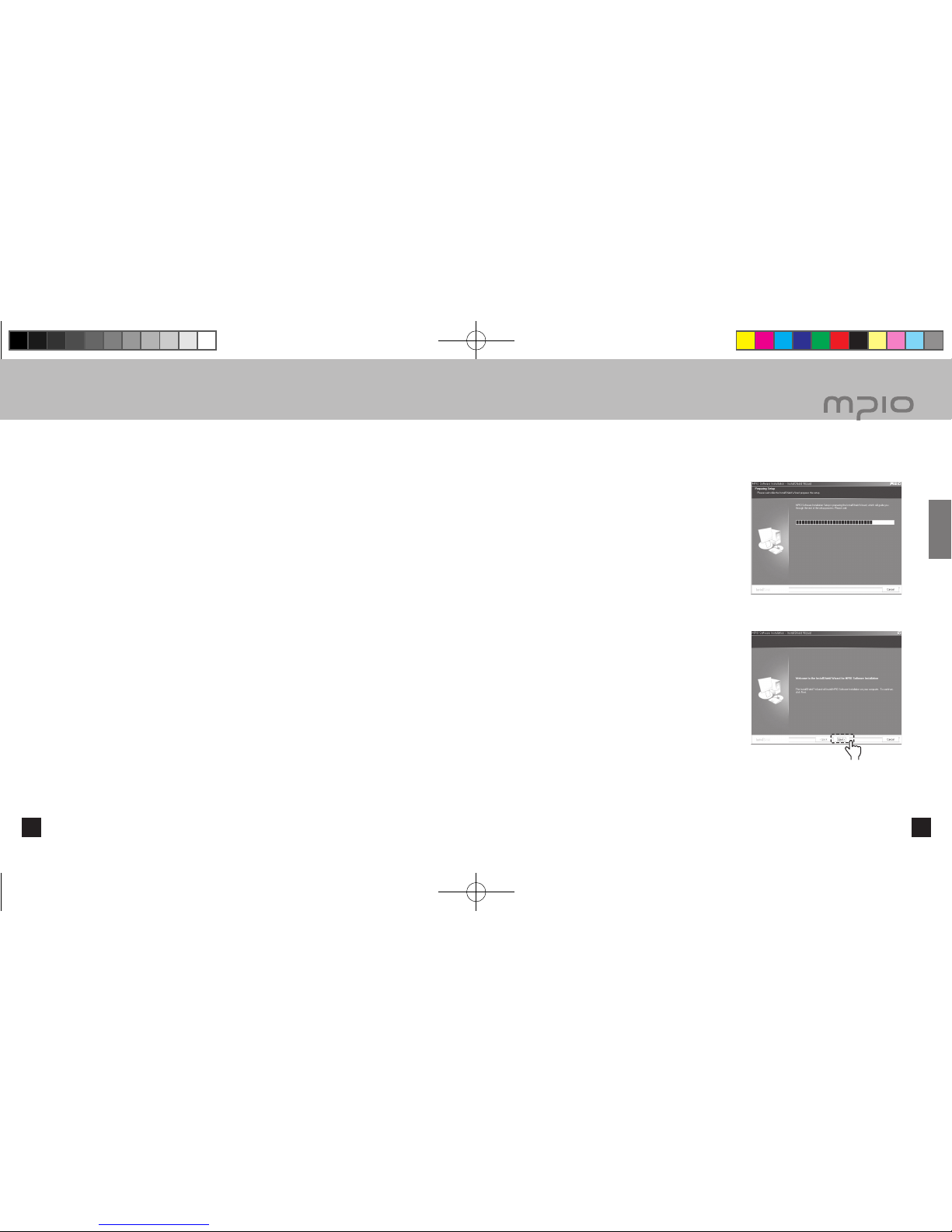
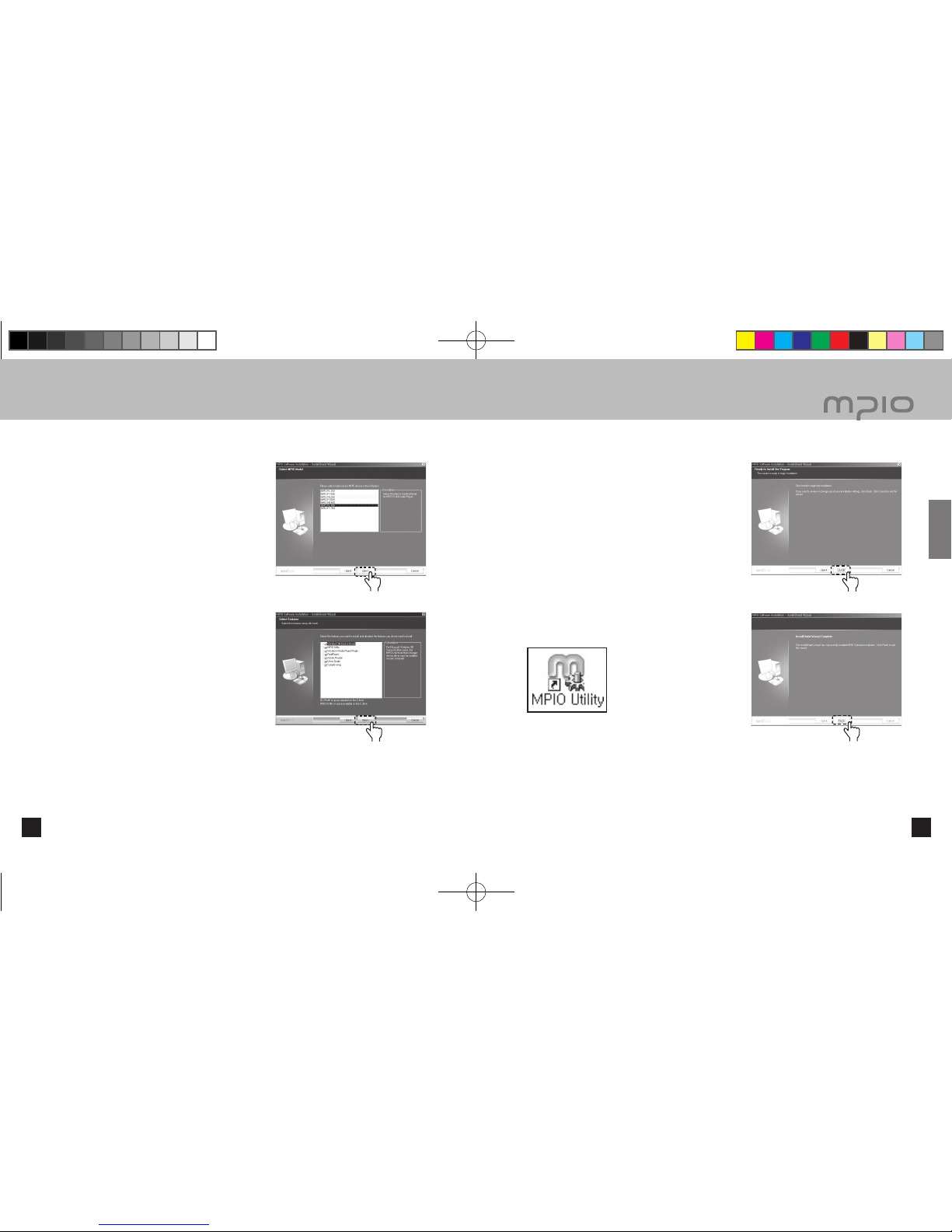
Installing the Software
Insert the Installation CD into the CD-ROM Drive. The
installation will auto-start and the installation will begin
as shown in right. If the installation doesn’t auto-start,
double-click the CD-ROM icon in Windows Explorer.
Click the [Next] button.
16 17
Connection
Click
FL400_Eng_060216.indd 16-17 2006-02-16 ソタネト 2:57:45
19
■
Connecting to a PC
18
After selecting [FL400], click the [Next] button.
Click the [Next] buton. All the utility programs will be
installed. The user can select the programs needed
to install. But, the following items must be installed.
- Windows 98 Device Driver
(For Windows 98/98SE user’s only)
- MPIO Utility
- Windows Media Player Plug-in
Click the [Install] button to install the selected utilities
in order.
Click the [Finish] button to finish the installation.
Check the MPIO Utility icon on the desktop to confirm
installation.
18 19
Connection
Click
Click
Click
Click
FL400_Eng_060216.indd 18-19 2006-02-16 ソタネト 2:57:45
Altri manuali per FL 400
1
Indice
Altri manuali Mpio Lettore MP3

Mpio
Mpio DMG PLUS Manuale utente

Mpio
Mpio FY 800 Manuale utente

Mpio
Mpio DMB Plus Manuale utente

Mpio
Mpio FL100 Manuale utente

Mpio
Mpio HD 200 Manuale utente

Mpio
Mpio FY 500 Manuale utente

Mpio
Mpio PD 100 Manuale utente

Mpio
Mpio FY 600 Manuale utente

Mpio
Mpio FY 200 Manuale utente

Mpio
Mpio HD 400 Manuale utente


