
NEC NHD-3000PVR Manuale utente
HIGH DEFINITION RECEIVER / RECORDER
Model : NHD-3000PVR
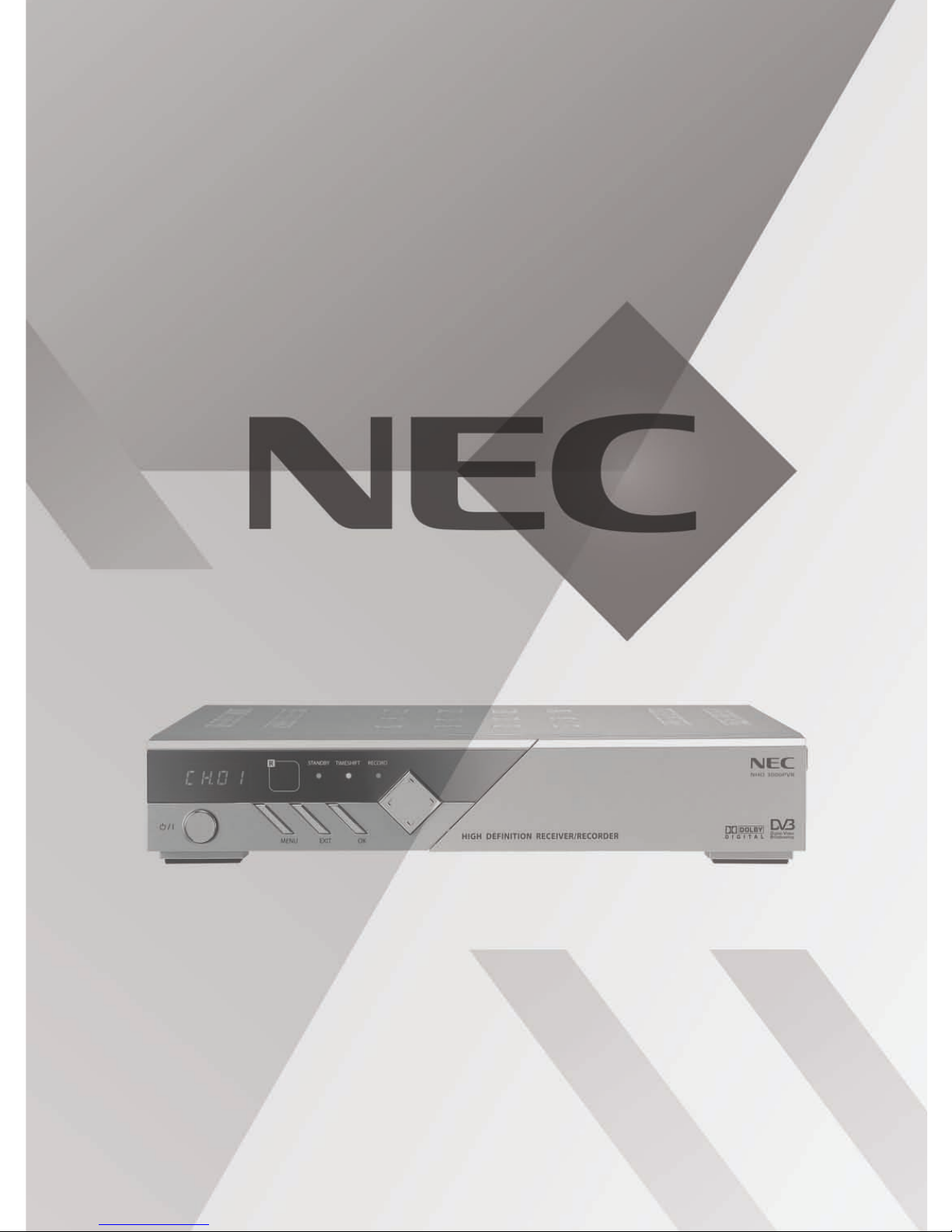
HIGH DEFINITION RECEIVER / RECORDER
Model : NHD-3000PVR
USER’S MANUAL
1
Warnings
01
Warnings
Read Instructions : All the safety and operating instructions should be read before the product is operated.
Retain Instructions : The safety and operating instructions should be retained for future reference.
Heed Warnings : All warnings on the product and in the operating instructions should be adhered to.
Follow Instructions : All operation and use instructions should be followed.
Cleaning : Unplug this product fro the wall outlet before cleaning. Do not use liquid cleaners or aerosol
cleaner. Use a da p cloth for cleaning.
Attach ent : Do not use attach ents not reco ended by the product anufacturer as they ay cause
hazards.
The lightning flash with arrowhead symbol, within an equilateral triangle, is intended to
alert the user to the presence of uninsulated "dangerous voltage" within the product's
enclosure that may be of sufficient magnitude to constitute a risk of electric shock to
persons.
The exclamation point within an equilateral triangle is intended to alert the user to the
presence of important operating and maintenance (servicing instructions in the literature
accompanying the appliance.
The appliance is not intended for use by young children / infirm persons without
supervision.
Young children should be supervised to ensure that they do not play with the appliance.
To prevent electric shock do not use this (polarized plug with a receptacle or other outlet
unless the blades can be fully inserted to prevent blade exposure.
Change or modification not expressly approved by the party responsible for compliance
could void the factory warranty.
The apparatus shall not be exposed to dripping or splashing and that no objects filled
with liquids, such as vases, shall be placed on the apparatus.
The socket-outlet shall be installed near the equipment and shall be easily accessible.
WARNING : To prevent fire of shock hazard, do not expose this appliance to rain or moisture.
CAUTION :
1.
2.
3.
4.
5.
6.
Important Safeguard

7.
8.
9.
10.
11.
12.
13.
14.
15.
16.
17.
18.
19.
Warnings
2
01
Warnings
Water and Moisture : Do not use the product near water - for exa ple, near a bath tub, wash bowl, kitchen
sink, or laundry tub ; in a wet base ent ; or near a swi ing pool ; and the like.
Accessories : Do not place this product on an unstable table. The product ay fall, causing serious injury
to a child or adult, and serious da age to the product. Use only with a table reco ended by the
anufacturer, or sold with the product. Any ounting of the product should follow the anufacturer's
instructions, and should use a ounting accessory reco ended by the anufacturer.
A product and cart co bination should be oved with care. Quick stops, excessive force,
and uneven surface ay cause the product and cart co bination to overturn. Please refer
to picture on the right.
Ventilation-Slot and openings in the cabinet are provided for ventilation and to ensure reliable
operation of the product and to protect it fro overheating, and these openings ust not be blocked or
covered. The openings should never be blocked by placing the product on a bed, sofa, rug, or other si ilar
surface. This product should not be placed in a built-in installation such as a bookcase or rack unless
proper ventilation is provided or the anufacturer's instructions have been adhered to.
Power Sources : This product should be operated only fro the type of power source indicated on the
arking label. If you are not sure of the type of power supply to your ho e, please contact NEC Service
Centre or NEC Pro Care Centre. For products intended to operate fro battery power, or other sources,
refer to the operating instructions.
Polarization : This product ay be equipped with a polarized alternating-current line plug. This plug will fit
into the power outlet only one way. This is a safety feature. Do not defeat the safety purpose of the
polarized plug.
Power-Cord Protection : Power-supply cords should be routed so that they are not likely to be walked on or
pinched by ite s placed upon or against the , paying particular attention to cords at plugs, convenience
receptacles, and the point where they exit fro the product.
Lighting : For added protection for this product during a lighting stor , or when it is left unattended and
unused for long periods of ti e, unplug it fro the wall outlet and disconnect the antenna or cable syste .
This will prevent da age to the product due to lighting and power-line surges.
Power Lines : An outside antenna syste should not be located in the vicinity or overhead power lines or
other electric light or power circuits, or where it can fall into such power lines or circuits. When installing an
outside antenna syste , extre e care should be taken to keep fro touching such power lines or circuits
as contact with the ight be fatal.
Overloading : Do not overload wall outlets, extension cords, or integral convenience receptacles as this
can result in a risk of fire or electric shock.
Object and Liquid Entry : Never push objects of any kind into this product through opening as they ay
touch dangerous voltage points or short-out parts that could result in a fire or electric shock. Never spill
liquid of any kind on the product.
Servicing : Do not atte pt to service this product yourself as opening or re oving covers ay expose you
to dangerous voltage or other hazards. Refer all servicing to qualified service personnel.
Da age Requiring Service : Unplug this product fro the wall outlet and refer servicing to qualified service
personnel under the following conditions :
a) When the power-supply cord or plug is da aged.

3
20.
21.
22.
23.
Warnings
01
Warnings
b) If liquid has been spilled, or objects have fallen into the product.
c) If the product has been exposed to rain or water.
d) If the product does not operate nor ally by following the operating instructions. Adjust only those
controls that are covered by the operating instructions as an i porter adjust ent of other controls
ay result in da age and will often require extensive work by a qualified technician to restore the
product to its nor al operation.
e) If the product has been dropped or da aged in any way.
f) When the product exhibits a distinct change in perfor ance-this indicate a need for service.
Replace ent Parts - When replace ent parts are required, be sure the service technician has used
replace ent parts specified by the anufacturer or have the sa e characteristics as the original part.
Unauthorized substitutions ay result in fire, electric shock, or other hazards.
Safety Check : Upon co pletion of any service or repairs to this product, ask the service technician to
perfor safety checks to deter ine that the product is in proper operating condition.
Heat : The product should be situated away fro heat sources such as radiators, heat registers, stoves, or
other products (including a plifiers) that produce heat.
RF Interference : Do not operate a obile phone in close proxi ity, as this ay cause picture and sound
breakup and da age to ain parts.
About the internal hard disk drive
Do not ove the recorder while it is on.
Install and use the recorder on a stable, level surface.
Do not block the top cover vent holes.
Do not use the recorder where it is excessively hot or hu id places, or where places are subject to
sudden changes in te perature. Sudden changes in te perature can cause condensation to for inside
the recorder. This can be a cause of HDD failure.
While the recorder is switched on, do not unplug fro the wall socket or switch the electricity off fro the
breaker switch.
Do not ove the recorder i ediately after switching it off. If you need to ove the recorder, please
follow the steps below:
a) After the essage ‘P-OFF’ (POWER OFF) is shown in the display, wait at least two(2) inutes.
b) Unplug fro the wall socket.
c) Move the recorder.
If there’s a power failure while the recorder is on, there is a chance that so e data on the HDD will be lost.
The HDD is very delicate. If used i properly or in an unsuitable environ ent, it is possible that the HDD
will fail after a few years of usage. Signs of proble s include playback unexpectedly freezing and
noticeable block noise ( osaic) in the picture. However, so eti es there will be no warning signs of
HDD failure. If the HDD fails, no playback of recorded aterial will be possible. In this case, it will be
necessary to replace the HDD unit.
The internal hard disk drive (HDD) is a fragile piece of equip ent. Please use the recorder following the
guidelines below to protect against possible HDD failure or to protect against accidental loss.
1.
2.
3.
4.
5.
6.
7.
8.

4
Table of Contents
02
Table of Contents
01.
02.
03.
04.
05.
06.
07.
Warnings
Table of Contents
Supplied Accessories
Controls
Front Panel Controls and LEDs
Rear Panel Connectors
Battery Installation for Remote Control
nstallation
Antenna Input
Connection to Digital TV ( PbPr)
Connection to Digital TV (RGB/HV)
Connection to RGB PC Monitor
Connection to Digital TV (HDMI/DVI)
Connection to HDMI/DVI PC Monitor
Connection to Analog TV (Composite/S-Video)
Connection to Digital Audio Amplifier
Basic Operation
Remote Control
On Screen Display
Channel Information
Channel Guide (EPG)
Channel Status
Channel List
Timeshift Control
Record Control (Dual Recording)
Timer Record List
Program List
Program List (Rename)
Playback Control
EDIT Control (Repeat, Cut, Split)
Closed Caption
1
4
6
7
8
10
11
12
13
14
15
16
17
18
19
22
23
24
25
26
27
28
29
30
31
32
33
Table of Contents
08.
09.
10.
11.
12.
Teletext
PIP Control
Channel
Channel Edit
Channel Scan
Manual Scan
Channel Sorting
Channel Duplication
Parental Rating
Audio/Video
HDMI Video
HDMI Audio
Monitor Setup
Digital Audio Out
PIP Size
Vol. Control
PVR Manager
Progra List
Skip Ti e
HDD Sleep Ti e
HDD For at
System
Opacity
Ti e Zone
Daylight Saving
Sleep Ti er
New Password
Factory Default
About
Spe ifi ations
34
35
36
37
38
39
40
41
42
43
44
45
46
47
48
49
50
51
52
53
54
55
56
57
58
59
5
02
Table of Contents
※Manufactured under license from Dolby Laboratories. Dolby and the double-D symbol are trademarks of Dolby
Laboratories.
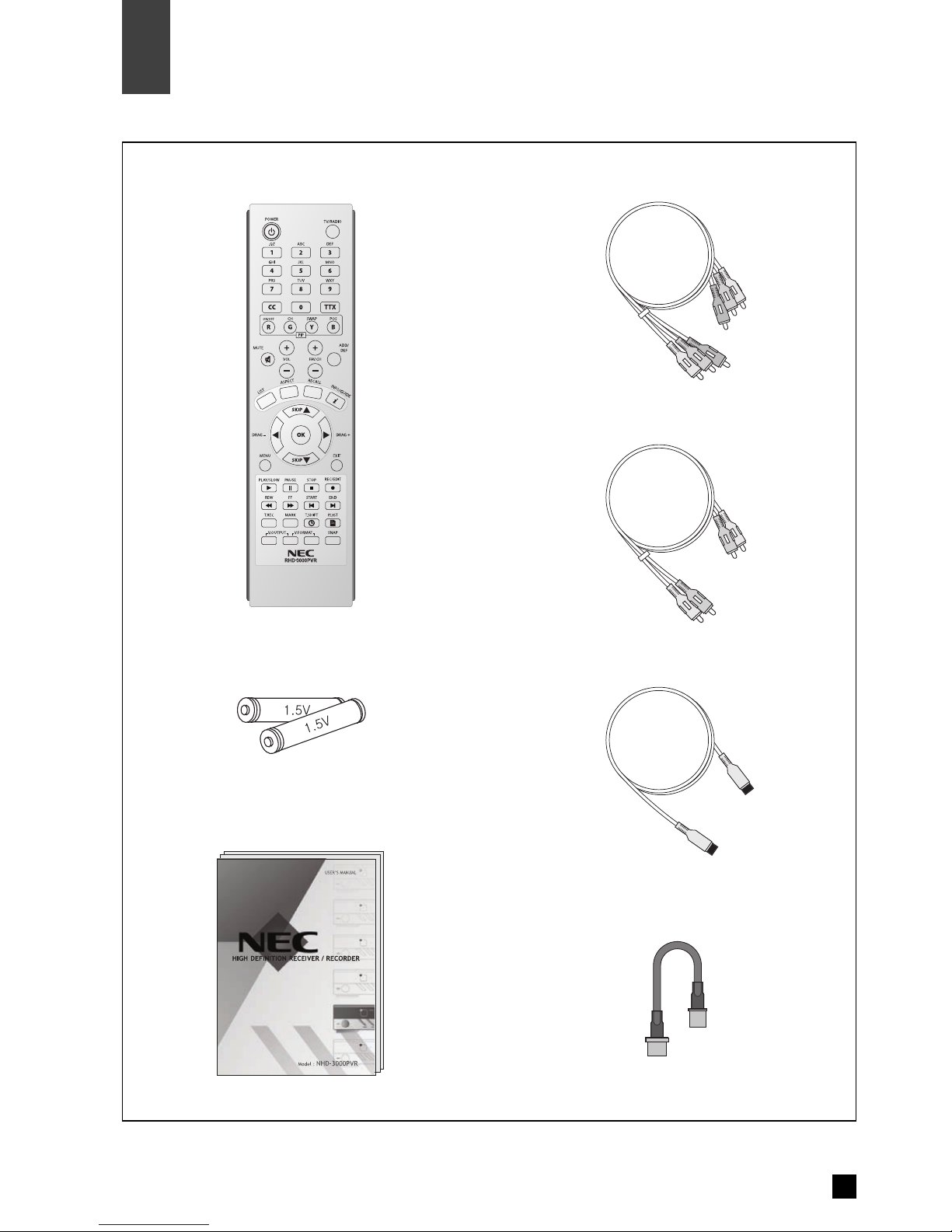
4. Component Video Cable
5. Audio Cable(L/R)
6.HDMI Cable
7. RF Loop Cable
. Remote Control
2. Batteries (size AAA)
3. User’s Guide
6
Supplied Accessories
03
Supplied Accessories
Make sure the following accessories are provided with product.
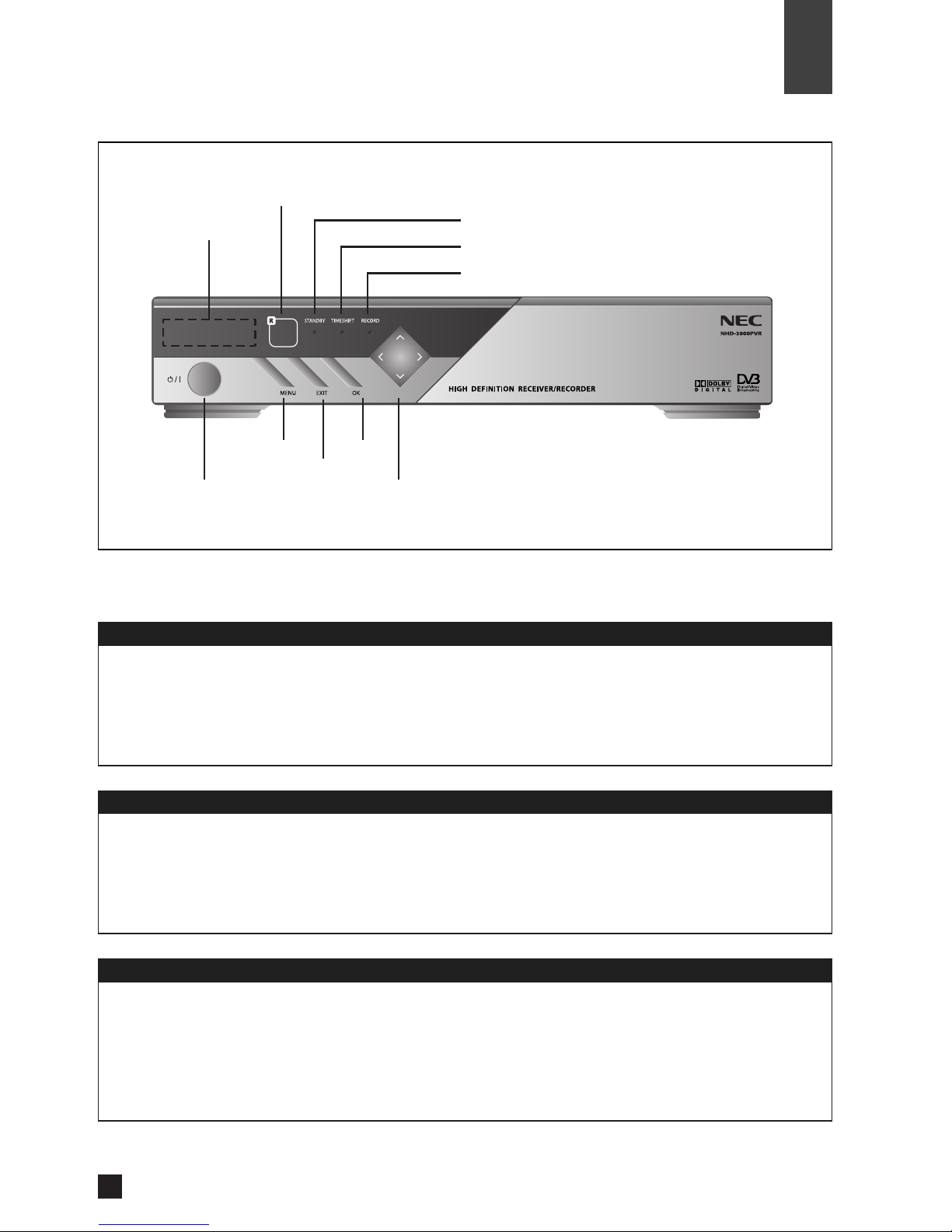
Power
Menu
Exit
OK
Arrow Buttons
Buttons
Front Display
Power On
Power Off
EXIT
Remote Control Sensor
POWER
Front Side
7
Front Panel Controls and LED’s
Controls
MENU
Front Display
04
LED Indicators
STA DBY
TIMESHIFT
RECORD
OK
Arrow uttons
STAND Y Power & Remote Indicator LED
Timeshift Playback Indicator LED
Recording Indicator LED
Channel number is displayed.
C100 means digital channel number is 100.
A200 means radio channel number is 200.
Clock is displayed.
STANDB Power & Remote Sensor Indicator LED.
During the period from STANDB to ON condition, the STANDB LED will be flashing.
Timeshift Playback Indicator LED.
Record Indicator LED.
Turns the unit on or off.
Display or exit the on screen menu.
Switch back to the previous menu screen that was displayed.
If the main menu is displayed, pressing the OK button will activate the highlighted MENU option.
Allows you to navigate on-screen menus and to adjust the system settings and preferences.
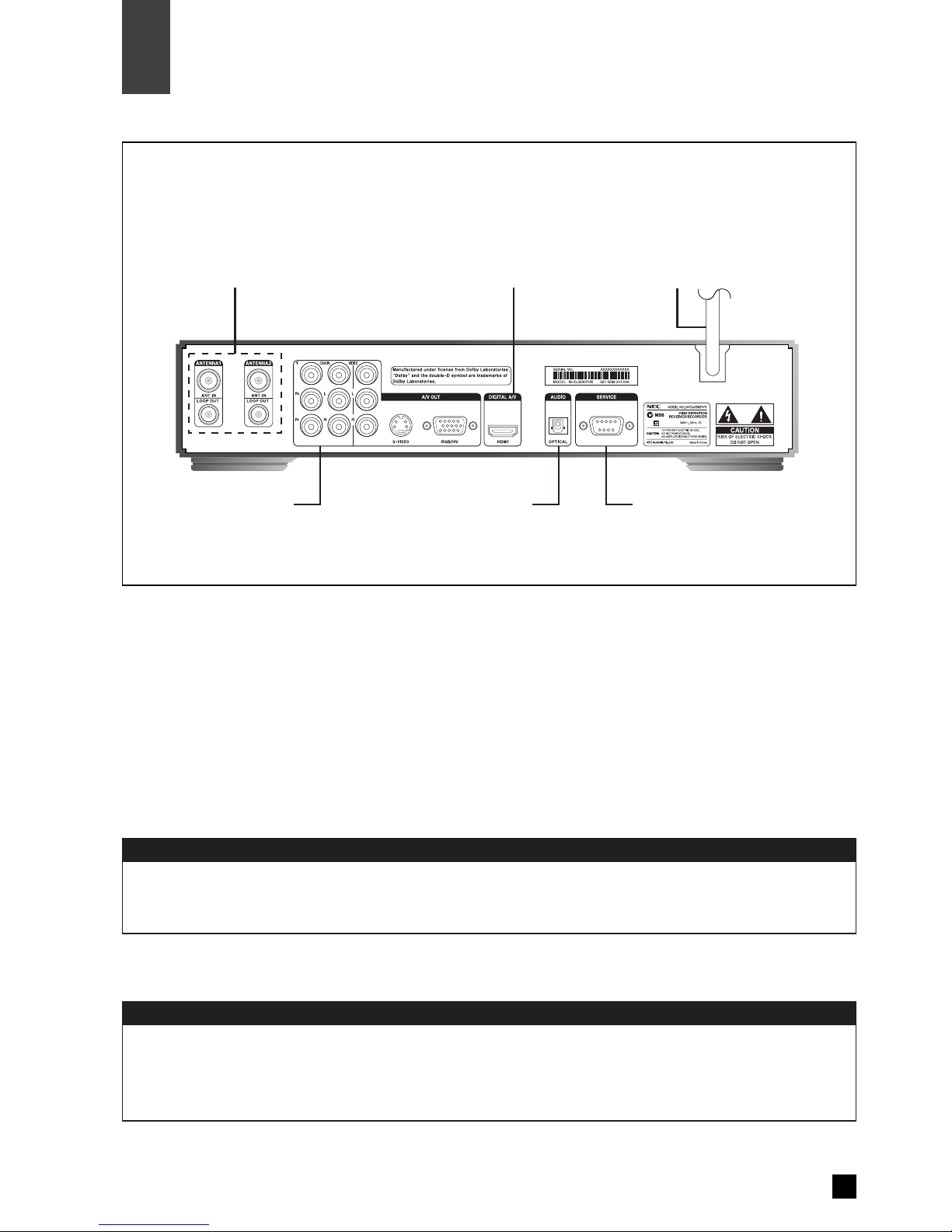
Antenna Input
Power Cord
8
Controls
◈Note. Connection of input/output connector in rear panel should be done while power is OFF.
Rear Panel Connectors
04
Connect the cable from an off-air TV antenna to Antenna1 input.
Connect Antenna1 loop out to Antenna2 input with RF loop cable.
Rear Side
Service Port A/V Output
Antenna Input Power CordHDMI/DVI Output
Connect to the AC power (AC 240 ~ 250V / 50Hz).
Optical Audio Output
Indice
Altri manuali NEC Registratore digitale


