
NEC DT750 Manuale utente

DT750
USER’S GUIDE
ISSUE 2.0a
UNIVERGE SV8100 Terminal


LIABILITY DISCLAIMER
NEC Unified Solutions reserves the right to change the specifications,
functions, or features, at any time, without notice.
NEC Unified Solutions has prepared this document for use by its employ-
ees and customers. The information contained herein is the property of
NEC Unified Solutions and shall not be reproduced without prior written
approval from NEC Unified Solutions. All brand names and product names
on this document are trademarks or registered trademarks of their respec-
tive companies.
Copyright 2010
NEC Unified Solutions


i
TABLE OF CONTENTS
1 Introduction
Face Layout .................................................................................................................................... 1
Technical Specifications ................................................................................................................. 2
Keys and Parts ................................................................................................................................ 3
Menu ............................................................................................................................................... 6
DESI-less Display ........................................................................................................................... 8
Softkeys ........................................................................................................................................ 11
Icon Display .................................................................................................................................. 16
Shortcut Menu ............................................................................................................................... 17
2 Terminal Setup
Setup with Up/Down Key .............................................................................................................. 19
To Adjust Handset Receiver Volume ...................................................................................... 19
To Adjust Speaker Volume ..................................................................................................... 19
To Adjust Ringer Tone ............................................................................................................ 19
Setup with Menu Key .................................................................................................................... 20
To Enable/Disable Off-Hook Ringing ...................................................................................... 20
To Set Ringing of Headset ......................................................................................................21
To Set Ringer Tone ................................................................................................................. 22
To Set Illumination Pattern for Call Indication Lamp ............................................................... 25
To Enable/Disable RTP Alarm ................................................................................................ 26
To Enable/Disable DTMF Tone .............................................................................................. 28
To Set Key Touch ................................................................................................................... 30
To Set Music on Hold .............................................................................................................. 31
To Set Clock Format ............................................................................................................... 33
To Enable/Disable Volume Level Display ............................................................................... 34
To Set Brightness of Backlight ................................................................................................ 36
To Change Character Size ..................................................................................................... 37
To Set a Language ................................................................................................................. 39
To Enable/Disable Wallpaper Operation ................................................................................. 40
To Enable/Disable Touch Panel Operation ............................................................................. 42

ii
TABLE OF CONTENTS
To Change Password .............................................................................................................44
To Reset Telephone Settings ................................................................................................. 46
To Download a File ................................................................................................................. 47
To Backup Personal Settings .................................................................................................. 55
To Restore Personal Settings ................................................................................................. 60
3 Basic Operation
To Login ........................................................................................................................................ 68
To Logout ...................................................................................................................................... 68
To Make an External Call .............................................................................................................. 69
To Make an Internal Call ............................................................................................................... 69
To Answer an External Call .......................................................................................................... 70
To Answer an Internal Call ............................................................................................................ 70
Multiline Appearance .................................................................................................................... 71
To Answer a Call ..................................................................................................................... 71
To Hold a Call ............................................................................................................................... 71
To Transfer a Call ......................................................................................................................... 72
One-Touch Speed Calling Keys .................................................................................................... 72
To Make a Call ........................................................................................................................ 72
To Program ............................................................................................................................. 72
To Verify .................................................................................................................................. 73
To Register Name on One-Touch Speed Calling Key .................................................................. 73
Speed Calling - Station/Group ...................................................................................................... 74
To Set ..................................................................................................................................... 74
To Make a Call ........................................................................................................................ 75
Speed Calling - System ................................................................................................................ 75
To Program Speed Calling - System Key (One-Touch Speed Calling Key) ........................... 75
To Operate from Speed Calling - System Key ........................................................................ 75
Last Number Redial ...................................................................................................................... 76
Three-Party Conference ............................................................................................................... 76
Voice Mail System ........................................................................................................................ 77
To Access ............................................................................................................................... 77

iii
TABLE OF CONTENTS
How to Input Characters ............................................................................................................... 78
Character Entry Mode ............................................................................................................. 78
Character Code List ................................................................................................................ 79
Character Entry Method .......................................................................................................... 86
To Delete a Character ............................................................................................................. 87
Security Mode ............................................................................................................................... 88
To Lock the Telephone ........................................................................................................... 88
To Unlock the Telephone ........................................................................................................88
Emergency Call ............................................................................................................................. 90
4 Directory Operation
To Add New Data .......................................................................................................................... 91
To Change Group Name ............................................................................................................... 92
To Find a Registered Data ............................................................................................................ 94
To Make a Call from Directory ...................................................................................................... 95
To Add Prefix Number .................................................................................................................. 96
To Set Prefix ........................................................................................................................... 96
To Add Prefix When Making A Call ......................................................................................... 98
To Edit Directory Data ................................................................................................................... 99
To Delete All Data ....................................................................................................................... 100
To Delete a Specific Data ........................................................................................................... 101
5 Call History Operation
View Call History ......................................................................................................................... 103
To Make a Call from History ....................................................................................................... 104
To Add Call History Data to Directory ......................................................................................... 104
To Edit Directory Data from Call History ..................................................................................... 107
To Delete All Data ....................................................................................................................... 110
6 Menu List
Menu List for DT750 ................................................................................................................... 111

iv
TABLE OF CONTENTS
7 Online Monitoring
Conditions for activating Online Monitoring Menu ...................................................................... 119
Key Operation Chart ............................................................................................................. 119
QoS Information (RTP Packet Loss (per 5 sec.), Payload, CODEC) ................................... 119
System Information ............................................................................................................... 120
Detail of System Information Menu ....................................................................................... 124
8 Web Programming
To LOGIN .................................................................................................................................... 128
To LOGOUT ................................................................................................................................ 130
How To Operate .......................................................................................................................... 132
1
1.
1. Introduction
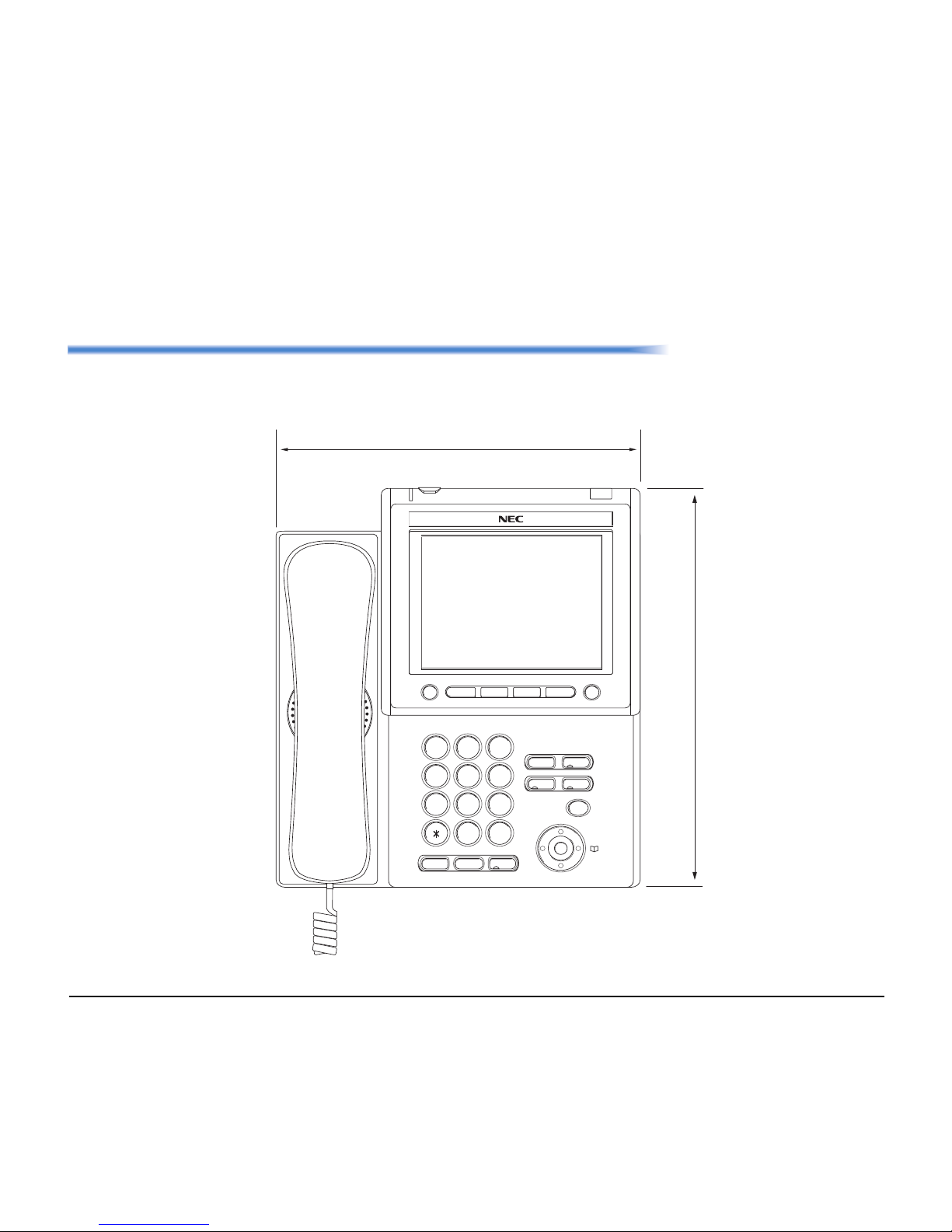
Face Layout
DT750 (ITL-320C-1)
Exit Help
1
2
ABC
3
DEF
4
GHI
5
JKL
6
MNO
7
PQRS
8
TUV
9
WXYZ
0#
Menu
HOLD Transfer Speaker
Recall Feautre
Answer Mic
Redial
227 [mm]
227 [mm]

2
1.
Technical Specifications
ITEM DT750 (ITL-320C-1)
Display (LCD) 5.7 inch TFT, QVGA, Touch Panel, with Backlight
Display Color Color
Programmable Key 32 (8 X 4) Keys (displayed on LCD)
Fixed Feature Key 9 keys (with Menu/Cursor button)
backlight Display and Digit Key (lit for 10 seconds when operating)
Softkey 4 Keys
Directory 500 records
Call History Outgoing Call: 50 record, Incoming Call: 50 records
XML Browser Available
Hands-free Standard equipment (Full-duplex), Wide-band
Headset Available
LAN Interface 2-port, 10BASE-T/100BASE-TX, Full-duplex/Half-duplex, Auto Negotiation /Fixed
Voice CODEC G.711, G.729a, G.722
IP Address Setting Sets via DHCP server/Sets Directly
QoS ToS (IP Precedence, Diffserv)
VLAN Tag VLAN (IEEE802.1Q/p)
Security IEEE802.1x authentication (EAP-MD5, EAPOL Forwarding), RTP Encryption, Auto Config
Encryption
Power Supply Center Power Supply = IEEE802.3af, Local Power Supply = AC adapter (AC-2R UNIT: optional)
Power Consumption PoE=7.68 [W]/Local=6.96 [W]
Download Program/Configuration data/Ringing Tone/Music on Hold/Directory data
Adapter (Optional) Recording Unit/Wall-mounting kit/Digit-key Set Unit/Side panel
Color Black
Dimension (W´D´H) 227(W) ´ 250(D) ´ 112(H) [mm]
Weight 1.6 kg
Altri manuali per DT750
4
Questo manuale è adatto per i seguenti modelli
1
Indice
Altri manuali NEC Terminale touch

NEC
NEC UNIVERGE SL2100 Manuale utente

NEC
NEC Univerge DT820 Manuale utente

NEC
NEC UNIVERGE SL2100 Manuale utente

NEC
NEC P4WW-24TXH-A Manuale utente

NEC
NEC VRW-06 Manuale utente

NEC
NEC Univerge SV9100 Guida alla configurazione

NEC
NEC Univerge SV8100 Manuale utente

NEC
NEC MultiSync C431 Manuale utente

NEC
NEC UNIVERGE SL2100 Manuale utente

NEC
NEC UNIVERGE SL2100 Manuale utente


