Neuros MPEG4 Recorder 2 Manuale utente

MPEG-4 Video Recorder_UM_EN.book Page i Monday, June 19, 2006 8:22 PM

ii
Preface
Information in this document has been carefully checked for accuracy; however, no
guarantee is given as to the correctness of the contents. The information in this doc-
ument is subject to change without notice. This document contains proprietary infor-
mation protected by copyright. No part of this manual may be reproduced by any
mechanical, electronic or other means, in any form, without prior written permission
of the manufacturer.
All trademarks are the property of their respective owners.
Copyright© 2005. All Rights Reserved.
Safety Information
Please read the following safety instructions, and keep the user manual for later
reference.
• Use only the power adapter supplied with the product.
• Do not place the product near any source of heat or expose it to direct sunlight.
• Do not attempt to connect any computer accessory or electronic product with-
out instruction from qualified service personnel. It may result in risk of electric
shock.
• Do not expose the product to moisture. Never spill any liquids on the product.
• Do not place the product in regions with extreme temperatures.
Routine care
Wipe the product with a soft cloth. Do not use abrasive powders or solvents, such as
benzene or thinner. When you leave the product unused for a long time, unplug the
AC adapter from the outlet.
● For the most up-to-date copy of the guide in English or a copy in German, French, Italian
or Spanish please visit:
http://www.neurostechnology.com/support
● Pour un exemplaire du guide d’utilisation en francais, consultez la page :
http://www.neurostechnology.com/support
● Per ottenere una copia del manuale utente in italiano, visitare:
http://www.neurostechnology.com/support
● Para obtener una copia de la guia del usuario en "Espanol" visite:
http://www.neurostechnology.com/support
● Ein Exemplar der deutschen Bedienungsanleitung finden Sie auf folgender Website:
http://www.neurostechnology.com/support
MPEG-4 Video Recorder_UM_EN.book Page ii Monday, June 19, 2006 8:22 PM

iii
Table of Contents
1 Overview
Features ................................................................................................ 1
Package contents .................................................................................. 2
About the Neuros MPEG-4 Recorder 2 ................................................. 3
Front view ..................................................................................... 3
Rear view ..................................................................................... 3
About the remote control ....................................................................... 4
2 Getting started
Installing the remote control battery ...................................................... 7
Connecting power ................................................................................. 8
Turning on the Recorder 2 .................................................................... 8
Inserting the Compact Flash (CF) or 1"Micro Drive Card ...................... 9
Inserting the MS Duo/Pro Duo, MMC or SD Series Card..................... 10
Connecting to a TV (viewing only)........................................................ 11
Connecting to a TV, DVD player, VCR or camcorder (recording) ....... 12
Confirming / Selecting the correct TV output........................................ 13
3 Using the Neuros MPEG-4 Recorder 2
Viewing pictures .................................................................................. 15
Displaying images ...................................................................... 15
Photo Settings menu .................................................................. 16
Slideshow ............................................................................. 16
Background music ................................................................ 17
Delete Files ........................................................................... 17
Listening to music ................................................................................ 18
Playing audio .............................................................................. 18
Setting menu for Music .............................................................. 19
Repeat .................................................................................. 19
Delete Files .......................................................................... 19
Watching videos .................................................................................. 21
Playing videos ............................................................................ 21
Setting menu for Video ............................................................... 22
Repeat .................................................................................. 22
Delete Files ........................................................................... 22
Recording video .................................................................... 24
Record menu .............................................................................. 24
Resolution .................................................................................. 24
Quality ........................................................................................ 24
MPEG-4 Video Recorder_UM_EN.book Page iii Monday, June 19, 2006 8:22 PM

iv
Quick setup .................................................................................24
Timer record ............................................................................... 25
Programs .............................................................................. 25
Start and Stop Times ............................................................ 25
Frequency ............................................................................. 26
Auto record ................................................................................. 26
Storage ....................................................................................... 26
Selecting the right recording resolution setting ................................... 27
Simple Record ...................................................................... 28
Setup menu ......................................................................................... 29
Date and Time ...................................................................... 29
Language .............................................................................. 29
Format Disk .......................................................................... 30
TV Output ............................................................................. 30
Factory Reset ....................................................................... 30
File browsing ....................................................................................... 31
Data management settings menu .............................................. 31
Copy ..................................................................................... 32
Delete ................................................................................... 32
Playing back recorded files ................................................................. 33
Playing back files recorded with the Recorder 2 ........................ 33
I. Sony PSP ......................................................................... 33
II. Neuros 442 Protable Media player / Recorder ................. 34
III. i-Pod Video ...................................................................... 35
IV. Nintendo Game Boy Micro .............................................. 42
V. Other Handhelds .............................................................. 43
4 Firmware Upgrade Instructions
Firmware Upgrade Instructions ........................................................... 45
5 Contact US
Contact Us............................................................................................ 47
6 Appendix
FCC Certification ................................................................................. 49
CE Notice (European Union) ............................................................... 50
Troubleshooting ................................................................................... 51
Specifications ...................................................................................... 52
MPEG-4 Video Recorder_UM_EN.book Page iv Monday, June 19, 2006 8:22 PM
1. Overview
Congratulations on purchasing the Neuros MPEG-4 Recorder 2.
Now you can enjoy quality multimedia anywhere you go and
record your favorite video programs from a variety of video
sources. The Recorder 2 also plays back your favorite audio
tracks, and displays photos and video on your TV.
Refer to this user manual for detailed descriptions about the prod-
uct and instructions for using it.
Features
The Neuros MPEG-4 Recorder 2 allows you to:
• record video from a TV, DVD, VCR or camcorder
• display images (jpg, gif, and bmp formats)
• play audio files (mp3 and wma formats)
• play videos (ASF, AVI, MP4 formats)
MPEG-4 Video Recorder_UM_EN.book Page 1 Monday, June 19, 2006 8:22 PM

2
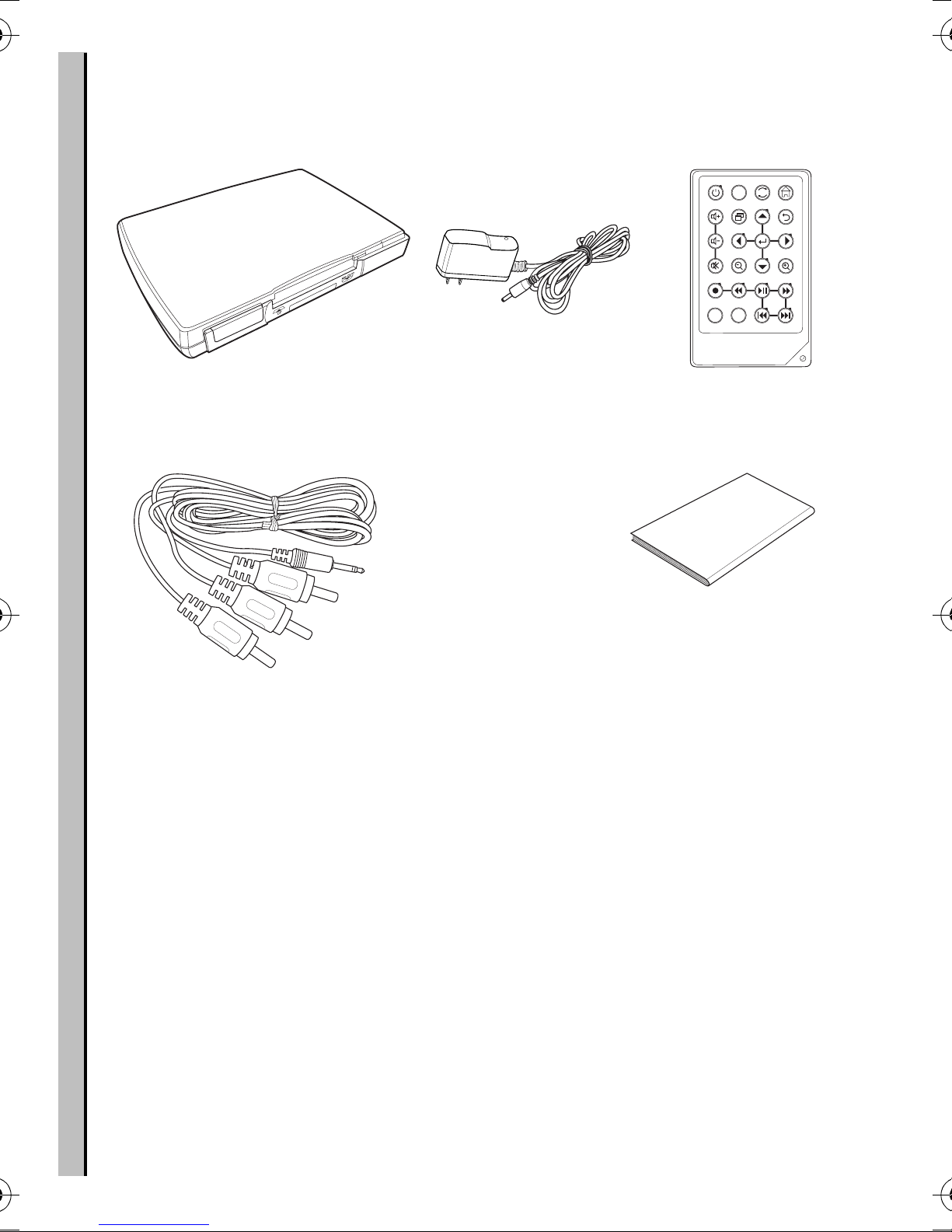
Package contents
Package contents
RCA Video cables (x2) User Manual
Recorder 2
User Manual
Power Adapter
NTSC
PAL
A
B
STORAGE
DISPLAY
Remote Control
MPEG-4 Video Recorder_UM_EN.book Page 2 Monday, June 19, 2006 8:22 PM

About the Neuros MPEG-4 Recorder 2
3
About the Neuros MPEG-4 Recorder 2
Refer to the following sections for information about the hardware
components of the Recorder 2.
Front view
Rear view
CF
Memory Stick Pro
SD, MMC, Slot
Power LED
(Green )
Recording LED (Red)
IR
Receiver
CF Card Slot
AV OUT
DC 5V
AV IN
DC Power AV Out AV In
MPEG-4 Video Recorder_UM_EN.book Page 3 Monday, June 19, 2006 8:22 PM

4
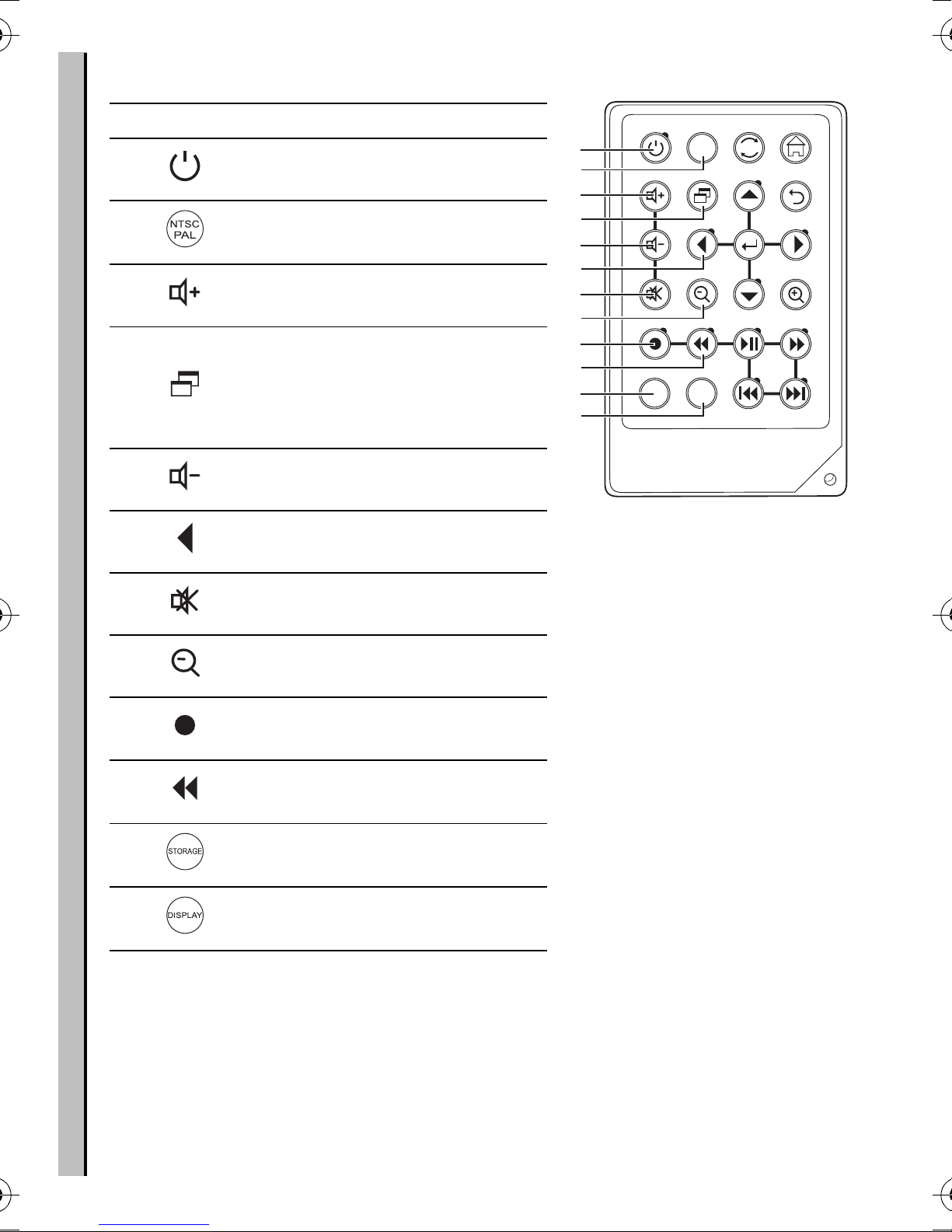
About the remote control
NTSC
PAL
A
B
STORAGE
DISPLAY
1
2
3
4
5
6
7
8
9
10
11
12
Icon Description
1. Turns on the power
2. Switches between NTSC and
PAL system
3. Increases the volume
4.
Enters the setting menu
(Note:settings menu options
vary depending on when
selected)
5. Decreases the volume
6. Scrolls left
7. Mutes all sound
8. Zooms out
9. Start and stop recording
10. Rewinds playback of video
and audio files
11. Switches between CF and
Memory Stick/SD/MMC.
12. Turn on and off the on screen
display
MPEG-4 Video Recorder_UM_EN.book Page 4 Monday, June 19, 2006 8:22 PM

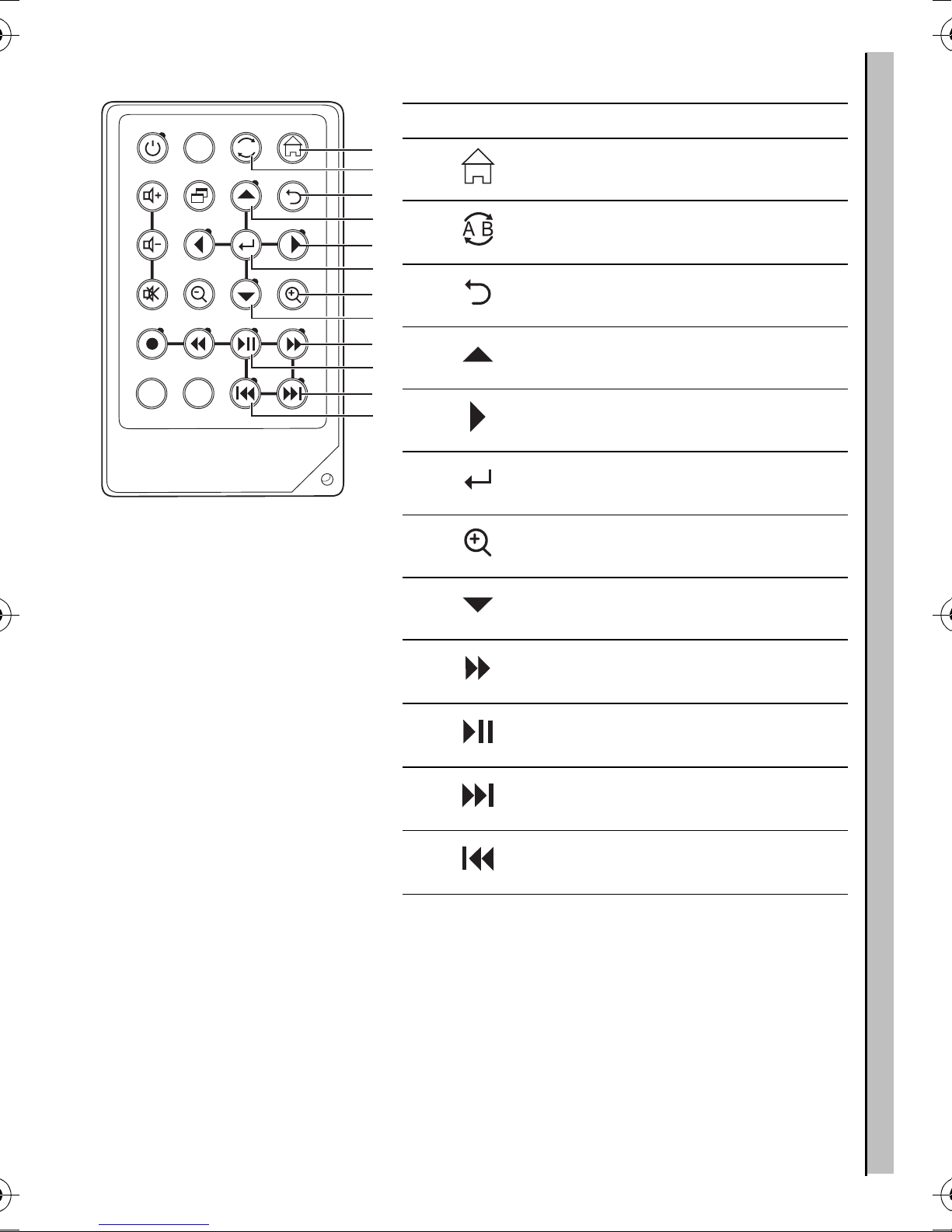
About the remote control
5
NTSC
PAL
A
B
STORAGE
DISPLAY
24
23
22
21
20
19
18
17
16
15
14
13
Icon Description
13. Returns to the top menu
14. Repeats playback of selected
audio/video file.
15. Returns to the previous menu
16. Scrolls up
17. Scrolls right
18. Confirms selection of menu
item
19. Zooms in
20. Scrolls down
21. Fast Forwards playback of
video and audio files
22. Plays or pauses playback of
photo, video and audio
23. Plays the next photo, video and
audio files
24. Playsthe previous photo, video
and audio files
MPEG-4 Video Recorder_UM_EN.book Page 5 Monday, June 19, 2006 8:22 PM

Sticker for Recording Setting
Before recording for target player (TV, PDA or PSP...), user can
refer to the sticker (as picture shows below) for the setting includ-
ing resolution and quality.
Please refer to page 21 to setup the recording format.
Please see www.neurostechnology.com / supporteddevices.asp and the manual of your playback device for details.
640X480
176X144
3GP
320X240
3GP
176X120
320X240
15fps
368X208
320X240
30fps
Normal Fine Super fine Legend
--- ---
Economic
TV
PSP
PDA
S/Phone
Mobile
iPod
Suggested Recording Resolutions
MPEG-4 Video Recorder_UM_EN.book Page 6 Monday, June 19, 2006 8:22 PM
Altri manuali per MPEG4 Recorder 2
2
Questo manuale è adatto per i seguenti modelli
1
Indice
Altri manuali Neuros Registratore digitale