
Nokia LD-1W - GPS Module Manuale utente
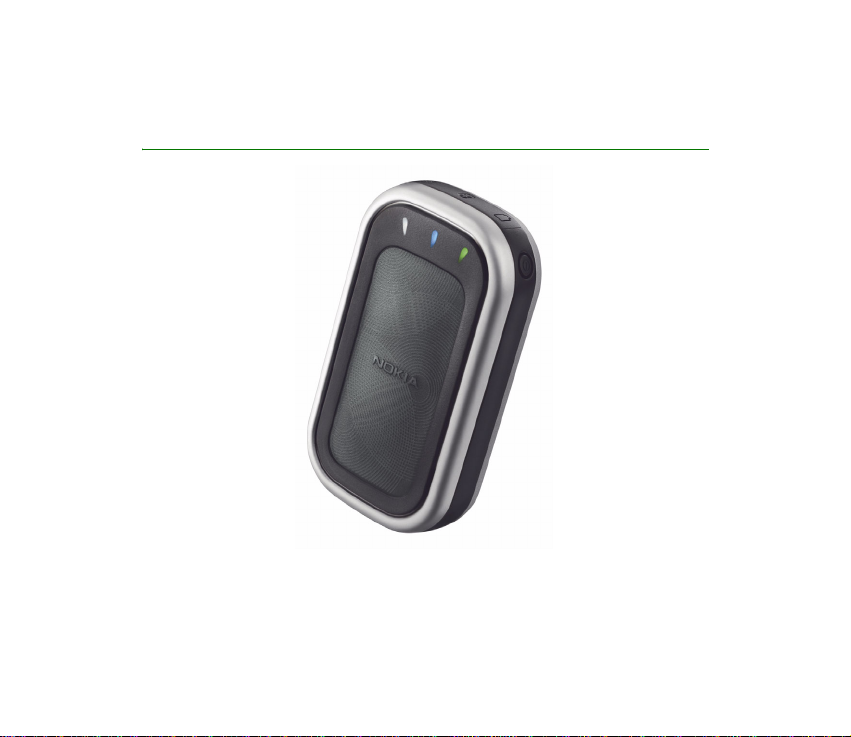
User Guide for the Nokia Wireless GPS
Module (LD-1W)
9236274
Issue 1

DECLARATIONOFCONFORMITY
We,NOKIACORPORATION,declareunderoursoleresponsibility that the product LD-1Wis
inconformitywiththeprovisionsofthefollowing Council Directive: 1999/5/EC.
AcopyoftheDeclarationofConformitycanbefoundfrom
http://www.nokia.com/phones/declaration_of_conformity/.
Copyright © 2004 Nokia. All rights reserved.
Reproduction, transfer, distribution orstorage of part orall of the contentsin this document in any form
without the prior written permission of Nokia is prohibited.
Nokiais aregistered trademarkof NokiaCorporation.Other productand companynames mentioned
herein may be trademarks ortradenamesof theirrespectiveowners.
Bluetooth is a registered trademarkof Bluetooth SIG, Inc.
Nokia operates a policyof continuous development. Nokia reserves the right to makechanges and
improvements to any of theproducts describedin thisdocument withoutprior notice.
Underno circumstancesshall Nokiabe responsiblefor anyloss ofdata orincome orany special,
incidental,consequentialorindirect damageshowsoever caused.
The contents of this documentare provided "as is".Except as required by applicablelaw, no warrantiesof
anykind,either expressor implied,including,but notlimited to,the impliedwarranties of
merchantabilityand fitnessfor aparticular purpose,are made in relation to the accuracy,reliability or
contents of this document. Nokiareserves the right torevise this document or withdraw it at any time
withoutprior notice.
The availabilityof particularproducts may vary by region. Please check with the Nokia dealer nearestto
you.
ExportControls
Thisdevicemaycontain commodities,technologyorsoftwaresubjecttoexportlawsand regulationsfrom
the US and other countries.Diversion contrary to lawis prohibited.
9236274/Issue 1 EN

Contents
For your safety ..................................................................................................... 4
1.Introduction...................................................................................................... 5
Global Positioning System....................................................................................................................... 5
2.Get started........................................................................................................ 7
GPS module parts....................................................................................................................................... 7
Batteries and chargers.............................................................................................................................. 8
Install the battery................................................................................................................................... 9
Charge the battery................................................................................................................................ 10
Protective case.......................................................................................................................................... 11
3.Basic use......................................................................................................... 12
Switch the GPS module on and off..................................................................................................... 12
Connect with Bluetooth wireless technology.................................................................................. 12
Bluetooth connection passcode........................................................................................................ 13
Pair the GPS module with a compatible phone........................................................................... 13
Use the GPS module with several paired phones........................................................................ 13
Disconnect the GPS module............................................................................................................... 14
Check the GPS module status in the night mode........................................................................... 14
Reset the GPS module............................................................................................................................. 14
External antenna...................................................................................................................................... 15
Troubleshooting........................................................................................................................................ 15
4.Battery information....................................................................................... 16
Care and maintenance ...................................................................................... 18

4Copyright © 2004 Nokia. All rights reserved.
For your safety
Read these simple guidelines. Breaking the rulesmaybedangerousorillegal.Further
detailedinformationisgiven inthisuserguide.
INTERFERENCE
Allwireless devices may besusceptible to interference, which could affect
performance.
BATTERIES AND CHARGERS
Useonlyapprovedbatteriesandchargers.Donotconnectincompatibleproducts.
CONNECTING TO OTHER DEVICES
Whenconnecting to any other device, read its user guide for detailed safety
instructions.Donot connect incompatible products.
QUALIFIED SERVICE
Onlyqualifiedpersonnel mayrepairthisdevice.

5Copyright © 2004 Nokia. All rights reserved.
1. Introduction
Withthe NokiaWireless GPS Module, you candetermine yourcurrent position
anddirection easily. TheGPS moduleis a battery-operateddevice that uses
Bluetoothwireless technology to communicate positioninginformation to
compatiblemobile phones, PCs, PDAs, andother devices.
Read this user guide carefully beforeusing the GPS module.Check also http://
www.nokia.com/support or your local Nokia Websitefor thelatestversion ofthis
guide,additional information, downloads, andservices related toyour Nokia
product.
■Global Positioning System
TheGlobal Positioning System(GPS) is aworldwide satellite-basedradio
navigationsystem.
AGPS terminal can calculate itslocation to an accuracy of 25 meters. The
accuracy depends on the number of satellites,the signals of whichthe GPS
modulereceives. In optimal conditions, the accuracy may be withina few meters.
Theantennaofthe GPS moduleislocated under theNokialogo,andit shouldface
upwards.Somecarwindshieldsandwindowsmaycontainmetal,whichmayblock
orweaken the satellitesignals.
If you stand still, GPS cannot detect whichwayyou are facing,because it
determines your direction on the basis of your movement.

6Copyright © 2004 Nokia. All rights reserved.
Note: The Global Positioning System
TheGlobal Positioning System (GPS) isoperated bythe United States
government,whichis solelyresponsiblefor accuracyandmaintenanceof
thesystem. The accuracy of locationdata canbe
affectedby adjustmentsto GPS satellites made bythe UnitedStates
governmentand issubjectto changewith theUnited States Department
of Defense civil GPS policy and theFederalRadionavigation Plan.
Accuracy can also be affected by poor satellite geometry.
Availability and quality ofGPS signals maybe affectedby buildings and
natural obstacles, as wellas weather conditions. The GPS receiver should
onlybe used outdoors to allowreception ofGPS signals.
Therefore, GPS should notbe usedfor precise locationmeasurement, and
you should never rely solely onlocationdatafromthe GPSreceiver. This
GPSreceiver does not support locationof the phoneby emergency
operators.

7Copyright © 2004 Nokia. All rights reserved.
2. Get started
Yourdevice may contain small parts.Keepthem outof reach ofsmall children.
Beforeyou can startusing theGPS module, youmust:
• Installa compatible softwareapplication on thephone.
• Charge the battery of theGPS module fully.
• Pair the compatible phone with theGPS module.
SomeNokia phone models, such asthe Nokia9500 Communicator, havea
location privacy setting. To provideGPS location data tosoftware applications,
select Tools → Controlpanel→Extras→Locationprivacy→Verificationpolicy
→Acceptall.
■GPS module parts
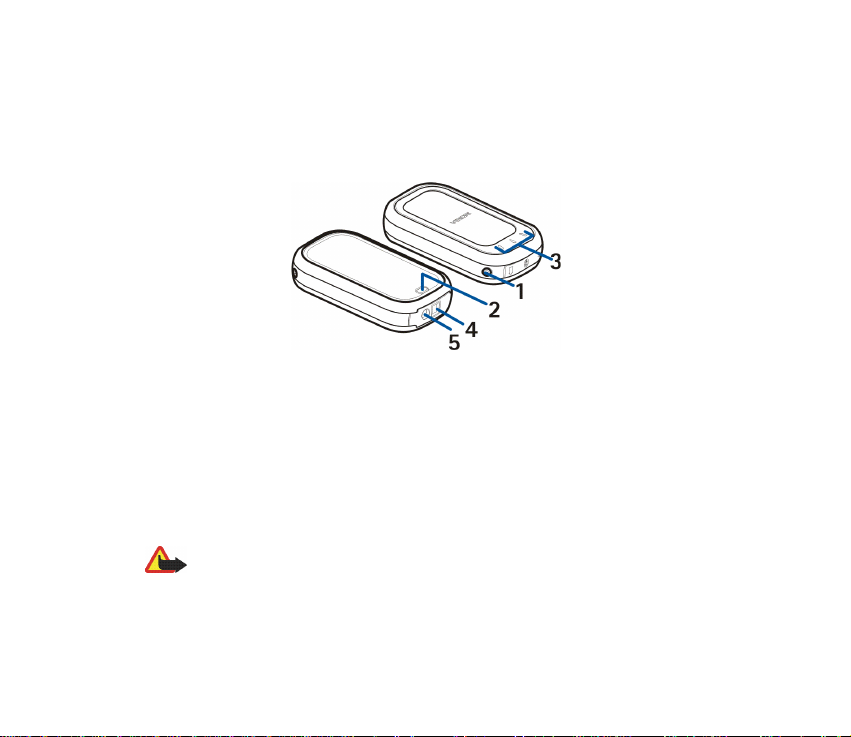
TheGPS module contains the followingparts:
1- Power key: Switches the GPS module on and off,or resets the Bluetooth
connectivity settings of the GPS module.
2 - Release button: Unlocksthe back cover.
3 - Indicator lights: Displaythe current status of the GPSmodule. Redor green
indicatesthe status of the batteryand charging,or indicatesthat themodule is
being reset. Blue indicates that theBluetoothconnection isactive. White
8Copyright © 2004 Nokia. All rights reserved.
indicates that the GPSmodule is receiving satellitedata andis ableto determine
itsposition.
4 - Connector for a compatible charger
5 - Connector for an external antenna
■Batteries and chargers
TheGPS module has a removableand rechargeableBL-5C battery. For availability
of approved batteries and chargers, check with your localdealer.
Checkthe model number of anycharger before using it withthis product. The
following chargers are intended for usewiththe GPSmodule: AC-1,ACP-8, ACP-
9, ACP-12, LCH-8, LCH-9, LCH-12.
Warning!Useonlybatteriesandchargers approvedbyNokia for usewith
this particular device. The use of anyothertypes will invalidate any
approval or warranty, andmay bedangerous.
9Copyright © 2004 Nokia. All rights reserved.
Whenyou disconnect the power cordof anyenhancement, grasp andpull the
plug,not thecord.
Install the battery
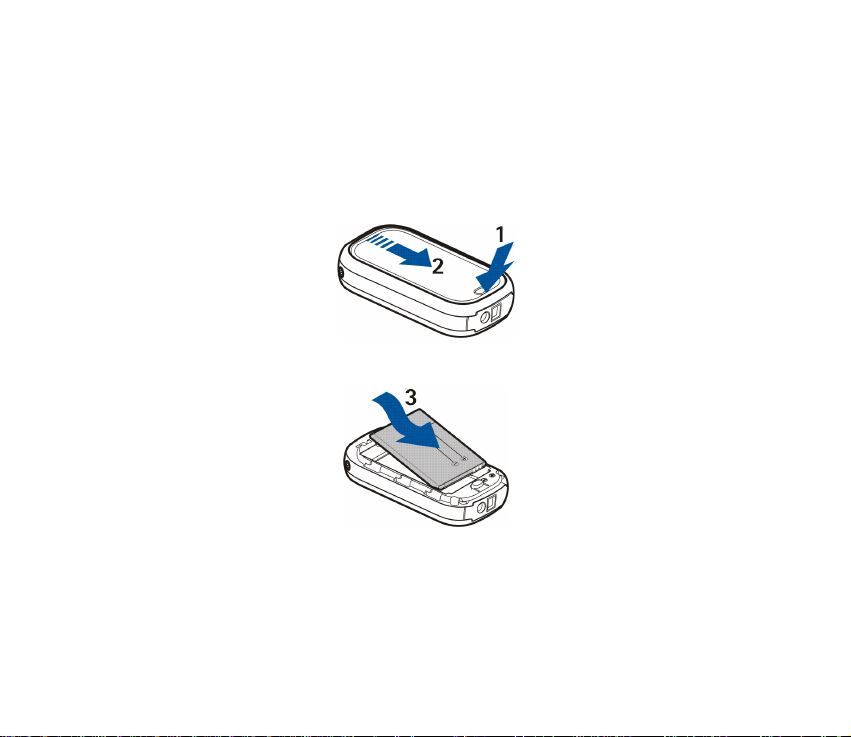
1. Toopen theback coverof the GPSmodule, presstherelease button (1), and
slidethe cover away from thedevice (2).
2. Insertthe battery (3).

10Copyright © 2004 Nokia. All rights reserved.
3. Closethe back cover (4), andslide itin the direction of thearrow (5)until it
locksinto place.
Charge the battery
1. Plug the charger into its connector on theGPS module. See GPS moduleparts
onpage 7.
2. Connect the charger to a power outlet. During charging, the green or red
indicator light blinks, depending on whethertheGPS module ison (green)or
off(red).
3. Whenthe battery is fully chargedand thepower is on,the greenlight is
displayedcontinuously. Whenthebattery isfully chargedand the poweris off,
thered light stops blinking. Disconnectthe charger from the power outlet and
theGPS module.
Whenthe battery is running outof power,the red indicatorlight onthe GPS
modulestarts blinking every 15 seconds. Recharge thebattery.
Altri manuali per LD-1W - GPS Module
2
Indice
Altri manuali Nokia GPS

Nokia
Nokia 330 Manuale utente

Nokia
Nokia LD-1W - GPS Module Manuale utente

Nokia
Nokia LD-4W Manuale utente

Nokia
Nokia 330 Manuale utente

Nokia
Nokia Go Manuale utente

Nokia
Nokia LD-3W - Wireless GPS Module Manuale utente

Nokia
Nokia HAIP Tag LD-6T Manuale utente

Nokia
Nokia LD-1W - GPS Module Manuale utente

Nokia
Nokia 330 Manuale utente

Nokia
Nokia Go Manuale utente


