
NuWave OXYPURE 47501 Manuale utente

Owner’s Manual
Model 47501 / 47502
Rev.1
Questions or Concerns?
support@nuwavenow.com
OXYPURE
HEPA AIR PURIFIER
2| nuwavenow.com
THANK YOU!
Register Today!
Protecting your investment is easy and rewarding. Simply
scan the QR code or visit nuwavenow.com/register
to register. When you register, simply opt in for additional
year of warranty. Don’t worry. There is no catch. We are
extending it absolutely FREE to show our appreciation!
support@nuwavenow.com
Scan to Email
nuwavenow.com/register
Scan to Register
Congratulations on your NuWave® purchase. We know there are many options
available and sincerely appreciate the trust you have placed in us.
For the last 30 years, we have committed to introducing products that promote
healthy living at affordable prices. By combining the highest quality designs with
cutting edge technology, we have always strived to blend feature, function, and
innovation in every product we make. We hope you will agree.
We would love to hear from you. Please feel free to reach
out with any feedback or comments that could improve
your experience. We would also enjoy hearing about your
successes. The best way to reach us is by email:
support@nuwavenow.com
Connect with Us!
#nuwavenow
Visit nuwavenow.com to see other
great products and accessories.
nuwavenow.com | 3
Important Safeguards.....................................................................4–5
Electrical Information......................................................................5
Parts & Accessories........................................................................6
Assembly........................................................................................7
Control Panel..................................................................................8
Maintaining the OxyPure ................................................................9-10
Troubleshooting..............................................................................10
Limited Warranty ............................................................................11–13
U.S Environmental
Protection Agency
Meets California ozone
emissions limit.
CARB certied
Para la versión en español de este manual, visita www.nuwavenow.com
TABLE OF CONTENTS
This equipment has been tested and found to comply with the limits for a Class B digital
device, pursuant to part 15 of the FCC Rules. These limits are designed to provide
reasonable protection against harmful interference in a residential installation. This
equipment generates, uses and can radiate radio frequency energy and, if not installed
and used in accordance with the instructions, may cause harmful interference to radio
communications. However, there is no guarantee that interference will not occur in a
particular installation. If this equipment does cause harmful interference to radio or televi-
sion reception, which can be determined by turning the equipment off and on, the user is
encouraged to try to correct the interference by one or more of the following measures:
• Reorient or relocate the receiving antenna.
• Increase the separation between the equipment and receiver.
• Connect the equipment into an outlet on a circuit different from that to which the
receiver is connected.
• Consult the dealer or an experienced radio/TV technician for help.

4| nuwavenow.com
1. ONLY use the OxyPure for its intended
purpose.
2. To protect against the risk of electrical
shock, DO NOT immerse the cord,
plug, or any part of the OxyPure in
water or any other liquid.
3. Close supervision is necessary when
the OxyPure is used by or near chil-
dren. The OxyPure is not intended for
use by children, persons with reduced
physical, sensory, or mental capabil-
ities, or those who lack expertise or
knowledge of this device.
4. DO NOT operate the OxyPure with a
damaged cord, plug, after any malfunc-
tion, or if the unit has been dropped or
damaged in any way. Contact Custom-
er Service by emailing
support@nuwavenow.com for more
information.
5. Discard the protective plastic covering
the power plug before use.
6. DO NOT run the cord under carpeting,
throw rugs, runners or other coverings.
7. DO NOT route the cord under furniture
or appliances. Arrange the cord away
from high-trafc areas where it will not
be tripped over.
8. DO NOT plug the OxyPure into an
outlet or power strip that is being used
by other appliances.
9. Remove any dust or water from the
plug, if needed.
10. ALWAYS set up the OxyPure on a at,
stable surface.
11. DO NOT set up the OxyPure where
it could be pushed, kicked, or tripped
over.
12. Leave at least 2-3 feet of space be-
tween the OxyPure’s vents and any
walls.
13. DO NOT install the OxyPure near a
heating device, ammable or combus-
tible gases or vapors, or in areas ex-
posed to moisture or water.
14. DO NOT operate the OxyPure on its
side.
15. DO NOT place objects on top of the
OxyPure.
16. DO NOT sit or stand on, or lean
against, the OxyPure.
17. Alteration or modication of any part of
the OxyPure, or the use of attachments
not recommended by the manufacturer,
may cause re, injury, or damage to
property.
18. As with most electrical units, electrical
parts are live even when the OxyPure
is off. Be sure the OxyPure is un-
plugged when assembling.
19. DO NOT use the OxyPure in a factory
or industrial setting where machine oil
may be present in the air.
20. Turn the power OFF on the OxyPure
before unplugging the OxyPure.
21. Unplug the OxyPure from the outlet
when the unit is not in use or will be
left unattended for an extended period
of time; before putting on or taking off
parts; when removing or replacing the
lter; and before cleaning.
IMPORTANT SAFEGUARDS
HOUSEHOLD USE ONLY • READ ALL INSTRUCTIONS BEFORE USE
ALWAYS KEEP THIS MANUAL HANDY FOR FUTURE REFERENCE.
READ ALL INSTRUCTIONS and WARNINGS: The failure to follow any of the important safe-
guards, warnings, or instructions for safe use is a misuse of the OxyPure that can void your warranty
and create the risk of serious injury. When using the OxyPure, basic safety precautions should always
be followed.

nuwavenow.com | 5
22. DO NOT operate the OxyPure if abnor-
mal sounds or motion is detected.
23. If any foreign object comes into con-
tact with the fan, do not operate. Turn
off and unplug the OxyPure and then
shake the unit to dislodge the foreign
object.
24. Inspect the OxyPure for any loose or
missing parts before and after each
use. If parts are loose, damaged, or
missing, contact Customer Service by
emailing support@nuwavenow.com.
25. DO NOT pull, lift, drag, or carry the
OxyPure by its cord.
26. DO NOT block the air inlet or outlet
vents.
27. DO NOT operate the OxyPure without
the lter.
FILTER CHANGING PRECAUTIONS
1. DO NOT try to clean the HEPA/Carbon
lter. Doing so will release dust and
other pollutants back into the air.
2. ALWAYS wear a mask and rubber
gloves when handling a dirty lter.
3. When removing a dirty lter, ALWAYS do
so outside or in a well ventilated area.
4. ALWAYS replace your lter with a
NuWave lter made for your model of air
purier.
ELECTRICAL INFORMATION
IMPORTANT SAFEGUARDS
HOUSEHOLD USE ONLY • READ ALL INSTRUCTIONS BEFORE USE
These servicing instructions are for use by
qualied personnel only. To reduce the risk
of electric shock, do not perform any servic-
ing other than that contained in the operat-
ing instructions unless you are qualied to
do so.
Power-Supply Cords
A short, detachable power-supply cord is
provided to reduce the risk of becoming
entangled in, or tripping over a longer cord.
Longer detachable power-supply cords or
extension cords are available and may be
used if care is exercised in their use. If a
longer, detachable power-supply cord or
extension cord is used:
1. The marked electrical rating of the exten-
sion cord should be at least as great as
the electrical rating of the appliance.
2. The longer cord should be arranged so
that it will not drape over any countertop
or tabletop where it could be pulled on or
tripped over unintentionally.
3. The OxyPure should be operated on
a separate electrical outlet from other
operating appliances due to wattage
limitations.
SAVE THESE
INSTRUCTIONS

6| nuwavenow.com
PARTS & ACCESSORIES
TOP
BOTTOM
Keeping your OxyPure up and running with new lters is a breeze.
1. Locate the part number on the above images, then
2. Contact NuWave Customer Service by emailing
support@nuwavenow.com
, or order
online at www.nuwavenow.com.
ORDERING PARTS
1
2
3
4
5
67
OxyPure HEPA 300
Air Purier
Model #: 47501
Motor
Part #: H0P4
Pre-Filter &
Filter
Holder
Part #: H0P1
HEPA/Carbon Filter
Part #: H0A1
Filter Access Lid
Part #:H0P2
Non-Skid Feet
Part #: H0P5
Power Supply
Part #: H0P3
1
2
3
5
6
7
4

nuwavenow.com | 7
1-Button
Control Panel
Air Intake
Vents
Clean Air
Exhaust
Filter Access Lid
Pre-Filter & Filter
Holder
ASSEMBLY
Remember...
ALWAYS remove the
plastic wrapping from the
new lter BEFORE using
it in the OxyPure. Failing
to do so may damage
the motor and other parts of the OxyPure
and may void your warranty.
Removable
Motor Housing
LOCK and
UNLOCK marks.

8| nuwavenow.com
1. Plug the Power Supply cord into the jack at the
back of the OxyPure, and then plug it into a suit-
able electrical outlet. The unit will beep once.
2. Press the Power icon. The unit will activate at
the lowest fan speed. It will beep once and the
upper-right LED will light.
3. Press the Power icon again to increase the fan
speed to medium. The unit will beep and the
second LED will light.
4. Press the Power icon again to increase the fan
speed to high. The unit will beep and the third
LED will light.
5. Press the Power icon a fourth time and the Oxy-
Pure will turn off. The unit will beep and the LEDs
will go dark.
Number of Presses Fan Speed Level Bars on Panel Fan Speed (RPM)
1 1 1 400
2 2 2 800
3 3 3 2450
4 OFF 0 OFF
One Button Does it All
Simplicity. That is the secret of the OxyPure HEPA 300 Air
Purier. With only one button, it is simple to operate. With
its revolutionary HEPA/Carbon lter, it is as easy to relax
knowing that your air is as clean as the unit is simple to
maintain. With its lightweight design and construction, it is
easy to take almost anywhere. Simplicity and peace of mind
at the touch of a button.
Low Speed
Fan Speed 1
Fan Speed 2
Medium Speed
Fan Speed 3
High Speed
CONTROL PANEL
View OxyPure® Test and Performance Data” on our
website https://www.nuwavenow.com/shop/oxypure-hepa

nuwavenow.com | 9
It is important to change the HEPA/Carbon Filter regularly.
When the Fan Speed 1 light turns yellow, we suggest replacing your HEPA/
Carbon Filter.
When the Fan Speed 1 light turns red, the HEPA/Carbon Filter has reached
the end of its lifespan and must be replaced.
MAINTAINING THE OXYPURE
TURN UNIT UPSIDE DOWN
After 6 Months
Within 6 Months
After 12 Months
1. Unplug the unit, turn it upside
down and open the Filter Access
Lid.
2. Remove the old lter using the
attached tabs.
3. Remove the new lter from its
packaging. The bag can be used
to discard the old lter.
4. Insert the new lter while ensuring
the tabs are facing up, then close
the Filter Access Lid.
Changing the HEPA/Carbon Filter
10 | nuwavenow.com
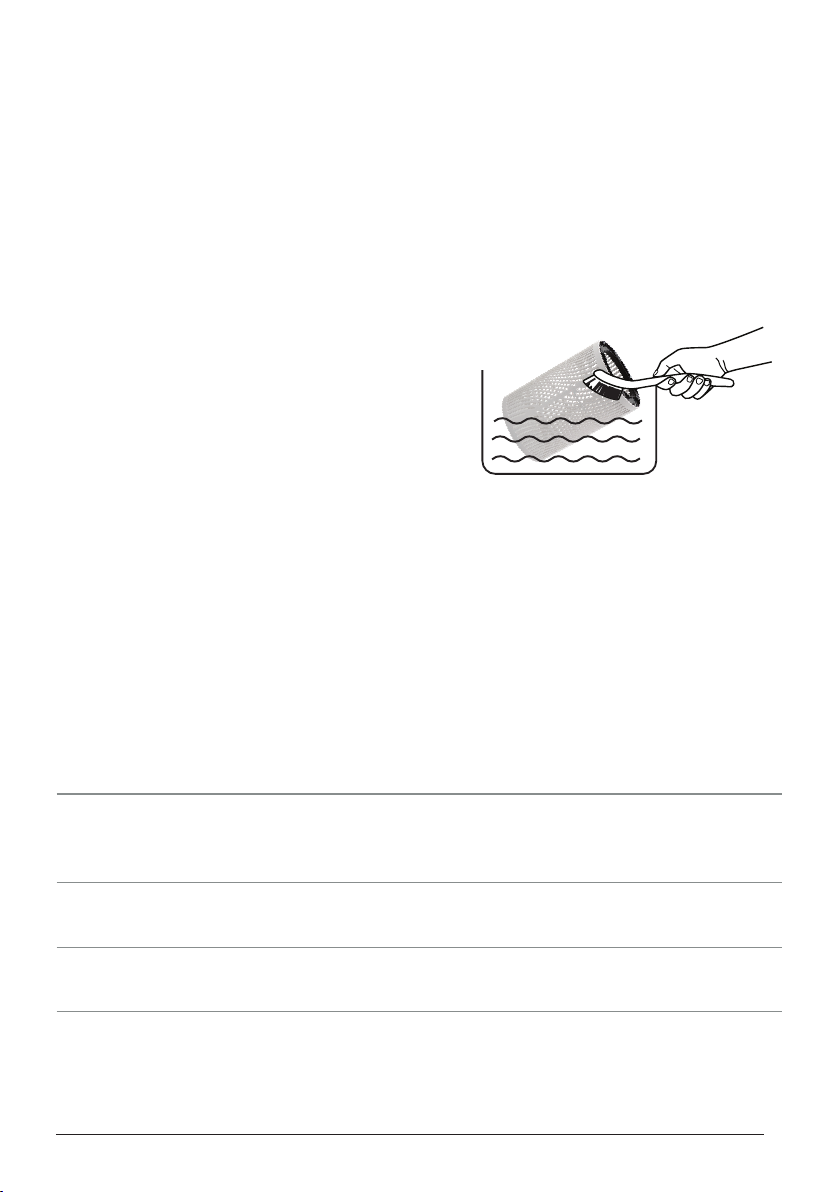
Cleaning the OxyPure
Depending on the environment, you may need to clean the OxyPure more often to main-
tain the nish and function of the unit.
• Remove the dirty HEPA/Carbon Filter and place it in a garbage bag.
• Wash the Pre-Filer body of the unit with warm, soapy water, and dry thoroughly before
inserting a clean HEPA/Carbon Filter. Alternatively, you can apply a gentle non-abrasive
cleaner to a cloth and use the cloth to clean the unit.
• Make sure the vents are free of any obstruction.
• Ensure the OxyPure body is completely dry
before reassembling.
• Clean the Motor housing on all sidesides, using
the brush attachment for your vacuum cleaner
or a damp cloth or sponge. Dry it thoroughly
before reassembly.
• DO NOT immerse the Motor housing in water.
The OxyPure Does Not Turn On.
1. The unit is not plugged-in. Plug the unit into an appropriate wall outlet.
2. POWER on the control panel is OFF.
Press POWER.
The Fan Speed Doesn’t Change.
There may be an issue with the control
panel button. Contact Customer Service for assistance.
Airow From the Top Vent is Weak.
The HEPA/Carbon lter is dirty. Change the lter.
The Unit Produces Smoke or Odor.
The HEPA/Carbon lter is dirty. Change the lter.
If any of these problems persist, contact NuWave’s friendly and knowledgeable
Customer Service by emailing support@nuwavenow.com.
TROUBLESHOOTING GUIDE
MAINTAINING THE OXYPURE
Altri manuali per OXYPURE 47501
1
Questo manuale è adatto per i seguenti modelli
1
Indice
Altri manuali NuWave Purificatore d'aria

NuWave
NuWave OXYPURE 47001 Manuale utente

NuWave
NuWave OxyPure BM47001 Manuale utente

NuWave
NuWave OXYPURE ZERO 47251 Manuale utente

NuWave
NuWave OXYPURE ZERO E1000 Manuale utente

NuWave
NuWave OXYPURE ZERO E1000 Manuale utente

NuWave
NuWave OxyPure Manuale utente

NuWave
NuWave 47401 Manuale utente

NuWave
NuWave OxyPure Zero E500 Manuale utente

NuWave
NuWave OXYPURE 47501 Manuale utente

NuWave
NuWave OXYPURE ZERO 47251 Manuale utente


