NuWave OxyPure Manuale utente

nuwavenow.com
OWNER’S MANUAL
Smart Air Purier

2
2
Using your smartphone or
smart device, scan the QR code
located on the unit label on the
back of the unit.
You will be directed to NuWave’s
product registration page with
your unit’s unique serial number
automatically entered in the
appropriate eld.
NOTE: If you do not have a
web-enabled smart device,
simply visit nuwavenow.com/QR
and manually enter in your unit’s
serial number.
Fill out the remaining information
and complete the optional survey.
Once you submit your
information, you will receive
a conrmation email containing
your extended warranty details.
1
2
3
4
REGISTER
NOW!
*Register your product within 1 year of date of purchase for a free
6-month extension of your limited warranty.
As a special thank-you for registering your NuWave
unit, you’ll automatically receive an additional 6 months
added to your limited manufacturer’s warranty!*
All you have to do is follow these simple steps.

nuwavenow.com 3
nuwavenow.com 3
1
2
3
QR code readers
6
for an additional
months
warranty!
Open your mobile app store
(App Store, Google Play).
Search for "QR code readers."
Simply download the QR code reader to your phone,
open it, scan the code and you are ready to go.
NOTE: You may need to open your downloaded QR
code reader each time you want to scan a QR code.
DOWNLOAD THE QR CODE
APP TO YOUR MOBILE DEVICE

nuwavenow.com 5
ENGLISH
nuwavenow.com 5
IMPORTANT SAFEGUARDS
HOUSEHOLD USE ONLY • READ ALL INSTRUCTIONS BEFORE USE
READ ALL INSTRUCTIONS
WARNING: When using the OxyPure, basic safety
precautions should always be followed:
1. To protect against risk of electrical shock, DO NOT
immerse cord, plug, or any part of the OxyPure unit in
water or any other liquids.
2. Close supervision is necessary when the OxyPure is
used by or near children. The unit is not intended for
use by children, persons with reduced physical, sensory,
or mental capabilities, or those with lack of expertise or
knowledge of this unit.
3. Do not operate OxyPure with a damaged cord, plug,
after unit malfunctions, is dropped, or damaged in any
manner. Contact Customer Service at 1-877-689-2838
or email help@nuwavenow.com for information.
4. Discard the protective plastic covering the power plug
before use.
5. Do not run cord under carpeting. DO NOT cover cord
with throw rugs, runners, or other coverings.
6. Do not route cord under furniture or appliances. Arrange
cord away from high-traffic areas where it will not be
tripped over.
7. Do not plug OxyPure in outlet or power strip that is
being used by other appliances.
8. Remove any dust or water from the plug, if needed.
9. Set up the OxyPure on flat, stable ground.
10. Do not set up where the OxyPure could be pushed,
kicked, or tripped over.
11. Leave at least 2-3 feet of space between the unit’s vents
and any walls.
12. Do not install the unit near a heating device.
13. Do not use in locations exposed to moisture or water.
14. Do not use unit near flammable or combustible gases
or vapors.
15. Do not operate the OxyPure on its side.
16. NOT INTENDED FOR OUTDOOR USE.

IMPORTANT SAFEGUARDS
HOUSEHOLD USE ONLY • READ ALL INSTRUCTIONS BEFORE USE
important safeguards
66
17. Do not place objects on top of the OxyPure.
18. Do not sit or stand on or lean against the OxyPure.
19. Alteration or modification of any part of the OxyPure or the
use of attachments not recommended by the manufacturer
may cause fire, injury, or damage to property.
20. As with most electrical units, electrical parts are live even
when the OxyPure is off. Be sure the unit is unplugged
when assembling.
21. Do not use the OxyPure in a factory or industrial setting
where machine oil may be present in the air.
22. Turn the power OFF on the OxyPure before unplugging
the unit. Unplug the OxyPure from outlet when not in
use, before putting on or taking off parts, when removing
or replacing the filters, and before cleaning.
23. Turn the power OFF and unplug when the unit is
unattended for extended periods.
24. FOR HOUSEHOLD USE ONLY.
25. Keep manual handy for future reference.
WARNING! RISK OF ELECTRIC SHOCK:
These servicing instructions are for use by qualified
personnel only. To reduce the risk of electric shock, do
not perform any servicing other than that is contained in
Instructions unless you are qualified to do so.

nuwavenow.com 7
ENGLISH
nuwavenow.com 7
Electrical Information
A short power-supply cord (or detachable power-
supply cord) is provided to reduce the risk resulting
from becoming entangled in or tripping over a longer
cord. Longer detachable power-supply cords or
extension cords are available and may be used if
care is exercised in their use. If a longer detachable
power-supply cord or extension cord is used:
1. The marked electrical rating of the extension cord
should be at least as great as the electrical rating of
the appliance.
2. The longer cord should be arranged so that it will
not drape over the countertop or tabletop where it
could be pulled on or tripped over unintentionally. The
OxyPure should be operated on a separate electrical
outlet from other operating appliances due to wattage
limitations. The appliance has a polarized plug (one
blade is wider than the other). To reduce the risk
of electric shock, this plug is intended to fit into a
polarized outlet only one way. If the plug does not fit
fully into the outlet, reverse the plug. If it still does not
fit, contact a qualified electrician. Do not attempt to
modify the plug in any way.
3. If the appliance is of the grounded type, the cord
set or extension cord should be a grounding-type
3-wire cord.
SEE INSTRUCTIONS BEFORE USE
ADDITIONAL SAFEGUARDS

important safeguards
8
IMPORTANT SAFEGUARDS
HOUSEHOLD USE ONLY • READ ALL INSTRUCTIONS BEFORE USE
88
SAVE THESE INSTRUCTIONS
Read and understand the entire manual before using
the OxyPure.
1. Do not operate the unit if abnormal sounds or motion
is detected.
2. If a hard or foreign object comes into contact with fan, do
not operate. Turn off and unplug unit.
3. Inspect for any loose or missing parts before and after
each use. If parts are loose, damaged, or missing,
contact Customer Service at 1-877-689-2838 or email
help@nuwavenow.com.
4. Always use extreme caution when operating the
OxyPure or any machinery.
5. Children should be supervised to ensure that they do not
play with the appliance.
6. Do not pull, lift, drag, pick up, or carry the unit by its cord.
7. Do not block air inlet or outlet vents.
8. Do not operate the OxyPure without a filter.
DO NOT USE THE UNIT FOR OTHER THAN ITS
INTENDED USE.
Note: Put the OxyPure on a surface that is horizontal,
even, and stable. This appliance is intended for normal
household use.
NOTICE: THE FAILURE TO FOLLOW ANY OF
THE IMPORTANT SAFEGUARDS, ADDITIONAL
SAFEGUARDS, OR THE INSTRUCTIONS FOR SAFE
USE IS A MISUSE OF THE OXYPURE THAT CAN
VOID YOUR WARRANTY AND CREATE THE RISK OF
SERIOUS INJURY.

nuwavenow.com 9
ENGLISH
nuwavenow.com 9
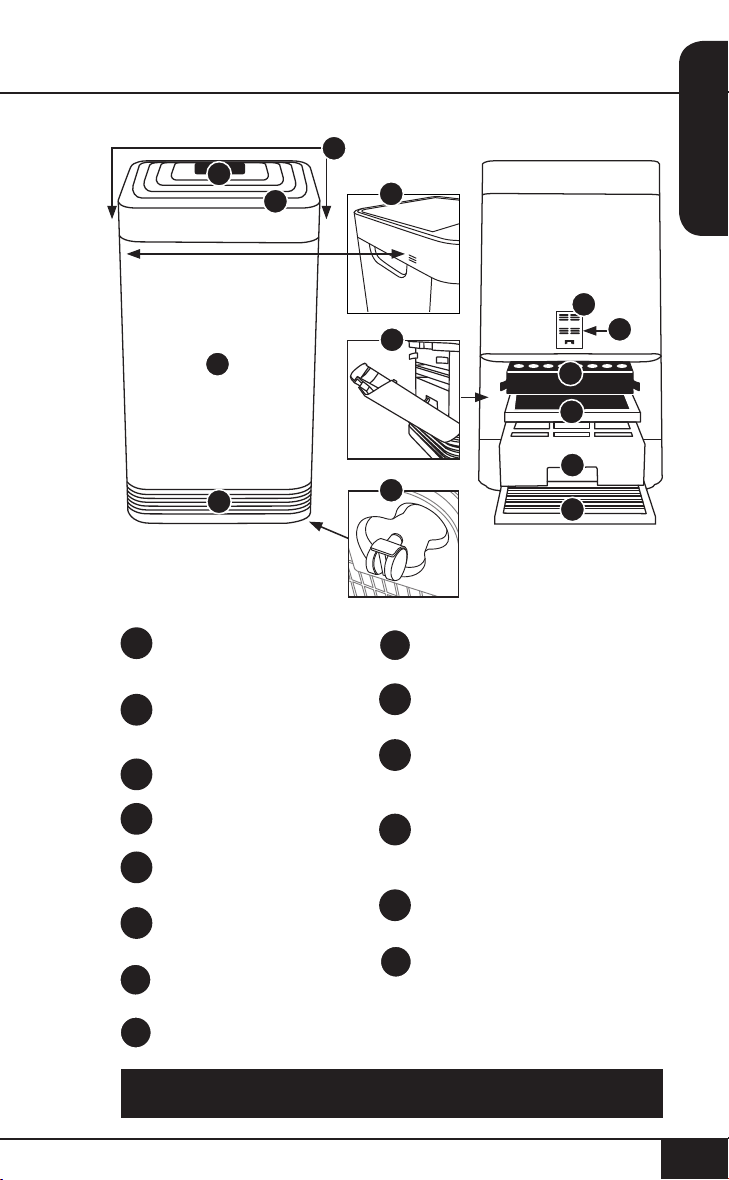
PARTS & ACCESSORIES
To order parts head over to the Replaceable Parts section of this
manual or NuWaveNow.com.
Sensor Cover
Part #: 47106
Filter Sensor
Part #: 47107
HEPA/Activated
Carbon Combo Filter
Part #: 47108
Ozone Emission
Removal Filter
Part #: 47109
Bio-Guard™ Filter
Part #: 47110
Stainless Steel Pre-Filter
Part #: 47111
9a
9b
10
11
12
13
Air Vent
Part #: 47101
Front Display
Touchpad Panel
Part #: 47102
Handles
Odor Sensor
Base
Part #: 47104
In Flow Vent
Filter Slot Cover
Part#: 47105
Wheels
1
2
3
4
5
6
7
8
1
2
Front Back
5
9a
9b
7
68
10
11
12
13
3
4

instructions
10
INSTRUCTIONS
10
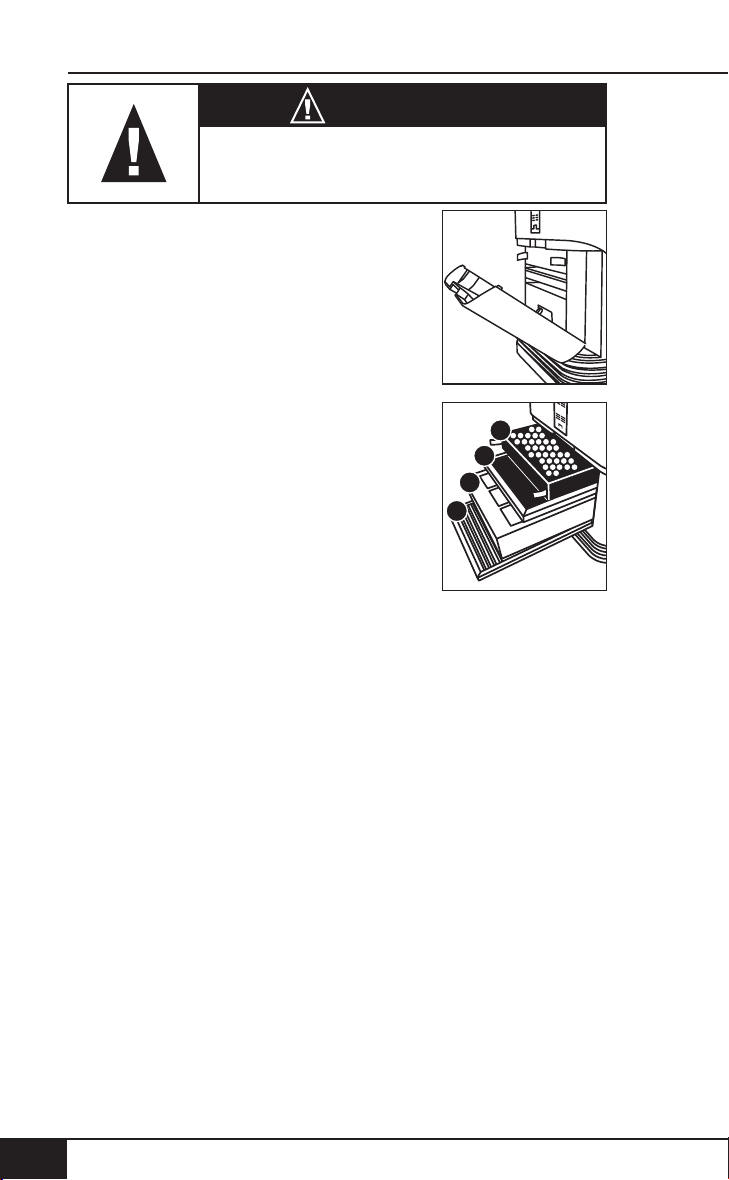
Air Filter Assembly
The OxyPure comes with four different
preassembled filters inside the unit.
When filters require replacement or
cleaning, follow all directions when
assembling.
See Cleaning & Maintenance.
Filter Functions
Air purifiers are more effective in operation when all
windows and doors are closed. Purifies extra-large rooms
up to 1,200 sq. ft.
Stainless Steel Pre-Filter
Washable and reusable for up to 20 years.
Captures and collects large particles, pollutants, and
allergens including pet hair, dander, and pollen.
Bio-Guard™ Filter
Washable and reusable for up to 20 years.
8,000V, positive and negative charges capture and trap
pollutants as small as 0.09 microns, including bacteria, mold,
viruses, smoke, pollen, and allergens.
Ozone Emission Removal Filter
Reusable for up to 20 years. Not washable.
Eliminates ozone emissions and other harmful airborne
chemicals.
HEPA/Activated Carbon Combo Filter
Lifespan, 6 months to 1 year. Not Washable.
Captures and traps pollen, allergens, industrial emissions,
VOCs including formaldehydes, household fumes, odors and
nitrogen dioxides from gas stoves and car exhausts.
The order of the filters inside the
OxyPure is as follows:
1. Stainless Steel Pre-Filter
2. Bio-Guard™Filter
3. Ozone Emission Removal Filter
4. HEPA/Activated Carbon Combo Filter
4
3
2
1
WARNING
Do not plug OxyPure in outlet or power strip
that is being used by other appliances.

nuwavenow.com 11
ENGLISH
nuwavenow.com 11
WIFI CONNECTION
The OxyPure is equipped with Wi-Fi to operate the unit
from any location. To set up and activate the Wi-Fi:
1. Download the NuWave Connect app via the Apple Store
or Google Play on your smartphone or device and open
the app.
2. Make sure your phone is connected to your network.
Open the app and follow the instructions for the
verification process. Once verification is complete,
begin adding devices. To add a device tap "+" then
select "OxyPure."
3. Next, plug the OxyPure into a compatible power outlet.
To activate Wi-Fi Pairing Mode, press and hold the power
button on the OxyPure for 2 seconds until the light next
WIFI begins to rapidly blink at a rate of about 2 blinks per
second. Once the Wi-Fi light is rapidly blinking, in the app,
tap the Finish Network Configuration button on the bottom
of the Add Device page.
4. Next, you will be prompted to either connect to your network
or confirm your existing network password.
Note: To either connect to or change networks, depending on
your phone, you may be removed from the app to complete the
network connection. Return back to the NuWave Connect app
and continue with the setup process.
5. When the OxyPure is connected to the Wi-Fi, the light
next to “WIFI” will stop flashing and stay continuously lit.
• If the OxyPure did not connect to your network, the
WIFI light will turn off. Follow steps 3-4. Make sure
to select the proper Wi-Fi network and type the
correct password.
Altri manuali per OxyPure
2
Indice
Altri manuali NuWave Purificatore d'aria

NuWave
NuWave OxyPure Manuale utente

NuWave
NuWave OxyPure Zero E500 Manuale utente

NuWave
NuWave OXYPURE ZERO E1000 Manuale utente

NuWave
NuWave OXYPURE ZERO E1000 Manuale utente

NuWave
NuWave 47401 Manuale utente

NuWave
NuWave OXYPURE ZERO 47251 Manuale utente

NuWave
NuWave OXYPURE ZERO 47251 Manuale utente

NuWave
NuWave OXYPURE 47501 Manuale utente

NuWave
NuWave OXYPURE ZERO E1000 Manuale utente

NuWave
NuWave OXYPURE 47001 Manuale utente