Onkyo CP-1050 Manuale utente

CP-1050
Direct Drive Turntable
Instruction Manual
Thank you for purchasing an Onkyo product.
Please read this manual thoroughly before making any
connections and plugging in your new Onkyo product.
Following the instructions in this manual will enable you to
obtain optimum performance and listening enjoyment from
your new product.
Please retain this manual for future reference.
Names and functions of parts ..... 6
Assembly and installation............ 7
Preparatory adjustments ............. 8
1. Horizontal balance............................8
2. Stylus pressure.................................9
3. Anti-skating.......................................9
Connections .............................. 10
Playing records ......................... 11
Troubleshooting ........................ 12
CP‑1050eng.book1ページ2014年11月17日 月曜日 午後2時29分

2
Important safety instructions
1. Read these instructions.
2. Keep these instructions.
3. Heed all warnings.
4. Follow all instructions.
5. Do not use this apparatus near water.
6. Clean only with dry cloth.
7. Do not block any ventilation openings. Install in
accordance with the manufacturer’s instructions.
8. Do not install near any heat sources such as radiators,
heat registers, stoves, or other apparatus (including
amplifiers) that produce heat.
9. Do not defeat the safety purpose of the polarized or
grounding-type plug. A polarized plug has two blades
with one wider than the other. A grounding type plug
has two blades and a third grounding prong. The wide
blade or the third prong are provided for your safety. If
the provided plug does not fit into your outlet, consult
an electrician for replacement of the obsolete outlet.
10.
Protect the power cord from being walked on or
pinched particularly at plugs, convenience receptacles,
and the point where they exit from the apparatus.
11.
Only use attachments/accessories specified by the
manufacturer.
12.
Use only with the cart, stand,
tripod, bracket, or table
specified by the manufacturer,
or sold with the apparatus.
When a cart is used, use
caution when moving the cart/
apparatus combination to
avoid injury from tip-over.
13.
Unplug this apparatus during
lightning storms or when
unused for long periods of time.
14.
Refer all servicing to qualified service personnel.
Servicing is required when the apparatus has been
damaged in any way, such as power-supply cord or
plug is damaged, liquid has been spilled or objects
have fallen into the apparatus, the apparatus has been
exposed to rain or moisture, does not operate
normally, or has been dropped.
15.
Damage Requiring Service
Unplug the apparatus from the wall outlet and refer
servicing to qualified service personnel under the
following conditions:
A. When the power-supply cord or plug is damaged,
B. If liquid has been spilled, or objects have fallen into
the apparatus,
C. If the apparatus has been exposed to rain or water,
D. If the apparatus does not operate normally by
following the operating instructions. Adjust only
those controls that are covered by the operating
instructions as an improper adjustment of other
controls may result in damage and will often require
extensive work by a qualified technician to restore
the apparatus to its normal operation,
E. If the apparatus has been dropped or damaged in
any way, and
F. When the apparatus exhibits a distinct change in
performance this indicates a need for service.
16.
Object and Liquid Entry
Never push objects of any kind into the apparatus
through openings as they may touch dangerous
voltage points or short-out parts that could result in a
fire or electric shock.
The apparatus shall not be exposed to dripping or
splashing and no objects filled with liquids, such as
vases shall be placed on the apparatus.
Don’t put candles or other burning objects on top of
this unit.
17.
Batteries
Always consider the environmental issues and follow
local regulations when disposing of batteries.
18.
If you install the apparatus in a built-in installation,
such as a bookcase or rack, ensure that there is
adequate ventilation.
Leave 20 cm (8") of free space at the top and sides
and 10 cm (4") at the rear. The rear edge of the shelf
or board above the apparatus shall be set 10 cm (4")
away from the rear panel or wall, creating a flue-like
gap for warm air to escape.
WARNING:
TO REDUCE THE RISK OF FIRE OR ELECTRIC
SHOCK, DO NOT EXPOSE THIS APPARATUS TO
RAIN OR MOISTURE.
CAUTION:
TO REDUCE THE RISK OF ELECTRIC SHOCK, DO
NOT REMOVE COVER (OR BACK). NO USER-
SERVICEABLE PARTS INSIDE. REFER
SERVICING TO QUALIFIED SERVICE
PERSONNEL.
The lightning flash with arrowhead symbol, within an
equilateral triangle, is intended to alert the user to the
presence of uninsulated “dangerous voltage” within the
product’s enclosure that may be of sufficient magnitude
to constitute a risk of electric shock to persons.
The exclamation point within an equilateral triangle is
intended to alert the user to the presence of important
operating and maintenance (servicing) instructions in
the literature accompanying the appliance.
WARNING
RISK OF ELECTRIC SHOCK
DO NOT OPEN
RISQUE DE CHOC ELECTRIQUE
NE PAS OUVRIR
AVIS
S3125A
PORTABLE CART
WARNING
CP‑1050eng.book2ページ2014年11月17日 月曜日 午後2時29分

3
Precautions
1. Recording Copyright—Unless it’s for personal use
only, recording copyrighted material is illegal without
the permission of the copyright holder.
2. AC Fuse—The AC fuse inside the unit is not user-
serviceable. If you cannot turn on the unit, contact your
Onkyo dealer.
3. Care—Occasionally you should dust the unit all over
with a soft cloth. For stubborn stains, use a soft cloth
dampened with a weak solution of mild detergent and
water. Dry the unit immediately afterwards with a clean
cloth. Don’t use abrasive cloths, thinners, alcohol, or
other chemical solvents, because they may damage
the finish or remove the panel lettering.
4. Power
WARNING
BEFORE PLUGGING IN THE UNIT FOR THE FIRST
TIME, READ THE FOLLOWING SECTION
CAREFULLY.
AC outlet voltages vary from country to country. Make
sure that the voltage in your area meets the voltage
requirements printed on the unit’s rear panel (e.g., AC
230 V, 50 Hz or AC 120 V, 60 Hz).
The power cord plug is used to disconnect this unit
from the AC power source. Make sure that the plug is
readily operable (easily accessible) at all times.
For models with [POWER] button, or with both
[POWER] and [ON/STANDBY] buttons:
Pressing the [POWER] button to select OFF mode
does not fully disconnect from the mains. If you do not
intend to use the unit for an extended period, remove
the power cord from the AC outlet.
For models with [ON/STANDBY] button only:
Pressing the [ON/STANDBY] button to select Standby
mode does not fully disconnect from the mains. If you
do not intend to use the unit for an extended period,
remove the power cord from the AC outlet.
5. Preventing Hearing Loss
Caution
Excessive sound pressure from earphones and
headphones can cause hearing loss.
6. Batteries and Heat Exposure
Warning
Batteries (battery pack or batteries installed) shall not
be exposed to excessive heat as sunshine, fire or the
like.
7. Never Touch this Unit with Wet Hands—Never
handle this unit or its power cord while your hands are
wet or damp. If water or any other liquid gets inside
this unit, have it checked by your Onkyo dealer.
8. Handling Notes
0If you need to transport this unit, use the original
packaging to pack it how it was when you originally
bought it.
0Do not leave rubber or plastic items on this unit for a
long time, because they may leave marks on the
case.
0This unit’s top and rear panels may get warm after
prolonged use. This is normal.
0If you do not use this unit for a long time, it may not
work properly the next time you turn it on, so be
sure to use it occasionally.
0When you’ve finished using this unit, remove all
discs and turn off the power.
9. Installing this Unit
0Install this unit in a well-ventilated location.
0Ensure that there’s adequate ventilation all around
this unit, especially if it’s installed in an audio rack. If
the ventilation is inadequate, the unit may overheat,
leading to malfunction.
0Do not expose this unit to direct sunlight or heat
sources, because its internal temperature may rise,
shortening the life of the optical pickup.
0Avoid damp and dusty places, and places subject to
vibrations from loudspeakers. Never put the unit on
top of, or directly above a loudspeaker.
0Install this unit horizontally. Never use it on its side
or on a sloping surface, because it may cause a
malfunction.
0If you install this unit near a TV, radio, or VCR, the
picture and sound quality may be affected. If this
occurs, move this unit away from the TV, radio, or
VCR.
10.Moisture Condensation
Moisture condensation may damage this unit.
Read the following carefully:
Moisture may condense on the lens of the optical
pickup, one of the most important parts inside this unit.
0Moisture condensation can occur in the following
situations:
– The unit is moved from a cold place to a warm
place.
– A heater is turned on, or cold air from an air
conditioner is hitting the unit.
– In the summer, when this unit is moved from an
air conditioned room to a hot and humid place.
– The unit is used in a humid place.
0Do not use this unit when there’s the possibility of
moisture condensation occurring. Doing so may
damage your discs and certain parts inside this unit.
If condensation does occur, unplug the power cord and
leave the unit for two to three hours in the room
temperature.
CP‑1050eng.book3ページ2014年11月17日 月曜日 午後2時29分

4
Precautions
For U.S. and Canadian models
FCC CAUTION
Changes or modifications not expressly approved by the
party responsible for compliance could void the user’s
authority to operate the equipment.
NOTE:
This equipment has been tested and found to comply with
the limits for a Class B digital device, pursuant to part 15
of the FCC Rules. These limits are designed to provide
reasonable protection against harmful interference in a
residential installation. This equipment generates, uses
and can radiate radio frequency energy and, if not
installed and used in accordance with the instructions,
may cause harmful interference to radio communications.
However, there is no guarantee that interference will not
occur in a particular installation. If this equipment does
cause harmful interference to radio or television reception,
which can be determined by turning the equipment off and
on, the user is encouraged to try to correct the
interference by one or more of the following measures:
– Reorient or relocate the receiving antenna.
– Increase the separation between the equipment
and receiver.
– Connect the equipment into an outlet on a circuit
different from that to which the receiver is
connected.
– Consult the dealer or an experienced radio/TV
technician for help.
For Canadian Models
NOTE:
CAN ICES-3 B/NMB-3 B
For models having a power cord with a polarized plug:
CAUTION:
TO PREVENT ELECTRIC SHOCK, MATCH WIDE
BLADE OF PLUG TO WIDE SLOT, FULLY INSERT.
For British models
Replacement and mounting of an AC plug on the power
supply cord of this unit should be performed only by
qualified service personnel.
IMPORTANT
The wires in the mains lead are coloured in accordance
with the following code:
Blue: Neutral
Brown: Live
As the colours of the wires in the mains lead of this
apparatus may not correspond with the coloured
markings identifying the terminals in your plug, proceed
as follows: The wire which is coloured blue must be
connected to the terminal which is marked with the letter
N or coloured black. The wire which is coloured brown
must be connected to the terminal which is marked with
the letter L or coloured red.
IMPORTANT
The plug is fitted with an appropriate fuse. If the fuse
needs to be replaced, the replacement fuse must
approved by ASTA or BSI to BS1362 and have the same
ampere rating as that indicated on the plug. Check for the
ASTA mark or the BSI mark on the body of the fuse. If the
power cord’s plug is not suitable for your socket outlets, cut
it off and fit a suitable plug. Fit a suitable fuse in the plug.
For European Models
Declaration of Conformity
We declare, under our sole
responsibility, that this product
complies with the standards:
–Safety
– Limits and methods of
measurement of radio
disturbance characteristics
– Limits for harmonic current emissions
– Limitation of voltage changes, voltage fluctuations
and flicker
– RoHS Directive, 2011/65/EU
WEEE
http://www.onkyo.com/manual/weee/weee.pdf
CP‑1050eng.book4ページ2014年11月17日 月曜日 午後2時29分

5
Features
Professional manual record player with a focus
on sound quality
This is a manual player with simple functions that is
designed with the highest priority placed on the sound
quality for playing analog records. In terms of operations,
usability is ensured with fittings such as a lifter for
lowering and raising the tone arm. Also, the cartridge and
head shell can be replaced.
Composed of highly reliable parts
High reliability parts such as a MDF-manufactured
cabinet for better sound quality, high rigidity aluminum
die-cast turntable, high sensitivity tone arm, MM-type
cartridge, etc., are used.
High precision and stable direct drive system
High precision rotating performance is achieved with a
quartz lock system. It is also equipped with an insulator to
absorb external vibrations effectively.
Luxurious finishing
A superior finishing reflecting the quality of the raw
materials used is achieved by using a combination of
aluminum parts arranged on the base of the operating
unit and a cabinet with a soothing color tone.
Supplied accessories
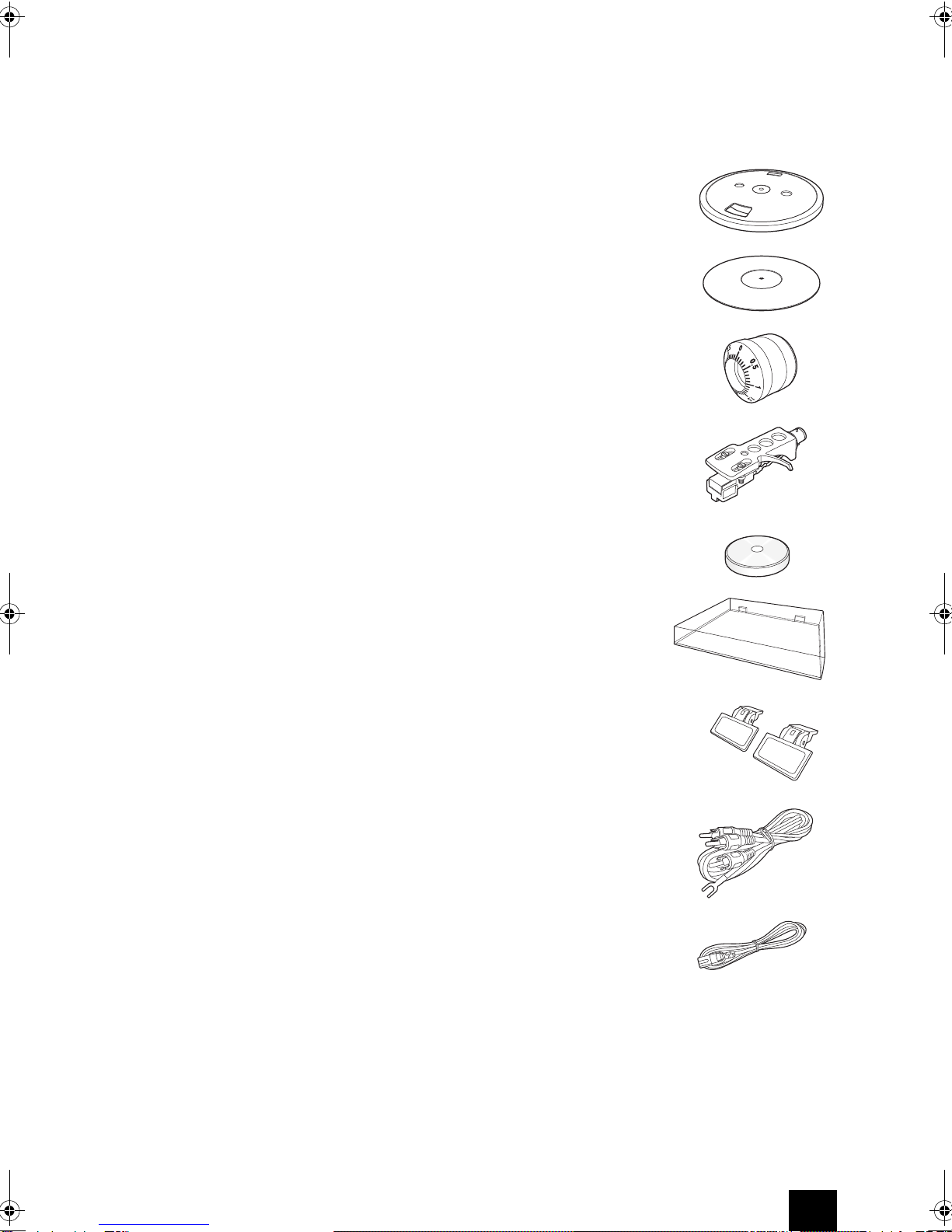
Before use, check whether the main unit and the
accessories below are supplied.
*
In catalogs and on packaging, the letter at the end of the
product name indicates the color. Specifications and operations
are the same regardless of color.
∫
Turntable
k
1
∫
Rubber mat
k
1
∫
Counterweight
k
1
∫
Head shell/Cartridge
k
1
∫
Adapter for 45 rpm records
k
1
∫
Dust cover
k
1
∫
Dust cover hinge
k
2
∫
Pin cables with attached
grounding
k
1
∫
Power cord
k
1
CP‑1050eng.book5ページ2014年11月17日 月曜日 午後2時29分

6
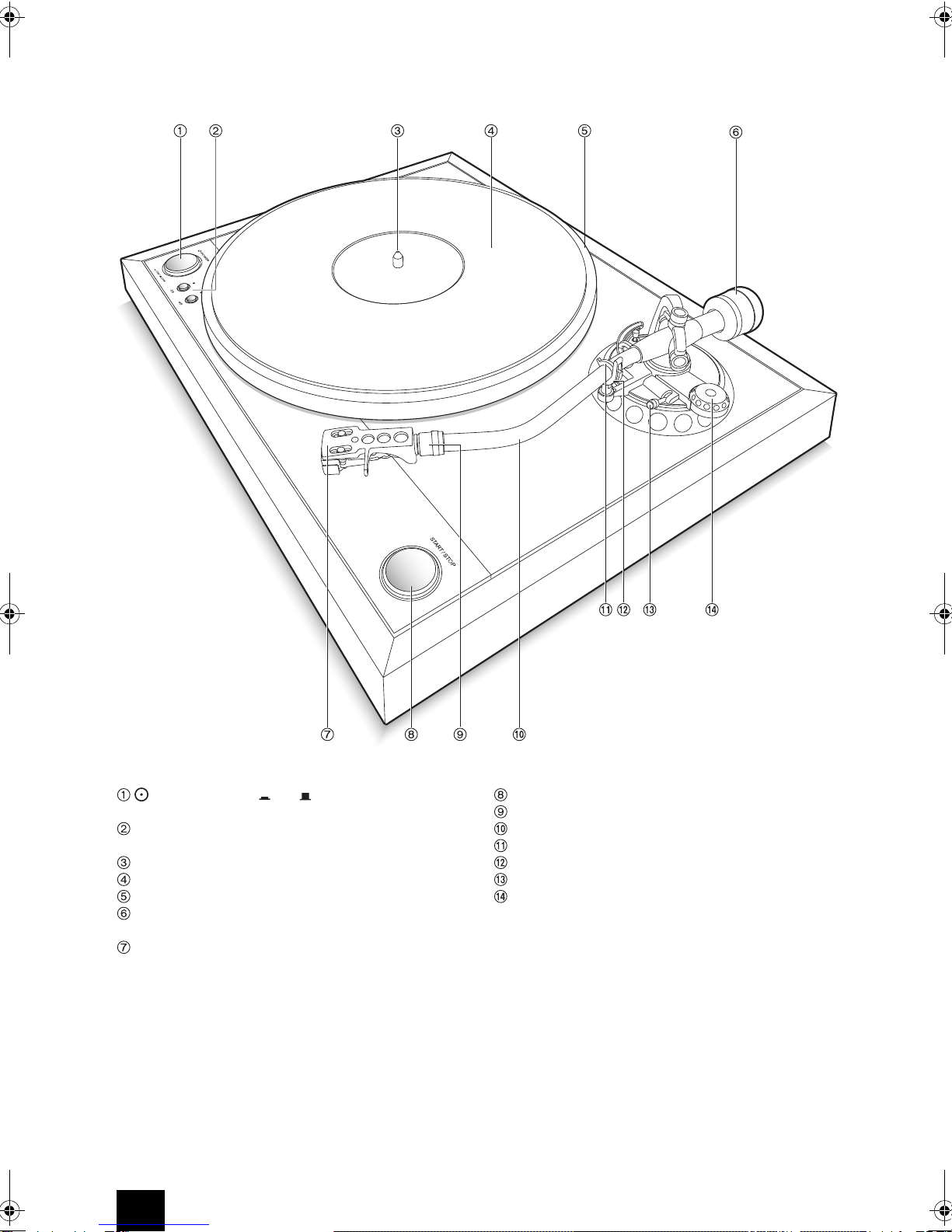
Names and functions of parts
POWER button ( ON/ OFF):
Press this button
to turn the unit on or off.
Speed selector button (33/45):
Set this button
according to the record’s playing speed.
Center spindle
Rubber mat
Turntable
Counterweight:
Use this to balance the tone arm and
to adjust the stylus pressure.
Head shell
START/STOP button:
Rotates/stops the turntable.
Locking nut:
Use this to install the head shell.
Tone arm
Arm clamp:
Secures the tone arm to the arm rest.
Arm rest:
Table to mount the tone arm.
Lifter lever:
Use this to lift and lower the tone arm.
Anti-skating knob:
Use this to adjust the anti-skating.
*
The turntable, rubber mat, counterweight and head shell are not
fitted at the point of purchase. Refer to “Assembly” on the next
page to assemble them.
CP‑1050eng.book6ページ2014年11月17日 月曜日 午後2時29分

7
Assembly and installation
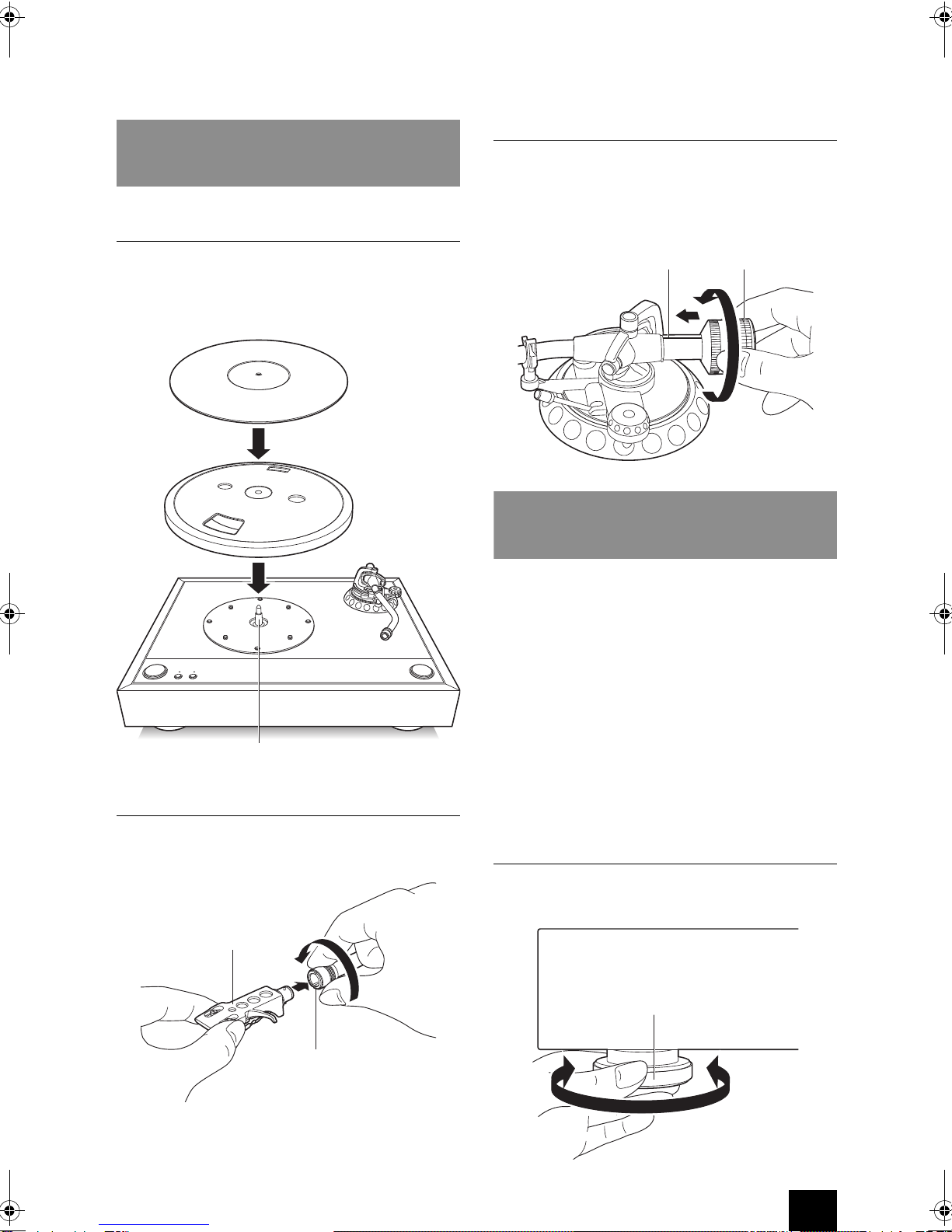
1. Mounting the turntable and rubber mat
1. Insert the turntable onto the center spindle.
0
Handle the turntable with care so that it does not
drop onto or hit the unit, tone arm, etc.
2. Lay the rubber mat on top.
2. Mounting the head shell
Fit the head shell into the tone arm, keep it horizontal and
tighten the locking nut.
3. Mounting the counterweight
Mount the counterweight on the shaft at the back of the
tone arm.
0
Do not rotate the counterweight to a position where the
white center line on the shaft at the back of the tone
arm is no longer visible.
Install the unit on a horizontal surface protected from vibrations.
0
Do not place the unit on top of the amplifier or speaker
system.
0
Install the unit away from the speaker system so as to
avoid the impact of vibrations and acoustic pressure.
0
Ensure the unit is not exposed to direct sunlight, dust,
humidity, and heat from a heating appliance.
0
This unit may cause interference to radio broadcast if
there is a radio nearby. Keep radios as far as possible
from this unit.
0
If you have any devices that emit high-intensity radio
waves near the unit, such as a cellular phone that’s
being used to make a call, the unit may output noise.
Adjust the unit horizontally
Place the unit where it is to be used and adjust the height
of the insulators to make the unit horizontal.
Assembly
Turntable
Rubber mat
Center spindle
Head shell
Locking nut
Counterweight
Center line
Installation
Insulator
CP‑1050eng.book7ページ2014年11月17日 月曜日 午後2時29分

8
Preparatory adjustments
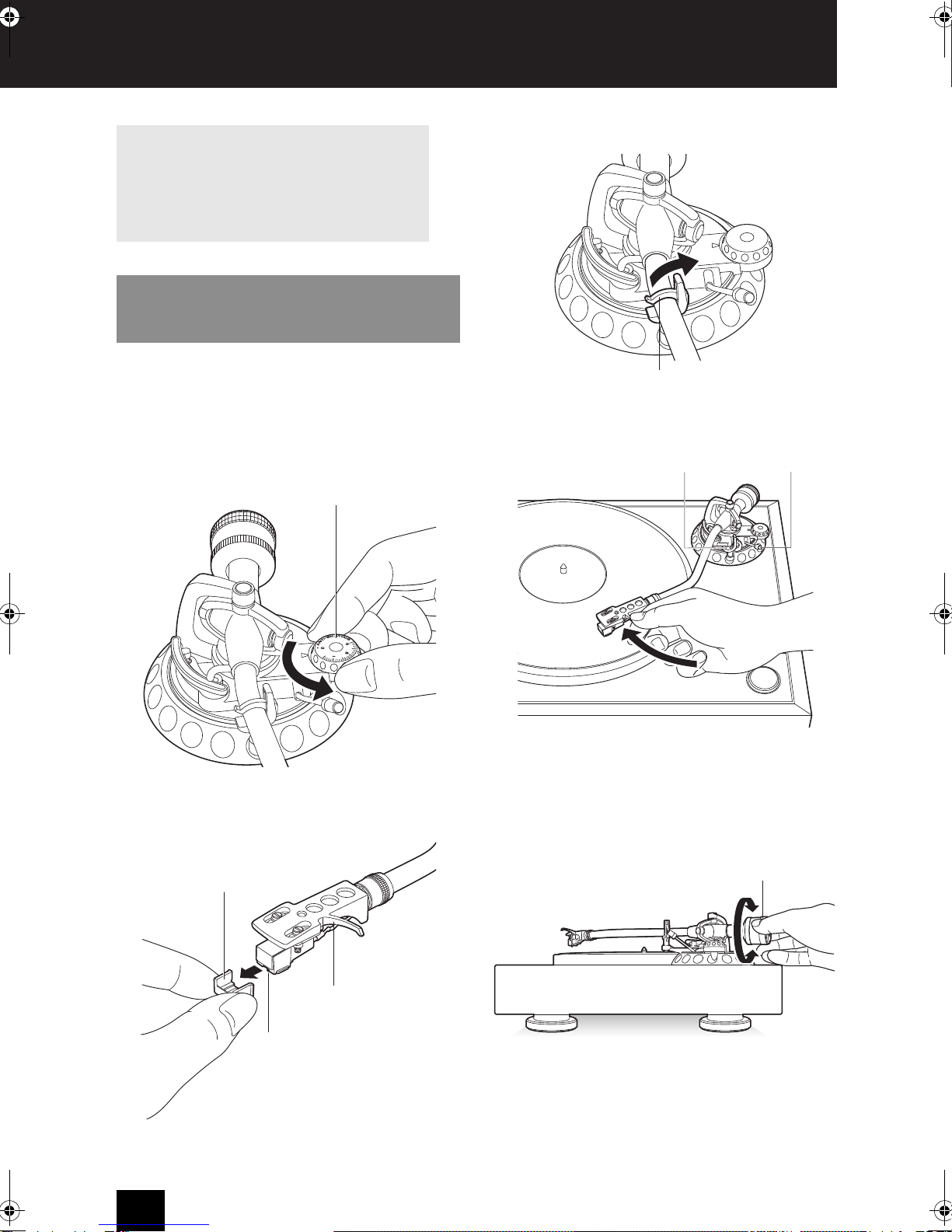
The horizontal balance of the tone arm needs to be
adjusted first in order to ensure that an appropriate stylus
pressure is applied on the record. Carry out the
adjustment with the power turned off.
1. Set the anti-skating knob to “0”.
2. Remove the translucent stylus cover, taking care not to
damage the stylus.
3. Release the arm clamp.
4. Free the tone arm from the arm rest.
Leave the lifter lever in a lowered state.
5. Turn the counterweight to adjust the tone arm so that it
returns to an almost horizontal state (*) when the hand
is released. During adjustment, take care not to allow
the stylus to touch the rubber mat or the turntable.
*
Ensure that the tone arm is balanced, so that the end of the tone
arm is neither too high nor too low.
6. Return the tone arm to the arm rest and fix it with the
arm clamp.
Handling the stylus
The tip of the stylus is extremely delicate. Be careful
not to break or bend the stylus when removing the
stylus cover. If the stylus tip is damaged, promptly
replace it with a new stylus. If a damaged stylus is
used, it will result in damage to the record.
1. Horizontal balance
Anti-skating knob
Stylus cover
Head shell
Stylus
Arm clamp
Lifter lever
Arm rest
Counterweight
CP‑1050eng.book8ページ2014年11月17日 月曜日 午後2時29分

9
Preparatory adjustments
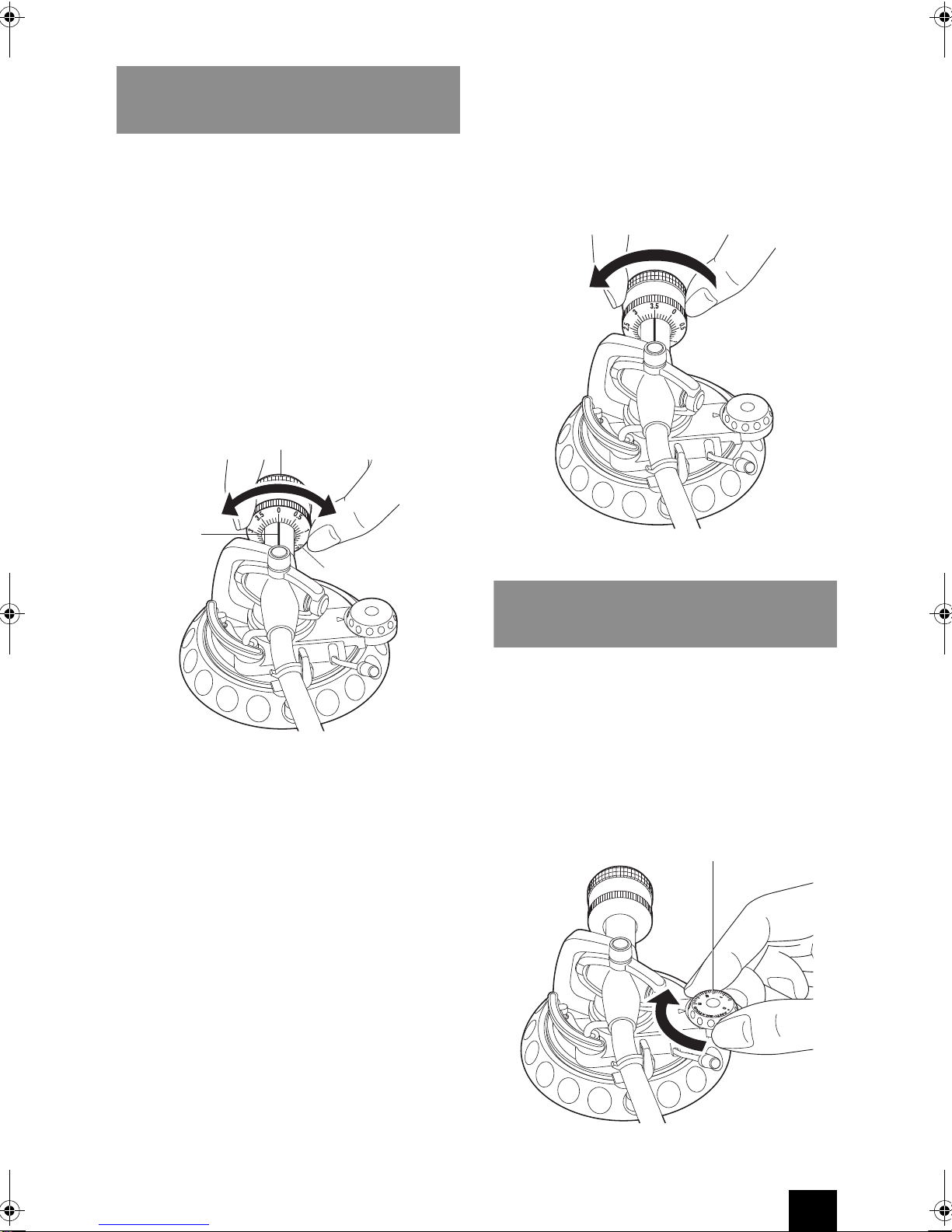
First turn the scale of the stylus pressure temporarily to
“0” in a horizontally balanced state, and then adjust the
stylus pressure.
If the stylus pressure is too high or too low, the record
may not be played back correctly, or the stylus life may be
shortened, or the record may be damaged. Be sure to
adjust the stylus pressure to an appropriate value to
match the cartridge.
1. Turn the stylus pressure adjustment ring so that the
white center line on the shaft at the back of the tone
arm is at “0”.
0
Keep your fingers in contact with the stylus
pressure adjustment ring only and turn it so that the
counterweight does not turn at the same time.
2. Turn the counterweight in the direction of the arrow so
that the white center line on the shaft at the back of the
tone arm is at “3.5”.
0
When the counterweight is turned, the stylus
pressure adjustment ring also turns.
0
When using a cartridge and head shell other than
those supplied, adjust the stylus pressure to an
appropriate value to match the cartridge after re-
adjusting the horizontal balance.
When playing a record, a force pulling the stylus tip
towards the inner circumference is generated. This force
can be canceled by setting the anti-skating value to the
same stylus pressure.
1. Turn the anti-skating knob to adjust it to the same
scale as the stylus pressure. If the stylus pressure is
“3.0” or higher like the supplied cartridge, adjust it to
“3”.
2. Stylus pressure
Counterweight
Stylus pressure
adjustment ring
Center line
3. Anti-skating
Anti-skating knob
CP‑1050eng.book9ページ2014年11月17日 月曜日 午後2時29分

10
Connections
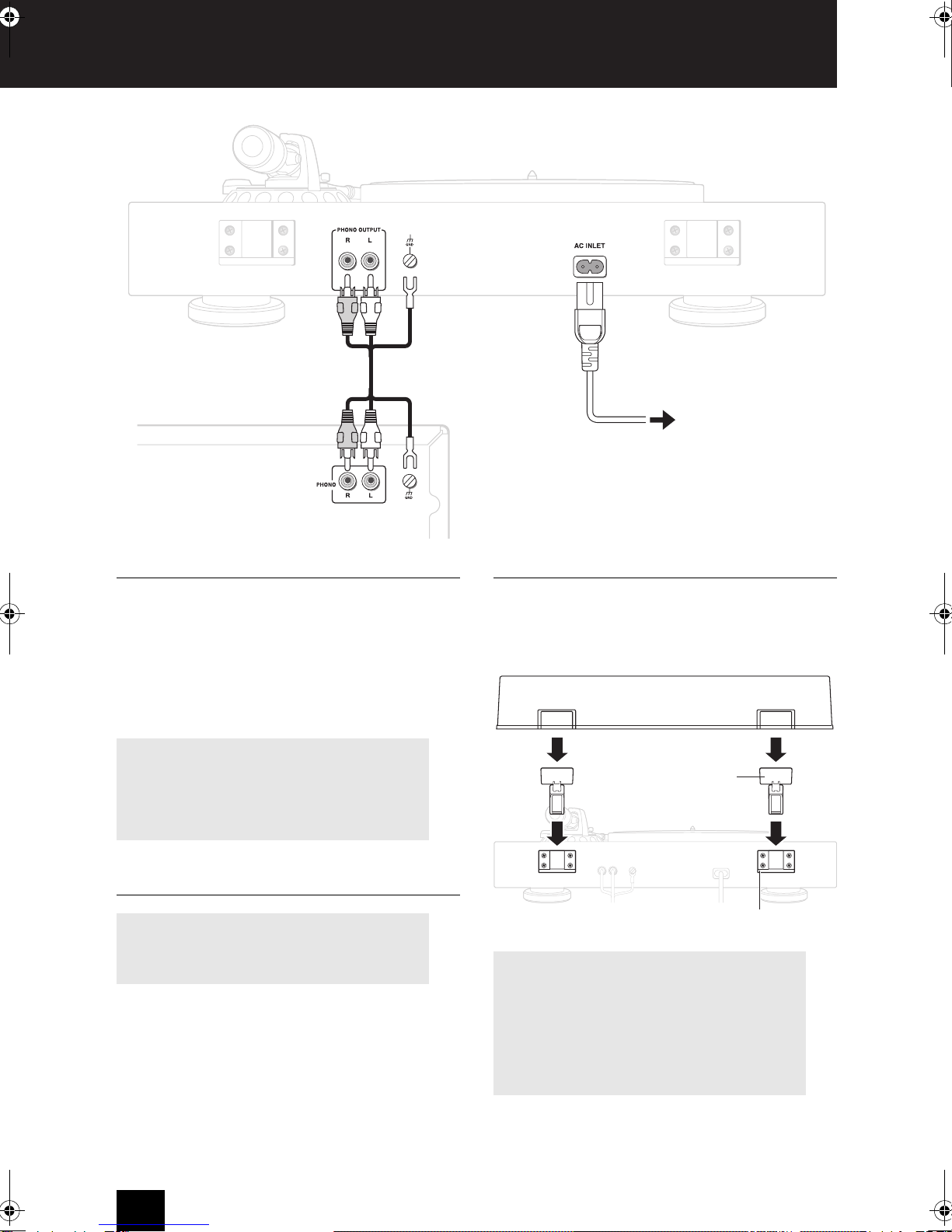
1. Connection with the amplifier
Connect the supplied pin cables with attached grounding
to the PHONO OUTPUT terminals on the rear panel of
the unit and the PHONO input terminals of the amplifier.
Connect the red plug to the R terminal and the white plug
to the L terminal respectively.
In addition, connect the grounding line of the pin cables
with attached grounding to the GND terminal (ground
terminal) of the rear panel of the unit and the amplifier.
2. Connecting the power cord
Always connect the power cord to an AC outlet only after
connecting it to the AC INLET terminal of the unit.
Disconnect the power cord only after turning the unit off.
To avoid electrical shock, always disconnect the power
cord from the AC outlet before disconnecting the other
end.
3. Mounting the dust cover
1. Insert the two supplied dust cover hinges fully into the
holder on the rear panel of the unit.
2. Adjust the square holes of the dust cover to the hinges
and insert them fully into the hinges.
to an AC outlet
Amplifier
About the amplifier
If there is no PHONO input terminal on the amplifier
used, connect a commercial phono-equalizer between
the unit and the amplifier. See the instruction manual
of the phono-equalizer for the connection method.
Do not use a power cord other than the one supplied
with this unit. Before connecting the power cord,
connect all of your components. Opening and closing the dust cover
Open and close the dust cover slowly. The stylus may
jump if the player is subjected to shock during a
musical performance.
Removing the dust cover
After opening the dust cover fully, hold the dust cover
at the back on both sides and pull it out from the top.
Holder
Hinge
CP‑1050eng.book10ページ2014年11月17日 月曜日 午後2時29分
Altri manuali per CP-1050
1
Indice
Altri manuali Onkyo Giradischi

Onkyo
Onkyo CP-1057F Manuale utente

Onkyo
Onkyo CP-1037F Manuale utente

Onkyo
Onkyo CP-1050 Manuale utente

Onkyo
Onkyo CP-1044F Manuale utente

Onkyo
Onkyo NS-6170 Manuale utente

Onkyo
Onkyo CP-1027F Manuale utente

Onkyo
Onkyo CP-101A Manuale utente

Onkyo
Onkyo CP-1200A Manuale utente

Onkyo
Onkyo CP-1057F Manuale utente

Onkyo
Onkyo CP-1046F Manuale utente