
Online Media Technologies DVD Copy Manuale utente

AVS DVD Copy Program Help
www.avsmedia.com
Online Media Technologies Ltd. © Copyright 2007

AVS DVD Copy
Send comments on this topic.
Introduction
Overview
AVS DVD Copy is a compact and fully functional application that lets the user copy, clone or compile
own CDs, DVDs and new generation Blu-Ray discs. It also supports shrinking DVD video to let the user
backup a double layer video DVD onto one single layer DVD±R/RW and burning previously saved ISO
images onto different types of optical discs. The software has a very easy-to-use and understandable
interface that lets you create your own data and video discs effortlessly in just several mouse clicks.
AVS DVD Copy supports writing to the following disc types: CD-R, CD-RW, CD-RW High Speed, DVD-
R, DVD-RW, DVD+R DL, DVD-RAM, D-R, BD-RE, BD DoubleLayer-R, BD DoubleLayer-RE. See the
Appendix section for more detail on different disc types.
© 2007 Online Media Technologies Ltd., London, UK. All rights reserved.
http://www.avsmedia.com/

AVS DVD Copy
Send comments on this topic.
Introduction
System Requirements
Windows 2000/XP/2003/Vista operating system (all of the last updates installed are
recommended);
Pentium III 800 MHz or higher;
128 MB RAM;
CD-RW, DVD-ROM/CD-RW combo drive, DVD-R/RW/DL, DVD+R/RW/DL, DVD-RAM, BD-R/RE
drive with 1394, USB2.0, ATAPI, SCSI, or CardBus interface;
At least 10 megabytes of free hard disk space; up to 200 Gb to create an ISO-image of a six-
layer Blu-Ray disc;
Enabling the DMA mode is recommended for proper use;
Administrative privileges are required for installation.
© 2007 Online Media Technologies Ltd., London, UK. All rights reserved.
http://www.avsmedia.com/

AVS DVD Copy
Send comments on this topic.
Introduction
Contact Us
If you have any comments, suggestions or questions regarding AVS DVD Copy or if you have a new
feature that you think could be added to improve our product, please feel free to contact us.
General information
Technical support
Sales
If you do not receive an answer to your question within 24 hours, please feel free to submit your
question via support form . Unfortunately some messages may be rejected by our mail server as
spam or as ones that contain viruses.
© 2007 Online Media Technologies Ltd., London, UK. All rights reserved.
http://www.avsmedia.com/

AVS DVD Copy
Send comments on this topic.
Introduction
Technical Support
AVS DVD Copy software does not require any professional knowledge. If you experience any problem
or have a question, please refer to the program help. If you cannot find the solution, please contact
our support staff.
AVS Media staff provides several forms of automated customer support:
Web Site Support
Please visit our website (www.avsmedia.com ) to explore the extensive customer support
information on AVS DVD Copy . Check our updates of Frequently Asked Questions and
How To section.
E-mail Support
You can submit your technical questions and problems via e-mail to
difficulties we will need the following information.
System parameters (CPU, hard drive space available, etc.)
Operating System
The information about the DVD drives installed on your computer (manufacturer and
model)
Detailed step by step description of your action
Please do NOT attach any other files to your e-mail message unless specifically requested by
AVS Media support staff.
If you do not receive an answer to your question within 24 hours, please feel free to submit
your question via support form . Unfortunately some messages may be rejected by our mail
server as spam or as ones, which contain viruses.
© 2007 Online Media Technologies Ltd., London, UK. All rights reserved.
http://www.avsmedia.com/

AVS DVD Copy
Send comments on this topic.
Program Interface
Main Window
AVS DVD Copy has a simple intuitive interface that is easy to understand and very easy to use. When
you launch the application you will see the Main Window where the basic controls of the program are
placed.
AVS DVD Copy Main Window consists of the following principal parts:
Top Toolbar - the toolbar with the main action buttons that let the user select the work mode
of the AVS DVD Copy program.
Main Area - the central part of the AVS DVD Copy program window that lets the user select
the main burning parameters or add files. Note, that the Main Area looks different depending
on the work mode of the program.
Disc size meter - the panel that shows the size of the most common disc media types and
the size of the data that is going to be written onto the disc. It is available in the Burn DVD ,
Burn DATA and Burn ISO work modes.


AVS DVD Copy
Send comments on this topic.
Program Interface
Top Toolbar
The Top Toolbar consists of the action buttons that can be used to select the work mode of the AVS
DVD Copy program. You should use the appropriate buttons depending on the task you are going to
perform:
Button
Description
Use this button to copy your input DVD video onto a disc or your computer hard
disk drive folder with the size selected in the box in the lower part of the main
area. The DVD video will be remastered if needed to fit the selected disc size. You
can also cut out all the unnecessary languages, menus and extras present on the
DVD.
Use this button to get an exact copy of the input CD or DVD onto the other disc.
No compression will be used to record the files onto the target disc, so you should
bear in mind that it is necessary to use the same disc type and capacity for the
recording to be performed correctly.
Use this button to burn your DVD video files onto a disc so that it become
readable on your home hardware or software DVD player. You can also create an
ISO image of the DVD video disc, so that you could burn it later onto a disc if you
do not have such a possibility right now.
Use this button to burn any kind of data onto a CD/DVD/BD disc. You can also
create an ISO image of the disc you would like to record, so that you could burn
it later onto a disc if you do not have such a possibility right now.
Use this button to burn a previously created ISO image onto a CD/DVD/BD disc.
Use this button to open this program help.
Use this button to visit the AVS Media web site on the Internet.

AVS DVD Copy
Send comments on this topic.
Program Interface
Main Area
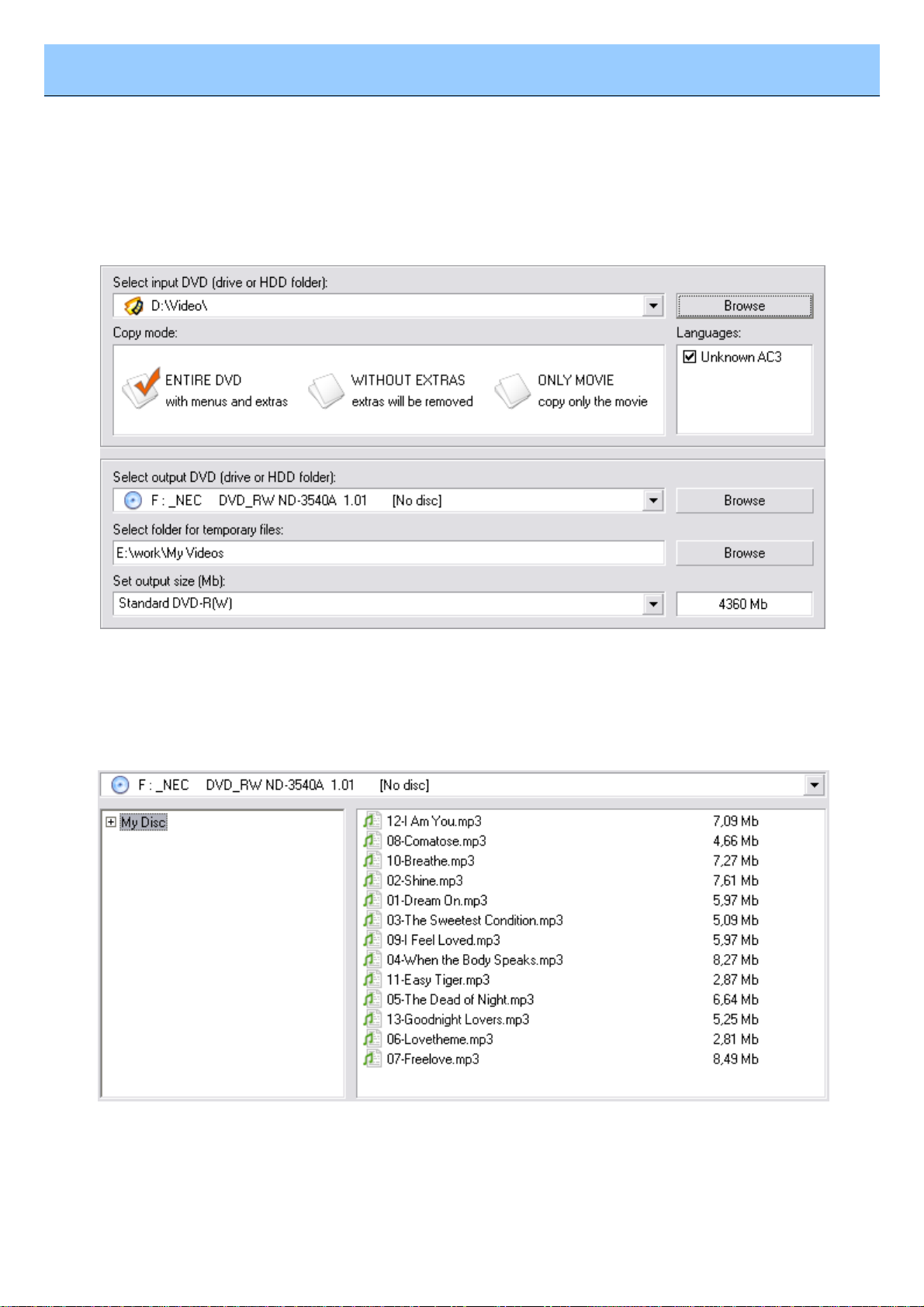
The Main Area is the central part of the AVS DVD Copy program window that lets the user select the
main burning parameters or add files. It looks different depending on the program work mode. For
instance, for the Copy DVD work mode it will look the following way:
Here one can select the Source and Target drive or HDD folder, Copy mode for the DVD, check or
uncheck the Languages that will be included into the output DVD, set the folder for the temporary
files and the target DVD size. See the Copy DVD section for more on all these parameters.
If you select Burn DVD , Burn DATA or Burn ISO work mode, the Main Area will look the following
way:
Here you can select the target disc drive or ISO-image to record your data to (please, note, that using
ISO-image as target is disabled in Burn ISO work mode) and the files to record to your compilation.
You can use the buttons below to add files, ISO-images or folders, erase the inserted disc, set the
Questo manuale è adatto per i seguenti modelli
1
Indice
Manuali Software popolari di altre marche


PS Audio
PS Audio PowerPlay Manuale del proprietario

Brady
Brady LOCKOUT PRO 3.0 Manuale di servizio

Avaya
Avaya Interaction Center Manuale utente

Texas Instruments
Texas Instruments TI-83 Plus Silver Edition Manuale

Novell
Novell GROUPWISE 8 - INTERNET AGENT Manuale utente

Oracle
Oracle Application 9i Manuale utente

Acer
Acer RDM Manuale utente

Canon
Canon Vixia HF21 Manuale utente

Canon
Canon ZR950 Manuale utente

Samsung
Samsung Auto Backup Manuale utente

Polycom
Polycom Vortex EF2201 Istruzioni per l'installazione e il funzionamento

Brocade Communications Systems
Brocade Communications Systems Brocade 8/12c Manuale utente