Orion XTREME 900 Manuale utente

November 2006,
V
ersion1.05
900 MHz OFDM
Users Manual

2
Notice: The changes or modifications not expressly approved by the party responsible
for compliance could void the user’s authority to operate the equipment.
IMPORTANT NOTE: To comply with the FCC RF exposure compliance requirements, no
change to the antenna or the device is permitted. Any change to the antenna or the device could
result in the device exceeding the RF exposure requirements and void user’s authority to operate
the device.
FCC Notice
This equipment has been tested and found to comply with the limits for a Class B digital device,
pursuant to Part 15 of the FCC Rules. These limits are designed to provide reasonable
protection against harmful interference in a residential installation. This equipment generates,
uses, and can radiate radio frequency energy and, if not installed and used in accordance with
the instructions, may cause harmful interference to radio communications. However, there is
no guarantee that interference will not occur in a particular installation. If this equipment does
cause harmful interference to radio or television reception, which can be determined by
turning the equipment off and on, the user is encouraged to try to correct the interference by
one or more of the following measures:
• Reorient or relocate the receiving antenna.
• Increase the separation between the equipment and receiver.
• Connect the equipment into an outlet on a circuit different from that to which the
receiver is connected.
• Consult the dealer or an experienced radio technician for help.
Changes or modifications not expressly approved in writing by Wireless Interactive Comm. Inc.
may void the user’s authority to operate this equipment. Wireless Interactive Comm. Inc. can
not accept any financial or other responsibilities that may be the result of your use of this
information, including direct, indirect, special, or consequential damages. Refer to warranty
documents for product warranty coverage and specifics.
Copyright
Copyright © 2006 all rights reserved. No part of this publication may be reproduced,
adapted, stored in a retrieval system, translated into any language, or transmitted in any form
or by any means without the written permission of the manufacturer.
Technical Support
If you have difficulty resolving a problem while installing or using this wireless product, Please
contact your supplier for support.

3
Table of Contents
SYMBOLS…………………………………………………………………………………….. ..... 4
GLOSSARY.....................................................................................COMING IN NEXT REVISION
CHAPTER 1 INTRODUCTION................................................................................................. 5
1-1 FEATURES AND BENEFITS............................................................................................................................5
.....................................................................................................................................................
CHAPTER 2 HARDWARE INSTALLATION ............................................................................. 6
2-1 PRODUCT KIT....................................................................................................................................................7
2-2 SYSTEM REQUIREMENTS..............................................................................................................................7
2-3 MECHANICAL DESCRIPTION .......................................................................................................................8
2.4 HARDWARE INSTALLATION...................................................................................................................... 10
CHAPTER 3 ANTENNA AND RF TUTORIAL......................................................................... 11
CHAPTER 4 CONFIGURATION ............................................................................................ 17
4-1 START-UP AND LOG IN .............................................................................................................................. 17
4-2 WIRELESS SETUP .......................................................................................................................................... 21
4-3 STATUS ............................................................................................................................................................ 26
4-4 MANAGEMENT.............................................................................................................................................. 28
APPENDIX A FREQUENCY TABLE....................................................................................... 33
APPENDIX B TROUBLESHOOTING ..................................................................................... 34
APPENDIX C OUTPUT POWER AND SPECIFICATION CHART............................................ 36

4
Symbols
This publication uses the following symbols to convey instructions and information:
This symbol means
reader take note
. Notes contain helpful suggestions or references
to materials not contained in this manual.
This symbol means
reader be aware
.In this situation an action could result in
equipment damage or loss of data.
This warning symbol means
danger
. You are in a situation that could cause bodily
injury. Before you install any equipment, be aware of the hazards involved with electrical
circuitry and be familiar with standard practices for preventing accidents.

5
Chapter 1 Introduction
The Orion-900, 900MHz OFDM radio is a cost-effective point-to-point / point-to-multipoint,
and multipoint-to-multipoint solution for ISM band wireless backhaul deployment equipped with
an Ethernet interface.
This radio is one of the first OFDM radios, utilizing 16/64QAM modulation. Although line of
sight installations are always recommended, OFDM technology makes the system ‘more
forgiving’ than non-OFDM radios.
This radio is incorporated with Time Division Duplex (TDD) technology that operates on a
single channel. This Ethernet product is primarily designed to provide a standard Ethernet
interface in a wireless link between distant sites.
1-1 Features and Benefits
Provides for easy installation and high performance wireless bridging of up to 50Km
With an effective data rate up to 5.5Mbps, 11Mbps, and 22Mbps, it is one of the fastest and
most efficient Ethernet radios in the industry.
OFDM Technology.
Channel size/bandwidth flexibility allows the user to select channel size at 5, 10, or 20 MHz
for optimal performance.
Versatile Quality of Service / Time-Division Multiplexing technique. TDM technology can
avoid Ethernet packet collision and send packets with more stability and efficiency so to
improve the quality of voice and data transmission.
nx64 selectable user data rates allow for better Quality of Service(QoS).
WEP 64 bit / 128 bit / 152 bit, WPA-PSK and WPA2-PSK as well as MAC access for added
security.
Easy to use Web-based configuration utility. is fully manageable both locally and remotely. In
addition, built-in SNMP support lets the operator, whether ISP or enterprise, expand the
network infrastructure with ease.
IP-68 rated weatherproof housing.
Multipoint-to-multipoint use allowing every radio installed to not only provide access, but
also be used as a repeater for other locations.
External N-connector allows operators to select the optimum antenna.

6
Chapter 2 Hardware Installation
In order to comply with international radio frequency (RF) exposure limits, dish antennas
should be placed at a minimum of 8.7 inches (22 cm) from the bodies of all persons. Other
antennas should be placed a minimum of 7.9 inches (20 cm) from the bodies of all persons.
Do not work on the system or connect or disconnect cables during periods of lightning
activity.
This equipment must be grounded. Never remove the ground conductor or operate the
equipment in the absence of a suitable installed ground conductor. Contact the appropriate
electrical inspection authority or an electrician if you are uncertain whether suitable
grounding is available.
Ultimate disposal of this product should be handled according to all national laws and
regulations.
Do not deploy the antenna near overhead power lines or other electric light or power
circuits, or where it can come into contact with such circuits. When installing the antenna,
take extreme care not to come into contact with such circuits, as they may cause serious
injury or death. For proper installation and grounding of the antenna, please refer to national
and local codes (e.g. U.S.:NFPA 70, National Electrical Code, Article 810, in Canada:
Canadian Electrical Code, Section 54).
Only trained and qualified personnel should be allowed to install, replace, or service this
equipment or your risk voiding your warranty.
To meet regulatory restrictions, the radio and the external antenna must be professionally
installed. The network administrator or other IT professional responsible for installing and
configuring the unit must be a suitable professional installer. Following installation, access to
the unit should be password protected by the network administrator to maintain regulatory
compliance.
The Orion-900, 900MHz ISM band radio and POE injector can be damaged by incorrect
power installation. Read and carefully follow the installation instructions before connecing
the system to its power source.
Follow the guidelines in this chapter to ensure correct operation and safe use of the radio.
802.11a Outdoor Multi-function Radio User Manual
8

7
2-1 Product Kit
Before installation, make sure that you have the following items:
Wireless Outdoor Bridge……….…….…..…………….…..…..x 1
Power over Ethernet………………………………….……….…x 1
Power Adapter……………………………….…….…………..…x 1
Power Cord……………………………………………………..…x 1
Mounting kit..……………………………….………………….....x 1
Product CD……………………………………………………..…x 1
Quick Installation Guide……………………………….……….x 1
NOTE: If any of the above items are missing or damaged, please contact your supplier for support.
2-2 System Requirements
Before installing the 900MHz ISM band radio, please ensure that you are in access of the following:
A 10/100 Mbps Local Area Network device such as a hub or switch or cross-over cable
when connecting POE directly to a computer
Category 5 UTP or STP networking cable. (From the PC to POE)
Category 5 SSTP or SFTP networking cable. (From the radio to POE)
A Web browser for configuration: Microsoft IE 5.0 or later, or Netscape Navigator 5.0 or
later version.
110/220V power source
System Requirements

8
2-3 Mechanical Description
Outdoor Unit (ODU)
Orion-900, 900MHz ISM band radio
1 RJ-45 Port Use SFTP CAT5 cable with a weatherproof connector to connect to
the “TO ODU” side of poe injector.
2 N-jack antenna
connector
Attach N-male connector to this port which will lead to the antenna
of choice. Shorter RF cable length results in less cable attenuation
(a.k.a. cable loss).
3 Grounding stud Connect to the ground conductor with ground wire.
N- Jack Antenna
Connector
Grounding stud RJ-45 Port

9
Power Over Ethernet (POE)
Power Over Ethernet Injector (POE)
Not properly connecting into these RJ45 ports can result in damage to your computer
network and/or radio.
1 TO ETHERNET This RJ-45 port is used to connect to the 10/100 Base-T compliant
device such as switch, router or PC.
2 TO ODU This RJ-45 port is used to connect to the ODU and provides power to
the radio.
3 DC INPUT Connect to the power adaptor for DC input.
4 LED INDICATOR When lit, indicates that power is being applied.
Refer to Hardware Installation Figure on next page.
To Ethernet
To Radio
DC Input
LED Indicator (Power)
12

10
2-4 Hardware Installation
The Orion-900, 900MHz ISM band radio is a radio device, so it is susceptible to common causes of
interference that can reduce throughput and range. Follow these basic guidelines to ensure the best
possible performance:
If there is any other 900MHz RF device deployed in the area, try to set the channel to one
that does not overlap the interferer. If you are not able to determine what channel the
interferer is on, randomly select a channel until the channel with the best signal strength is
locked in.
A clear line-of-sight path can guarantee the best performance. Ensure proper antenna height
and no obstructions. Although the Orion-900 can be forgiving under certain circumstances,
it is always recommend that. clear line of sight is achieved.
[See Radio Horizon Graph; Chapter 3, page 14]
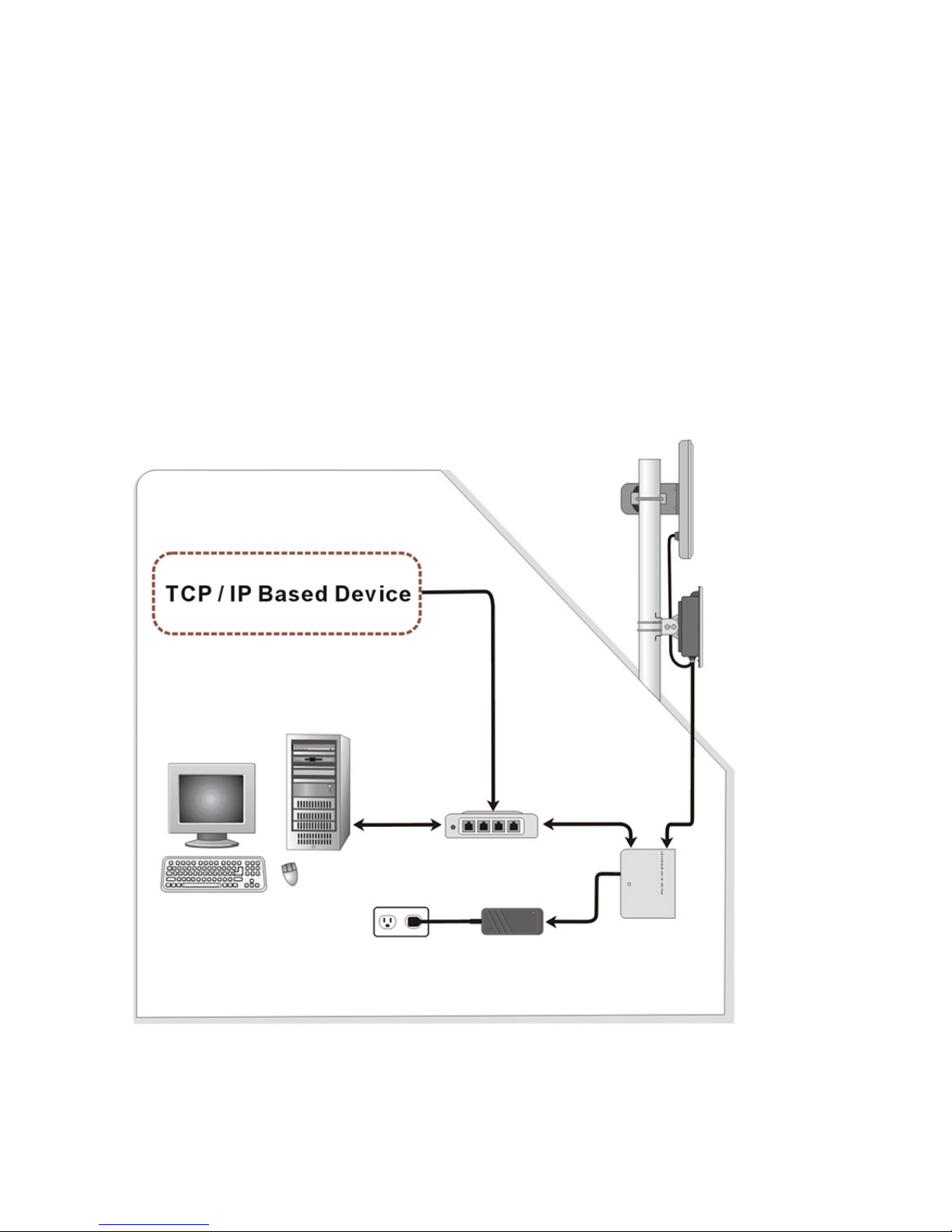
Hardware Installation Figure
Panel Antenna
900MHz licensed
radio
Power adaptor POE
AC Outlet
110V~240V
Router / Switch
(Optional)
OUTDOOR
INDOOR
10/ 100 Base T
10/ 100 Base T
Hardware Installation
Indice
Altri manuali Orion Radio