OXO COLORBEAM 150 BFX Manuale utente

INSTRUCTION MANUAL
MODE D’EMPLOI
COLORBEAM 150 BFX
FOR YOUR OWN SAFETY, PLEASE READ THIS INSTRUCTION
MANUAL CAREFULLY BEFORE YOU INITIALLY START-UP
POUR VOTRE SÉCURITÉ, MERCI DE LIRE ATTENTIVEMENT
CE MODE D’EMPLOI AVANT D’UTILISER VOTRE PRODUIT
V1.4 03/2018


ENGLISH
COLORBEAM 150 BFX - USER INSTRUCTION Page
1. In the box 4
2. Instructions 4
3. Overview 5
4. Operation guide 6
5. Technical data 12
FRANÇAIS
COLORBEAM 150 BFX - MODE D’EMPLOI Page
1. Dans la boîte 14
2. Instructions 14
3. Vue d’ensemble 15
4. Utilisation 16
5. Données techniques 22

User Manual - COLORBEAM 150 BFX V1.4 03/2018 4/24
1. In the box
• 1 ColorBeam 150 BFX
• 1 Powercon cable
• 1 Instruction Manual
2. Instructions
WARNING
• Read the instruction in this manual carefully and thoroughly, as they give important
information regarding safety during use and maintenance. Keep this manual with the unit,
in order to consult it in the future. If the unit is sold or given to another operator, make
certain that it always has its manual, to enable the new owner to read about its operation
and relative instructions.
• Protect the unit from excessive dryness or humidity (ideal conditions are between 35%
and 80% of ambient humidity without condensing).
• To prevent fire or shock hazard, do not expose this product under a high temperature or
humidity area.
• DO NOT make any inflammable liquids, water or metal objects enter the unit.
• Should any liquid be spilled on the unit, DISCONNECT the power supply to the unit
immediately.
• This product must be earthed.
• Take care not to damage the power cord.
• After having removed the packaging check that the unit is NOT damaged in any way.
• If in doubt, DON’T use it and contact an authorized dealer.
• NEVER use the unit under the following conditions:
- In places subject to excessive humidity.
- In places subject to vibrations or bumps.
- In places with a temperature of over 40 °C or less than 0 °C.
• DO NOT open the unit--there are no user serviceable parts inside.
• NEVER try to repair the unit yourself. Repairs by unqualified people could cause damage
or faulty operation. Contact your nearest dealer.
• Wait for at least one second to turn on the power after turning off this unit.
• This unit is intended for indoor use only.
• Packaging material (plastic bags, polystyrene foam, nails, etc.) MUST NOT be left within
children’s reach, as it can be dangerous.
• STOP using the unit immediately In the event of serious operation problems and either
contact your local dealer for a check or contact us directly.

User Manual - COLORBEAM 150 BFX V1.4 03/2018 5/24
• DO NOT dismantle or modify the unit.
• If in doubt, DON’T use it and contact an authorized dealer.
• This unit must only be operated by adults. DO NOT allow children to tamper or play with it.
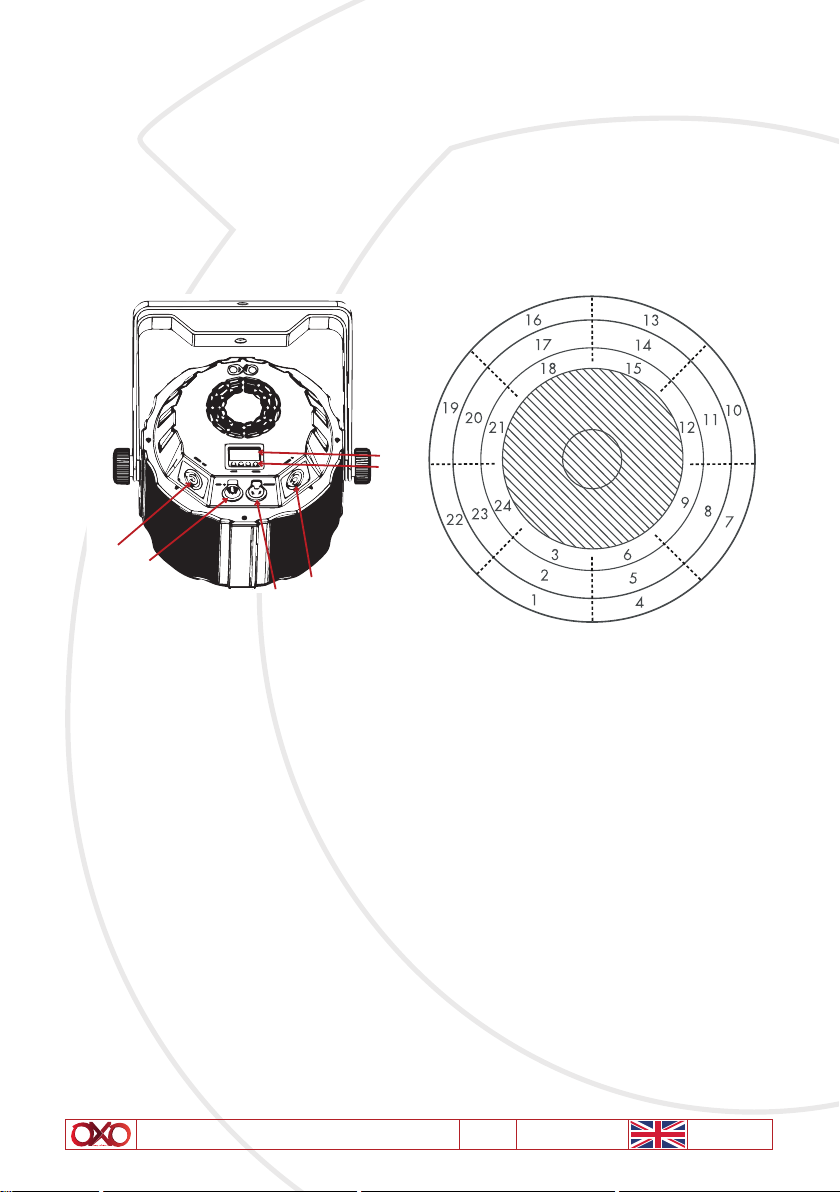
3. Overview
1
2
3
4
5
6
Mapping zone for white LED from 1 to 24
1. Power supply IN (BLUE POWERCON) To connect power supply cable.
2. DMX IN (XLR 5) To connect DMX IN cable.
3. DMX OUT (XLR 5) To connect DMX OUT cable
4. Power supply OUT (WHITE POWERCON) To connect power supply cable OUT
5. Button Mode / Up / Down / Enter To navigate and change value in Menu
6. Display

User Manual - COLORBEAM 150 BFX V1.4 03/2018 6/24
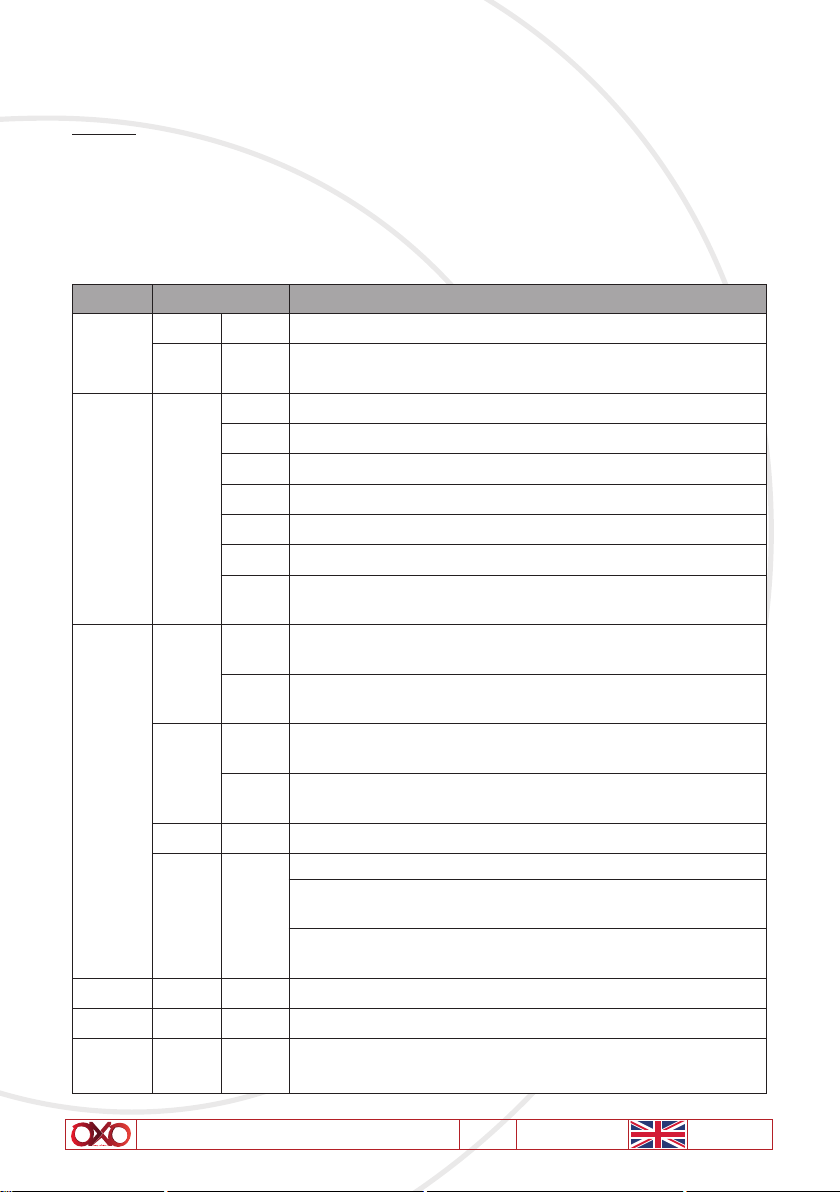
4. Operation guide
A- Menu
To navigate thru menu use "up" and "down" button.
To enter and validate use "enter"
To get out menu use "mode"
After a few seconds the display turn off, press any button to restart it.
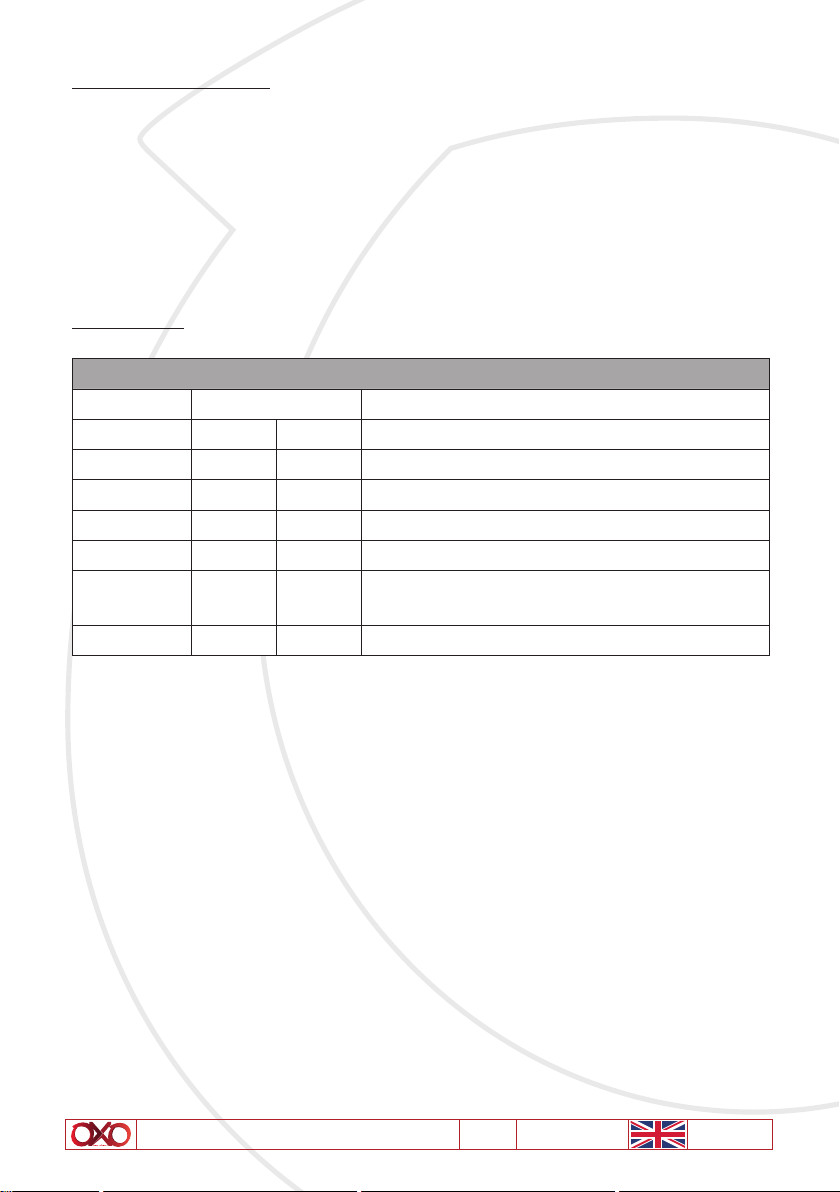
MENU Display
DMX
Addr A001 Set DMX Address from 001 to 512
ChNd 7CH Set Channel mode and choose into 3 mode 7 / 11 / 35 chan-
nels (see DMX charts after)
MANUAL MANu
Set manually value of each parameter
r000 To set Red color from 0 to 255
g000 To set Green color from 0 to 255
b000 To set Blue color from 0 to 255
U000 To set internal white LED ring (1 thru 8) value from 0 to 255
M000 To set middle white LED ring (9 thru 16) value from 0 to 255
Y000 To set external white LED ring (17 thru 24) value from 0 to
255
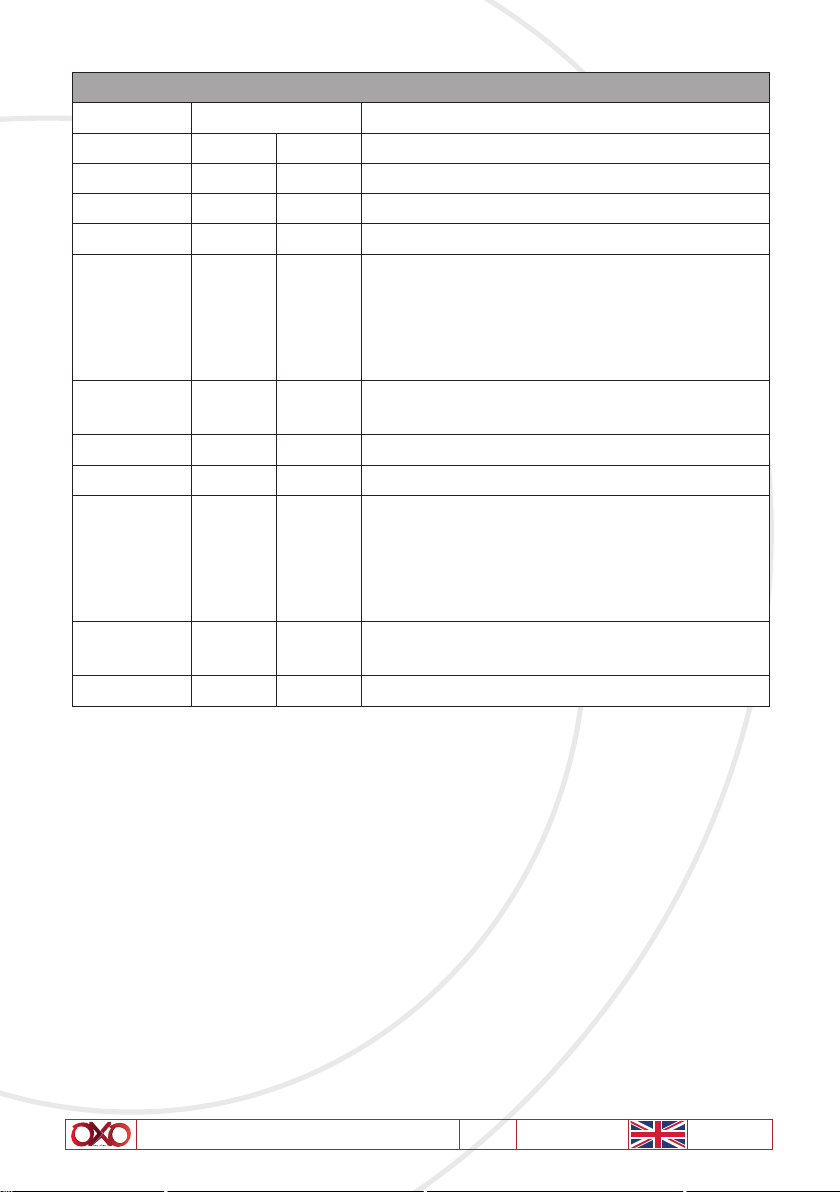
AUTO
Shou
Sh 01 Set automatic internal program for COB LED and choose 1, 2
or OFF internal program
SP 01 Set speed of internal program for COB LED and choose speed
from 1 to 99
SMoN
SM 01 Set automatic internal program for Ring LED and choose
1 to 25 or OFF internal program
SP 01 Set speed of internal program for Ring LED and choose speed
from 1 to 99
SEnS 1 Choose sensitivity of microphone and choose from 1 to 99
Soud Sou1
Choose sound control for internal program
Mode 1 to change step at each "kick" with dimmer always at
full
Mode 2 to change step at each "kick" with dimmer On only
when there is sound
FAN FAN Stud Choose FAN control, studio or auto
INFO tEmP 29 Temperature information in °C
SSdd ON NO DMX behaviour, if ON turn blackout after one second, if
OFF hold last DMX value

User Manual - COLORBEAM 150 BFX V1.4 03/2018 7/24
B- MASTER / SLAVE MODE
To use master slave mode, link product as a daisy chain with Master in first position.
Then choose an automatic mode for Master and put every slave in DMX mode Addr 1 then
slave product will act as the master.
WARNING : The Colorbeam 150 BFX mode generate DMX. This could generate trouble, so
please double check your menu and put every Colorbeam 150 BFX in DMX mode to avoid any
problem.
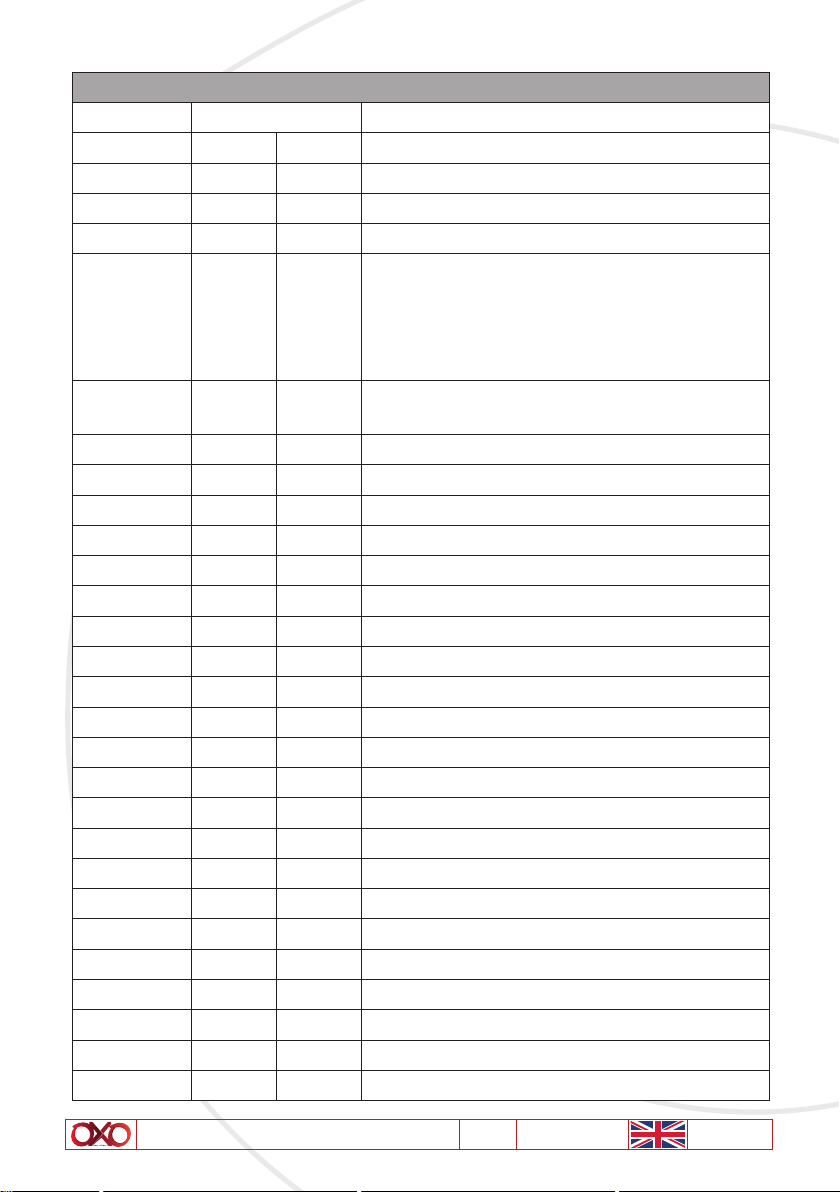
C- DMX CHART
MODE 7 CHANNELS
CHANNELS VALUES FEATURES
10 255 RGB Dimmer : 0 - 100%
20 255 Red : 0 - 100%
30 255 Green : 0 - 100%
40 255 Blue : 0 - 100%
50 255 White LED ring Dimmer 1 thru 24
60 255 White LED Ring Macros
See Macros after DMX Charts
70 255 Macros speed

User Manual - COLORBEAM 150 BFX V1.4 03/2018 8/24
MODE 11 CHANNELS
CHANNELS VALUES FEATURES
10 255 Dimmer : 0 - 100%
20 255 Red : 0 - 100%
30 255 Green : 0 - 100%
40 255 Blue : 0 - 100%
5
0
10
171
251
9
170
250
255
RGB Strobe
Open
Single flash (from slow to fast)
Double flash (from slow to fast)
Open
60 255 RGB Macros
See Macros after DMX Charts
70 255 RGB Macros speed
80 255 White LED ring Dimmer 1 thru 24
9
0
10
171
251
9
170
250
255
White Ring Strobe
Open
Single flash (from slow to fast)
Double flash (from slow to fast)
Open
10 0 255 White LED ring Macros
See Macros after DMX Chart
11 0 255 White LED Macros speed

User Manual - COLORBEAM 150 BFX V1.4 03/2018 9/24
MODE 35 CHANNELS
CHANNELS VALUES FEATURES
10 255 Dimmer : 0 - 100%
20 255 Red : 0 - 100%
30 255 Green : 0 - 100%
40 255 Blue : 0 - 100%
5
0
10
171
251
9
170
250
255
RGB Strobe
Open
Single flash (from slow to fast)
Double flash (from slow to fast)
Open
60 255 RGB Macros
See Macros after DMX Charts
70 255 RGB Macros speed
80 255 White LED ring Dimmer 1 thru 24
90 255 White LED 1
10 0 255 White LED 2
11 0 255 White LED 3
12 0 255 White LED 4
13 0 255 White LED 5
14 0 255 White LED 6
15 0 255 White LED 7
16 0 255 White LED 8
17 0 255 White LED 9
18 0 255 White LED 10
19 0 255 White LED 11
20 0 255 White LED 12
21 0 255 White LED 13
22 0 255 White LED 14
23 0 255 White LED 15
24 0 255 White LED 16
25 0 255 White LED 17
26 0 255 White LED 18
27 0 255 White LED 19
28 0 255 White LED 20

User Manual - COLORBEAM 150 BFX V1.4 03/2018 10/24
CHANNELS VALUES FEATURES
29 0 255 White LED 21
30 0 255 White LED 22
31 0 255 White LED 23
32 0 255 White LED 24
33
0
10
171
251
9
170
250
255
White LED Ring Strobe
Open
Single flash (from slow to fast)
Double flash (from slow to fast)
Open
34 0 255 White LED ring Macros
See Macros after DMX Charts
35 0 255 White LED macros speed
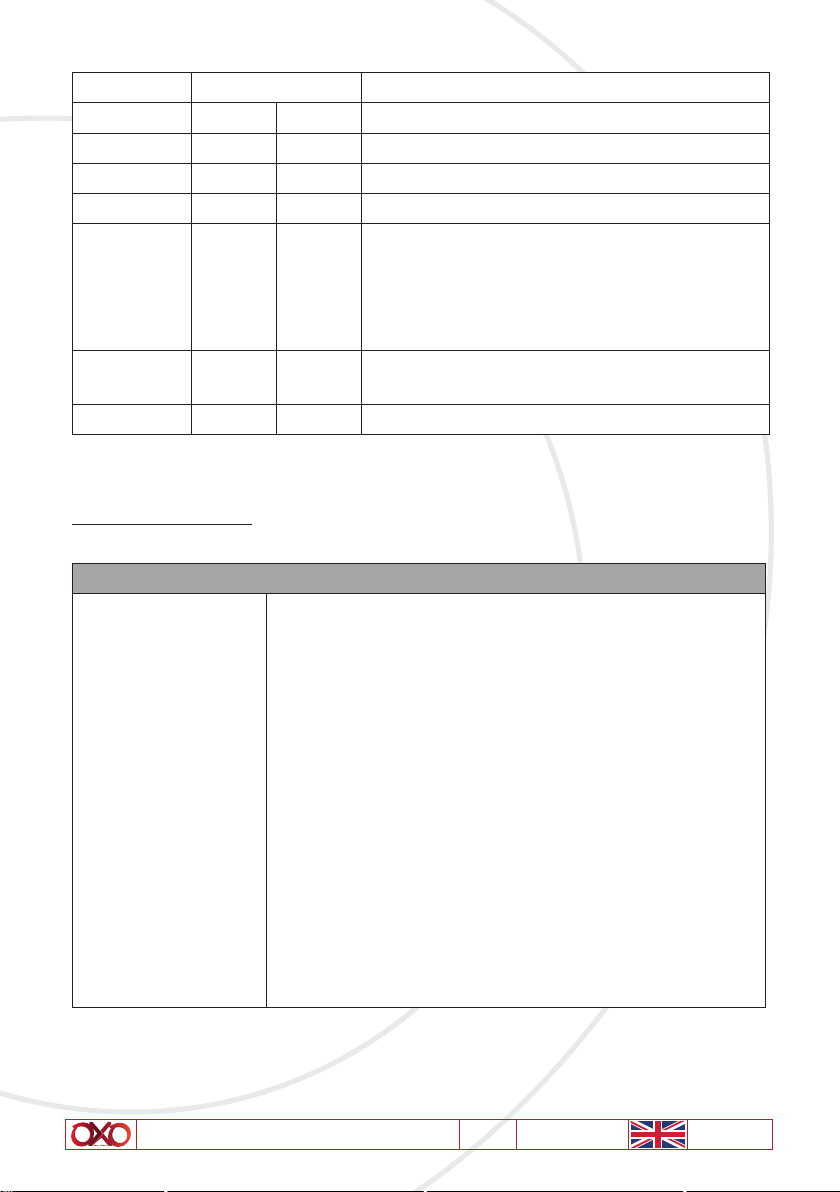
D- MACROS FUNCTIONS
RGB LED Ring Macros
0
5
15
25
35
45
55
65
75
98
121
144
167
190
231
239
247
4
14
24
34
44
54
64
74
97
120
143
166
189
230
238
246
255
Off
Red
Green
Blue
Yellow
Purple
Cyan
White
Color chase
Color Fade
Color pulse
Color pulse up
Color pulse down
Blank
Sound Mode 1
Sound Mode 2
Full On
Indice
Lingue:
Altri manuali OXO Proiettore