
Pacostar Ratai PRC6242 Manuale utente

User manual
PACOSTAR™ Electronics User manual IR programmable remote control version. 1.1.8
11
PC Programmable remote help
(Professional version)
Version description
Retail or end user version
Only contains user guide.
Professional version
Not only contains user guide, but also contains user guide for professional users.

User manual
PACOSTAR™ Electronics User manual IR programmable remote control version. 1.1.8
22
Quick Guide
First Step
1. Prepare PC programmable remote control and install 2pcs AAA battery.
2. Prepare PC programmer(transceiver) and plug into the USB port of PC.
3. Downloading and installing software in your PC (windows OS).
Picture 1
Second Step
1. Identify(Read)
2. Code Select from database
3. Program(Write)
User manual
PACOSTAR™ Electronics User manual IR programmable remote control version. 1.1.8
33
Picture 2
Picture 3

User manual
PACOSTAR™ Electronics User manual IR programmable remote control version. 1.1.8
44
Index
1. Description
2. Remote control
3. Programmer
4. Identify (Read)
5. Code adding (Simple Search)
6.Programm (Write)
7. Code Learning(reading of new original remotes).
8. Manage Database
9. Code Search
9.1 Learning Search
9.2 Transmitting Search
9.3. Key Code Search
10. Some useful skills
11. Others
12. FAQ

User manual
PACOSTAR™ Electronics User manual IR programmable remote control version. 1.1.8
55
1. Description
PC programmable remote control is an update product for traditional universal
remote control. Its main difference and characteristic is the IR code database source.
Universal remote control contains IR code database in itself. PC
programmable remote database is stored in PC or web server. So PC programmable
remote
has no risk to be out of date.
IR communication mode remote control needs a transceiver to connect to PC. Please
see the diagram below.
Picture 4
1.1. Software
“Programmable remote control” is a program which allows reading and
copying every kind of IR remote controls. It has a big data base of original
remote controls ( if your original remote control is damaged or missing). It
helps for coalescence the remote controls of all domestic technics.
The program works on personal PCs with Windows installed.

User manual
PACOSTAR™ Electronics User manual IR programmable remote control version. 1.1.8
66
Picture 5
PC hardware request:
CPU: 800MHZ and above
RAM: 256Mbytes and above
Hard disk, 4G bytes and above
Operation system: Win 2000,Windows XP, Windows Vista, Windows 7.
1.2. Instructions for installation of the program.
Run the program from CD-ROM by double-clicking with the mouse and follow further
instructions from the program. Answer with “NEXT” and “OK”. It is usually installed in
the folder C: \ Program Files \ Pacostar \ Programmable remote V2 and set a screen
for quick launch icons named "IR Programmable Remote Control" and "USB
Programmable Remote Control".
This training will use "IR Programmable Remote Control". Click twice on the icon with
the mouse to start the program.

User manual
PACOSTAR™ Electronics User manual IR programmable remote control version. 1.1.8
77
2. Remote control
This kind of remote looks same as universal remote control or learning remote
control. It combines all functions of universal and learning remote controls.
It can be programmed with any code of any device. Because its buttons can be
programmed with any kind of information, you can design any kind of remote control
with any kind of data to replace original remote.

User manual
PACOSTAR™ Electronics User manual IR programmable remote control version. 1.1.8
88
3. Programmer
The IR code data is stored in PC. It needs a transceiver or programmer to
program to PC programmable remote control.
IR mode, this PC peripherals is connected to PC with USB cable and communicates
with remote control by IR signal. This peripherals is indeed a transceiver, or we can
call it programmer, because it programmes remote control with the IR code in PC.
Picture 6

User manual
PACOSTAR™ Electronics User manual IR programmable remote control version. 1.1.8
99
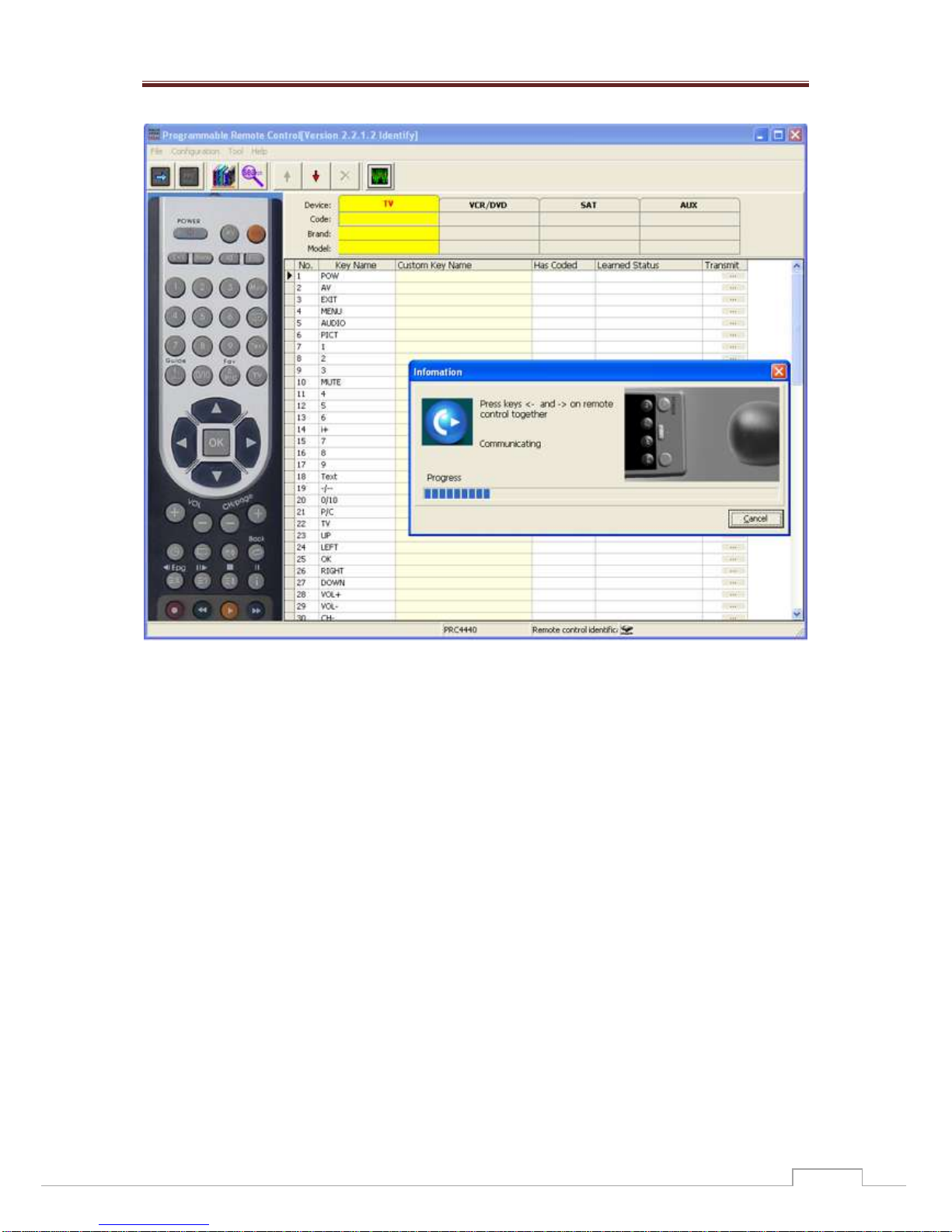
4. Identify(Read)
When first using or after programming, model of the programmable remote
control can be identified by PC software and read back the content in the
programmable remote control. Please see the picture below.
Picture 7
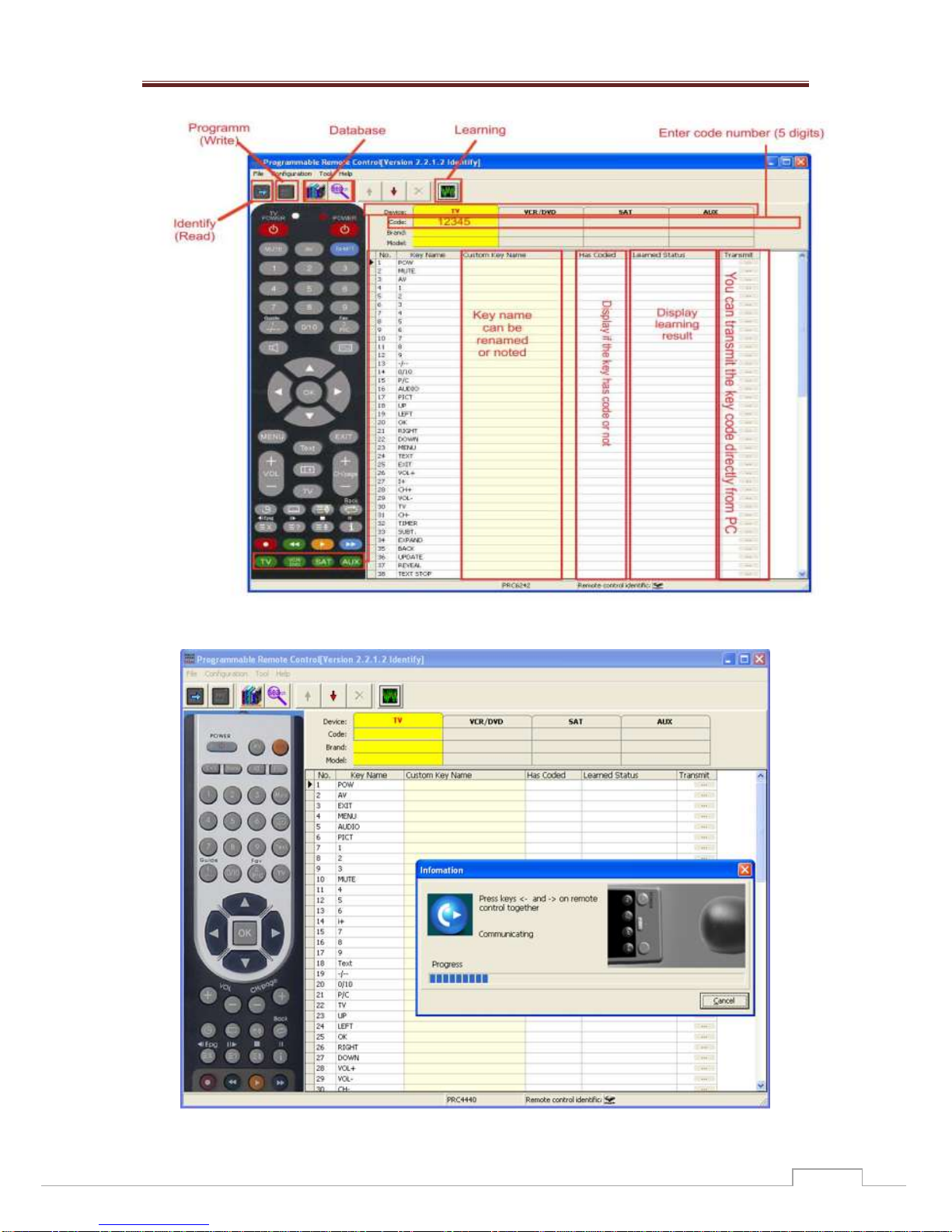
For V2 version, after the identification of the picture and the model of the
programmable remote control, its content will be read back and displayed in the
software, as the diagram above, including code, brand, model and key code info.
In the picture above, the model of the remote control is PRC4440, if the model of
your remote control is PRC6242, after its recognition, a picture of the remote will
appear in the left:
User manual
PACOSTAR™ Electronics User manual IR programmable remote control version. 1.1.8
1010
Picture 8
For V2 version, after identify, the photo and model of the programmable remote
control will be identified to correct model and photo, the content of the programmable
remote control will be read back and displayed in the software as above diagram,
including Code, Brand, Model and key code info.
Before programming, the model of programmable remote control should be selected.
For the older version V1 version, it has to be selected by hand. Please see the
diagram below.
Questo manuale è adatto per i seguenti modelli
6
Indice


