PcCom Elysium 27 Manuale utente

Elysium
GAMING MONITOR
EN
1

Elysium27”
GAMING MONITOR
GO2780
The terms HDMI and HDMI High-Denition Multimedia
Interface, and the HDMI Logo are trademarks or
registered trademark of HDMI Licensing Administrator,
Inc. in the United States and other countries.

GARANTÍA
Estimado cliente:
Gracias por comprar este producto PcCom. Si tiene alguna dicultad para instalar o utilizar el producto, le recomendamos
que consulte primero las instrucciones de funcionamiento antes de ponerse en contacto con el servicio técnico.
Le pedimos disculpas si su producto es defectuoso o tiene algún problema de fabricación. Nuestro agente autorizado se
encargará de la reparación, sustitución, reembolso o proporcionará piezas de repuesto para el producto según las
condiciones de la garantía.
La garantía comienza el día de compra del producto en un distribuidor autorizado o a través de compra on-line. En cuanto
al plazo de garantía del portátil es de 36 meses
Condiciones de la garantía
Las condiciones de la garantía son:
•La garantía es válida sólo con la presentación de la factura de compra del producto.
• Durante el tiempo que pase entre el contacto con el servicio técnico y la reparación del aparato, no se
abonará importe alguno en concepto de daños y perjuicios por el tiempo que el aparato esté fuera de
servicio.
•PcComponentes autoriza las mejoras que el usuario pueda hacer al equipo sin perder la garantía, tales
como el incremento de memoria o almacenamiento. No obstante, PcComponentes no cubrirá la
ampliación con la propia garantía del aparato por lo que en caso de presentar incidencia se deberá enviar
el aparato con las piezas originales únicamente.
• Si ante cualquier incidencia el aparato es recibido en PcComponentes con piezas no originales, este se
reserva el derecho a descontar la diferencia económica en concepto de piezas originales faltantes.
Exclusiones de la garantía
• Daños causados por negligencia o mal uso, montaje o instalación incorrecta, así como las inuencias
externas, tales como: rayos atmosféricos o eléctricos, inundaciones, humedad, etc.
• Daños causados como consecuencia de inadecuada instalación o conexión eléctrica inadecuada.
• Daños estéticos (como rasguños, desconchados, etc) surgidos por el uso.
• Daños causados por manipulación del usuario y/o servicio técnico no autorizado.
• Equipos sin la etiqueta identicativa correspondiente.
• La pérdida o daño de datos, programa o cualquier medio de almacenamiento removible. Se recomienda
tener un plan de copia de seguridad de datos. Por favor, tenga en cuenta que PcComponentes puede optar
por reemplazar el equipo entregado por lo que cualquier dato almacenado en el equipo original podría ser
inaccesible de forma permanente.
• Los componentes no originales del equipo instalados en cualquier ampliación que se realice, así como los
accesorios no originales.
• Cualquier tipo de software no suministrado de manera original con el equipo.
Cuidado del producto y resolución de problemas
• Para mantener el máximo rendimiento, un producto requiere atención regular a variables como ujo de
aire, control del polvo y actualizaciones pertinentes. Rogamos al cliente que realice el mantenimiento del
equipo de forma periódica para garantizar su longevidad.
• Si un producto falla, PcComponentes identicará la causa del problema y determinará si el problema está
cubierto por la garantía. En caso contrario, puede haber un sobrecoste por el diagnóstico del problema así
como su solución.
• Es necesario que el cliente ayude en la evaluación de un producto defectuoso, pudiendo solicitar
PcComponentes alguna manipulación sencilla sobre el producto.
Para hacer uso de la garantía acuda al centro donde compró este producto o bien contacte con nosotros a través de nuestro centro de soporte:
LA GARANTÍA NO AFECTA A LOS DERECHOS LEGALES DEL CONSUMIDOR ANTE LA FALTA DE CONFORMIDAD DE LOS PRODUCTOS CON EL CONTRATO.
https://www.pccomponentes.com/soporte/ o código QR >

WARRANTY
Dear customer,
Thank you for purchasing this PcCom product. If you have any diculty installing or using the product, we recommend
that you rst consult the manual before contacting technical support.
We apologize if your product is not working as expected or it has a manufacturing problem. Our authorized agent will
repair, replace, refund or provide replacement parts for the product according to the warranty conditions.
The warranty begins on the day of purchase of the product from an authorized dealer or through our website. The
warranty period for the laptop is 36 months (12 months warranty for the battery)
Warranty conditions
The warranty conditions are:
• The warranty is valid only upon presentation of the invoice.
• During the time between the contact with the technical service and product reparation, Pc Componentes will
not pay any amount.
• PcComponentes authorizes improvements that the user can make to the equipment without losing the
warranty, such as increased memory or storage. However, PcComponentes will not cover the extension with the
warranty of the device itself, so in case of an incident, the device must be sent with the original parts only.
• If in any incident the device is received at PcComponentes with non-original parts, PcComponentes reserves the
right to deduct the economic dierence in concept of missing original parts.
Out of Scope
• Damage caused by negligence or misuse, incorrect assembly or installation, as well as external inuences, such
as: atmospheric or electrical lightning, ooding, humidity, etc.
• Damage caused as a result of improper installation or improper electrical connection.
• Aesthetic damage (such as scratches, chipping, etc.) arising from use.
• Damage caused by manipulation by the user and/or unauthorized technical service.
• Equipment without the corresponding identication label.
• Loss or damage of data, software or any removable storage media. It is recommended to have a data backup
plan. Please note that PcComponentes may choose to replace the product so any data stored on the original
equipment may be permanently inaccessible.
• Any non-original components of the equipment installed in any upgrades that are made, as well as any
non-original accessories.
• Any software not originally supplied with the equipment.
Product maintenance and problem’s resolution
• To maintain peak performance, a product requires regular attention to variables such as airow, dust control and
relevant upgrades. Please, maintain the equipment on a regular basis to ensure longevity.
• If a product fails, PcComponentes will identify the cause of the problem and determine if the problem is covered
under warranty. If not, there may be an additional charge for diagnosing the problem as well as troubleshooting.
• It is necessary for the customer to assist in the evaluation of a defective product, PcComponentes may request
some simple manipulation on the product.
To make use of the warranty, please contact with the center where you purchased this product or contact us through our support center:
THE WARRANTY DOES NOT AFFECT THE CONSUMER'S LEGAL RIGHTS IN THE EVENT OF NON-CONFORMITY OF THE PRODUCTS WITH THE CONTRACT.
https://www.pccomponentes.com/soporte/ or QR code >

Elysium
GAMING MONITOR
EN
5
IMPORTANT SAFETY PRECAUTIONS
OPERATION
Keep the monitor out of direct sunlight and away from stoves or any other heat source.
Keep the monitor out of water source.
Remove any object that could fall into venlaon holes or prevent proper cooling of the
monitor’s electronics. Do not block the venlaon holes.
Do not knock or drop the monitor during operaon or transportaon.
MAINTENANCE GUIDELINES
CAUTION
Do not place the monitor in rain, humid environment or open the monitor case to avoid any
shock electrical hazards, and/or mechanical hazards.
Before cleaning the monitor, unplug the monitor power cable from the electrical outlet.
CARING FOR YOUR MONITOR
To clean your screen, slightly dampen a so, clean cloth with water.
lf possible, use a special screen-cleaning ssue or soluon. Do not use benzene, thinner,
ammonia, abrasive cleaners, or compressed air.
Use a slightly dampened, warm cloth to clean the frame. Avoid using detergent of any kind
as some detergents might leave a milky lm on the plascs.
Unplug the monitor if you are not going to use it for an extended period.
To avoid the risk of shock or permanent damage to the set, do not expose the monitor to
dust, rain, water, or excessive moisture environment.

Elysium
GAMING MONITOR
EN
6
CONTENTS
1. PACKPAGE CONTENT ............................................................................... 7
2. PRODUCT OVERVIEW .............................................................................. 7
3. INSTALLATION ......................................................................................... 8
4. WALL MOUNTING ................................................................................... 9
5. BASIC OPERATION ................................................................................... 9
6. MONITOR PORTS .................................................................................. 10
7. OSD MENU ............................................................................................ 11
8. TECHNICAL PRODUCT SPECIFICATIONS .................................................. 14

Elysium
GAMING MONITOR
EN
7
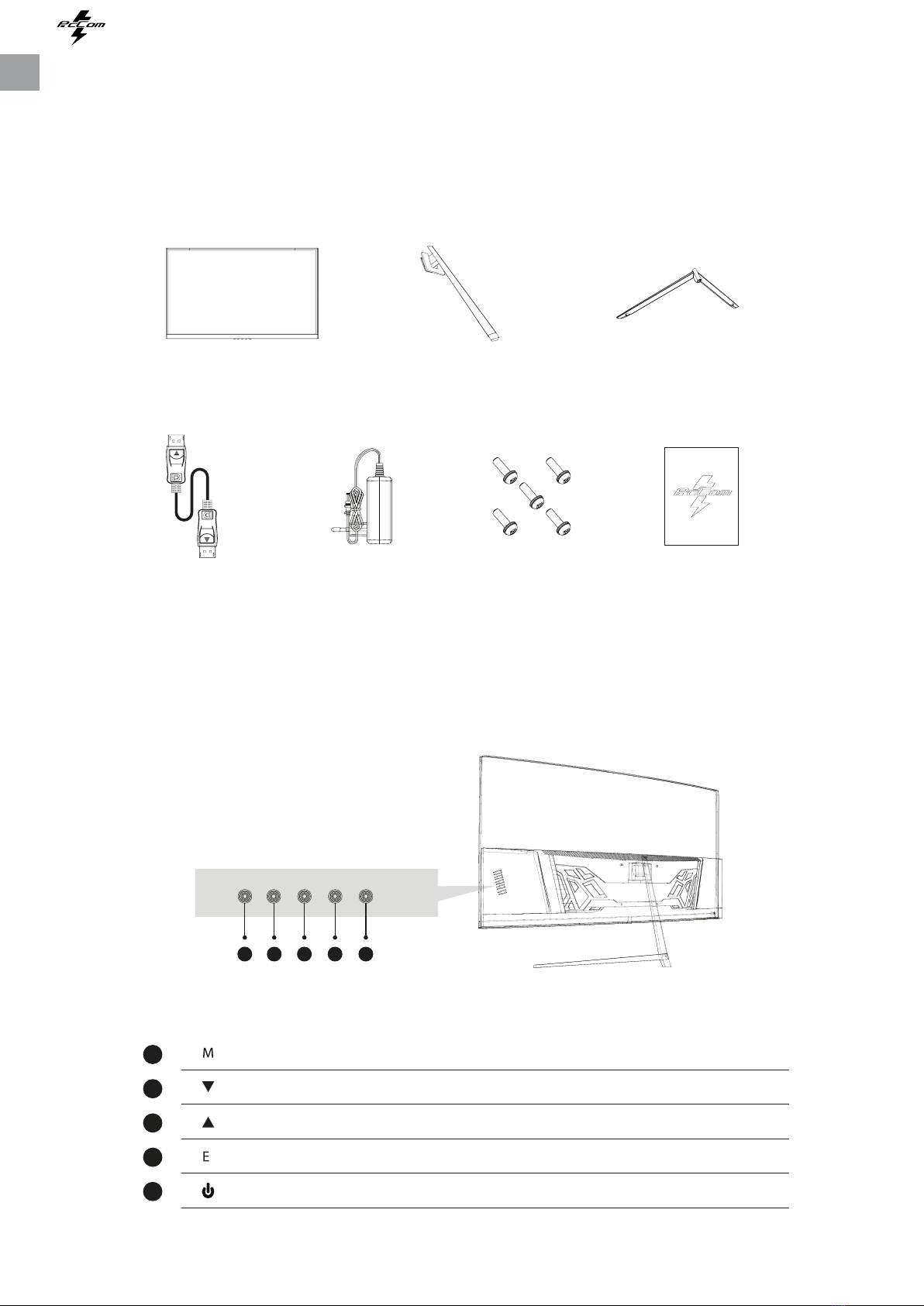
1. PACKAGE CONTENT
2. PRODUCT OVERVIEW
PACKING LIST
Please, check the following items in the packing case before installa on. If any of above items
is missing, contact with provider.
MONITOR BUTTON
Press to display the OSD menu or enter sub-menus.Menu Buon
Press to move down in the menus.Down Buon
Press to move up in the menus.Up Buon
Press to exit.Exit Buon
Press to turn the monitor ON/OFFPower Buon
Monitor X1
DP Cable X1 Power Adaptor X1 Screw X5 User Manual X1
Stand stem X1 Stand base X1
N O P Q R
N
O
P
Q
R

Elysium
GAMING MONITOR
EN
8
3. WALL MOUNTING
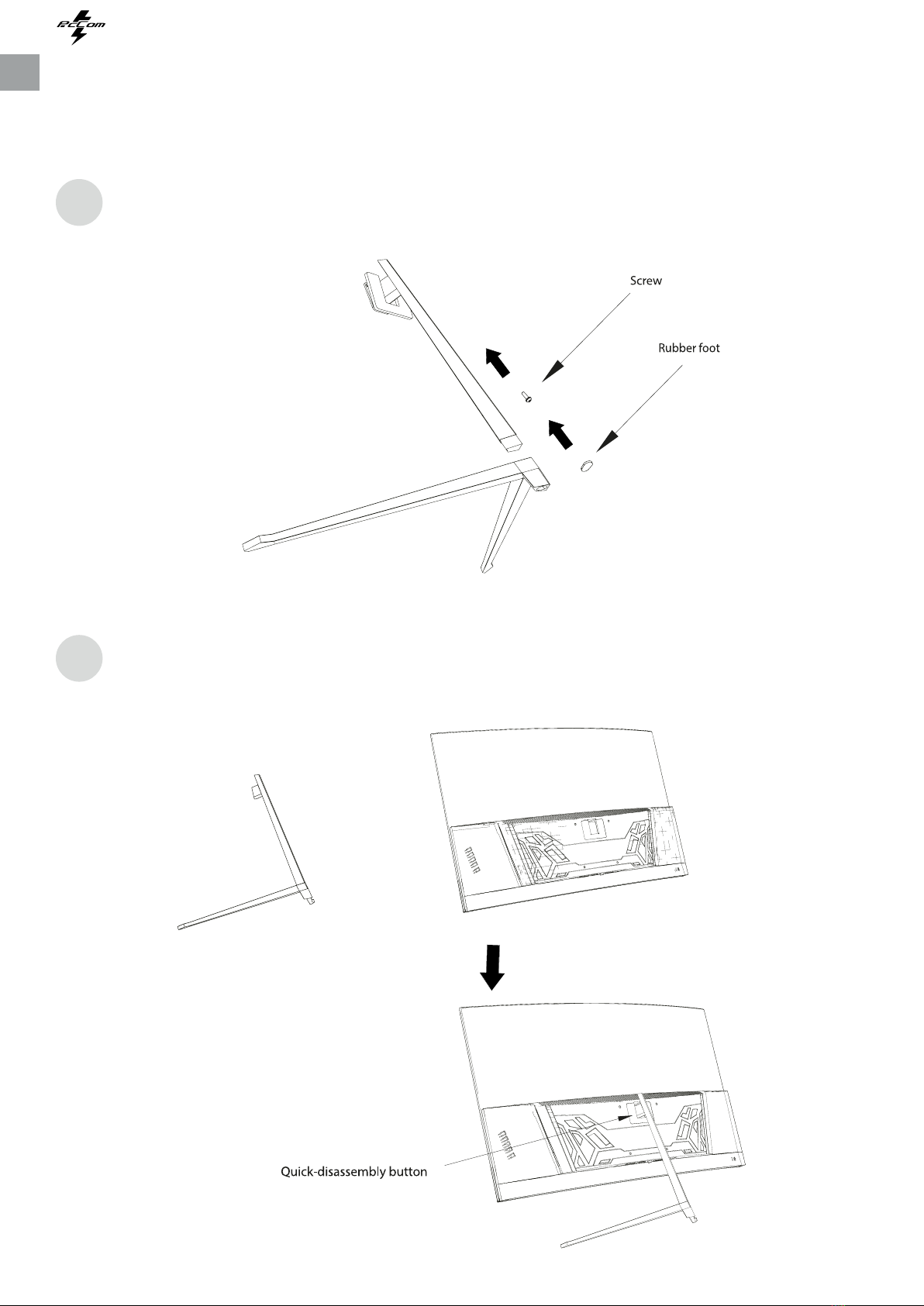
STAND INSTALLATION
Open the package, take out stand base, insert screw into the base to lock the stand and
then the rubber foot.
Take the monitor out from the package, keep the monitor facing up, insert 4 screws with
stand on assembly. Then, click the plasc buon on assembly.
1
2

Elysium
GAMING MONITOR
EN
9
4. INSTALLATION
The iron stud found from the accessory bag can
be locked in M4 threaded hole of the rear shell as
shown in the gure below and locked with a
at-blade screwdriver.
Do not pinch the screen directly with your hand
during the process of hanging the product to prevent
the screen from being broken.
1
2
5. BASIC OPERATION
1. Insert one end of DP cable into your PC’s graphics card. HDMI cable may be also used.
2. Connect the other end of the cable to the corresponding connector of your monitor.
FreeSync
This feature is o by default. To acvate, you must have hardware with FreeSync capability, a DP or
HDMI cable and the latest graphic drivers installed. Aer connecng your computer and monitor
with DP or HDMI, you may receive a prompt to enable the feature on your computer. If not, you
may need to enable the funcon in your graphics card menu. See your graphics card manufacturer’s
documentaon for instrucons.

Elysium
GAMING MONITOR
EN
10
6. MONITOR PORTS
Please connect the power adapter
to the power adapter interface of a
PC, and plug the other end of the
power cable into the power socket.
Use the DP cable to connect the DP
IN interface of the product to the
DP OUT interface of a PC.
Use the HDMI cable to connect the
HDMI IN interface of the product to
the HDMI OUT interface of a PC.
Connect audio outpung devices
such as earphones to the AUDIO
OUT interface.
A
C
B
D
Power Adapter
DP Interface
HDMI Intreface
Audio Out
Questo manuale è adatto per i seguenti modelli
1
Indice
Lingue:
Altri manuali PcCom Monitor