
Perle IOLAN SCG Series Manuale

Updated: Dec 20, 2018
Version A.12.20.2018
Document Part#:5500427-10 (Rev B)
IOLAN SCG Hardware Installation Guide
Expandable Models
www.perle.com
2
IOLAN SCG Hardware Installation Guide Expandable Models
Preface
Preface
Audience
This guide is for the network or computer technician responsible for installing the Perle IOLAN SCG
also referred to as the IOLAN within this document.
Familiarity with the concepts and terminology of Ethernet and local area networks is required.
Purpose
This document describes the hardware and physical characteristics of the Perle IOLAN SCG. It
covers hardware features as well as installation and operation of the IOLAN. This document does not
cover how to configure your IOLAN. Information to configure your IOLAN can be found in the
IOLAN Secure User’s Guide V5.0 and greater and in the IOLAN SCG Quick Start Guide that came
with your product.
Chapter Overviews
Main Topics Description
IOLAN SCG Components Components of your IOLAN.
Reset Function Resetting the IOLAN to custom or factory defaults.
Configuring the IOLAN SCG Methods to configure the software features for the IOLAN.
Appendix A - Technical
Specifications
Overall technical specifications including input power and
environmental specifications.
Appendix B - Labels Product label.
Appendix C - Pinouts and
Cabling Diagrams
Cables and connectors used with the IOLAN.
Appendix D - Maintaining your
IOLAN
Maintenance of your IOLAN.
Appendix E - Mechanical Mechanical drawings showing product dimensions.

3
IOLAN SCG Hardware Installation Guide Expandable Models
Preface
Additional Documentation
Document Conventions
This document contains the following conventions:
Most text is presented in the typeface used in this paragraph. Other typefaces are used to help you
identify certain types of information. The other typefaces are:
Note: Means reader take note: notes contain helpful suggestions.
Caution: Means reader be careful. In this situation, you might perform an action that could result in
equipment damage or loss of data.
Warning: IMPORTANT SAFETY INSTRUCTIONS
Means danger. You are in a situation that could cause bodily injury. Before you work on any equipment, be
aware of the hazards involved with electrical circuitry and be familiar with standard practices for preventing
accidents.
Cautions and Warnings
Warning: Power sources must be off prior to beginning the power connection steps. Read the installation
instructions before you connect the unit to its power source.
Warning: Ensure that the voltage and current ratings of the intended power source are appropriate for the
SCG as indicated on the product label.
Warning: Ensure that the installation and electrical wiring of the equipment is performed by trained and
qualified personnel and that the installation complies with all local and national electrical codes.
Warning: The working voltage inputs are designed for operation with Safety extra low Voltage (SELV).
Connect only to SELV circuits with voltage restrictions in line with IEC/EN 62368-1.
Warning: This equipment must be used in the matter specified by the manufacturer.
Warning: In case of malfunction or damage, no attempts at repair should be made by the user. Do not
dismantle this product.
Document Description
IOLAN Secure User’s Guide
V5.0 and greater
User guide explaining how to configure the IOLAN
features using the WebManager or DeviceManager
applications. New users should use these methods to
configure the IOLAN.
IOLAN Secure CLI (Command
Reference Guide) Guide V5.0 and
greater
Command reference guide using CLI commands to
configure the IOLAN (this is an advanced way to configure
the IOLAN)

4
IOLAN SCG Hardware Installation Guide Expandable Models
Preface
THE SPECIFICATIONS AND INFORMATION REGARDING THE PRODUCTS IN THIS GUIDE ARE
SUBJECT TO CHANGE WITHOUT NOTICE. ALL STATEMENTS, INFORMATION, AND
RECOMMENDATIONS IN THIS GUIDE ARE BELIEVED TO BE ACCURATE BUT ARE PRESENTED
WITHOUT WARRANTY OF ANY KIND, EXPRESS OR IMPLIED. USERS MUST TAKE FULL
RESPONSIBILITY FOR THEIR APPLICATION OF ANY PRODUCTS.
This equipment has been tested and found to comply with the limits for a Class A digital device, pursuant to
part 15 of the FCC rules. These limits are designed to provide reasonable protection against harmful
interference when the equipment is operated in a commercial environment. This equipment generates, uses,
and can radiate radio-frequency energy and, if not installed and used in accordance with this hardware guide
may cause harmful interference to radio communications. Operation of this equipment in a residential area is
likely to cause harmful interference, in which case users will be required to correct the interference at their own
expense.
Modifications to this product not authorized by Perle could void the FCC approval and negate your authority to
operate the product.
Perle reserves the right to make changes without further notice, to any products to improve reliability, function,
or design.
Perle, the Perle logo, and IOLAN SCG Serial Device Servers (SDS) are trademarks of Perle Systems Limited.
Copyright
©2018 Perle Systems Limited.
60 Renfrew Drive
Markham, Ontario
L3R 0E1 Canada
All rights reserved. No part of this document may be reproduced or used in any form without written permission
from Perle Systems.

5
IOLAN SCG Hardware Installation Guide Expandable Models
Publishing History
Publishing History
Date Revision Update Details
June 2018 A.06.21.2018 Initial release of the IOLAN SCG series.
October 2018 A.10.28.2018 Updates to Front panel information. Added serial
pinout.
December 2018 A.12.20.2018 Updates to Technical specifications for Wireless
models.

6
IOLAN SCG Hardware Installation Guide - Expandable Models
Table of Contents
Preface . . . . . . . . . . . . . . . . . . . . . . . . . . . . . . . . . . . . . . . . . . . . . . 2
Publishing History . . . . . . . . . . . . . . . . . . . . . . . . . . . . . . . . . . . . . 5
Overview . . . . . . . . . . . . . . . . . . . . . . . . . . . . . . . . . . . . . . . . . . . . . 7
IOLAN SCG Models ................................................................................... 7
What’s Included .......................................................................................... 7
What You Need to Supply .......................................................................... 8
IOLAN SCG Components . . . . . . . . . . . . . . . . . . . . . . . . . . . . . . . 8
IOLAN SCG Front View.............................................................................. 8
IOLAN SCG Back Views ............................................................................ 8
Installing IOLAN SCG Modules .................................................................. 9
Ethernet LAN Ports................................................................................... 10
Front LCD Display and Keypad ................................................................ 13
Micro-USB Console Port .......................................................................... 19
Installing the Micro SIM Card ................................................................... 19
Modem Port (only applies to certain models) ........................................... 20
WLAN/WWAN Antennas (only applies to certain models) ....................... 20
Resetting the IOLAN SCG . . . . . . . . . . . . . . . . . . . . . . . . . . . . . . 21
Configuring the IOLAN SCG . . . . . . . . . . . . . . . . . . . . . . . . . . . . 23
Front Panel ............................................................................................... 23
DeviceManager ........................................................................................ 23
WebManager ............................................................................................ 23
CLI ............................................................................................................ 23
SNMP ....................................................................................................... 23
Appendix A - Technical Specifications . . . . . . . . . . . . . . . . . . . 24
Appendix B - Labels . . . . . . . . . . . . . . . . . . . . . . . . . . . . . . . . . . 26
Appendix C - Pinouts and Cabling Diagrams . . . . . . . . . . . . . . 27
Appendix D - Maintaining your IOLAN. . . . . . . . . . . . . . . . . . . . 32
Appendix E - Mechanical. . . . . . . . . . . . . . . . . . . . . . . . . . . . . . . 33

7
IOLAN SCG Hardware Installation Guide Expandable Models
Overview
Overview
For infrastructure management, the Perle's IOLAN SCG Series will provide the most
versatile access to your IT equipment's serial and USB consoles whether in a large scale data center or
remote branch. The IOLAN SCG Series is the next edition in our highly successful line of serial
console servers. The IOLAN SCG gives you a way to access them remotely from anywhere there is a
network or modem connection. These advanced console servers provide models that include
integrated wireless technology, 4G/LTE cellular technology, and remote modem support.
IOLAN SCG Models
All IOLAN SCG models have the following basic hardware set;
IOLAN SCG Chassis: 1U-tall (1.75 inch), rack-mountable chassis
16/32/48 RJ45 ports or
16/32/48 USB ports
any combination of 16 port modules up to a total of 48 ports on the back of
the unit
2 auto-sensing Ethernet Combo ports (RJ45 10/00/1000 Mbps/SFP 100/1000 Mbps)
1 Micro-USB and 1 RS232 RJ45 Console Admin Port
Two USB front ports for serial class devices
Micro SD card slot (SD card provided by the user)
Front Panel Display with keyboard
Additional hardware on some models
Internal V.92 modem with one RJ11 connector
Cellular WWAN capability based on 4G LTE technology (North American or
European)
SIM card slot to be used for 4G LTE networks
Wireless LAN (Wifi) client 802.11 a,b,g,n @2.4Ghz/5Ghz support
What’s Included
The following components are included with your product:
IOLAN SCG Chassis: 1U-tall (1.75 inch), rack-mountable chassis
Combination of
16 port USB modules
16 port RS232 RJ45 modules
to a maximum total of 48 ports in the back of the unit
Power cables for dual AC
Quick Start Guide
Rack mount kit
1 meter CAT5 straight-through patch cable
Adapter to convert from Cisco (RJ45) pin-out to DB9F
Added components for wireless models:
2 x RP-SMA Antennas

8
IOLAN SCG Hardware Installation Guide Expandable Models
IOLAN SCG Components
Added components for cellular models:
Two multi-band swivel-mount dipole antennas
What You Need to Supply
Before you can begin, you need to have the following:
A serial cable(s) to connect serial devices to your IOLAN unit
An Ethernet CAT5e 10/100/1000BASE-T cable or an SFP module with the
appropriate fiber cable to connect the IOLAN unit to the network
Data Plan subscription with a supported carrier and activated 3FF SIM Card for
SCG-LA and SCG-LE models only)
IOLAN SCG Components
IOLAN SCG Front View
(Pictured SCG50 RRU LAWM)
IOLAN SCG Back Views
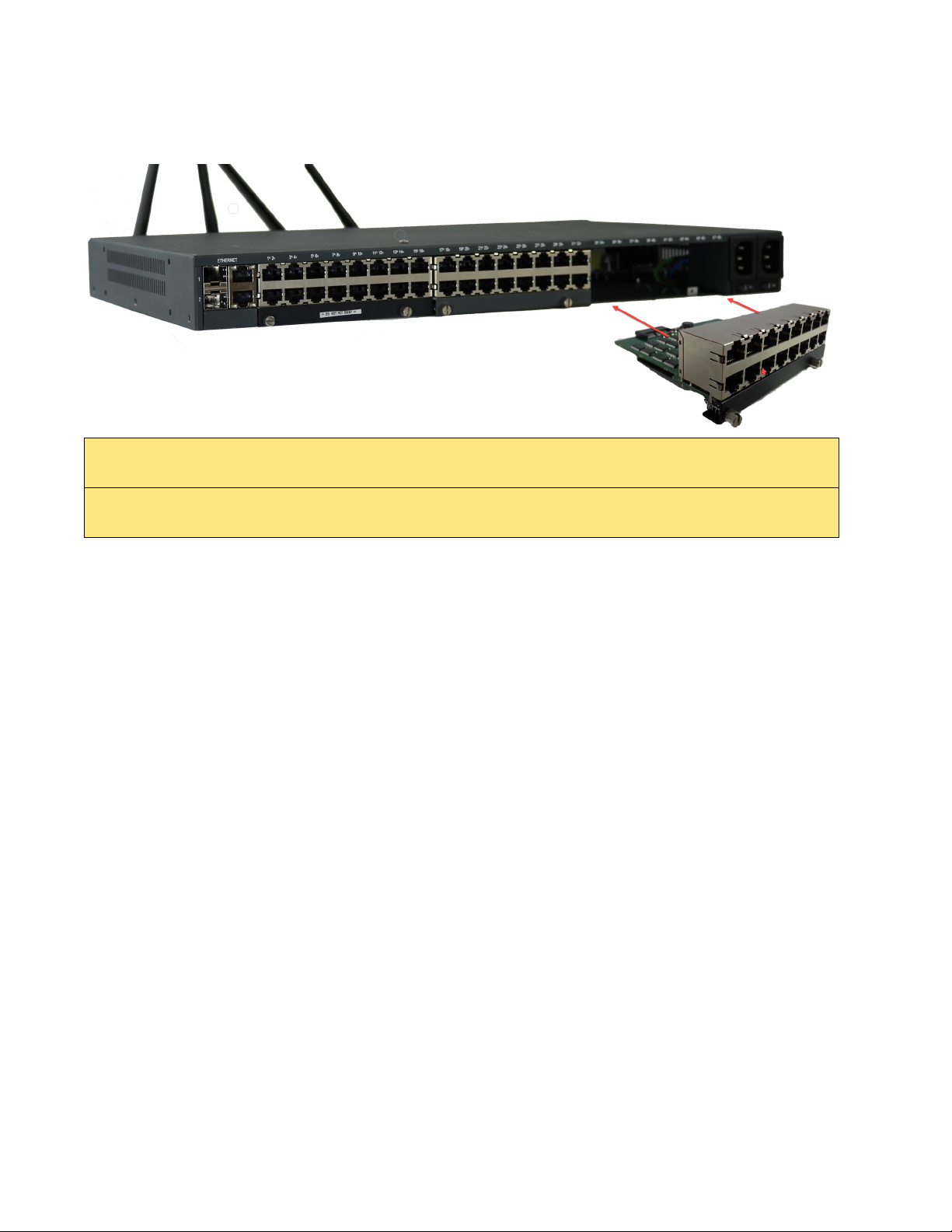
Three module bays are available on the back of the IOLAN unit. A combination of 16-port USB mod-
ules and 16-port RS232 RJ45 modules can be installed to provide up to forty-eight serial RS232 RJ45
ports and/or USB ports. The modules are field upgradeable.
Note: When installing modules into the IOLAN, Bay 1, Bay2, and Bay 3 must be
populated in consecutive order starting at Bay 1.

9
IOLAN SCG Hardware Installation Guide Expandable Models
IOLAN SCG Components
Each IOLAN has an additional two USB device ports on the front of the unit.
Installing IOLAN SCG Modules
1. Disconnect power from the IOLAN. Failure to do so will result in damage to the IOLAN.
2. Using your fingers, loosen the retainer screws holding the face plate to the unit.
3. Gently remove the face plate and set aside.
4. Align the expansion module up with the opening where you want to insert the module.
5. Gently push the module into place until you hear a audible click.
IOLAN SCG50RRR-LAWM
(Shown)
IOLAN SCG50UUU-LAWM
(Shown)
IOLAN SCG 50RRU-LAWM
(Shown)
10
IOLAN SCG Hardware Installation Guide Expandable Models
IOLAN SCG Components
6. Tighten the retainer screws on each side.
Ethernet LAN Ports
There are two Ethernet combo pairs (RJ45 and SFP) identified as Ethernet 1 and 2. The two Ethernet
RS232 RJ45 ports provide the standard Ethernet interface speeds of 10/100/1000 Mbps through
twisted pair (UTP) cables of up to 100 meters (328ft) in length. The two Ethernet SFP transceiver
ports support the use of single mode, multi-mode, fiber optic and copper SFP transceiver modules.
When using the SFP transceiver ports, the speed and distance will be calculated by the module
inserted. SFP modules are provided by you.
Each combo pair consists of a RS232 RJ45 port and a SFP transceiver port. Only one port in each
combo pair can be active at a time. Should both ports in a combo pair be connected, then the first port
to get a link up will take priority. The IOLAN supports the active standby feature that permits the
grouping of two Ethernet interfaces - one from each of the combo Ethernet ports to form a group. This
feature allows Ethernet traffic on either interface to be routed to the other interface should the
connection fail. Both interfaces will have the same MAC address. Once the IOLAN has connected
and the link is established, the speed LED will turn on. This LED will indicate whether you have a 10,
100 or 1000 Mbps link on either of the Ethernet combo ports.
Warning: When installing modules into the IOLAN, the power to the unit must be turned off to
avoid damage. The modules are NOT hot swappable.
Warning: Power must be off before attempting to insert or remove a module. Failure to do so will
result in damage to the IOLAN.
Altri manuali per IOLAN SCG Series
1
Questo manuale è adatto per i seguenti modelli
3
Indice
Altri manuali Perle Hardware di rete


Manuali Hardware di rete popolari di altre marche

Matrix Switch Corporation
Matrix Switch Corporation MSC-HD161DEL Manuale utente

B&B Electronics
B&B Electronics ZXT9-IO-222R2 Manuale utente

Yudor
Yudor YDS-16 Manuale utente

D-Link
D-Link ShareCenter DNS-320L Manuale utente

Samsung
Samsung ES1642dc Istruzioni per l’uso

Honeywell Home
Honeywell Home LTEM-PV Istruzioni per il montaggio


