Phoenix Contact Basicline 2 PPC 1200 Manuale utente

User manual
UM EN BL2 PPC 1200
Basicline 2 PPC 1200 industrial PC

2021-02-10
PHOENIX CONTACT GmbH & Co. KG • Flachsmarktstraße 8 • 32825 Blomberg • Germany
phoenixcontact.com
4031_en_C
Basicline 2 PPC 1200 industrial PC
Designation Order No.
BL2 PPC7 1201-4/64-W10 1274012
BL2 PPC10 1201-4/128-W10 1274014
User manual
This user manual is valid for:
UM EN BL2 PPC 1200, Revision C

Table of contents
4031_en_C PHOENIX CONTACT 3/24
Table of contents
1 For your safety............................................................................................................................5
1.1 Labeling of warning notes...................................................................................... 5
1.2 Qualification of users ............................................................................................. 5
1.3 Field of application of the product.......................................................................... 5
1.3.1 Intended use .......................................................................................... 5
1.3.2 Product changes .................................................................................... 6
2 Overview and ordering data........................................................................................................7
2.1 Description ............................................................................................................ 7
2.2 Ordering data ........................................................................................................ 7
3 Installation ..................................................................................................................................9
3.1 Mounting ............................................................................................................... 9
3.2 Interfaces............................................................................................................. 11
3.2.1 Power connection ................................................................................ 12
3.2.2 Serial communication .......................................................................... 13
3.3 Antenna............................................................................................................... 14
A Technical appendix...................................................................................................................15
A 1 Technical data.................................................................................................... 15
B Appendixes...............................................................................................................................19
B 1 List of figures ...................................................................................................... 19
B 2 List of tables ....................................................................................................... 21


For your safety
4031_en_C PHOENIX CONTACT 5/24
1 For your safety
Read this user manual carefully and keep it for future reference.
1.1 Labeling of warning notes
1.2 Qualification of users
The use of products described in this user manual is oriented exclusively to:
– Qualified electricians or persons instructed by them. The users must be familiar with the
relevant safety concepts of automation technology as well as applicable standards and
other regulations.
– Qualified application programmers and software engineers. The users must be familiar
with the relevant safety concepts of automation technology as well as applicable stan-
dards and other regulations.
1.3 Field of application of the product
1.3.1 Intended use
The products described in this document are designed for use in manufacturing and
industrial environments. They are tested to ITE levels.
The products are built according to the latest safety requirements. However, dangerous
situations or damage to the products or other property can arise from misuse of this device.
This symbol indicates hazards that could lead to personal injury.
There are three signal words indicating the severity of a potential injury.
DANGER
Indicates a hazard with a high risk level. If this hazardous situation is not
avoided, it will result in death or serious injury.
WARNING
Indicates a hazard with a medium risk level. If this hazardous situation is not
avoided, it could result in death or serious injury.
CAUTION
Indicates a hazard with a low risk level. If this hazardous situation is not avoided,
it could result in minor or moderate injury.
This symbol together with the NOTE signal word alerts the reader to a situation
which may cause damage or malfunction to the device, hardware/software, or
surrounding property.
Here you will find additional information or detailed sources of information.

BL2 PPC 1201-4/…
6/24 PHOENIX CONTACT 4031_en_C
The products fulfill the requirements of the EMC directives and harmonized European
standards Any modifications to the systems can influence the EMC behavior.
Operating display panel at full brightness for long duty cycles and/or at higher ambient
temperature may short lifespan of the display.
Dim panel when not in use to extend the life of the display.
Radio interference
These products are Class A items of equipment (EN 55024 and EN 55032). When using the
equipment in residential areas, it may cause radio interference. In this case, the operator is
obligated to implement appropriate measures.
1.3.2 Product changes
Changes or modifications to hardware and software of the device are not permitted.
Incorrect operation or modifications to the device can endanger your safety or damage the
device. Do not repair the device yourself. If the device is defective, please contact
Phoenix Contact.
The device contains valuable recyclable materials, which should be utilized. The
electronic circuit board is fitted with a lithium battery.
Dispose of the device separately from other waste, i.e., via an appropriate collection site.

Overview and ordering data
4031_en_C PHOENIX CONTACT 7/24
2 Overview and ordering data
2.1 Description
The BL2 PPC 1201-4/… IPC is a configurable panel PC (PPC) that utilizes the Intel®
processors chosen for their balance of processing power, graphic performance, and energy
efficiency. The robust design and I/O capability make the BL2 PPC 1201-4/… a product that
can be used in a wide variety of applications.
Features
– Compact, rugged housing
– Fanless design available
– Two integrated 10/100/1000 Ethernet ports with independent MAC addresses
– IP65 rating (front), IP20 rating (back)
– Two UEFI-configurable RS-232/422/485 communication ports
– Up to 4 GB RAM
– USB 2.0 and 3.0 ports
2.2 Ordering data
Products
Description Type Order No. Pcs./Pkt.
Industrial panel PC, Intel® Celeron® processor N3350
1.10/2.40 GHz, 7-inch display, 4 GB of RAM, 64 GB mSATA
SSD, and Windows 10 IoT Enterprise LTSC 2019
BL2 PPC7 1201-4/64-W10 1274012 1
Industrial panel PC, Intel® Celeron® processor N3350
1.10/2.40 GHz, 10-inch display, 4 GB of RAM,
128 GB mSATA SSD, and Windows 10 IoT Enterprise LTSC
2019
BL2 PPC10 1201-4/128-
W10
1274014 1
Accessories
Description Type Order No. Pcs./Pkt.
Visit phoenixcontact.net/products for available accessories
Replacement parts
Description Type Order No. Pcs./Pkt.
Connector, printed circuit board connector MC 1,5/ 2-STF-3,81 1827703 1


Installation
4031_en_C PHOENIX CONTACT 9/24
3 Installation
When installing the BL2 PPC 1201-4/… in a enclosure, follow these general rules:
– Verify clearances within the cabinet. Typically, leave at least 5 cm (2 in.) on each side
with 13 cm (5 in.) on the connector side.
– Drill all holes and make all cuts before beginning installation. Be sure to protect already
installed components from shavings during this procedure.
– Supporting panels must be at least 1.9 mm (14 ga.) to provide proper support.
– Make sure that there is adequate space around the heat sink to provide sufficient
cooling.
3.1 Mounting
1. Cut a hole in the enclosure according to the dimensions for the selected display.
Figure 3-1 Panel cutout dimensions
NOTE:
Exceeding the system temperature limits can result in performance degradation of any or
all components.
Install the BL2 PPC 1201-4/… with adequate clearance around the heat sink and provide
a minimum of 0.5 m/s air flow so that ambient air temperatures do not exceed the
operation limits. Insert cooling fan(s) in the enclosure, if necessary.
Connectors and switches must be accessible.
Table 3-1 Display cutout dimensions
Display size X (mm) Y (mm)
7 in. 186 124
10 in. 229 155
X
Y
BL2 PPC 1201-4/…
10/24 PHOENIX CONTACT 4031_en_C
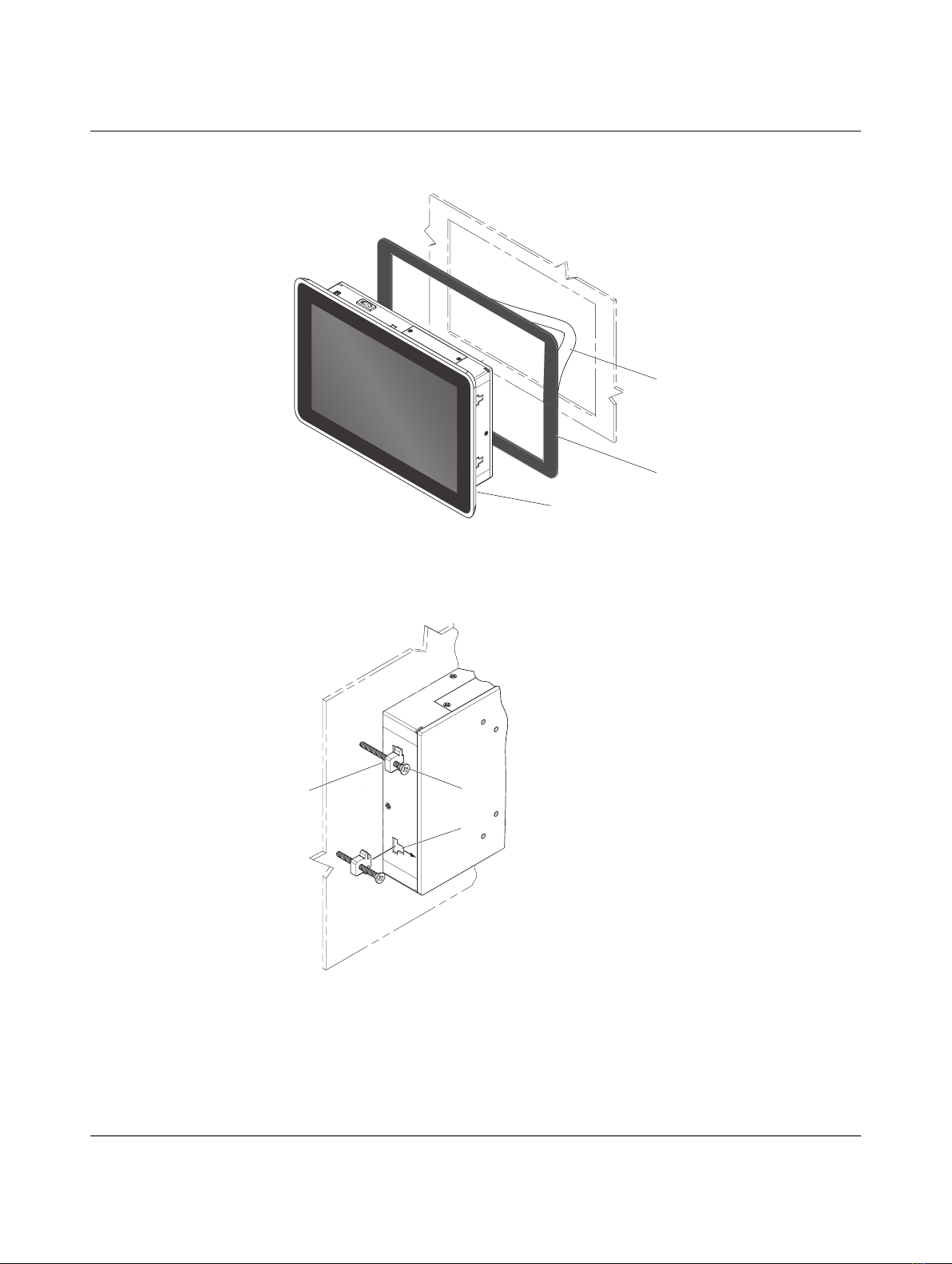
2. Remove the paper seal (1) from the sticky side of the gasket (2) and apply it to the back
side of the bezel (3).
Figure 3-2 Gasket installation
3. Insert the BL2 PPC 1201-4/… through the opening.
4. Insert the screws (1) through the clamps (2).
Figure 3-3 Panel-mounting clamps
5. From the rear of the enclosure, place a clamp in each slot (3) and slide away from the
enclosure panel.
6. Using an alternating pattern, turn each screw clockwise until the BL2 PPC 1201-4/… is
secured in the enclosure panel.
7. Torque each clamp screw to 0.88 Nm.
USB2.0
POWER
1
2
3
1
2
3
Questo manuale è adatto per i seguenti modelli
4
Indice
Altri manuali Phoenix Contact PC industriale