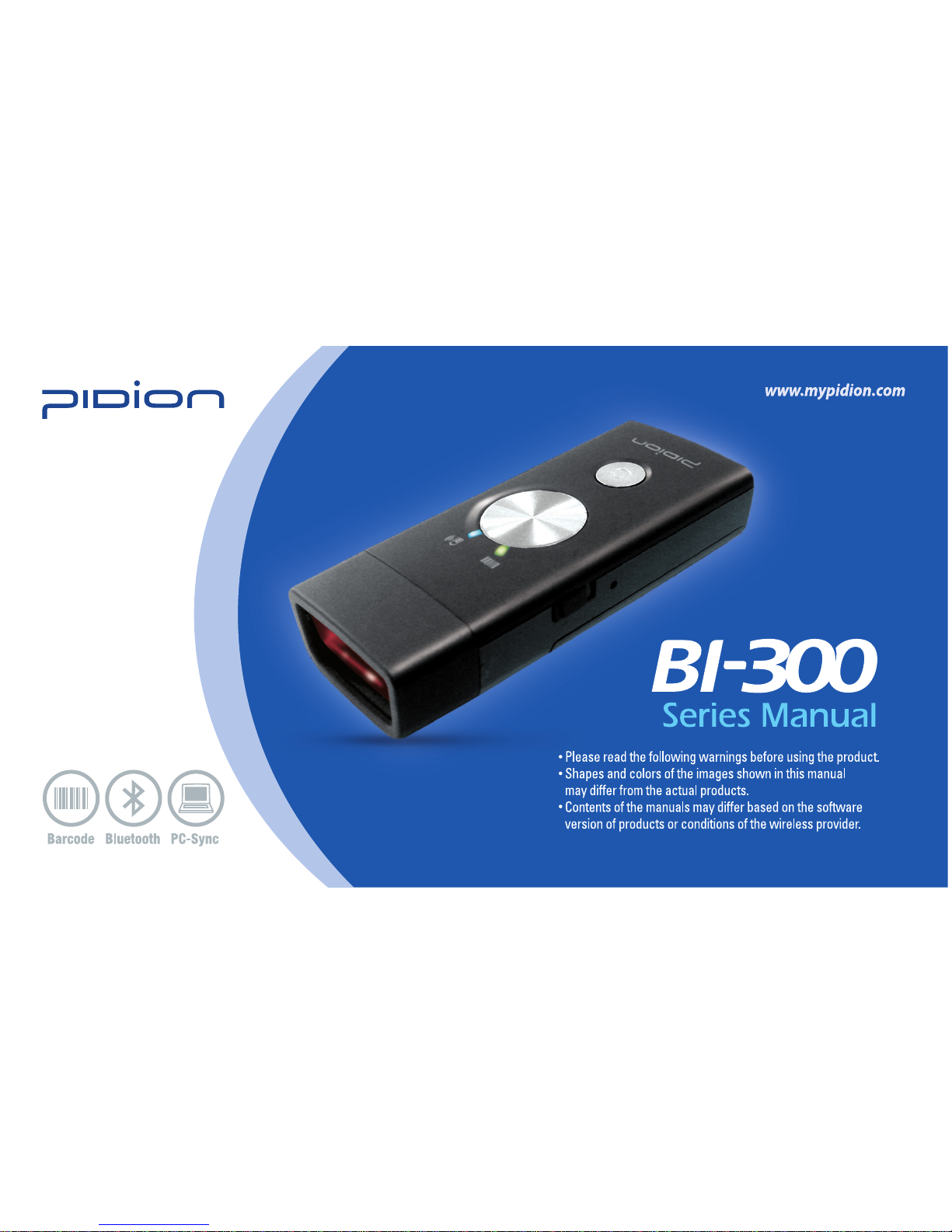
Pidion BI-300 Series Manuale utente


• This User’s Manual is protected under copyright laws.
• This User’s Manual is produced by Bluebird Soft Inc. We made every effort to avoid wrong editing and missing
information. Some parts, however, may not completely reflect actual case. We ask for your positive understanding
about this.
• The programs installed in this Product are protected under related laws and regulations; they cannot be copied,
moved or deleted without notice.
• Depending on users’ environments, used programs or peripherals, some parts of this Product may not work normally.
• This wireless device may cause propagation interference, and so, it cannot be involved with life-saving services.
Trade mark
Thank you for purchasing BI-300 of Bluebird Soft.
BI-300 is the latest wireless barcode scanner in that it is not just a data collector, but it also has a
Bluetooth function. We ensure that BI-300 can save high capacity of information with
1D, 2D (PDF417 only supported), and it is easy to carry and use because of its ultra light and
hand-held simple design, which gives you the best satisfaction.
PIDION aims for leading brand in the future mobile industry.
As a global brand representing the image of reliability, representativeness, and cutting-edge
technologies, this mark has been registered by Bluebird Soft Inc. around the world to be
protected under trademark-related laws.

PB BI-300
Series Manual
BI-300
1
Content
2 Warnings and Cautions
4 Checking components
1. Basic components
2. Options
5 Name and function of each
component
6 About scan, memory lamp/
battery, communication lamp
1. Checking lamp
2. Indication of lamp status
8 About signal tone
9 Changing a battery
1. Removing a battery
2. Inserting a battery
10 Charging a battery
1.
Charging with a charging cable
2. Charging with a charger
(option)
11 Power On/Off
1. Power On
2. Power Off
12 Scanning barcode
13 Sending data to PC
1.
Procedures for data transmission
2. Installing Driver
- Windows XP
3. Installing Driver
- Windows Vista
4. Installing PidionScan Program
25 Sending data by PDA
1.
Procedures for data transmission
2. Installing ActiveSync
3. Installing PidionScan Program
4.
Bluetooth Power On/Power Off
5. Bluetooth setting
- Windows Mobile
6. Bluetooth Setting
- Windows CE
37 Using PidionScan Program
1. Connect
2. Download
3. Setting
4. Configure
5. About
47 Product Specifications
48 Q&A
49 Customer Service
50 Service Center Information
52 Certificate of Guarantee
53 MIC Certification
53 CE Mark and EEA
54 Laser device

2BI-300
Series Manual
BI-300
3
2BI-300
Series Manual
BI-300
3
These instructions are to protect the user’s safety and prevent property loss. Please, read the instructions and use the product properly.
If you do not observe this sign, it may cause a physical
damage or property loss.
If you do not observe this sign, it may cause property
loss or product damage.
• Do not direct the scanner window toward eyes of a man • animal. (It may cause damage to the retina and eyesight damage.)
• For product operation, do not press the button with a pointed or sharp tool or do not touch metallic materials with the connector while
the product is operating. (It may lead to electric shock or fire, or product damage or malfunction.)
• Do not give a strong shock on the product or battery, or do not drop the product. (It may cause an explosion or fire.)
• Do not pull the cord or touch the power cord with a wet hand. (It may cause electric shock or product damage.)
• To remove the product from the power cord, do not pull the power cable or do not touch the power cord with a wet hand. (It may
cause an electric shock or product fault.)
• Do not use the product while charging. (It may cause an electric shock or fire.)
• Do not use the product at a place with much humidity (bathroom), or with the possibility of snow • rain. (It may cause a product
malfunction or electric shock.)
• If there is strange sound, smell or smoke, unplug the power cord immediately and contact the Customer Service Center. (It may cause
fire or electric shock.)
• Keep the terminal, battery, charger and other accessories out of reach of the animals or children. (It may cause product damage or
physical injury.)
• This product conforms to Rules of Electromagnetic Wave Emission prescribed by the Government, but do not use the product for a long
time since it may cause a physical damage due to electromagnetic waves. (Note that using the product for a long time may cause a
physical pain or convulsions due to excessive motion.)
• Do not put the product in a heater, microwave oven, heating cooker and high-pressure vessels. (It may cause explosion or fire.)
Warning
Warnings and Cautions

2BI-300
Series Manual
BI-300
3
2BI-300
Series Manual
BI-300
3
• Do not explode • repair • remodel the product. If you suspect a fault, contact the Customer Service Center. (It may cause electric shock
or malfunction.)
• Power on the product at a place where products are forbidden to use or at an explosion hazard area in terms of radio. (It may cause
malfunction of other equipment or explosion.)
• Do not use a charger and other components together with electric appliances of other manufacturers, and be sure to use a qualifying
product. (We are not responsible for any damage due to non-use of a qualifying product.)
• Do not bend or twist the power cable too much, and do not put the cable under heavy materials. (It may cause fire or product damage.)
• Keep the product off a place with strong vibration or magnetic field. (It may cause product damage or malfunction.)
• When clearing the product, do not use toxic chemicals or strong detergent, but clean with a soft dry cloth. (It may cause product
damage.)
• Do not shake or turn the hand-held necklace. (If dropped, it may cause abrasion or product damage.)
• Do not keep the product at too high or too low temperature. (It may cause product damage or malfunction.)
• Prevent sand or foreign substance from entering into the product. (It may cause product damage or malfunction.)
• Do not paint the product. (It may cause appearance damage and product defect.)
• Do not use the product for purposes other than those specified in the manual. (It may cause product damage and physical injury.)
• Do not give shock (e.g., fall of a battery) to the product and do not explode the product without permission. (It may cause product
defect or short lifetime, or overhead leading to danger.)
• Do not place the battery around fire, a heater or microwave oven. (It may cause an explosion.)
• Use a designated qualifying battery and charger only. (It may cause an explosion and fire, leading to short lifetime of a battery.)
• Note that do not connect (short) a necklace, coin and other conductors(metal) to the battery terminal. (Overheating of a battery and
short object may cause fire.)
• Do not place the battery around the car window with direct sunrays and at a closed place with high temperature. Keep the battery
indoor at the normal temperature. (It may cause explosion.)
• Keep the battery out of reach of the children or animals. (It may cause product damage and physical injury)
• Even if the battery is charged sufficiently, the lifetime of a battery may be shortened due to a low voltage of internal characteristics.
Caution
Battery Precaution

4BI-300
Series Manual
BI-300
5
4BI-300
Series Manual
BI-300
5
Checking components
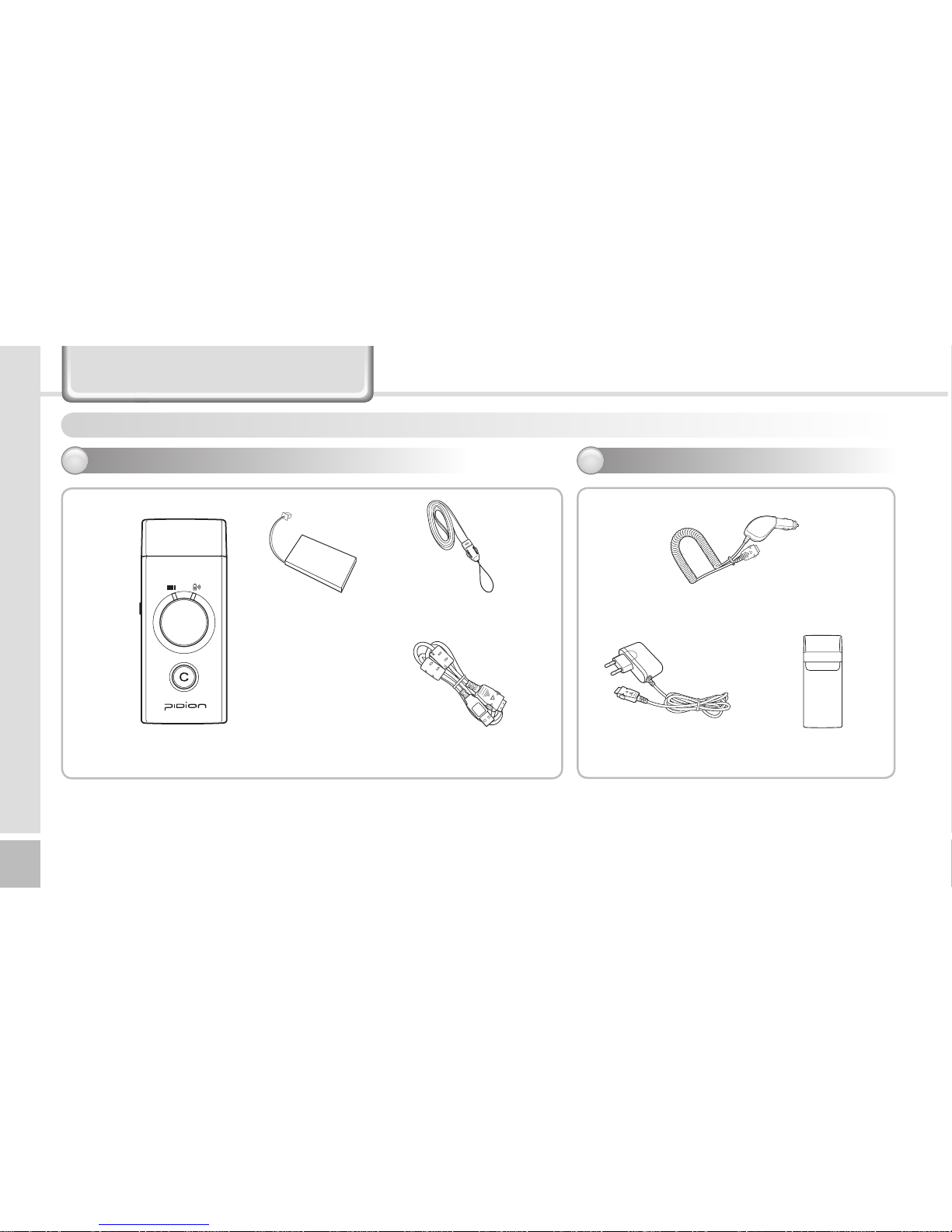
Before use, check if the components match with the purchased product. (If you want to purchase more, please contact a nearby agency.)
※The above figure may be a little different from a real object.
※Accessory components may differ from the above figure depending on purchase specifications.
[Car charger]
[Case]
[Battery]
[USB cable][Barcode scanner(terminal)]
Basic components
1
Options
2
[Charger]
[Portable necklace]

4BI-300
Series Manual
BI-300
5
4BI-300
Series Manual
BI-300
5
Name and function of each component
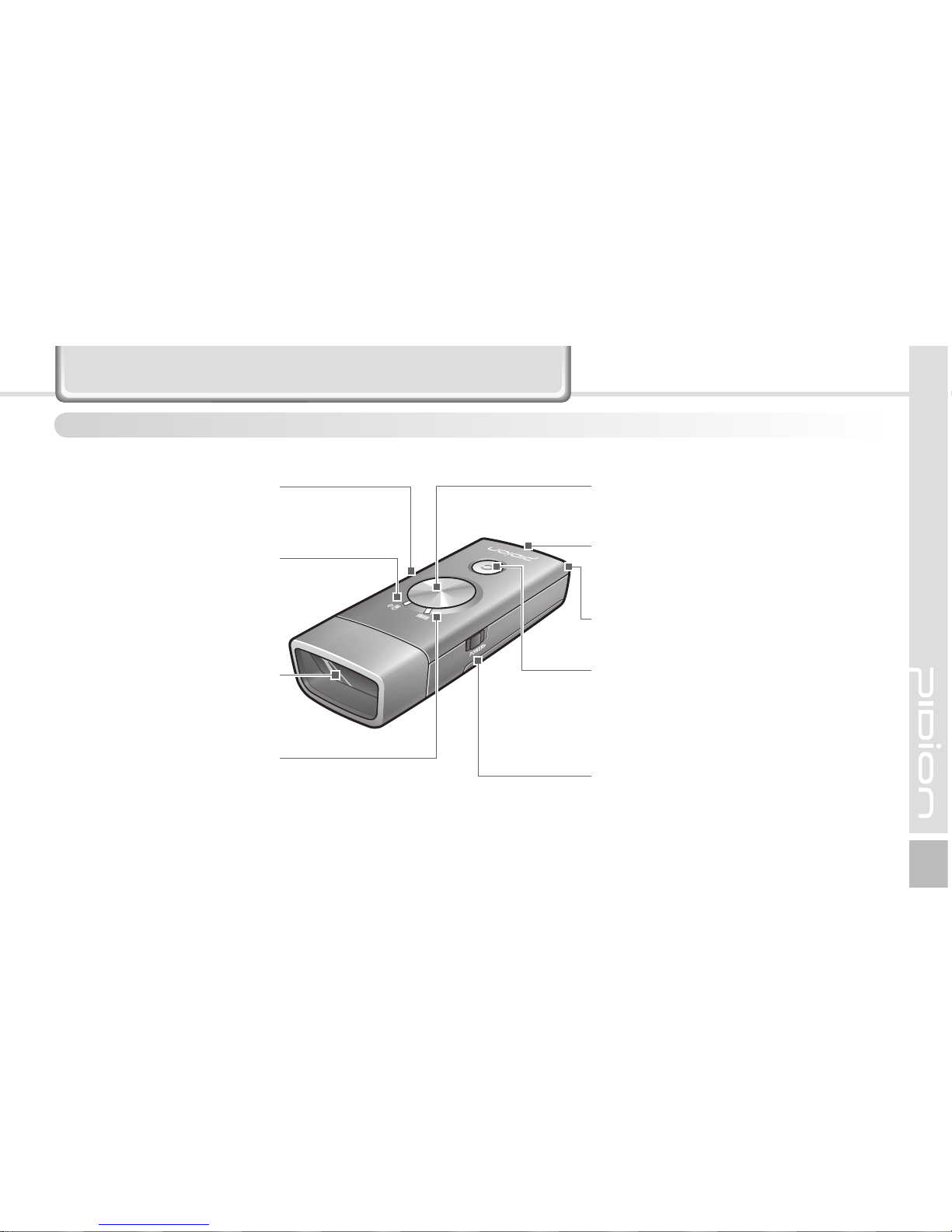
Be familiar with the name and function of each component before using the product.
Signal tone
Notify the scanner status by
signal tone (See P-8)
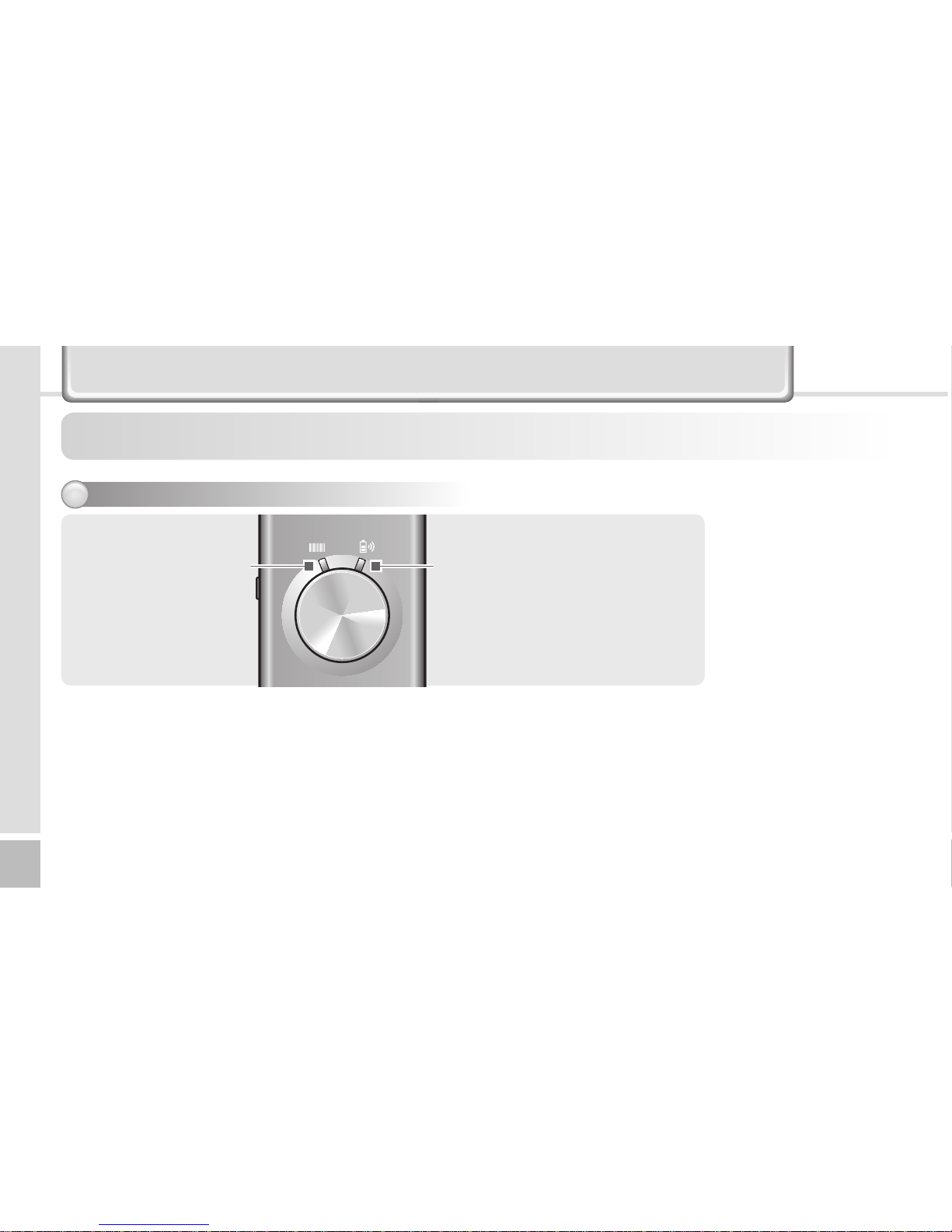
Battery • communication lamp
Indicate the status of battery
charging, Indicate the status of
communication connection
(See P-6)
Scanner window
Beam exit if the barcode
operates
Scan• Memory lamp
Indicate the status of barcode
operation and memory
(See P-6)
Scan button
Barcode scan and save (See P-12)
External connector
Used when connecting to the
charger and data cable (See P-10)
Portable necklace ring
Used when connecting the portable
necklace
Cancel button
If you press the button once short, one
scanned barcode is deleted/If you press
the button long for over 6 seconds, all
saved barcodes are deleted (See P-12)
Power button
Left-OFF, Right-ON (See P-11)

6BI-300
Series Manual
BI-300
7
6BI-300
Series Manual
BI-300
7
About scan, memory lamp/battery, communication lamp
Changing the color of the scan • memory lamp and battery • communication lamp let the user know the
operating information on the scanner.
Scan • Memory lamp Battery • Communication lamp
Checking lamp
1

6BI-300
Series Manual
BI-300
7
6BI-300
Series Manual
BI-300
7
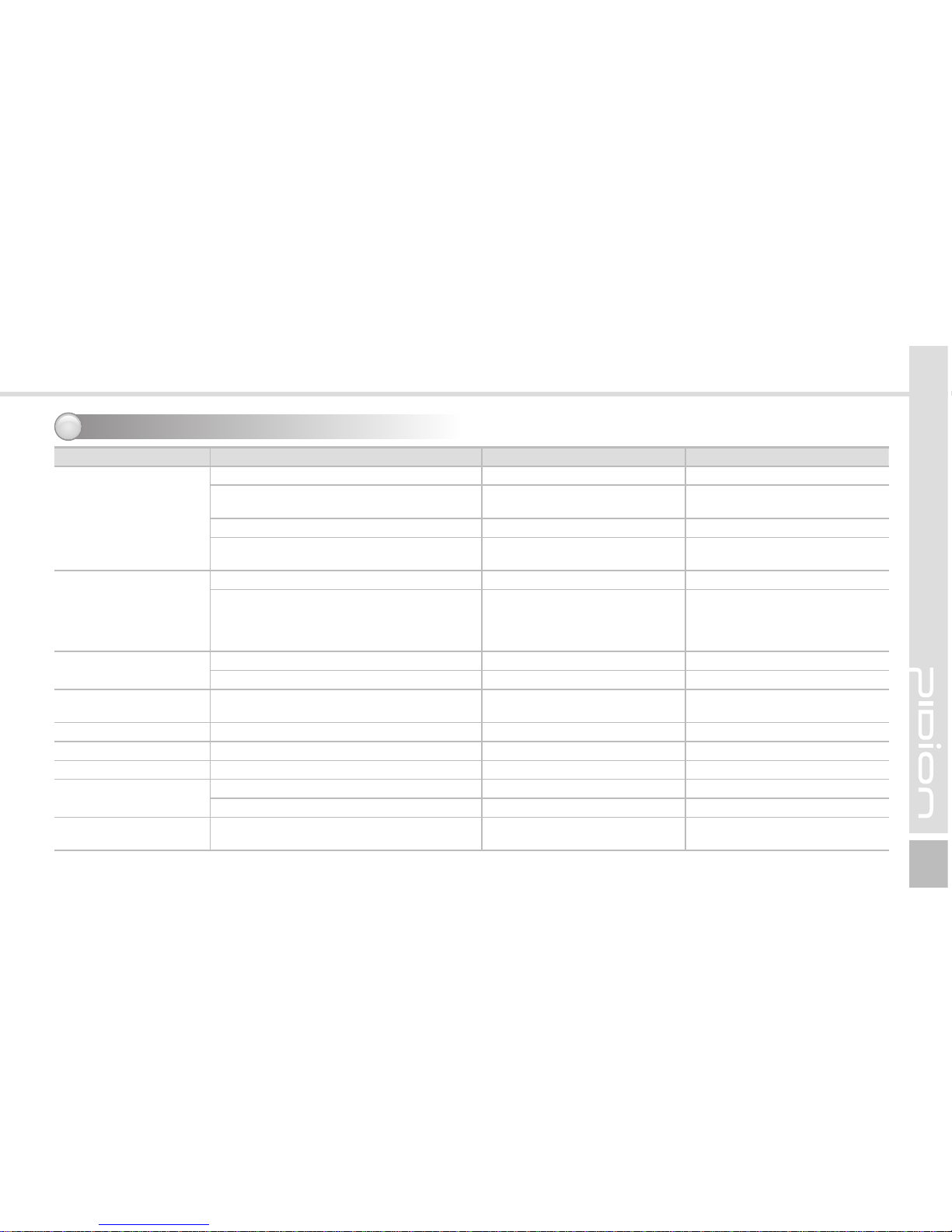
Indication of lamp status
2
Division Status Scan • Memory lamp Battery • Communication lamp
Basic operation
Booting Violet Violet
Power supply, scanner initialization
complete, barcode scan enabled Orange/blue/violet conversion Orange/blue/violet conversion
Lack of memory storage Turn orange -
Default mode (Sleep mode×)Violet lamp 1 time/flickering
5 seconds -
Scanning
Barcode scan successful Blue lamp is flickering once -
Input error occurs, wrong barcode
scanning, invalid input item, incorrect
barcode setup procedure, set mode
maintained
Orange lamp is flickering twice -
Cancel Delete one successfully scanned barcode Orange lamp is flickering once -
Clear all saved barcodes (memory clear) Orange (while clearing) -
Charging required Battery level of a scanner is less than 20%
(charging is required) Violet lamp is flickering Violet lamp is flickering
Charging
- -
Orange lamp is flickering
Charging
c
ompleted
- -
Blue lamp is flickering
Radio communication Connect Bluetooth - Blue lamp is flickering
Wire communication Connect with USB or Serial - Blue lamp is flickering
Rx error and reject to attempt connecting - Orange lamp is flickering twice
Others Barcode scan is successful during wire •
radio communication, but Rx error occurs Blue lamp is flickering once Orange lamp is flickering twice

8BI-300
Series Manual
BI-300
9
8BI-300
Series Manual
BI-300
9
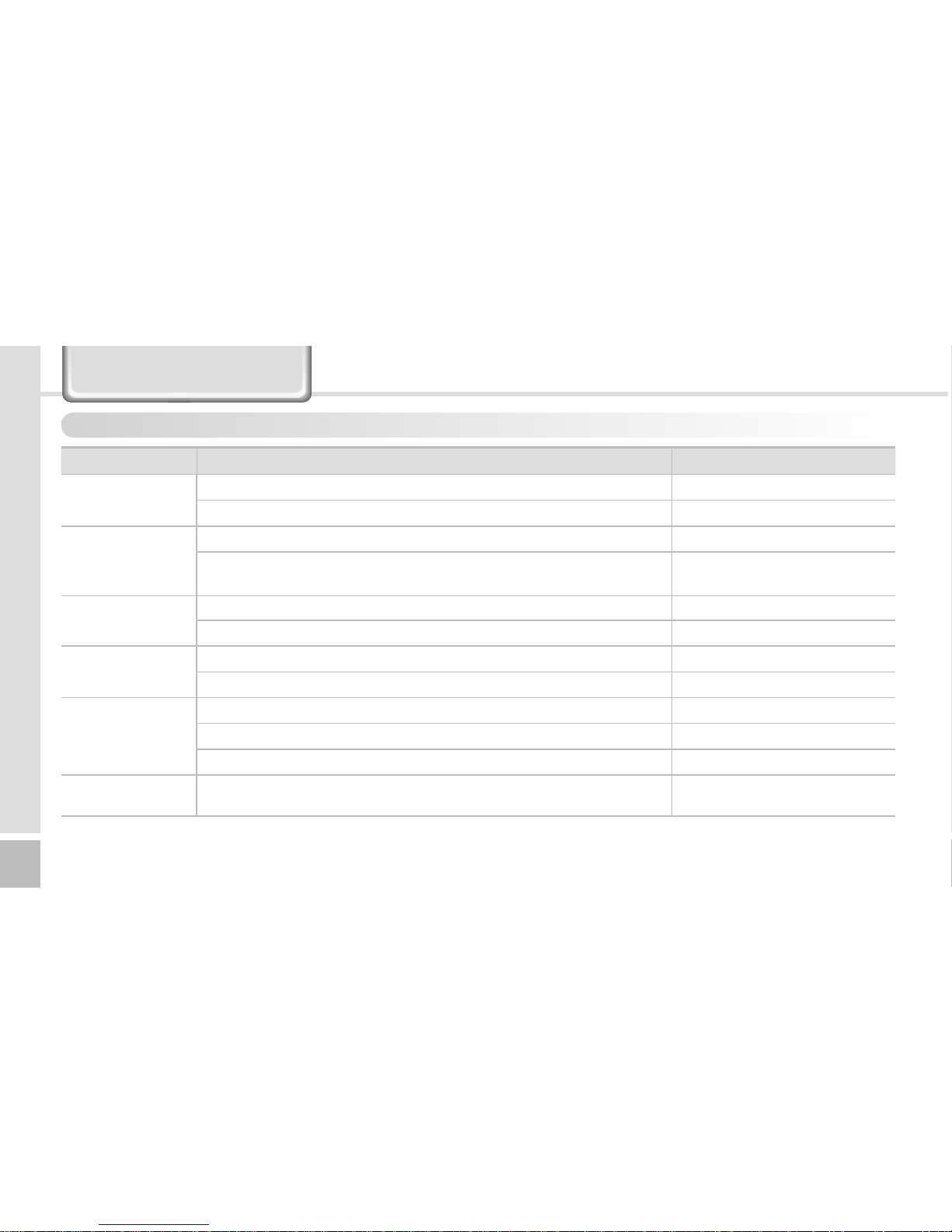
About signal tone
Notifies the operating information of the scanner to the user by tone volume or sequence.
Division Status Signal tone
Basic operation Power supply, scanner initialization complete, barcode scan enabled Low/medium/high once
Lack of memory storage High 3 times
Scanning
Barcode scan successful High once
Input error occurs, wrong barcode scanning, invalid input item,
incorrect barcode setup procedure, set mode maintained Low twice
Cancel Delete one successfully scanned barcode Low /high/low once
Clear all saved barcodes (memory clear) Low /high/low/long once
Radio
communication
Bluetooth is connected High once
Bluetooth is disconnected High /low once
Wire
communication
Connect with USB or Serial High once
Wire communication is disconnected High/low once
Rx error and reject to attempt connecting Low twice
Others Barcode scan is successful during wire•radio communication, but Rx
error occurs High once
Altri manuali per BI-300 Series
1
Indice
Altri manuali Pidion Lettore di codici a barre
Manuali Lettore di codici a barre popolari di altre marche

POSMicro
POSMicro Datalogic PowerScan D7100 Manuale utente

Marson
Marson MT780 Guida rapida alla configurazione

NCR
NCR RealPOS Manuale utente

Motorola
Motorola SE3300 Guida rapida alla configurazione

Element
Element P130BT Manuale utente

Motorola
Motorola Symbol LS3008 Manuale di installazione e funzionamento