
PNI SAFE HOUSE PG230 Manuale utente

PNI SAFE HOUSE PG230
WiFi socket / WiFi гнездо / WiFi-Buchse / Toma WiFi / Prise WiFi / WiFi aljzat
Presa WiFi / Gniazdo WiFi / Priza inteligenta wireless
EN User manual ............................................. 2
BG Ръководство за потребителя ................ 4
DE Benutzerhandbuch ................................... 6
ES Manual de usuario .................................... 8
FR Manuel utilisateur ..................................... 10
HU Használati utasítás ................................... 12
IT Manuale utente ........................................ 14
PL Instrukcja obsługi ..................................... 16
RO Manual de utilizare ................................... 18
EN
2User manual
SPECIFICATIONS
• Input voltage: 230V / 10A / 50-60Hz
• Output voltage: 230V / 10A / 50-60Hz
• Maximum supported power: 2000W / 10-13A
• WiFi frequency: 2.412GHz - 2.484GHz
CONFIGURATION
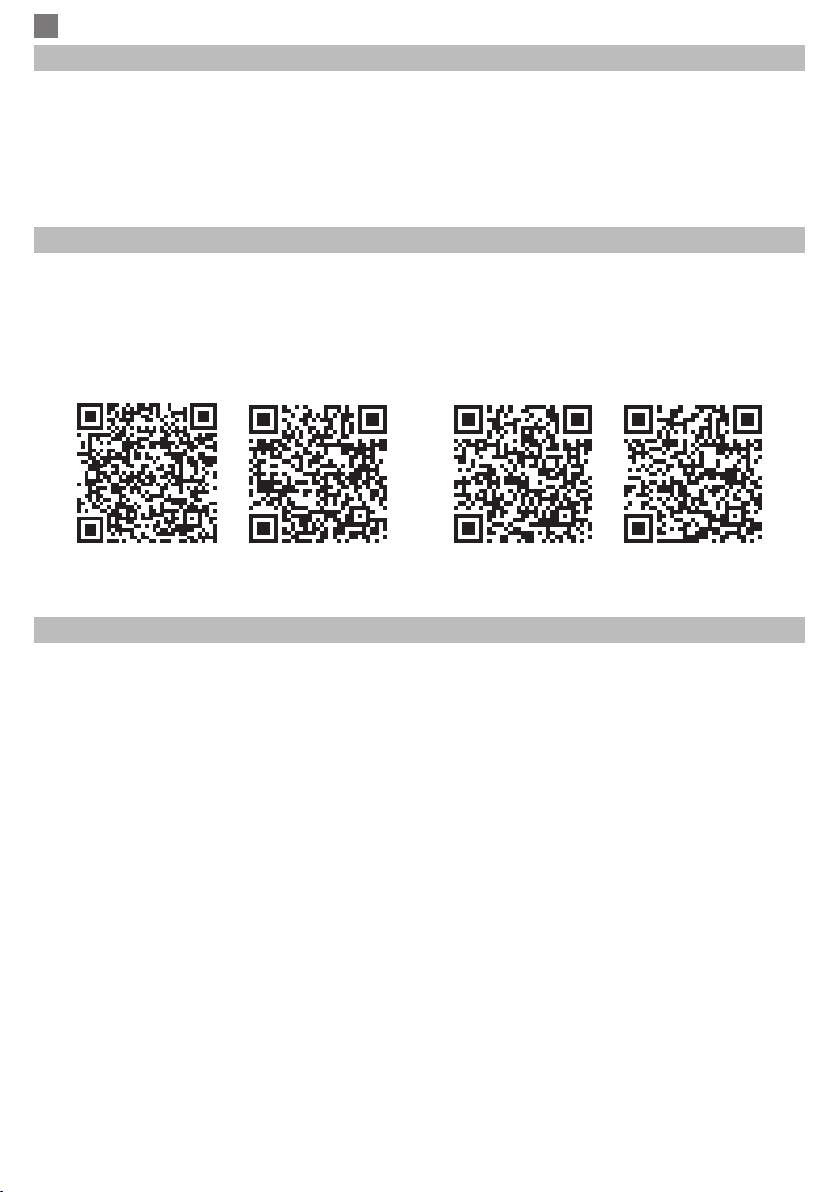
Search in Google Play or AppStore for Smart Life or TuyaSmart app or scan the code below. After
installation open the application and register.
Note: PNI PG230 is also compatible with Alexa and Google Home.
SmartLife Android SmartLife iOS Tuya Android Tuya iOS
CONFIGURATION VIA TUYA SMART APP
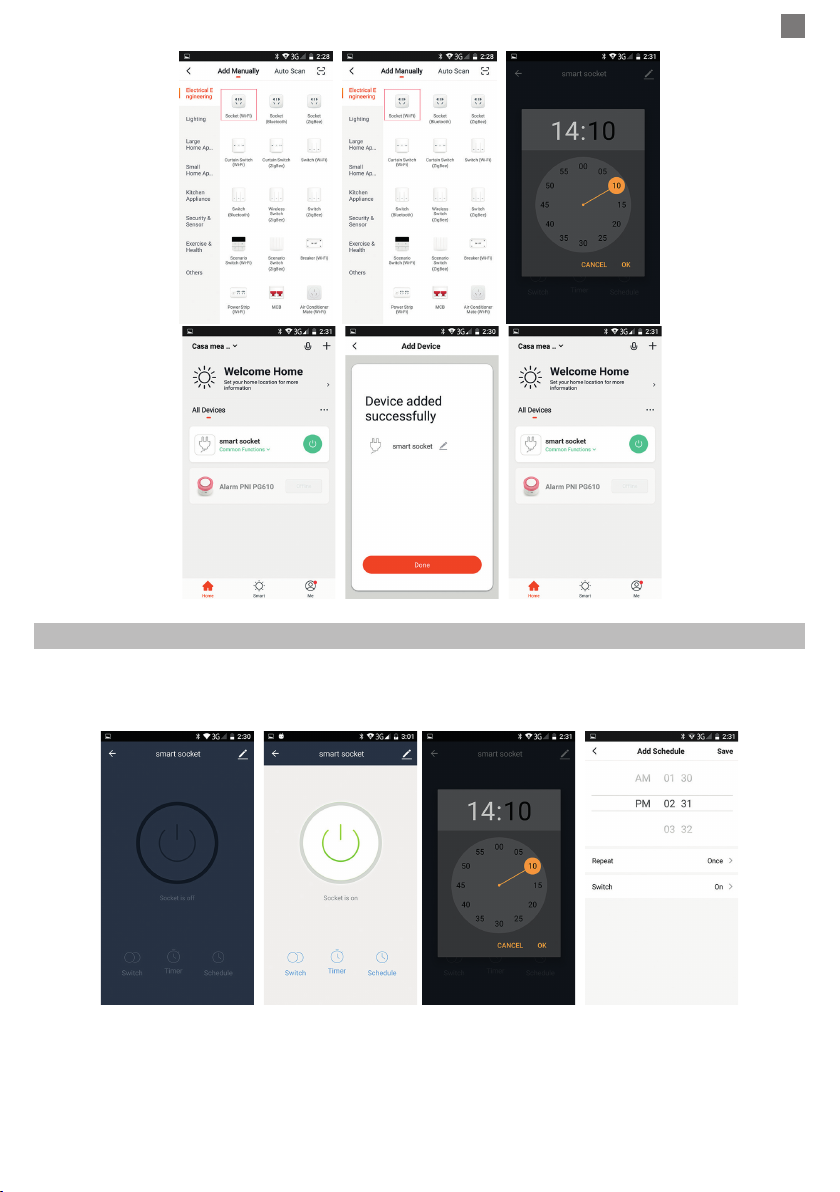
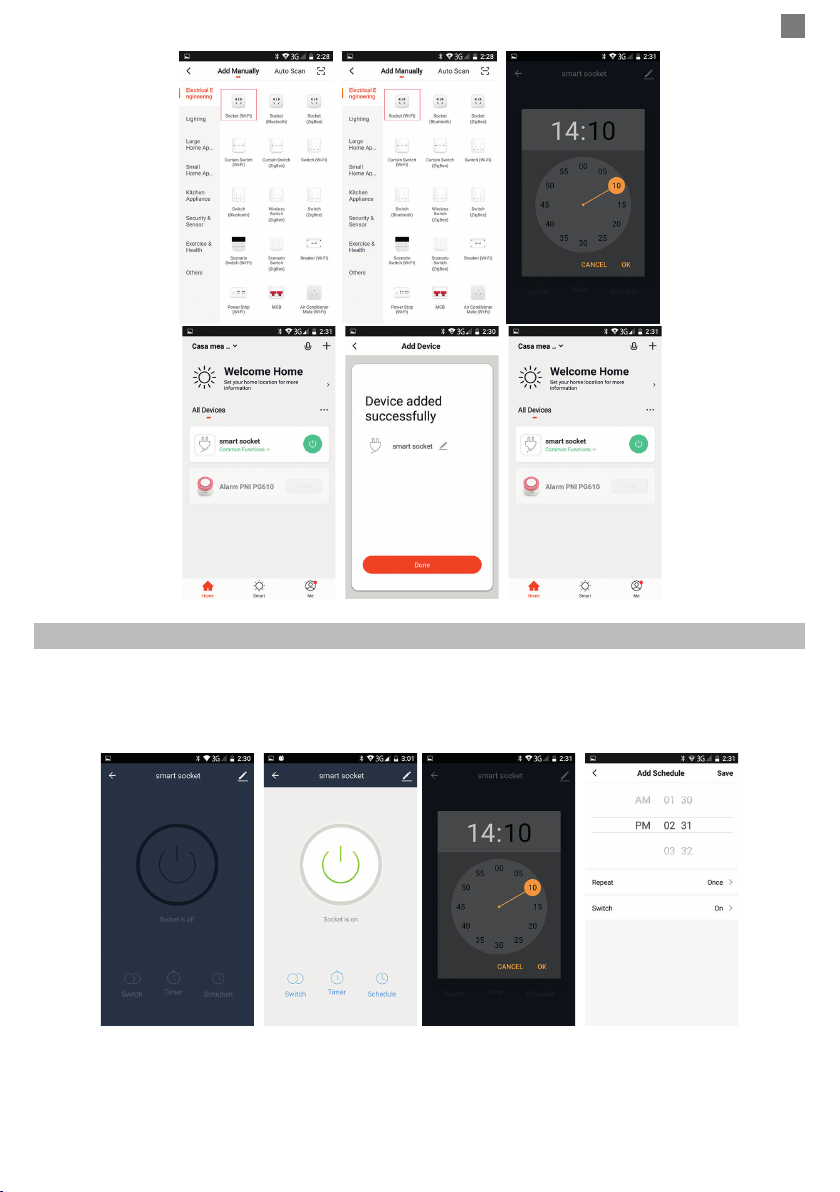
1. Connecting to the WiFi network
• Open the application, press “+” in the upper right corner to add devices. Select “Security &
Sensor” → “Wi-Fi Socket”.
• Power the device to a 230V power outlet.
• The red light ashes to indicate that it is in the pairing status.
Notes:
If the LED does not blink, reset the device by pressing and holding the ON / OFF button for 5-7
seconds or unplug and plug again the 230V power outlet.
If the LED is constantly lit blue, it means that the socket is in the ON status. Press the ON / OFF
button briey to turn the power o. Now the red light should blink.
• Conrm in the application if the device is blinking.
• From the following interface, select the WiFi network to which you want to connect the device
and enter the password
• Wait for the phone and device to sync.
• The newly added device will appear in the main interface of the application

EN
3
User manual
DEVICE CONTROL BY APPLICATION
In the main interface of the Tuya Smart application, in the list of added devices, click on the smart
socket. The settings interface will open. Available options: Switch (On / O) - Timer - Schedule.
Compatible with PNI Safe House PG600 alarm system
PNI SmartHome PG230 can be integrated with the PNI Safe House PG600 wireless alarm system
in an intelligent automation through the dedicated TuyaSmart application.
For details on the PNI Safe House PG600 wireless alarm system, please read the alarm system
manual.
BG
4Ръководство за употреба
СПЕЦИФИКАЦИИ
• Входно напрежение: 230V / 10A / 50-60Hz
• Изходно напрежение: 230V / 10A / 50-60Hz
• Максимална мощност: 2000W / 10-13A
• WiFi честота: 2.412GHx - 2.484GHz
CONFIGURARE
Търсете в Google Play или AppStore за приложение Smart Life или Tuya Smart или сканирайте
кода по-долу. След инсталиране отворете приложението и се регистрирайте.
Забележка: PNI PG230 е съвместим също с Alexa и Google Home.
SmartLife Android SmartLife iOS Tuya Android Tuya iOS
КОНФИГУРАЦИЯ ЧРЕЗ СМАРТ ПРИЛОЖЕНИЕ
1. Свързване към WiFi мрежата
• Отворете приложението, натиснете „+“ в горния десен ъгъл, за да добавите устройства.
Изберете “Security&Sensor” → “Socket Wi-Fi”.
• Захранване към 230V захранващ контакт.
• Червената светлина мига, за да покаже, че е в състояние на връзка.
бележки:
Ако светодиодът не мига, нулирайте устройството, като натиснете и задържите
бутона ON / OFF за 5-7 секунди или изключете и поставете отново 230V контакта за
захранване.
Ако светодиодът постоянно свети синьо, това означава, че гнездото е в положение ON.
Натиснете за кратко ON / OFF бутона, за да изключите захранването. Сега червената
светлина трябва да мига.
• Потвърдете в приложението, ако устройството мига.
• От следния интерфейс изберете WiFi мрежата, към която искате да свържете
устройството, и въведете паролата
• Изчакайте телефона и устройството да се синхронизират.
• Ново добавеното устройство ще се появи в основния интерфейс на приложението
BG
5
Ръководство за употреба
УПРАВЛЕНИЕ НА УСТРОЙСТВОТО ЧРЕЗ ПРИЛОЖЕНИЕ
В основния интерфейс на приложението Tuya Smart в списъка с добавени устройства
щракнете върху смарт гнездото. Интерфейсът за настройки ще се отвори. Налични опции:
Превключване (Вкл. / Изкл.) - Таймер - График.
Съвместим с алармена система PNI Safe House PG600
PNI SmartHome PG230 може да бъде интегриран с безжичната алармена система PNI Safe
House PG600 в интелигентна автоматизация чрез специализираното приложение TuyaSmart.
За подробности относно безжичната алармена система PNI Safe House PG600, моля,
прочетете ръководството за алармената система.
DE
6Benutzerhandbuch
SPEZIFIKATIONEN
• Eingangsspannung: 230V / 10A / 50-60Hz
• Ausgangsspannung: 230V /10A / 50-60Hz
• Höchstleistung: 2000W / 10-13A
• Frequenz WiFi: 2.412GHx - 2.484GHz
KONFIGURATION
Suchen Sie in Google Play oder APP Store die App SmartLife oder TuyaSmart oder scannen Sie
den Kode unten. Nach Installierung önen Sie die App und melden sich an.
Hinweis: PNI PG230 ist kompatible auch mit Alexa und Google Home.
SmartLife Android SmartLife iOS Tuya Android Tuya iOS
KONFIGURATION DURCH TUYA SMART APP
1. Anschluss WiFi
• Önen Sie die App, drücken Sie “+“ rechts oben, um andere Geräte hinzufügen. Wählen Sie
“Security & Sensor“ → “Socket Wi-Fi“.
• Versorgen Sie mit einer Quelle 230V.
• Die rote LED blinkt und zeigt, dass es verbunden wird.
Hinweis:
Wenn die LED nicht blinkt, stellen Sie das Gerät neu ein, indem Sie 5-7 Minuten auf den Knopf
ON/OFF drücken oder nehmen Sie die Steckdose heraus und stecken sie wieder in einer 230V
Quelle.
Wenn die LED blau ist, bedeutet es, dass die Steckdose auf ON ist. Drücken Sie einmal kurz den
Knopf ON/OFF, um die Steckdose auszuschalten. Die rote LED sollte jetzt blinken.
• Bestätigen Sie in der App, wenn das Gerät blinkt.
• Im nächsten Interface, wählen Sie das gewünschte WiFi Netzwerk und geben Sie das
Passwort ein.
• Warten Sie bis das Telefon und das Gerät sich synchronisieren.
• Das neu hinzufügte Gerät wird im Hauptinterface der App angezeigt

DE
7
Benutzerhandbuch
KONTROLLE DURCH DIE APP
Im Hauptinterface der Tuya Smart App, in der Liste mit den hinzugefügten Geräten, drücken
Sie auf die intelligente Steckdose. Das Interface mit Einstellungen wird geönet. Vorhandene
Optionen: Switch (ON/OFF) – Timer – Schedule (Programm).
Kompatibel mit PNI Safe House PG600 Alarmsystem
PNI SmartHome PG230 kann mit dem drahtlosen Alarmsystem PNI Safe House PG600 in einer
intelligenten Automatisierung über die spezielle TuyaSmart-Anwendung integriert werden.
Einzelheiten zum drahtlosen Alarmsystem PNI Safe House PG600 nden Sie im Handbuch des
Alarmsystems.
ES
8Manual de usuario
ESPECIFICACIONES
• Voltaje de entrada: 230V / 10A / 50-60Hz
• Voltaje de salida: 230V / 10A / 50-60Hz
• Potencia máxima: 2000 W / 10-13 A
• Frecuencia WiFi: 2.412GHx - 2.484GHz
CONFIGURACIÓN
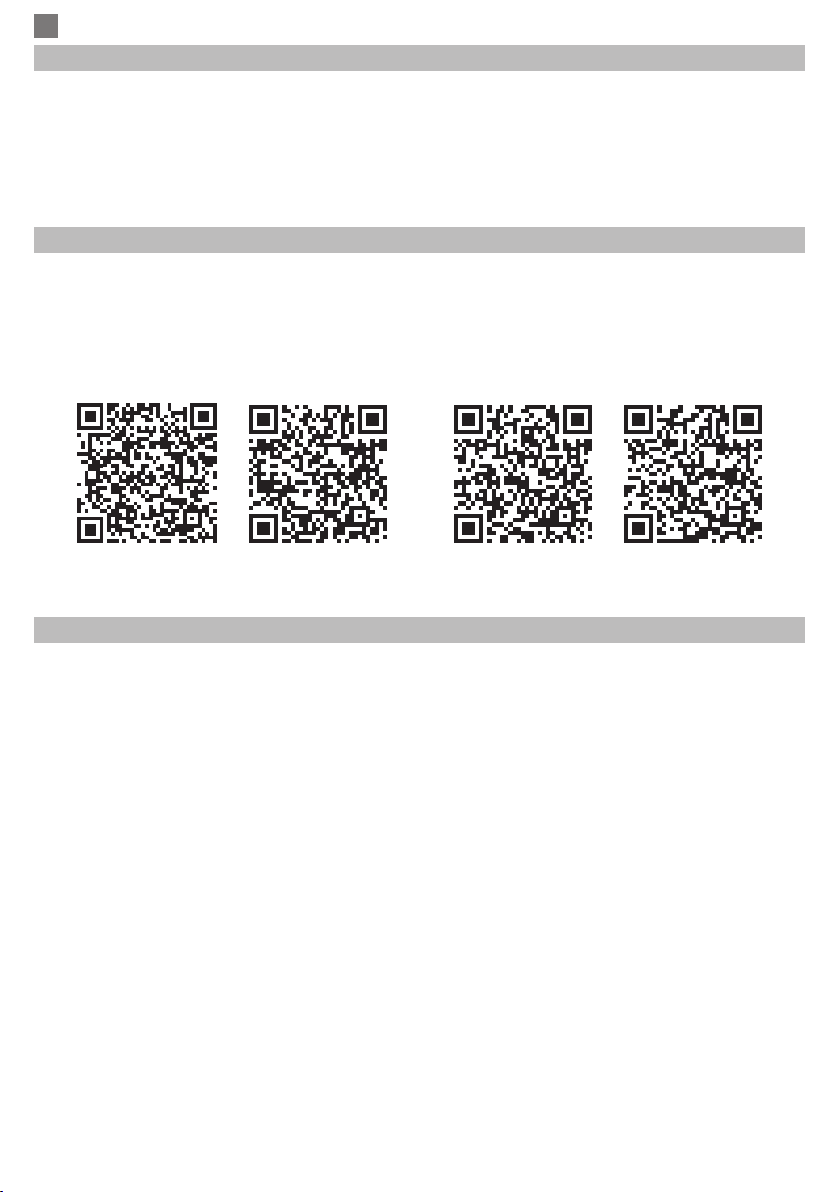
Busque en Google Play o AppStore los aplicaciones Smart Life o TuyaSmart o escanee el código
a continuación. Abra la aplicación después de la instalación y regístrese.
Nota: PNI PG230 también es compatible con Alexa y Google Home.
SmartLife Android SmartLife iOS Tuya Android Tuya iOS
CONFIGURACIÓN A TRAVÉS DE LA APLICACIÓN INTELIGENTE TUYA
1. Conectando a la red WiFi
• Abra la aplicación, presione “+” en la esquina superior derecha para agregar dispositivos.
Seleccione “Security&Sensor” → “Socket Wi-Fi”.
• Fuente de alimentación a una toma de corriente de 230V.
• La luz roja parpadea para indicar que está en el estado de conexión.
Notas:
Si el LED no parpadea, reinicie el dispositivo presionando y manteniendo presionado el botón
de ENCENDIDO / APAGADO durante 5-7 segundos o desconecte y vuelva a insertar la toma de
corriente de 230V.
Si el LED está constantemente iluminado en azul, signica que el enchufe está en la posición
ON. Presione el botón ON / OFF brevemente para apagar la unidad. Ahora la luz roja debería
parpadear.
• Conrme en la aplicación si el dispositivo parpadea.
• Desde la siguiente interfaz, seleccione la red WiFi a la que desea conectar el dispositivo e
ingrese la contraseña
• Espera a que el teléfono y el dispositivo se sincronicen.
• El dispositivo recién agregado aparecerá en la interfaz principal de la aplicación.
ES
9
Manual de usuario
CONTROL DEL DISPOSITIVO POR APLICACIÓN
En la interfaz principal de la aplicación Tuya Smart, en la lista de dispositivos agregados, haga clic
en el zócalo inteligente. Se abrirá la interfaz de conguración. Opciones disponibles: Interruptor
(Encendido / Apagado) - Temporizador - Programación.
Compatible con el sistema de alarma PNI Safe House PG600
PNI SmartHome PG230 se puede integrar con el sistema de alarma inalámbrico PNI Safe House
PG600 en una automatización inteligente a través de la aplicación dedicada TuyaSmart.
Para obtener detalles sobre el sistema de alarma inalámbrico PNI Safe House PG600, lea el
manual del sistema de alarma.
FR
10 Manuel utilisateur
CARACTÉRISTIQUES
• Tension d’entrée: 230V / 10A / 50-60Hz
• Tension de sortie: 230V / 10A / 50-60Hz
• Puissance maximale: 2000W / 10-13A
• Fréquence WiFi: 2.412GHx - 2.484GHz
CONFIGURATION
Recherchez sur Google Play ou AppStore pour SmartLife ou TuyaSmart ou scannez le code ci-
dessous. Ouvrez l’application après l’installation et enregistrez-vous.
Remarque: PNI PG230 est également compatible avec Alexa et Google Home..
SmartLife Android SmartLife iOS Tuya Android Tuya iOS
CONFIGURATION VIA L’APPLI INTELLIGENTE TUYA
1. Connexion au réseau WiFi
• Ouvrez l’application, appuyez sur “+” dans le coin supérieur droit pour ajouter des
périphériques. Sélectionnez “Security & Sensor” → “Socket Wi-Fi”.
• Alimentation d’une prise de courant 230V.
• Le voyant rouge clignote pour indiquer qu’il est dans l’état de la connexion.
Notes:
Si le voyant ne clignote pas, réinitialisez l’appareil en appuyant sur le bouton ON / OFF et en le
maintenant enfoncé pendant 5 à 7 secondes, ou débranchez et rebranchez la prise d’alimentation
230V.
Si le voyant est constamment allumé en bleu, cela signie que la prise est en position ON.
Appuyez brièvement sur le bouton ON / OFF pour éteindre l’appareil. Maintenant, le feu rouge
devrait clignoter.
• Conrmez dans l’application si le périphérique clignote.
• À partir de l’interface suivante, sélectionnez le réseau WiFi auquel vous souhaitez connecter
le périphérique et entrez le mot de passe.
• Attendez que le téléphone et l’appareil se synchronisent.
• Le périphérique nouvellement ajouté apparaîtra dans l’interface principale de l’application
Indice
Lingue:
Altri manuali PNI Accessori

PNI
PNI SafeHouse HS130 Manuale utente

PNI
PNI HU180 Manuale utente

PNI
PNI JS10A Manuale utente

PNI
PNI SafeHouse HS002 Manuale utente

PNI
PNI RM3000-f Manuale utente

PNI
PNI PlacePod Manuale utente

PNI
PNI SmartHome SM1500 Manuale utente

PNI
PNI SAFE HOUSE PG07 Manuale utente

PNI
PNI SmartHome SM440 Manuale utente

PNI
PNI HS004 Manuale utente

PNI
PNI RM3100 Manuale utente

PNI
PNI SmartHome WP800 Manuale utente

PNI
PNI SmartHome WP850 Manuale utente

PNI
PNI PlacePod Manuale utente

PNI
PNI PlacePod Manuale utente

PNI
PNI SafeHome PT840S Manuale utente

PNI
PNI SmartHome WP202 Manuale utente

PNI
PNI GD-01 Manuale utente

PNI
PNI SafeHome PT225G Manuale utente

PNI
PNI SAFE HOUSE PG07 Manuale utente


