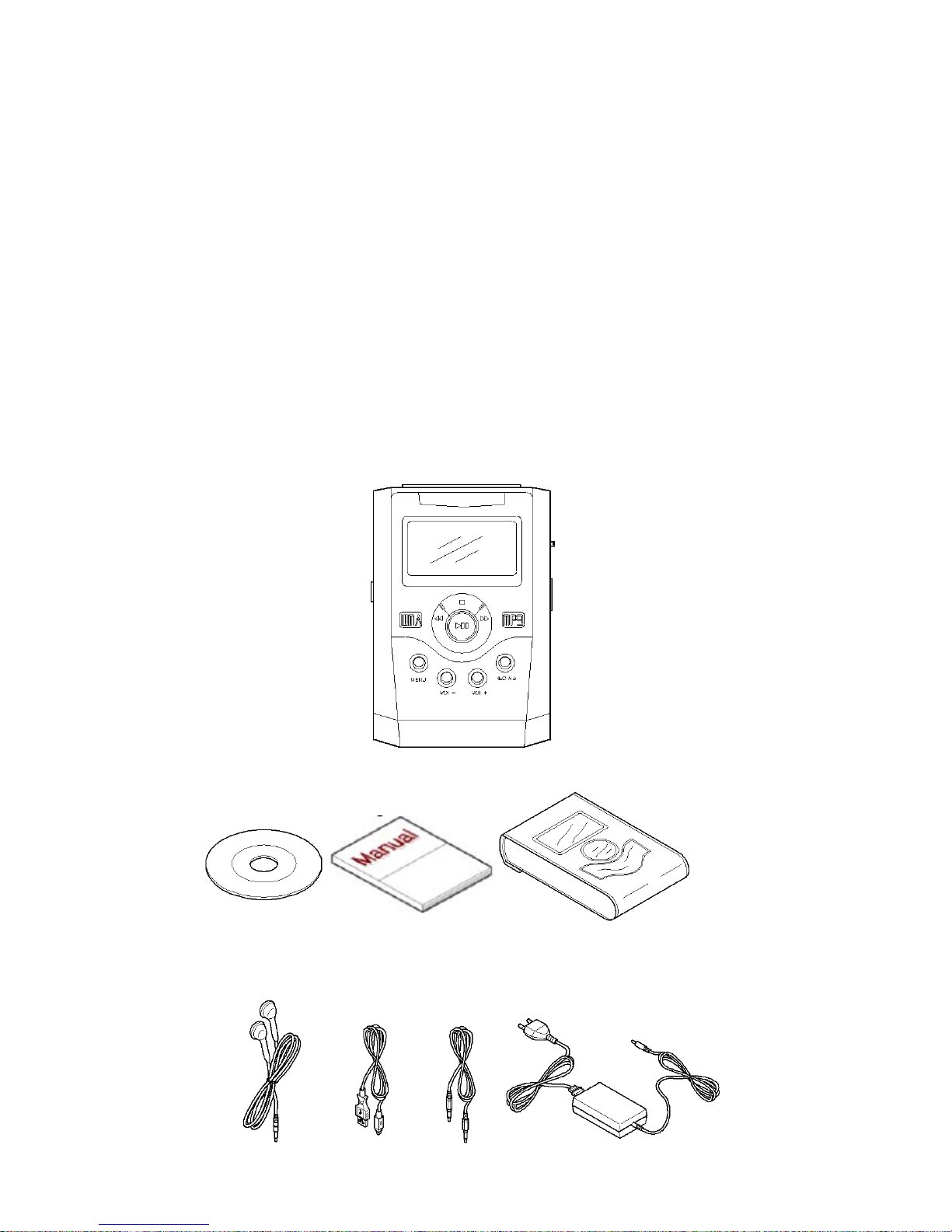
Pogo RipDrive 20GB Manuale utente

Notice to Users
This manual is protected by copyright laws and all rights are reserved. No portion of this manual may be
reproduced in any form or translated into other languages without written permission from the manufacturer
and publisher of this manual.
The content of this manual is provided “as is” and the manufacturer is under NO obligation to notify users of
revisions or modifications to the product or procedures.
Every effort has been taken to ensure the accuracy of the information herein. However, the manufacturer is
not responsible for any inaccuracies or omissions that may affect the RipDrive’s operation.
All programs or accessories included with the RipDrive are under copyright protection. No part of these
programs may be reproduced without written permission from the manufacturer and publisher.
All product names used in this manual are protected by each product’s trademark, service mark, or registered
brand.

Safety Checkpoints
Thank you for purchasing the RipDrive! Please read this manual carefully prior to using the
RipDrive.
1. DO NOT alter the RipDrive in any way. Such tampering may result in a fire, injury, electric shock,
or serious damage to the RipDrive or to the user.
2. Keep the RipDrive away from water. Water may cause fire, electric shock, and mechanical or
electrical breakdown.
3. DO NOT leave the RipDrive in a car or other locations in which there are the possibilities of high
temperatures or high humidity. Keep it away from direct sunlight or drastic temperature changes.
Being exposed to high temperatures or humidity may be harmful to the RipDrive components and
could cause a fire.
4. Avoid dropping the RipDrive from high places. It may cause a malfunction or serious damage to
the unit.
5. DO NOT clean the RipDrive with alcohol or any strong detergent. It may cause the fading
of the RipDrive’s exterior surface.
6. DO NOT use any accessories other than the ones recommended by the manufacturer. The
manufacturer IS NOT responsible for any malfunction or breakdown caused by the use of third-
party accessories.
7. Use only the recommended battery charger. Other chargers may cause a fire or the product to
malfunction.
8. DO NOT disassemble the RipDrive.
9. In the event of problems, contact the After Service (A/S) Center at 714-671-1854.

Contents
1. Introduction ................................................................................................................................. 1
Checking Package Contents......................................................................................................... 2
2. Product Overview......................................................................................................................... 3
Product Features......................................................................................................................... 4
Mass Storage ........................................................................................................................ 4
MP3 and WMA Playback....................................................................................................... 4
10 Hours Use with Each Charge ............................................................................................. 4
Direct MP3 Encoding without a PC........................................................................................ 4
FM Tuner ............................................................................................................................ 4
Search Function .................................................................................................................... 4
Text View ............................................................................................................................. 4
Name of Each Part...................................................................................................................... 5
Functional Description of Each Part............................................................................................. 6
3. Preparation .................................................................................................................................. 8
Charging the Battery................................................................................................................... 9
Connecting the Battery Charger.............................................................................................. 9
Battery Remaining Indicator ................................................................................................ 10
Connecting Earphones/Line-in Cable ......................................................................................... 11
Earphones Connection......................................................................................................... 11
Line-in Connection.............................................................................................................. 11
Connecting to Your PC.............................................................................................................. 12
Installing the USB Driver.......................................................................................................... 13
Automatic Installation ......................................................................................................... 13
Manual Installation.............................................................................................................. 13
Checking the Installation ..................................................................................................... 18
Removing the RipDrive....................................................................................................... 19
4. Basic Operation.......................................................................................................................... 21
Turning Power on..................................................................................................................... 22
Turning Power off..................................................................................................................... 22

Initial Screen............................................................................................................................ 23
LCD Screen Indicators.............................................................................................................. 24
Major Modes............................................................................................................................ 26
1. Browser Mode................................................................................................................. 28
Playback....................................................................................................................... 28
Pause............................................................................................................................ 29
Fast Forward ................................................................................................................. 29
Rewind......................................................................................................................... 29
Viewing Popup Menu during Playback............................................................................ 30
Adjusting the Volume..................................................................................................... 31
2. Tuner Mode .................................................................................................................... 32
Listening to Radio ......................................................................................................... 32
Presetting Stations ......................................................................................................... 33
Viewing Popup Menu During Playback ........................................................................... 33
3. Encoding Mode............................................................................................................... 34
Encoding....................................................................................................................... 34
Voice Recording ............................................................................................................ 34
4. PlayList Mode................................................................................................................. 35
5. Text Mode....................................................................................................................... 36
6. Setup Mode..................................................................................................................... 37
Tree View ..................................................................................................................... 38
Search View.................................................................................................................. 38
7. Exit Mode....................................................................................................................... 40
5. Advanced Operation ................................................................................................................... 41
Using Options .......................................................................................................................... 42
DISPLAY........................................................................................................................... 42
SYSTEM............................................................................................................................ 43
MUSIC-OPTION................................................................................................................ 44
OTHER-OPTION ............................................................................................................... 46
A-B Repeat Play....................................................................................................................... 47
Managing Files......................................................................................................................... 47
Upgrading Firmware................................................................................................................. 49
6. Specifications............................................................................................................................. 50

7. Troubleshooting ......................................................................................................................... 52
8. Warranty .................................................................................................................................. 53
9. FCC Notice................................................................................................................................ 55


1. Introduction
Thank you for purchasing the RipDrive. We appreciate your patronage. You will now enjoy the advantage of
having a mass storage device that solves the capacity limitation problems of most existing MP3 players. The
RipDrive’s Playback feature supports MP3 and WMA formats so you can handle various music files with ease.
In addition, the Setup mode provides various menus that you can configure to suit your personal preferences.
The RipDrive can be connected to your PC via a USB cable. Once connected to your PC, the unit is
automatically recognized by your PC as a mass storage device (drive letter). In addition, you can continue to
enjoy the benefits of improved product performance through firmware upgrades.
You can obtain information about our company, PoGo! Products, and other innovative technologies we’ve
developed by consulting on our website at www.pogoproducts.com. You can sign up to receive free
information about our other innovative products and receive technical support services.
The topic in this section:
Checking Package Contents
1

Checking Package Contents
Check your RipDrive package to make sure it has the following items:
Main Unit
User's Manual
USB Cable
AC Adapter/Charger
USB Driver Installation CD (for Windows 98)
Earphones
Line-in Cable
Carrying Case
2

2. Product Overview
The RipDrive is a portable HDD Type MP3 Player that is compatible with your PC. It features a portable
20GB hard disk and a 160 x 105 full-graphic LCD screen.
This product supports various languages, making it convenient to use anywhere you go.
This section describes the main features of the product as well as the names and functions of the components.
Read through this information carefully so you’ll be able to use the product easily and effectively.
The topics in this section:
Product Features
Name of Each Part
Functional Description of Each Part
3

Product Features
Mass Storage
RipDrive uses mass storage technology that exceeds the capacity of most existing MP3 players and permits
you to use it as a removable drive.
MP3 and WMA Playback
You can play MPEG1-Layer3 (MP3) and Windows Media Audio (WMA) files.
Extended Use with Each Charge
You can enjoy up to 10 hours of music playback with just one battery charge.
Direct MP3 Encoding without a PC
You can encode music from just about any audio source to MP3 by connecting the line-in cable of the
RipDrive to an earphone jack of any external device. No PC is required!
FM Tuner
You can listen to FM radio by using the Auto Scan or Preset function.
Search Function
RipDrive’s user-friendly search feature enables you to quickly find the files you want.
You can search for a music files easily by using the Search Function.
Text View
You can view text files stored in the RipDrive anytime and anywhere.
4
Questo manuale è adatto per i seguenti modelli
1
Indice
Altri manuali Pogo Lettore MP3

Pogo
Pogo Radio YourWay PRY900M2 Manuale utente

Pogo
Pogo RipFlash PRO 128MB Manuale utente

Pogo
Pogo Radio YourWay LX 128MB Manuale utente

Pogo
Pogo RipFlash PRO-2 256MB Manuale utente

Pogo
Pogo Radio YourWay 32MB Manuale utente

Pogo
Pogo RipFlash DX 256MB Manuale utente

Pogo
Pogo Radio YourWay Manuale utente

Pogo
Pogo Recordable MP3 Player Manuale utente

Pogo
Pogo RipFlash Plus 128MB Manuale utente