4. OPERATION INSTRUCTIONS
4.1 Power-Up
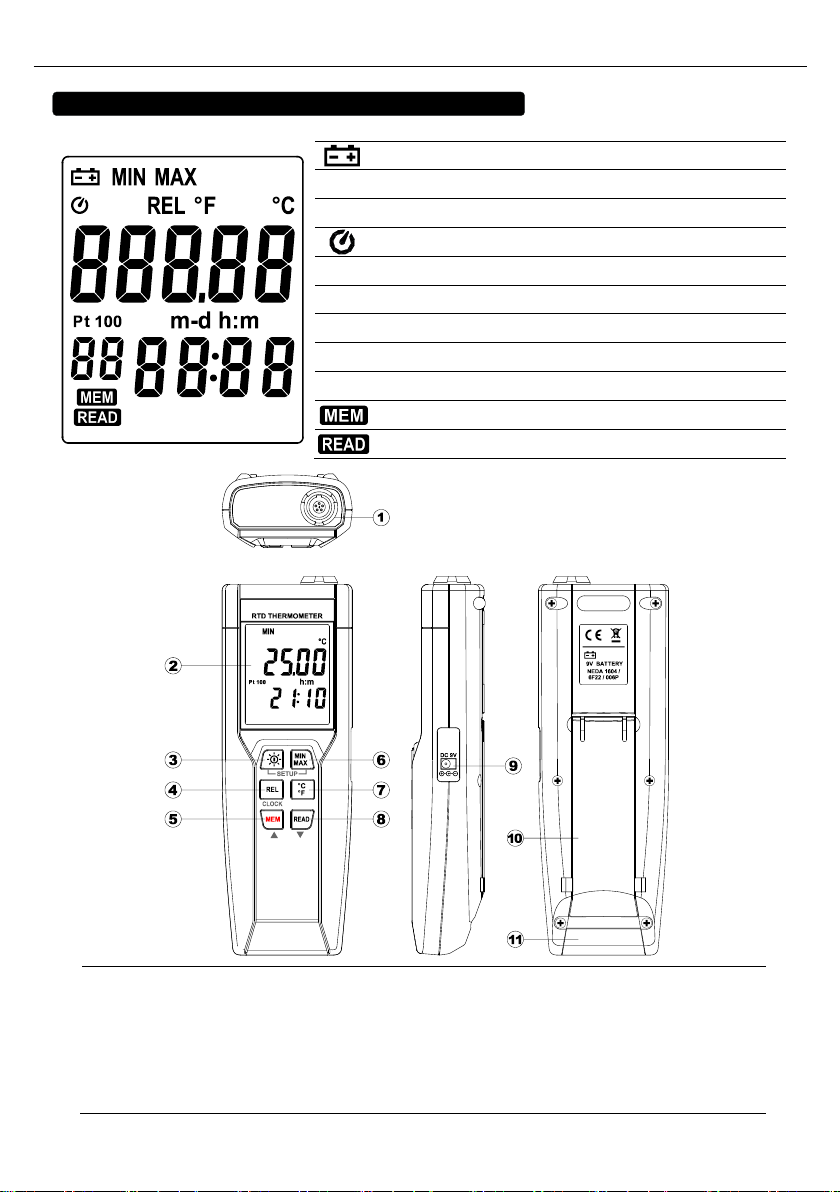
Press the “”key to turn ON the thermometer and Press and hold “”buttons for 3 seconds
to OFF.
4.2 Connection the Temperature Probe
For measurement, plug the temperature probe into the input connectors.
4.3 Selecting the Temperature Scale
When the meter was first power on, the default scale setting is set at Celsius (°C) scale. The user
may change it to Fahrenheit (°F) by pressing button and vice versa to Celsius and change
default scale.
4.4 READ Operation
Press button to view logged readings. The display shows “ ”. Press or button
to scroll through the logged readings. The display shows each logged reading, its time stamp, and
its memory location. Press or or any button to exit READ mode.
4.5 Back light Operation:
Press the button will turn back light on and Press it once again will turn off.
The meter will turn back light off if there is no push button for 30 seconds.
4.6 Relative Operation:
When one press the button, the meter will memorize the present reading and the difference
between the new reading and the memorized data will be shown on the display. Press the
button again to exit the Relative operation.
4.7 Memory Operation:
The thermometer stores a single set of logged readings in memory each time you press
button. The thermometer has 99 memory locations.
4.8 MAX/MIN Operation:
When one press the button the meter will enter the MAXMIN mode. Under this mode the
maximum value, minimum value is kept in the memory simultaneously and updated with every new
data.
When the MAX symbol is display, the Maximum is shown on the display.
Press button again, then the MIN symbol is on the display and also the minimum reading.