
Pudu HolaBot HL100 Manuale utente
User manual
HL100、HL110、HL101、HL111
V1.0

FCC Noitce
This device complies with part 15 of the FCC Rules. Operation is subject to the condition that
this device does not cause harmful interference (1) this device may not cause harmful
interference, and (2) this device must accept any interference received, including interference
that may cause undesired operation.
Any changes or modifications not expressly approved by the party responsible for compliance
could void the user's authority to operate the equipment.
NOTE: This equipment has been tested and found to comply with the limits for a Class B digital
device, pursuant to Part 15 of the FCC Rules. These limits are designed to provide reasonable
protection against harmful interference in a residential installation. This equipment generates,
uses and can radiate radio frequency energy and, if not installed and used in accordance with
the instructions, may cause harmful interference to radio communications. However, there is
no guarantee that interference will not occur in a particular installation.
If this equipment does cause harmful interference to radio or television reception,
which can be determined by turning the equipment off and on, the user is encouraged to try to
correct the interference by one or more of the following measures:
-- Reorient or relocate the receiving antenna.
-- Increase the separation between the equipment and receiver.
-- Connect the equipment into an outlet on a circuit different
from that to which the receiver is connected.
-- Consult the dealer or an experienced radio/TV technician for help.
To maintain compliance with FCC’s RF Exposure guidelines, This equipment should be
installed and operated with minimum distance between 20cm the radiator your body: Use only
the supplied antenna.
FCC ID: 2AV7T-HL100
Declaration:

2
CATALOG
Safety Instructions
Instructions for use
Environmental notes
Power and power requirements
Safety instructions
Product Composition
Component descriptionPerformance
Performance parameters
Tray size and height
Product Use
Charging instructions
Charging interface
Power ON, Power OFF, Pause, Start
Mode selection
Passive call mode
Cruise mode
Manual collection mode
Alarm display
Emergency handling
Key switch
4
5
7
9
11
12
13
14
14
15
17
18
20
21
23
24
24

3
Service functions
Basic settings
Wireless LAN
Voice settings
Speed settings
Version upgrade
Advanced settings
Parking instructions
Voice interaction introduction
Untouching interaction introduction
Product Maintenance
Troubleshooting
After-sales service policy
Trays, drive wheel and auxiliary wheel
Sensors maintenance
Robot body maintenance
Handling of robot
Sign maintenance
30
31
25
25
25
26
26
26
27
27
28
29
29
29
29
29
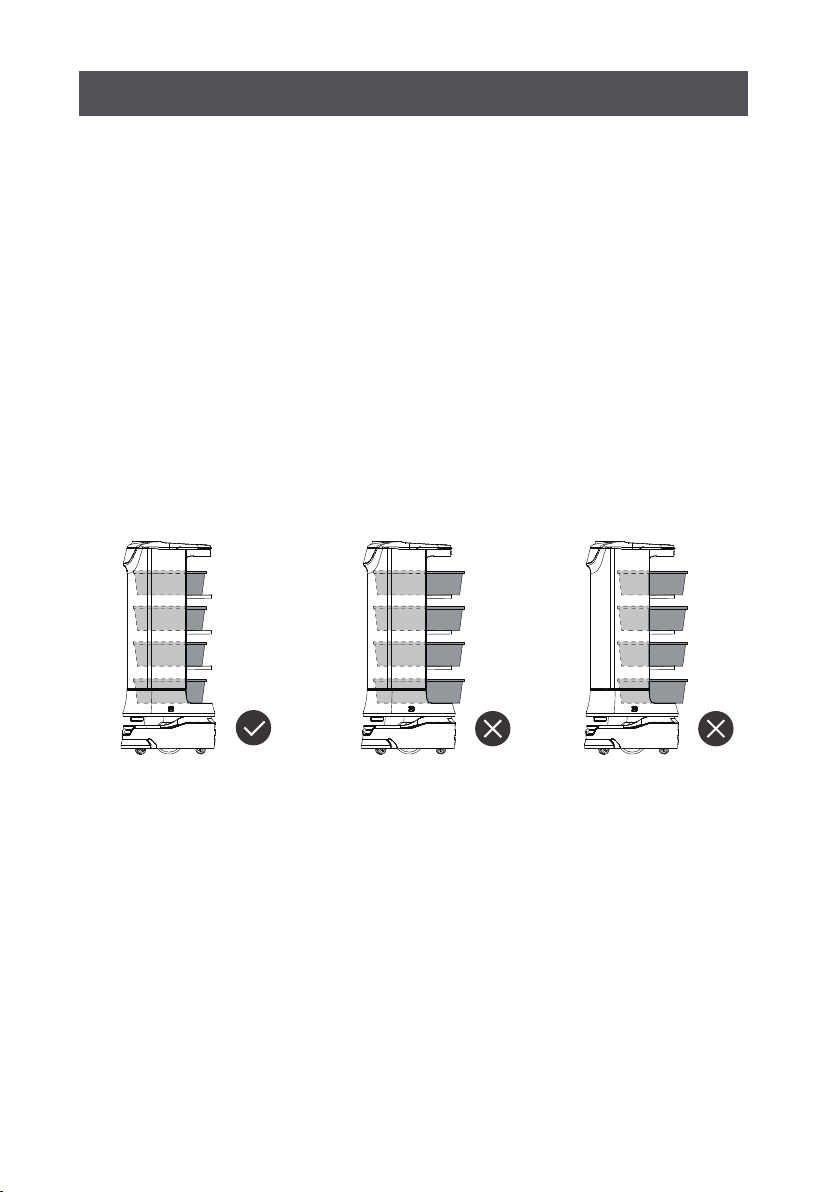
1. DO NOT place any item with weight over the load of the tray: 15kg/tray(standard)
2. Tap “Return” button, the robot will return to the dishwashing room. The user needs
to judge whether the robot can go to the next tableware collection point according to
the loading situation of the robot. Tap any button and the robot will go there, so
please finish placing the item before tapping the screen button.
3. DO NOT pick or place items while the robot is running, if necessary, tap the screen,
or press the physical button on top to pause before picking or placing, the pause time
in cruise mode is 10s, and 20s in other modes, the robot will automatically resume
moving after the pause.
4. DO NOT press hard on the screen or tap the screen.
5. DO NOT pull the robot during operation.
6. DO NOT push the robot backwards while the robot is powered on.
7. The item or box shall NOT exceed the size of the tray, otherwise the sensor may be
blocked and the robot may not move properly.
8. In the event of a collision, please cancel the current task or pause, re-enter the task, DO
NOT artificially block the robot.
9. In the absence of special custom-made trays, it is not recommended in principle to
deliver soup with PuduBot.When using, be sure to prevent the soup from being splashed
and being scalded by the hot water.
10. Pay attention to the change of state of the robot during its travel, please avoid the
robot when it is carrying hot tableware or soup pot to prevent collision with the robot and
high temperature burns.
11. The top camera is used for precise positioning of the robot, DO NOT block it with a
cover during starting and running.
12. DO NOT tap or make other actions to the robot, otherwise it may easily cause
equipment damage.
Instructions for use
Safety Instruction
4
1. The robot is suitable for use in flat environments such as floors, tiles, and thin carpets, it
is not suitable for use in environments where there are steps, the slope is too large, or the
environment is too tight.
2. It is not recommended to use the robot on wet or obviously watery ground.
3. Any kind of debris such as the power cord that has been scattered on the ground may
catch or wrap the robot, be sure to remove it before use.
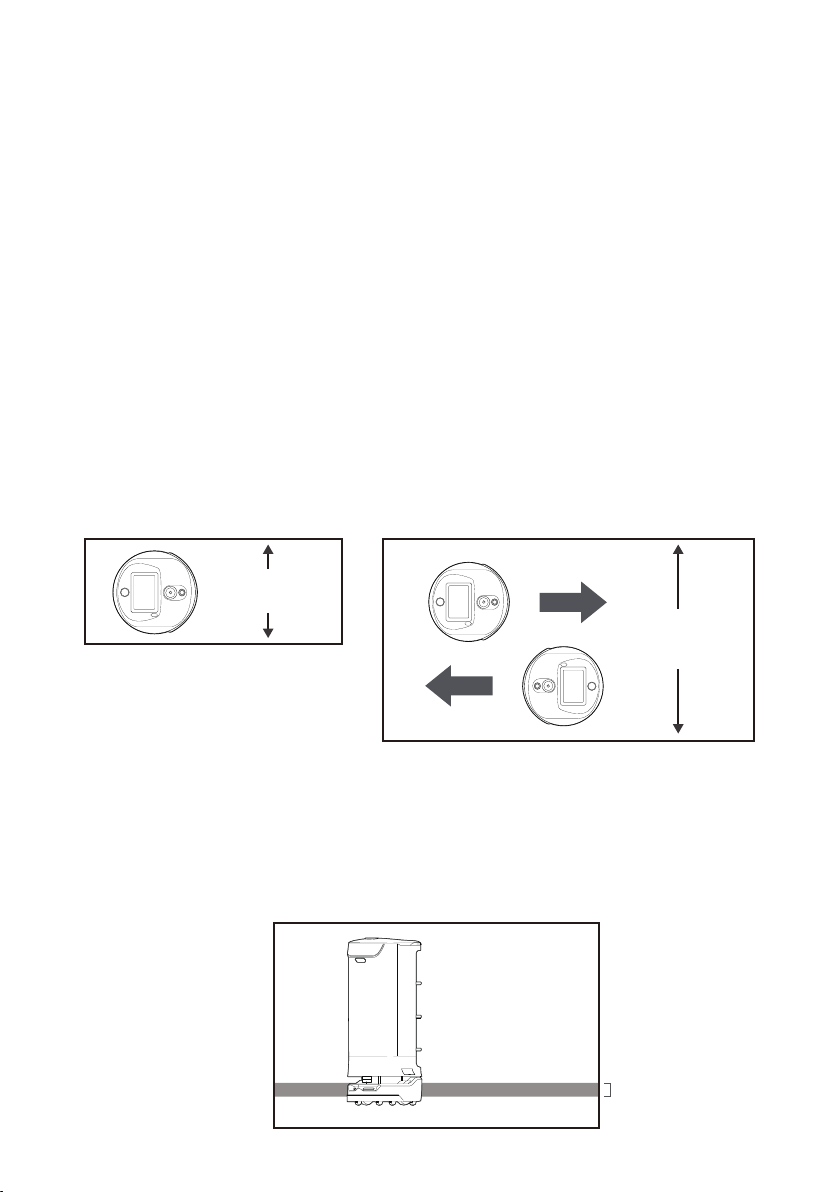
4.The use of this product in the case of obvious protrusions such as sills may cause
the items to sprinkle, please make sure that the height of the protrusions is within
1cm.
5. The minimum travel width of the robot should be greater than 80cm, the width of the
long pass should be greater than 1m; if the width is greater than 2m, two robots can be set
to travel side by side in opposite direction (the specific width is evaluated by the technical
staff based on the actual scenario), otherwise it will move by making the way; the
standard entrance of the kitchen should be greater than 1.2m, and less than 1.2m may
cause certain human-machine congestion.
6. The pure black (such as skirting), mirror surface (such as wall), or full transparency
(such as floor-to-ceiling glass) items within 16~22cm from the ground, it may interfere
with the robot radar reflection, causing the robot to move abnormally, and it may be
necessary to make some modifications to the site so that the radar can reflect (such as
applying stickers).
Environmental notes
16-22cm
5
Minimum pass
width is 0.8m
Minimum pass
width is 2m
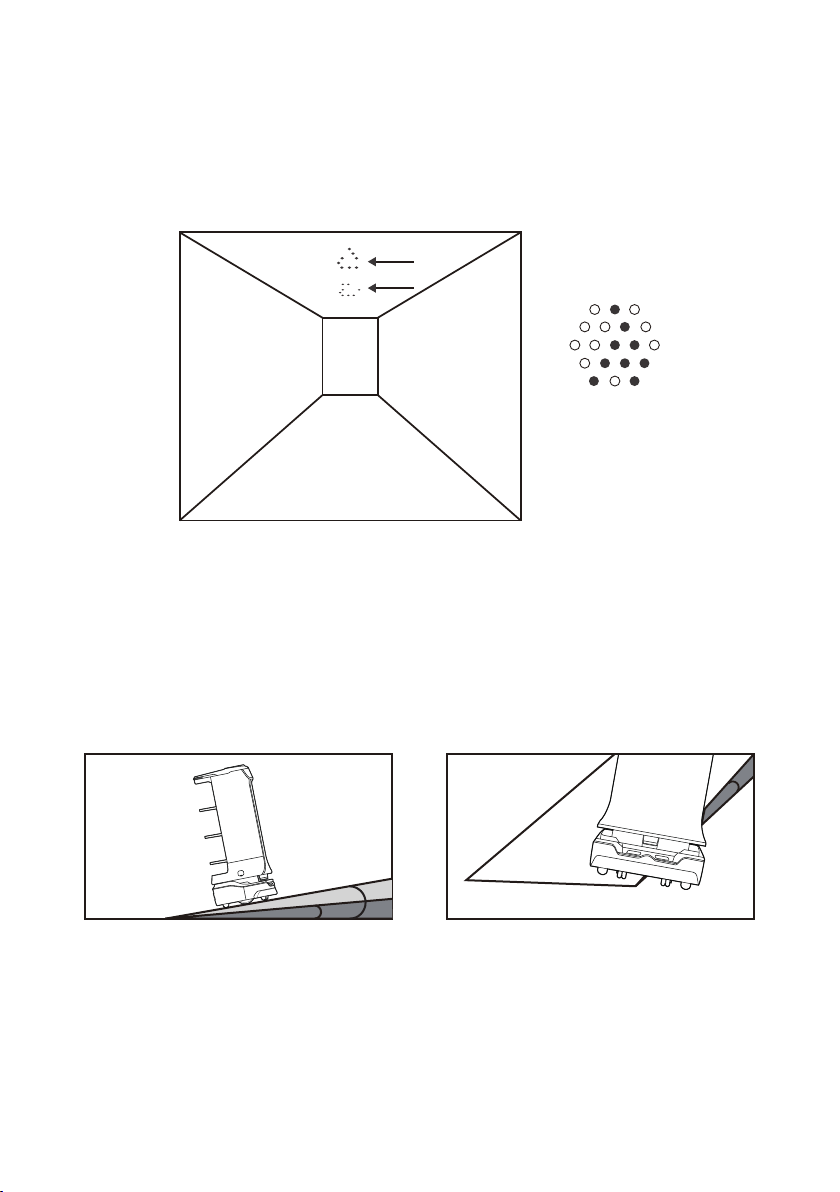
7. The ceiling height is within the range of 2-8 meters (higher or lower may require
technical evaluation); taking the height of 3 meters as an example, it is necessary to apply
a graphic mark every 2 meters or so, there is no lighting fixture or other strong light source
in the 30cm area around the graphic mark. (Data for specific interval needs to be provided
by Technology Dept.)
8. The designed maximum climbing angle of the robot is 7.5°, but in order to prevent the
dishes from toppling, it is recommended that the slope of the dishes is within 5º; to
prevent possible risks caused by the robot slipping back and forth, avoid pausing the
robot while it is going uphill; to prevent the robot from falling accidentally on the slope,
the width of the slope should not be less than the minimum passing width of 0.80cm, and
the rollover angle should not exceed 5°
The gradient recommended for carrying dishes
should be within 5ºand not exceed 7.5º at most
Marker
5º
5º
7.5º
6
是
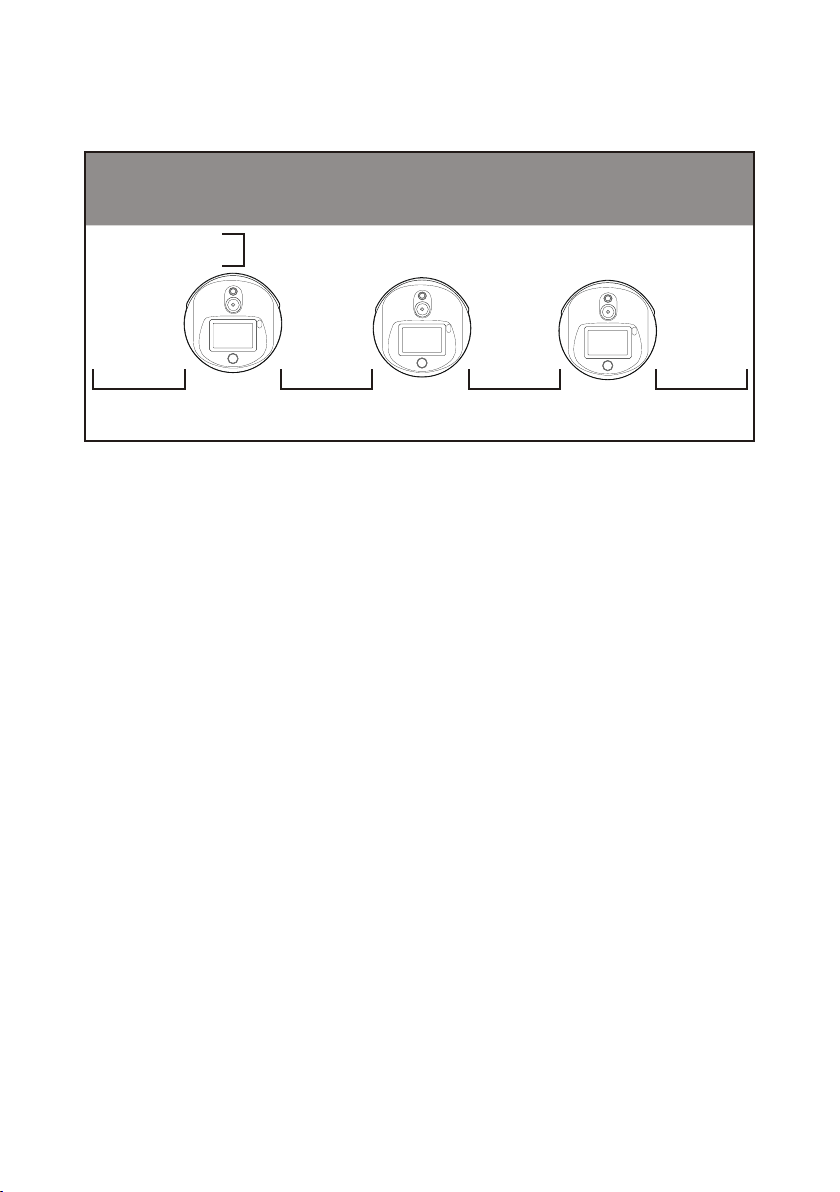
9. There is a 35cm space between the two robots placed side by side at the standby point,
and a clearance of 15cm from the rear wall and 35cm from the side wall.
10. It is necessary to add fences or other blocking protection at the locations, such as
the edge of the stairs and entrance of the downhill, where there is a risk of the robot
falling.
15CM
35CM
35CM 35CM 35CM
1. When the remaining power of the robot is less than 20%, please charge it in time,
long-term operation with low power may shorten the service life of the battery.
2. Before charging, please make sure that the battery of the robot is installed in the
robot,and it is forbidden to charge the robot without battery.
3. It is strictly forbidden to remove the quick detachable battery during charging.
4. It is strictly forbidden to remove the quick detachable battery when the power is on.
5. When charging is finished, please disconnect the power supply in time. Do not charge
the machine for a long time when the machine power is full.
6. If the robot is not used for a long time, please lock the robot through the key switch and
cut off the power supply to protect the battery.
7. It is necessary to use the battery and charging equipment specially provided by the
original factory. It is strictly prohibited to use non original charger to charge the robot.
8. Charge the main engine with power voltage marked on the charger nameplate.
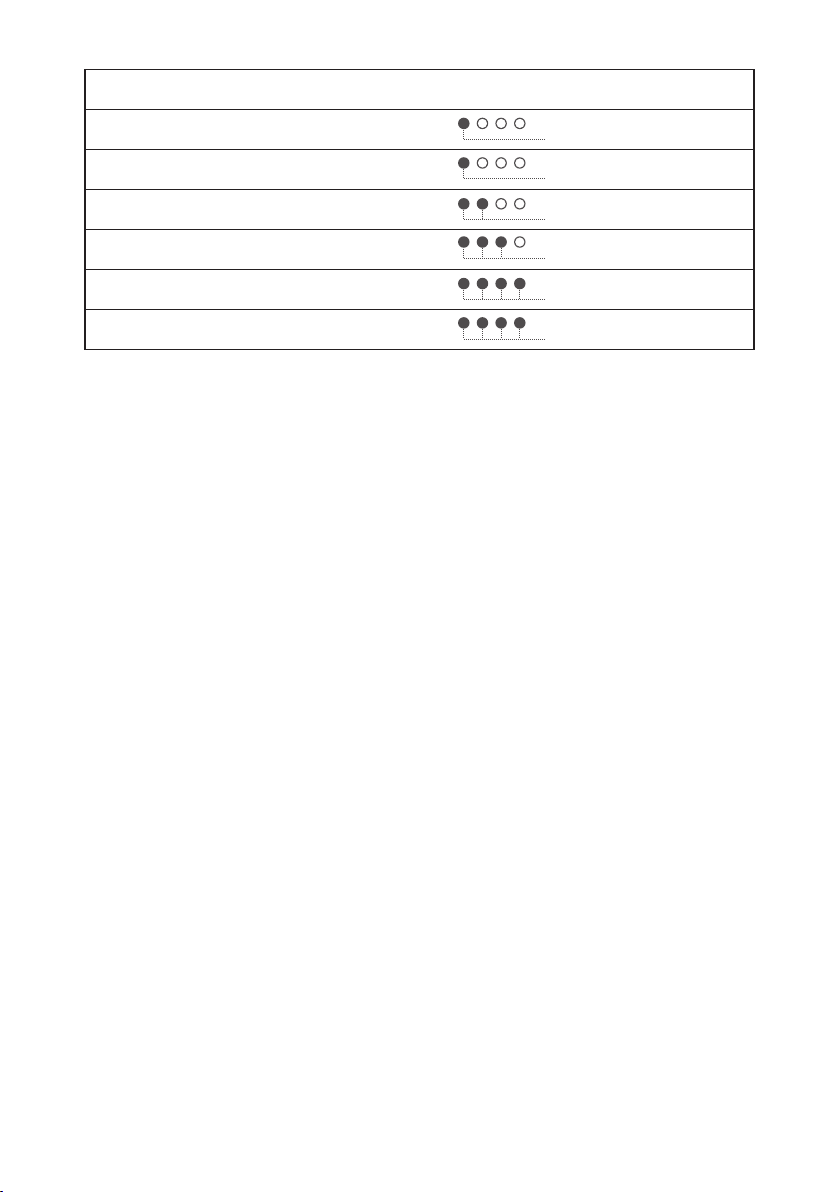
9. The quick detachable battery can be charged only by the original charger.The battery
charging progress can be notified by the lights,the details is below:
Power and power requirements
7
10. Please make sure that the robot is power off before changing the battery and it is
strictly prohibited to change the battery when robot is NOT power off.
11. Please make sure the input voltage is fit for the requirement voltage, whitch may
damage the charger if not.
12. Please protect the charging line carefully and do NOT pull or twist the line.
13. Please designate a person in charge to charge the machine. Do not charge the robot or
the battery alone without being on duty.
14. DO NOT place the machine near flammable and explosive objects to charge.
15. The storage and charging position of the robot should be kept dry and at normal
temperature. It is strictly prohibited to place the machine and charger in the high-tem-
perature area (> 40℃), and water is strictly prohibited to enter the machine or charger.
16. It is strictly prohibited for the charger to collide with external objects and cause
damage to the charger.
17. If the charger is found damaged and the charging current is abnormal, please replace
the charger in time.
18.If you receive the robot alarm, please disconnect the charging device immediately.
8
Current battery remaining capacity
0%~10%
10%~25%
25%~50%
50%~75%
75%~90%
90%~100%
Red
Light Mode
Blue
Blue
Blue
Blue
Green
1. DO NOT place any open flame on the tray, and DO NOT place any flammable solids,
gases or liquids.
2. It is forbidden to do cleaning and maintenance work when the machine is powered on.
3. To ensure safety, it is recommended to adjust the robot speed to medium or below, and
it is forbidden to play in front of the robot to avoid unnecessary injury.
4. Temporary tray loading adjustment is prohibited during the robot's travel, all opera-
tions should be performed after clicking the screen to make the robot pause.
5. When the robot delivers food to the designated table number area, DO NOT perform the
operation such as picking up the food before the machine body is stopped, so as to avoid
the loss of food or personal injury caused by accidental collision.
6. If the robot is going away and the screen operation is invalid, or other emergency
situations occur, please use the toe to kick the emergency switch at the charging port.
7. This product is a wheeled robot, which is limited to indoor flat environment (smooth
ground, slope less than 5 degrees, protrusions not higher than 1cm), DO NOT use it in
outdoor environments (such as open balconies) or on rugged floors (such as stairs).
8. DO NOT use it in an environment where the ambient temperature is above 50°C or
below 0°C, or if there is any liquid or viscous material on the floor.
9. Please put away all kinds of wires on the ground in the environment before use to avoid
dragging when the main unit is running. Remove sharp objects on the ground (such as
decoration waste, glass, nails, etc.) before use to avoid damage to the machine chassis.
Safety instructions
* Our company does not assume any responsibility for all accidents caused by improper operation.
9
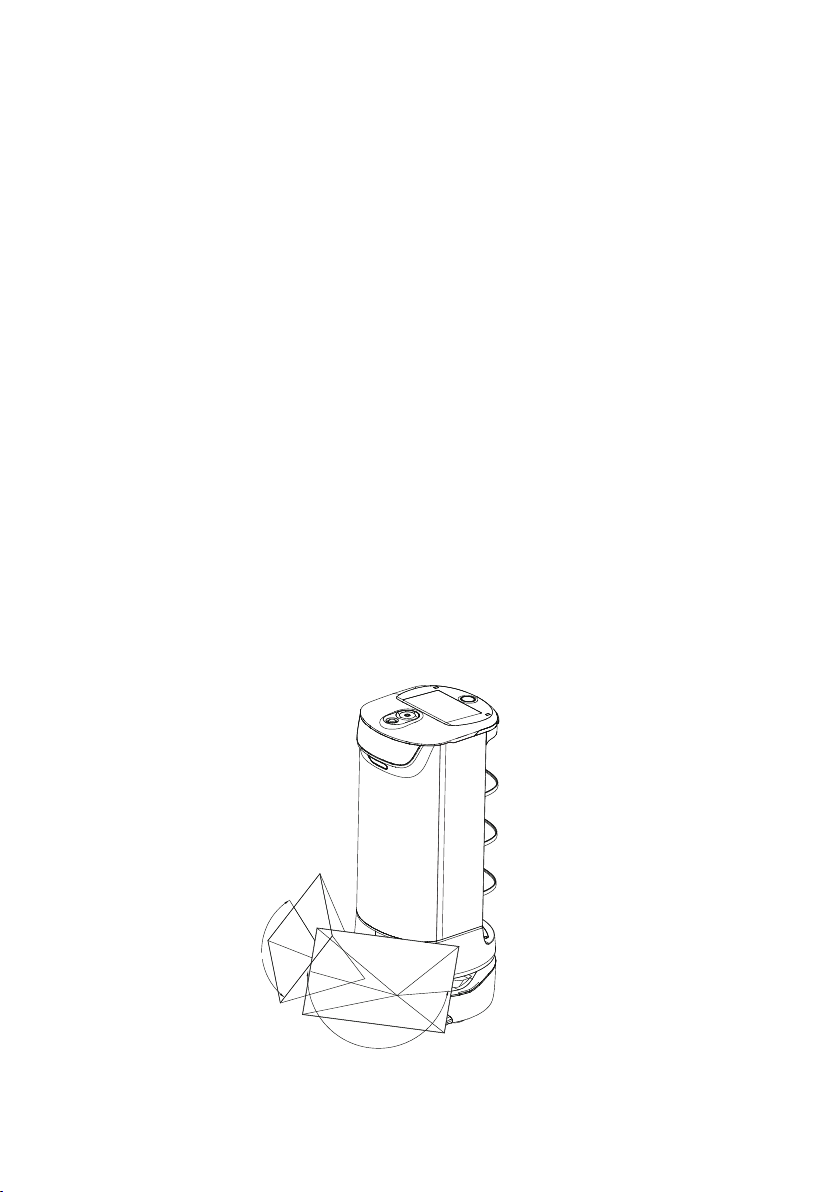
87°
87°
Altri manuali per HolaBot HL100
1
Questo manuale è adatto per i seguenti modelli
3
Indice
Altri manuali Pudu Robotica

Pudu
Pudu Puductor Robot Manuale utente

Pudu
Pudu PuduBot PD9 Anti-sunlight Manuale utente

Pudu
Pudu BellaBot BL100 Manuale utente

Pudu
Pudu PuduBot PD1 Standard Manuale utente

Pudu
Pudu SwiftBot SWFD01 Manuale utente

Pudu
Pudu PuduBot Manuale utente

Pudu
Pudu HolaBot HL100 Manuale utente

Pudu
Pudu Puductor2 PJ1 Standard Manuale utente

Pudu
Pudu BelleBot BL100 Manuale utente


