
PXM PX227-L0 Manuale utente

User manual

1 Description...................................................................................................4
2 Safety conditions........................................................................................5
3 Connectors and control elements...........................................................6
4 Programming..............................................................................................7
4.1 Button features............................................................................................................ 7
4.2 nformation parameters............................................................................................. 7
4.3 Setting the DMX address........................................................................................... 8
4.3.1 Setting the DMX address – L0 version...........................................................9
4.4 Characteristics of the output channels................................................................10
4.4.1 Characteristics of the output channels – version L0.................................1
4.5 Response to the loss of DMX signal.....................................................................14
4.6 Smoothing function..................................................................................................18
4.7 Operation mode........................................................................................................ 19
4.8 Screen blanking.........................................................................................................20
4.9 Default settings and device errors.........................................................................21
4.9.1 Restore default settings..................................................................................
4.9. Error message.................................................................................................. 3
5 Mounting...................................................................................................24
6 Menu scheme...........................................................................................25
7 Menu scheme – L0 version....................................................................26
8 RDM – available parameters..................................................................27
9 Device update...........................................................................................29
10 DMX signal connecting.........................................................................30
11 Connection scheme..............................................................................31
12 Dimensions.............................................................................................32
13 Technical data........................................................................................33

!"#"$ % $ "&$
& '
#(& #&'#'
$)*+,-.
//$)*+
01! "-2
'3./-/,
" 4 5&6"'&
777'&6"'&
8'
''
/

1 Description
" &6- !9'
$ !$&- ! !
!9&7 :;/<'
$$ "&$$ ! !7
$&!" !'
$ $:&!""&"7$% $&$
$$"!9-'= " &
: !" & !$$'
&$ !$&$
" !/-""> $ &7$:!9.
'
?"7 ',@&&8&
"&"$'
>1AB7 !"&& $ " "
2'
.

2 Safety conditions
$ &7$:7!C9.D7@
&7 !:$ ! $4
' $ "$9.7 : !
& :"& 7 $'
' E$$&$! " $
"$"!'
/' $"! !:$@ $&$7
$" $'
.' 1: $$ ! !'
-' E& $ & !:"$
7 &7&&:'
,' $ :&$! 7 7$
C $'
' E$$#@& :$&& !@$ $$'
' $ $ &7 " $ :6$ !
2<'
2' $ $ &7 "&73F
!3.F'
' 7 $"&:97&7 '
-

3 Connectors and control elements
&
! !A
$ &:
A
#:
&
&
.
&7&&:
,
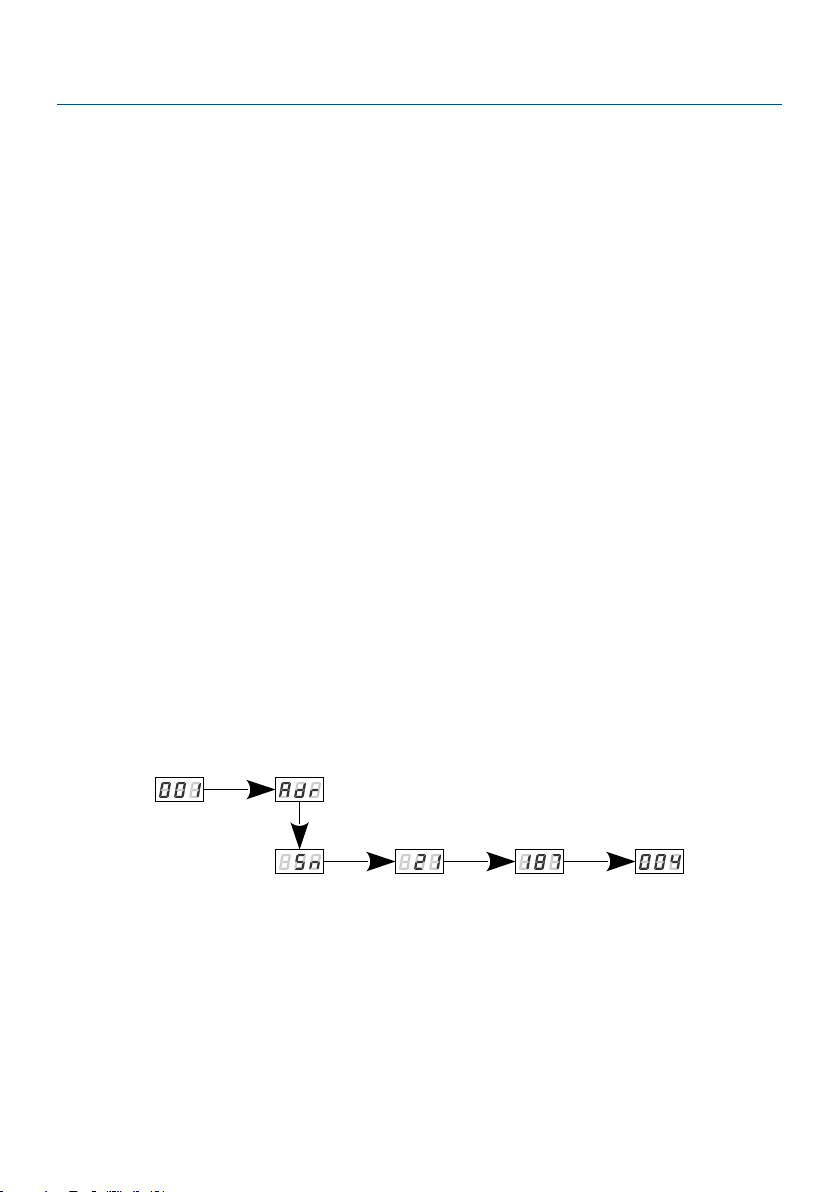
4 Programming
E7 !@$ &:7 &!"$
" &$GL0H' enter!" "@
$ &:7 ALLAdr L0' prev next
&!"" !"$&enter%"'
4.1 Button features
esc 96 :&!""$&"7 !!
#: !"
prev 9#7"$
next 9# !"
enter 9#$ &!"" ! $%"
4.2 Information parameters
@$ &: "
$ '
ENTER
6 x NEXT
ENTER ENTER ENTER
A6"& "4.
>1AB &" : 7 L0&'

4.3 Setting the D X address
"$ 7$$
$ 7 !9--'
$$!&4
' IAdr '
' Jnextprev$ $$$'
enter%"'
ENTER ENTER ENTER
NEXT
$$ $ $:4
' IInd '
' Jnextprev&$ #
enter'
/' Jnextprev$ $$$'
enter%"'
ENTER
ENTER
NEXT
NEXT
ENTER
NEXT
ENTER

4.3.1 Setting the DMX address – L0 version
@$$"
!9-G7Cbn& !"$ 8chH@ "
$$@'!'-@9/7 #
:$$-@-$-'.97 !$
$$-'
$$ L0 GH@ 8ch & !"$4
ENTER ENTER
NEXT
E$$ :@ L0 @: !CbnG& !"$H
AdvG$$H$$74
•SEQ9C9$$"!9
-@$6 !$6$$'
" $$@6"&4-@
9-7 # :$$-@-2@-@-
$-',97 !$$$-'
•ALL9 !$$@
•Ind9 $ $ !$$'
2
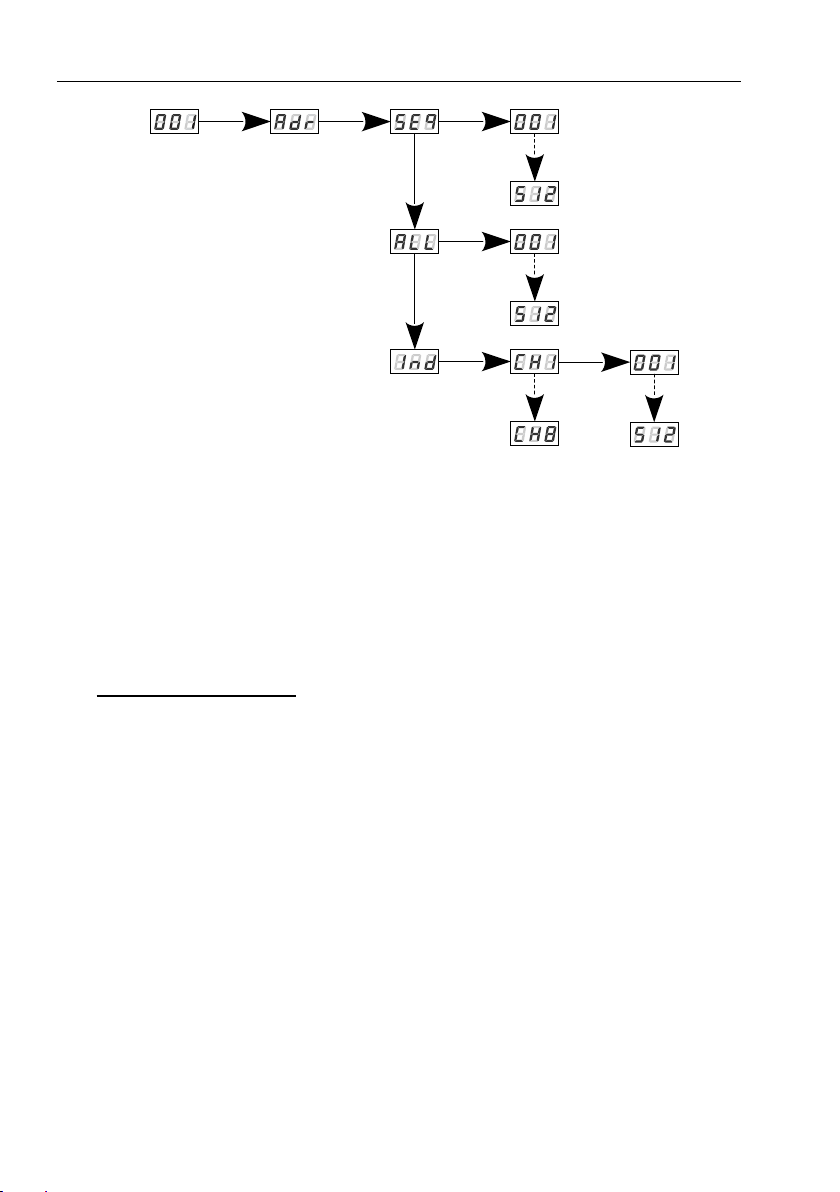
$$ L0 GH Adv & "$4
ENTER ENTER
NEXT
NEXT
NEXT
ENTER
ENTER
NEXT
ENTER
NEXT
ENTER
NEXT
>1AB" 7$ L0 $ &:$$ !
$ &'
4.4 Characteristics of the output channels
E &"4
•Lin9 9@
•FLu9 9@
•S_P97 ! GH@
•uSr9$%$ @ @! !"MinMax'
" ""$"6 "" !"'
Questo manuale è adatto per i seguenti modelli
1
Indice
Altri manuali PXM Sistema I/O

Manuali Sistema I/O popolari di altre marche

WAGO
WAGO 750-344 Manuale utente

Teknim
Teknim TWM-1887 Manuale di istruzioni

Intelligent Appliance
Intelligent Appliance IA-2662-E Manuale utente

BERGHOF
BERGHOF ECC DIO 16/16 Manuale di istruzioni

Advantech
Advantech PCM-27J3AU Manuale di installazione e funzionamento

Festo
Festo CP-E08-M12-CL Manuale utente


