
Quatech MPAP-100 Manuale utente

Syncdrive Plus
Communications Software
User’s Manual
QUATECH, INC.
662 Wolf Ledges Parkway
Akron, Ohio 44311
Toll free: 1-800-553-1170
TEL: (330) 434-3154
FAX: (330) 434-1409
http://www.quatech.com
Syncdrive Plus
User’s Manual P/N: 940-0184-100
CONNECT WITH RELIABILITY

Copyright Copyright © 1984 - 2003, Quatech, Inc. All rights are reserved. The
information contained in this document cannot be reproduced in any form
without the written consent of Quatech, Inc. Any software programs that
might accompany this document can be used only in accordance with any
license agreement(s) between the purchaser and Quatech, Inc. Quatech,
Inc. reserves the right to change this documentation or the product to
which it refers at any time and without notice.
Trademarks QUATECH® is a registered trademarks of Quatech, Inc. IBM PC™,
PC-AT™, PS/2™, OS/2™, and Micro Channel™ are trademarks of
International Business Machines Corporation. Windows™ is a trademark
of Microsoft Corporation. Other product and brand names listed in this
manual may be trademarks of their respective owners.
Disclaimer The information in this manual is believed to be accurate and reliable at
the time of posting. Notwithstanding the foregoing, Quatech assumes no
responsibility for any damage or loss resulting from the use of this
manual, and expressly disclaims any liability or damages for loss of data,
loss of use, and property damage of any kind, direct, incidental or
consequential, in regard to or arising out of the performance or form of
the materials presented herein or in any software program(s) that may
accompany this document.
Changes or modifications to this device not explicitly approved by
Quatech will void the user's authority to operate this device.
Feedback Quatech, Inc. encourages and appreciates feedback concerning this
document. Please send any written comments to the Technical Support
department at the address listed on the cover page of this manual.

Quatech Syncdrive Plus User’s Manual Table of contents
Rev 01 (2/6/2003) Page i
Table of contents
Introduction----------------------------------------------------------------------------------------------------------------------- 1
System Requirements ---------------------------------------------------------------------------------------------------- 1
Installing Syncdrive plus------------------------------------------------------------------------------------------------ 2
Synchronous communication with Syncdrive Plus-------------------------------------------------------------------- 6
Understanding BIT-synchronous formatting---------------------------------------------------------------------- 6
Operational overview----------------------------------------------------------------------------------------------------------- 7
Data handling--------------------------------------------------------------------------------------------------------------- 7
Transmitting frames------------------------------------------------------------------------------------------------- 7
Receiving frames------------------------------------------------------------------------------------------------------ 8
Clocking parameters------------------------------------------------------------------------------------------------------ 8
Include file structure------------------------------------------------------------------------------------------------------ 9
Operating under Windows 2000/XP---------------------------------------------------------------------------------- 9
Building Syncdrive Plus applications -------------------------------------------------------------------------- 9
Terminating applications ------------------------------------------------------------------------------------------ 9
Tips and Techniques------------------------------------------------------------------------------------------------- 9
Syncdrive Plus data structures --------------------------------------------------------------------------------------------10
Syncdrive Plus application programming interface------------------------------------------------------------------16
Calling convention--------------------------------------------------------------------------------------------------------16
Return values --------------------------------------------------------------------------------------------------------------16
Examples--------------------------------------------------------------------------------------------------------------------17
Command reference------------------------------------------------------------------------------------------------------17
Using example programs-----------------------------------------------------------------------------------------------------29
Source code------------------------------------------------------------------------------------------------------------------29
Executable files------------------------------------------------------------------------------------------------------------29
Descriptions of example programs-----------------------------------------------------------------------------------29
LPBCKBI2K ----------------------------------------------------------------------------------------------------------29
FDBCKBI2K----------------------------------------------------------------------------------------------------------29
SENDBI2K ------------------------------------------------------------------------------------------------------------29
RECBI2K---------------------------------------------------------------------------------------------------------------30
THREADRX2K-------------------------------------------------------------------------------------------------------30
THREADTX2K-------------------------------------------------------------------------------------------------------30
Crossover cable-------------------------------------------------------------------------------------------------------30
Troubleshooting-----------------------------------------------------------------------------------------------------------------31
Verify that the hardware is configured properly ----------------------------------------------------------------31
Check the Syncdrive Plus configuration ---------------------------------------------------------------------------31
Check the clock sourcing------------------------------------------------------------------------------------------------31
Know the speed limits---------------------------------------------------------------------------------------------------31
Error codes -----------------------------------------------------------------------------------------------------------------------32
Appendix A-----------------------------------------------------------------------------------------------------------------------33
Definitions ------------------------------------------------------------------------------------------------------------------33

Quatech Syncdrive Plus User’s Manual Table of contents
Rev 01 (2/6/2003) Page ii
Table of figures
Figure 1 - Found new hardware prompt....................................................................................................2
Figure 2 - Welcome screen ..........................................................................................................................2
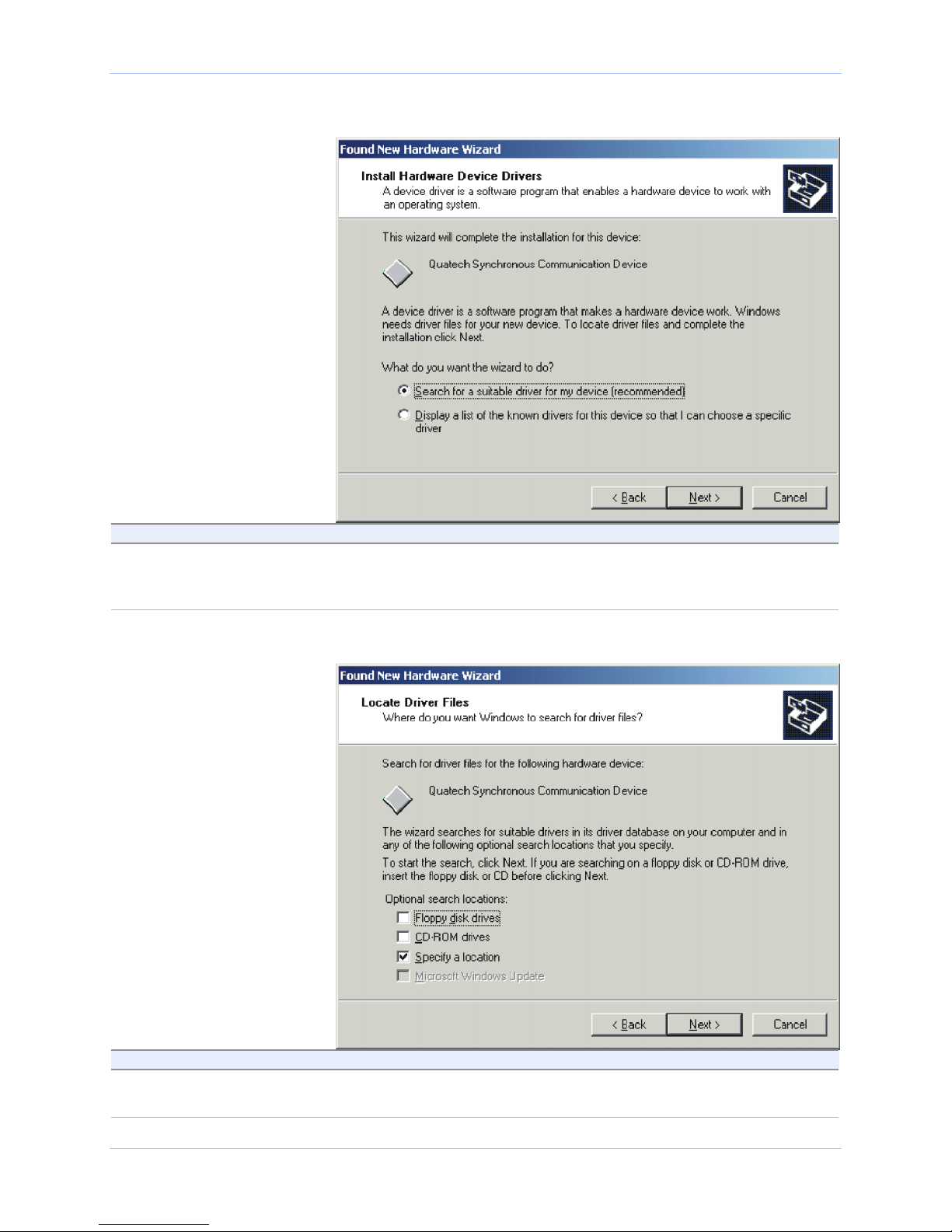
Figure 3 - Install Hardware Device Drivers screen...................................................................................3
Figure 4 - Locate Driver Files screen.........................................................................................................3
Figure 5 - Insert installation disk prompt .................................................................................................4
Figure 6 - Locate File screen.......................................................................................................................4
Figure 7 - Driver Files Search Results screen...........................................................................................5
Figure 8 - Completing the Found New Hardware Wizard screen............................................................5
Figure 9 - Syncdrive Plus bit-synchronous frame format.........................................................................6
Figure 10 - RS-232 Crossover cable pinouts............................................................................................30
Figure 11 - RS-422/485 Crossover cable pinouts.....................................................................................30

Quatech Syncdrive Plus User’s Manual Introduction
Rev 01 (2/6/2003) Page 1
Introduction
Syncdrive Plus is a synchronous communications software driver
package that helps users of Quatech synchronous communication
hardware to develop their application software.
The Syncdrive Plus driver package includes these features:
! Multiple communication channels using multiple MPA-series
adapters
! Support for bit-synchronous (SDLC, HDLC) communications
! User-control of most communication parameters
! Relieves programmers of the burden of directly programming the
synchronous communications hardware
! User can change or upgrade synchronous communication
hardware with minimal modifications to the application software
! Support for all Quatech MPA-series PCI bus and PCMCIA
adapters:
* MPAP-100: Multi-protocol RS-232 synchronous serial card
* MPAP-200/300: Multi-protocol RS-422/485 synchronous serial
card
* MPAC-100: Single port RS-232 synchronous board.
! Versions for Windows 2000 and Windows XP
Written specifically for use with C, Syncdrive Plus is also compatible
with other languages that support C-type subroutine interfaces.
System Requirements
The system requirements are as follows:
! PC running either Windows 2000 or Windows XP
! Available PCI slot or PC Card slot
We recommend that you install the latest service packs.
All other requirements are the same as for the respective operating
systems.
Note: For on-line technical
support, see Quatech’s Web site:
http://www.quatech.com/technical
.htm
Note: See Quatech’s Internet
site for the latest drivers and
updates:
http://www.quatech.com/.

Quatech Syncdrive Plus User’s Manual Introduction
Rev 01 (2/6/2003) Page 2
Installing Syncdrive plus
Follow this procedure to install your Quatech Syncdrive Plus
synchronous communication software.
Step Procedure Description
! Step 1 Insert the Quatech installation CD-ROM
into your CD-ROM drive. This is the CD that shipped with the
MPAX-XXX adapter.
! Step 2 Insert the MPAX-XXX adapter into any
available PC Card socket. The Found New Hardware prompt
displays briefly, followed by the Found
New Hardware Wizard’s Welcome screen.
Figure1- Foundnewhardwareprompt
Figure2-Welcomescreen
Step Procedure Description
! Step 3 Press Next to continue. The Install Hardware Device Drivers
screen displays.
Quatech Syncdrive Plus User’s Manual Introduction
Rev 01 (2/6/2003) Page 3
Figure3- InstallHardwareDeviceDriversscreen
Step Procedure Description
! Step 4 Select the Search for a suitable driver for
my device (recommended) option.
Press Next to continue.
The Locate Driver Files screen displays.
Figure4-LocateDriverFilesscreen
Step Procedure Description
! Step 5 Select the Specify a location option.
Press Next to continue. The Insert installation disk prompt
displays.

Quatech Syncdrive Plus User’s Manual Introduction
Rev 01 (2/6/2003) Page 4
Figure5- Insertinstallationdiskprompt
Step Procedure Description
! Step 6 Browse to the correct drive location on your
CD-ROM drive.
Click OK to continue.
The complete path is E:\Synchronous
Adapters\Software\Windows 2000,
XP\Syncdrive Plus. Replace E: with your
CD-ROM drive designation.
The Locate File screen displays.
Figure6- LocateFilescreen
Step Procedure Description
! Step 7 Select the Quainf.inf file and click Open. The Driver Files Search Results screen
displays, showing the path to the Quainf.inf
driver.

Quatech Syncdrive Plus User’s Manual Introduction
Rev 01 (2/6/2003) Page 5
Figure7-DriverFilesSearchResultsscreen
Step Procedure Description
! Step 8 Make sure the directory path ends at the
Quainf.inf file. Click Next to continue. The Completing the Found New Hardware
Wizard screen displays.
Figure8- CompletingtheFoundNewHardwareWizardscreen
Step Procedure Description
! Step 9 Click Finish to continue. The Installation Wizard completes the
installation of the Syncdrive Plus driver.
Note: You can find your
Syncdrive Plus adapter listed
in the Windows Device
Manager under Synchronous
Communication

Quatech Syncdrive Plus User’s Manual Synchronous Communication with Syncdrive Plus
Rev 01 (2/6/2003) Page 6
Synchronous communication with Syncdrive Plus
Most data communications in personal computers is handled
asynchronously using standard communication ports. Asynchronous
communication transfers data one character at a time with
significant overhead due to the addition of the start and stop bits
required for each character. These additions can decrease the rate of
data transfer by 20% or more.
In contrast, synchronous communication transfers data in a format
referred to as a frame. Each frame consists of a block of data plus a
fixed amount of overhead from the insertion of control, synchronization,
and error detection characters. Since the amount of overhead is
independent of the data block size, the percentage of the total
transfer time devoted to the frame overhead diminishes as the size of
the data block increases.
Synchronous communication is further divided into bit-synchronous
and byte-synchronous transfers. Bit-synchronous transfers treat the
data block as a series of data bits with no specific character
boundaries. Byte-synchronous transfers treat the data block as a
series of fixed-length characters.
The first release of Syncdrive Plus transfers data in bit-synchronous
mode only. The bit-synchronous mode can be used to implement such
protocols as SDLC or HDLC. Syncdrive Plus does not implement any
specific protocol itself, but supports most protocols implemented by
the application software. Future releases of Syncdrive Plus will add
support for byte-synchronous modes such as BISYNC.
Understanding BIT-synchronous formatting
Syncdrive's bit-synchronous mode generates a frame formatted
according to the scheme shown below.
Figure9- SyncdrivePlusbit-synchronousframeformat
flag data CRC flag
The hardware uses the frame's start flag and end flag characters for
synchronization purposes. When the application transmits a block of
data, Syncdrive Plus automatically appends these flag characters to
the frame. When receiving a frame, the driver automatically removes
these flag characters from the frame before returning it to the
application.
Syncdrive Plus uses the frame's CRC bytes for error detection
purposes. When transmitting a block of data, it automatically
generates and transmits the CRC after it sends all of the data. When
receiving a frame, Syncdrive Plus automatically checks the CRC to
determine if the frame was corrupted. If a CRC error occurs,
Syncdrive Plus returns an error code (see MPA_GetData() return
values).
Note: Syncdrive Plus uses
synchronous communication
for faster data transfer rates
with less overhead.
Altri manuali per MPAP-100
1
Questo manuale è adatto per i seguenti modelli
3
Indice
Altri manuali Quatech Software

Manuali Software popolari di altre marche


PS Audio
PS Audio PowerPlay Manuale del proprietario

Brady
Brady LOCKOUT PRO 3.0 Manuale di servizio

Avaya
Avaya Interaction Center Manuale utente

Texas Instruments
Texas Instruments TI-83 Plus Silver Edition Manuale

Novell
Novell GROUPWISE 8 - INTERNET AGENT Manuale utente

Oracle
Oracle Application 9i Manuale utente

Acer
Acer RDM Manuale utente

Canon
Canon Vixia HF21 Manuale utente

Canon
Canon ZR950 Manuale utente

Samsung
Samsung Auto Backup Manuale utente

Polycom
Polycom Vortex EF2201 Istruzioni per l'installazione e il funzionamento

Brocade Communications Systems
Brocade Communications Systems Brocade 8/12c Manuale utente