
Radenso XP Manuale utente

XP
XPXP
XP
High Performance Long Range Radar Detector
High Performance Long Range Radar DetectorHigh Performance Long Range Radar Detector
High Performance Long Range Radar Detector
User
UserUser
User
Manual
ManualManual
Manual
© 2016 Radenso®

Pag
e
1
Radar Detector Radenso XP
Foreword
Congratulations on your new investment. The Radenso XP was designed to deliver class leading radar detection
performance on all radar bands coupled with the best false alert filtering in the industry. The built-in GPS
feature lets you loc out nown false alerts or you can mar your own Points of Interest for future alerts. The
world-class directional GPS database includes all nown Redlight- and speed cameras in North America and is
updated monthly. For radar alerts choose between standard bar graph display, Frequency display or Threat
display.
Radenso XP features:
LNA equipped antenna board for highest possible sensitivity on all bands
GPS enabled
RJ11 power connection
Bright Red OLED display
Selectable radar bands (X, K, Ka band)
Ka band segmentation (10 segments)
K narrow band
Selectable Ka POP radar band (ON/OFF)
Low power / low frequency K band detection
BSM / CAS filter to eliminate falsing from newer cars
Separate TSR filter to eliminate falsing from Traffic sensors
3-digit frequency display to accurately report detected radar frequencies
Multiple Threat display
AutoMute with selectable Mute volume
Low Speed muting (X and K band only)
MUTE Mode to MUTE K and X Band until manually unmuted
Highway, City and AutoCity Mode
AutoCity Mode with selectable speed increments and filter levels for each band
Fully directional world class RLC/speed camera database with free monthly updates
Free firmware / database updates for life
Voice alerts with 260 different messages
Alert frequency voice announcement
GPS loc outs
Test Mode (full sensitivity, no filtering, no signal lag)
6 driving mode selections (speed and compass, speed and time, speed and voltage, Voltage, Time, Speed)
VG2 undetectable / nearly undetectable by Spectre IV / Elite (less than 15 feet detection range)
Optional Direct Wire power cord available
1 year manufacturer warranty.

Quick Start up Guide
To start using your Radenso XP radar detector follow these easy steps:
1. Slide the windshield mounting brac et into the Quic Mount slot at the front of the radar detector.
2. Plug the RJ11 plug of the power cord power jac on the Radenso XP on the left side and connect the large plug with
the 12V power soc et in your car.
3. Press the Power button (middle upper button on top of unit) for 2 seconds to turn on Radenso XP.
Unit will power up with a brief start-up sequence. After a few seconds, the Radenso XP will notify you
with a voice message that the satellite is connected.
4. Adjust the volume level by pressing the volume buttons "Vol +" or "Vol -" .
Change Default settings:
Radenso XP is now ready to go. If you want to change any of the default settings of your unit please refer to
the next pages.
Main functions of Radenso XP
The Radenso XP is a very powerful windshield mounted radar detectors. It's designed to protect the driver from
speeding tic ets/fines. The Radenso XP communicates with the driver in English by text and voice messages and
its main functions are the detection of microwave radars (X / K / Ka bands), laser guns, red light cameras and
fixed-speed cameras (GPS database).
Notifications:
When a radar signal is detected, the driver will be alerted by a visual text warning and a voice/tone alert. The
display and voice alert will indicate the detected radar band, frequency and signal strength. A beeping warning
tone will increase its intensity with increasing signal strength. The signal strength has 9 levels. GPS alerts are
reported by voice and text; for example "Speed Camera".
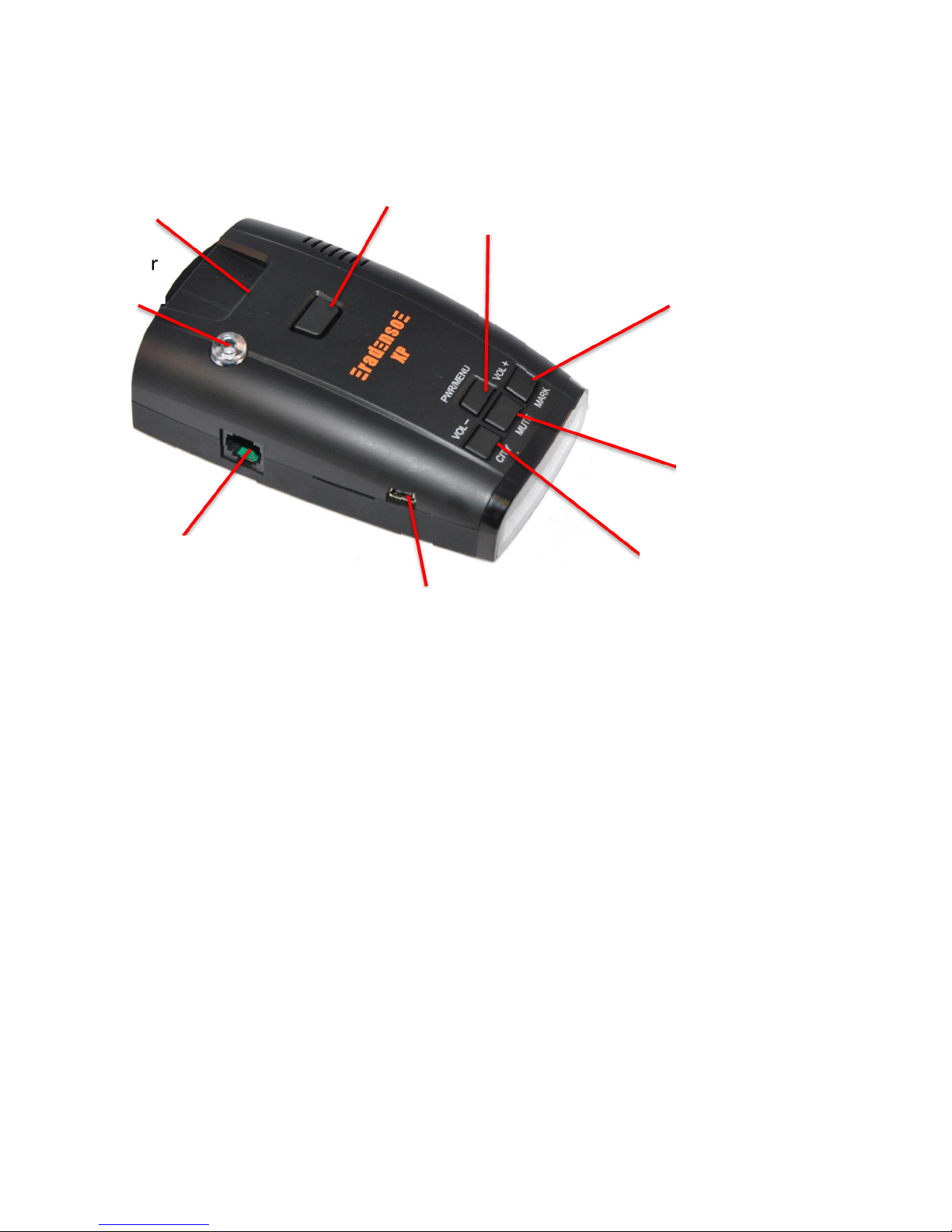
=============================================================================
Function of Control Buttons
=============================================================================
=============================================================================
Button Operation
=============================================================================
1. [ ITY]
1.1. Short press : Change City Mode( HIGHWAY -> CITY -> AUTO CITY )
1.2. Press and hold for 2 seconds : Volume Down
2. [MARK]
2.1. Short press : Add or delete User Point up to maximum 100 points, pressing button during RLC alert will
permanently MUTE the alert
2.2. Press and hold for 2 seconds : Volume Up (from 0 to 9 level)
3. [MUTE]
3.1. Short press : Change Mute Mode (Mute On <-> Mute Off ) (MUTE On will Mute all X and K signals)
3.2. Press and hold for 2 seconds : Add or delete Loc out location(200 points)
4. [POWER]
4.1. Short press : Power On/Off
4.2. Press and hold for 2 seconds to enter Menu Mode
Volume +
Mar POI
Quic Mount
slot
Release
Power /
Menu
Volume –
City Mode
Mute
GPS Loc out
RJ11 Power
Jac
360º Laser
Sensor
USB Port

=============================================================================
Menu Mode
=============================================================================
1. Press and hold POWER button for 2 seconds to enter Menu Mode.
2. Menu List (Beginner Mode )
Menu List Menu Setting
Brightness Mode Bright <-> Dim <-> Dimmer <-> Dar <-> Smart Dar
User Mode Beginner <-> Expert
X Band Mode On <-> Off
K Band Mode Wide <-> Narrow
Ka Wide Band Mode On <-> Off
Laser Mode On <-> Off
TSR Filter Mode On <-> Off
Driving Display Mode
Speed/ ompass
<
-
> Speed/Time <
-
> Speed/Voltage
<
-
> Voltage <
-
> Time <
-
> Speed
Unit Mode English <-> Metric
GMT Mode -12 ~ 0 ~ +12
Low Speed Mute Mode
Off
, 5, 10, 15, 20, 25, 30, 35, 40, 45, 50, 55
mph
or
Off
, 10, 20, 30, 40, 50, 60, 70, 80, 90 mph
User Point All Delete Mode
Loc out All Delete Mode
Firmware Version Mode
Database Version Mode
Factory Reset Mode
Exit
3. Menu List (Expert Mode )
Menu List Menu Setting
Brightness Mode Bright <-> Dim <-> Dimmer <-> Dar <-> Smart Dar
User Mode Beginner <-> Expert
X Band Mode On <-> Off
K Band Mode Wide <-> Narrow <-> Off
Ka Wide Band Mode On <-> Off
Ka1 Mode (33.392 - 33.704 Ghz) On <-> Off
Ka2 Mode (33.704 - 33.896 Ghz) On <-> Off
Ka3 Mode (33.886 - 34.198 Ghz) On <-> Off
Ka4 Mode (34.184 - 34.592 Ghz) On <-> Off

Ka5 Mode (34.592 - 34.808 Ghz) On <-> Off
Ka6 Mode (34.806 - 35.166 Ghz) On <-> Off
Ka7 Mode (35.143 - 35.383 Ghz) On <-> Off
Ka8 Mode (35.378 - 35.618 Ghz) On <-> Off
Ka9 Mode (35.595 - 35.835 Ghz) On <-> Off
Ka10 Mode (35.830 - 35.998 Ghz) On <-> Off
Laser Mode On <-> Off
POP Mode On <-> Off
BSM Filter Mode On <-> Off
TSR Filter Mode On <-> Off
AutoMute Mode 0% , 20%, 40%, 60%, 80%
UNIT Mode English <-> Metric
City Mode Filter
X Filter : 0 ~ 90% (Default 40%)
K Filter : 0 ~ 90% (Default 20%)
Ka Filter : 0 ~ 90% (Default 0%)
Low Speed Mute
& City Mode Speed Mode
Low Speed Mute Set :
Off , 5, 10, 15, 20, 25, 30, 35, 40, 45, 50, 55 mph
or
Off, 10, 20, 30, 40, 50, 60, 70, 80, 90 mph
City Speed Set :
10, 15, 20, 25, 30, 35, 40, 45, 50, 55, 60 mph
or
10, 20, 30, 40, 50, 60, 70, 80, 90, 100 mph
Display Mode Standard <-> Frequency <-> Threat
Driving Display Mode
Speed/ ompass
<
-
> Speed/Time <
-
>
Speed/Voltage
<
-
> Voltage <
-
> Time <
-
> Speed
GMT Mode -12 ~ 0 ~ +12
Red Light Camera Mode On <-> Off
Speed Camera Mode On <-> Off
Red Light & Speed Camera Mode On <-> Off
User Point Mode On <-> Off
GPS Warning Distance Mode Normal <-> Farther <-> Farthest
Voice Mode On <-> Off
Test Mode On <-> Off
User Point All Delete Mode
Loc out All Delete Mode
Firmware Version Mode
Database Version Mode
Factory Reset Mode
Exit

4. Menu ontrol buttons
4.1. [MARK] button: Toggle downward
4.2. [ ITY] button: Toggle upward
4.3. [POWER] button : change Menu setting or execute Menu function forward
4.4. [MUTE] button : change Menu setting or execute Menu function bac ward
5. Exit Menu
5.1. Select “Exit” in Manu
5.2. Press and hold POWER button for 2 seconds
5.2. Automatically exit Menu If there is no button operation in Menu mode for 20seconds.
=============================================================================
Factory Reset
=============================================================================
1. Select FACTORY RESET in the Menu to reset all settings to the factory defaults except GMT setting.
=============================================================================
User Setting Memory
=============================================================================
1. All features selected are retained in the memory.
2. Mute on is not stored in the memory so Unit stays Mute Off (Default) after Power Reset.
=============================================================================
GPS Connection Message
=============================================================================
: GPS Connection Message displays with a voice when GPS is initially connected after Power On.
=============================================================================
User Point
=============================================================================
1. Press [MARK] button to register or delete User point.
2. You can register up to 100 user points.
=============================================================================
User Point ll Delete
=============================================================================
You can select “User Point All Delete” in the Menu to delete all User points registered in the memory.

=============================================================================
larm Priorities
=============================================================================
1. POI Detect Alarm and POI Pass Alarm
2. Laser
3. Ka Band
4. K Band
5. X Band
6. POI Limit Speed Alarm
=============================================================================
POI lert ( DB Point / User Point )
=============================================================================
1. POI alert announces when DB Point or User Point is detected.
2. POI alert
2.1 Display POI alert icon, Distance to the POI and current driving speed with a voice alert. .
1) Red Light Camera or Red Light & Speed Camera
(-340ft : Distance to POI , 25mph : current driving speed )
2) Speed Camera
3) User Point
2.2. Display POI Pass message with a voice alert when passing by POI point.
1) Red Light Camera or Red Light & Speed Camera
2) Speed Camera
3) User Point
2.3. No alert goes off when exiting from POI area without passing by POI.
3. POI Warning Distance
Normal : 800ft ( 250m )
Farther : 1250ft ( 400m )
Farthest : 1650ft ( 500m )

4. POI Direction Type
4.1. DB Point : All-direction, Two-direction, Single-direction
4.2. User Point : Single-direction
5. POI alert operates only when GPS is connected.
=============================================================================
GPS Lockout
=============================================================================
1. Mute audio alerts (Voice/Beep) for Radar within a 300m radius of the Loc out locations.
2. Loc out display
2.1. Enter Loc out location : “ Loc out” is shown in the lower right corner of the display.
2.2. Exit Loc out location : “Loc out” disappears.
3. POI alert operates only when GPS is connected.
4. Press and hold [MUTE] button for 2 seconds to store or delete Loc out location (up to 200 points)
5. Select “Loc out All Delete” in the Menu to delete all Loc out locations registered in the memory.
=============================================================================
POI Limit Speed larm
=============================================================================
1. POI Limit Speed Alert operates when driving speed is over the POI speed limit.
2. POI Limit Speed alert message displays with a voice (Voice on) or beep (voice off).
3. The current driving speed blin s as below with alert sounds until driving speed is under POI speed limit
=============================================================================
uto City Mode
=============================================================================
1. Select Auto City Mode in Driving mode.
2. Auto City Mode operates as below.

2.1. All radar alerts on X and K bands are completely muted and only displayed if vehicle’s speed is lower than Left
speed setting (Low Speed Mute). It does NOT mute Ka and Laser alerts.
2.2. Radar detector operates in City mode with reduced radar sensitivity set in City Mode Filter if vehicle’s speed
is between Left speed setting (Low Speed Mute) and Right speed setting (City Mode Speed).
2.3. Maximum detector sensitivity will be achieved above Right speed setting (City Mode Speed). Radar detector
operates with maximum sensitivity (Full sensitivity on all bands) if vehicle’s speed is over Right speed setting.
Auto City Mode setting :
3. City Filter and City Mode Speed settings are always default in Beginner Mode.
4. City Filter and City Mode Speed settings can be changed in Expert Mode only.
=============================================================================
Low Speed Mute
=============================================================================
1. All radar alerts on X and K bands are completely muted and only displayed if vehicle’s speed is lower than Low
Speed Mute Setting. However, it does NOT mute Ka and Laser.
2. Low Speed Mute Setting
1) English : Off , 5, 10, 15, 20, 25, 30, 35, 40, 45, 50, 55 mph(Default : 20 mph)
2) Metric : Off, 10, 20, 30, 40, 50, 60, 70, 80, 90 mph (Default : 30 ph)
=============================================================================
GPS Error Message
=============================================================================
GPS error message displays if the unit does not receive GPS signals for 30 seconds.
=============================================================================
utoMute Mode
=============================================================================
AutoMute Mode : Selectable Mute volume 0%, 20%, 40%, 60%, 80% of alert volume
1. Radar(X, K, Ka ) / POI Limit Speed : Current volume level stays for the first 3 seconds after the alarm starts, and
reduces to the current volume according to your volume selection. AutoMute is not applicable to Laser alerts.
2. AutoMute ends 10 seconds after the alarm ends. If the same radar is detected or the same POI Limit Speed alert
begins within 10 seconds, the unit eeps AutoMute On
3. If a different band signal is detected or a different POI Limit Speed alert begins during AutoMute on, AutoMute
will be off and revert to the current volume level.
Altri manuali per XP
1
Indice
Altri manuali Radenso Rilevatore radar


