
RGBlue MHD-44(AO) Manuale utente

Stock Code 873117 en.rgble.com 400-1661-021
18Gbps 4K@60Hz
With Audio De-embedding
4X4 HDMI MATRIX SWITCHER
MHD-44(AO)
User Manual
VER 1.0

Stock Code 873117 en.rgble.com 400-1661-021
Thank you for purchasing this product
For optimum performance and safety, please read these instructions carefully before
connecting, operating or adjusting this product. Please keep this manual for future reference.
Surge protection device recommended
This product contains sensitive electrical components that may be damaged by electrical
spikes, surges, electric shock, lighting strikes, etc. Use of surge protection systems is highly
recommended in order to protect and extend the life of your equipment.
Table of Contents
1. Introduction........................................................................................... 2
2. Features................................................................................................ 2
3. Package Contents................................................................................. 3
4. Specifications........................................................................................ 3
5. Operation Controls and Functions........................................................ 5
5.1. Front Panel................................................................................... 5
5.2. Rear Panel.................................................................................... 5
5.3. Connecting to the Switcher........................................................... 6
5.4. Using the Switcher........................................................................ 6
6. IR Remote............................................................................................. 6
7. Using the Built-In Web GUI Interface.................................................... 7
8. API Control Command......................................................................... 12
9. Connection Diagram.............................................................................17

Stock Code 873117 en.rgble.com 400-1661-021
4X4 HDMI MATRIX SWITCHER
4K2K@60Hz 18Gbps With Audio De-embedding
1. Introduction
This RGBLE MHD-44(AO) high-performance HDMI Matrix Switcher can switch any of these
four HDMI 2.0 sources to four HDMI 2.0 displays. Each input and output support up to 4K60 444
resolution and HDCP 2.2. The outputs can be individually scaled for 1080p. De-embedded
audio as analog L/R and coaxial is available for both outputs. The ARC function can return
display device audio to coaxial port output only. Advanced EDID management is supported.
With its 18Gbps bandwidth and the additional features with latest HDMI standards. This
switcher can be controlled from the front panel, RS-232, IR remote, or TCP/IP.
2. Features
1) HDMI 2.0, HDCP 2.2 / HDCP 1.4 and DVI 1.0 compliant
2) Four 18G HDMI 2.0 video inputs support up to 4K60 444 resolution
3) Four 18G HDMI 2.0 video outputs support up to 4K60 444 resolution
4) Four outputs can be individually scaled for 4K→1080p
5) De-embedded audio to analog L/R and Coaxial ports output
6) ARC audio return to the coaxial ports output only
7) Built-in Web GUI for TCP/IP control
8) Advanced EDID management supported
9) Four methods of control: Front panel, RS-232, IR remote and TCP/IP
10) Compact design for easy and flexible installation

Stock Code 873117 en.rgble.com 400-1661-021
3. Package Contents
Qty
Item
1
4×4 HDMI 2.0 18Gbps Matrix Switcher
1
12V/2.5A Locking Power Adapter
1
IR Remote
2
Mounting Ears
1
38KHz IR Receiver Cable (1.5 meters)
1
3-pin Phoenix Connector
1
User Manual
4. Specifications
Technical
HDMI Compliance
HDMI 2.0
HDCP Compliant
HDCP 2.2 and HDCP 1.4
Video Bandwidth
594MHz / 18Gbps
Video Resolution
4K2K 50/60Hz 4:4:4
4K2K 50/60Hz 4:2:0
4K2K 30Hz 4:4:4
1080p, 1080i, 720p, 720i, 480p, 480i
All HDMI 3D TV formats
All PC resolutions including 1920 x 1200
Output Scaling
4K to 1080p
3D Support
Yes
Color Space
RGB, YCbCr4:4:4, YCbCr4:2:2, YCbCr 4:2:0
Color Depth
8-bit, 10-bit, 12-bit [1080P, 4K30Hz, 4K60Hz (YCbCr 4:2:0)]
8-bit [4K60Hz (YCbCr 4:4:4)]
HDMI Audio Formats
PCM2.0/5.1/7.1CH, Dolby Digital/Plus/EX, Dolby True HD, DTS,
DTS-EX, DTS-96/24, DTS High Res, DTS-HD Master Audio, DSD
Coaxial Audio Formats
PCM2.0, Dolby Digital / Plus, DTS 2.0/5.1
L/R Audio Formats
PCM2.0CH
HDR Support
HDR10, HDR10+. Dolby Vision, HLG
ESD Protection
Human-body Model:
±8kV (Air-gap discharge), ±4kV (Contact discharge)

Stock Code 873117 en.rgble.com 400-1661-021
Connection
Inputs
4×HDMI Type A [19-pin female]
Outputs
4×HDMI Type A [19-pin female]
4×L/R audio out [3.5mm Stereo Mini-jack]
4×COAX audio out [RCA]
Control ports
1x TCP/IP [RJ45]
1x RS-232[3-pin phoenix connector]
1x IR EXT [3.5mm Stereo Mini-jack]
General
Housing
Metal Enclosure
Color
Black
Dimensions
220mm (W)×105mm (D)×44mm (H)
Weight
792g
Power Supply
Input: AC100~240V 50/60Hz
Output: DC12V/2.5A (Locking connector)
Power Consumption
10W (max), 1.56W (Standby)
Operating Temperature
0°C ~ 40°C / 32°F ~ 104°F
Storage Temperature
-20°C ~ 60°C / -4°F ~ 140°F
Relative Humidity
20~90% RH (non-condensing)
Resolution /
Cable Length
4K60 –
Feet / Meters
4K30 –
Feet / Meters
1080P60 –
Feet / Meters
HDMI IN / OUT
10ft / 3M
30ft / 10M
42ft / 15M
The use of “Premium High Speed HDMI” cable is highly recommended.

Stock Code 873117 en.rgble.com 400-1661-021
5. Operation Controls and Functions
5.1 Front Panel
Name
Function Description
1
IR Sensor
IR input for remote control of the switcher.
2
Power LED
Red LED indicates that the unit is powered.
3
IN 1 IN2 / IN3 / IN4 LED
Green LED indicates when the input is selected for
respective output.
4
OUT 1 / OUT 2 /
OUT 3 / OUT 4 Button
Press to select the desired input.
5.2 Rear Panel
Name
Function Description
1
HDMI Input 1 to 4
HDMI Source inputs 1 to 4.
2
HDMI Output 1 to 4
HDMI outputs for displays 1 to 4.
3
Coaxial Audio OUT 1 /
OUT 2 / OUT 3 / OUT 4
RCA connector for coaxial audio output from HDMI OUT 1
/ OUT 2 / OUT 3 / OUT 4.
4
L/R Audio OUT1 / OUT
2 / OUT 3 / OUT 4
3.5mm Mini-jack connector for stereo audio output from
HDMI OUT 1 / OUT 2 / OUT 3 / OUT 4.
5
TCP/IP (RJ45)
Control port for TCP/IP control or accessing the built-in
Web GUI.
6
RS-232
3-pin pluggable connector for RS-232 control of the
Switcher.
7
IR EXT
IR eye input for IR control of the Switcher.
8
Earthing Point
Screw terminal for earthing the Switcher.
9
DC 12V IN
DC 12V input for 12V 2.5A PSU.

Stock Code 873117 en.rgble.com 400-1661-021
5.3 Connecting to the Switcher
1) Connect the desired HDMI input sources.
2) Connect the desired HDMI display devices.
3) Connect any CONTROL inputs that may be required: TCP/IP,
RS-232 or IR IN.
4) Connect any audio devices to either the Coaxial or L/R outputs.
5) Connect the 12V DC PSU.
5.4 Using the Switcher
A:Power LED and Standby Mode
The Power LED provides the following indications:
Color
Description
Red
The Switcher is active and fully controllable
Off
The Switcher is in standby mode, this state can be changed by using
API commands or IR Remote, or from the Web GUI interface.
B:Selecting Inputs
Manual Selection of the inputs is done by briefly pressing the OUT 1 / OUT 2 / OUT
3 / OUT 4 button repeatedly for that channel until the desired input is selected.
6. IR Remote
Power on the Switcher or set it to standby mode.
Output 1 (Output 2 / 3 / 4)
1/2/3/4
Select the desired input source to Output 1 port
output, the corresponding green LED on the front
panel illuminates.
SD
Switch downscale or bypass mode to the Output
1 port output.
Select the last or next the desired input source to
Output 1 port output, the corresponding green
LED on the front panel illuminates.

Stock Code 873117 en.rgble.com 400-1661-021
7. Using the Built-In Web GUI Interface
The Switcher has a built-in Web interface to provide a means of controlling or configuring
various settings. There are six pages available, each of which will be outlined in detail in the
following sections:
The six pages are:
1. Status – Display information about the firmware and IP setting.
2. Video – Switch the desired input source to output and set the preset.
3. Input – Display information about the input signal and EDID setting.
4. Output – Display information about the output signal and scaler option.
5. Network – Allow basic network setting management and login options.
6. System – Panel lock, beep, serial baud rate setting and firmware update.
Note these six pages are only accessible in Admin mode, when User mode is used only the
Status and Video pages are available.
To access the Web interface, enter the IP address of the switcher into the address bar of any
web browser. The default IP address is 192.168.1.100. Please see the following operation
method.
Note that if the IP address of the switcher is not known, use the RS-232 command given in the
Network Setting section “r ip addr!” to discover the current IP address or set the switcher to
factory default status and IP address restores to default 192.168.1.100.
Step 1: The TCP/IP port on the rear panel is directly connected a PC with an UTP cable.
Step 2: Set your PC IP address to the same network segment with Switcher, for instance set
PC IP address to 192.168.1.200 and Subnet mask to 255.255.255.0.

Stock Code 873117 en.rgble.com 400-1661-021
Step 3: Enter the Switcher’s IP address into your browser on the PC to enter Web GUI page.
After entering the IP address the following log in screen will appear:
Select the Username from the list and enter the password. The default passwords are:
Username User Admin
Password user admin
After entering the log in details, click the LOGIN button and the following Status page will
appear.
■ Status page
The Status page provides basic information about the product Model name, the installed
firmware version and the network setting. This page is visible in both User and Admin modes.
The buttons at the top right of the web interface are always available and provide the following
function:
• The Log out button will disconnect the current user from display the log in screen.
• The Power on button changes the power status of the Switcher between On and Stand-by
mode.
Stock Code 873117 en.rgble.com 400-1661-021
■ Video page
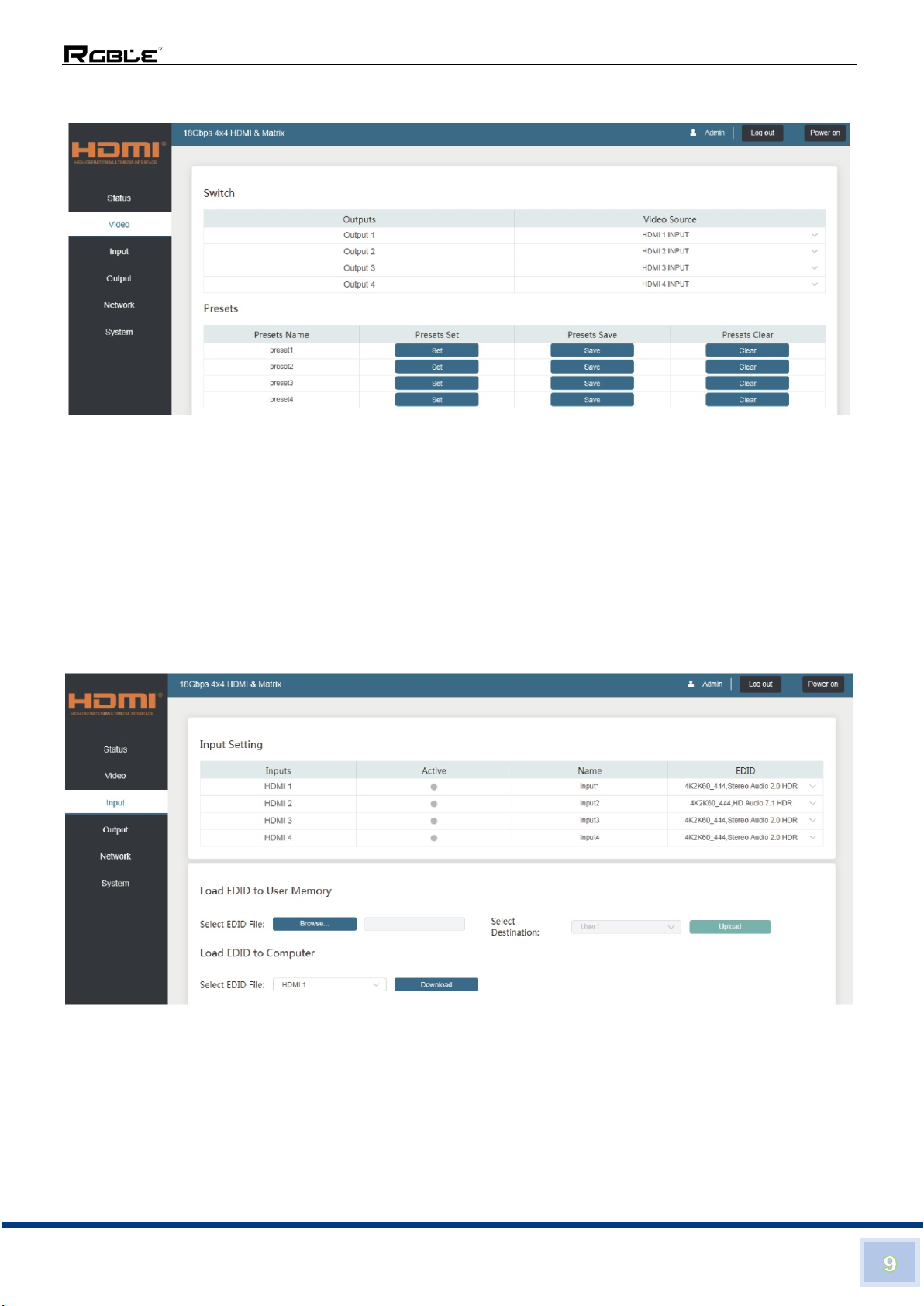
The Video page allows selection of the inputs source and set the presets.
To this preset setting, first you need to select the desired input source to four output ports. Then
click the Save button to save the setting. When you click the line Set button, this preset you
have saved will be used. The Clear button will clear the preset. There are four presets setting
available.
■ Input page
The Input page provides information about which inputs are connected and have a signal
present. The inputs can be giving more meaningful names, if desired. The EDID column
provides a list of EDID options for each individual input.
The following EDID options are available in any of the EDID drop-down lists:
1080P, Stereo Audio 2.0 1080P, Dolby/DTS 5.1 1080P, HD Audio 7.1
1080I, Stereo Audio 2.0 1080I, Dolby/DTS 5.1 1080I, HD Audio 7.1
3D, Stereo Audio 2.0 3D, Dolby/DTS 5.1 3D, HD Audio 7.1
4K2K30Hz_444 Stereo Audio 2.0 4K2K30Hz_444 Dolby/DTS 5.1
4K2K30Hz_444 HD Audio 7.1 4K2K60Hz_420 Stereo Audio 2.0
4K2K60Hz_420 Dolby/DTS 5.1 4K2K60Hz_420 HD Audio 7.1
Indice


