
Rihac IP3000 Series Manuale utente

Premium
Continuous
Ink Supply
Systems.
Instruction Manual
For Canon Printers
IP3000, IP4000, IP5000
I860 & I865.
MP760& 780 (additional Instructions required)
157 Union Road, Ascot Vale, Victoria 3032 | Phone: (+613) 9005 5555

2

3
Installation Manual
IP3000, IP4000, IP5000, MP760, MP780, i860, i865 -100ml Series
Version 3-2009
1) Printer pre-check.....................................................................................................4
2) Preparing your new CISS for installation.................................................................6
2) Inserting the silicone nozzle seals...........................................................................8
3) Inserting the cartridges............................................................................................9
4) Tube set up...........................................................................................................10
3) Refilling your CISS................................................................................................13
4) Priming..................................................................................................................14
5) Trouble shooting ...................................................................................................16
6) Warranty................................................................................................................17
7) Warning.................................................................................................................17

4
Instruction Manual
For Canon Printers
IP3000, IP4000, IP5000, MP760, MP780, I860 & I865 -100ml Series
Congratulations on your purchase of a RIHAC Continuous Ink Supply System (CISS).
Before using the system please read this manual carefully. It will help you install the
system correctly and ensure trouble free printing.
Great care is taken to prepare your CISS for trouble free installation. Your CISS has
been primed (Australian customers only) and should be ready for immediate
installation into your printer.
Please be aware that some of the pictures in this manual may not represent the
printer you are working with. Throughout the installation process please feel free to
contact us or refer to our website- www.rihac.com.au for any troubleshooting and
frequently asked questions. If you are installing this unit into an MP760 or MP780 you
will require an additional instruction sheet with specific details for those printers.
1) Printer pre-check.
Before opening your CISS, please perform the following print tests to ensure your
printer heads are in good condition.
a) Perform a printer head clean.
For Windows XP users, this is done by accessing your printer properties
through the start menu on the bottom left of your screen and choosing the
control panel. Select the printers and faxes option and locate your printer.
Right click your mouse button on the printer icon and choose Properties from
the menu. Select the Maintenance tab. Click on the cleaning icon which will be
similar to the one pictured below. Choose to perform a head clean on All
Colours and then execute the clean.
5
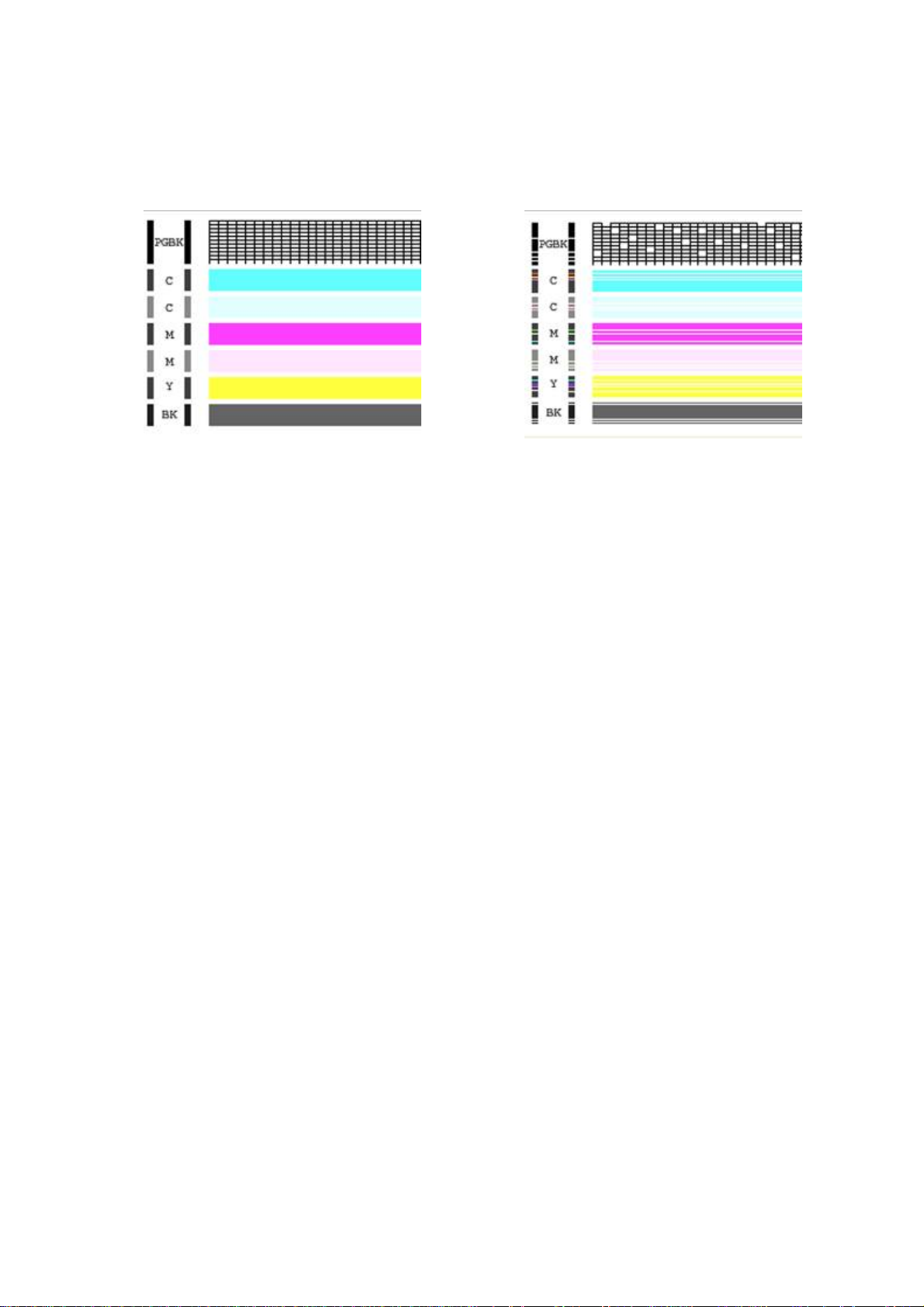
b) After performing a head clean you must then perform Print Check Pattern.
The computer will automatically ask you this, however if it does not, simply
choose to perform a ‘Nozzle Check’ on the printer maintenance screen.
Your printer will print either of the following;
Aor B
If your printer has produced a perfect result (A), please attach a copy of the
nozzle check to your purchase receipt as this will validate your warranty. You
can now start to install your CISS.
If your printer has printed with missing lines or uneven colouring (B) please
repeat steps 1.a and b again. If your second print is similar to the first, you
more then likely have damaged printer heads and you will need them replaced
before successfully installing a CISS.
6
2) Preparing your new CISS for installation
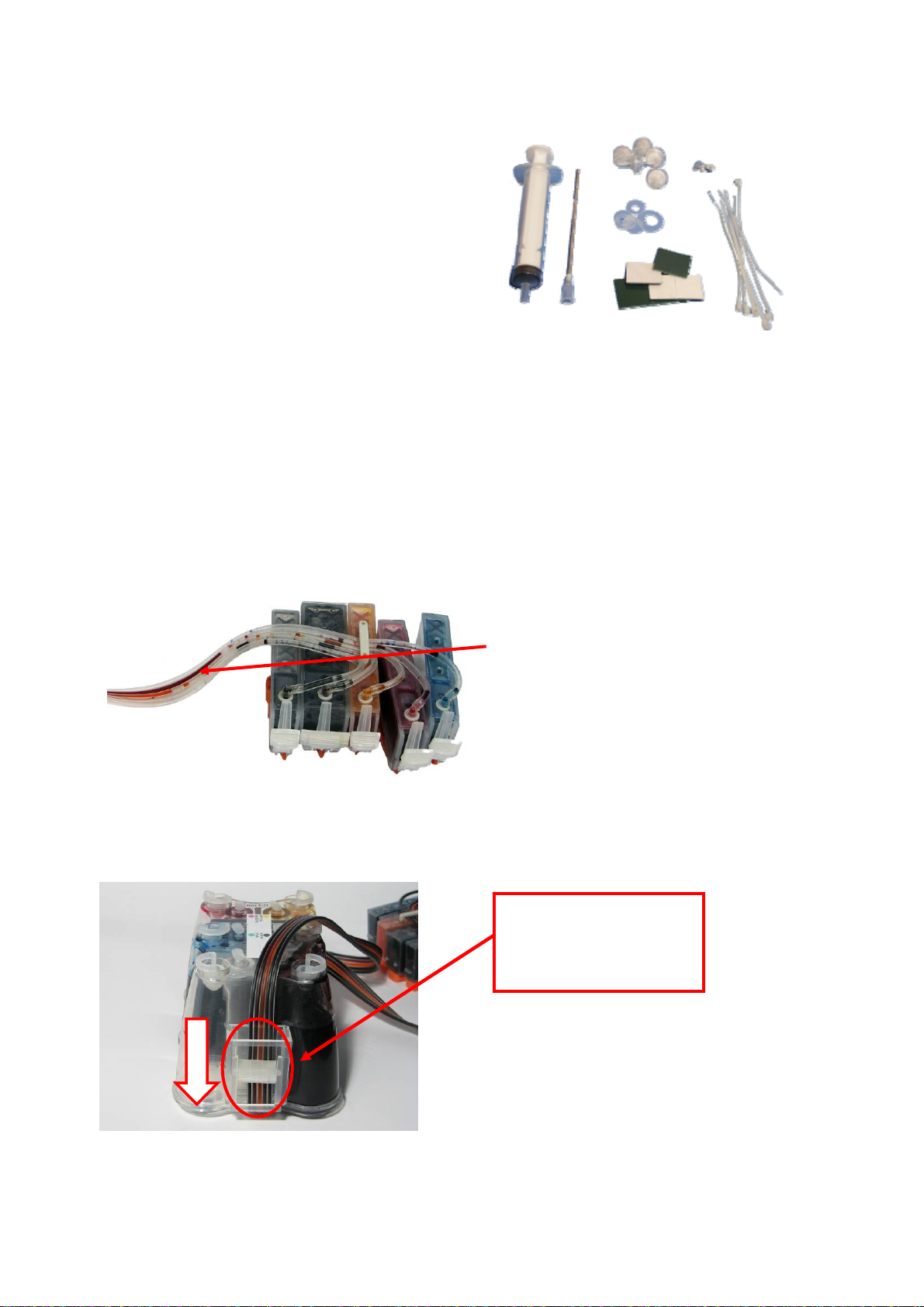
Please ensure the following are present with your CISS.
(1) Air filters x5
(2) Silicone nozzle seal x 5
(3) Cable ties (spare)
(4) Double sided tape tabs (spare)
(5) Syringe and needle
(6) Spare elbow joints and connections
b) Remove your CISS from the box and check the there are no leakages or
cracks and that the silicone tubing is not damaged.
c) Inspect the silicone tubing for air pockets.
d) Close the tube clamp located on the side of the CISS by rolling the roller down
to squeeze the silicone tubing which will prevent ink flow.
1
2
4
53
If you have an excessive amount (5cm or
more) of air in the tubing, you will need to
prime the unit. Please refer to page 14 of
this installation manual.
This will prevent any problems with your print
quality further down the track.
If you do not close this valve,
ink will flow back into the
reservoir from your
cartridges.
6
Engage the tube
clamp by rolling
the roller down
7
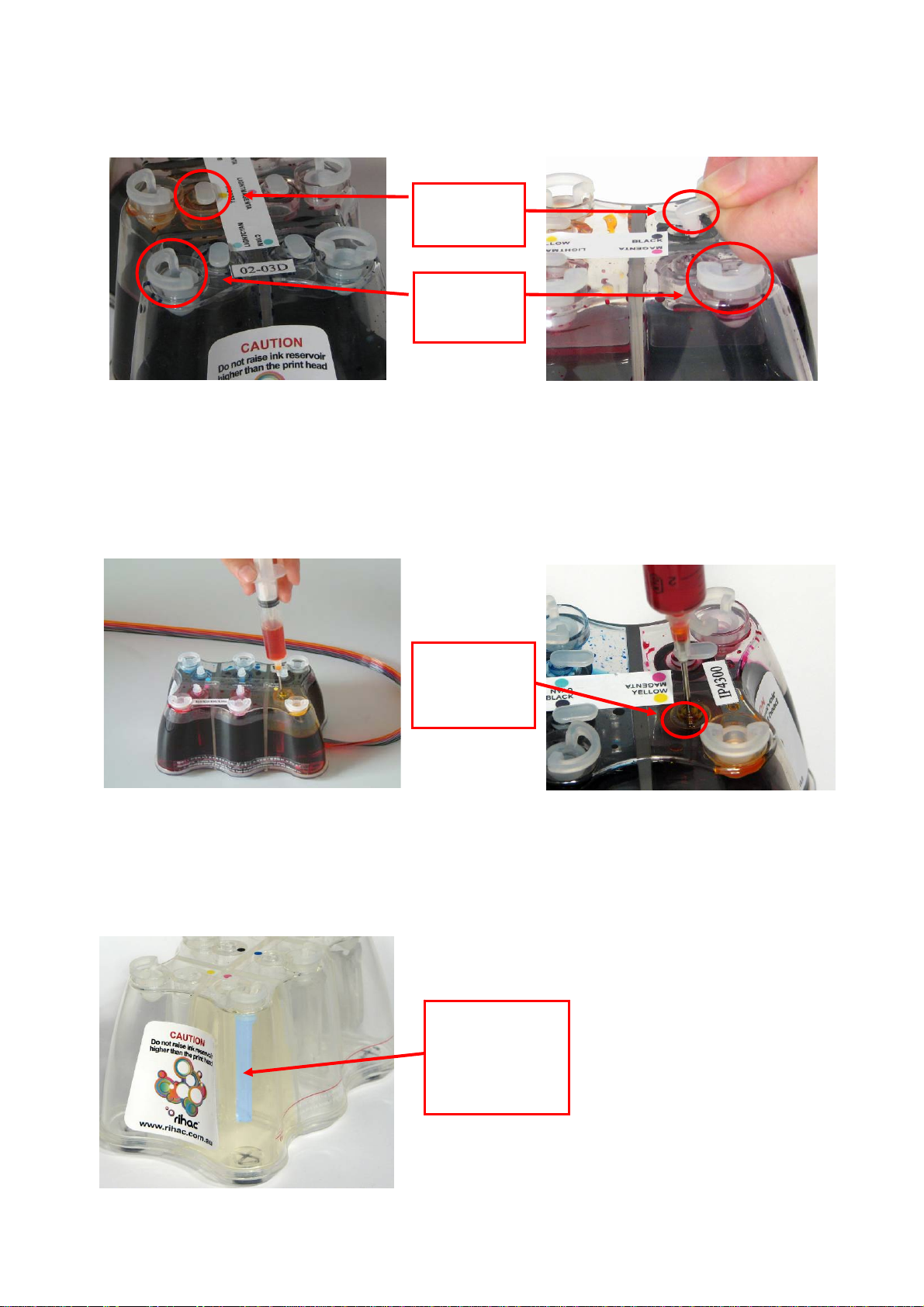
a) Carefully remove the small travel plugs on the CISS, leaving the filler plug in
place.
b) Using the syringe, remove any excess ink from the inner air balance chamber.
The chamber does not have to be completely empty for the CISS to function
correctly. Removing excess ink simply helps reduces the air pressure drawing
back from the cartridges and can assist in preventing air to develop in the ink
feeder tubes. The excess ink can be discarded or replaced into the reservoir
via the filler plug. Please refer to refilling instruction page 13 .
Never have the filler plug removed at the same time as the travel plug. The air
balance chamber has a hole in the base linking it to the main ink reservoir.
Having both plugs removed at the same time will re-fill the air balance chamber
with ink.
Travel
Plu
g
Filler
Plug
Air
Balance
Chamber
Air
Balance
Chamber
(shown in blue)
8
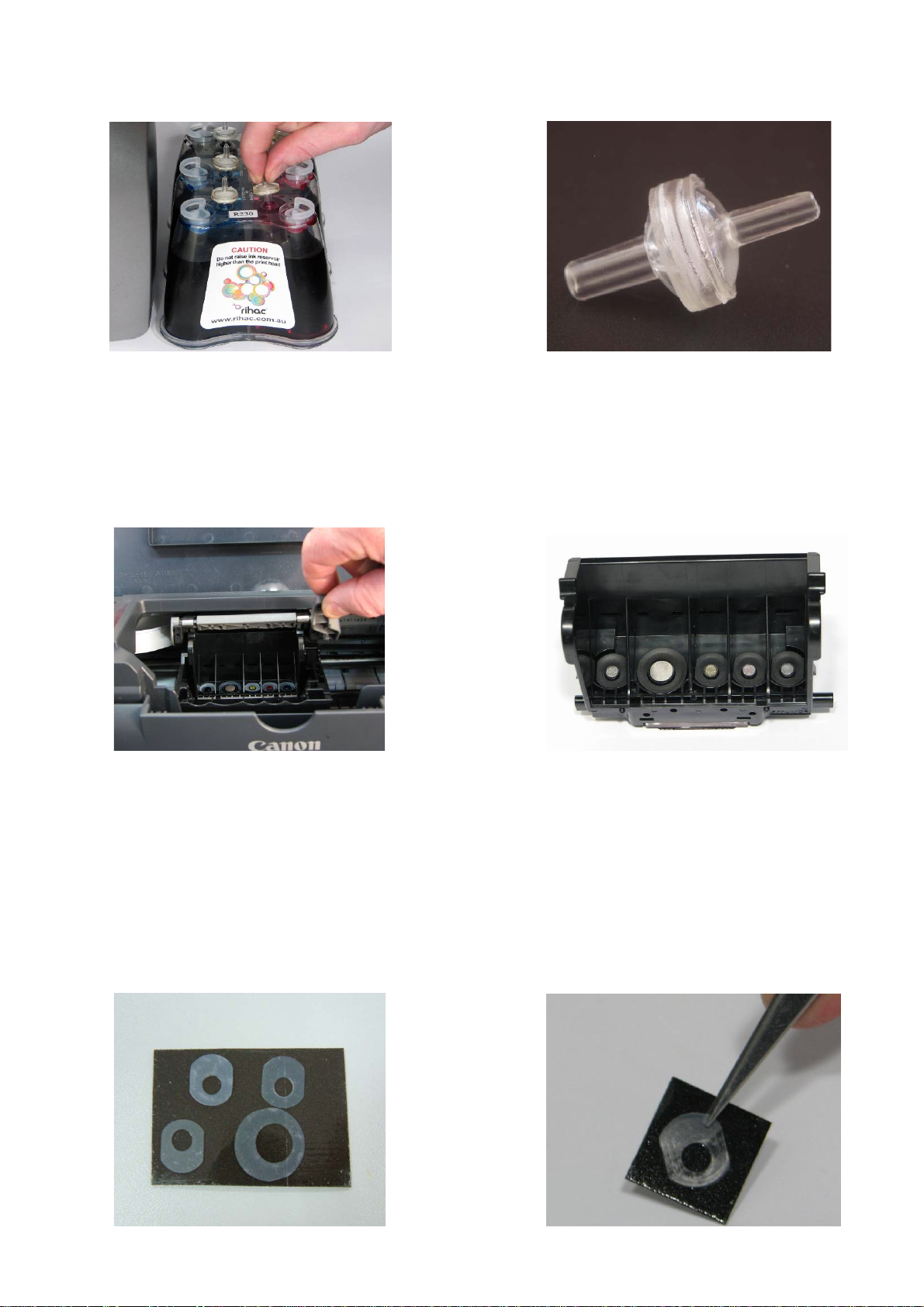
c) Place the CISS unit on the right hand side of your printer and Insert all the air
filters into the top of each air balance chamber. The larger end should be
inserted into the air balance chamber.
THE FOLLOWING STEPS ARE VERY IMPORTANT FOR ALL CANON PRINTERS.
2) Inserting the silicone nozzle seals.
a) Remove the printer head from your printer by lifting the print head arm lock.
The print head will then lift out from the printer.
b) Remove the 5 silicone seals from your kit. During manufacture 2 seals may
stick together giving the appearance of a single seal. If you only find 4 seals in
your package two may be stuck together. Simply located the thicker seal and
pry them apart.
c) Ensure each seal is clean. This can be done by placing each seal onto the
small pieces of double sided tape provided to remove dust and dirt. Please
ensure both sides of the seal are cleaned. Use the tweezers remove each seal
from the tape ensuring no dust, dirt or oils are passed onto it from your hands.
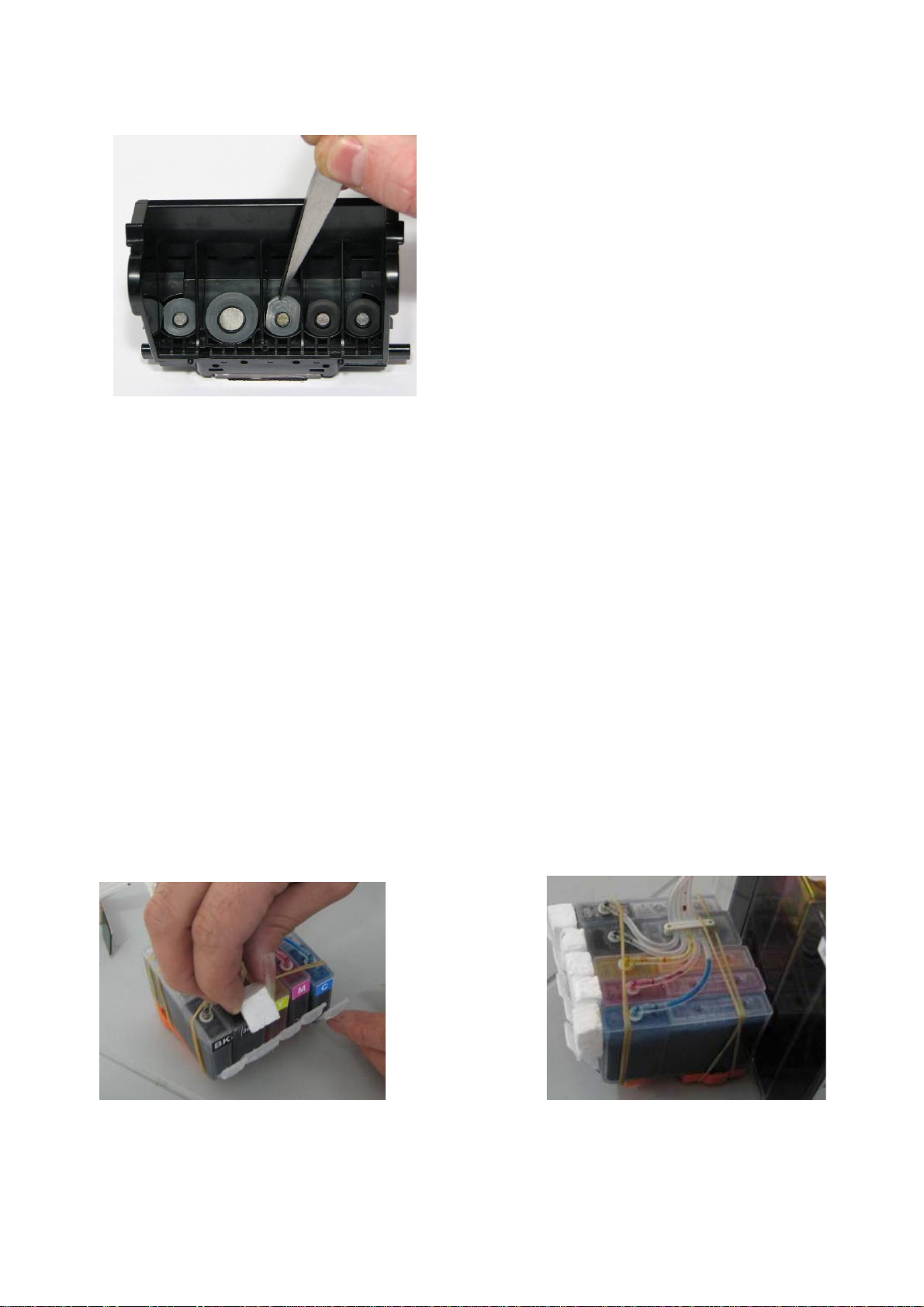
9
d) Carefully place each silicone nozzle seal into position around each of the
printer heads as shown.
Incorrectly placed silicone seals can cause poor printing quality. Please
ensure that the silicone seals do not move from position when inserting the
cartridges. These seals must not cover the silver printer head.
3) Inserting the cartridges
Canon printers have an inherent design fault which has been overcome by the
new Canon printer series such as the IP5200. This fault is in the design of the
printer head and ink delivery system from the cartridge. Whilst this fault offers
little problem for standard cartridge use, it can pose a problem for people using
a CISS . By performing the following steps you can ensure to have the best
possible seal between the cartridge and the printer head, hence producing
optimal printing results.
a) Cut 5 small Styrofoam cubes from your CISS box (1cm3). These cubes must be
small enough to fit in-between the cartridge and the cartridge holder clip as
shown below. Place the foam in-between the cartridge and cartridge holder
clip before installing them into the printer.
*For more information on Canon Print Head design faults please visit our web site.

10
b) Remove the orange cartridge cover from each of your new cartridges. This is
done by slowly moving the clip in an anticlockwise direction. Beware that
during transit ink may build up in this cap and will release when the cover is
removed. (i)
(i) (ii)
c) Insert the new cartridges into your printer. Please ensure that the cartridges are
placed in the correct coloured cartridge holder. (ii)
4) Tube set up
a) Remove the backing tape on the metal tube arm and place it approximately 5
cm from the rear as shown below.
*Please be careful not to twist the tubing before connecting it to the printer.
5-6cm
Questo manuale è adatto per i seguenti modelli
6
Indice
Altri manuali Rihac Accessori per stampanti


