
Roberts CD9912 Manuale utente

CD9912
Stereo CD Radio
Cassette Recorder
Please read this manual before use
ROBERTS
Sound for Generations
cd9912 instruction book.PMD 4/21/2004, 11:15 AM1

Contents.............................................................................1
Controls...........................................................................2-3
Display ...............................................................................4
Battery Operation...............................................................5
Mains Operation.................................................................5
General ..............................................................................6
Sound controls ...................................................................6
Radio operation..................................................................7
Presetting stations .............................................................8
Recalling a preset station ..................................................9
Last station memory...........................................................9
Compact discs .................................................................10
Inserting a CD ..................................................................10
Playing a CD ....................................................................11
Selecting a track ..............................................................12
Random play ....................................................................12
Intro play ..........................................................................12
Repeat play......................................................................13
CD programmed play...................................................... 13
Checking a programme.................................................... 14
Changing a programme ...................................................14
Playing a programme.......................................................15
Erasing a programme ......................................................15
Listening to cassette tapes ..............................................16
Recording from the radio .................................................17
Recording from CD ..........................................................17
Preventing accidental erasure .........................................18
Cleaning tape heads ........................................................18
Remote control.................................................................19
Headphones.....................................................................20
Specification.....................................................................21
Guarantee ........................................................................22
1
CLASS 1
LASER PRODUCT
Warning
CLASS 1LASER PRODUCTmeansthatthelaser'sconstructionmakes
it inherently safe so that the legally prescribed maximum permissible
radiation values can never be exceeded
Caution: Using any equipment or devices other than those described
andspecifiedintheseoperatinginstructions,ortamperingwiththeunitin
any way, can result in dangerous exposure to radiation.
cd9912 instruction book.PMD 4/21/2004, 11:15 AM2
If you need any further advice, please call our Technical Helpline on :-
020 8758 0338 (Mon-Fri)
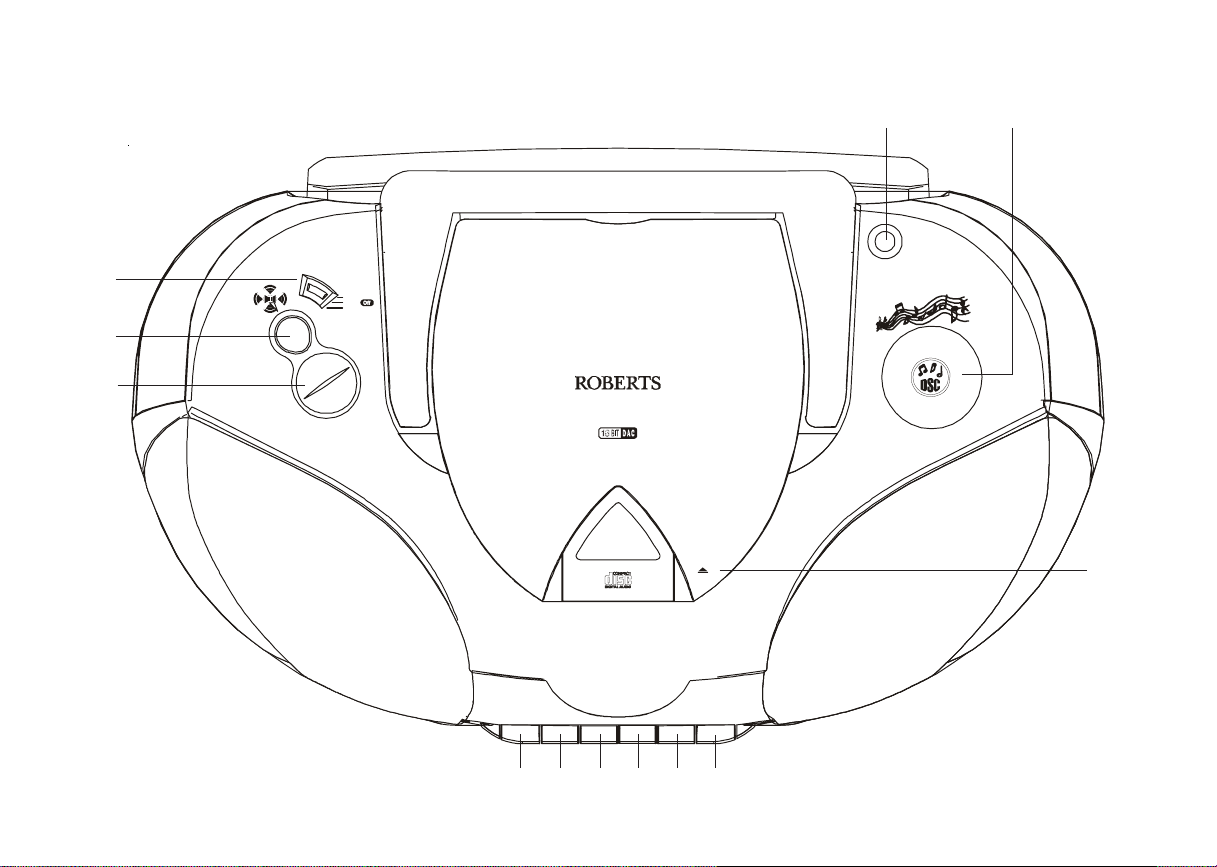
Controls (Top)
1. Volume control
2. Spatial sound control
3. Function switch
4. Telescopic aerial
5. Digital sound control
6. CD door 12 11 10 9 8 7
7. Pause button
8. Stop/Eject button
9. Fast forward button
10. Rewind button
11. Play button
12. Record button
CD 9912
Di
g
it al to Analo
g
ue Converter
Open
Volum e
Function
Radio
CD
Tap e
SPATIAL
SOUND
Digital Sound Control
1
2
3
45
6
2
cd9912 instruction book.PMD 4/21/2004, 11:15 AM3

Controls
(Front)
13. Intro button
14. Random/Memory down button
15. Repeat/Memory up button
16. Band select button
17. Tuning Up/F.Skip button
18. Tuning Down/B.Skip button
19. Display
Play/Pause
SEN SOR
Trac k
On
Stop
Prog
Stand By
UP/
F.Sk i p
Repeat
Random
MEM
Intro
DOWN/
B.Skip
Band
Close
STEREO RADIO CD CASSETTE PL AYER
Play Rewind F. Forward Stop/Eject Pause
13 14 15 16 17 19 20 21 22 23
25
24
3
18
20. Stop button
21. Play pause button
22. Standby button
23. Prog. button
24. FM Mono\Stereo switch (on rear)
25. Cassette door
cd9912 instruction book.PMD 4/21/2004, 11:15 AM4

If you need any further advice, please call our Technical Helpline on :-
020 8758 0338 (Mon-Fri)
Display
4
Indicates sound effect
Lights during CD playback
Lights during CD pause
Lights during CD intro mode
Lights during CD repeat all tracks
Flashes during CD repeat one track
Lights during CD random play
Indicates radio memory channel
Indicates CD track
Lights when adjusting volume
Lights when receiving FM stereo stations
Indicates selected waveband
Shows MHZ for FM reception and kHz for
MW/LW reception
Indicates CD track number or radio memory
channel
Indicates CD playing time or radio station
frequency
cd9912 instruction book.PMD 4/21/2004, 11:15 AM5

ON
Battery operation
1. Remove the Battery cover on the rear of your CD radio cassette by
pushing the catches in the direction of the arrows.
2. InserttwoLR6(AAsize)batteriesintothesmallspacesinthebattery
compartment. Insert eight LR20 (D size) batteries into the remaining
spaces in the compartment. Take care to ensure all batteries are
inserted with the correct polarity as shown inside the battery
compartment. Replace the battery cover.
note:the two LR6 batteries provide power for the radio memory
and must be fitted at all times.
3. Reduced power, distortion, and a ‘stuttering’ sound are all signs that
the batteries may need replacing. If your CD radio cassette is not to
be used for any extended period of time it is recommended that the
eight LR20 (D size) batteries are removed from the radio.
We would recommend for economy that the CD9912 is used on the
mains whenever possible with battery operation for occasional or
stand-by use only.
Mains operation
1. Place your CD radio cassette on a flat surface.
2. Plug the mains lead into the Socket located on the rear of your CD
radio cassette. Ensure that the plug is pushed fully into the socket.
3. Plug the other end into a wall socket and switch on.
4. Do not allow this unit to be exposed to water, steam or sand. Do not
leaveyour radiowhere excessive heat could cause damage such as
inaparkedcarwheretheheatfromthesuncanbuildupeventhough
the outside temperature may not seem too high.
5
cd9912 instruction book.PMD 4/21/2004, 11:15 AM6

If you need any further advice, please call our Technical Helpline on :-
020 8758 0338 (Mon-Fri)
Sound controls
Volume
1. Adjust the volume to the required level using the Volume control.
Spatial sound
1. This feature creates a 3-D effect from the stereo sound produced by
the loudspeakers. Press the Spatial sound button to turn on Spatial
sound. Press the button again to release and turn off Spatial sound.
Digital Sound Control (DSC)
TheDSCfeaturecreatesarealisticatmosphereforastyleofmusicusing
the latest digital sound technology.
1. RepeatedlypressandreleasetheDSCbuttonuntilthedesiredsound
effect CLASSIC, ROCK or POP is shown on the display.
General
Switching on and off
1. Press the Standby button to switch on. The Standby indicator
located within the Standby button will turn off.
2. ToswitchoffpresstheStandbybuttonagain.TheStandbyindicator
will light up.
3. When using the mains supply the Standby button on the remote
control can be used to turn the unit on and off.
4. WhenusingbatterysupplytheStandbybuttonontheremotecontrol
can only be used to turn the unit off. This is to save battery life.
Stand By
Stand By
Play/Pause
Digital Sound
Control
Stand By
Volume
SPATIAL
SOUND
6
cd9912 instruction book.PMD 4/21/2004, 11:15 AM7

Radio operation
note:thetwo LR6batteriesprovidepowerfortheradiomemoryand
must be fitted at all times.
1. Set the Function switch to the 'Radio' position.
2. Adjust the Volume control until a hissing sound is heard.
3. Repeatedly press and release the Band button until the required
wavebandappearsinthedisplay.OnFM fullyextendtheTelescopic
aerial. On MW and LW rotate your radio for best reception.
4. Pressandhold down eitherthe UP or DOWN buttonsuntil
the frequency in the display begins to change rapidly. Release the
button.
5. Your radio will scan the selected waveband, stopping each time it
findsastationofsufficientstrength.AdjusttheVolumecontroltothe
required level.
6. Tosearchforadditionalstationsrepeattheaboveprocedure.Search
tuning may be stopped by a single press on either the UP or
DOWN buttons.
7. To tune to a weak station repeatedly press and release the UP
orDOWN buttonsuntilthecorrectfrequencyisdisplayedoruntil
reception is best.
8. OnFM ifthestationbeingreceivedisweaksomehissmaybeaudible,
toreducethehisssettheFMmodeswitch (locatedontherearofthe
unit) to the 'Mono' position.
Function
Radi
o
CD
Tape
Volume
Band
UP/
F.S ki p
DOWN/
B.Skip
7
cd9912 instruction book.PMD 4/21/2004, 11:15 AM8

If you need any further advice, please call our Technical Helpline on :-
020 8758 0338 (Mon-Fri)
Presetting stations
Youmaystore up to40different stations, 20onFM, 10 onMW and 10 on
LW.
1. Select the required waveband using the Band button.
2. SelecttherequiredstationusingtheUP orDOWN buttons.
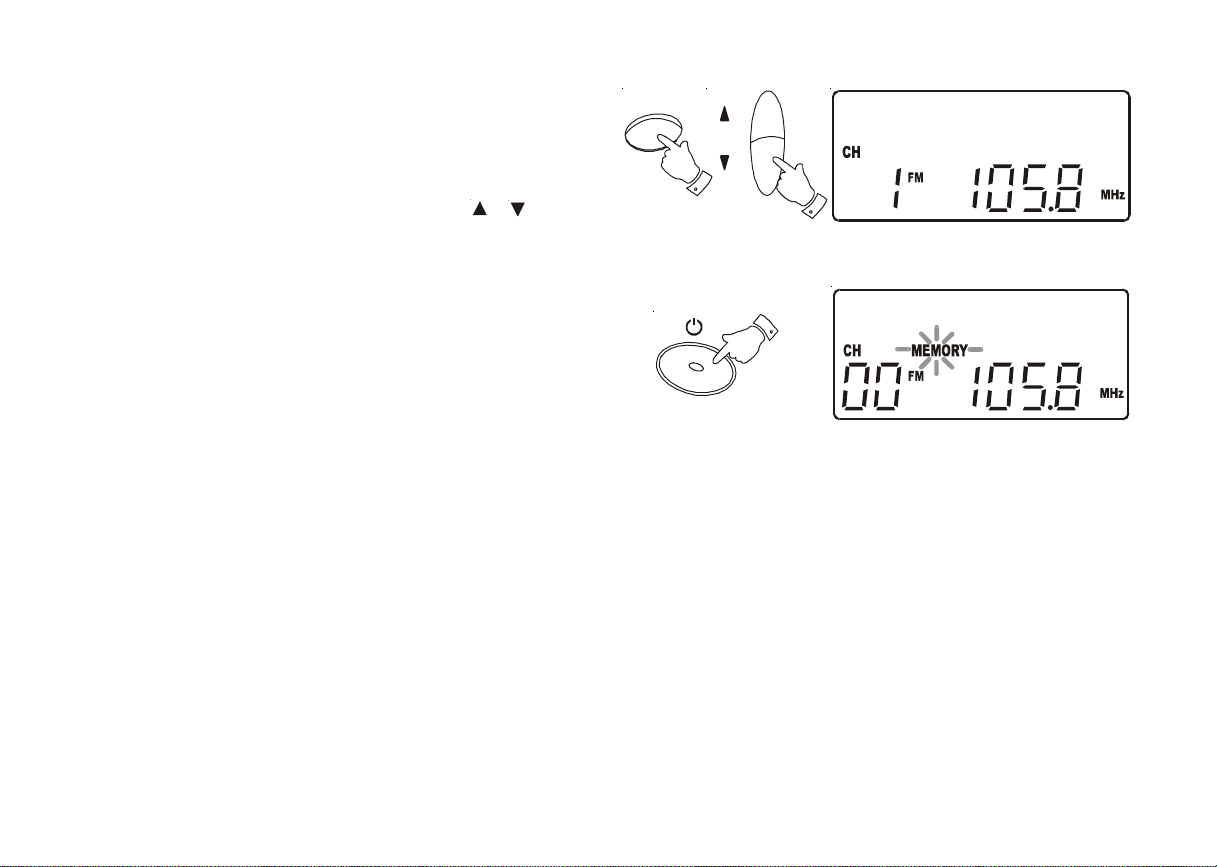
3. Press the Prog. button. MEMORY will flash in the display.
4. Select the required memory channel where you wish to store the
station using the MEM or buttons.
5. Whilst MEMORY is flashing in the display press PROG. to store the
station.
6. Memory will disappear from the display. The display will indicate the
stations memory channel, its frequency and waveband.
7. Repeat the above procedure for the remaining presets.
8. Ifyouassign a stationto a memorychannel that hadbeenpreviously
assigned to a different station the old station is deleted and replaced
by the new one.
Band
UP/
F.S ki p
DOWN/
B.Skip
Pro
g
MEM
Pro
g
8
cd9912 instruction book.PMD 4/21/2004, 11:15 AM9
Recalling a preset station
1. Select the required waveband using the Band button.
2. SelectthedesiredmemorychannelusingtheMEM or buttons.
The display indicates the selected channel, station frequency and
waveband.
Last station memory
1. Your radio provides an automatic last station memory function. This
function recalls the station that was playing when the radio was
switched off.
Band
MEM
Stand By
9
cd9912 instruction book.PMD 4/21/2004, 11:15 AM10
Indice
Altri manuali Roberts Impianto stereo

Roberts
Roberts Blutune65 Manuale utente

Roberts
Roberts MP-16CD Manuale utente

Roberts
Roberts STREAM 83I Manuale utente

Roberts
Roberts Blutune 100 Manuale utente

Roberts
Roberts STREAM 83I Manuale utente

Roberts
Roberts Stream 67 Manuale utente

Roberts
Roberts MP-23 Manuale utente

Roberts
Roberts Sound 80 Manuale utente

Roberts
Roberts SOUND 70 Manuale utente

Roberts
Roberts CD9925 Manuale utente


