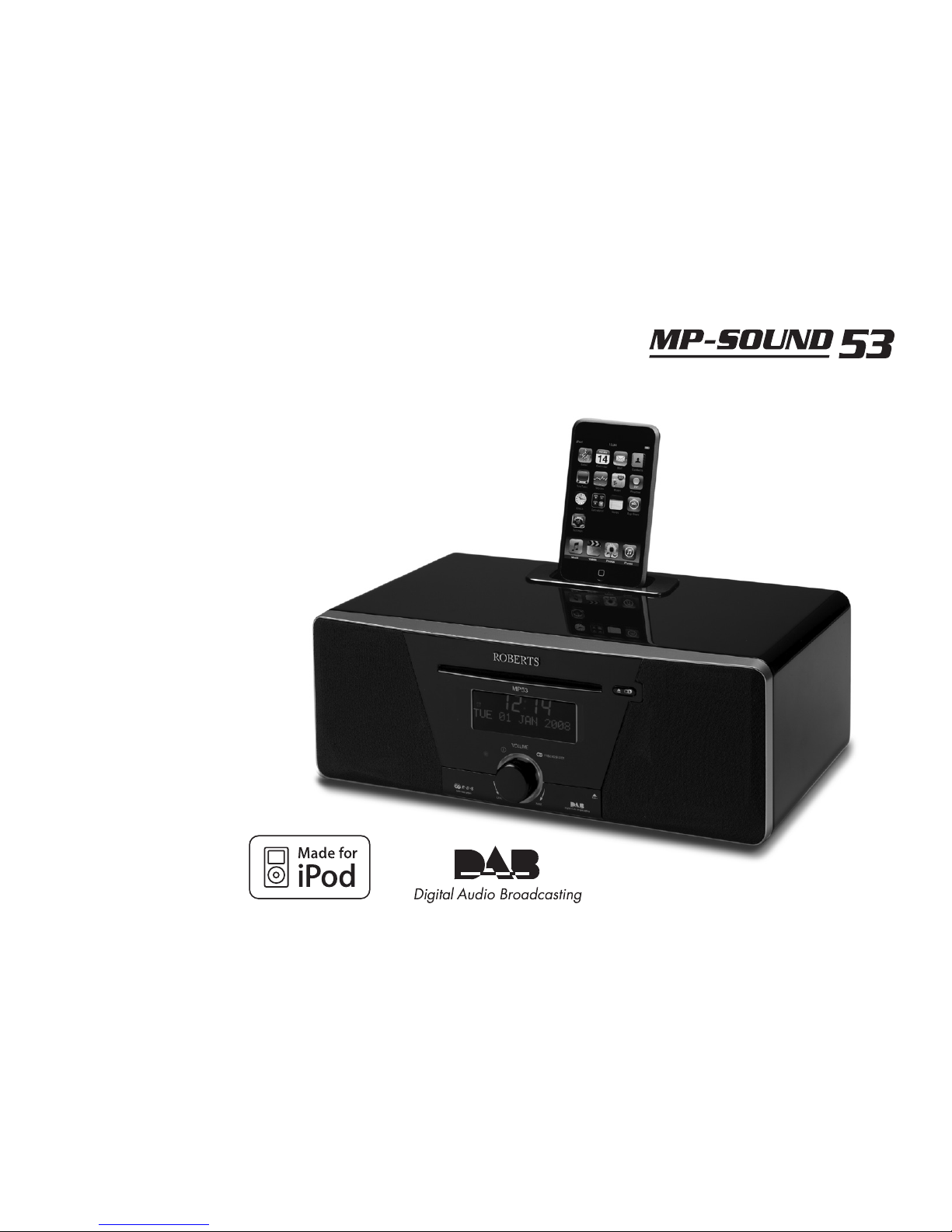
Roberts MP-SOUND 53 Manuale utente

CD/USB/SD/DAB/FM RDS Digital Sound System with dock for iPod
ROBERTS
Sound for Generations
Please read this manual before use

iPod is a trademark of Apple Inc., registered in the U.S. and other countries.
"Made for iPod" means that an electrical accessory has been designed to connect specifically to
iPod and has been certified by the developer to meet Apple performance standards.
Apple is not responsible for the operation of the device or its
compliance with safety and regulatory standards.

If you need any further advice, please call our Technical Helpline on :-
020 8758 0338 (Mon-Fri)
About this instruction manual .....................................................2
Introduction ...................................................................................3
MP-53 Sound System features ..................................................3
Controls and connections ........................................................4-5
Remote control ........................................................................6-7
Front panel control .....................................................................8
Remote control functions ............................................................8
Display icons ..............................................................................8
Using the sound system for the first time ...................................9
DAB radio ....................................................................................10
Operating your sound system - DAB ........................................10
Selecting a station - DAB ......................................................... 11
Secondary services - DAB ....................................................... 11
Display modes - DAB ..........................................................12-13
Finding new stations - DAB ......................................................13
Manual tuning - DAB ................................................................14
Station order setup - DAB ...................................................15-16
Software version - DAB ............................................................17
Dynamic range control - DAB ...................................................18
FM radio .......................................................................................19
Operating your radio - search tuning FM ..................................19
Manual tuning - FM ..................................................................20
FM stereo / mono .....................................................................20
Display modes - FM..................................................................21
Presetting stations ....................................................................22
CD / MP3 / WMA ..........................................................................23
Compact discs ..........................................................................23
Playing a CD .......................................................................24-25
CD search and repeat ..............................................................26
CD track programming .............................................................27
Contents
MP3 / WMA CD mode .........................................................28-30
SD / USB playback and recording ............................................31
SD / USB file and folder selection .......................................32-33
Recording to SD / USB ........................................................34-36
Deleting and formatting .......................................................37-38
iPod Docking ...............................................................................39
Navigating your iPod ................................................................40
Playing a file on your iPod ...................................................40-41
Clock and Alarms .......................................................................42
Alarms .................................................................................42-43
Cancelling alarms .....................................................................44
Snooze .....................................................................................44
Sleep function ...........................................................................44
Setting the clock manually ...................................................45-46
Standby brightness control .......................................................47
Audio and Setup .........................................................................48
Equaliser function .....................................................................48
Bass and treble settings ......................................................48-49
Mute function ............................................................................49
Auxiliary input socket ................................................................50
Line output socket ....................................................................50
Headphone socket ...................................................................51
Optical S/PDIF output socket ...................................................51
Aerial removal ...........................................................................51
System reset ............................................................................52
Information ..................................................................................53
Cautions ...................................................................................53
Specifications ...........................................................................53
Mains supply ............................................................................54
Guarantee ................................................................................57
1

About this instruction manual
This instruction manual is split into sections for each of the different operating
modes of your Roberts MP-53 Digital Sound System. The introduction
describes the features and controls of the product.
There are seven sections covering the main features in detail - DAB radio,
FM radio, CD / MP3 / WMA playback, SD card / USB device, iPod docking,
Clock and Alarm, and Audio and Setup. Each section is clearly identified by
the shaded heading in the top right hand corner of each pair of pages.
The two sections for DAB Radio and FM Radio describe how to use the
sound system to listen to radio broadcasts.
The section for CD / MP3 / WMA player describes how to play digital
audio or MP3 / WMA files which have previously been recorded to CD-R
or CD-RW.
The section for SD / USB media describes playback and record using SD
card and USB memory devices.
The section for iPod docking describes how to use your MP-53 to play
audio files or video soundtracks directly from your iPod.
The section titled Clock and Alarms describes setting the clock, as well
as explaining the use of the alarms, snooze and sleep timer features.
The Audio and Setup section describes how to use the audio equaliser
and tone controls, how to connect other audio equipment and how to
reset the sound system.
Lastly, the Information section includes safety, specifications and warranty
information.
2
Introduction (page 3)
FM Radio (page 19)
DAB Radio (page 10)
iPod Docking (page 39)
CD / MP3 / WMA (page 23)
Clock and Alarms (page 42)
Audio and Setup (page 48)
Information (page 53)
SD / USB (page 31)

If you need any further advice, please call our Technical Helpline on :-
020 8758 0338 (Mon-Fri)
MP-53 Sound System features
The Roberts MP-53 Digital Sound System provides the following range
of features in an attractive compact unit:-
● Radio for DAB and FM (with RDS) broadcasts.
● Audio CD player (can also play CD-R, CD-RW discs).
● Playback of MP3 and WMA files which have been recorded to CD-R
or CD-RW.
● Playback of MP3 and WMA files which have been recorded to SD
card and USB memory devices.
● Record from the radio, CD or auxiliary input to SD card or USB
memory devices.
● Record MP3 / WMA files from CD / SD / USB card to SD / USB.
● 20 radio station presets (10 for DAB and 10 for FM).
● iPod docking connector to play your music collection or video
soundtracks from your iPod.
● Clock display with time and date when in standby.
● Two alarm timers with snooze feature to wake you to either buzzer,
radio, CD, SD card, USB memory device or iPod (with humane wake
system on buzzer alarm).
3
● Adjustable sleep timer which can be set to turn the sound system off
after between 15 and 120 minutes.
● Easy-to-read 2 line text display with large clock display.
● A 3.5mm stereo Auxiliary Input socket for playing audio from MP3
players, iPod devices which cannot use the dock connector, or from
other audio equipment.
● A standard 3.5mm Line Output socket for connecting the audio signal
to an external amplifier or recorder.
● A standard 3.5mm headphone socket for private listening.
● An S/PDIF optical output is provided for connection to AV receivers,
mini disc recorders or other devices with a digital input.
● High quality, full range, stereo speakers (2 x 8W).
● An acoustically tuned, hand finished cabinet that includes bass ports
and internal bracing for optimal sound reproduction.
● Low power consumption when in standby mode.
Introduction .

4
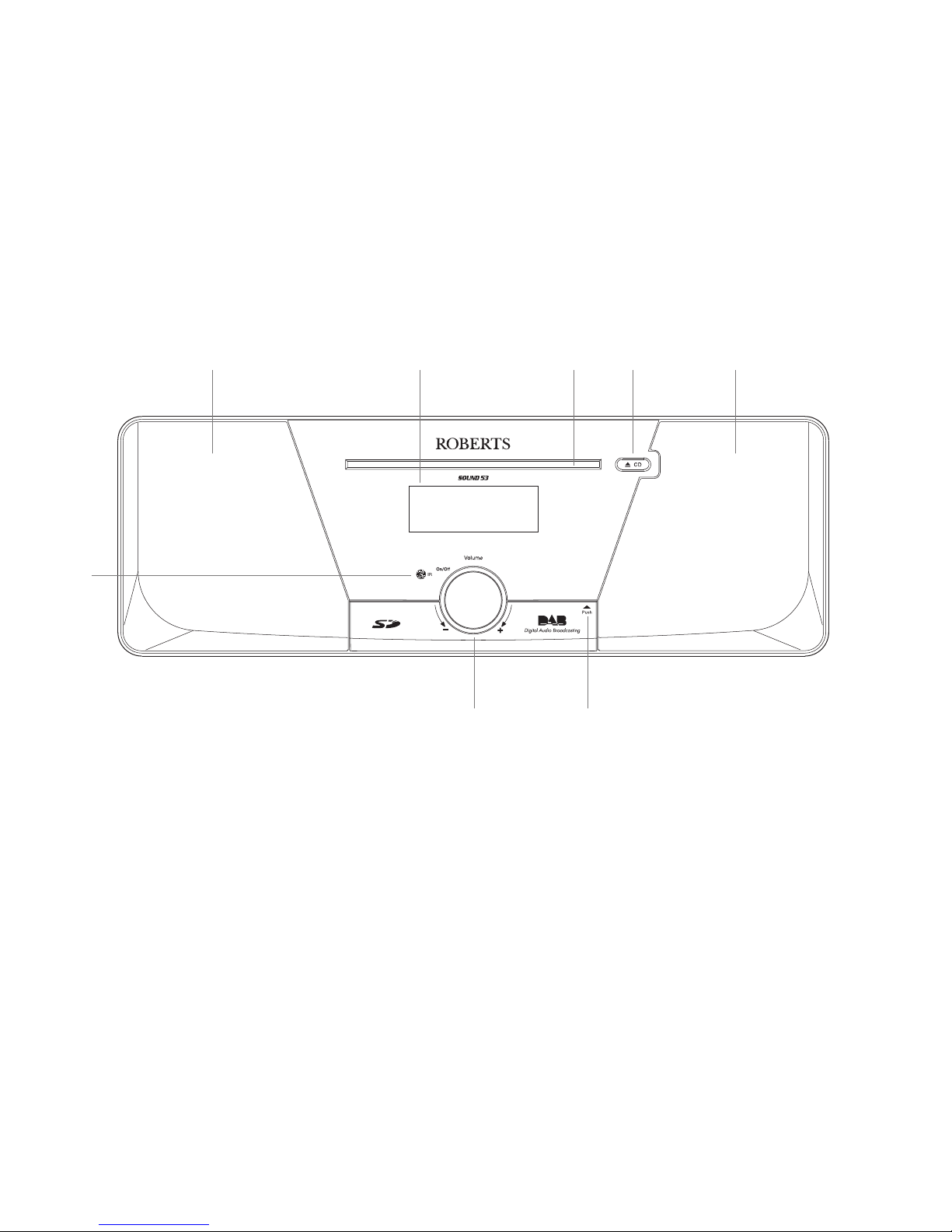
Controls and connections
1. Infra-red sensor
2. Loudspeakers
3. LCD display
4. CD slot
(Front)
67
2
1
3 4 5 2
5. CD eject button
6. SD card / USB device door
7. On / Standby / Volume control

If you need any further advice, please call our Technical Helpline on :-
020 8758 0338 (Mon-Fri) 5
Controls and connections
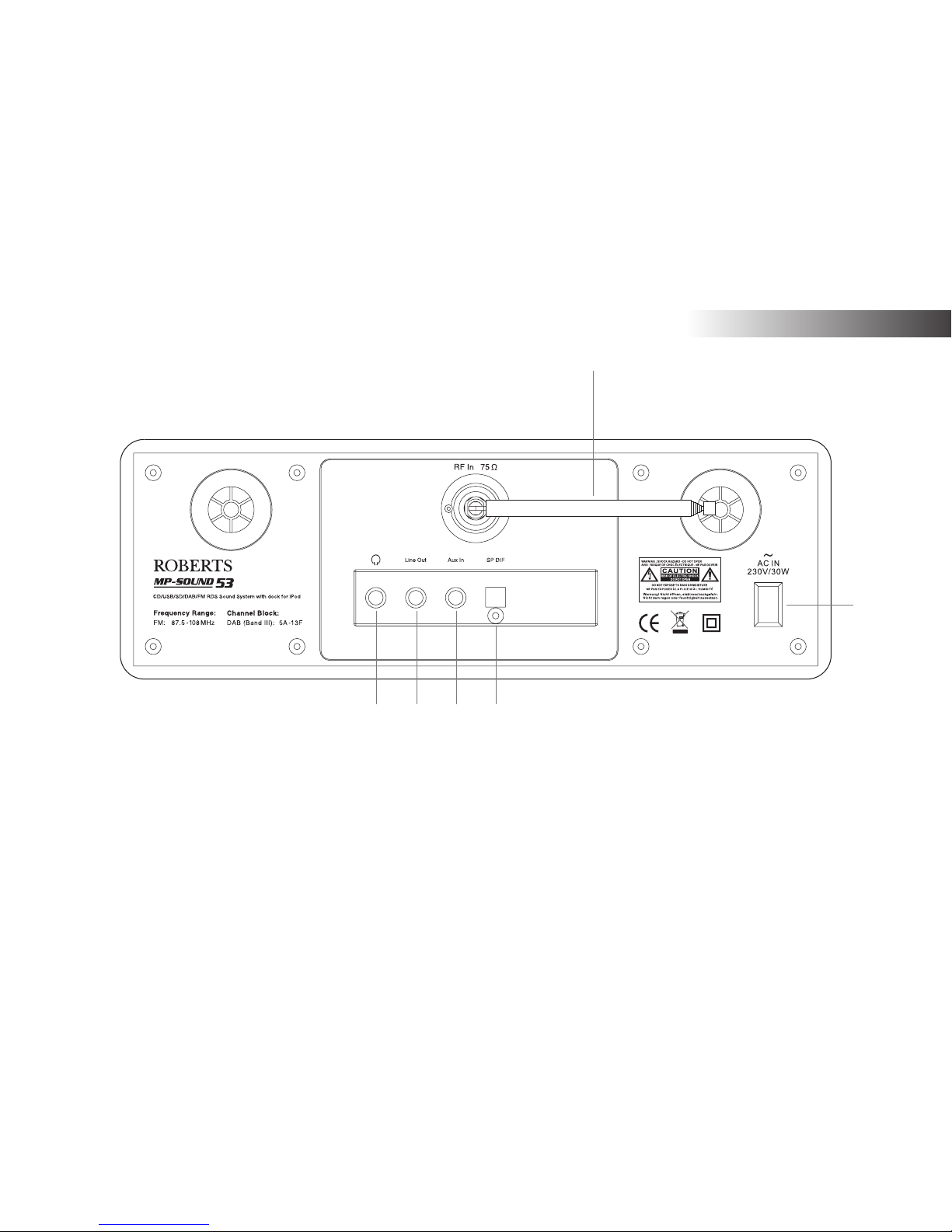
(Rear)
8. Telescopic aerial
9. Mains input socket
10. Optical output socket (Toslink)
11. Auxiliary input socket
12. Line output socket
13. Headphone socket
8
12
9
11 10
Introduction .
13

6
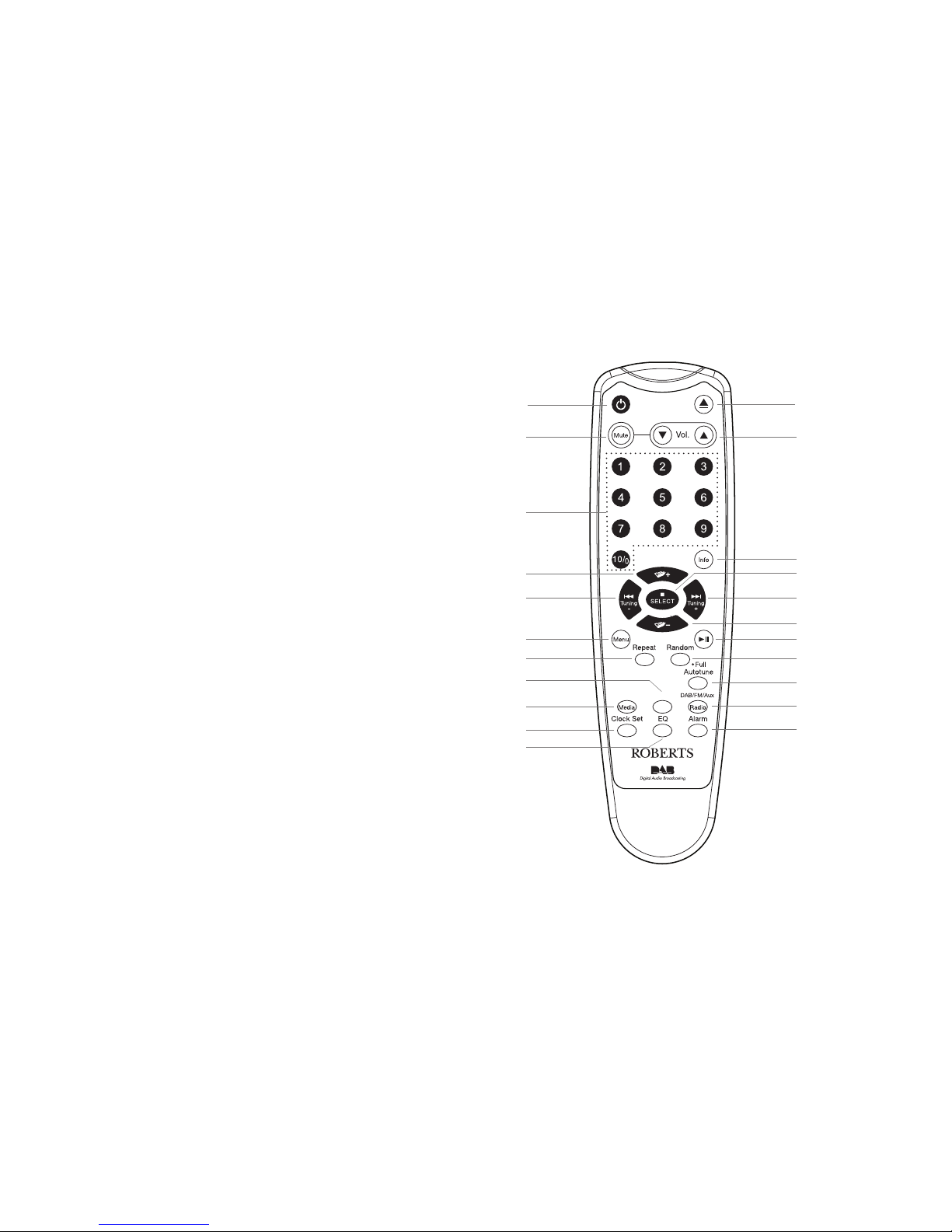
Remote control
1. On / Standby button
2. Mute button
3. Key pad buttons 1-10/0
4. Folder Up button
5. Tuning Down / Rewind button
6. Menu button
7. Repeat button
8. Record button
9. Media button
10. Sleep / Clock set button
11. Equaliser button
12. Alarm button
13. Radio button
14. Auto-tune button
15. Random button
16. Play / Pause button
17. Folder down button
18. Tuning / Fast-forward button
19. Select / Stop button
20. Info button
21. Volume Up / Down buttons
22. CD eject button
1
15
16
17
18
19
20
7
6
5
3
2
12
14
4
22
9
10
11
13
21
Record
SD/USB
CD/iPod/
8

If you need any further advice, please call our Technical Helpline on :-
020 8758 0338 (Mon-Fri) 7
Introduction .
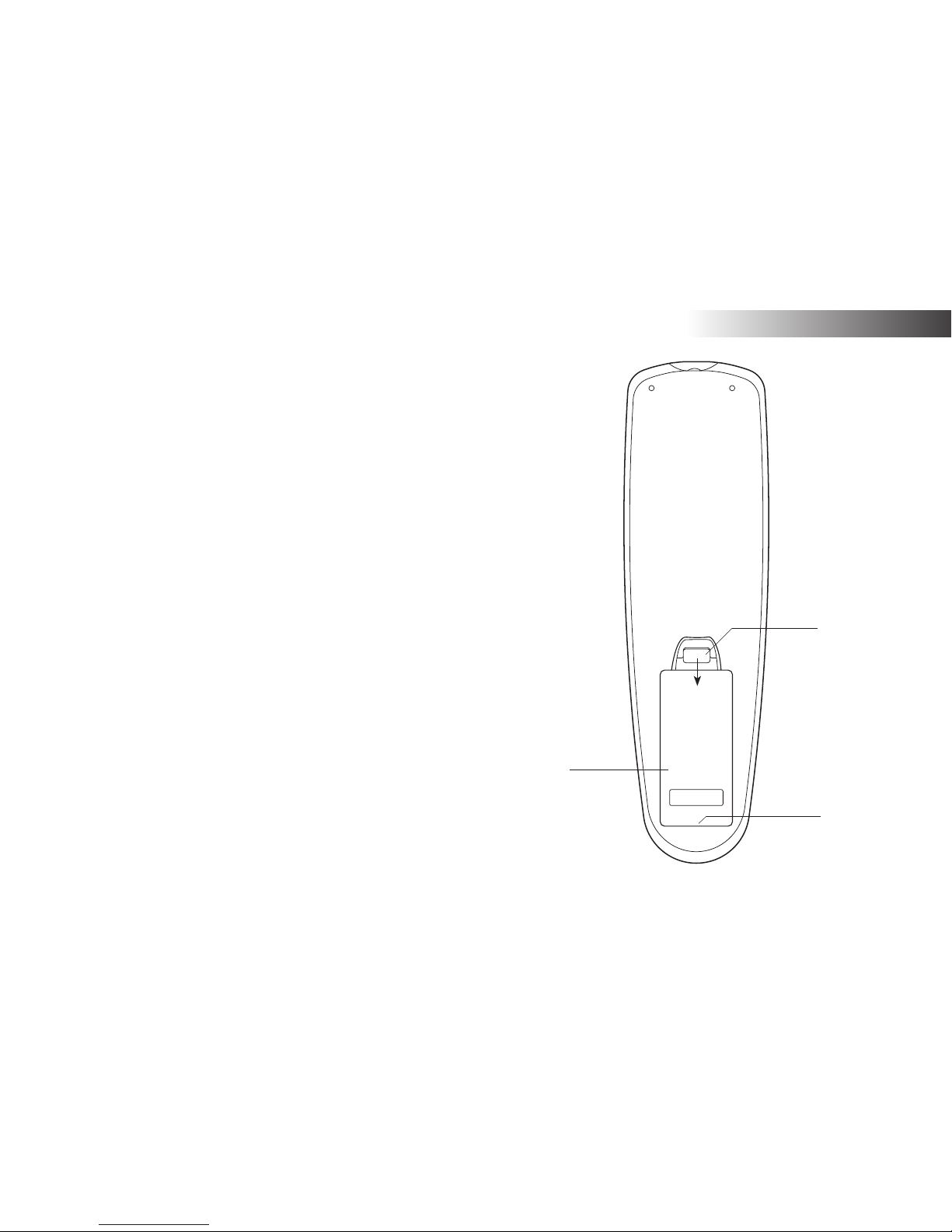
Remote control battery replacement
1. Remove the battery cover on the rear of your remote control by
applying pressure to the catch in the direction shown by the arrow in
the diagram, and then lifting the cover.
2. Insert 2 x AAA size batteries into the compartment. Make sure the (+)
and the (-) ends of the batteries are positioned as shown inside the
compartment.
3. Close the battery cover by inserting the retaining lugs first, then
apply pressure to the free end such that the catch latches the cover
securely.
4. If the remote is not to be used for an extended period of time it is
recommended that the batteries are removed.
IMPORTANT: The batteries should not be exposed to excessive heat
such as sunshine, fire or the like. After use, disposable batteries should
if possible be taken to a suitable recycling centre. On no account
should batteries be disposed of by incineration.
1
2
3
1. Battery compartment
2. Latch
3. Retaining lugs (inside)

Front panel control
The MP-53 sound system has a front panel control which is the
On / Standby / Volume control. Momentarily press the control to switch
your sound system on or off. Rotate the control clockwise to increase the
volume level or anti-clockwise to decrease volume level.
Your MP-53 has a SD card / USB door located on the front panel below
the On / Standby / Volume control. Inside the door is the SD card slot on
the left hand side and the USB memory device socket on the right hand
side. The door is opened by pushing and releasing the right hand top
corner of the panel. To close the panel, gently press the panel door at the
right hand corner until it clicks into place.
Do not attempt to open or close the panel door using the left hand
edge as this may distort or damage the panel.
Remote control functions
All functions of the MP-53 sound system can be operated using the remote
control. Some operations require a longer press of the button (explained
in the relevant sections). In this case simply keep your finger held on the
remote control button for 2-3 seconds until the display on the sound system
shows that the command has been accepted.
8
Display icons
A. Sleep indicator
B. Alarm 1 and 2 indicators
C. Snooze indicator
D. Speaker indicator
E. Clock digits
F. FM indicator
G. DAB indicator
H. CD indicator
I. Stereo indicator
J. USB indicator
K. SD indicator
L. WMA indicator
M. MP3 indicator
N. Repeat all files indicator
O. Repeat folder indicator
P. Repeat single file indicator
Q. Aux input indicator
R. Two line text display
A
B
C
D E F GH I
L
M
NOPQ
R
J
K
Indice
Altri manuali Roberts Impianto stereo

Roberts
Roberts Stream 67L Manuale utente

Roberts
Roberts Sound 80 Manuale utente

Roberts
Roberts STREAM 83I Manuale utente

Roberts
Roberts Swallow CD9959 Manuale utente

Roberts
Roberts STREAM 83I Manuale utente

Roberts
Roberts Blutune65 Manuale utente

Roberts
Roberts CD9912 Manuale utente

Roberts
Roberts SOUND 70 Manuale utente

Roberts
Roberts Stream 67 Manuale utente

Roberts
Roberts Blutune 100 Manuale utente