RUKO F11 GIM Manuale di installazione e funzionamento

v2.0
14+
for age
CONTACT US FOR MORE TECH SUPPORT
+ 1 949-394-4635 Mon-Sun 6PM-4AM(PST)
User Manual &
Safety Disclaimer

CONTACT US FOR MORE TECH SUPPORT
+86 19129317359
+ 1 949-394-4635 Mon-Sun 6PM-4AM(PST)

User Manual
1-10
11-54
Disclaimer and Safety Guidelines

Copyright ©2022 Ruko All Rights Reserved.
1
F11GIM User Manual
This product is NOT a toy and is NOT suitable for people under the
age of 14. Keep the aircraft out of the reach of children and exercise
caution when operating this aircraft in the presence of children.
This product is a flying camera that offers easy flight when in good
working order as set forth below. Read the materials associated with
the product before using it for the first time. These documents are
included in the product package.
Inappropriate use of the product could result in personal injury or
property damage.
The information in this document affects your safety and your legal
rights and responsibilities. Read this entire document carefully to
ensure proper configuration before use. Failure to read and follow
the instructions and warnings in this document may result in
product loss, serious injury to you, or damage to your aircraft.
By using this product, you hereby signify that you have read this
disclaimer carefully and that you understand and agree to abide by
the terms and conditions herein. Please be sure to strictly abide by
the specification requirements and safety guidelines stated in
this document.
You agree to use this product only for purposes that are proper and
in accordance with local regulations, terms and all applicable policies
and guidelines.
Any personal injury property damage, legal disputes and all other
adverse events caused by the violation of the safety instructions or
due to any other factors, WILL NOT be Ruko’s responsibility.
2. Disclaimer and Warning
Safety at a Glance
The following terms are used throughout the product literature to
indicate various levels of potential harm when operating this product:
1. Glossary
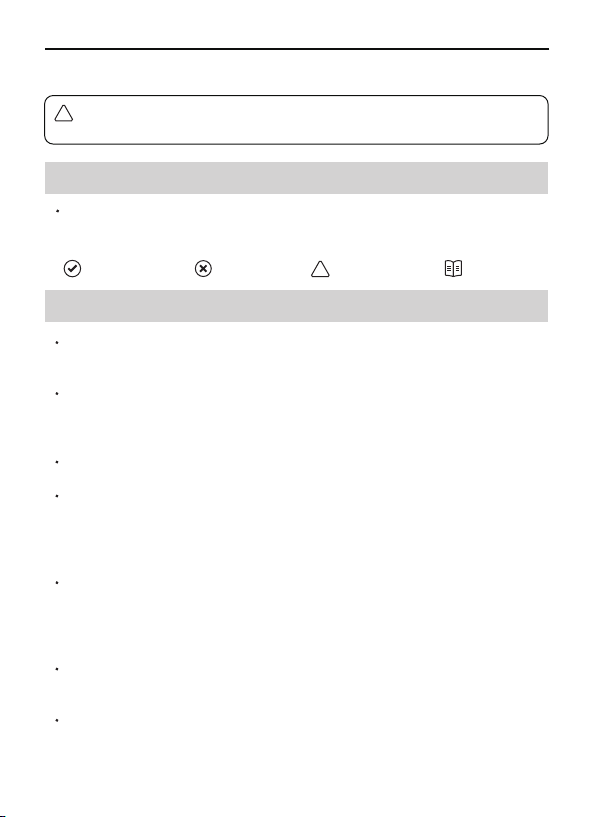
Recommend Warning Hints & Tips
!
Reference
The Ruko F11GIM is NOT a toy and is NOT suitable for people under
the age of 14.
!

Copyright ©2022 Ruko All Rights Reserved. 2
F11GIM User Manual
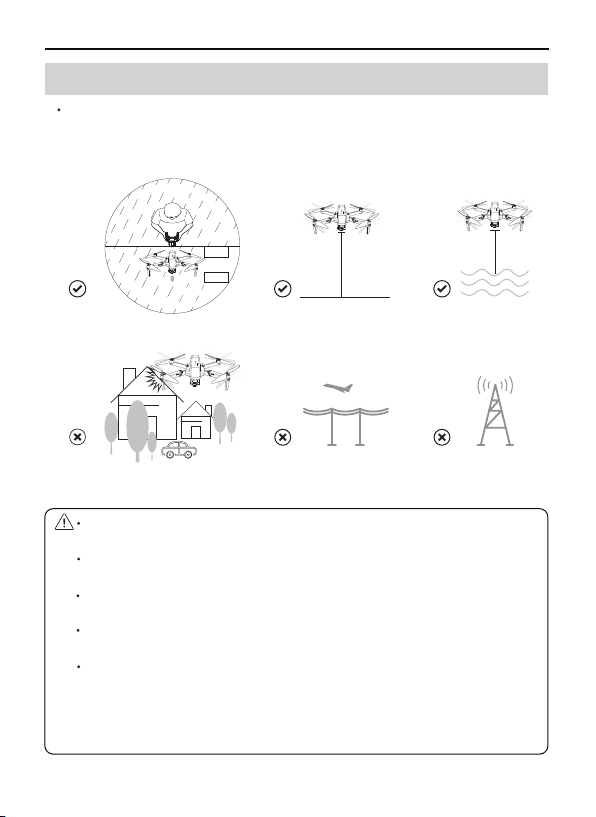
3. Flight Environment Requirements
Fly in an open field far away from densely populated areas,
residential surroundings and electromagnetic interference sources.
When flying in areas below 6562 feet above sea level, please be at
least 9.8 feet above the water when flying on the water.
The compass and GPS signals on the aircraft will be interfered by
buildings, mountains, and trees.
It is recommended to fly in an open space with a diameter of 32 feet
without interference.
The flying height must be higher than the obstacles on the ground to
avoid collision.
It is recommended that the flight altitude be greater than 49 feet to
avoid other signal interference from the ground.
Electromagnetic interference sources include, but are not limited to:
high-voltage power lines, high-voltage power transmission stations,
mobile phone base stations and TV broadcast signal towers, Wi-Fi hot
spots, routers, and Bluetooth devices. Must fly away from
electromagnetic interference sources.
d>32ft
Front
Back <6562ft >9.8ft

Copyright ©2022 Ruko All Rights Reserved.
3
F11GIM User Manual
4. Pre-Flight Checklist
Ensure that the aircraft battery, remote control, and mobile device
are fully charged.
Ensure that the arms of the Aircraft are fully extended. Make sure
that the battery compartment cover is fastened firmly and the
intelligent flight battery is installed firmly.
Ensure that the propeller is free from damage, aging, deformation,
no foreign matter entanglement, and firm installation.
Ensure that the camera cover was moved before turning on the aircraft.
Please make sure that nothing obstructs the motors.
Please make sure the camera lens and sensor are clean and without
stains.
Please make sure that GPS is turned on to avoid that it would be lost.
Please fly outdoor in an open place.
Turn on the Aircraft, then turn on the Transmitter, please pair it with
the Aircraft.
Connect Aircraft WiFi with your phone, make sure that you have
connected the WiFi name “RUKO-GIM-******" exactly after App
access right and Internet permission with your phone, please make
reference to operation video on App first before flying.
Fly in an environment of 0°C to 40°C and good weather (not rain,
fog, snow, thunder and lightning, strong wind, or extreme weather).
It is forbidden to fly indoors. Only fly in authorized areas. To learn
more about aircraft requirements, please visit the Federal Aviation
Administration's aircraft page, https://www.faa.gov/

Copyright ©2022 Ruko All Rights Reserved. 4
F11GIM User Manual
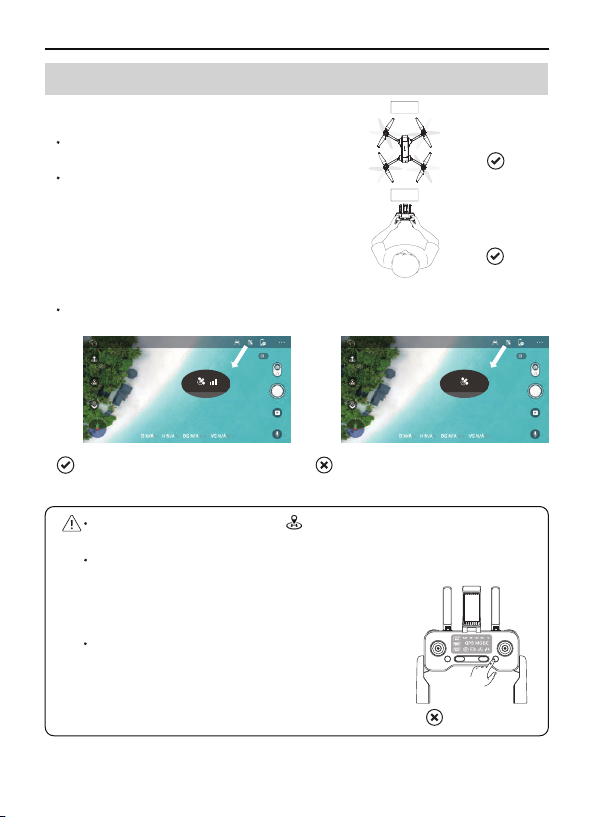
Please unfold the arms of the aircraft and
turn on the power before flight.
Please pay attention to the direction of
the aircraft when flying. The camera
direction is the forward of the aircraft.
Make sure to fly outdoors in an environment with strong GPS signals.
Please do not long-press the button on the remote control when
flying, otherwise GPS Mode will be turned off.
After turning off the GPS, the aircraft cannot realize one-key return
to home, low power return, or out of control.
5. Flight Operations
After turning off the, GPS follow, orbiting,
route planning, and aircraft finding functions
cannot be realized.
Unfold arms
Stay away
from People
Front
Back
GPS Mode
Strong GPS Signal Weak GPS Signal
Long Press
Fly Outdoor
GPS ≥3 bars GPS <3 bars
GPS Mode

Copyright ©2022 Ruko All Rights Reserved.
5
F11GIM User Manual
It is important to set an appropriate RTH altitude before each flight.
Make sure your phone has permission to access the Wi-Fi "RUKO
-GIM-******" and connect successfully.
Do the compass and gyroscope calibration each time before flying,
or it maybe can’t work normally.
Pay attention and control the aircraft at all times during flight. GPS
flight assistance features and App are meant to assist the pilot, not
replace their control of the aircraft.
Pay close attention to its flight when operate return to home. Use
discretion to operate the aircraft and manually avoid obstacles in a
timely manner.
Keep away from propellers and motors that are working and rotating.
Fly in a non-interference environment and within line of sight (VLOS).
Do not make calls or send text messages during the flight.
Please return as soon as possible when the GPS signal is poor, the
battery is low, or the wind is warning.
The Aircraft is not equipped with obstacle avoidance function.
During the flight, please judge the flight status reasonably, avoid
obstacles in time, and set the corresponding flight and return
altitude according to the flight environment.
If the Aircraft drifts during flight and cannot hover steadily, please
land the aircraft and recalibrate the compass before taking off.

Copyright ©2022 Ruko All Rights Reserved. 6
F11GIM User Manual
Please fully charge the battery for the first time before using it.
It is recommended to charge and discharge it once a month, do not
store it fully charged, keep 50%-60% of the electricity, the storage
temperature is 10-40°C, and the best storage temperature is 19-21°C.
Water enters the battery and the battery protection board fails,
which will cause the battery to not be used normally. Do not use the
battery in rain or in a humid environment, as this may cause the
battery to self-ignite or even explode.
If the battery is squeezed, deformed, and dropped from a high
altitude, it is forbidden to use it again.
Prohibition of prolonged high-temperature exposure. The high
temperature of the battery will cause the internal pressure of the
battery to be too high and cause an explosion.
The positive and negative poles are short-circuited for a long time
(such as the short-circuit caused by the water coming out of the
battery contacts, the foreign matter in the hair, etc.). If it exceeds 30
minutes, the protection board IC will fail and disconnect, and the
battery will not work normally.
DO NOT use fast chargers that exceed the rated power of the battery
when charging. It is recommended to use 5V/3A chargers, do not
use more than 5V/3A chargers.
If the aircraft has not been used for a month, the battery must be
removed to prevent the battery from being in a long-term low-power
discharge state.
6. Instructions for Using Intelligent Flight Battery and
Warning

Copyright ©2022 Ruko All Rights Reserved.
7
F11GIM User Manual
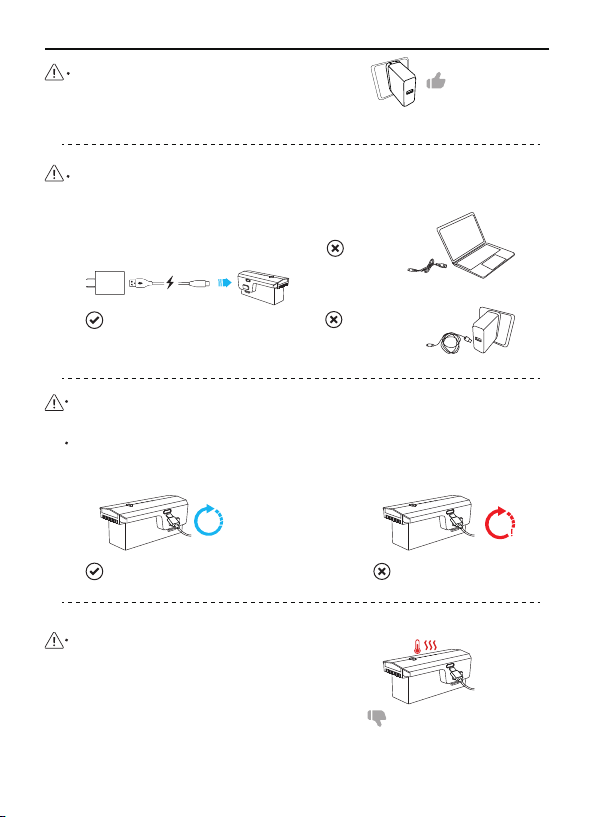
It is prohibited to use computer USB, simple USB, and non-original
charging cables for charging.
Please remove the battery in time after the Aircraft has landed on
low power to avoid battery damage caused by battery over-discharge.
It is forbidden to overcharge the battery, please remove charging
cable in time after fully charged to avoid damage due to overcharge.
DO NOT charge the battery immediately
after the flight as the temperature may
be too high.
Wait until it cools down to room
temperature before chargingagain.
Due to the battery current output,
slighthotness is normal while flying.
Use 5V/3A charging plugs. Fast charging
plugs exceeding 5V/3A are prohibited.
Charging Time≈5 hours
Non-original
charging cables
Computer USB
Overcharge>5 hours
5h >5h
(5V/3.0A )
USB Adapter
Overheating warning
Original charging cable
Altri manuali per F11 GIM
4
Indice
Altri manuali RUKO Drone

RUKO
RUKO F11MINI Manuale utente

RUKO
RUKO F11PRO Manuale utente

RUKO
RUKO F11MINI Manuale utente

RUKO
RUKO F11 Manuale utente

RUKO
RUKO F11MINI Manuale utente

RUKO
RUKO F11 GIM2 Manuale utente

RUKO
RUKO U11 Manuale utente

RUKO
RUKO F11 GIM Manuale utente

RUKO
RUKO F11 GIM2 Manuale utente

RUKO
RUKO F11 GIM Manuale utente

RUKO
RUKO F11 GIM Manuale utente

RUKO
RUKO F11 Manuale utente

RUKO
RUKO U11 Manuale di istruzioni

RUKO
RUKO F11 GIM Manuale utente

RUKO
RUKO F11MINI Manuale utente

RUKO
RUKO U11 PRO Manuale utente

RUKO
RUKO U11PRO Manuale utente

RUKO
RUKO F11 Manuale utente

RUKO
RUKO F11 Manuale utente

RUKO
RUKO U11 PRO Manuale utente