
Sailor S6000 series Manuale utente

SAILOR 6300B MF/HF Service Interface
User Manual
Document num er: 97-147768-A
Release Date: 31 August 2015

97-147768-A SAILOR 6300B MF/HF Serv ce Interface User Manual
2
Disclaimer
Any respons b l ty or l ab l ty for loss or damage n connect on w th the use of th s product and the accompany ng
documentat on s d scla med by Thrane & Thrane A/S. The nformat on n th s manual s prov ded for nformat on
purposes only, s subject to change w thout not ce and may conta n errors or naccurac es. Manuals ssued by
Thrane & Thrane A/S are per od cally rev sed and updated. Anyone rely ng on th s nformat on should acqu re the
most current vers on e.g. from http://www.cobham.com/commun cat ons-and-connect v ty/satcom, Serv ce and
support, or from the d str butor. Thrane & Thrane A/S s not respons ble for the content or accuracy of any
translat ons or reproduct ons, n whole or n part, of th s manual from any other source. In the event of any
d screpanc es, the Engl sh vers on shall be the govern ng text.
Thrane & Thrane A/S s trad ng as Cobham SATCOM.
Copyright
© 2015 Thrane & Thrane A/S. All r ghts reserved.
Record of revisions
Rev.
Descr pt on
Release Date
In t als
A
In t al
August 2015
JTR
A
Rev ew Comments from BLN, DAV, CMA, RSH,
JKR, TOP and JHO August 2015 JHO
A
Comments from CMA+TOP
August 2015
JHO

97-147768-A SAILOR 6300B MF/HF Serv ce Interface User Manual
3
Ta le of contents
1 Introduction .................................................................................................................... 4
1.1 Precaut ons us ng the serv ce tool ........................................................................................... 4
2 Connecting to the service tool ........................................................................................... 4
2.1 Connect ng to the serv ce w thout a network .......................................................................... 4
2.2 Connect ng to the serv ce tool through a network................................................................... 4
3 Overview of functionality ................................................................................................. 6
3.1 Open access funct onal ty ....................................................................................................... 6
3.1.1 STATUS .............................................................................................................................. 6
3.1.2 LOGS .................................................................................................................................. 8
3.1.3 NMEA ................................................................................................................................. 8
3.2 Protected access funct onal ty ................................................................................................ 9
3.2.1 CHANNELS ........................................................................................................................ 10
3.2.2 CONFIG .......................................................................................................................... 12
3.2.3 TOOLS ............................................................................................................................... 17

97-147768-A SAILOR 6300B MF/HF Serv ce Interface User Manual
4
1Introduction
The serv ce tool for the S6000 rad o ser es MF/HF dev ces s made ava lable by a bu lt- n
web server n the rad o. The serv ce tool can be accessed from a computer connected to a
LAN shared w th the dev ce and s d splayed n an nternet browser w th no add t onal
nstallat on of software requ red. Currently we do not guarantee full support for
M crosoft Internet Explorer, but most HTML5 enabled browsers are supported.
Screenshots n th s manual were done us ng Google Chrome.
1.1 Precautions using the service tool
WARNING: Wh le us ng the serv ce tool the network cable should not be removed
or d sconnected from ne ther the PC nor the rad o.
WARNING: Wh le us ng the serv ce tool, power to the rad o should not be sw tched off.
V olat on of the precaut ons above can result n a defect rad o, wh ch only
can be repa red by the manufacturer.
WARNING: The Serv ce agent s respons ble for all changes made w th the serv ce tool.
Changes must be n conformance w th rad o spec f cat ons and regulat ons.
2Connecting to the service tool
2.1 Connecting to the service without a network
The serv ce tool for the rad o can be accessed d rectly w thout use of a network, by use of
a PC w th automat c network conf gurat on and an nternet browser. Connect the rad o
to the computer us ng the Ethernet nterface and type the IP address of the rad o n the
address f eld of an nternet browser to access the serv ce tool. Th s w ll open the rad o
status page of the serv ce tool and the rad o can now be conf gured. The rad o’s current
IP address s v s ble n the SYSTEM SETUP menu on the rad o control un t or n the
rad o’s entry n the TMA tool as seen n Figure 1 below.
2.2 Connecting to the service tool through a network
The serv ce tool can be accessed through a LAN from a PC w th an nternet browser.
Type the IP address of the rad o n the address f eld of an nternet browser to access the
serv ce tool. Th s w ll open the rad o status page of the serv ce tool and the rad o can now
be conf gured. The rad o’s current IP address s v s ble n the SYSTEM SETUP menu on
the rad o control un t or n the rad o’s entry n the TMA tool as seen n Figure 1 below.

97-147768-A SAILOR 6300B MF/HF Serv ce Interface User Manual
5
Figure 1: TMA tool page for the radio displaying IP address, etc.

97-147768-A SAILOR 6300B MF/HF Serv ce Interface User Manual
6
3Overview of functionality
The serv ce tool s used to perform updates to the f rmware and var ous sett ngs of the
rad o. Th s sect on descr bes each feature of the serv ce tool n turn. The tool w ll show
nformat on about f rmware, status of the rad o and data from the logs for all users
w thout adm n strator r ghts, covered n sect on 3.1. For adm n strators the serv ce tool
prov des funct onal ty for conf gurat on of rad o sett ngs and tools for adm n strat on of
f rmware, covered n sect on 3.2.
3.1 Open access functionality
The open access nformat on of the serv ce tool s d v ded nto three tab pages, descr bed
n the follow ng three subsect ons.
3.1.1 STATUS
The STATUS tab page can be seen below n Figure 2.
Figure 2: Status ta .
The status tab s used to show the current platform and hardware conf gurat on of the
rad o. The f eld Hardware tracking ID s used n serv ce of the transce ver un t.

97-147768-A SAILOR 6300B MF/HF Serv ce Interface User Manual
7
If the ma n board of the rad o s replaced, a new ser al number can be appl ed n the
Current serial f eld. When no ser al number s programmed, the ‘current ser al’ f eld w ll
d splay a 10-d g t track ng number. Th s means that t s poss ble to nput the ser al
number of the system .
Note: updat ng the ser al number can only performed one t me and that updat ng the
f eld requ res logg ng n (descr bed n sect on 3.2).

97-147768-A SAILOR 6300B MF/HF Serv ce Interface User Manual
8
3.1.2 LOGS
The LOGS tab can be seen n Figure 3 below.
Figure 3: LOGS ta .
Th s tab ncludes four s de-bar buttons, where each d splays the respect ve logs over
Received Distress Calls, Received DSC Calls, Transmitted DSC Calls and one button for
the System Log. Each log can be downloaded as a .tar.gz f le.
3.1.3 NMEA
The NMEA tab pane d splays a stream of NMEA data collected over SERIAL and/or LAN.
The data can be downloaded as a compressed f le of the format .tar.gz and w ll conta n
more l nes than d splayed on the screen. See example pr ntout n Figure 4 below.
Figure 4: NMEA ta .
Note: Several tools are capa le of unpacking tar.gz files, including 7zip, Winrar,
Winzip, etc.

97-147768-A SAILOR 6300B MF/HF Serv ce Interface User Manual
9
3.2 Protected access functionality
Protected adm n strator access to the serv ce tool s obta ned by logg ng n us ng the
button n the upper r ght corner of the serv ce tool (see Figure 5 below).
Figure 5: Login utton.
By press ng the LOGIN button a pop-up w ll show.
Figure 6: Login pop-up.
To get adm n strator access enter the follow ng nto the two f elds:
•Username: admin
•Password: sailorsailor
When logged n to the protected part of the serv ce tool the rad o s d sabled and the tab
pages CHANNELS, CONFIG and TOOLS become access ble. These tabs are descr bed n
the follow ng sub sect ons.
97-147768-A SAILOR 6300B MF/HF Serv ce Interface User Manual
10
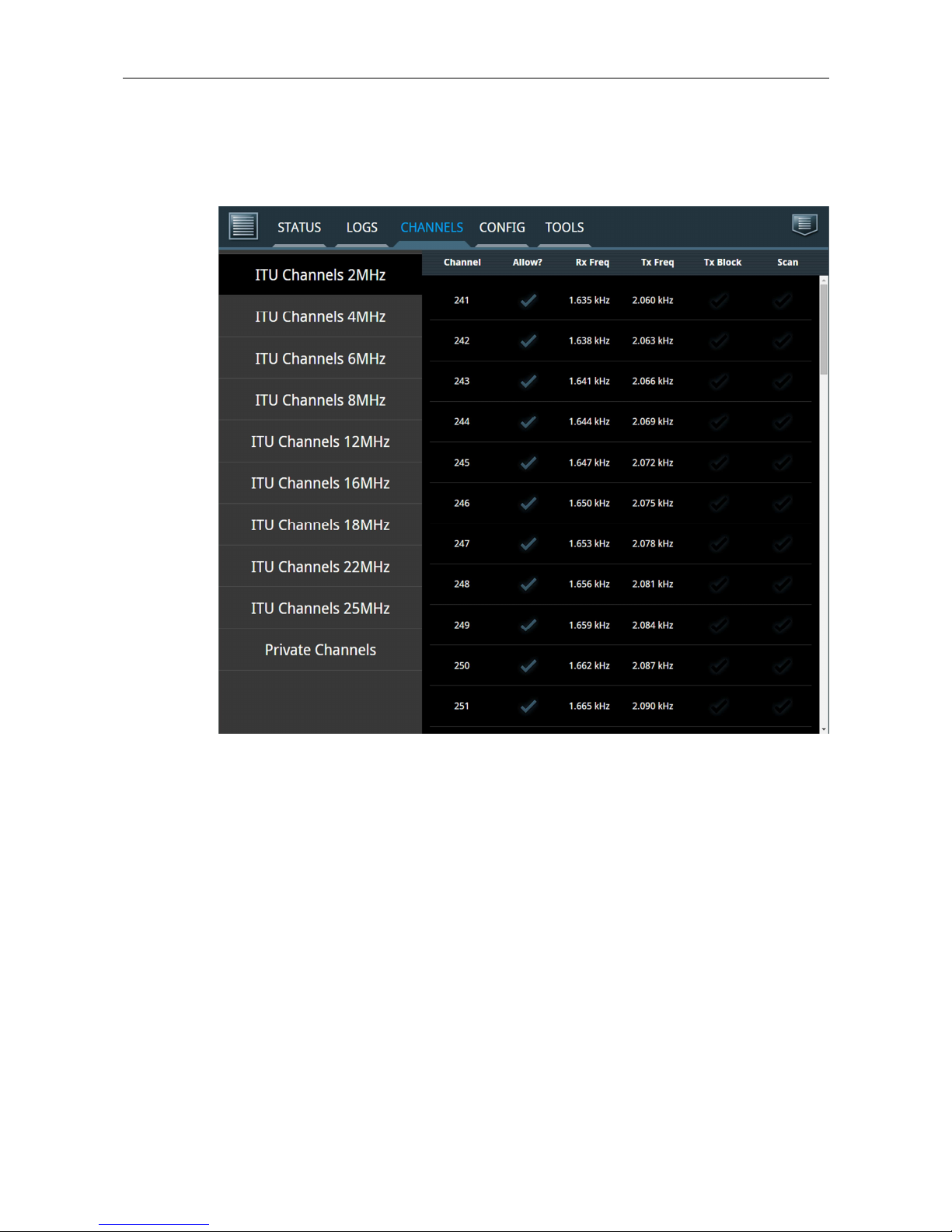
3.2.1 CHANNELS
An example of the CHANNELS tab can be seen n Figure 7 below.
Figure 7: CHANNELS ta .
Th s tab has a s de-bar button for var ous ITU channel bands and for pr vate channels.
The user must cl ck on a channel row on the page to select a channel for conf gurat on.
When select ng channel 241 the follow ng conf gurat on page for the channel appears
(Figure 8):
Questo manuale è adatto per i seguenti modelli
1
Indice
Altri manuali Sailor Radio

Sailor
Sailor 6200 VHF Series Manuale utente

Sailor
Sailor RT2047 Manuale utente

Sailor
Sailor 6210 VHF Manuale utente

Sailor
Sailor RM2042 Manuale utente

Sailor
Sailor SA-222 Manuale utente

Sailor
Sailor 6215 VHF DSC Guida

Sailor
Sailor SP3520 VHF GMDSS Manuale utente

Sailor
Sailor 6249 Manuale utente

Sailor
Sailor Plus SA-285NDAB Manuale utente

Sailor
Sailor SP3520 Manuale utente


