
SBS Dj Touch Manuale utente
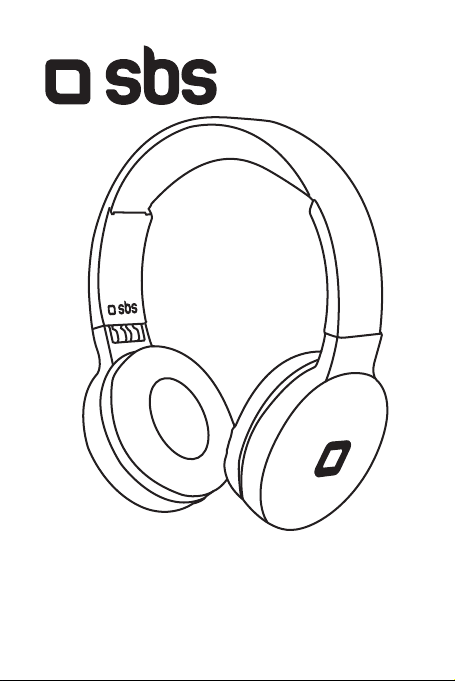
TEHEADPHDJTOUCHBTW
Wireless Stereo Headphone
Dj Touch

SPECIFICATION
Wireless 5.0
Range 10m
Speaker diameter 40mm
Frequency range 20 Hz - 20 kHz
Sensitivity 110dB
LED Microphone
Up arrow
Down arrow
MLF Micro-USB port
Impedance 32Ω
Battery capacity 300mAh
Playing time 20 hours
Playing time 18 hours
Charging time 2 hours
For other informations please contact us at
Impedance 32Ω
Battery capacity 300mAh
Playing time 20 hours
Playing time 18 hours
Charging time 2 hours
UK User Manual 4
IT Manuale di istruzioni 5
F Mode d’emploi 6
D Bedienungsanleitung 7
ES Manual de instrucciones 8
P Manual de instruções 9
NL Gebruikershandleiding 10
RUS Руководство по эксплуатации 11
PL Instrukcja obsługi 12
TR Kullanim kilavuzu 13
GR Εγχειρίδιο χρήστη 14
AR 15
CZ Uživatelský manuál 16
SK Používateľská príručka 17
LT Lietotāja rokasgrāmata 18
LV Vartotojo vadovas 19
HU Használati utasítás 20

4
UK INSTRUCTION MANUAL
Charging the Headphones
Plug one end of the included charging cable into the Micro USB port
on the headphones. Plug the other end into a charging point with
a USB port.
The LED will turn red while recharging (approximately 2 hours for
full recharge). When the LED turns blue, the headphones will be
fully recharged.
Turning the headphones on:
Press the MLF button on the headphones for approximately 3
seconds. You’ll hear a BEEP and the LED will flash red and blue.The
headphones are now on.
Turning the headphones o:
Press the MLF button on the headphones for about 4 seconds.You’ll
hear a BEEP and the LED will go o. The headphones are then o.
Connecting the headphones to a single device
Turn the headphones on. Shortly after, the LED will flash red and
blue. Open the Bluetooth settings on the device you want to connect
with. Search for “SBS DJ TOUCH” (the headphones) in Bluetooth
and select it.
Connecting to 2 devices
Connect the headphones to the first device as indicated above.
Then, turn that device o.
Next, connect the headphones to the second device in the same
way. Then, turn the first device on again and the headset will
automatically be connected to both devices.
Controls
Press the MLF button once (1) to answer/hang up a call.
Press the MLF button once (1) to play/pause music.
press the up arrow to turn the volume up
press and hold the up arrow to return to the previous song
press the down arrow to turn the volume down
press and hold the down arrow to skip to the next song

5
Ricarica della Cua
Inserire un capo del cavo di ricarica in dotazione nella porta
Micro USB della cua, l’altra estremità in un caricabatteria con
porta USB.
Il LED si accenderà rosso e a ricarica terminata (circa 2 ore)
diventerà blu.
Accensione
Premere per circa 3 secondi il tasto MLF della cua, si sentirà
un BIP e il LED lampeggerà rosso e blu.
Spegnimento
Premere per circa 4 secondi il tasto MLF della cua, si sentirà
un BIP e il LED si spegnerà
Collegamento della cua al dispositivo
Accendere la cua, do poche il LED lampeggerà rosso e blu,
aprire le impostazioni bluetooth del device, cercare SBS DJ
TOUCH e selezionarla.
Collegamento a due dispositivi
Una volta collegato al primo dispositivo, spegnerlo.
Collegare la cua ad un nuovo dispositivo seguendo lo stesso
procedimento, quindi accendere il primo dispositivo: la cua si
collegherà automaticamente.
Comandi
premere il tasto MLF 1 volta per rispondere/terminare una
chiamata
premere il tasto MLF 1 volta per play/pausa musica
premere la freccia in su per aumentare il volume
premere e tenere premuta la freccia in su per tornare alla
canzone precedente
premere la freccia in giù per diminuire il volume
premere e tenere premuta la freccia in giù per passare alla
canzone successiva
IT MANUALE D’USO

6
FR NOTICE D’UTILISATION
Chargement du casque
Insérez une extrémité du câble de charge fourni dans le port Micro
USB du casque, l’autre extrémité sur un chargeur doté d’un port
USB.
Le voyant LED s’allume en rouge et deviendra bleu une fois le
chargement terminé (env. 2 h).
Mise en marche
Appuyez sur le bouton MLF du casque pendant environ 3 secondes,
vous entendrez un BIP et le voyant LED clignotera en rouge et bleu.
Extinction
Appuyez sur le bouton MLF du casque pendant environ 4 secondes,
vous entendrez un BIP et le voyant LED s’éteindra.
Connexion du casque à l’appareil
Allumez le casque. Dès que le voyant LED clignote en rouge et bleu,
ouvrez les paramètres Bluetooth de votre appareil, recherchez
SBS DJ TOUCH et sélectionnez-le.
Connexion à deux appareils
Une fois connecté au premier appareil, éteignez-le.
Connectez le casque à un nouvel appareil en suivant la même
procédure, puis allumez le premier appareil et le casque se
connectera automatiquement.
Commandes
Appuyez sur la touche MLF 1 fois pour répondre/mettre fin à un
appel.
Appuyez sur le bouton MLF 1 fois pour lire/mettre en pause de
la musique.
Appuyez sur la flèche vers le haut pour augmenter le volume
Appuyez et maintenez enfoncée la flèche vers le haut pour revenir
à la chanson précédente
Appuyez sur la flèche vers le bas pour diminuer le volume
Appuyez et maintenez enfoncée la flèche vers le bas pour passer
à la chanson suivante

7
D GEBRAUCHSANLEITUNG
Aufladen des Kopfhörers
Stecken Sie ein Ende des mitgelieferten Ladekabels in den Micro-
USB-Anschluss am Kopfhörer, das andere Ende in ein Ladegerät
mit USB-Anschluss.
Die LED leuchtet rot und wird blau, sobald der Aufladeprozess
abgeschlossen ist (ca. 2 Stunden).
Einschalten
Drücken Sie die MLF-Taste am Kopfhörer für ca. 3 Sekunden. Es
ertönt ein Beep-Ton und die LED blinkt rot und blau auf.
Ausschalten
Drücken Sie die MLF-Taste am Kopfhörer für ca. 4 Sekunden. Es
ertönt ein Beep-Ton und die LED schaltet sich aus.
Anschließen des Kopfhörers an das Gerät
Schalten Sie den Kopfhörer ein,die LED blinkt kurz danach rot und
blau auf. Önen Sie die Bluetooth-Einstellungen Ihres Geräts und
suchen bzw. wählen Sie „SBS DJ TOUCH“.
Anschließen an zwei Geräte
Sobald Sie mit dem ersten Gerät verbunden sind, schalten Sie es
aus.
Schließen Sie den Kopfhörer auf die gleiche Weise an ein neues
Gerät an. Schalten Sie dann das erste Gerät ein. Der Kopfhörer
wird automatisch verbunden.
Befehle
Drücken Sie die MLF-Taste, um einen Anruf anzunehmen bzw. zu
beenden.
Drücken Sie die MLF-Taste 1 Mal, um Musik abzuspielen bzw.
anzuhalten.
Drücken Sie den Pfeil nach oben, um die Lautstärke zu erhöhen.
Drücken und halten Sie den Aufwärtspfeil gedrückt, um zum
vorherigen Song zurückzukehren.
Drücken Sie den Abwärtspfeil, um die Lautstärke zu verringern.
Drücken und halten Sie den Abwärtspfeil gedrückt, um zum
nächsten Song überzugehen.

8
ES MANUAL DE INSTRUCCIONES
Carga de los auriculares
Inserte un extremo del cable de carga suministrado en el puerto
Micro USB de los auriculares y el otro extremo en un cargador con
puerto USB.
El LED se pondrá rojo y cuando finalice la carga (aproximadamente
2 horas) se volverá azul.
Encendido
Pulse el botón MLF del auricular durante aproximadamente 3
segundos, escuchará un BEEP y el LED parpadeará en rojo y azul.
Apagado
Pulse el botón MLF en el auricular durante aproximadamente 4
segundos, escuchará un BEEP y el LED se apagará
Conexión de los auriculares al dispositivo
Encienda los auriculares, después de un momento el LED
parpadeará en rojo y azul, abra la configuración de bluetooth del
dispositivo, busque SBS DJ TOUCH y selecciónelo.
Conexión a dos dispositivos
Una vez conectado al primer dispositivo, apáguelo.
Conecte el auricular a un nuevo dispositivo siguiendo el mismo
procedimiento,luego encienda el primer dispositivo: los auriculares
se conectarán automáticamente.
Comandos
pulse el botón MLF 1 vez para responder/finalizar una llamada
pulse el botón MLF 1 vez para reproducir/pausar la música
pulse la flecha hacia arriba para aumentar el volumen
mantenga presionada la flecha hacia arriba para volver a la
canción anterior
pulse la flecha hacia abajo para bajar el volumen
pulse y mantenga pulsada la flecha hacia abajo para pasar a la
siguiente canción

9
P MANUAL DE UTILIZAÇÃO
Recarga dos auscultadores
Insira uma ponta do cabo de recarga incluído na porta Micro USB
dos auscultadores, e a outra ponta num carregador de bateria com
porta USB.
O LED acende-se a vermelho e, uma vez concluída a recarga (cerca
de 2 horas), passa a azul.
Ligação:
Prima durante cerca de 3 segundos o botão MLF nos auscultadores,
ouvirá um BIPE e o LED piscará a vermelho e a azul.
Desligamento
Prima durante cerca de 4 segundos o botão MLF dos auscultadores,
ouvirá um BIPE e o LED irá apagar-se
Ligação dos auscultadores ao dispositivo
Ligue os auscultadores, pouco depois o LED piscará a vermelho e
a azul, abra as definições de Bluetooth do dispositivo, procure SBS
DJ TOUCH e selecione-a.
Ligação a dois dispositivos
Uma vez ligados ao primeiro dispositivo, desligue-o.
Ligue os auscultadores a um novo dispositivo seguindo o mesmo
procedimento e, em seguida, ligue o primeiro dispositivo: os
auscultadores irão ligar-se automaticamente.
Comandos
prima o botão MLF durante cerca de 2 segundos para responder/
terminar uma chamada
prima o botão MLF 1 vez para reproduzir/pausar a música
prima a seta para cima para aumentar o volume
prima e mantenha premida a seta para cima para voltar à canção
anterior
prima a seta para baixo para diminuir o volume
prima e mantenha premida a seta para baixo para passar à canção
seguinte

10
NL HANDLEIDING
Opladen van de Koptelefoon
Steek het ene uiteinde van de meegeleverde oplaadkabel in de
micro-USB-poort van de koptelefoon en het andere uiteinde in een
oplader met een USB-poort.
De led wordt rood en als het opladen na ongeveer twee uur klaar
is, wordt deze blauw.
Inschakelen
Druk ongeveer drie seconden op de MLF-knop van de koptelefoon
- daarna hoor je een piepje en gaat de led rood en blauw knipperen.
Uitschakelen
Druk ongeveer vier seconden op de MLF-knop van de koptelefoon
- daarna hoor je een piepje en gaat de led uit
Verbinden van de koptelefoon met het apparaat
Zet de koptelefoon aan, de led gaat rood en blauw knipperen, open
de Bluetooth-instellingen van het apparaat, zoek naar SBS DJ
TOUCH en selecteer deze optie.
Verbinden met twee apparaten
Schakel het uit nadat het met het eerste apparaat is verbonden.
Verbind de koptelefoon op dezelfde wijze met een nieuw apparaat
en schakel vervolgens het eerste apparaat in: de koptelefoon
maakt dan automatisch verbinding.
Commando’s
druk één keer op de MLF-knop om een oproep te beantwoorden
of te beëindigen
druk één keer op de MLF-knop om muziek af te spelen of te
pauzeren
druk op de pijl omhoog om het volume te verhogen
druk op de pijl omhoog en houd deze ingedrukt om naar het vorige
nummer te gaan
druk op de pijl omlaag om het volume te verminderen
druk op de pijl omlaag en houd deze ingedrukt om naar het
volgende nummer te gaan
Questo manuale è adatto per i seguenti modelli
1
Indice
Lingue:
Altri manuali SBS Cuffie senza fili


