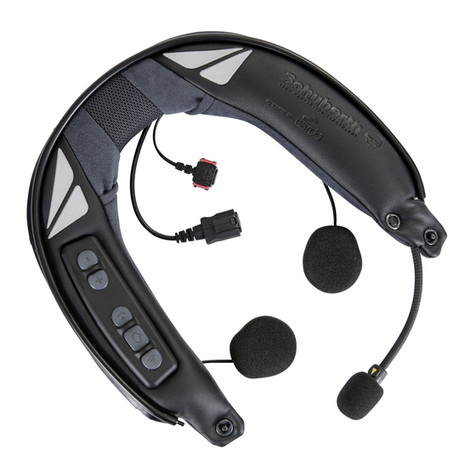
SCHUBERTH SC1 Manuale utente

SC1
CONTENTS
Safety Precautions ................................................................................................. 4
1 INTRODUCTION...............................................................................................6
2 PACKAGE CONTENTS...................................................................................... 7
3 INSTALLING THE SC1 ON YOUR HELMET........................................................ 8
3.1 Installing the SC1.............................................................................................................................. 9
3.2 Taking out the SC1........................................................................................................................... 9
4 GETTING STARTED.........................................................................................10
4.1 Button Operation ............................................................................................................................10
4.2 Powering On and O...................................................................................................................... 10
4.3 Charging ..........................................................................................................................................10
4.4 Checking the Battery Level ............................................................................................................11
4.5 Volume Adjustment..........................................................................................................................11
4.6 Softwares ........................................................................................................................................ 12
5 PAIRING THE SC1 WITH BLUETOOTH DEVICES .............................................12
5.1 Mobile Phone Pairing - Mobile Phone, Bluetooth Stereo Device............................................... 13
5.2 Second Mobile Phone Pairing - Second Mobile Phone, GPS, and SR10................................... 13
5.3 Advanced Selective Pairing - A2DP Stereo or Handsfree .......................................................... 14
6 MOBILE PHONE, GPS, SR10 ...........................................................................15
6.1 Mobile Phone Call Making and Answering ...................................................................................15
6.2 Speed Dialing (SC1 Advanced Only) .............................................................................................16
6.3 GPS Navigation............................................................................................................................... 17
6.4 Sena SR10, Two-Way Radio Adapter............................................................................................. 17
7 STEREO MUSIC ..............................................................................................18
7.1 Bluetooth Stereo Music ................................................................................................................. 18
7.2 Music Sharing (SC1 Advanced only)............................................................................................. 18
8 INTERCOM .....................................................................................................19
8.1 Intercom Pairing..............................................................................................................................19
8.2 Two-way Intercom .......................................................................................................................... 21
8.3 Three-way Intercom ....................................................................................................................... 21
8.4 Four-way Intercom ........................................................................................................................ 23
8.5 Team Signal (SC1 Advanced Only) ............................................................................................... 23
9 THREE-WAY CONFERENCE PHONE CALL
WITH INTERCOM PARTICIPANT.................................................................... 24
10 GROUP INTERCOM ....................................................................................... 25
11 UNIVERSAL INTERCOM................................................................................. 25
11.1 Universal Intercom Pairing ............................................................................................................ 26
11.2 Two-way Universal Intercom .........................................................................................................27
11.3 Three-way Universal Intercom.......................................................................................................27
11.4 Four-way Universal Intercom........................................................................................................ 28
12 FM RADIO ...................................................................................................... 30
12.1 FM Radio On and O .................................................................................................................... 30
12.2 Seek Frequencies........................................................................................................................... 30
12.3 Preset Stations............................................................................................................................... 30
12.4 FM Sharing...................................................................................................................................... 31
12.5 Region Selection ............................................................................................................................. 31
13 FUNCTION PRIORITY..................................................................................... 32
14 CONFIGURATION SETTING ........................................................................... 32
14.1 Headset Conguration Setting..................................................................................................... 32
14.2 Software Conguration Setting ................................................................................................... 36
15 REMOTE CONTROL ....................................................................................... 40

English
SC1
16 FIRMWARE UPGRADE ................................................................................... 40
17 TROUBLESHOOTING ......................................................................................41
17.1 Intercom Failure .............................................................................................................................. 41
17.2 Intercom Reconnection.................................................................................................................. 41
17.3 Factory Reset.................................................................................................................................. 41
18 QUICK OPERATION REFERENCE................................................................... 42
CERTIFICATION AND SAFETY APPROVALS......................................................... 43
• FCC Compliance Statement .............................................................................................................. 43
• FCC RF Exposure Statement ............................................................................................................ 44
• FCC Caution........................................................................................................................................ 44
• CE Declaration of Conformity............................................................................................................ 44
• Industry Canada Statement .............................................................................................................. 45
• Bluetooth License .............................................................................................................................. 45
• WEEE (Waste Electrical and Electronic Equipment)....................................................................... 45
PRODUCT WARRANTY AND DISCLAIMER........................................................... 46
• Limited Warranty................................................................................................................................. 46
• Warranty Exclusions ........................................................................................................................... 48
• Warranty Service ................................................................................................................................ 49

SC1
4
Safety Precautions
Please ensure that the product is properly used by observing the warnings and cautions
below to prevent any risk and/or damage to property.
Product Storage and Management
• Keep the product free of dust. It may damage mechanical and electronic parts of the
product.
• Do not store the product in high temperatures as this may reduce the life span of
electronic devices, damage the battery, and/or melt plastic parts of the product.
• Do not store the product in cold temperatures. Abrupt changes in temperatures may
cause condensation and damage electronic circuits.
• Do not clean the product with cleaning solvents, toxic chemicals, or strong detergents as
this may damage the product.
• Do not paint the product. Paint may obstruct moving parts or interfere with the normal
operation of the product.
• Do not drop or otherwise shock the product. It may damage the product or its internal
electronic circuits.
• Do not disassemble, repair or modify the product as this may damage the product and
invalidate the product warranty.
• Do not store the product in humid environments, especially for long time storage.
Product Use
• In some regions, it is prohibited by law to ride motorcycles while wearing headsets or
earbuds. Therefore be certain to comply with all relevant laws in the region before using
the product.
• The headset is for motorcycle helmets only. To install the headset, you must follow the
installation instructions shown in the User’s Guide.
• Use of the product at a high volume for a long period of time may damage your eardrums
or hearing ability. Keep the volume at a modest level to prevent damage.
• Do not cause impact to the product or touch it with sharp tools as this may damage the
product.
• Do not use the product in high-temperatures or apply heat to the product as this may
cause damage, explosion, or re.
• Keep product away from pets or small children. It may damage the product.
• In any place where wireless communication is prohibited, such as hospitals or airplanes,
turn o the power and refrain from using the product. In a place where wireless
communication is prohibited, electromagnetic waves may cause hazards or accidents.
• Do not use the product near hazardous explosives. When it is near any explosion hazards,
turn o the power and heed any regulations, instructions, and signs in the area.
• When using the product, be certain to conform to laws regarding the use of
communications devices while riding.
• Do not put the product where it may hamper the rider’s vision or manipulate it while
riding. This may cause trac accidents.
• Before riding, fasten the product to the helmet, and double-check that it is fastened.
Separation of the product while riding may cause damage to the product or accidents.
• If the product is damaged, stop using it immediately. It may cause damage, explosion, or
re.

SC1
5
English
Battery
This product has an irreplaceable rechargeable battery inside. Therefore, when using the
product, make sure to adhere to the following:
• Never separate the battery from the product as this may damage the product.
• The battery performance may be reduced over time with usage.
• In recharging the battery, make sure to use an approved charger provided by the
manufacturer. Use of a non-approved charger may cause re, explosion, leakage, and
other hazards may also reduce the life time or performance of the battery.
• Any 3rd party USB charger can be used with Sena products if the charger is approved by
either the FCC, CE, IC or other locally approved agencies that Sena accepts.
• Do not use cigarette chargers other than the included cigarette charger to charge the
headset.
• Store the battery at temperatures of 15°C~25°C (59°F~77°F). Higher or lower
temperatures may reduce the capacity and life of the battery, or may cause temporary
non-operation. Do not use the product in sub-zero temperature, because it may cause
serious reduction of the battery performance.
• If you apply heat to the battery or throw it into re, it may explode.
• Do not use the product with a damaged battery. It may explode and/or cause accidents.
• Never use a damaged charger. It may explode and/or cause accidents.
• Battery life may vary depending on conditions, environmental factors, functions of the
product in use, and devices used with it.

SC1
6
1 INTRODUCTION
Thank you for choosing the SCHUBERTH SC1. With the SC1, you can
call handsfree on your Bluetooth mobile phone, listen to stereo music or
voice instructions of GPS navigations wirelessly, and have intercom
conversations in full duplex with a passenger or other motorcycle
riders.
The SC1 is compliant with the Bluetooth 4.1 supporting the following
proles: Headset Prole, Hands-Free Prole (HFP), Advanced Audio
Distribution Prole (A2DP), and Audio Video Remote Control Prole
(AVRCP). Please check with the manufacturers of other device to
determine their compatibility with this headset.
Please read this User’s Guide carefully before using the headset. Also
check www.schuberth.com for the latest version of the User’s Guide
and additional information related to SCHUBERTH Bluetooth products.
The SC1 features:
•Bluetooth 4.1
•Invisible beauty with custom design
•Bluetooth intercom with distance more than 1 kilometer for SC1
Advanced and up to 1 kilometer for SC1 Standard*
•Audio Multitasking (SC1 Advanced only)
•Audio Source Priority
•Four-way intercom
•Voice prompts
•Smartphone App for iPhone and Android
•Built-in FM radio tuner with a station scan and save function (SC1
Advanced only)
•Universal Intercom™
•Music sharing (SC1 Advanced only)
•Advanced Noise Control™
•Firmware upgradeable
* in open terrain

SC1
7
English
Key Specications:
•Bluetooth 4.1
•Supporting proles: Headset Prole, Hands-Free Prole (HFP),
Advanced Audio Distribution Prole (A2DP), and Audio Video Remote
Control Prole (AVRCP).
2 PACKAGE CONTENTS
•
SC1 Main Unit

SC1
8
3 INSTALLING THE SC1 ON YOUR
HELMET
LED
(+) Button
DC Power Charging &
Firmware Upgrade Port
(-) Button
•
Battery
•
Release Tool

SC1
9
English
3.1 Installing the SC1
1. Insert the main unit into the helmet and push it gently until you
hear a click.
Click
2. Insert the battery into the helmet and push it gently until it is all
the way in.
3.2 Taking out the SC1
1. Insert the release tool into the main unit and push it gently until you
hear a click.
Click
2. Pull the release tool until the main unit comes o the helmet.

SC1
10
4 GETTING STARTED
4.1 Button Operation
(+) Button
(–) Button
4.2 Powering On and O
To power on the headset, press and hold the (+) Button and the (-)
Button at the same time for 1 second while hearing ascending beeps
and a voice prompt, “Hello”. To power o the headset, press and hold
the (+) Button and the (-) Button at the same time for 3 seconds while
hearing descending beeps and a voice prompt, “Goodbye”.
4.3 Charging
You can charge the headset by connecting the supplied USB power &
data cable into a computer’s USB port or USB wall charger. You can use
any standard micro USB cable to charge the unit. The LED turns red
while charging and turns blue when fully charged. It takes about 2.5
hours to be completely charged.
or
AC Adapter
Note:
Please make sure to take o your SC1-installed helmet while charging. The
headset automatically turns o during charging.
Altri manuali per SC1
3
Indice
Altri manuali SCHUBERTH Accessori per automobili