SecuLock ND-M Series Manuale utente

Mortise locks
ND-M Series
M700, M710, M711
H1000, H1100, H1200,
H1300, H1310, H1320
User Manual
If it is a key door lock, keep the key with in your reach in
case of emergency.
Retain this user manual for future reference after reading it
thoroughly.
A non-key door lock may be partially broken to open the door
when it malfunctions.

CONTENTS
ㆍThe contents and images of this manual are subject to change without prior
notice to improve the quality of the products.
Safety Precautions 3
Products Specifications / Components 4
Parts Name 5
PIN-codes Activation / Deactivation 6
Card keys Activation / Deactivation 7
Remote Controllers Activation / Deactivation 8
Fingerprints Activation / Deactivation 9
Double Authorization Mode 10
Pre Authentication Mode 11
Opening Door
● Opening the Door from Outside 12
● Opening the Door from Inside 13
Locking Door
● Locking the Door from Outside 13
● Locking the Door from Inside 13
Safety Lock Mode [Outdoors/Indoors] 14
Automatic / Manual Lock Mode 15
Volume Setting 16
Warning Alarms
● Fire Detection Alarm 17
● Intrusion Alarm 17
● 1min. Mischief Prevention 17
● Dead bolt Warning Alarm17
● Low Battery Alarm18
Trouble Shooting 19

_ 3
Safety Precautions
Installation of the product by an unauthorized person may result in
malfunctions of the product. Installation work must be performed in
accordance with the standards by authorized personnel only.
ㆍRead this manual carefully and use the product accordingly.
ㆍThis product was designated for the residential fire door, if it is used
for other purpose, the performance cannot be warranted for its original
purpose.
ㆍLong-term exposure to direct sunlight, to moisture or to salinity may
cause deformation of the product.
ㆍMake sure that the door is completely closed when going outside.
ㆍDo not recommend installing in condensation environments.
This may cause problems with product performance.
ㆍDo not disassemble and assemble the product in person.
ㆍDo not use sharp objects like a drill, a pin and a screwdriver to
push the touch screen, as this can damage the product.
ㆍDo not expose PIN-codes to an unauthorized person and change
them regularly.
ㆍDo not operate the product with wet hands and do not allow water to
enter the product.
ㆍReplace all batteries immediately after they run out of power.
(Do not use old and new batteries at the same time.)
ㆍUse the soft dry fabrics to clean the product.
ㆍDo not use the product for other use.
ㆍDo not insert batteries with the positive and negative polarities
reversed. It may cause leakage, heat generation, explosion or fire.

_ 4
Products Specifications/Components
● Products Specifications
Registration of New Authentication Measures
1. While registering authentication measures such as PIN-codes, Card keys, Fingerprints
and Remote controllers, the door has to be open. Before closing the door, test first if
the Dead bolt is operating properly by using [OPEN/CLOSE] button.
2. Registered authentication measures cannot be individually deleted.
When registering new authentication measures, all previously registered authentication
measures will be automatically deleted. (PIN-code, Card key, Remote controller)
3. If there were no inputs for 7 seconds after pressing the button, the touch plate will
be off and the registration process will be cancelled.
4. The default PIN-code is “1234” to be operated during its initial setup.
DescriptionSpecification
Door Thickness 40~50mm
Rated Voltage DC6V (LR6 1.5V AA Alkaline battery only)
Operating Temperature -20℃~ 50℃
Temperature Sensor Operating Range 60℃ (±5℃)
MaterialAl, Zn, ABS
ㆍIf the door thickness is out of the standard specification, please be advised from an expert
for installation. The screws may differ according to the door thickness.
● Products Components
ㆍOuter body, Inner Body
ㆍAA batteries 4ea
ㆍScrews
ㆍStrike, Strike box
ㆍMortise, Mortise Shaft
ㆍInstallation Instruction/Installation Template
ㆍUser Manual
ㆍCard Key
ㆍEmergency Key (only applied model with an Emergency key)
ㆍRemote Controller (Optional)
Authentication Method
PIN-code
(up to 10)
Card key
(up to 30)
Fingerprint
(up to 100)
Emergency
Key (2ea)
Remote controller
(Optional Features)
Model
M710
M711
H1000
H1100
H1200
H1300
H1310
H1320
M700
up to 5

_ 5
Parts Name
● Inner body
Fingerprint Model
※All images shown are for illustration purposes only.
Their design and colors may differ in accordance with the model.
General Model
● Outer body
Mortise
Battery Cover
button
[OPEN/CLOSE] button
Thumb Turn
Handle
Fingerprint Reading Panel
(only for applied models)
Numeric Touch Plate
Card key Touch Plate
Emergency Power Supply Terminal
Key Hole (only for applied models)
Handle
Dead bolt
Latch bolt

_ 6
PIN-codes Activation/Deactivation
● PIN-codes Activation
● PIN-codes Deactivation
Open the battery cover, press the button shortly.1
2When the Numeric touch plate is on, enter the registered PIN-code with the [ ] button.
3Press the number [6] with the [#] for 3 seconds, then all registered PIN-codes will be deleted.
4After deactivating all PIN-codes, the PIN-code reset as the default code “1234”.
Repeat the process and as stated
above to register more PIN-codes.
4 2 3
2
3
Enter new PIN-code (4-12 digits)
on the numeric touch plate and
press the [ ] button.
Press the [ ] button one more time,
the touch plate will be off.
2
3
H1200 / H1300 / H1310 / H1320
1Open the battery cover,
press the button shortly.
When the numeric touch plate is on,
enter the registered PIN-code
with the [ ] button.
Open the battery cover, press the button shortly.
When the Numeric touch plate is on, enter the
registered PIN-code with the [ ] button and
press the number [1].
Beep Beep
2
Beep

_ 7
Card keys Activation/Deactivation
2Press the number [7] and press
the [#] button for 3 seconds then
all registered Card keys will be
deleted with buzzer sound.
3After registering all Card keys,
Press the [ ] button to finish the process.
3Place all Card keys to the Card key touch plate.
The sound beeps when registration of each
card has been done. To register more than
a Card key, make sure to place next Card key
before the touch plate is off.
● Card keys Deactivation
● Card keys Activation
1Open the battery cover,
press the button shortly.
When the numeric touch plate is on,
enter the registered PIN-code
with the [ ] button.
Open the battery cover, press the button shortly.
When the Numeric touch plate is on, enter the
registered PIN-code with the [ ] button and
press the number [2].
Beep Beep
2
1Open the battery cover, press the button
shortly. When the numeric touch plate is on,
enter the registered PIN-code with the [ ] button.
H1200 / H1300 / H1310 / H1320
only for Card key models
Beep

_ 8
Open the battery cover,
press the button shortly.
When the numeric touch plate is on,
enter the registered PIN-code
with the [ ] button.
1
2Press the number [8] and
press the [#] button for 3 seconds.
All registered Remote Controllers are
deleted with buzzer sound.
● Remote Controllers Activation
● Remote Controllers Deactivation
Remote Controllers Activation/Deactivation
Remote
Controller
①
[OPEN] button
Remote
Controller
②
[OPEN] button
Remote
Controller
…
[OPEN] button
▶
ㆍRemote controllers are not provided with a standard package.
2Press the [OPEN] button of Remote Controller.
Registering more than a Remote Controller,
press the [OPEN] button of each Remote Controller.
▶
To synchronize the password between the door lock and the remote control, you must
press the button of the remote controller at least 3 times when using it for the first time,
and after that, press once to open the door. When replacing the door lock battery,
the remote control must be synchronized.
When the remote controller is registered newly, all pre-registered remote controllers
are deactivated.
H1200 / H1300 / H1310 / H1320
1Open the battery cover,
press the button shortly.
When the numeric touch plate is on,
enter the registered PIN-code
with the [ ] button.
Open the battery cover, press the button shortly.
When the Numeric touch plate is on, enter the
registered PIN-code with the [ ] button and
press the number [3].
Beep
Beep
Beep

_ 9
Fingerprints Activation/Deactivation
2
Press number [4],
number ‘1 2 3’ will blink.
Press your finger on the panel
3 times, after the registration
the buzzer will sound.
3Press button to finish the process.
only for Fingerprint models
● Fingerprint Activation
ㆍFingerprint recognition may not be possible if the fingerprint is damaged.
ㆍFingerprint recognition may not be possible if sweat or moisture is on the
fingerprint or the fingerprint reading panel.
ㆍTo raise the recognition rate, we highly recommend you to add same fingerprints
in different conditions.
● Fingerprints Deactivation
1Open the battery cover,
press the button shortly.
When the numeric touch plate is on,
enter the registered PIN-code
with the [ ] button. Beep
2Press the number [7] and press
the [#] button for 3 seconds then
all registered Card keys will be
deleted with buzzer sound.
1Open the battery cover, press the button
shortly. When the numeric touch plate is on,
enter the registered PIN-code with the [ ] button.
Beep

_10
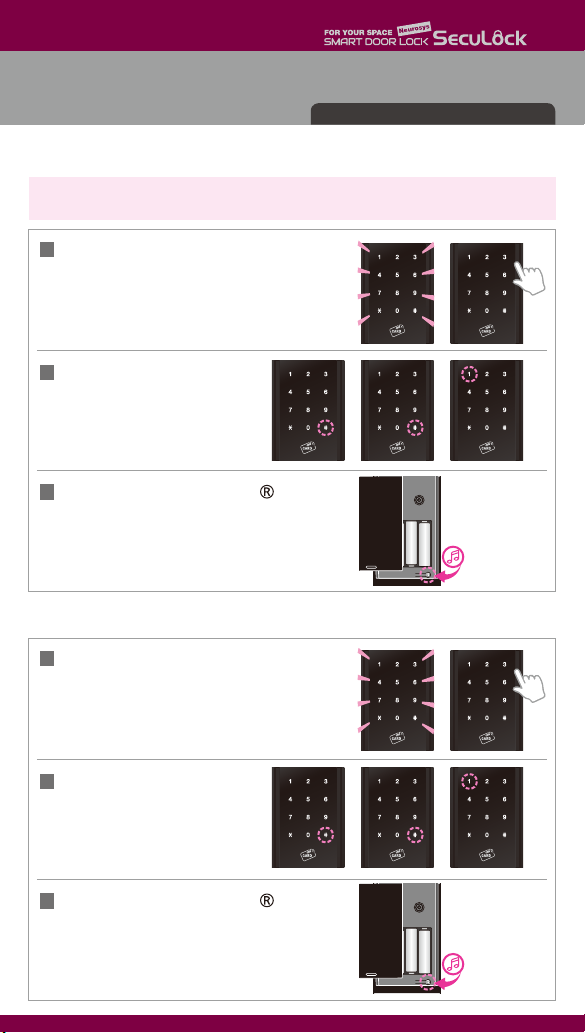
● Double Authorization Mode Activation
● Double Authorization Mode Deactivation
Double Authorization Mode
ㆍDouble Authorization Mode requires two different authentications registered to activate.
( e.g. [PIN-code] + [Fingerprint], [PIN-code] + [Card Key] )
Open the battery cover, press the button
to finish the process, buzzer sound “Bi-rik”.
3
1Touch the numeric touch plate gently,
then the touch plate turns on.
Enter the registered PIN-code.
2Press the [#] button twice and
then number [1] to deactivate
double authorization mode.
Only for models with more than one authorization
Bi-ri-ri-rik
Bi-rik
Open the battery cover, press the button
to finish the process, buzzer sound “Bi-ri-ri-rik”.
3
1Touch the numeric touch plate gently,
then the touch plate turns on.
Enter the registered PIN-code.
2Press the [#] button twice then
press number [1].
Questo manuale è adatto per i seguenti modelli
9
Indice
Altri manuali SecuLock Serratura della porta