_ 8
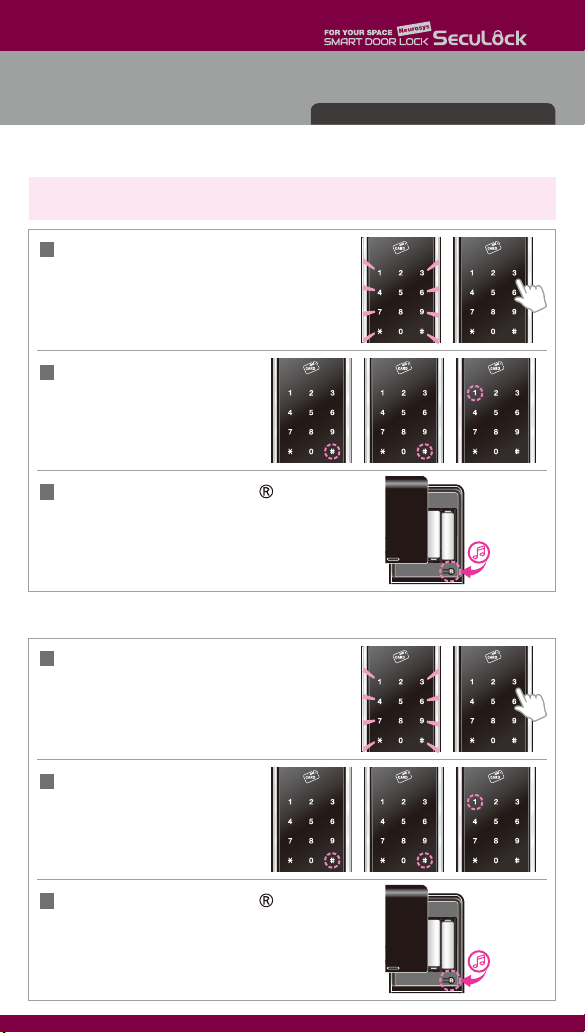
Open the battery cover,
press the button shortly.
When the numeric touch plate is on,
enter the registered PIN-code
with the [ ] button.
1
2Press the number [8] and
press the [#] button for 3 seconds.
All registered Remote Controllers are
deleted with buzzer sound.
● Remote Controllers Activation
● Remote Controllers Deactivation
Remote Controllers Activation/Deactivation
Remote
Controller
①
[OPEN] button
Remote
Controller
②
[OPEN] button
Remote
Controller
…
[OPEN] button
▶
ㆍRemote controllers are not provided with a standard package.
2Press the [OPEN] button of Remote Controller.
Registering more than a Remote Controller,
press the [OPEN] button of each Remote Controller.
▶
To synchronize the password between the door lock and the remote control, you must
press the button of the remote controller at least 3 times when using it for the first time,
and after that, press once to open the door. When replacing the door lock battery,
the remote control must be synchronized.
When the remote controller is registered newly, all pre-registered remote controllers
are deactivated.
Beep
Open the battery cover,
press the button shortly. When the Numeric touch
plate is on, enter the registered PIN-code with the
[ ] button and press the number [3].
1
Beep Beep
Open the battery cover, press the
button shortly. When the numeric
touch plate is on, enter the registered
PIN-code with the [ ] button.
only applied M560 model