
Sensors & Software LMX100 Manuale utente

LMX Does Not Power Up or LMX Sensor Not Detected
If you have connected the cables to the LMX Sensor, Display Unit, and the battery, pressed the
Power button on the Display Unit and:
•The Display Unit does not power up, or
•The LMX Sensor is not detected, and you get the following messages:
1) Wait at least 1-minute and see if the Display Unit starts up. Sometimes the Power LED on the
Display Unit fails but the Display Unit is otherwise OK. If the application starts but the LED on
the Display Unit does not turn on, test the operation of the LED using the System Test >
Keypad test under Tools.
2) Test the battery
a) Check that the fuse, inside the battery case, has not blown. If so, replace the 10 Amp
fuse with one of the spare fuses inside the battery case.
b) Use a multimeter with fine tipped probes (1mm or 0.04 inches) to measure the battery
voltage at the connector on the outside of the battery case. Measure the voltage between
socket #1 (ground, using the black probe) and socket #4 (power, using the red probe). If
the voltage is less than 10.5 volts, there is a problem with the battery.
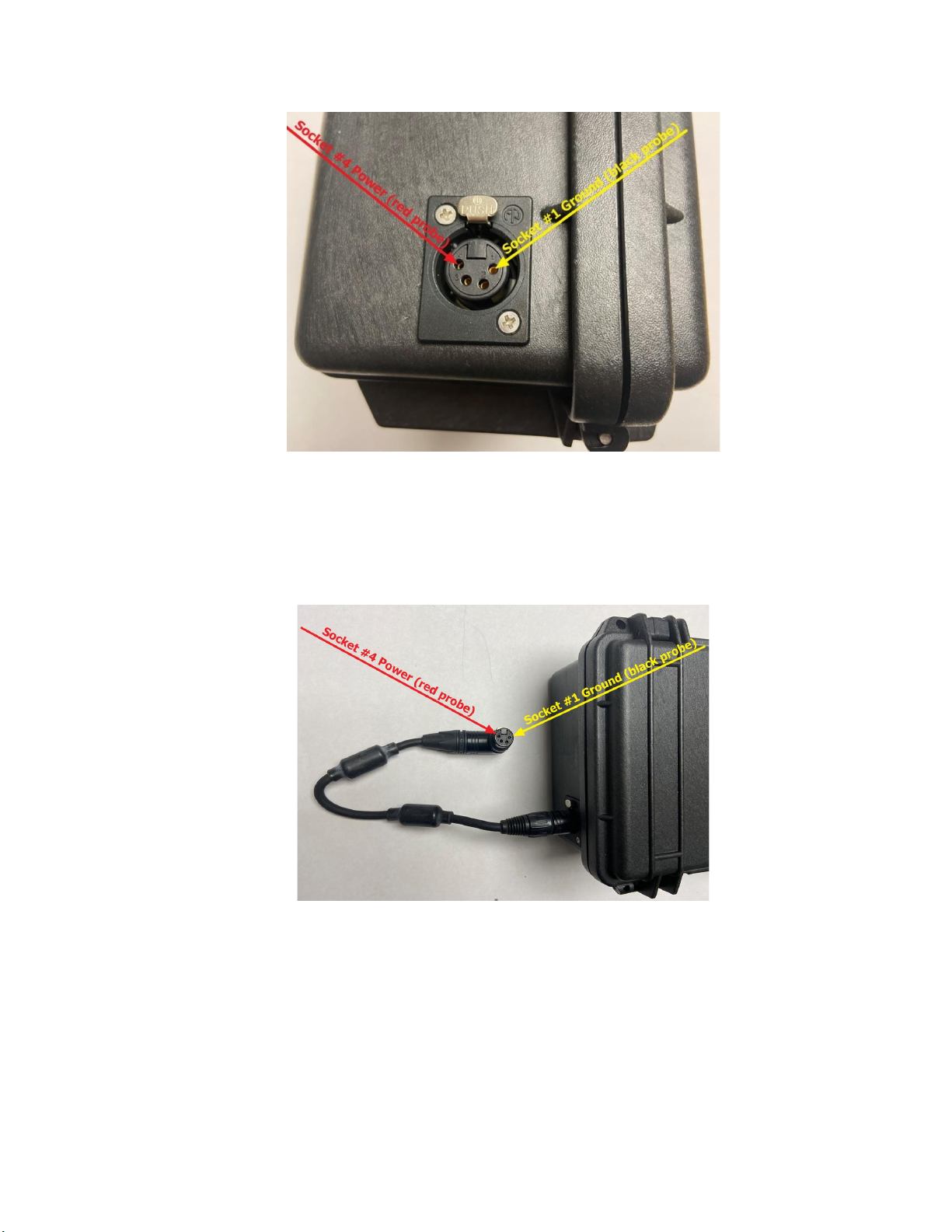
3) Test the Battery Cable
Insert the battery cable into the battery and test the battery cable. Use a multimeter to
measure the battery voltage at the connector at the end of the battery cable. Measure the
voltage between socket #1 (ground, using the black probe) and socket #4 (power, using
the red probe). If the voltage is less than 10.5 volts, there is a problem with the battery
cable.
4) Check the LMX Sensor and Display Unit Connectors
Turn off the LMX system and disconnect the battery before disconnecting the cable that
connects the Display Unit to the LMX Sensor.
a) On the back of the Display Unit, check that none of the 37 pins are missing, bent, or
recessed. Look at the pins on an angle to confirm they are all flush with one another.
If one is bent or recessed, gently bend the pin back straight and flush with the other
pins. Then reconnect the cable and try powering the LMX system again.

b) Check all 37 sockets at the LMX connector, ensuring that none are blocked with debris.
If so, clean out the debris, reconnect the cable and try powering the system again.
5) Replace the Cable
If you have a spare cable, replace the current cable. If the system does not power on
or if the LMX Sensor is not detected with either cable, please contact your GPR
supplier for further assistance.
6) Test the Cable
a) On the end of the cable that connects to the LMX Sensor, check that none of the 37 pins
are missing, bent, or recessed. Look at the pins on an angle to confirm they are all flush
with one another. If one is bent or recessed, gently bend the pin back straight and flush
with the other pins. Connect the cable to the LMX Sensor and try powering the LMX
system again.
b) Disconnect the end of the cable that connects to the back of the Display Unit.

c) Check all 37 sockets at the end of the cable, ensuring that none are blocked with debris.
If so, clean out the debris, reconnect the cable and try powering the Display Unit again.
d) With the cable connected to the LMX Sensor and the battery connected to the system,
check the power from the battery is reaching the Display Unit through the cable by using a
multimeter to measure the voltage between socket #21 (ground, using the black probe)
and sockets #1 or #2 (power, using the red probe) on the end of the cable. If the voltage
is zero, there may be a problem with the cable. If the voltage is at least 10.5 volts, the
problem may be the Display Unit. Please contact your GPR supplier for further assistance.
Display Unit Screen turns White After Powering Up
If the Display Unit screen turns completely white after powering up the system, the battery does not
have enough voltage to completely power the system. Recharge or replace the battery
Altri manuali per LMX100
1
Indice
Altri manuali Sensors & Software Radar

Sensors & Software
Sensors & Software LMX200 Series Manuale utente

Sensors & Software
Sensors & Software pulseEKKO Pro Manuale utente

Sensors & Software
Sensors & Software pulseEKKO Manuale utente

Sensors & Software
Sensors & Software Conquest Series Manuale utente

Sensors & Software
Sensors & Software CONQUEST 100 Manuale utente

Sensors & Software
Sensors & Software Noggin 100 Manuale utente


