SERAD IMD 20 Series Manuale utente

IMD20-GI-2101-EN
Digital DRIVE for Brushless motor
IMD 20 Series
Read manual before installing and respect
all indications with this icon:
INSTALLATION
GUIDE


IMD 20 Drive installation guide
R2101 - 3 -
SERAD S.A
Table of Contents
1-
Introduction................................................................................... 4
1-1- Warning...................................................................................... 4
1-2- MD series drive description....................................................... 5
2-
Installation..................................................................................... 7
2-1- General....................................................................................... 7
2-2- Front view................................................................................... 8
2-3- Top view...................................................................................... 9
2-4- Bottom view.............................................................................. 10
2-5- Mounting................................................................................... 11
2-6- Connector pin assignments ...................................................... 12
2-7- Cables....................................................................................... 23
2-8- Connection diagrams / Protections.......................................... 24
2-9- Stand-alone drive ..................................................................... 25
2-10- Drive controlled by a motion controller................................ 26
2-11- Connecting a motor brake...................................................... 27
2-12- System checks before starting ................................................ 27
2-13- STATUS DISPLAY.................................................................. 28
2-14- Error messages: ..................................................................... 31

IMD 20 Drive installation guide
R2101 - 4 -
SERAD S.A
1- Introduction
1-1- Warning
Read this manual before first installing, nonobservance may result in property
damages and in personal injuries.
Only suitable qualified personnel should undertake the mounting, installation,
operation and maintenance of the equipment must be complied with the general setup
and safety regulations for work on power installations (e.g. DIN, VDE, EN, IEC or
other national and international regulations).
It is important that all safety instructions are strictly followed. Personal injury can
result from a poor understanding of the safety requirements.
The following safety regulations should be followed:
•
VDE 0100
Specification for the installation of power systems
up to 1000 V
•
VDE 0113
Electrical equipment of machines
•
VDE 0160
Equipment for power systems containing electronic
components.
-Never open the equipment.
-Dangerous high voltages exist within the equipment and on the connectors.
Because of this, before removing any of the connectors, it is necessary to remove
the power and wait at least 5 minutes to allow the capacitors to discharge.
-Never connect or disconnect the drive with power applied.
-Some of the drive’s surfaces can be very hot.
Some of the drive's components are susceptible to damage from electrostatic
discharges. Always handle the equipment using appropriate anti-static precautions.
We have gone to great lengths to ensure this documentation is correct and complete. However, since it
is not possible to produce an absolutely error-free text. No responsibility will be assumed by SERAD
for all damages caused by using this documentation and software.
We reserve the right to make changes to all or part of the specification without prior notice.

IMD 20 Drive installation guide
R2101 - 5 -
SERAD S.A
1-2- MD series drive description
Supply : 230V to 400V AC ±10% three phase
Auxiliary supply : 24 V DC ±10%, 0.5A typical (0,8A max if all options)
Supply filter : Integral
Switching frequency : 6.67 kHz sine-wave PWM
DC bus voltage : 310V to 680V
Braking resistance :
Integral : 33 ohms 60W
Possibility to add an external resistor :
Min value Max. cont. power Imp power
26Ω10KΩ20KΩ
Protection :
Short circuit between phases, phase to earth, over current, I2t
Over voltage, under voltage
Motor feedback fault
Motor feedback : Resolver
SinCos encoder Hiperface
(option)
Master encoder :
Incremental encoger
Absolute encoder SSI
SinCos encoder Hiperface
(option)
Virtual
Encoder emulation : Incremental : A, /A, B, /B, Z, /Z 1 to 100 000 points per rev
Diagnostic : STATUS display
Communication :
RS 232 MODBUS RTU
RS 422
(option)
, RS 485 MODBUS RTU
(option)
EtherCAT
(option)
CANopen
(option)
Digital inputs :
4 inputs (with 2 fast inputs I3 and I4)
12 additional inputs with expansion module (with 2 fast inputs I15 and I16)
Type: PNP, 24V DC, 8mA per input and 15 per fast input
Logic 0: Between 0 and 5 V
Logic 1: Between 8 and 30 V
Digital outputs :
2 outputs as standard
S1 : Relay, 48V dc / 48V ac, 3A max
S2 : NPN (open collector) 24V dc, 100mA
8 additional outputs with expansion module
Type : PNP 24V dc, 500mA max per output
Protected against short circuit and over temperature.
Analogue inputs :
2 inputs :
Input voltage : ±10 V
Maximum voltage : ±12 V
Input impedance : 20 Kohms
Resolution : 16 bits for input 1 and 12 bits for input 2
Analogue output :
1 output :
Output voltage : ±10 V
Maximum current : 5 mA
Resolution : 8 bits, bandwidth 20Hz

IMD 20 Drive installation guide
R2101 - 6 -
SERAD S.A
Architecture :
Processor :150 MHz DSP and 100 000 gates FPGA
FLASH memory for programs and parameters
RAM memory for data
FRAM memory for variables
Real-time, multi-tasking kernel
Control loops :
Current loop : 75 µs
Speed loop : 150 µs
Position loop : 150µs
Operating modes :
Torque mode
Speed mode
Position mode
Stepper Mode (pulse input, direction)
Motion functions (absolute, relative and infinite movements, S profile)
Advanced motion functions (gearbox, CAM profiles, CAMBOX functions, triggered movement)
Operating temperature : 0 to 40°C
Storage temperature : -10 to 70°C
Degree of protection : IP 20
Weight 6,4 Kg
Drive Rated current Peak current ( 2s ) Rated power Dimensions w x h x d
IMD / 2
0
2
0 Aeff
4
0 Aeff
11
,
2
kVA
72 x 293 x 233

IMD 20 Drive installation guide
R2101 - 7 -
SERAD S.A
2- Installation
2-1- General
It is very important to adhere to the following:
A badly earthed connection can damage electronic drive components.
The drive must be installed vertically in free air to ensure cooling by natural
convection.
It must be protected from excess humidity, liquids, and dirt.
The motor, resolver and encoder cables must be screened, the screen being earthed
at both ends of the cable.
The analogue I/O must use screened cable, the screen being earthed at one end
only.
The cable for the RS 232 serial link between the drive and the PC must be screened,
the screen being earthed at both ends of the cable. It should be disconnected from the
drive when no longer in use. All of these cables, as well as the I/O cables, should be
run separately from the power cables.
Diodes must be fitted across the loads on all static digital outputs (Q2 to Q10).
These diodes must be positioned as close to the load as possible. The supply and
signal cables must be free from over-voltage transients.
Safety standards specify a manual reset after a stop caused either by a supply
interruption, or by an emergency stop or by a drive fault.
For all serious faults, it is obligatory to remove the high voltage supply to the drive.
The Drive Ready output should be connected in series in the emergency stop loop.
In the case of axis over-travel, the over-travel limit switches must be connected to
the limit inputs or in series with the emergency stop loop. It is also recommended to
use the software limits.
If the drive is configured in speed loop, the drive enable input should be controlled
by the supervisory controller (CNC, PLC etc).
If the drive is configured in position loop, the parameter "Maximum following
error" should be set appropriately.
If the drive contains an application program developed using iDPL, connect a
signal ‘Cabinet supplies OK’ to one of the digital inputs and monitor it in a non-
blocking safety task. On detection of an excess following error the drive will be put in
open loop mode and the drive ready relay will be opened. If another action is required
you should use the SECURITY instruction.

IMD 20 Drive installation guide
R2101 - 8 -
SERAD S.A
2-2- Front view
STATUS 7-segment diagnostic display
X1 COM RS-232 serial port for communication with a PC
X2 EXT1 Extension: Optional communications ports
X3 EXT2 Extension: Optional communications ports

IMD 20 Drive installation guide
R2101 - 9 -
SERAD S.A
2-3- Top view
X4 ENCODER OUTPUT Multifunction encoder output
X5 ENCODER INPUT Multifunction encoder input
X6 24Vdc Auxiliary 24V DC supply
X7 I/O Digital I/O
X8 POWER SUPPLY Single / Three-phase power supply
X9 EXT I/O Option: I/O expansion board
X SAFE Option : Secure input
The voltage on connector X8 can reach 480V!
X - SAFE

IMD 20 Drive installation guide
R2101 - 10 -
SERAD S.A
2-4- Bottom view
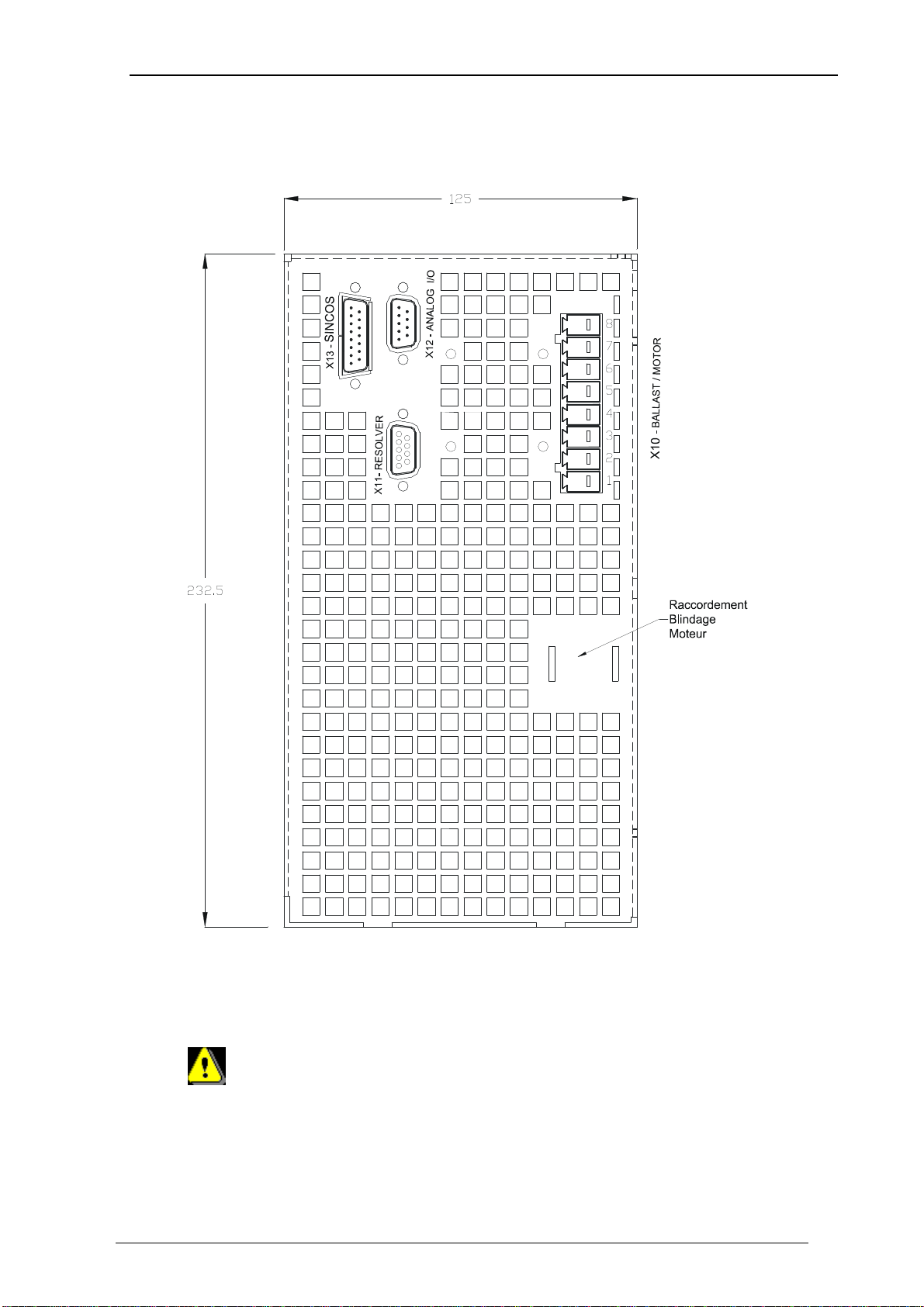
X10 RB / MOTOR External braking resistor and motor supply
X11 FEEDBACK Motor position feedback (resolver / encoder)
X12 ANALOG Analogues I/O
X 13 SINCOS Motor position feedbacks (if SINCOS encoder is used)
Care must be taken when making connection to connector X10. An incorrect
connection can seriously damage the drive. Dangerous voltages are present on
X10 (900V).
Wait at least 5 minutes to allow the capacitors to discharge before remove
connector.
Indice
Altri manuali SERAD Azionamento CC
Manuali Azionamento CC popolari di altre marche

Vincent Associates
Vincent Associates UNIBLITZ ED12DSS Manuale utente

EKSMA OPTICS
EKSMA OPTICS DQ-100-4 Manuale elenco delle parti

Chamberlain Garog
Chamberlain Garog D Series Manuale utente

Parker
Parker PDS Series Manuale utente

Festo
Festo DGC G Series Guida all'installazione

Binks
Binks QS-5012-1-CE Manuale utente